Welcome Guest ( Log In | Register )

22 Pages « < 19 20 21 22 >Bottom

Outline · [ Standard ] · Linear+

 AMD Ryzen, AM4 / AM5 Platform

views
     
Bonchi
post Jul 8 2021, 03:28 PM

KittehPowah
******
Senior Member
1,649 posts

Joined: Sep 2008
QUOTE(SSJBen @ Jul 8 2021, 02:42 PM)
Monolithic die vs chiplets+huge IOD, that's the trade off for both designs.

Also understand that 5900x has 50% more cores and threads than the 9900k. Idle power consumption is bound to be higher.
*
more like it's the tradeoff to use the chiplet architecture to enable more cores. Same higher power draw and temps will also be noticed on the lower cores 5600X and especially 3100 and 3300 during idle or low load situations.

But yeah, just have to accept it. if wanna nitpick like me than no choice, going intel is the only answer lol because no undervolting or bios setting can affect the IOD's behavior.
Bonchi
post Jul 8 2021, 03:38 PM

KittehPowah
******
Senior Member
1,649 posts

Joined: Sep 2008
QUOTE(coolkwc @ Jul 8 2021, 03:27 PM)
I will say not that bad considering lowest clock only down to 3.3GHz in idle. Would be better if can lower to sub 1GHz in idle, for sure that is going to help on idle power.

My swap from Intel to AMD decision happened within 12 hours last week without really keep up with AMD Zen design since 2 years ago, let alone those in depth details. All i known was AMD rule the high end segment now without answer from Intel.
So basically i left no choice when my motherboard dead on me suddenly (I thought is motherboard end up is 1 of 4 RAM stick fault after swapped to AMD, what a costly mistake tongue.gif ).

I try to pickup everything within a week, PBO, curve optimizer, architecture etc. and start to learn there are quite alot of drawbacks of AMD platform as well, both on the processor and chipset as well, especially memory latency side and memory clock limitation wise.

Currently my rig looks stable in everything, all/single core boost is satisfying, except a crappy cold boot issue of my board, and this is a famous issue online for Asus Rog Strix B550-E series with DOCP enable, consequences of not doing enough homework before land for this board. shakehead.gif
*
weak AGESA bios, memory compatibility, USB device compatibility and over aggressive boosting behavior is the issues with AMD... which mostly all point back to crappy AGESA and crappy chipset drivers.

Cold boot issues you can try use more aggressive LLC as it solved on my Gigabyte B550. And usually dont worry about picking boards as usually the issues are always faced by across All AIBs as it always down to AGESA.

memory compatibility sometimes still bites back even on Zen3. it is still picky with ram especially at speeds beyond 3200mhz. It tends work best with micron E and Samsung B. Hynix D/CJR quite ok... the rest like samsung C, Micron rev B and hynix A die, you may have WHEA nightmares.

So... if you have any dissatisfaction, all you can do is just wait for newer AGESA and hopefully it solves your problem. Dont ever change mobo if you already have a mid-higher RM900+ one... i can pretty much say that the next board will have the same problem.
Bonchi
post Jul 8 2021, 03:47 PM

KittehPowah
******
Senior Member
1,649 posts

Joined: Sep 2008
QUOTE(coolkwc @ Jul 8 2021, 03:38 PM)
But i really love the AMD's idea of PBO, Curve optimizer. This is really easy and good provided nowadays you won't get any meaningful overclocking at the top end chip in both Intel and AMD.

But, am i hit the silicon lottery? because i don't find many chip that can reduce all core to -30 in CO like i did.
*
Eh.. intel 10th and 11gen actually have a pretty big OC headroom and very fine tuning features which AMD lack with OCTVB(10th)ABT(11th) and MCE, provided you can tame 250W and up to 400W if you wanna go crazy and not use AVX offset. Those you see online especially gamer nexus are a bunch of noob just put the multiplier numbers and run those CPU close to 1.4V. Of course will seem very limited. This is why some OC Enthusiasts still prefer to play with intel at the moment because the platform has more things to touch and tweak.

for AMD yeah... it's pretty much plug and play and it will opportunistically extract its max performance out of the box automatically based on thermal and power limit... that's where the PBO2 and undervolting comes in

QUOTE(coolkwc @ Jul 8 2021, 03:43 PM)
To me basically Intel is dead after i9-9900KS, the efficiency doesn't make sense in full load.
Imagine my CPU core temp is @ 96-98'C even with my custom loop.
So i know AMD is the only way can go if i want something immediately.
*
avx offset, per core overclocking, or even set a power limit... well pretty much undervolting. if you dont hold AMD back and let it unleash, it will also hit 200-300W easily.
kinda depends on how you view efficiency. intel is draw alot at max but average is low. AMD is draw lower at max but average is high.

like me, I set up my 10600K to 125W max as that was the limit to my 120mm aio do some optimization. Overall, it's much faster and much cooler than my Ryzen3600. my i5 gaming always below 60C while 3600 above 75C. (also due to AMD have higher power draw at low load situations like gaming)

This post has been edited by Bonchi: Jul 8 2021, 03:53 PM
Bonchi
post Jul 8 2021, 04:14 PM

KittehPowah
******
Senior Member
1,649 posts

Joined: Sep 2008
QUOTE(coolkwc @ Jul 8 2021, 04:02 PM)
This AGESA bios is something really missing in HW review everywhere. I always read HW review like Toms, TechpowerUp, Anandtech etc., but no one mentioned all the weakness but just end up with 'highly recommended' 'gold award'...So it give an impression to me AMD is 'perfect'. (me too native huh).

Regarding the cold boot issue, i'm not going to fix it as i will just left my rig to standby/sleep 24/7 without plug out AC will do. Or i can disable DOCP before i do so sometimes like away from home more than few days.
With that money, i should have go for Gigabyte B550/570 Aorus Master rather than this Asus crap if i'm not prejudice due to my misjudgment last week (i thought is 3rd time the same board failed me). I lost the front QC3 USB charge, back panel clear CMOS button, onboard reset button by changing from my Z390 Aorus Master to this Asus B550, those are quite useful/important features for me.

Anyway, is this cold boot issue widespread in AMD platform but not Asus alone? Changing motherboard is one of my thought last week, but scraped after further survey, basically left no choice and stuck with this, not worth it for such tiny cold boot issue.

Haha, I totally lost in RAM memory chip, and i don't think seller disclose the information (they don't even know maybe). So i just choose whatever capacity i want with reasonable speed (3200MHz is baseline).

My RAM stick just went for RMA yesterday and stuck with 32GB with me now, at the same time i just ordered 2 x 32GB GSkill Trident Z Neo 3600 due to my work nature need for electronics/CAD simulation, so min 64GB RAM is needed.
*
all i can say is, they are probably short handed on the inhouse implementation side aka the software. The hardware is all outsourced especially to TSMC that's why it is so damn high quality and good. So it's actually the software side is struggling to catch up to the hardware.... but the hardware is progressing way faster.

AMD idle 24/7 will draw a lot of power to your monthly bills siot sweat.gif


This post has been edited by Bonchi: Jul 8 2021, 04:18 PM
Bonchi
post Jul 8 2021, 04:18 PM

KittehPowah
******
Senior Member
1,649 posts

Joined: Sep 2008
QUOTE(coolkwc @ Jul 8 2021, 04:13 PM)
I don't know whether the cold boot is Asus limited or widespread as AMD platform, but solution for Asus is:
1. Run the speed 1 rank lower than rated XMP. 3600 -> 3200 etc..
2. Change the CL from rated to few clock lower. CL16 -> CL18

Both are HELL NO solution to me, is not end of the world by put my rig standby in full time rather than to sacrifice the RAM performance.
*
your coldboot is ram stability issue la tu.... better run some memtest and see. You will not want data to be corrupted on ram and then stored to disk. you can potentially brick your OS like this... or ruin your work files. Even more so if you gonna run 64GB..AMD memory controller is weak. Going 2X dual ranks will be a huge challenge. While single rank 32GB are sadly samsung C, micron RevB which AMD dont really cooperate well.
Bonchi
post Jul 8 2021, 04:31 PM

KittehPowah
******
Senior Member
1,649 posts

Joined: Sep 2008
QUOTE(coolkwc @ Jul 8 2021, 04:23 PM)
I didn't manual overclock my RAM at all, what i did was enable the XMP profile (Asus called DOCP) only without adjust any timing manually, not stable? shocking.gif  I have use that RAM with my Intel rig for more than 1 year without any issue. rclxub.gif

Just to be sure, many Asus user use their QVL RAM also facing the issue.
*
XMP is not guaranteed to work. even if it's on the QVL, regardless of intel or AMD. (altho AMD is much more sensitive)
Bonchi
post Jul 8 2021, 06:39 PM

KittehPowah
******
Senior Member
1,649 posts

Joined: Sep 2008
QUOTE(coolkwc @ Jul 8 2021, 05:00 PM)
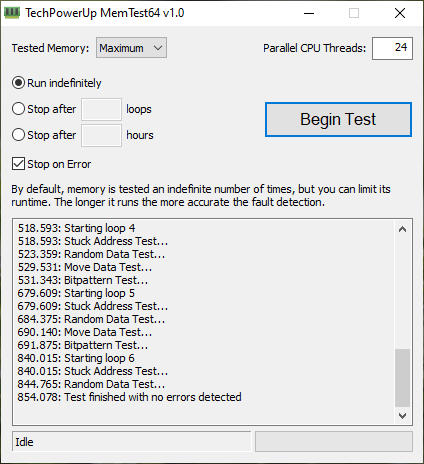
5 loops without issue. Or need more?

user posted image
*
Try to find memtest pro and then run overnight to about 10passes.. those usually will take more than an hour for a single pass.

https://www.hkepc.com/19073/_想知é“記æ†...文書機版本 Im using this chinese one.. set target to 1000% at night then go sleep.

This post has been edited by Bonchi: Jul 8 2021, 06:43 PM
Bonchi
post Jul 8 2021, 06:41 PM

KittehPowah
******
Senior Member
1,649 posts

Joined: Sep 2008
QUOTE(coolkwc @ Jul 8 2021, 04:39 PM)
sad.gif  Haiz, so damn much constraint...will just sell it if really not working well. Hopefully Intel can bounce back anytime sooner. (I doubt so)
*
Depends on your usage. If you need alot of cpu cores, there's no competition. All the benefits far outweigh the setbacks as ben mentioned.
Bonchi
post Jul 16 2021, 12:24 AM

KittehPowah
******
Senior Member
1,649 posts

Joined: Sep 2008
drop the power limit PPT instead of the target temp if you want to cap the temps.... but of course that will simply make your AMD much slower than intels of the same range because ryzens need all the boost to get up to speed. laugh.gif

Ryzen are design to boost high and aggressively, gets very unstable whenever you try to tame the boosting behaviors. So better to just upgrade to a better cooler. Go custom WC.

This post has been edited by Bonchi: Jul 16 2021, 12:27 AM
Bonchi
post Jul 22 2021, 12:19 AM

KittehPowah
******
Senior Member
1,649 posts

Joined: Sep 2008
QUOTE(1024kbps @ Jul 21 2021, 10:34 PM)
typical fan header provide 1 Ampere, if both of your fan draw more than 1 Amp (eg one is 0.5A and one is 0.7A), they will slow down.
most pc fan dont draw that much, 0.5a fan is usually high speed fan, 1A is server fan and 3A is ~6000 rpm fan that will create black holes in your pc tongue.gif
*
doesnt work that way lol. fan speed is controlled by voltage and their current is fixed so maybe his fan curve something wrong... running pushpull will make the cpu max temp cooler so fan speed will stay lower... or perhaps he is using a Y splitter that have a resistor aka low noise adapater. Generally if exceed 1A, its very likely he will smell something burning from the motherboard laugh.gif

This post has been edited by Bonchi: Jul 22 2021, 12:19 AM
Bonchi
post Jul 22 2021, 06:01 PM

KittehPowah
******
Senior Member
1,649 posts

Joined: Sep 2008
QUOTE(TristanX @ Jul 22 2021, 05:59 PM)
After my first experience of that, now I turn the cooler left and right first before I pull it out. No more pulling the CPU out.
*
careful... i got a friend slipped his grip when twisting and the damage is far worse... he twisted half the pins off.

For me, i press down and push sideways (like how you delid)

This post has been edited by Bonchi: Jul 22 2021, 06:05 PM
Bonchi
post Jul 22 2021, 07:54 PM

KittehPowah
******
Senior Member
1,649 posts

Joined: Sep 2008
QUOTE(coolkwc @ Jul 22 2021, 06:15 PM)
Before you shutdown and take out the cooler, just remember to fire up the prime95 stress test for 20 minutes to cook the thermal paste such that it become soften. tongue.gif
*
Actually some pastes will bake at high heat (80C) and dry up, and it will be cemented (kryonaut is one example). When that happens you will need a screw driver to pry the cpu off from the heatsink. laugh.gif
Bonchi
post Aug 24 2021, 01:14 PM

KittehPowah
******
Senior Member
1,649 posts

Joined: Sep 2008
QUOTE(EBBattlefield @ Aug 24 2021, 11:23 AM)
main proof that you are noob is that you keep asking about bottlenecking tongue.gif

with a 3080ti, you are going to hit 60-100fps consistently in all or most games at 1080p and 1440p anyway.
even with just a r9 290, i can hit 50fps in most games i play at 4k.

if you are getting 100fps with a 3700x, while your friend is getting 120fps with a 11900k.
both guys are playing at 1080p, then you are just being pedantic.
*
20fps = 20% is alot sweat.gif altho not just 11900k, ryzen 3000 series suffers significant lower fps even compared to a 10400F in 1080p (with similar ram speed). Which is why most will recommend a 5000 series upgrade for gaming, not the G sku with half the cache tho...

And there are still many people who uses 1080p like me laugh.gif so the difference still matters.

This post has been edited by Bonchi: Aug 24 2021, 01:15 PM
Bonchi
post Aug 24 2021, 02:04 PM

KittehPowah
******
Senior Member
1,649 posts

Joined: Sep 2008
QUOTE(EBBattlefield @ Aug 24 2021, 01:32 PM)
my point is at 100fps, does it really matter?  icon_rolleyes.gif
*
60hz monitor then not really. However a monitor with 120 or 144hz and beyond, 100 and 120 is night and day.... enough to ruin a shot, especially if the player is competitive.
Bonchi
post Aug 25 2021, 08:19 PM

KittehPowah
******
Senior Member
1,649 posts

Joined: Sep 2008
QUOTE(Mavik @ Aug 25 2021, 03:15 PM)
Thanks appreciate it. Whilst FPS matters to me because I tend to play a bit more competitively (just by nature), it is mostly for 1440p. Right now, I can't get a stable 144FPS (currently averaging around 110-125FPS at 1440p) whilst compared to my friend with the 5600x CPU and the 3080 GPU, he gets about 150-160 FPS (with exactly the same settings and 1440p monitor). Personally, I feel that just because of the CPU that I am missing out and was thinking of initially just swapping out the CPU. Haven't made the decision yet to do it as due to work commitments, I don't have the time to play FPS games at the moment.
*
Yeap, 3000 series will miss out alot of fps as it doesnt have the big shared cache like the 5000 series. That's why i will always recommend 10400F over 3600 for budget builds because even a 10400F actually performs better than a 3900x when it comes to gpu bottleneck. (When properly tuned aka ram and cache OC, the 10400F matches a stock 5600x in games fps)

So on your predicament. Just go ahead and grab a 5900x. Try to scalp that 3700x on People who die die wants an AMD cpu, i think still alot of buyers. (I actually sold my 3000 series higher than what i paid for brand new early this year laugh.gif)

This post has been edited by Bonchi: Aug 25 2021, 08:21 PM
Bonchi
post Aug 26 2021, 11:23 PM

KittehPowah
******
Senior Member
1,649 posts

Joined: Sep 2008
QUOTE(yimingwuzere @ Aug 26 2021, 10:07 PM)
General rule:

Tier 1 gaming CPUs:
Ryzen 5000 (preferably non-G)
Intel gen11 Rocket Lake
Intel gen10 + B560 chipset (budget build option)

Tier 2:
Intel gen8/9/10 without B560 or Z series chipset
Ryzen 3000

Tier 3:
Ryzen 4000/2000/1000
Intel gen7 and earlier

Ryzen 3000 used to be tier 1 budget options, only because of the lack of B560 chipsets and higher Intel CPU prices earlier making them less price competitive.
*
yeap, back then 10400F costs a bit more than 3600 as well making them not too ideal considering productivity it loses to 3600.. and a Z board is needed to use its full potential.

But late 2020 price slash....and 2021 B560 board appears. it became a no brainer budget choice laugh.gif

This post has been edited by Bonchi: Aug 26 2021, 11:23 PM
Bonchi
post Sep 13 2021, 01:56 AM

KittehPowah
******
Senior Member
1,649 posts

Joined: Sep 2008
QUOTE(Cruxs @ Sep 12 2021, 06:39 PM)
Its not ryzen or mobo issue. Its about windows & radeon card. Especially RX580. Now im using adrenalin 21.1.1. Latest one will got driver timed out every few second.
*
Cant be blaming windows when nvidia and intel dont have these issues. laugh.gif, amd and software issues never berpisah.

QUOTE(riku2replica @ Sep 12 2021, 08:04 PM)
Yeah, i suspected this as its managed to survice occt and memtest for hours. I'm using a 3500x and apparently it says made in china, so i could suspect degrade issue or bad waffle.
I've tried revert to stock on bios and no pbo, ram stock at 2666 no xmp enabled. It will random black screen on me. Sometimes just 2 hours after a reboot sometimes couple of days. Temps are ok. It does that on some idle, tried bump cpu volt by 0.1v, didn't help. Note: Motherboard has some heatsink over its VRM.
Yeah, it appears to be listed as qualified but not sure if the one they tested are the early batch but not the recent once since Ryzen B450 has been available for quite some time already.

It sometimes gets on my nerves, when it tries to restart when doing web browsing.
*
If youre using B450, likely mobo issue. Change it to B550 as AMD seems to have obsolete that board and will be slow on bios fixes. And your troubles are pretty much bios related.... high load no issues, but crashing like mad on low load situations such as browsing and idle. This problem as plagued me to the point i switched to intel laugh.gif

This post has been edited by Bonchi: Sep 13 2021, 02:02 AM
Bonchi
post Sep 13 2021, 09:48 PM

KittehPowah
******
Senior Member
1,649 posts

Joined: Sep 2008
QUOTE(hashtag2016 @ Sep 13 2021, 09:24 AM)
since u mention "idle" got issue , so increase the "CPU LLC"  to "medium" shall ease your problem.
if my memory serve me right ,  it was tested at  AGESA ComboAM4v2PI 1.0.0.2 , but I guess it shall work in newer AGESA either.  (please don't suka suka flash your BIOS , unless  your mobo have dual bios or flashback function).

there are some other ways , but I think CPU LLC is the only way I would suggest anybody to try . more easier and less risk  , if comparing to others . brows.gif

p/s: if u google "amazon" "new world" "crash" "rtx", u may see some RTX cards die ,coz of playing this game, shall we blame "Nvidia" or "game developer" ?  or just "EVGA" only?? different person may have different opinion...  (I knew it is not related to your problem, I just saying, I guess u got the point)  icon_idea.gif  icon_idea.gif  icon_idea.gif
*
actually pretty much confirmed exclusively RTX3090 ftw3 with confirmed batch defect and replacements has been immediately shipped out by EVGA.
Bonchi
post Sep 13 2021, 09:54 PM

KittehPowah
******
Senior Member
1,649 posts

Joined: Sep 2008
QUOTE(riku2replica @ Sep 13 2021, 08:12 AM)
It is ticking my nerve to switch platform, while i can keep my M.2 SSD and DDR4. I've tried update Bios, it didn't work. Currently on further observation.
I did clean install after the problem starts to arise, and it still crashes from time to time.
*
it's a voltage modulation issue on the bios and the cpu is kinda walking at the edge of stability and is ready to fall off anytime. more prominent during idle as the wattage drops. LLC is the only way and you may have to set to mode 4-5 and have high temps as a compromise. your only other bet is trying to flash each and every bios your board has and find one that has the least issue.
Bonchi
post Oct 27 2021, 07:59 PM

KittehPowah
******
Senior Member
1,649 posts

Joined: Sep 2008
QUOTE(SSJBen @ Oct 27 2021, 04:18 PM)
Actually don't have high hopes for their 3D v-cache either. Zen 3 is complicated enough as is, just tacking on massive amounts of L3 isn't going to alleviate the problems it already has. This is just a stop gap for AMD so they can have something to compete with ADL (eventhough it's a futile attempt) so that they have a buffer before launching Zen 4.
*
Im very curious how hot will it be. Right now then zen3 is already running at max 90C all the time... now stacking a super hot L3 cache and then with a thicker die. That's playing with fire.

22 Pages « < 19 20 21 22 >Top
 

Change to:
| Lo-Fi Version
0.2340sec    0.76    7 queries    GZIP Disabled
Time is now: 10th December 2025 - 12:25 PM