Welcome Guest ( Log In | Register )

22 Pages « < 6 7 8 9 10 > » Bottom

Outline · [ Standard ] · Linear+

Hardware Lenovo Miix 510 Review and AMA, Coz there's no actual thread for it lol

views
     
xxboxx
post May 8 2017, 07:58 PM

The mind is for having ideas, not holding them
*******
Senior Member
5,261 posts

Joined: Oct 2004
From: J@Y B33


QUOTE(Eiraku @ May 8 2017, 05:09 AM)
Nah I was just referring that they kept the card slot even in the low end Kaby Lake version. The Skylakes, as you have noticed, never had any card slots lol.
*
As much as I want to cheat myself, sadly 6006u is still not kaby lake hahaha..
Heck it's top speed is even lower than 6100u. I guess their objective is for better battery life.

Haven't tried hevc video, heard Skylake suppose to be sort of hybrid system without taxing the cpu much for hevc.
TSEiraku
post May 9 2017, 02:24 PM

Geeking since 1985!
*******
Senior Member
7,037 posts

Joined: Apr 2006


QUOTE(xxboxx @ May 8 2017, 07:58 PM)
As much as I want to cheat myself, sadly 6006u is still not kaby lake hahaha..
Heck it's top speed is even lower than 6100u. I guess their objective is for better battery life.

Haven't tried hevc video, heard Skylake suppose to be sort of hybrid system without taxing the cpu much for hevc.
*
Most of my video files are HEVC/HEVC2 and yes they play with minimal CPU load on my Skylake i5 510 with QuickSync decoding enabled. Thankfully lol, otherwise bungkus battery life coz I only really download HEVC now due to the size.

Supposedly Kaby improves on that though.

mitodna A pack of 4 alkaline AAAA batts is like RM15-20 IINM, which isn't too bad IMHO. Places that have it include most Harvey Norman outlets, most All-It outlets and the big Viewnet place in LowYat.

Haven't stumbled upon rechargeable AAAA yet though.

This post has been edited by Eiraku: May 9 2017, 02:28 PM
xxboxx
post May 10 2017, 11:30 AM

The mind is for having ideas, not holding them
*******
Senior Member
5,261 posts

Joined: Oct 2004
From: J@Y B33


QUOTE(Eiraku @ May 9 2017, 02:24 PM)
Most of my video files are HEVC/HEVC2 and yes they play with minimal CPU load on my Skylake i5 510 with QuickSync decoding enabled. Thankfully lol, otherwise bungkus battery life coz I only really download HEVC now due to the size.

Supposedly Kaby improves on that though.

mitodna A pack of 4 alkaline AAAA batts is like RM15-20 IINM, which isn't too bad IMHO. Places that have it include most Harvey Norman outlets, most All-It outlets and the big Viewnet place in LowYat.

Haven't stumbled upon rechargeable AAAA yet though.
*
Tried 1080p hevc on my i3, around 12% CPU usage. I think not bad.

I got a device with z3735 CPU, running hevc with 100% CPU usage and very laggy. While another device with z8350 can run same hevc smoothly but CPU usage around 60%.

Do you use Intel Extreme Tuning Utility? Last time use on my Core-M device and can save battery quite significantly but so far haven't found any difference on i3, maybe the setting need to tweak some more.
xxboxx
post May 12 2017, 03:04 PM

The mind is for having ideas, not holding them
*******
Senior Member
5,261 posts

Joined: Oct 2004
From: J@Y B33


QUOTE(Eiraku @ Feb 6 2017, 12:09 AM)
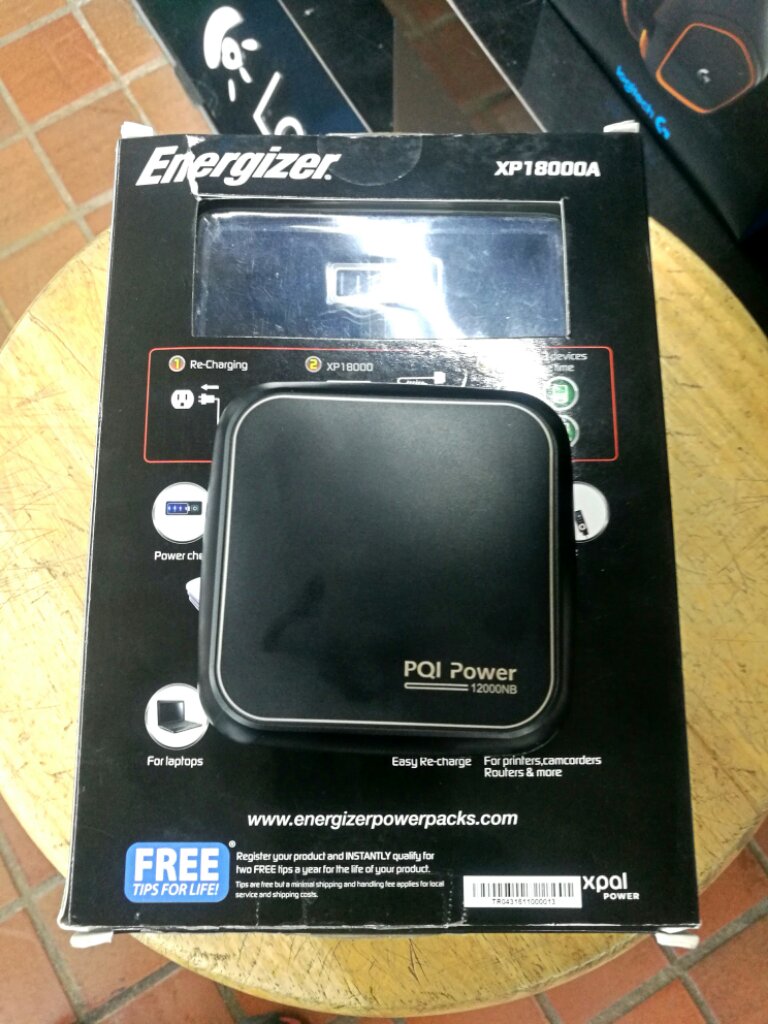
The PB? It's not a Type-C PD PB though, just a normal "laptop" powerbank (that works for everything that charges on 19V/3.42A = 65W).

It's slightly less then RM300 and you can get it either from Lazada or Lelong. Myself I got it from the Brightstar Malaysia online shop, best online price I've seen for it.

There's also the Apacer B222, which is pretty much just a re-labelled PQI. It's slightly more expensive though.

And yes, I just tested it yesterday and it works fine with the Miix. Don't expect it to charge fully from zero though, you'll get more like 30-40% at most... but considering the size of the PB, that's probably enough.

As a bonus, it does come with an Acer tip for it (that looks like it would fit your Switch) so you can use that Type-C for something more productive lol.

» Click to show Spoiler - click again to hide... «


BTW, this is how small it is VS the traditional "laptop" PB, the RM500+ Energizer Xpal:

user posted image
*
sweat.gif
I bought the same power bank as I see it now comes with 9 tips. But unfortunately none is compatible with miix...

Do you have the link which adapter have the tip that can be used with this power bank and miix?

The PQI power bank

This post has been edited by xxboxx: May 12 2017, 04:21 PM
TSEiraku
post May 12 2017, 07:24 PM

Geeking since 1985!
*******
Senior Member
7,037 posts

Joined: Apr 2006


QUOTE(xxboxx @ May 12 2017, 03:04 PM)
sweat.gif
I bought the same power bank as I see it now comes with 9 tips. But unfortunately none is compatible with miix...

Do you have the link which adapter have the tip that can be used with this power bank and miix?

The PQI power bank
*
IINM, the Huntkey 40w mini universal adapter has one tip that fits the 510 that you can use with the PQI powerbank. It's a bit awkward though, you have to use the PQI big HP round tip and then slide the Huntkey adapter on that tip before connecting to the 510.

Annnnnnd that 40w adapter barely charges the 510 itself (can but slowly). So yeah. You're basically buying the adapter for the tip... unless you have a family member using an Ultrabook/Netbook you can pawn/gift the thing to.

Unfortunately, that is the ONLY way I know of to get that tip.
You can try contacting Huntkey though. Or PQI.

Really sorry if I missed stating CLEARLY the part that you need to actually get the 510 tips for the PQI PB seperately. I already have the tip from one of my old Huntkey universal adapters myself so it must have slipped my mind.

Again, really sorry.

This post has been edited by Eiraku: May 12 2017, 07:37 PM
xxboxx
post May 13 2017, 09:37 AM

The mind is for having ideas, not holding them
*******
Senior Member
5,261 posts

Joined: Oct 2004
From: J@Y B33


QUOTE(Eiraku @ May 12 2017, 07:24 PM)
IINM, the Huntkey 40w mini universal adapter has one tip that fits the 510 that you can use with the PQI powerbank. It's a bit awkward though, you have to use the PQI big HP round tip and then slide the Huntkey adapter on that tip before connecting to the 510.

Annnnnnd that 40w adapter barely charges the 510 itself (can but slowly). So yeah. You're basically buying the adapter for the tip... unless you have a family member using an Ultrabook/Netbook you can pawn/gift the thing to.

Unfortunately, that is the ONLY way I know of to get that tip.
You can try contacting Huntkey though. Or PQI.

Really sorry if I missed stating CLEARLY the part that you need to actually get the 510 tips for the PQI PB seperately. I already have the tip from one of my old Huntkey universal adapters myself so it must have slipped my mind.

Again, really sorry.
*
Nah, it's not your fault. I see you wrote yours with 6 tips, and the ads is with 9 tips, so I thought maybe the additional 3 tips have sizes for Miix. Too bad none of it have the same tip. From googling it seem miix tip is 4.0mm x 1.7mm, size usually use by netbook.

I check my miix power adapter is 45w (20v 2.25A), same as what written on back of the miix. So a 40w adapter should be theoretically only slower by 12%. I do plan to get additional adapter for travelling while the ori charger use at home. But do you confirm it have same tip with Lenovo? I try to search more about the tip they have but didn't mention on the tip size. Some seller written have 5 tips while some written have 4 tips. rclxub.gif

Lazada have the AC/DC power adapter tips, which have 4.0mm x 1.7mm size.
http://www.lazada.com.my/buyincoins-univer...-8-1967041.html
Only thing is seller from overseas, it take weeks to arrive.

Think today I'll hunt the adapter tip on electrical parts shop and computer shop see if can find it. Otherwise have to buy the mini universal adapter or wait weeks for the adapter tips.

Btw, do your miix power button need to press a bit more when want to wake it from sleep/hibernate/off? Mine need it, unlike when it's ON and want it to sleep, light press of the power button will make it go into sleep. Sometimes a bit frustrating when I thought I press enough and wait but see nothing happen.

LOL just noticed even the original charger charge it very slow. I browsing the web while charging it and after almost an hour it only charge 26%

This post has been edited by xxboxx: May 13 2017, 09:40 AM

TSEiraku
post May 13 2017, 12:49 PM

Geeking since 1985!
*******
Senior Member
7,037 posts

Joined: Apr 2006


QUOTE(xxboxx @ May 13 2017, 09:37 AM)
Nah, it's not your fault. I see you wrote yours with 6 tips, and the ads is with 9 tips, so I thought maybe the additional 3 tips have sizes for Miix. Too bad none of it have the same tip. From googling it seem miix tip is 4.0mm x 1.7mm, size usually use by netbook.

I check my miix power adapter is 45w (20v 2.25A), same as what written on back of the miix. So a 40w adapter should be theoretically only slower by 12%. I do plan to get additional adapter for travelling while the ori charger use at home. But do you confirm it have same tip with Lenovo? I try to search more about the tip they have but didn't mention on the tip size. Some seller written have 5 tips while some written have 4 tips.  rclxub.gif

Lazada have the AC/DC power adapter tips, which have 4.0mm x 1.7mm size.
http://www.lazada.com.my/buyincoins-univer...-8-1967041.html
Only thing is seller from overseas, it take weeks to arrive.

Think today I'll hunt the adapter tip on electrical parts shop and computer shop see if can find it. Otherwise have to buy the mini universal adapter or wait weeks for the adapter tips.

Btw, do your miix power button need to press a bit more when want to wake it from sleep/hibernate/off? Mine need it, unlike when it's ON and want it to sleep, light press of the power button will make it go into sleep. Sometimes a bit frustrating when I thought I press enough and wait but see nothing happen.

LOL just noticed even the original charger charge it very slow. I browsing the web while charging it and after almost an hour it only charge 26%
*
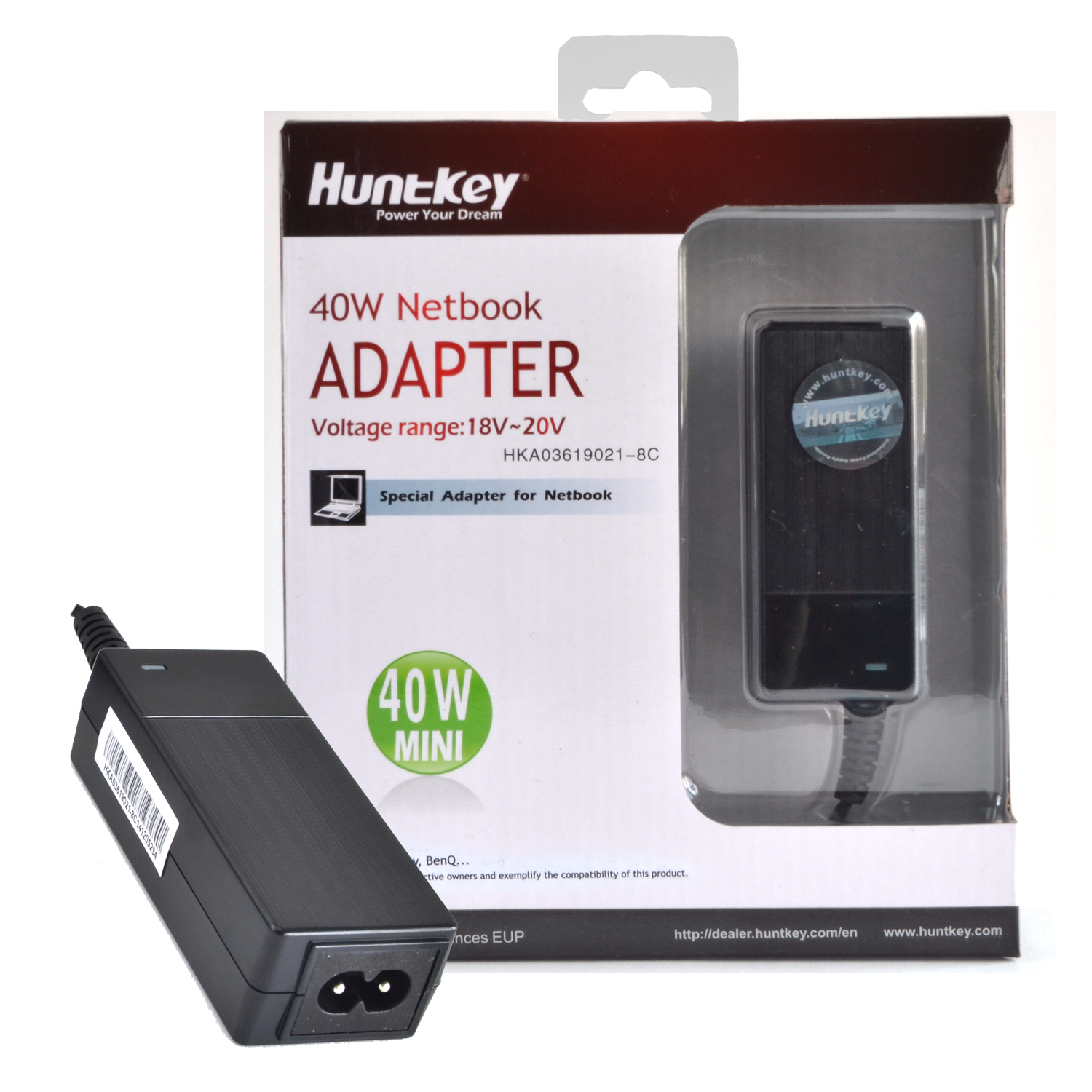
The buyincoins adapters look like they might work. Otherwise it's back to the tiny Huntkey adapter, which BTW looks like this:

user posted image

I can confirm it does have the same tips (and the tip is also usable with the ANOTHER tip on the PQI to allow use) as I've actually opened up one of packages at All-IT to check.
xxboxx
post May 13 2017, 01:20 PM

The mind is for having ideas, not holding them
*******
Senior Member
5,261 posts

Joined: Oct 2004
From: J@Y B33


QUOTE(Eiraku @ May 13 2017, 12:49 PM)
The buyincoins adapters look like they might work. Otherwise it's back to the tiny Huntkey adapter, which BTW looks like this:

user posted image

I can confirm it does have the same tips (and the tip is also usable with the ANOTHER tip on the PQI to allow use) as I've actually opened up one of packages at All-IT to check.
*
The computer shop I visited also have Huntkey 40w, and indeed it is perfect fit for miix.

Afterwards I visited electrical components shop. They do have all those adapter tip, same like buyincoins/huntkey adapter. Buy one for RM3.50 biggrin.gif

A note to anyone else that want to buy the adapter, bring your miix or any other laptop to make sure the tip is correct size, there's tons of tip sizes there. I ask for 4.0 x 1.7mm, but it cannot fit into miix, the staff change to smaller tip which fit in perfectly.

This post has been edited by xxboxx: May 13 2017, 01:22 PM
TSEiraku
post May 13 2017, 02:31 PM

Geeking since 1985!
*******
Senior Member
7,037 posts

Joined: Apr 2006


QUOTE(xxboxx @ May 13 2017, 01:20 PM)
The computer shop I visited also have Huntkey 40w, and indeed it is perfect fit for miix.

Afterwards I visited electrical components shop. They do have all those adapter tip, same like buyincoins/huntkey adapter. Buy one for RM3.50 biggrin.gif

A note to anyone else that want to buy the adapter, bring your miix or any other laptop to make sure the tip is correct size, there's tons of tip sizes there. I ask for 4.0 x 1.7mm, but it cannot fit into miix, the staff change to smaller tip which fit in perfectly.
*
Do make sure of the polarity. Not sure HOW you can confirm that though. I know the Huntkey tip at least is of correct polarity.

BTW, do share the exact details of the electrical components store you went to (name, location) and a pix of the tip itself?More spare tips for me wouldn't hurt either.
xxboxx
post May 13 2017, 03:17 PM

The mind is for having ideas, not holding them
*******
Senior Member
5,261 posts

Joined: Oct 2004
From: J@Y B33


QUOTE(Eiraku @ May 13 2017, 02:31 PM)
Do make sure of the polarity. Not sure HOW you can confirm that though. I know the Huntkey tip at least is of correct polarity.

BTW, do share the exact details of the electrical components store you went to (name, location) and a pix of the tip itself?More spare tips for me wouldn't hurt either.
*
The input and output is same like Huntley adapter, means inner and outer polarity output on the adapter will stay the same according to input.

I'm in JB, the shop called Darson. Not sure KL have it or not.
But I remember KL got 1 place famous for having the most varieties for electrical components. IINM Jalan Pasar?
dpelican
post May 16 2017, 09:55 AM

New Member
*
Junior Member
20 posts

Joined: Dec 2005
Just a slight update on the AAAA battery. Just bought a Mr.DIY brand 9V battery to 'slaughter'. Unfortunately, even they have gone the gel pack type. So no more 6x AAAA battery within. At least I have tried...
dpelican
post May 16 2017, 09:59 AM

New Member
*
Junior Member
20 posts

Joined: Dec 2005
QUOTE(xxboxx @ May 13 2017, 09:37 AM)

Btw, do your miix power button need to press a bit more when want to wake it from sleep/hibernate/off? Mine need it, unlike when it's ON and want it to sleep, light press of the power button will make it go into sleep. Sometimes a bit frustrating when I thought I press enough and wait but see nothing happen.

LOL just noticed even the original charger charge it very slow. I browsing the web while charging it and after almost an hour it only charge 26%
*
I have the same issue too with the power button. It needs to be depressed and hold a wee bit longer to get it wake up vs getting it to go into sleep. So much so that I created a nick on the button already... maybe through the fingernails accidentally...

Another issue that I am facing, not sure whether anyone of you having the same....I noticed it's a bit laggy when running Chrome or Edge....takes a while for pages to load....way too slow for a i5-7200U with 8GB ram...
TSEiraku
post May 16 2017, 12:10 PM

Geeking since 1985!
*******
Senior Member
7,037 posts

Joined: Apr 2006


QUOTE(dpelican @ May 16 2017, 09:59 AM)
I have the same issue too with the power button. It needs to be depressed and hold a wee bit longer to get it wake up vs getting it to go into sleep. So much so that I created a nick on the button already... maybe through the fingernails accidentally...

Another issue that I am facing, not sure whether anyone of you having the same....I noticed it's a bit laggy when running Chrome or Edge....takes a while for pages to load....way too slow for a i5-7200U with 8GB ram...
*
Personally using Waterfox (full 64-bit Firefox port) and Chrome, zero lag or page loading pauses. Not sure why it's laggy for you.

Did you change any network settings? Also, what AV are you using? Coz some AVs can be quite invasive and can slow down page loading to a crawl.

I'm on ESET NOD32 (AV-only, no Internet Security Suite), and it has been ok so far.

This post has been edited by Eiraku: May 16 2017, 12:11 PM
epel
post May 17 2017, 11:52 AM

New Member
*
Junior Member
14 posts

Joined: Mar 2008


QUOTE(lionlamb18 @ May 2 2017, 06:04 PM)
i tried with the anti bluelight at lenovo settings, it doesnt help. But i downloaded the iris mini pro (yup, paid for it in USD 5) and it has level of brightness that i can adjust and it didnt cause flicker. not sure whether long term its good for the machine though. i checked flicker using my camera . :-) and you are right, when i set the brightness to low without using iris, the screen flickers. in fact, it flickers at anything below 100 percent.

now with iris installed it didnt flicker, and i am happy with it. less pening lalat and feeling like i am on the boat.
*
I believe I have sensitivity towards flickering caused by PWM controlling too. This only come to my knowledge after I have bought Miix 510 and I have been searching how to solve the problem.

I came across the iris software and if I am not mistaken the author mentioned how to eliminate the flickering. First the hardware brightness is set at 100% (Windows 10 display setting) then iris will control the brightness according to your preference.

To test this without using iris in Windows 10 follow these steps-:

1) Settings -> Display -> Change brightness to 100%
2) Intel Graphics Settings (in taskbar) -> Display -> Color Settings -> Change the brightness to lower value
3) Using your camera, notice there will be no flickering

In theory, the LED backlight is set at 100% brightness thus no PWM controlling will take place. To reduce the brightness to your comfort level, color correction via software is applied. If this is true, I wonder if constantly set the LED brightness to 100% will have negative impact on the panel life span and other component such as battery.


dpelican
post May 17 2017, 05:35 PM

New Member
*
Junior Member
20 posts

Joined: Dec 2005
QUOTE(Eiraku @ May 16 2017, 12:10 PM)
Personally using Waterfox (full 64-bit Firefox port) and Chrome, zero lag or page loading pauses. Not sure why it's laggy for you.

Did you change any network settings? Also, what AV are you using? Coz some AVs can be quite invasive and can slow down page loading to a crawl.

I'm on ESET NOD32 (AV-only, no Internet Security Suite), and it has been ok so far.
*
I m using Chrome. Bit laggy.

My wifi driver has been buggy for a while...initially, everytime I have rebooted/awaken from sleep for the machine , it will not reconnect. I dug around in the Lenovo forum and found out to be the driver that Lenovo is updating....So I installed the one from Intel and seems to have solved the problem.

As for AV, not using any at all - relying on the good ol' Windows Defender....
xxboxx
post May 18 2017, 12:45 PM

The mind is for having ideas, not holding them
*******
Senior Member
5,261 posts

Joined: Oct 2004
From: J@Y B33


QUOTE(dpelican @ May 16 2017, 09:59 AM)
I have the same issue too with the power button. It needs to be depressed and hold a wee bit longer to get it wake up vs getting it to go into sleep. So much so that I created a nick on the button already... maybe through the fingernails accidentally...

Another issue that I am facing, not sure whether anyone of you having the same....I noticed it's a bit laggy when running Chrome or Edge....takes a while for pages to load....way too slow for a i5-7200U with 8GB ram...
*
Yeah, the power button issue still the same. Now kinda used to wait few seconds after press the button to see if the screen will lit. If not then have to press again.

Edge trying to save battery, hence it seems to be processing things quite slow. Very noticeable when load youtube or when close all tabs.

Chrome you feel laggy when scrolling? Their scrolling only feel smooth if use mouse scroll wheel, and the not smooth very apparent if using touch screen swipe.
dpelican
post May 19 2017, 05:45 PM

New Member
*
Junior Member
20 posts

Joined: Dec 2005
QUOTE(xxboxx @ May 18 2017, 12:45 PM)
Yeah, the power button issue still the same. Now kinda used to wait few seconds after press the button to see if the screen will lit. If not then have to press again.

Edge trying to save battery, hence it seems to be processing things quite slow. Very noticeable when load youtube or when close all tabs.

Chrome you feel laggy when scrolling? Their scrolling only feel smooth if use mouse scroll wheel, and the not smooth very apparent if using touch screen swipe.
*
Mine seems to be the opposite...I use touch to scroll, it's quite responsive. However, using trackpad on attached keyboard or USB wireless mouse, seems extremely laggy....

Update on the AAAA battery: Slaughtered a Tesco 9V Alkaline cell, it's confirmed 6 AAAA battery inside. Unlike other brands, the battery is encased in a plastic casing. The Tesco label is a sticker that you can easily peel off. The plastic case, you need to use a screwdriver and hammer to crack it open. Then the batteries are easily extracted.

TSEiraku
post May 19 2017, 07:54 PM

Geeking since 1985!
*******
Senior Member
7,037 posts

Joined: Apr 2006


QUOTE(dpelican @ May 19 2017, 05:45 PM)
Mine seems to be the opposite...I use touch to scroll, it's quite responsive. However, using trackpad on attached keyboard or USB wireless mouse, seems extremely laggy....

Update on the AAAA battery: Slaughtered a Tesco 9V Alkaline cell, it's confirmed 6 AAAA battery inside. Unlike other brands, the battery is encased in a plastic casing. The Tesco label is a sticker that you can easily peel off. The plastic case, you need to use a screwdriver and hammer to crack it open. Then the batteries are easily extracted.
*
Have you updated the keyboard cover firmware? Seems to help. Also using crappy non-standard AC chargers seems to eff up the keyboard cover touchpad something fierce.
dpelican
post May 24 2017, 11:37 AM

New Member
*
Junior Member
20 posts

Joined: Dec 2005
QUOTE(Eiraku @ May 19 2017, 07:54 PM)
Have you updated the keyboard cover firmware? Seems to help. Also using crappy non-standard AC chargers seems to eff up the keyboard cover touchpad something fierce.
*
Yeah, I have updated the firmware from Lenovo website. I suspected that too earlier....Now, am not sure whether it's the updated firmware that is effing the keyboard.

I am using the ori AC charger that comes with the Miix. Had not gotten any 3rd party charger.
waqqas80
post May 28 2017, 01:31 PM

New Member
*
Junior Member
17 posts

Joined: Jul 2011
Hi all & masta Eiraku.
Been following this thread closely. Very interested in the miix 510 but with the recent price drop for sp4, still undecided. Some questions:
1. Anyone faced any issues with their miix?
2. Anyone used usb-c to hdmi/vga adapter with their miix? Any recommendation of adapter brand?

22 Pages « < 6 7 8 9 10 > » Top
 

Change to:
| Lo-Fi Version
0.0295sec    0.55    6 queries    GZIP Disabled
Time is now: 20th December 2025 - 09:51 PM