Welcome Guest ( Log In | Register )

22 Pages  1 2 3 > » Bottom

Outline · [ Standard ] · Linear+

Hardware Lenovo Miix 510 Review and AMA, Coz there's no actual thread for it lol

views
     
TSEiraku
post Feb 2 2017, 12:55 PM, updated 8y ago

Geeking since 1985!
*******
Senior Member
7,037 posts

Joined: Apr 2006


user posted image

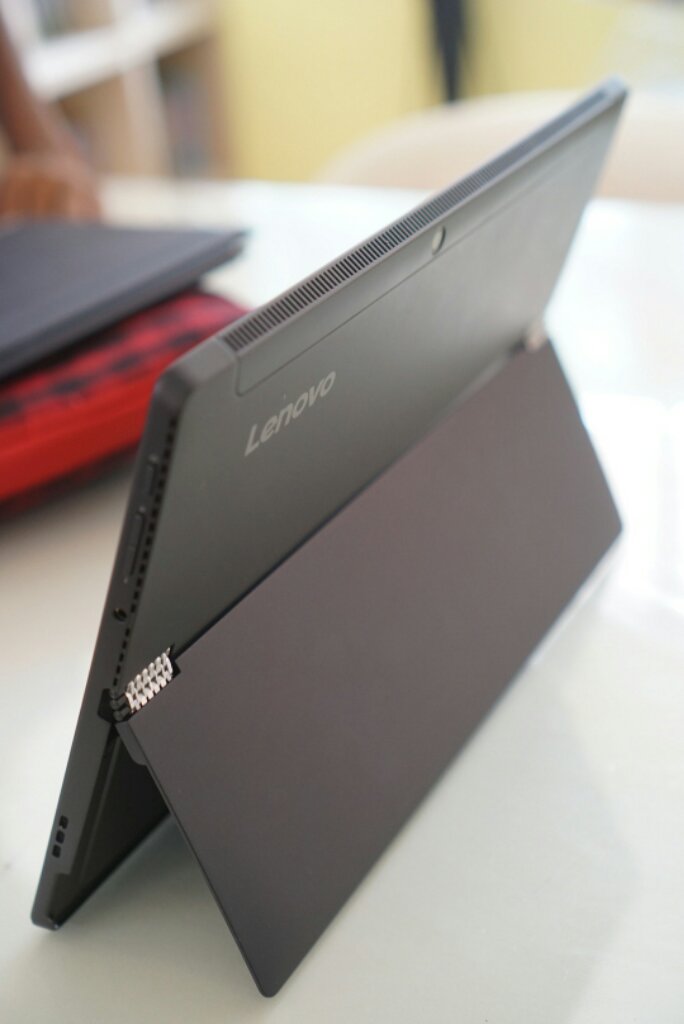
Hey ho folks, here's mah humble rebiu on the i5/8GB Lenovo Miix 510, which should be useful if you guys are, as I was, looking for an "affordable" Surface Pro Clone (Surface gaise please don't flame us poorfags here).

Main points:

- Build Quality almost on par with SP4 (much better built than Switch A12, hinge is slightly superior to the SP4 even).

- Benchmark wise slightly faster than the i5/8GB SP4 (on par with the Switch A12).

- REAL Wacom Pen FTW (AES + Wacom Digitizer - unfortunately not EMR, but better drivers/stylus usability than both Switch A12 or SPs. Slightly crappier physical pen vs the SP4).

- Battery life 5-6 hours nominal (better than Switch A12, worse than SP4).

- Screen is decent (Switch A12 and SP4 brighter and better reso).

- Heat management excellent (though fan runs almost constantly, but for me it's not really noticeable).

- Warranty is 2 years international INCLUDING Accidental Damage Protection for both (confirmed with Lenovo direct)... PLUS it's extendable to 5 years if you want (Switch A12 needs additional purchase for extended warranty, no Accidental Protection. Not sure about SP4).

- Unlike the Lenovo Miix 700, it has been relatively problem free so far (which is admittedly quite rare for a Lenovo product lol). Also Miix 700 had a crappy Elan Digitizer, and this one doesn't.

You can read up on all the nitty-gritty details in the full review on my site/blog here: https://goo.gl/ebQd0N

In conclusion it's an awesome little 12-incher haiburid if you have a need for one and can't afford an SP4. Might sound like I'm shilling but I'm just a really happy user here.

Also it's bound to get better as the IFA announced Miix 720 is gonna be released soon... prices should drop you further for the 510 and - unless you need Kaby Lake, TB3, a Hello Webcam AND a microSD reader - the 510 is really "good enough" already (not to mention the 720 sounds like it will cost a bomb lol).

Not sure if Lenovo's gonna cost cut in other ways and go back to that crappy Elan Digitizer in the 720 though... which might just happen as the 720 (like the 700) has a 3:2 aspect ratio screen, and Wacom doesn't really do 3:2.

Anyway, do sound off if anybody got any questions about the Miix 510. I'll be more than happy to answer if I can.

(EDIT 13/02) Here's a few PSAs for new Miix 510 users BTW:


1) Model Differences:
i3/4GB - 128G SSD, NO YES pen (according to rosihan) W10 Home, 1yr Warranty + ADP.
i5/8GB - 256G SSD, YES pen, W10 Home, 2yr Warranty + ADP. i7/8GB - 256G SSD, YES pen, W10 Pro, 2yr Warranty + ADP.

2) Turn off Fast Startup - The SSD already boots plenty fast without it, and it drains your battery turned on. Steps here: https://goo.gl/tBKxnH

3) Update your Keyboard Folio driver and firmware (from the Lenovo Website). Helps make the KB and touchpad work a lot better. Unfortunately, the touchpad is still VERY sensitive to dodgy AC adapters/plugs, so watch what you're plugging your Miix into.

4) Screen protection - Tempered glass/film SP is readily available from eBay and Lazada, or you can go to Mobile Outfitters (Gurney Plaza, Sunway, BTS) for a custom made SP.

5) ANY Wacom AES Lenovo Active Stylus (and even Dell and HP's) works with the Miix 510, so you can get any one from eBay if you need spares and replacements. I got the Lenovo GX80K32884 (Miix 700/Yoga 900 stylus) as it was the cheapest available, and it works fine.

6) AAAA batteries for the darned things are readily available from Harvey Norman (cheap) or All IT, so you don't need to go hack open 9V cells to find some.

7) The SSD IS upgradable, but it needs a considerable amount of skill, finesse and luck. Get the maintainance manual from the Lenovo support site, the proper tools (plastic prying picks for the screen and thermal paste for the CPU) and take it SLOW prying the screen open, as the screen housing around the screen itself is plastic and chips easily (talking from... sadly... experience).

This post has been edited by Eiraku: Mar 4 2017, 05:19 AM
acbc
post Feb 2 2017, 12:56 PM

Look at all my stars!!
*******
Senior Member
9,050 posts

Joined: Jan 2003
As the battery don't get bloated like my Chuwi Hi12 and price is right, then worth it.
TSEiraku
post Feb 2 2017, 01:01 PM

Geeking since 1985!
*******
Senior Member
7,037 posts

Joined: Apr 2006


QUOTE(acbc @ Feb 2 2017, 12:56 PM)
As the battery don't get bloated like my Chuwi Hi12 and price is right, then worth it.
*
No bloating so far and screen is awesome compared to the Chuwi (methinks at least). Price-wise still cannot compare direct unfortunately... though if you wait for the upcoming Miix 720 the 510 price might just drop low enough to be decently comparable.

It's still a good deal now vs the Acer Switch Alpha 12 though for the non-drifty stylus (Synaptics pen baddddd), the backlighted keyboard, the (slightly better) battery life and warranty alone IMHO.

Also the Sammy (EDIT: after checking, apparently mine's SK Hynix) NVMe SSD Lenovo used on this thing is fassssssst... and upgradable too if you don't mind unscrewing a few screws lol. Similarly the battery is also (kinda) replaceable if it DOES bloat.

This post has been edited by Eiraku: Feb 7 2017, 01:01 PM
10071985
post Feb 2 2017, 05:56 PM

Workaholic
*******
Senior Member
2,744 posts

Joined: Jan 2003
From: Seremban


whats the price for this baby
MaxHW
post Feb 2 2017, 07:06 PM

Getting Started
**
Junior Member
70 posts

Joined: Feb 2017
From: Kuala Lumpur


Interesting device, what is the current retail price?
TSEiraku
post Feb 2 2017, 07:30 PM

Geeking since 1985!
*******
Senior Member
7,037 posts

Joined: Apr 2006


QUOTE(MaxHW @ Feb 2 2017, 07:06 PM)
Interesting device, what is the current retail price?
*
Last I checked it was around RM3.5k for the i5/8GB version (same as mine), 2.4k for the i3/4GB and 4.6k for the i7/8GB. Comes all in with Keyboard Cover AND Wacom stylus (also a nice simple sleeve free in the box).

Expect it to be 100-200 cheaper + freebies on Lazada or through Tech Hypermart... and maybe even cheaper in a few months as we get closer to the launch of the successor 720 model.

Got mine full retail from ThunderMatch Digital Mall just so that I can pay part cash and part EZPay... wasn't sure any of the online retailers can manage such a slipshod method of payment the way physical shops could.

Also, weirdly enough, folks at Lenovo Malaysia aren't trying too hard to push this thing over that funky Yoga Book thing and the rest of the Yoga bunch... when arguably this one is far more practical (at least to me).

Very the fishy indeed.

Maybe Malaysians just like them funky Yogas lol.

This post has been edited by Eiraku: Feb 2 2017, 08:55 PM
shirogawawa
post Feb 2 2017, 10:05 PM

Laptop enthusiast
*******
Senior Member
2,383 posts

Joined: Feb 2015
From: IT wonderland


QUOTE(MaxHW @ Feb 2 2017, 07:06 PM)
Interesting device, what is the current retail price?
*
Latest Jan 2017 pricing

RM 2,649
New Model! With backlit Keyboard
INTEL® CORE™ I3-6100U PROCESSOR
W10 HOME
12.2" FHD (1920 x 1080) IPS, 320 nits, Multi-touch
4GB
128GB SSD PCIE
Integrated
1 x USB 3.0 Type C, 1 x USB 3.0, Audio Jack
"Up to 8 hrs,
900g (Tablet), 1.25kg (with keyboard)"
1 Yr Carry-in + ADP (Accidental Damage Protection) warranty!


RM 3,699
New Model! With backlit Keyboard
INTEL® CORE™ I5-6200U PROCESSOR
W10 HOME
12.2" FHD (1920 x 1080) IPS, 320 nits, Multi-touch
8GB
256GB SSD PCIE
Integrated
1 x USB 3.0 Type C, 1 x USB 3.0, Audio Jack
"Up to 8 hrs,
900g (Tablet), 1.25kg (with keyboard)"
2 Yrs Carry-in + ADP (Accidental Damage Protection)warranty!


RM 4,399 / RM 4,799 ( With LTE Data )
New Model! With backlit Keyboard
INTEL® CORE™ I7-6500U PROCESSOR
W10 PRO
12.2" FHD (1920 x 1080) IPS, 320 nits, Multi-touch
8GB
256GB SSD PCIE
Integrated
1 x USB 3.0 Type C, 1 x USB 3.0, Audio Jack
"Up to 8 hrs,
900g (Tablet), 1.25kg (with keyboard)"
2 Yrs Carry-in + ADP (Accidental Damage Protection) warranty!


MaxHW
post Feb 2 2017, 10:52 PM

Getting Started
**
Junior Member
70 posts

Joined: Feb 2017
From: Kuala Lumpur


QUOTE(Eiraku @ Feb 2 2017, 07:30 PM)
Last I checked it was around RM3.5k for the i5/8GB version (same as mine), 2.4k for the i3/4GB and 4.6k for the i7/8GB. Comes all in with Keyboard Cover AND Wacom stylus (also a nice simple sleeve free in the box).

Expect it to be 100-200 cheaper + freebies on Lazada or through Tech Hypermart... and maybe even cheaper in a few months as we get closer to the launch of the successor 720 model.

Got mine full retail from ThunderMatch Digital Mall just so that I can pay part cash and part EZPay... wasn't sure any of the online retailers can manage such a slipshod method of payment the way physical shops could.

Also, weirdly enough, folks at Lenovo Malaysia aren't trying too hard to push this thing over that funky Yoga Book thing and the rest of the Yoga bunch... when arguably this one is far more practical (at least to me).

Very the fishy indeed.

Maybe Malaysians just like them funky Yogas lol.
*
Did not know you can do part pay cash and part EZPay, is that only on certain retailer like ThunderMatch?
Thanks.
MaxHW
post Feb 2 2017, 10:52 PM

Getting Started
**
Junior Member
70 posts

Joined: Feb 2017
From: Kuala Lumpur


QUOTE(shirogawawa @ Feb 2 2017, 10:05 PM)
Latest Jan 2017 pricing

RM 2,649 
New Model! With backlit Keyboard 
INTEL® CORE™ I3-6100U PROCESSOR
W10 HOME
12.2" FHD (1920 x 1080) IPS, 320 nits, Multi-touch
4GB
128GB SSD PCIE
Integrated
1 x USB 3.0 Type C, 1 x USB 3.0, Audio Jack
"Up to 8 hrs,
900g (Tablet), 1.25kg (with keyboard)"
1 Yr Carry-in + ADP (Accidental Damage Protection) warranty!
RM 3,699 
New Model! With backlit Keyboard 
INTEL® CORE™ I5-6200U PROCESSOR
W10 HOME
12.2" FHD (1920 x 1080) IPS, 320 nits, Multi-touch
8GB
256GB SSD PCIE
Integrated
1 x USB 3.0 Type C, 1 x USB 3.0, Audio Jack
"Up to 8 hrs,
900g (Tablet), 1.25kg (with keyboard)"
2 Yrs Carry-in + ADP (Accidental Damage Protection)warranty!
           
RM 4,399 / RM 4,799 ( With LTE Data )
New Model! With backlit Keyboard 
INTEL® CORE™ I7-6500U PROCESSOR
W10 PRO
12.2" FHD (1920 x 1080) IPS, 320 nits, Multi-touch
8GB
256GB SSD PCIE
Integrated
1 x USB 3.0 Type C, 1 x USB 3.0, Audio Jack
"Up to 8 hrs,
900g (Tablet), 1.25kg (with keyboard)"
2 Yrs Carry-in + ADP (Accidental Damage Protection) warranty!
*
Price is ok i guess, thanks btw smile.gif
TSEiraku
post Feb 2 2017, 11:54 PM

Geeking since 1985!
*******
Senior Member
7,037 posts

Joined: Apr 2006


QUOTE(MaxHW @ Feb 2 2017, 10:52 PM)
Did not know you can do part pay cash and part EZPay, is that only on certain retailer like ThunderMatch?
Thanks.
*
When I checked @DigiMall (for both the Switch 12 and the Miix 510) ThunderMatch, All IT and even the small Acer Store/Booth next to the Entrance was okay with the idea of part cash/part EzPay payment... as long as the EzPay portion was RM1k and above/12 months (as that is the minimum requirement for conversion to EzPay).

That said, the All IT KLCC, when called up to ask, was not keen on the idea, so I'd say it really depends on the retailer and also on how well you discuss it with them.

Also, there might be a one time fee imposed on the transaction (as per the normal retailer CC fees thingy), but otherwise it's the true blue zero interest EzPay installment, at least in the case of Maybank (not sure about the other banks).

This post has been edited by Eiraku: Feb 2 2017, 11:59 PM
MaxHW
post Feb 3 2017, 12:28 AM

Getting Started
**
Junior Member
70 posts

Joined: Feb 2017
From: Kuala Lumpur


QUOTE(Eiraku @ Feb 2 2017, 11:54 PM)
When I checked @DigiMall (for both the Switch 12 and the Miix 510) ThunderMatch, All IT and even the small Acer Store/Booth next to the Entrance was okay with the idea of part cash/part EzPay payment... as long as the EzPay portion was RM1k and above/12 months (as that is the minimum requirement for conversion to EzPay).

That said, the All IT KLCC, when called up to ask, was not keen on the idea, so I'd say it really depends on the retailer and also on how well you discuss it with them.

Also, there might be a one time fee imposed on the transaction (as per the normal retailer CC fees thingy), but otherwise it's the true blue zero interest EzPay installment, at least in the case of Maybank (not sure about the other banks).
*
I see, alright, now got a new way to pay for my devices.
Thanks for the tips thumbup.gif thumbup.gif
sqahmad17
post Feb 3 2017, 07:37 AM

Getting Started
**
Junior Member
73 posts

Joined: Feb 2015
The usb c can be used for charging this laptop/tablet or only for data transfer?
TSEiraku
post Feb 3 2017, 08:38 AM

Geeking since 1985!
*******
Senior Member
7,037 posts

Joined: Apr 2006


QUOTE(sqahmad17 @ Feb 3 2017, 07:37 AM)
The usb c can be used for charging this laptop/tablet or only for data transfer?
*
No PD (Type-C changing), unfortunately. You'll have to wait for the upcoming Miix 720 (PD + Thunderbolt 3) for that. On the other hand, it can be used to charge other devices... while that is of limited value really lol considering the Miix has got limited batt life itself.

On the plus side, the Type-C also works for display out (DP Alt mode) and everything else. I have an incoming Hootoo Shuttle multi-hub (USB+HDMI+SD reader, no PD), will test and report once it arrives.

Also, planning on getting my hands on the cute new PQI Laptop Powerbank soon to supplement the batt life. Pretty interesting gadget in itself that PB.

This post has been edited by Eiraku: Feb 3 2017, 08:43 AM
sqahmad17
post Feb 3 2017, 10:01 AM

Getting Started
**
Junior Member
73 posts

Joined: Feb 2015
QUOTE(Eiraku @ Feb 3 2017, 08:38 AM)
No PD (Type-C changing), unfortunately. You'll have to wait for the upcoming Miix 720 (PD + Thunderbolt 3) for that. On the other hand, it can be used to charge other devices... while that is of limited value really lol considering the Miix has got limited batt life itself.

On the plus side, the Type-C also works for display out (DP Alt mode) and everything else. I have an incoming Hootoo Shuttle multi-hub (USB+HDMI+SD reader, no PD), will test and report once it arrives.

Also, planning on getting my hands on the cute new PQI Laptop Powerbank soon to supplement the batt life. Pretty interesting gadget in itself that PB.
*
Nice one do update how the outcome is 😁
TSEiraku
post Feb 3 2017, 10:26 PM

Geeking since 1985!
*******
Senior Member
7,037 posts

Joined: Apr 2006


QUOTE(sqahmad17 @ Feb 3 2017, 10:01 AM)
Nice one do update how the outcome is 😁
*
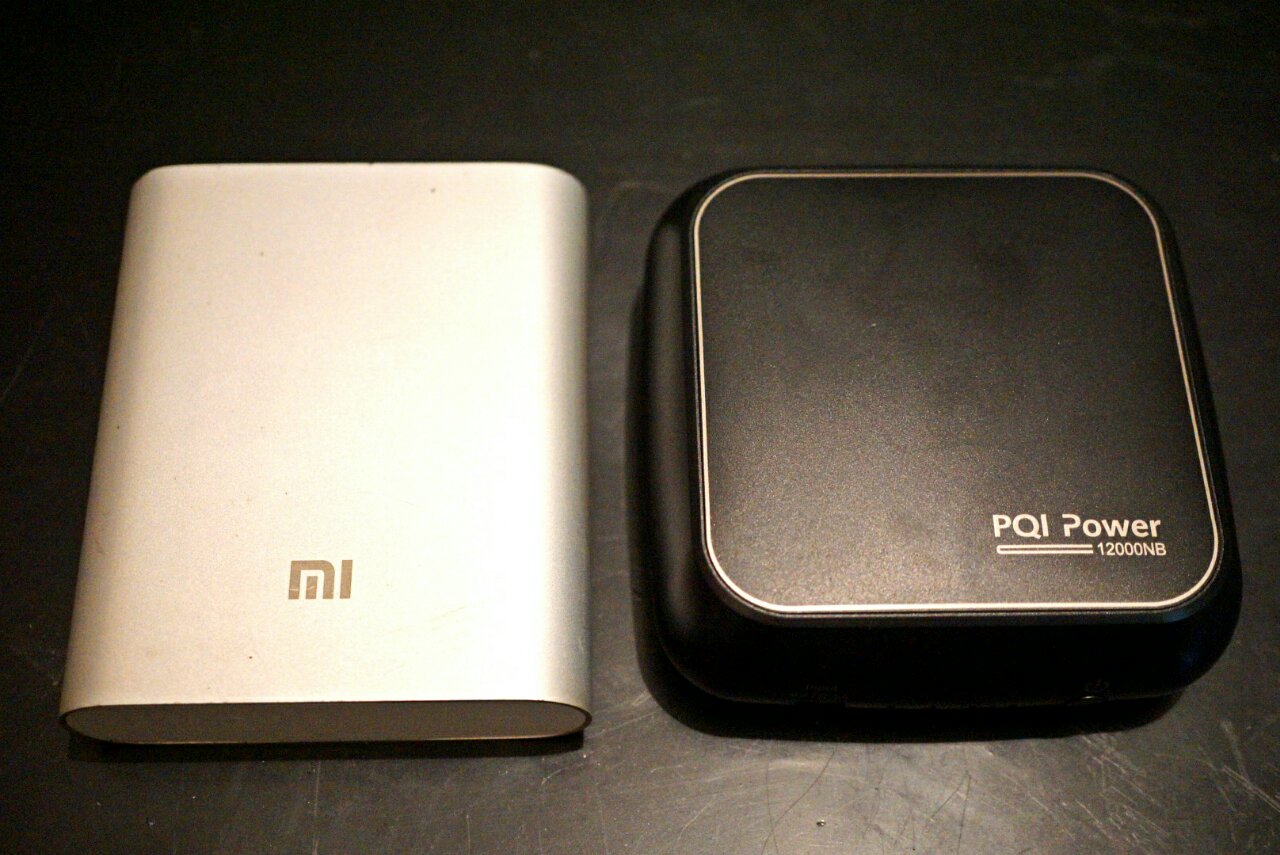
The Hootoo Shuttle is still out there in the void of international shipping so I can't comment much yet lol. But as for the PQI "laptop" powerbank, here's a teaser:

user posted image

It's actually smaller but slightly thicker than an old style Mi 10400mAh PB lol... How it can even do 19V/3.42A I can't even... shocking.gif

This post has been edited by Eiraku: Feb 6 2017, 03:07 AM
willgan
post Feb 5 2017, 11:58 PM

Casual
***
Junior Member
302 posts

Joined: Jan 2003
How much you bought it and from where?

I'm using romoss sofun 6 for my alpha 12.. still looking for usbc power bank

This post has been edited by willgan: Feb 6 2017, 12:00 AM
TSEiraku
post Feb 6 2017, 12:09 AM

Geeking since 1985!
*******
Senior Member
7,037 posts

Joined: Apr 2006


QUOTE(willgan @ Feb 5 2017, 11:58 PM)
How much you bought it and from where?
*
The PB? It's not a Type-C PD PB though, just a normal "laptop" powerbank (that works for everything that charges on 19V/3.42A = 65W).

It's slightly less then RM300 and you can get it either from Lazada or Lelong. Myself I got it from the Brightstar Malaysia online shop, best online price I've seen for it.

There's also the Apacer B222, which is pretty much just a re-labelled PQI. It's slightly more expensive though.

And yes, I just tested it yesterday and it works fine with the Miix. Don't expect it to charge fully from zero though, you'll get more like 30-40% at most... but considering the size of the PB, that's probably enough.

As a bonus, it does come with an Acer tip for it (that looks like it would fit your Switch) so you can use that Type-C for something more productive lol.

» Click to show Spoiler - click again to hide... «


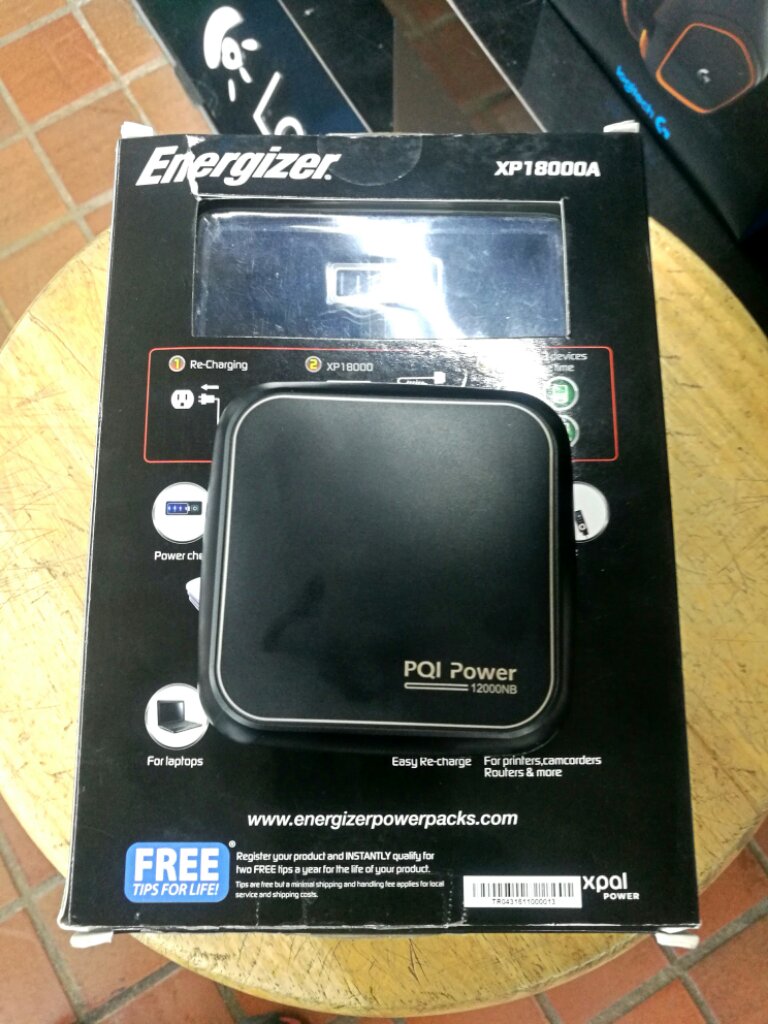
BTW, this is how small it is VS the traditional "laptop" PB, the RM500+ Energizer Xpal:

user posted image

This post has been edited by Eiraku: Feb 6 2017, 03:10 AM
TSEiraku
post Feb 6 2017, 05:31 AM

Geeking since 1985!
*******
Senior Member
7,037 posts

Joined: Apr 2006


Oh mai... suddenly feel that my 256GB SSD is a tad... cramped lol. Now checking the markets for an upgrade, maybe a Samsung PM951 in 512.

Thankfully the Miix, as I mentioned before, is almost as upgradable/repairable as the enterprise grade HP Elite X2 1012... six screws and you're in.

Problem now is to find a good deal on the actual SSD. NVMe summore lol.

EDIT: Found one. Later this week will go get it. Will post up the self-upgrade steps over on the blog and link back here as usual.

This post has been edited by Eiraku: Feb 7 2017, 01:02 PM
SUSgogo2
post Feb 7 2017, 01:42 PM

gogo2
********
All Stars
18,672 posts

Joined: Jan 2003
From: Penang


QUOTE(Eiraku @ Feb 6 2017, 05:31 AM)
Oh mai... suddenly feel that my 256GB SSD is a tad... cramped lol. Now checking the markets for an upgrade, maybe a Samsung PM951 in 512.

Thankfully the Miix, as I mentioned before,  is almost as upgradable/repairable as the enterprise grade HP Elite X2 1012... six screws and you're in.

Problem now is to find a good deal on the actual SSD. NVMe summore lol.

EDIT: Found one. Later this week will go get it. Will post up the self-upgrade steps over on the blog and link back here as usual.
*
Should get LTE version and put in Webe. Winrar.
TSEiraku
post Feb 7 2017, 01:58 PM

Geeking since 1985!
*******
Senior Member
7,037 posts

Joined: Apr 2006


QUOTE(gogo2 @ Feb 7 2017, 01:42 PM)
Should get LTE version and put in Webe. Winrar.
*
Well, can always just get the parts to "make" it the LTE version lol. The modem and SIM slots are there, just unfilled and blanked out with a plastic insert.

Though for my on the move purposes adding those parts will just add to the base battery drain, so no. I always have my phone close by to tether anyway.

22 Pages  1 2 3 > » Top
 

Change to:
| Lo-Fi Version
0.0257sec    0.80    6 queries    GZIP Disabled
Time is now: 18th December 2025 - 08:55 PM