QUOTE(lin@lowyat @ Jun 7 2017, 10:57 AM)
What monitor model is that? Did you enable Freesync in monitor setting? Does the monitor have it's own driver?AMD Radeon™ Discussion V15, Radeon Software 20.10.1
AMD Radeon™ Discussion V15, Radeon Software 20.10.1
|
|
Jun 7 2017, 12:20 PM
Return to original view | Post
#121
|
![]() ![]() ![]() ![]() ![]() ![]() ![]()
Senior Member
6,612 posts Joined: Jan 2003 From: Tomorrow |
|
|
|
|
|
|
Jun 7 2017, 12:45 PM
Return to original view | Post
#122
|
![]() ![]() ![]() ![]() ![]() ![]() ![]()
Senior Member
6,612 posts Joined: Jan 2003 From: Tomorrow |
QUOTE(lin@lowyat @ Jun 7 2017, 12:25 PM) my monitor is LG 23MP68VQ - Freesync certified monitor pair it with RX560. You didn't install latest driver from AMD website? i've installed the driver from cd provided. in the OSD settings i cannot find the freesync. i've just found that there is OSD driver. will try tonight. btw, any chances that HDMI cable can cause the issue, considering HDMI cable have few types such as 1.2, 1.3, 1.4, 2.0 Should work with any HDMI >1.3 cable. AFAIK you need to enable it in monitor first before you can enable it in Radeon Setting, similar to GSYNC i think. |
|
|
Jun 7 2017, 08:32 PM
Return to original view | Post
#123
|
![]() ![]() ![]() ![]() ![]() ![]() ![]()
Senior Member
6,612 posts Joined: Jan 2003 From: Tomorrow |
|
|
|
Jul 4 2017, 05:40 PM
Return to original view | Post
#124
|
![]() ![]() ![]() ![]() ![]() ![]() ![]()
Senior Member
6,612 posts Joined: Jan 2003 From: Tomorrow |
|
|
|
Jul 15 2017, 11:21 AM
Return to original view | Post
#125
|
![]() ![]() ![]() ![]() ![]() ![]() ![]()
Senior Member
6,612 posts Joined: Jan 2003 From: Tomorrow |
|
|
|
Jul 15 2017, 04:27 PM
Return to original view | Post
#126
|
![]() ![]() ![]() ![]() ![]() ![]() ![]()
Senior Member
6,612 posts Joined: Jan 2003 From: Tomorrow |
|
|
|
|
|
|
Jul 15 2017, 05:41 PM
Return to original view | Post
#127
|
![]() ![]() ![]() ![]() ![]() ![]() ![]()
Senior Member
6,612 posts Joined: Jan 2003 From: Tomorrow |
|
|
|
Jul 18 2017, 04:27 PM
Return to original view | Post
#128
|
![]() ![]() ![]() ![]() ![]() ![]() ![]()
Senior Member
6,612 posts Joined: Jan 2003 From: Tomorrow |
QUOTE(diaBoliQu3 @ Jul 17 2017, 08:20 PM) Guys, need your advice. I got a rig with i5 3570k, so now I want to add a GPU. Should I go just with HD7970 or a newer gen card? Just for occasional gaming so I think HD7900 should be okay for me, plus the cheaper the better. What's your budget mang?I'm thinking of GTX 670 and 680 too but I prefer AMD due to Hackintosh and they tend to be cheaper but that was long time ago. |
|
|
Jul 19 2017, 01:38 PM
Return to original view | Post
#129
|
![]() ![]() ![]() ![]() ![]() ![]() ![]()
Senior Member
6,612 posts Joined: Jan 2003 From: Tomorrow |
QUOTE(khelben @ Jul 19 2017, 11:33 AM) Is it really GTX1080? If yes then there's another hint on which performance bracket Vega will compete. |
|
|
Jul 21 2017, 04:21 PM
Return to original view | Post
#130
|
![]() ![]() ![]() ![]() ![]() ![]() ![]()
Senior Member
6,612 posts Joined: Jan 2003 From: Tomorrow |
|
|
|
Jul 26 2017, 05:59 PM
Return to original view | Post
#131
|
![]() ![]() ![]() ![]() ![]() ![]() ![]()
Senior Member
6,612 posts Joined: Jan 2003 From: Tomorrow |
QUOTE(khelben @ Jul 26 2017, 02:29 PM) #waitforNavi? |
|
|
Jul 27 2017, 09:44 PM
Return to original view | Post
#132
|
![]() ![]() ![]() ![]() ![]() ![]() ![]()
Senior Member
6,612 posts Joined: Jan 2003 From: Tomorrow |
AMD Radeon Crimson 17.7.2.
http://support.amd.com/en-us/kb-articles/P...ease-Notes.aspx What's new QUOTE Radeon Settings Radeon Additional Settings has been retired and its previously supported controls for Switchable Graphics, Color Depth and Pixel Format have all been moved into Radeon Settings. Radeon ReLive (1) Now supports bitrates up to 100Mbps for recording or capturing. Added new controls for camera transparency. Optimized memory usage for lower overhead while recording or capturing. Added new notifications for Instant Replay Saving, Recording Timers in Overlay Toolbar and Network Connectivity Issues when streaming. Enhanced Audio Controls: Radeon Software Crimson ReLive Edition now has support for customizable microphone volume controls, audio boost for captured replays and push to talk (mouse + keyboard) support for microphone. Radeon Chill(2) Now supports DirectX®12 and Vulkan™. For more details on new and supported games visit http://www.radeon.com/chill. Now supports Multi-GPU. Now supports Hybrid Graphics system configurations. Now supports Radeon XConnect™ Technology system configurations. Enhanced Sync(3) Enhanced Sync is a display technology which helps minimize screen tearing while decreasing latency and stuttering at an unlocked frame rate. Enhanced Sync is available in Radeon Settings Game Manager under the "Wait for Vertical Refresh" drop down menu. Per-Display Color Controls(4) Per-Display Color Controls are now available in the display tab of Radeon Settings allowing users to configure Brightness, Hue, Contrast and Saturation. Game Responsiveness(5) Radeon Software Crimson ReLive Edition 17.7.2 features optimizations for improved gaming responsiveness in DirectX®9 and select DirectX®11 gaming titles. Radeon WattMan(6) Now supports memory underclocking. Now supports power state controls. Frame Rate Target Control(7) Now supports DirectX®12 and Multi-GPU. Shader Cache(8) Shader Cache is now supported for select DirectX®9 titles |

|
|
Jul 29 2017, 11:20 AM
Return to original view | Post
#133
|
![]() ![]() ![]() ![]() ![]() ![]() ![]()
Senior Member
6,612 posts Joined: Jan 2003 From: Tomorrow |
|
|
|
|
|
|
Jul 29 2017, 11:30 AM
Return to original view | Post
#134
|
![]() ![]() ![]() ![]() ![]() ![]() ![]()
Senior Member
6,612 posts Joined: Jan 2003 From: Tomorrow |
|
|
|
Jul 29 2017, 03:59 PM
Return to original view | Post
#135
|
![]() ![]() ![]() ![]() ![]() ![]() ![]()
Senior Member
6,612 posts Joined: Jan 2003 From: Tomorrow |
|
|
|
Jul 30 2017, 02:26 PM
Return to original view | Post
#136
|
![]() ![]() ![]() ![]() ![]() ![]() ![]()
Senior Member
6,612 posts Joined: Jan 2003 From: Tomorrow |
QUOTE(sHawTY @ Jul 30 2017, 12:39 AM) I believe it's either the graphic card or the monitor itself, but too damn busy to send them for RMA Only happened when Freesync is enabled?QUOTE(pinkguy @ Jul 30 2017, 12:53 PM) Which model?Not worth it imo, got mine for Rm1.6k new last year when they doing some sort of clearance sales. I suggest wait a little longer for price to stabilize since GPU mining craze is slowing down and also see if Vega will bring these prices further down. ![]() ![]() |
|
|
Jul 31 2017, 10:14 AM
Return to original view | Post
#137
|
![]() ![]() ![]() ![]() ![]() ![]() ![]()
Senior Member
6,612 posts Joined: Jan 2003 From: Tomorrow |
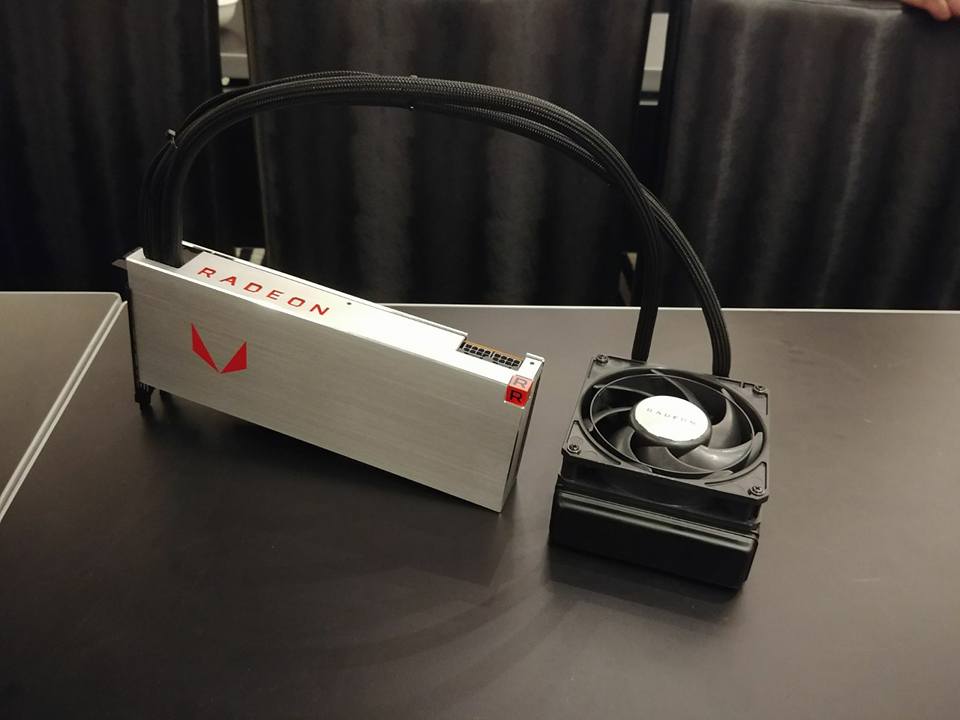
RX Vega Nano?
![]() |
|
|
Jul 31 2017, 10:27 AM
Return to original view | Post
#138
|
![]() ![]() ![]() ![]() ![]() ![]() ![]()
Senior Member
6,612 posts Joined: Jan 2003 From: Tomorrow |
|
|
|
Jul 31 2017, 11:23 AM
Return to original view | Post
#139
|
![]() ![]() ![]() ![]() ![]() ![]() ![]()
Senior Member
6,612 posts Joined: Jan 2003 From: Tomorrow |
QUOTE(sHawTY @ Jul 30 2017, 02:39 PM) Yes Seem that Freesync and flickering is quite common, have you try lowering the refresh rate to 120hz and see if that eliminate it?Ordered an RX 550 to test, once it arrives will check if the issue is caused by the monitor itself or the graphic card Hopefully it's the monitor, not the graphic card because I highly doubt I can get R9 390X if I send it for RMA now Don't want them to replace it with RX 580 because that will be a downgrade And my HAF XB EVO case is a little cramped to put anything longer than 285mm |
|
|
Jul 31 2017, 01:55 PM
Return to original view | Post
#140
|
![]() ![]() ![]() ![]() ![]() ![]() ![]()
Senior Member
6,612 posts Joined: Jan 2003 From: Tomorrow |
|
| Change to: | 0.0207sec
0.59
7 queries
GZIP Disabled
Time is now: 1st December 2025 - 07:59 PM |