Welcome Guest ( Log In | Register )

Bump Topic Topic Closed RSS Feed
43 Pages « < 7 8 9 10 11 > » Bottom

Outline · [ Standard ] · Linear+

 [OFFICIAL]Rig Suggestion Q&A Thread V12!

views
     
terence_nwb
post Sep 3 2016, 03:28 PM

Look at all my stars!!
*******
Senior Member
7,016 posts

Joined: Jul 2012
From: Kuala Lumpur


QUOTE(bb100 @ Sep 3 2016, 03:21 PM)
The one you recommended bro. Zotac GTX 1060 Mini 3GB. That one is 6.85-in x 4.40-in only. Both the HDD slots in the casing are 2.5 in.

rclxub.gif

» Click to show Spoiler - click again to hide... «

*
That one is back of the case, I am referring to the front side.

» Click to show Spoiler - click again to hide... «

terence_nwb
post Sep 3 2016, 03:49 PM

Look at all my stars!!
*******
Senior Member
7,016 posts

Joined: Jul 2012
From: Kuala Lumpur


QUOTE(bb100 @ Sep 3 2016, 03:31 PM)
Yes, but this side does not have a HDD bracket to hold the HDD in place. Do I need to superglue the bracket there then slot in the HDD?

Sorry if I am asking a stupid question bro...I am slowly learning how to build my first PC so please bear with me.

blush.gif
*
There are few screw mounting holes available for you to hold the HDD in place.
terence_nwb
post Sep 3 2016, 05:32 PM

Look at all my stars!!
*******
Senior Member
7,016 posts

Joined: Jul 2012
From: Kuala Lumpur


QUOTE(woque @ Sep 3 2016, 04:40 PM)
Guys, is it possible to build an i7-6700k rig (oc-able) within the price range of RM2500-RM2600?

Parts that i need:
i7-6700k
16gb ram
mobo, power supply, good casing and cooling stuffs(if needed, please advise)

re-use hardware: hard disk, gc (currently gtx950, but planning for gtx1080)

thanks in advance!
*
Not possible, i7 6700K would take more than half of your available budget already sweat.gif
terence_nwb
post Sep 3 2016, 09:16 PM

Look at all my stars!!
*******
Senior Member
7,016 posts

Joined: Jul 2012
From: Kuala Lumpur


QUOTE(bb100 @ Sep 3 2016, 05:50 PM)
Since I am currently building a PC, I wanna get a GPU for my friend along the way. He only plays Dota and watches movie via HDMI output connected to his LED TV. Which one is more suitable?

GTX 950 2GB
RX460 WINDFORCE OC 2GB
*
Either one will work fine in Dota 2.

Get whichever you find it is cheaper biggrin.gif

QUOTE(linkinawe @ Sep 3 2016, 08:32 PM)
please recommend processor, ram, mobo and SSD. Budget under Rm1k , 1.2k max.

Usage : no gaming , only multimedia (music and movie) and office document works.
*
Intel Core i3 6100
Gigabyte H110M-DS2/Asus H110M-K
Kingston/Corsair 8GB DDR4 2133MHz Value RAM
Kingston SSDNow UV400 120GB SSD

Total will be around 1k nod.gif
terence_nwb
post Sep 4 2016, 12:42 AM

Look at all my stars!!
*******
Senior Member
7,016 posts

Joined: Jul 2012
From: Kuala Lumpur


QUOTE(linkinawe @ Sep 4 2016, 12:30 AM)
Thanks for the reply. Can this system last me for 5 6 years, in term of performance ? I forget to mention that I do some lightroom, photoshop and video editing occasionally(once a month), personal use only. Would this i3 be sufficient for my usage? What is the minimum budget i have to top up if I want a i5 system(the type of best for bang)  ? I need to see if I can fork out extra $$ and doesnt overkill for my usage.

thanks again
*
Hard to say it can last for 5 to 6 years, if you are able to tolerate with old hardware now (those with Core 2 Duo) then you can mostly do the same in the next 5 to 6 years when Skylake i3 has started to slow down.

i3 will work for those tasks mentioned but at slower pace, same theory as above again, if you have enough tolerance then it shouldn't bother you too much. Get i5 if you want to have a smoother operation.

i5 6402P is the cheapest Skylake i5 in the market currently and requires top up of nearly RM 300 (more or less). If you can fork out even more, get the 6500 instead, small top up from 6402P/6400 but gain a significant base clock boost (from 2.7 to 3.2).
terence_nwb
post Sep 4 2016, 01:27 AM

Look at all my stars!!
*******
Senior Member
7,016 posts

Joined: Jul 2012
From: Kuala Lumpur


QUOTE(linkinawe @ Sep 4 2016, 01:01 AM)
Intel Core i3 6100 --> i5 6500
Gigabyte H110M-DS2/Asus H110M-K
Kingston/Corsair 8GB DDR4 2133MHz Value RAM
Kingston SSDNow UV400 120GB SSD

Thanks icon_rolleyes.gif .
I decided to go with i5 6500. So the mobo no need to change right ? Since I only run one SSD , maybe a couple of HDD, without gaming , no need GPU also. For the mobo, Giga or Asus are the same ? Do they have pro and cons ?

btw, i3 6100 is the best i3 in term of price and performance ? asking on behalf of my friend
*
i3 6098P is the holding the best price/performance ratio but with weaker iGPU compared to i3 6100 (HD 510 vs HD 530), if you aren't doing any GPU demanding stuff or going for dedicated GPU then this shouldn't be a problem.

Different mobo model is having different onboard features, the two I recommended are using Skylake lowest end chipset (H110), they are cheap but come with all the basic necessities that are required to run a PC.

More expensive = more onboard features but before going deeper into that, you may have to ask yourself (or your friend), do I need those "fancy" or extra features provided? If don't need then no need to spend the extra nod.gif
terence_nwb
post Sep 4 2016, 10:02 AM

Look at all my stars!!
*******
Senior Member
7,016 posts

Joined: Jul 2012
From: Kuala Lumpur


QUOTE(linkinawe @ Sep 4 2016, 02:56 AM)
Hi Sifu, I have some question.

1. Can GA-H110M-DS2 support Kingston/Corsair 8GB DDR4 2133MHz Value RAM ? I notice supported memory speed, DDR3/DDR3L 1600/1333 MHz memory modules , just checked on GA-H110M-DS2
2.
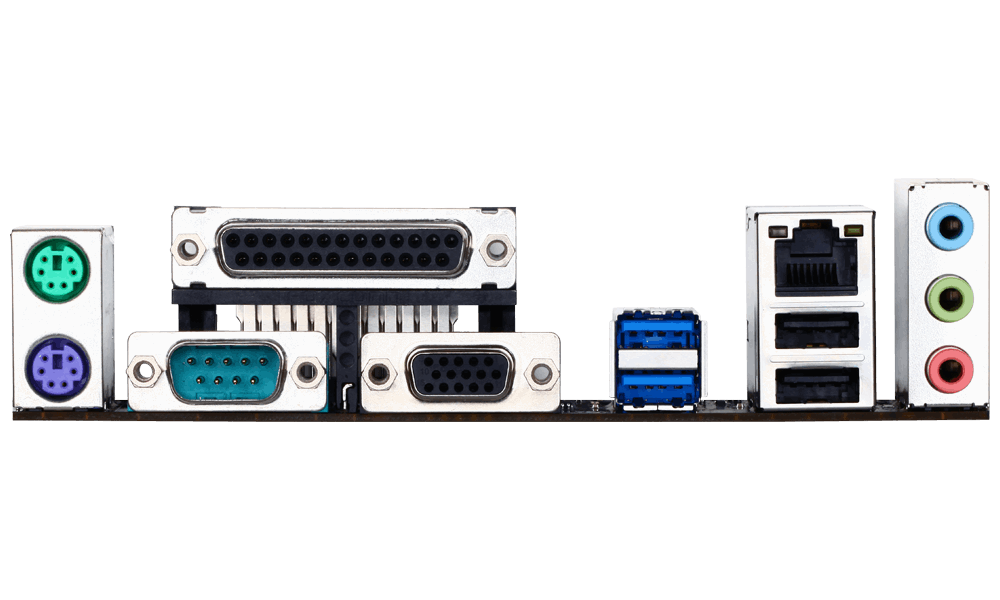
user posted image , image taken from http://www.gigabyte.com/products/product-p...spx?pid=5640#ov

from the picture above, GA-H110M-DS2 does not seem to have DVI port ? I need either dvi or hdmi . Any idea which mobo fit my requirement ?
*
You need to look for DDR4 version, there are two models in Skylake generation because it is the cross over point for last gen DDR3 and latest gen DDR4 so some models will have 2 version with each supporting different RAM module.

H110M-DS2 (D4)

As for the display output port, you can either use a adapter (VGA to DVI) or swap to Asus H110M-K that I have recommended earlier.
terence_nwb
post Sep 4 2016, 12:45 PM

Look at all my stars!!
*******
Senior Member
7,016 posts

Joined: Jul 2012
From: Kuala Lumpur


QUOTE(linkinawe @ Sep 4 2016, 11:39 AM)
Hi ,I can fork out a little more for mobo,  is GA-B150M-D3H any good ? or you have a better idea in mind ?
*
Yup it's one of the best mobo priced under RM 400.
terence_nwb
post Sep 4 2016, 05:29 PM

Look at all my stars!!
*******
Senior Member
7,016 posts

Joined: Jul 2012
From: Kuala Lumpur


QUOTE(DesktopLimousine @ Sep 4 2016, 04:44 PM)
My friend needs a suggestion for rm2k rig. Will use for gaming and video editing including photoshop. Thanks!
*
Intel Core i3 6100 - RM 470
Gigabyte H110M-DS2 (D4) - RM 276
Kingston 8GB DDR4 2133MHz Value RAM - RM 145
Palit GTX950 2GB GDDR5 StormX - RM 609
WD Blue 1TB HDD - RM 209
FSP Hexa+ 450W - RM 166
Tecware F3 - RM 125

Total: RM 2000 (ETech price inclusive of GST)

QUOTE(- JaY - @ Sep 4 2016, 04:56 PM)
did advice my friend about all these, he decided to go for a "bigger" upgrade to future proof abit and budget can go up till 2500.

Any recommendations for this budget? His power supply might be able to reuse if can support RX470/GTX1060, the model is CM RS460-PCAR-A3.

Proc: i5/Xeon
Mobo: u recommended a m-ATX mobo, is there any difference compared to other form factors?
Graphic: around 900-1k range
*
The 12V rails in the stated PSU is able draw a maximum of 312W from the wall, based on the power draw reported by online reviews, the PSU is able to handle the load of RX470/RX480/GTX1060, if you have other components (those power hungry one) to hook on this PSU then it is recommended to get a better one.

Skylake Xeon CPU requires C232 chipset mobo and it is not cheap to get so stick with Core i5 family is a wiser choice for now.

Intel Core i5 6500 - RM 835
Gigabyte B150M-D3H (D4) - RM 379
Kingston 8GB DDR4 2133MHz Value RAM - RM 152
Gigabyte RX470 4GB GDDR5 G1 Gaming - RM 999

Total: RM 2265 (ETech price inclusive of GST)

Optional build/upgrade:
1. Zotac GTX1060 6GB GDDR5 Mini - RM 1169 (Merdeka promotion till end of this month by Zotac MY)
2. Zotac GTX1060 3GB GDDR5 Mini - RM 949

QUOTE(caprillachen @ Sep 4 2016, 05:05 PM)
1 question to pc master race, in what situation do I need liquid colling instead of fan? My room has no aircond and normally use to render.
*
When you overclock the CPU.

For locked (non-overclockable) CPU, you can just get a decent RM 150 3rd party CPU cooler to reduce the temperature if it gets too hot when you do the rendering, but of course you can spend more money to get a decent liquid cooler AIO if you want the temperature to be even lower.
terence_nwb
post Sep 4 2016, 05:44 PM

Look at all my stars!!
*******
Senior Member
7,016 posts

Joined: Jul 2012
From: Kuala Lumpur


QUOTE(caprillachen @ Sep 4 2016, 05:36 PM)
But is liquid cooling make less noise or more noise compare to fan? Sorry im very noob in this
*
Same theory as air cooler, you need to install casing fan on the radiator itself to dissipate the heat from it, some liquid cooler AIO allow user to control the speed of the fan via 3rd party software (like Corsair Link), so the audible level is solely based on your own settings.

Some are automated, meaning when the temperature rises, the fan will increase its speed and noise level will increase also.


terence_nwb
post Sep 4 2016, 06:03 PM

Look at all my stars!!
*******
Senior Member
7,016 posts

Joined: Jul 2012
From: Kuala Lumpur


QUOTE(caprillachen @ Sep 4 2016, 05:53 PM)
Okay, thx alot yea, one last question, should I get i5 6600k or i7 6700?
*
Depends on your budget and usage.

If you do a lot of rendering work then it is better to go for multi core CPU.
terence_nwb
post Sep 5 2016, 02:08 PM

Look at all my stars!!
*******
Senior Member
7,016 posts

Joined: Jul 2012
From: Kuala Lumpur


QUOTE(sleepy 1 @ Sep 5 2016, 01:56 PM)
Among these 4 GPU, which one is the better choice providing they are come with 3 years local warranty and the price is different +- RM60 only?

1) Gigabyte nVidia GeForce GTX 1070 G1 Gaming OC

2) Asus nVidia GeForce GTX 1070 ROG Strix OC

3) EVGA nVidia GeForce GTX 1070 FTW Gaming ACX 3.0

4) EVGA nVidia GeForce GTX 1070 SC Gaming ACX 3.0
*
If they really fall into those categories you mentioned, then I will pick whichever I prefer, in this case, EVGA card (the color and theme suit my rig design) laugh.gif
terence_nwb
post Sep 5 2016, 02:47 PM

Look at all my stars!!
*******
Senior Member
7,016 posts

Joined: Jul 2012
From: Kuala Lumpur


QUOTE(sleepy 1 @ Sep 5 2016, 02:33 PM)
I am in the dilemma between Asus and EVGA, but I ended purchased Asus Rog Strix 1070 OC. And I accidentally purchase 2 same card!!! Try to return it via ebay but seem like I need to wait till i receive the card then only can return it.  cry.gif  cry.gif  cry.gif
*
Asus Strix is also ok. So you mean initially you only want to buy 1 card but then accidentally bought 2? And they charged your credit card twice? sweat.gif
terence_nwb
post Sep 5 2016, 05:27 PM

Look at all my stars!!
*******
Senior Member
7,016 posts

Joined: Jul 2012
From: Kuala Lumpur


QUOTE(munyen @ Sep 5 2016, 04:49 PM)
Thanks, would like to ask how much power is suitable for this kind of build:-

Intel Core i5 6500
H110M
Kingston 16GB DDR4 2133MHz (2x 8GB)
GTX 1070
WD 3.5” 1TB 7200RPM 64MB SATA III
Kingston SSDNOW 240GB SSD

Is it suitable and compatible for the parts above??
*
You didn't specify the exact H110 model so please make sure it is using DDR4 RAM module instead of DDR3 then everything will be fine (if you pick from one of the boards listed by me then it is good to go).

If speaking of raw power draw during load, a decent true power 300W - 350W PSU is enough, but you need to prepare some extra headroom for future expansion and overhead, so a true power 450W - 500W rated PSU is more preferred in this way.
terence_nwb
post Sep 5 2016, 09:09 PM

Look at all my stars!!
*******
Senior Member
7,016 posts

Joined: Jul 2012
From: Kuala Lumpur


QUOTE(munyen @ Sep 5 2016, 05:53 PM)
Alright, so get a H110M model using DDR4 RAM module right?
THANK YOU VERY MUCH smile.gif
*
Ya.

QUOTE(fish133 @ Sep 5 2016, 08:31 PM)
current build:
CPU
Intel Core i3 3220 @ 3.30GHz
Ivy Bridge 22nm Technology
RAM
4.00GB Single-Channel DDR3 @ 665MHz (9-9-9-24)
Motherboard
ASUSTeK COMPUTER INC. P8B75-M LX PLUS (LGA1155)
Graphics
LG TV (1360x768@60Hz)
767MB NVIDIA GeForce GTX 460 (NVIDIA)
Storage
465GB Western Digital WDC WD5000AAKX-00KJ3A0 (SATA)

PSU
        450W cap ayam

Display
        LG tv 1366 x 768

can all sifus recommend any upgrade ? wish to play current games with low settings budget is below Rm 700 thanks
*
Get another 4GB (to make it 8GB in total) and GTX950/RX460.
terence_nwb
post Sep 6 2016, 09:05 AM

Look at all my stars!!
*******
Senior Member
7,016 posts

Joined: Jul 2012
From: Kuala Lumpur


QUOTE(lzx1002 @ Sep 5 2016, 10:07 PM)
Hi guys, im changing from laptop to desktop. Need some help w my rig.

[Budget] 2.5k

[Purpose] light to medium gaming

[Monitor resolution] 1080p

[Games & softwares that use frequently] Dota 2

[Personal preferences] none

[Location] KL

Reusing mouse and keyboard only. Thank you very much.
*
Intel Pentium i3 6100 - RM 479
Gigabyte H110M-DS2 (D4) - RM 299
Apacer 8GB DDR4 2133MHz Value RAM - RM 149
HIS RX460 4GB GDDR5 iCooler OC - RM 599
WD Blue 1TB HDD - RM 209
FSP Hexa+ 550W - RM 199
<Casing of your own choice> ~ RM 200
BenQ GW2270 - RM 399

Total: RM 2533 (Viewnet price inclusive of GST)

Viewnet price list doesn't state the pricing for the casing so I couldn't include it in the build list, please make sure the form factor is correct (at least mATX).
terence_nwb
post Sep 6 2016, 09:25 AM

Look at all my stars!!
*******
Senior Member
7,016 posts

Joined: Jul 2012
From: Kuala Lumpur


QUOTE(DesktopLimousine @ Sep 6 2016, 01:21 AM)
Hello, another friend of mine also wants to build a rig. His budget is around 2.7k. Just a rig without monitor, Thanks!
*
For gaming?

Intel Core i5 6402P - RM 707
Gigabyte H110M-DS2 (D4) - RM 276
Kingston 8GB DDR4 2133MHz Value RAM - RM 151
Gigabyte RX470 4GB GDDR5 G1 Gaming - RM 999
WD Blue 1TB HDD - RM 209
FSP Hexa+ 550W - RM 188
Tecware Alpha - RM 199

Total: RM 2729 (ETech price inclusive of GST)

QUOTE(fish133 @ Sep 6 2016, 01:44 AM)
thanks! thumbup.gif
HIS RX 460 4GB D5 , rm599  from viewnet . is this the best one i can get within  the budget ? since i dint see anyone recommending this card
*
HIS is not widely available in Malaysia that's why it is a bit "underrated" here.

By judging at the price, it should be a good deal. Quality and performance *not included* (yet to check review but should be doing good for budget build) biggrin.gif

QUOTE(Ronin_Amin @ Sep 6 2016, 08:28 AM)
Hi guys.
Planning on a upgrade in the near future and have some questions.

1. My priority right now is upgrading the psu. I've set my sights on seasonic for this.
a) For a single gpu, all air cooling setup, is there a recommended wattage? Since I am planning for the psu to last a few builds I wanted to future proof from the wattage side of things.

b) Got my eyes on the m12II and X series, does the 80 bronze and 80 gold give any difference in terms of overclocking? Or is it just purely power saving cost?

2) Second would be the gpu. Currently have a 7870. The issue is I am torn on whether to upgrade to a gpu that is capable of good 1080p gaming or should I aim to future proof it a bit by getting a 1440p gpu. Current monitor is 1080p 60hz,  I'm planning on upgrading my monitor to a 1440p 144hz but not I'm not getting the monitor anytime soon.

Any thoughts?
*
Depends on your setup, if you have a power hungry GPU then you need to prepare more headroom for it. For the current GTX1070/1080, a decent 400 - 450W is already enough, if you are planning to stick with AMD then get a 500/550W just to be safe, their power consumption never amuse me so extra headroom is always recommended.

Difference in terms of overclocking? Do you mean CPU overclocking? If you are using Intel CPU then overclocking doesn't take a lot of power from the wall, just a small increase. The 80+ rating is mainly for efficiency, it does save you some money in your electricity bill, but that will take quite a long time before you can benefit from it (as in the money paid for a 80+ Gold PSU vs the money saved from the bills).

GPU upgrade, well it depends on your budget TBH, even if you decide to stick with 1080p in the next couple of years, you still can invest in a "1440p" card, i.e GTX1070/1080, this gives you the opportunity to run all the games at ultra settings with decent frame rate without compromise. But don't forget you have to prepare at least 3k for the monitor too, 1440p 144Hz is pricey in Malaysia, so GPU and monitor upgrade would cost you nearly 5k+.

terence_nwb
post Sep 6 2016, 02:26 PM

Look at all my stars!!
*******
Senior Member
7,016 posts

Joined: Jul 2012
From: Kuala Lumpur


QUOTE(buzz123 @ Sep 6 2016, 11:53 AM)
Hi sifus, want to build my 1st rig. need recommendation.

[Budget] 3k to 3.4k( exclude monitor)

[Purpose] gaming- run AA titles at 30fps

[Monitor resolution] 1080p

[Personal preferences] gtx1060- mini version and normal dual fan version, alot difference?

[Location] KL

[Hardware already purchased ] benq gl24, mouse and keyboard.

Thank you very much boss
*
If you are referring to Zotac Mini and Palit Dual Fan version then the main difference between them is just the cooler itself, both come with similar base clock and base clock FYI.

Intel Core i5 6500 - RM 835
Gigabyte H110M-DS2 (D4) - RM 276
Kingston 8GB DDR4 2133MHz Value RAM - RM 151
Palit GTX1060 6GB GDDR5 Dual Fan - RM 1128
WD Blue 1TB HDD - RM 209
FSP Hexa+ 550W - RM 188
Tecware Alpha - RM 199

Total: RM 2986 (ETech price inclusive of GST)

Optional upgrade/build:
1. 240GB SSD (or 120GB if only use to store OS)
2. RX480
3. GTX1060 (other version with better cooler design and clock speed)
4. Fully modular PSU
terence_nwb
post Sep 6 2016, 03:07 PM

Look at all my stars!!
*******
Senior Member
7,016 posts

Joined: Jul 2012
From: Kuala Lumpur


QUOTE(buzz123 @ Sep 6 2016, 03:02 PM)
Thanks alot. planning to add in ssd 120gb( you recommend samsung evo 750 or 850?) . and use palit gtx1060 jetstream 6gb( any significant improvement?)

psu part im noob, modular psu?
http://support.nzxt.com/hc/en-us/articles/...he-Differences- 
is this it? for better airflow and cable managament?
*
If budget is tight, go for 750 EVO/UV400 and vice versa.

Jetstream comes with factory overclocked settings so you will gain slight performance improvements (probably around 5 FPS+/-) over the one which runs on stock speed (Mini & Dual etc).

Yes, better airflow and cable management. Non modular cables are messy and a dust collector but much cheaper than fully modular sweat.gif
terence_nwb
post Sep 6 2016, 08:06 PM

Look at all my stars!!
*******
Senior Member
7,016 posts

Joined: Jul 2012
From: Kuala Lumpur


QUOTE(DesktopLimousine @ Sep 6 2016, 07:02 PM)
Thanks master! Is it able to change to gtx1060 build? The mini one looks cheaper.
*
Yes but small amount of top up is needed.

Palit Dual Fan - RM 1128
Zotac Mini - RM 1169

43 Pages « < 7 8 9 10 11 > » Top
Topic ClosedOptions
 

Change to:
| Lo-Fi Version
0.1053sec    0.56    7 queries    GZIP Disabled
Time is now: 1st December 2025 - 11:30 AM