Welcome Guest ( Log In | Register )

69 Pages « < 43 44 45 46 47 > » Bottom

Outline · [ Standard ] · Linear+

 [OFFICIAL] Ubiquiti Networks, Home/SOHO/Enterprise Networking

views
     
asellus
post Dec 21 2019, 10:00 PM

#gompusas
Group Icon
Elite
4,541 posts

Joined: Jan 2003
From: BSRPPG51 Access Concentrator


QUOTE(gahkin @ Dec 21 2019, 07:34 PM)
this is all in one wireless router , meanwhile i don't need to buy any thin AP and Cloud key to host the controller. and with the DPI and statistics that i need for network device info.

will MY distributor bring in this model?
*
A stupendous RM1710 at Lazada from Subtel.
SUSpakji
post Dec 21 2019, 10:41 PM

Regular
******
Senior Member
1,386 posts

Joined: Nov 2012


QUOTE(asellus @ Dec 21 2019, 10:00 PM)
A stupendous RM1710 at Lazada from Subtel.
*
link
asellus
post Dec 22 2019, 06:09 AM

#gompusas
Group Icon
Elite
4,541 posts

Joined: Jan 2003
From: BSRPPG51 Access Concentrator


QUOTE(pakji @ Dec 21 2019, 10:41 PM)
link
*
Ubiquiti Dream Machine UDM Dual Band 802.11ac 4x4 Wave 2 MU-MIMO WiFi Access Point AP UAP built in USG Cloud Key and Ubiquiti Switch

Seriously I don't think it is worth the price, unless maybe you also has other Ubiquiti APs in the network.

This post has been edited by asellus: Dec 22 2019, 06:11 AM
gahkin
post Dec 24 2019, 12:05 AM

Enthusiast
*****
Senior Member
735 posts

Joined: Jan 2003
From: Selayang , Kepong


Hi, i just try the new ui demo at the ubnt for UDM (unifi dream machine) .

before going to purchase , i would like to know it can support vlan500 and vlan600 at the same time? so can get the lan1 lan2 lan3 all on the same subnet ? i no mean inter-vlan. hmm.gif hmm.gif
TSpandera999
post Dec 24 2019, 10:54 AM

모든 것​에는 정해진 때​가 있으니
*******
Senior Member
6,214 posts

Joined: Sep 2010
From: Busan, Kr | Kuching, Swk


QUOTE(gahkin @ Dec 24 2019, 12:05 AM)
Hi, i just try the new ui demo at the ubnt for UDM (unifi dream machine) .

before going to purchase , i would like to know it can support vlan500 and vlan600 at the same time? so can get the lan1 lan2 lan3 all on the same subnet ? i no mean inter-vlan. hmm.gif  hmm.gif
*
is it like using dual WAN? hmm.gif
gahkin
post Dec 24 2019, 11:54 AM

Enthusiast
*****
Senior Member
735 posts

Joined: Jan 2003
From: Selayang , Kepong


QUOTE(pandera999 @ Dec 24 2019, 10:54 AM)
is it like using dual WAN?  hmm.gif
*
Just act as normal router will do la. All port use 1 subnet.
aneip
post Dec 24 2019, 01:31 PM

Look at all my stars!!
*******
Senior Member
2,466 posts

Joined: Nov 2004


QUOTE(gahkin @ Dec 24 2019, 12:05 AM)
Hi, i just try the new ui demo at the ubnt for UDM (unifi dream machine) .

before going to purchase , i would like to know it can support vlan500 and vlan600 at the same time? so can get the lan1 lan2 lan3 all on the same subnet ? i no mean inter-vlan. hmm.gif  hmm.gif
*
Not really understand what you saying. whats lan have to do with vlan600? Then lan1-3 same subnet? If same subnet than it's will be same vlan. Maybe can describe what you trying to achieve
TSpandera999
post Dec 24 2019, 11:13 PM

모든 것​에는 정해진 때​가 있으니
*******
Senior Member
6,214 posts

Joined: Sep 2010
From: Busan, Kr | Kuching, Swk


QUOTE(gahkin @ Dec 24 2019, 11:54 AM)
Just act as normal router will do la. All port use 1 subnet.
*
support vlan500 and vlan600 at the same time.. vlan assignment? lan 1,2 and 3.. can explain more.. y need vlan 500 and vlan 600? why not vlan 20, 21 or 22?

QUOTE(aneip @ Dec 24 2019, 01:31 PM)
Not really understand what you saying. whats lan have to do with vlan600? Then lan1-3 same subnet? If same subnet than it's will be same vlan. Maybe can describe what you trying to achieve
*
laugh.gif no idea too
gahkin
post Dec 24 2019, 11:47 PM

Enthusiast
*****
Senior Member
735 posts

Joined: Jan 2003
From: Selayang , Kepong


sorry for my typo , what i mean UDM can support our unifi ISP with vlan tagging 500 for internet and 600 for IPTV without need any switch to do?

and i know the router another 4 port (lan1,lan2,lan3,lan4) will have own IP subnet , can i bridge them to combine into 1 subnet for all? i don't need use too many subnet and don't want to waste these empty port.

tongue.gif

This post has been edited by gahkin: Dec 24 2019, 11:48 PM
aneip
post Dec 25 2019, 12:51 PM

Look at all my stars!!
*******
Senior Member
2,466 posts

Joined: Nov 2004


QUOTE(gahkin @ Dec 24 2019, 11:47 PM)
sorry for my typo , what i mean UDM can support our unifi ISP with vlan tagging 500 for internet and 600 for IPTV without need any switch to do?

and i know the router another 4 port (lan1,lan2,lan3,lan4) will have own IP subnet , can i bridge them to combine into 1 subnet for all? i don't need use too many subnet and don't want to waste these empty port.

tongue.gif
*
Should be can since it's managed switch. Normally all 4 lan configured without vlan which means it's single subnet.

BTW RM1700 quite high price asking by sublime.. Maybe because the product is new.. Should be 1300-1400 range.

MonkeYsua
post Jan 4 2020, 04:57 AM

Casual
***
Junior Member
402 posts

Joined: Jan 2003
From: KL, Kepong


Anyone using noip ddns with edgerouter x here? I'm facing the public IP somehow not updating after public IP changes due to reboot of device or reconnection.

Using PPPoE already bind to this interface, done force updating from GUI and check CLI no clue what's the prob...

I have to go noip website to manually update the new public IP myself zzz

This post has been edited by MonkeYsua: Jan 4 2020, 04:58 AM
taqu
post Jan 4 2020, 06:56 PM

Enthusiast
*****
Junior Member
864 posts

Joined: May 2005
QUOTE(MonkeYsua @ Jan 4 2020, 04:57 AM)
Anyone using noip ddns with edgerouter x here? I'm facing the public IP somehow not updating after public IP changes due to reboot of device or reconnection.

Using PPPoE already bind to this interface, done force updating from GUI and check CLI no clue what's the prob...

I have to go noip website to manually update the new public IP myself zzz
*
Not Ubiquiti user, but Tomato firmware user.

To update WAN IP into No-IP, you run URL like this:

CODE
https://username:password@dynupdate.no-ip.com/nic/update?hostname=yourhost.no-ip.com


You don't need to pass your WAN IP, No-IP will figure out your public IP.

Use either wget or curl, whichever Edgerouter X supports. Then run after PPPOE is up, or maybe run a scheduler.

This post has been edited by taqu: Jan 4 2020, 06:58 PM

MonkeYsua
post Jan 4 2020, 07:30 PM

Casual
***
Junior Member
402 posts

Joined: Jan 2003
From: KL, Kepong


QUOTE(taqu @ Jan 4 2020, 06:56 PM)
Not Ubiquiti user, but Tomato firmware user.

To update WAN IP into No-IP, you run URL like this:

CODE
https://username:password@dynupdate.no-ip.com/nic/update?hostname=yourhost.no-ip.com


You don't need to pass your WAN IP, No-IP will figure out your public IP.

Use either wget or curl, whichever Edgerouter X supports. Then run after PPPOE is up, or maybe run a scheduler.
*
Hey man appreciate ur tips but GUI or CLI built in that function I saw the code line was there but it just don't work as expected...

For that 1 I'm not sure but I think is doable, coz edgeOS some sort of extendable Debian OS if I'm not mistaken..
taqu
post Jan 4 2020, 07:59 PM

Enthusiast
*****
Junior Member
864 posts

Joined: May 2005
QUOTE(MonkeYsua @ Jan 4 2020, 07:30 PM)
Hey man appreciate ur tips but GUI or CLI built in that function I saw the code line was there but it just don't work as expected...

For that 1 I'm not sure but I think is doable, coz edgeOS some sort of extendable Debian OS if I'm not mistaken..
*
If it used to work last time but recently doesn't work, maybe No-IP has changed their method that's incompatible with existing updater in Edgerouter. Last time I used DNS-O-Matic to update 4 DDNS, but DNS-O-Matic recently changed their login method to OpenDNS, so it breaks the existing updater in Tomato firmware. Therefore I switched to methods similar to wget as workaround.
TSpandera999
post Jan 4 2020, 10:59 PM

모든 것​에는 정해진 때​가 있으니
*******
Senior Member
6,214 posts

Joined: Sep 2010
From: Busan, Kr | Kuching, Swk


QUOTE(MonkeYsua @ Jan 4 2020, 04:57 AM)
Anyone using noip ddns with edgerouter x here? I'm facing the public IP somehow not updating after public IP changes due to reboot of device or reconnection.

Using PPPoE already bind to this interface, done force updating from GUI and check CLI no clue what's the prob...

I have to go noip website to manually update the new public IP myself zzz
*
im using noip... but mine works as usual.. no issue..... hmm.gif
MonkeYsua
post Jan 5 2020, 12:34 AM

Casual
***
Junior Member
402 posts

Joined: Jan 2003
From: KL, Kepong


QUOTE(pandera999 @ Jan 4 2020, 10:59 PM)
im using noip... but mine works as usual.. no issue.....  hmm.gif
*
Yes but in CLI or GUI will not show if u cannot update the public IP unless u triggered the reboot to verify from ur NOIP DDNS portal...
Usually by right EdgeOS booted up it shld push the latest public IP to NOIP DDNS records, my case just somehow stopped working...
MonkeYsua
post Jan 5 2020, 12:41 AM

Casual
***
Junior Member
402 posts

Joined: Jan 2003
From: KL, Kepong


QUOTE(taqu @ Jan 4 2020, 07:59 PM)
If it used to work last time but recently doesn't work, maybe No-IP has changed their method that's incompatible with existing updater in Edgerouter. Last time I used DNS-O-Matic to update 4 DDNS, but DNS-O-Matic recently changed their login method to OpenDNS, so it breaks the existing updater in Tomato firmware. Therefore I switched to methods similar to wget as workaround.
*
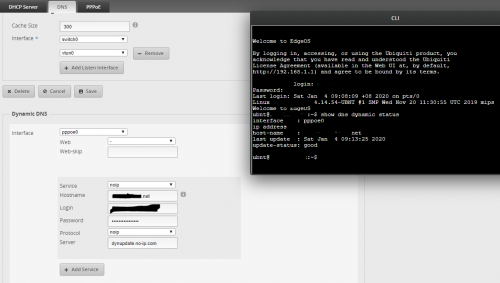
Just showing my EdgeOS GUI and CLI:
user posted image

already latest version of EdgeOS so not sure abt how compatible of NOIP DDNS maybe i need to email NOIP support to find out... hmm.gif
maybe i also need to digging ubnt community forum ask ppl over there c any recent cases... hmm.gif

Just trying luck to find any user here having a similar issue using the EdgeRouter-X with EdgeOS having similar issue haha notworthy.gif

taqu
post Jan 5 2020, 09:43 AM

Enthusiast
*****
Junior Member
864 posts

Joined: May 2005
Good luck then 😁
MX510
post Jan 5 2020, 12:09 PM

Love Me Sin Hate Me Sinner
*******
Senior Member
4,038 posts

Joined: Aug 2005
From: Earth


Ubiquiti Amplifi just add new Amplifi Alien

This post has been edited by MX510: Jan 5 2020, 12:32 PM
junsheng
post Jan 16 2020, 04:52 AM

---> pokemon ftw <---
******
Senior Member
1,257 posts

Joined: Apr 2011
From: Penang Malaysia, sometime KL


QUOTE(MX510 @ Jan 5 2020, 12:09 PM)


Ubiquiti Amplifi just add new Amplifi Alien
*
tried some units

no doubt their OFDMA implimentation is better then other consumer brands
but honestly speaking still need a lot of work

furthermore there are some confusion on the support of OFDMA uplink, where they went slient on

better just stay away from it, till they come out with proper clarification

69 Pages « < 43 44 45 46 47 > » Top
 

Change to:
| Lo-Fi Version
0.0194sec    0.26    6 queries    GZIP Disabled
Time is now: 2nd December 2025 - 01:37 AM