Outline ·
[ Standard ] ·
Linear+
[OFFICIAL] Ubiquiti Networks, Home/SOHO/Enterprise Networking
|
MonkeYsua
|
 Jan 4 2020, 04:57 AM Jan 4 2020, 04:57 AM
|

|
Anyone using noip ddns with edgerouter x here? I'm facing the public IP somehow not updating after public IP changes due to reboot of device or reconnection.
Using PPPoE already bind to this interface, done force updating from GUI and check CLI no clue what's the prob...
I have to go noip website to manually update the new public IP myself zzz
This post has been edited by MonkeYsua: Jan 4 2020, 04:58 AM
|
|
|
|
|
|
MonkeYsua
|
Jan 4 2020, 07:30 PM
|
|
|
QUOTE(taqu @ Jan 4 2020, 06:56 PM) Not Ubiquiti user, but Tomato firmware user. To update WAN IP into No-IP, you run URL like this: CODE https://username:password@dynupdate.no-ip.com/nic/update?hostname=yourhost.no-ip.com You don't need to pass your WAN IP, No-IP will figure out your public IP. Use either wget or curl, whichever Edgerouter X supports. Then run after PPPOE is up, or maybe run a scheduler. Hey man appreciate ur tips but GUI or CLI built in that function I saw the code line was there but it just don't work as expected... For that 1 I'm not sure but I think is doable, coz edgeOS some sort of extendable Debian OS if I'm not mistaken.. |
|
|
|
|
|
MonkeYsua
|
Jan 5 2020, 12:34 AM
|
|
|
QUOTE(pandera999 @ Jan 4 2020, 10:59 PM) im using noip... but mine works as usual.. no issue.....  Yes but in CLI or GUI will not show if u cannot update the public IP unless u triggered the reboot to verify from ur NOIP DDNS portal... Usually by right EdgeOS booted up it shld push the latest public IP to NOIP DDNS records, my case just somehow stopped working... |
|
|
|
|
|
MonkeYsua
|
Jan 5 2020, 12:41 AM
|
|
|
QUOTE(taqu @ Jan 4 2020, 07:59 PM) If it used to work last time but recently doesn't work, maybe No-IP has changed their method that's incompatible with existing updater in Edgerouter. Last time I used DNS-O-Matic to update 4 DDNS, but DNS-O-Matic recently changed their login method to OpenDNS, so it breaks the existing updater in Tomato firmware. Therefore I switched to methods similar to wget as workaround. Just showing my EdgeOS GUI and CLI: 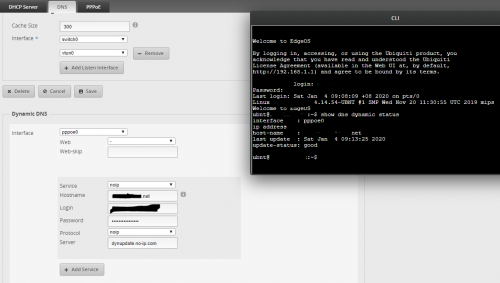 already latest version of EdgeOS so not sure abt how compatible of NOIP DDNS maybe i need to email NOIP support to find out... maybe i also need to digging ubnt community forum ask ppl over there c any recent cases... Just trying luck to find any user here having a similar issue using the EdgeRouter-X with EdgeOS having similar issue haha  |
|
|
|
|



 Quote
Quote

 0.0459sec
 0.32
0.32
 7 queries
 GZIP Disabled