

Hi, I was wondering if any one successfully setup a USG to work with Astro IPTV on Maxis? I want to replace the crappy router they gave.
[OFFICIAL] Ubiquiti Networks, Home/SOHO/Enterprise Networking
[OFFICIAL] Ubiquiti Networks, Home/SOHO/Enterprise Networking
|
|
 Jan 17 2020, 08:02 AM Jan 17 2020, 08:02 AM
|
 
Probation
3 posts Joined: Jan 2020 
|
Hi, I was wondering if any one successfully setup a USG to work with Astro IPTV on Maxis? I want to replace the crappy router they gave.
|
|
|
|
|
|
Jan 17 2020, 08:02 AM
|
|
Probation
3 posts Joined: Jan 2020
|
Hi, I was wondering if any one successfully setup a USG to work with Astro IPTV on Maxis? I want to replace the crappy router they gave.
|
|
|
Feb 10 2020, 07:09 PM
|
|
Junior Member
456 posts Joined: Nov 2005 From: KL-Dungun 
|
hi guys,
please help, i want to replace my TM router with ubiquiti router and wireless. which one to buy. normal 2-storey terrace house. thanks |
|
|
Feb 10 2020, 09:53 PM
|
 
Elite
4,541 posts Joined: Jan 2003 From: BSRPPG51 Access Concentrator
|
QUOTE(MC_Amig0 @ Feb 10 2020, 07:09 PM) hi guys, Ubiquiti Dream Machine UDM Dual Band 802.11ac 4x4 Wave 2 MU-MIMO WiFi Access Point AP UAP built in USG Cloud Key Switchplease help, i want to replace my TM router with ubiquiti router and wireless. which one to buy. normal 2-storey terrace house. thanks  |
|
|
Feb 26 2020, 08:02 PM
|

Junior Member
680 posts Joined: Sep 2010
|
Amplifi alien not available?
|
|
|
Feb 27 2020, 07:50 AM
Show posts by this member only | IPv6 | Post
#906
|

Senior Member
6,214 posts Joined: Sep 2010 From: Busan, Kr | Kuching, Swk 
|
QUOTE(skywardsword @ Feb 26 2020, 08:02 PM) Amplifi alien not available? Not able to import yet...if i not mistaken. |
|
|
|
|
|
Feb 27 2020, 07:55 AM
|
|
Junior Member
680 posts Joined: Sep 2010
|
QUOTE(pandera999 @ Feb 27 2020, 07:50 AM) Not able to import yet...if i not mistaken. Haha USD 370, so about rm1600++, I don't have AX, grade clients, but been observing mikrotik and ubiquiti.So for me I am watching ambience (2*700+800) or amplifi alien.(1800 maybe) |
|
|
Mar 13 2020, 11:25 PM
|
|
Junior Member
362 posts Joined: Dec 2013
|
Hi, which router model would u recommend for my condition:
-2 floor semi D (is the square foot important for u to take into account? Not sure how big is it exactly). Edit: around 5000 squarefeet -Currently using default TM router/modem which is located at the ground floor. -My rig is in my room at the 1st floor. (currently using wifi connection as cable is not an option) -Am still using 10 mbps unifi lite as my area got no coverage for the upgrade yet. -Wifi throughput is not the best but decent. The only thing that I am looking to improve with the new router is wifi stability and reliability as i do play online games from time to time. This post has been edited by Akatsuki0895: Mar 13 2020, 11:33 PM |
|
|
Mar 14 2020, 04:00 AM
Show posts by this member only | IPv6 | Post
#909
|
|
Senior Member
6,214 posts Joined: Sep 2010 From: Busan, Kr | Kuching, Swk
|
QUOTE(Akatsuki0895 @ Mar 13 2020, 11:25 PM) Hi, which router model would u recommend for my condition: Uap ac lr or uap ac M will helps at least. Get 5Ghz connectivity. Disable 2.4G. Or broadcast separate ssid for 2.4G and 5Gm. Connect to 5G.. -2 floor semi D (is the square foot important for u to take into account? Not sure how big is it exactly). Edit: around 5000 squarefeet -Currently using default TM router/modem which is located at the ground floor. -My rig is in my room at the 1st floor. (currently using wifi connection as cable is not an option) -Am still using 10 mbps unifi lite as my area got no coverage for the upgrade yet. -Wifi throughput is not the best but decent. The only thing that I am looking to improve with the new router is wifi stability and reliability as i do play online games from time to time. Try see with tm default router.. any vlan tagging? Unifi lite is streamyx right? |
|
|
Mar 14 2020, 09:41 AM
|
|
Junior Member
362 posts Joined: Dec 2013
|
QUOTE(pandera999 @ Mar 14 2020, 04:00 AM) Uap ac lr or uap ac M will helps at least. Get 5Ghz connectivity. Disable 2.4G. Or broadcast separate ssid for 2.4G and 5Gm. Connect to 5G.. I am unable to connect to 5ghz wifi in my room but the ssid is separated all this while.Try see with tm default router.. any vlan tagging? Unifi lite is streamyx right? i have googled vlan tagging and read about it but still couldnt understand it.  and yea i think it's still streamyx as the cables are not being upgraded yet... still using the same old cable Currently the router provided by TM is an all in one modem/router i think as there's only 1 device instead of a separate router and a modem. That device is connected to a telephone line(rj11) to the WAN port. My plan now is maybe to get a UAP nanoHD(for future proof. is it worth it?) and a UAP ac lr. the nanoHD will be the main router sitting at the ground floor and the UAP ac lr, which will be sitting at the 1st floor or in my room, would probably configured to media bridge or mesh to extend the signal. is it a legit plan? This post has been edited by Akatsuki0895: Mar 14 2020, 09:59 AM |
|
|
Mar 14 2020, 12:08 PM
|
|
Senior Member
6,214 posts Joined: Sep 2010 From: Busan, Kr | Kuching, Swk
|
QUOTE(Akatsuki0895 @ Mar 14 2020, 09:41 AM) I am unable to connect to 5ghz wifi in my room but the ssid is separated all this while. oh my gad.. lol... had use same router.. but you can add wireless point.i have googled vlan tagging and read about it but still couldnt understand it. and yea i think it's still streamyx as the cables are not being upgraded yet... still using the same old cable Currently the router provided by TM is an all in one modem/router i think as there's only 1 device instead of a separate router and a modem. That device is connected to a telephone line(rj11) to the WAN port. My plan now is maybe to get a UAP nanoHD(for future proof. is it worth it?) and a UAP ac lr. the nanoHD will be the main router sitting at the ground floor and the UAP ac lr, which will be sitting at the 1st floor or in my room, would probably configured to media bridge or mesh to extend the signal. is it a legit plan? For example. buy 2 units (if you have budget) current wireless router, disable the wifi. make it just use as a router. 2 access point u buy will use for wifi... and you might need lay some cables around.. if you need the service and consultation, you can refer to page#1 of the forum for ubnt official distributor and reseller |
|
|
Mar 14 2020, 03:06 PM
|
|
Junior Member
362 posts Joined: Dec 2013
|
QUOTE(pandera999 @ Mar 14 2020, 12:08 PM) oh my gad.. lol... had use same router.. but you can add wireless point. ok noted. will give a ring/email if i need further service or consultation. Thanks a lot For example. buy 2 units (if you have budget) current wireless router, disable the wifi. make it just use as a router. 2 access point u buy will use for wifi... and you might need lay some cables around.. if you need the service and consultation, you can refer to page#1 of the forum for ubnt official distributor and reseller  |
|
|
Mar 21 2020, 01:04 AM
|
|
Junior Member
31 posts Joined: Sep 2014
|
Hi I would like to ask the TM Unifi just come and install the fiber in my home and they give a Nokia Modem that to plug in the fiber. After that I can buy the Ubiquiti USG Router to replace the router that TM given? And would like to ask what the difference of the Ubiquti USG cost RM579 & Ubiquiti USG Pro 4 Cost RM1409?
|
|
|
|
|
|
Mar 22 2020, 09:45 AM
|

Junior Member
151 posts Joined: Dec 2011
|
Hi. I just got into the Ubiquiti ecosystem and am trying to understand how to configure my nanoHD for 5 GHz properly.
I did a radio channel utilization scan. For 5 GHz it only displayed statistics for the DFS channels. In addition, I cannon select non-DFS channels in the AP configuration settings. Does it mean that the scanned channels (all DFS) are the only allowed channels for Malaysia? |
|
|
Mar 22 2020, 12:06 PM
Show posts by this member only | IPv6 | Post
#915
|
|
Senior Member
6,214 posts Joined: Sep 2010 From: Busan, Kr | Kuching, Swk
|
QUOTE(tcwan @ Mar 22 2020, 09:45 AM) Hi. I just got into the Ubiquiti ecosystem and am trying to understand how to configure my nanoHD for 5 GHz properly. DFS is reserve channel.. if you live nearby airport or military base, it is not wise to use it.. they can detect you using those channel.I did a radio channel utilization scan. For 5 GHz it only displayed statistics for the DFS channels. In addition, I cannon select non-DFS channels in the AP configuration settings. Does it mean that the scanned channels (all DFS) are the only allowed channels for Malaysia? You need to select which AP you want. AP > Config > Radio > 5G > Channel there is DFS included there. |
|
|
Mar 22 2020, 01:38 PM
|
|
Junior Member
151 posts Joined: Dec 2011
|
QUOTE(pandera999 @ Mar 22 2020, 12:06 PM) DFS is reserve channel.. if you live nearby airport or military base, it is not wise to use it.. they can detect you using those channel. Well, I tried selecting the lower range non-DFS channels (36-48) in the radio configuration panel but it does not stick. You need to select which AP you want. AP > Config > Radio > 5G > Channel there is DFS included there. Somehow it only allows selection of channels that have been scanned previously (or it only scans channels that are allowed to be used for Malaysia). The only channels scanned are 52-64 and 149-161. If I leave it on auto the UniFi controller will default to the DFS channels. I don’t know the actual 5.8 GHz channel allocation in Malaysia so I just want to check if these are the only channels available. I’d like to use a lower frequency channel if possible assuming that the propagation is better (though it might not make much difference, I’ve not tested this in actual production environments). What are the default 5.8 GHz channels that I should use for Malaysia? This post has been edited by tcwan: Mar 22 2020, 01:40 PM |
|
|
Mar 22 2020, 02:20 PM
|
|
Elite
4,541 posts Joined: Jan 2003 From: BSRPPG51 Access Concentrator
|
QUOTE(tcwan @ Mar 22 2020, 01:38 PM) Well, I tried selecting the lower range non-DFS channels (36-48) in the radio configuration panel but it does not stick. The only Wifi channels that did not require DFS and/or TPC are all 2.4Ghz channels, and also channel 144-173 (5ghz high-band) and channel 32-42 (parts of 5Ghz low-band). Channel 96-128 (5Ghz mid-band) and channel 50-68 (parts of 5Ghz low-band) require DFS and TPC support.Somehow it only allows selection of channels that have been scanned previously (or it only scans channels that are allowed to be used for Malaysia). The only channels scanned are 52-64 and 149-161. If I leave it on auto the UniFi controller will default to the DFS channels. I don’t know the actual 5.8 GHz channel allocation in Malaysia so I just want to check if these are the only channels available. I’d like to use a lower frequency channel if possible assuming that the propagation is better (though it might not make much difference, I’ve not tested this in actual production environments). What are the default 5.8 GHz channels that I should use for Malaysia? |
|
|
Mar 22 2020, 03:48 PM
|
|
Junior Member
151 posts Joined: Dec 2011
|
@asellus Thanks for the info!
This post has been edited by tcwan: Mar 22 2020, 03:49 PM |
|
|
Mar 22 2020, 06:58 PM
Show posts by this member only | IPv6 | Post
#919
|
|
Senior Member
6,214 posts Joined: Sep 2010 From: Busan, Kr | Kuching, Swk
|
QUOTE(tcwan @ Mar 22 2020, 01:38 PM) Well, I tried selecting the lower range non-DFS channels (36-48) in the radio configuration panel but it does not stick. by right able too... Somehow it only allows selection of channels that have been scanned previously (or it only scans channels that are allowed to be used for Malaysia). The only channels scanned are 52-64 and 149-161. If I leave it on auto the UniFi controller will default to the DFS channels. I don’t know the actual 5.8 GHz channel allocation in Malaysia so I just want to check if these are the only channels available. I’d like to use a lower frequency channel if possible assuming that the propagation is better (though it might not make much difference, I’ve not tested this in actual production environments). What are the default 5.8 GHz channels that I should use for Malaysia?  already click "que changes" then "apply"?? already click "que changes" then "apply"??There are 3 type of 5G frequency range for Malaysia. 5150 MHz to 5350 MHz, 5470 MHz to 5650 MHz 5725 MHz to 5875 MHz info : WLAN 5G |
|
|
Mar 23 2020, 08:13 AM
|
|
Junior Member
151 posts Joined: Dec 2011
|
QUOTE(pandera999 @ Mar 22 2020, 06:58 PM) by right able too... This is what I get when I try to configure for Channel 100 on my nanoHD. already click "que changes" then "apply"??There are 3 type of 5G frequency range for Malaysia. 5150 MHz to 5350 MHz, 5470 MHz to 5650 MHz 5725 MHz to 5875 MHz info : WLAN 5G Anyway, I've decided to set it to Channel 149 for production based on the SKMM guidelines. 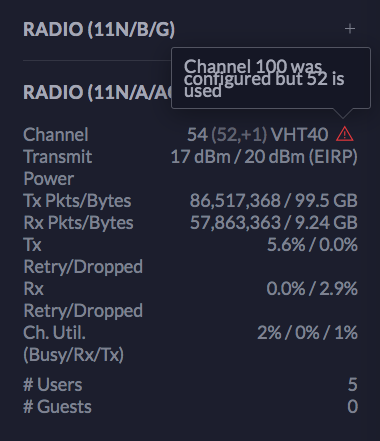 |
| Change to: |  0.0225sec 0.0225sec
 0.38 0.38
 6 queries 6 queries
 GZIP Disabled GZIP Disabled
Time is now: 1st December 2025 - 02:07 PM |
 Quote
Quote