Outline ·
[ Standard ] ·
Linear+
Cheap Asus Wifi Router Alternative, Huawei WS880 & Others
|
sHawTY
|
 Jul 12 2016, 07:40 PM Jul 12 2016, 07:40 PM
|

|
QUOTE(fkinmeng @ Jul 12 2016, 07:34 PM) i cant even enter the emergency upgrade page  Try again bro 1. Disconnect the AC adapter for 30 seconds 2. Press the reset button using a toothpick & don't release it 3. While pressing the reset button, reconnect the AC adapter, but don't release the reset button for 20 ~ 30 seconds 4. After 30 seconds, release the reset button 5. Run Internet Explorer & type 192.168.1.1 into the URL area |
|
|
|
|
|
sHawTY
|
Jul 12 2016, 07:43 PM
|
|
|
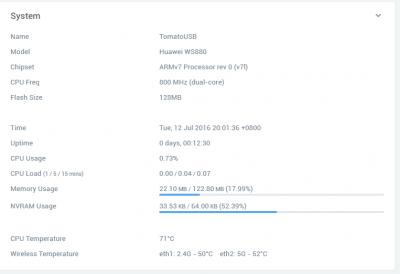
For those of you who uses AsusWRT-Merlin firmware, could you provide the temperature of your CPU? Mine is at 78°C  |
|
|
|
|
|
lokwm
|
Jul 12 2016, 07:55 PM
|
Getting Started

|
fyi, vlan tag for maxis home fibre I connected Lan3 for my Maxis home line. https://advancedtomato.com/This post has been edited by lokwm: Jul 12 2016, 08:04 PM Attached thumbnail(s)
|
|
|
|
|
|
fkinmeng
|
Jul 12 2016, 07:57 PM
|
|
|
QUOTE(sHawTY @ Jul 12 2016, 07:40 PM) Try again bro 1. Disconnect the AC adapter for 30 seconds 2. Press the reset button using a toothpick & don't release it 3. While pressing the reset button, reconnect the AC adapter, but don't release the reset button for 20 ~ 30 seconds 4. After 30 seconds, release the reset button 5. Run Internet Explorer & type 192.168.1.1 into the URL area now i can enter but i always seem to fail to upload the file.  any idea? |
|
|
|
|
|
CoffeeDude
|
Jul 12 2016, 08:04 PM
|
|
|
ok I've flashed to the Asuswrt-Merlin Xwrt-Vortex firmware  |
|
|
|
|
|
AMDAthlon
|
Jul 12 2016, 08:07 PM
|
|
|
QUOTE(sHawTY @ Jul 12 2016, 07:43 PM) For those of you who uses AsusWRT-Merlin firmware, could you provide the temperature of your CPU? Mine is at 78°C Mine about the same.. Is it normal or too high? |
|
|
|
|
|
sHawTY
|
Jul 12 2016, 08:08 PM
|
|
|
QUOTE(fkinmeng @ Jul 12 2016, 07:57 PM) now i can enter but i always seem to fail to upload the file. any idea? I had that issue too I tried several times with several browser before the upload was succesful Microsoft Edge - Failed Chrome - Failed Firefox - Failed Maxthon - Pass! But only after the 3rd time uploading the .trx file Just try again bro, and try to use a different browser |
|
|
|
|
|
fkinmeng
|
Jul 12 2016, 08:09 PM
|
|
|
QUOTE(sHawTY @ Jul 12 2016, 08:08 PM) I had that issue too I tried several times with several browser before the upload was succesful Microsoft Edge - Failed Chrome - Failed Firefox - Failed Maxthon - Pass! But only after the 3rd time uploading the .trx file Just try again bro, and try to use a different browser now i successfully uploaded the file, but i cant enter CFE miniweb. how long to wait for the router to restart? |
|
|
|
|
|
CoffeeDude
|
Jul 12 2016, 08:10 PM
|
|
|
QUOTE(fkinmeng @ Jul 12 2016, 08:09 PM) now i successfully uploaded the file, but i cant enter CFE miniweb. how long to wait for the router to restart? click on the continue button |
|
|
|
|
|
sHawTY
|
Jul 12 2016, 08:12 PM
|
|
|
QUOTE(AMDAthlon @ Jul 12 2016, 08:07 PM) Mine about the same.. Is it normal or too high? It's normal I think My ASUS RT-AC68U runs at 67°C with a notebook cooler attached to the back of the router ASUS RT-AC68U has a perforated back, which helps the notebook cooler suck the hot air out Our Huawei WS880 however doesn't have a perforated back. It's just solid plastic Considering the WS880 has a solid plastic at the back, I believe it's normal for it to run at 78°C This post has been edited by sHawTY: Jul 12 2016, 08:15 PM |
|
|
|
|
|
sHawTY
|
Jul 12 2016, 08:13 PM
|
|
|
QUOTE(fkinmeng @ Jul 12 2016, 08:09 PM) now i successfully uploaded the file, but i cant enter CFE miniweb. how long to wait for the router to restart? Leave it be for the next 5 minutes Then try entering the 192.168.1.1 URL again |
|
|
|
|
|
CoffeeDude
|
Jul 12 2016, 08:13 PM
|
|
|
QUOTE(sHawTY @ Jul 12 2016, 08:12 PM) It's normal I think My ASUS RT-AC68U runs at 67°C with a notebook cooler attached to the back of the router ASUS RT-AC68U has a perforated back, which helps the notebook cooler suck the air out Our Huawei WS880 however doesn't have a perforated back. It's just solid plastic How did you set the IPv6 settings? |
|
|
|
|
|
fkinmeng
|
Jul 12 2016, 08:14 PM
|
|
|
QUOTE(CoffeeDude @ Jul 12 2016, 08:10 PM) click on the continue button i did, then my IE cannot display the webpage. the internet light keep blinking, then the wlan and wps blink, then the process repeats again. |
|
|
|
|
|
RViN
|
Jul 12 2016, 08:18 PM
|
|
|
QUOTE(sHawTY @ Jul 12 2016, 08:12 PM) It's normal I think My ASUS RT-AC68U runs at 67°C with a notebook cooler attached to the back of the router ASUS RT-AC68U has a perforated back, which helps the notebook cooler suck the hot air out Our Huawei WS880 however doesn't have a perforated back. It's just solid plastic Considering the WS880 has a solid plastic at the back, I believe it's normal for it to run at 78°C Mine seems to be running cooler, but I do have a fan near the rear blowing some air. Didn't think it would make much of a difference since the air vents aren't large. 2.4 GHz: 43°C - 5 GHz: 52°C - CPU: 65°C |
|
|
|
|
|
sHawTY
|
Jul 12 2016, 08:19 PM
|
|
|
QUOTE(CoffeeDude @ Jul 12 2016, 08:13 PM) How did you set the IPv6 settings? If you're on UniFi like me, just copy my configuration as per the screenshot below  |
|
|
|
|
|
sHawTY
|
Jul 12 2016, 08:20 PM
|
|
|
QUOTE(RViN @ Jul 12 2016, 08:18 PM) Mine seems to be running cooler, but I do have a fan near the rear blowing some air. Didn't think it would make much of a difference since the air vents aren't large.
2.4 GHz: 43°C - 5 GHz: 52°C - CPU: 65°C That's quite cool Is there an air-conditioner in your room? |
|
|
|
|
|
sHawTY
|
Jul 12 2016, 08:22 PM
|
|
|
QUOTE(fkinmeng @ Jul 12 2016, 08:14 PM) i did, then my IE cannot display the webpage.
the internet light keep blinking, then the wlan and wps blink, then the process repeats again. That's strange. I don't experience that at all In my experience, once the file upload is succesful, the router boots fine I think you've having a bootloop. Not sure how to resolve that |
|
|
|
|
|
fkinmeng
|
Jul 12 2016, 08:23 PM
|
|
|
QUOTE(sHawTY @ Jul 12 2016, 08:22 PM) That's strange. I don't experience that at all In my experience, once the file upload is succesful, the router boots fine I think you've having a bootloop. Not sure how to resolve that i think mine is bricked. internet blinking, then wlan and wps. this keeps repeat. anyone can help? |
|
|
|
|
|
sHawTY
|
Jul 12 2016, 08:25 PM
|
|
|
QUOTE(fkinmeng @ Jul 12 2016, 08:23 PM) i think mine is bricked. internet blinking, then wlan and wps. this keeps repeat. anyone can help? Disconnect the power cable for 20 seconds then try reconnecting it again If still not succesful, then you'll have to try & get into the emergency upgrade page again |
|
|
|
|
|
RViN
|
Jul 12 2016, 08:26 PM
|
|
|
QUOTE(sHawTY @ Jul 12 2016, 08:20 PM) That's quite cool Is there an air-conditioner in your room? Nope, I took out an old 12cm case fan and use it to run air over the router and modem. Made a big difference on my previous TP link, that one had perforations on the whole underside. Significant difference when touching the router with/without the fan. On this WS880 though, the difference in touch not so much. But I guess comparing your temperature to mine, it does still make a difference. On the IPv6 settings, I made the same changes as you did, and the information shows up in the system log. But running the browser IPv6 test fails for some reason ... Have to try on a different PC later and see. Attached thumbnail(s)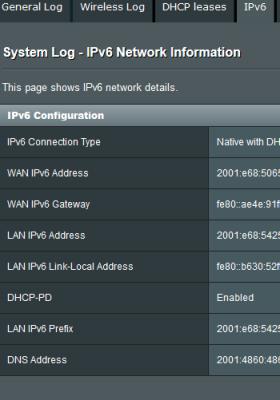
|
|
|
|
|



 Quote
Quote




 0.0287sec
 0.30
0.30
 6 queries
 GZIP Disabled