Welcome Guest ( Log In | Register )

119 Pages « < 13 14 15 16 17 > » Bottom

Outline · [ Standard ] · Linear+

 Cheap Asus Wifi Router Alternative, Huawei WS880 & Others

views
     
sHawTY
post Jul 12 2016, 09:27 PM

Frequent Reporter
********
All Stars
14,909 posts

Joined: Jul 2005

QUOTE(RViN @ Jul 12 2016, 09:19 PM)
Edit: hmm one thing I noticed, in the router log the ipv6 gateway is listed as :
WAN IPv6 Gateway fe80::ae4e:91ff:fe60:5f1e
Nothing wrong with that, mine displays the same, albeit some difference numbers at the back
sHawTY
post Jul 12 2016, 09:32 PM

Frequent Reporter
********
All Stars
14,909 posts

Joined: Jul 2005

vincent_ng86 & RViN
This is mine. Sorry, had to hide some details there. Takut kena hack laugh.gif

user posted image

This post has been edited by sHawTY: Jul 12 2016, 09:33 PM
thankyou
post Jul 12 2016, 09:33 PM

Regular
******
Senior Member
1,941 posts

Joined: Jan 2003
QUOTE(fkinmeng @ Jul 12 2016, 09:19 PM)
no, nothing.

only 192.168.1.2
*
sorry i didnt follow your issue. just to understand more, habe you done your first flash to unlock the router?
RViN
post Jul 12 2016, 09:34 PM

There Is Only One United
*******
Senior Member
5,827 posts

Joined: Jan 2003
From: Selayang, Selangor


QUOTE(sHawTY @ Jul 12 2016, 09:27 PM)
Nothing wrong with that, mine displays the same, albeit some difference numbers at the back
*
If I restart the router than the gateway address disappears... strange.

fe80 addresses are local thats why I mentioned it. By right it should be a public address, wonder why it works for you.

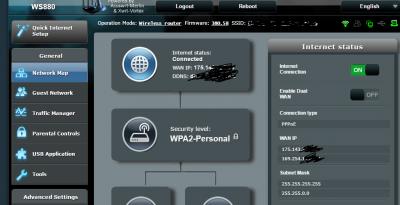
Also... do two WAN IPs show up for you guys in the status section?

This post has been edited by RViN: Jul 12 2016, 09:42 PM


Attached thumbnail(s)
Attached Image
fkinmeng
post Jul 12 2016, 09:35 PM

Look at all my stars!!
*******
Senior Member
6,373 posts

Joined: May 2007
QUOTE(thankyou @ Jul 12 2016, 09:33 PM)
sorry i didnt follow your issue. just to understand more, habe you done your first flash to unlock the router?
*
i did the first flash, it said upload complete, then ask me to wait for router to restart.

i waited, nothing happened, so i restart my router manually.

and now the internet light just blink, nothing else.

i can't access anything whatsoever.
irwan6179
post Jul 12 2016, 09:38 PM

Regular
******
Senior Member
1,040 posts

Joined: Oct 2004
From: the other side


QUOTE(sHawTY @ Jul 12 2016, 09:10 PM)
What about flashing to WS880 AsusWRT firmware directly in the firmware upgrade page?
*
that's what i did and it failed. Haven't tried CFE flash page yet coz son watching youtube. scare downtime too long
thankyou
post Jul 12 2016, 09:41 PM

Regular
******
Senior Member
1,941 posts

Joined: Jan 2003
QUOTE(fkinmeng @ Jul 12 2016, 09:35 PM)
i did the first flash, it said upload complete, then ask me to wait for router to restart.

i waited, nothing happened, so i restart my router manually.

and now the internet light just blink, nothing else.

i can't access anything whatsoever.
*
1) perform constant ping to 192.168.1.1
2) unplug power
3) plug in power

from my experience flashing 4 device... the IP should be pingable as soon as 3 sec after power on...

did you make sure the cfe was properly edited?

if you dont mind, can you share your bin file?

This post has been edited by thankyou: Jul 12 2016, 09:42 PM
sHawTY
post Jul 12 2016, 09:41 PM

Frequent Reporter
********
All Stars
14,909 posts

Joined: Jul 2005

QUOTE(fkinmeng @ Jul 12 2016, 09:35 PM)
i waited, nothing happened, so i restart my router manually.
Not to point fingers but I think this is the reason why

After uploading the modified WS880_trans file, I didn't disconnect the power cable at all, eventhough nothing is displayed, I just waited for something to reappear on my internet browser again
Yes, the "Internet" keep appearing & disappering, but I just waited until something reappear on my internet browser

My advise is, just leave it be
Go back to SRI Computers tomorrow and request for immidiate exchange. Just tell them the router is not working
sHawTY
post Jul 12 2016, 09:43 PM

Frequent Reporter
********
All Stars
14,909 posts

Joined: Jul 2005

QUOTE(irwan6179 @ Jul 12 2016, 09:38 PM)
that's what i did and it failed. Haven't tried CFE flash page yet coz son watching youtube. scare downtime too long
Sayang sangat kat anak tu, flash jek Hehehehehe

Use back your old router lah for the time being, then use your laptop to flash the correct firmware through CFE
sHawTY
post Jul 12 2016, 09:44 PM

Frequent Reporter
********
All Stars
14,909 posts

Joined: Jul 2005

QUOTE(RViN @ Jul 12 2016, 09:34 PM)
Also... do two WAN IPs show up for you guys in the status section?
Nope
This is mine

user posted image
fkinmeng
post Jul 12 2016, 09:44 PM

Look at all my stars!!
*******
Senior Member
6,373 posts

Joined: May 2007
QUOTE(thankyou @ Jul 12 2016, 09:41 PM)
1) perform constant ping to 192.168.1.1
2) unplug power
3) plug in power

from my experience flashing 4 device...  the IP should be pingable as soon as 3 sec after power on...

did you make sure the cfe was properly  edited?

if you dont mind, can you share your bin file?
*
i tried to reset to enter the upgrade page but fail. all i can is ping the ip address that i send, that's all.

QUOTE(sHawTY @ Jul 12 2016, 09:41 PM)
Not to point fingers but I think this is the reason why

After uploading the modified WS880_trans file, I didn't disconnect the power cable at all, eventhough nothing is displayed, I just waited for something to reappear on my internet browser again
Yes, the "Internet" keep appearing & disappering, but I just waited until something reappear on my internet browser

My advise is, just leave it be
Go back to SRI Computers tomorrow and request for immidiate exchange. Just tell them the router is not working
*
ya i suspect so, but im trying to solve it without going back there if possible.

RViN
post Jul 12 2016, 09:46 PM

There Is Only One United
*******
Senior Member
5,827 posts

Joined: Jan 2003
From: Selayang, Selangor


QUOTE(sHawTY @ Jul 12 2016, 09:44 PM)
Nope
This is mine
You need to click on the 'internet status section'
sHawTY
post Jul 12 2016, 09:50 PM

Frequent Reporter
********
All Stars
14,909 posts

Joined: Jul 2005

QUOTE(RViN @ Jul 12 2016, 09:46 PM)
You need to click on the 'internet status section'
Yeah, just realized that. LOL
Sorry bro

Here you go. And yes, I have 2 IP
I believe the 2nd IP is pointing to TM, maybe their distribution point? I'm not sure

user posted image
thankyou
post Jul 12 2016, 09:56 PM

Regular
******
Senior Member
1,941 posts

Joined: Jan 2003
QUOTE(fkinmeng @ Jul 12 2016, 09:44 PM)
i tried to reset to enter the upgrade page but fail. all i can is ping the ip address that i send, that's all.
ya i suspect so, but im trying to solve it without going back there if possible.
*
what is 192.168.1.2? the static IP set on your PC network interface?
RViN
post Jul 12 2016, 10:00 PM

There Is Only One United
*******
Senior Member
5,827 posts

Joined: Jan 2003
From: Selayang, Selangor


QUOTE(sHawTY @ Jul 12 2016, 09:50 PM)
Yeah, just realized that. LOL
Sorry bro

Here you go. And yes, I have 2 IP
Wonder why that is ... because the gateway is listed at the bottom.

Damn this IPv6 thing is giving me a headache, it should work, nothing on mine is different from yours.

Unless on the TMNet side they only support IPv6 on certain IP ranges? That's the only thing I can see different in our setups.
fkinmeng
post Jul 12 2016, 10:01 PM

Look at all my stars!!
*******
Senior Member
6,373 posts

Joined: May 2007
QUOTE(thankyou @ Jul 12 2016, 09:56 PM)
what is 192.168.1.2? the static IP set on your PC network  interface?
*
ya, the static ip that i set.
thankyou
post Jul 12 2016, 10:04 PM

Regular
******
Senior Member
1,941 posts

Joined: Jan 2003
QUOTE(fkinmeng @ Jul 12 2016, 10:01 PM)
ya, the static ip that i set.
*
set back to automatic and see if you get 192.168.3.x IP range?

if not...

try to hold the reset button while starting up router... constantly ping 192.168.1.1 before you plug in.... if no sign of ping reply... 1-to-1 exchange
sHawTY
post Jul 12 2016, 10:05 PM

Frequent Reporter
********
All Stars
14,909 posts

Joined: Jul 2005

QUOTE(RViN @ Jul 12 2016, 10:00 PM)
Unless on the TMNet side they only support IPv6 on certain IP ranges? That's the only thing I can see different in our setups.
Nope. My IPV6 has been tested to work with all IP ranges where the first numbers starts with 115/175/60/210 & the rest

But there was a time when IPV6 didn't work in my office's ASUS RT-N16. At that time the RT-N16 was using AsusWRT-Merlin's firmware
After reverting back to original ASUS firmware, the IPV6 works like a charm

Memang IPV6 ni memeningkan kepala LOL laugh.gif
sHawTY
post Jul 12 2016, 10:09 PM

Frequent Reporter
********
All Stars
14,909 posts

Joined: Jul 2005

QUOTE(thankyou @ Jul 12 2016, 05:16 PM)
wonder is the author still interested to update WS880 AsusWRT firmware? the latest development only include Netgear P7000 router...
Maybe he's busy
Afterall, it's not that big of a jump from 380.58 to 380.59

Unless we're left at 370.00 or older while R7000 already getting 380.59 then can consider the XWRT-VORTEX to abandon WS880 la laugh.gif
RViN
post Jul 12 2016, 10:10 PM

There Is Only One United
*******
Senior Member
5,827 posts

Joined: Jan 2003
From: Selayang, Selangor


QUOTE(sHawTY @ Jul 12 2016, 10:05 PM)
Nope. My IPV6 has been tested to work with all IP ranges where the first numbers starts with 115/175/60/210 & the rest

But there was a time when IPV6 didn't work in my office's ASUS RT-N16. At that time the RT-N16 was using AsusWRT-Merlin's firmware
After reverting back to original ASUS firmware, the IPV6 works like a charm

Memang IPV6 ni memeningkan kepala LOL laugh.gif
*
Haha damn it.

I don't know what to try any more. Unless I do some factory reset and attempt to re-configure.

Maybe another day when I have more time.

119 Pages « < 13 14 15 16 17 > » Top
 

Change to:
| Lo-Fi Version
0.0247sec    0.20    6 queries    GZIP Disabled
Time is now: 7th December 2025 - 10:43 PM