Welcome Guest ( Log In | Register )

Bump Topic Topic Closed RSS Feed
127 Pages « < 44 45 46 47 48 > » Bottom

Outline · [ Standard ] · Linear+

 NVIDIA GeForce Community V16 (welcum pascal), ALL HAIL NEW PASCAL KING GTX1080 out now

views
     
Demonic Wrath
post Jul 12 2016, 02:07 PM

My name so cool
******
Senior Member
1,667 posts

Joined: Jan 2003
From: The Cool Name Place

QUOTE(adilz @ Jul 12 2016, 01:55 PM)
An article from extremetech

http://www.extremetech.com/gaming/231527-n...rformance-boost

Not only talk about the Vulkan patch, but general response from both camps on shifting to the new APIs.

On the Async Compute,  here is excerpt from that article
"According to AMD, Doom now takes advantage of asynchronous compute and shader intrinsics that allow the game engine to directly access hardware (a video describing how this works is embedded above)."

I can only hope Nvidia lack of response is only because they are working on way to overcome this.
*
Actually, NVIDIA responded during GPU Technology Conference during the talk "VULKAN OVERVIEW" by Piers Daniell biggrin.gif
http://on-demand.gputechconf.com/gtc/2016/...an_Overview.pdf

NVIDIA TODO
What’s not in our first release?
Transfer-only queue to expose copy engine(s) (implemented already on 364.91)
Compute-only queue for potential async compute

Attached Image

This post has been edited by Demonic Wrath: Jul 12 2016, 02:15 PM
edmund_yung
post Jul 12 2016, 02:19 PM

Regular
******
Senior Member
1,198 posts

Joined: Aug 2009


QUOTE(kianweic @ Jul 12 2016, 02:04 PM)
Interesting setup, can you post some photos of that?

What are the temperatures like after doing so?
*
From someone's pic
user posted image

I can OC to ~1450, Temp:80C with fan @1400rpm. It is much much more quiet than ref even after OC.
kianweic
post Jul 12 2016, 02:38 PM

Work hard, play hard.
*******
Senior Member
3,809 posts

Joined: Sep 2007
From: Jakarta


QUOTE(edmund_yung @ Jul 12 2016, 02:19 PM)
From someone's pic
user posted image

I can OC to ~1450, Temp:80C with fan @1400rpm. It is much much more quiet than ref even after OC.
*
Wow, that is very awesome.

With reference, I am already using the fans at 100%.

How did you manage to remove the reference fans of AX3?

In addition, how did you manage to attach the 2x120mm fans to the heatsink?

This can potentially extend the lifespan of the AX3 since I initially thought that there is no way to replace the fans on the AX3.

Lurker
post Jul 12 2016, 02:56 PM

L U R K I N G
Group Icon
Elite
4,420 posts

Joined: Jan 2003
Looks like 3 slots with those fans installed?
edmund_yung
post Jul 12 2016, 03:09 PM

Regular
******
Senior Member
1,198 posts

Joined: Aug 2009


Yes it will be 3 slots, I guess that's parts of the case maker's plan.

The fan bracket is attached by clips. Get a mini 4 pin converter so your GPU can power any case fans. The fans aren't attached to the heatsink, they are instead attached to the bottom of the case.
TSskylinelover
post Jul 12 2016, 03:16 PM

Future Crypto Player😄👊Driver Abamsado😎😎
********
All Stars
11,265 posts

Joined: Jul 2005
QUOTE(XeactorZ @ Jul 11 2016, 11:11 PM)
so sad, mine also using i5-4460 as well laugh.gif
luckily right now haswell i7 are cheap due to skylake whistling.gif
*
And when you plan 2 grab it fast icon_idea.gif cool2.gif
adilz
post Jul 12 2016, 03:16 PM

Getting Started
**
Junior Member
267 posts

Joined: Oct 2007
From: Kuala Lumpur, Malaysia


QUOTE(Demonic Wrath @ Jul 12 2016, 02:07 PM)
Actually, NVIDIA responded during GPU Technology Conference during the talk "VULKAN OVERVIEW" by Piers Daniell biggrin.gif
http://on-demand.gputechconf.com/gtc/2016/...an_Overview.pdf

NVIDIA TODO
What’s not in our first release?
Transfer-only queue to expose copy engine(s) (implemented already on 364.91)
Compute-only queue for potential async compute

Attached Image
*
Piers Daniell also responded about the same thing in 2015.
http://on-demand.gputechconf.com/siggraph/...ers-Daniell.pdf

So looks like between Jan 2016 when Nvidia responded about Vulkan, and now, Nvidia didnt make much progress with Vulkan Look like the "to-do compute-only queue for potential async compute" still remains a to do list.

Im expecting response from Nvidia saying that they are working to get Vulkan improvement like AMD, at least in relation to the recent Doom Vulkan update. Unless Nvidia concedes that they not going to get any.
SUSTheHitman47
post Jul 12 2016, 03:26 PM

Nuke
******
Senior Member
1,053 posts

Joined: Sep 2009
From: In Your Mind


QUOTE(adilz @ Jul 12 2016, 03:16 PM)

Im expecting response from Nvidia saying that they are working to get Vulkan improvement like AMD, at least in relation to the recent Doom Vulkan update.  Unless Nvidia concedes that they not going to get any.
*
or they will just paid the dev. sweat.gif
Demonic Wrath
post Jul 12 2016, 03:51 PM

My name so cool
******
Senior Member
1,667 posts

Joined: Jan 2003
From: The Cool Name Place

QUOTE(adilz @ Jul 12 2016, 03:16 PM)
Piers Daniell also responded about the same thing in 2015.
http://on-demand.gputechconf.com/siggraph/...ers-Daniell.pdf

So looks like between Jan 2016 when Nvidia responded about Vulkan,  and now, Nvidia didnt make much progress with Vulkan Look like the "to-do compute-only queue for potential async compute" still remains a to do list.

Im expecting response from Nvidia saying that they are working to get Vulkan improvement like AMD, at least in relation to the recent Doom Vulkan update.  Unless Nvidia concedes that they not going to get any.
*
Not really.. they implemented asynchronous transfer queue on driver 364.91 (April 2016).. who knows how far is the compute-only queue from being finished.. but seeing that they're still performing fastest (GTX1080), they might just chill out.

They already have this for CUDA (32 hardware work queue), it is not impossible to implement, just needs the driver so the app can recognize it.

From Vulkan CapViewer on latest drivers,
Before the 364.91 driver, NVIDIA GTX970 has 16 graphics queue only
After the driver, NVIDIA GTX970 has 16 graphics queue, 1 transfer queue
GTX780 has 16 graphics queue, 1 transfer queue too

AMD R9 390 has 1 graphics queue, 4 compute queue, 1 transfer queue
AMD Fury or RX480 has 1 graphics queue, 3 compute queue, 2 transfer queue
XeactorZ
post Jul 12 2016, 04:19 PM

♥ PandaDog ♥
*********
All Stars
31,612 posts

Joined: Aug 2010
QUOTE(richard912 @ Jul 12 2016, 08:55 AM)
Noob question, will changing CPU give rise to having to "re-activate" Windows 10? I know changing mobo will do that.
*
nope
if deactivated just give Microsoft a call biggrin.gif

QUOTE(goldfries @ Jul 12 2016, 10:07 AM)
Yes, can get it under RM 1500.
*
both reference and non-reference also under RM 1.5k ?

QUOTE(skylinelover @ Jul 12 2016, 03:16 PM)
And when you plan 2 grab it fast icon_idea.gif cool2.gif
*
no idea
but sure grab GC 1st laugh.gif
Vannus
post Jul 12 2016, 05:25 PM

Geeks
*****
Senior Member
909 posts

Joined: Jan 2003
From: Subang Jaya


QUOTE(adilz @ Jul 12 2016, 09:14 AM)
I don't have any numbers to recall. Plus I run my games with V-sync on, so I may not be really loading my Gigabyte GTX 1080 G1 to the max. Just like any other GTX 1080, the fan is totally off when if the GPU temp is below 60 deg C, and the Gigabyte G1 has nice "Fan Stop" LED glowing logo on the side. So from that I know, that in all the games I played, it ran above 60C since the Fan Stop logo stopped glowing, except for Warcraft III (which I think never stressed the GPU beyond 60 C even at 4K resolution max settings)

What I can say, my PC fan noise (combination of the GPU and CPU cooler fans) is noticeably louder when I ran Firestrike.  The G1 custom cooler design is dumping hot air into my case and its effecting my CPU temp. Again, I don't have exact number to put in. I'm using Enermax ELC240 AIO cooler for my Intel i7-4930K OC 4.6Ghz on all 6-cores, with the 240mm radiator located at the top of my NZXT Phantom case, 2  x 120 mm fan blowing the air upwards. The top of my case just feels noticeably hotter to the touch after I ran Firestrike with this G1 card, compared to when I was using Asus GTX 970 Turbo OC SLI (which was blower design). This could also explain why I think the CPU fans are running faster, hence contributing the overall noise level.

I would have preferred to get the GTX 1080 Founder Edition with the blower style cooler, but the price was higher, and I thought I could try custom cooler for a change. Also I don't want any of the 2.5 slot high cards, which will block PCI-E slot below the GPU, so that left with me with not that many options. So I settled for the G1 Gaming (also kind nostalgic to the time when I had Sapphire R9 290 Tri-X). One thing for sure, if I'm ever going to SLI, the second card will definitely have to be blower style.

Anyway, maybe later today, I'll try to run Firestrike or CoD:BO3 at 4K max V-sync off, with HW monitor running in the background, and  post the temp results here.
*
1080 FE blower like mine very slow in cooling the card down after gaming. Take like 10minutes before the card dropped from 82C back to 41C. Mak Ai..So slow la. shakehead.gif

On a normal condition room, the idle temp is 41C
On full stress mode / gaming mode where gpu utilization 100%, the FE card stabilized and maxed out at 82C on stock fan profiling.

How does your Gigabyte 1080 G1 Gaming AIB cooler perform?

adilz
post Jul 12 2016, 06:40 PM

Getting Started
**
Junior Member
267 posts

Joined: Oct 2007
From: Kuala Lumpur, Malaysia


QUOTE(kianweic @ Jul 12 2016, 09:34 AM)
I would think it is mainly attributable to the GPU cooler which is Artic Cooling Accelero Xtreme 3. From my experience with Artic Cooling Accelerro Xtreme products, I usually leave it on at 100% as it is still sufficiently silent and it cools very well.

My old Asus Geforce GTX 970 will only reach a maximum of 61c (during Doom) based on 100% fan speed.
Thanks for explaining.

I presume that you will eventually go for a SLI setup. Do share you benchmarking later. I hope to join the Geforce GTX1080 team or at least the GTX1070 soon.
*
Done a quick run just now. Room ambient temperature around 26-27C. I overclocked my GTX 1080 G1, adding 135 Mhz clock, 190 Mhz memory, power limit up to 108% with temp limit 92C. Had HWMonitor running, reset the min/ max value and ran Firestrike Basic. After that, I let the GOU cool down for awhile, reset the HW Monitor min/ max value and ran CoD: Black Ops III (Screen Resolution and Renderer Resolution both at 3840 x 2160, FOV: 80, Advance Graphics maxed out on all settings including AA using Filmic SMAA T2x. Vsyn-Off. Played for around 5 minutes.


Below is what got on HW Monitor

Attached Image Firestrike Attached Image CoD: Black Ops III

So the GPU stabilized around 73-74C with fan running at around 60+%

Too bad I didn't do the same when I had the GTX 970 SLI. But I feel that my CPU ran cooler then because the GTX 970s are dumping hot air out of the case.

This post has been edited by adilz: Jul 12 2016, 06:46 PM
SUSguguzhiao
post Jul 12 2016, 07:39 PM

New Member
*
Newbie
3 posts

Joined: Jul 2015
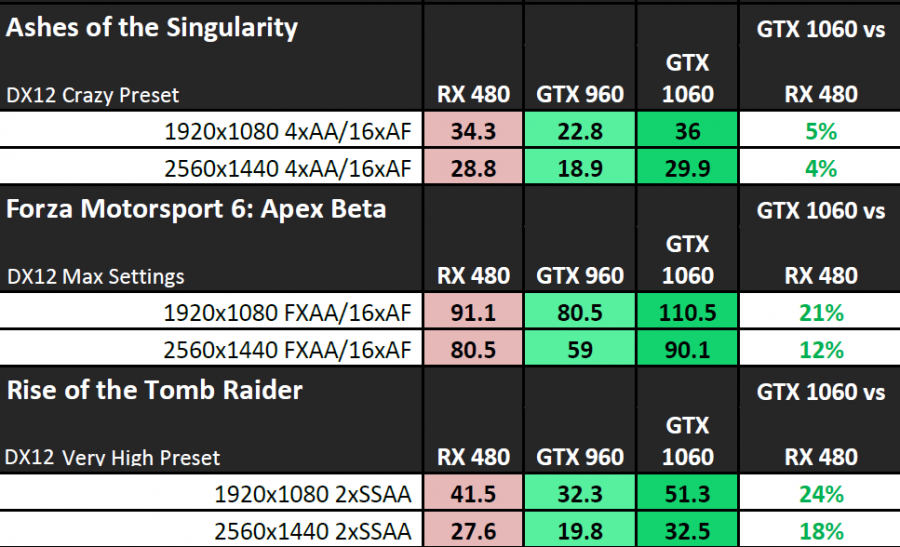
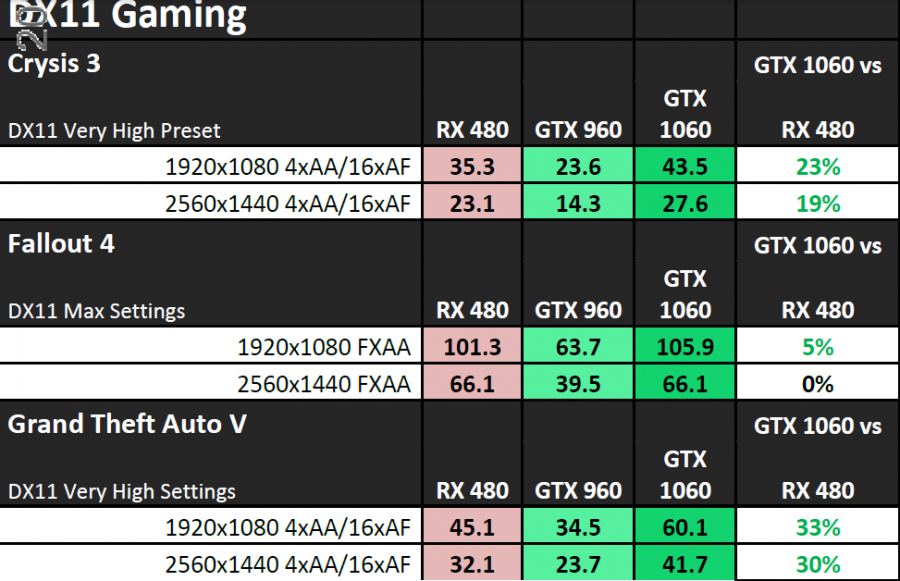
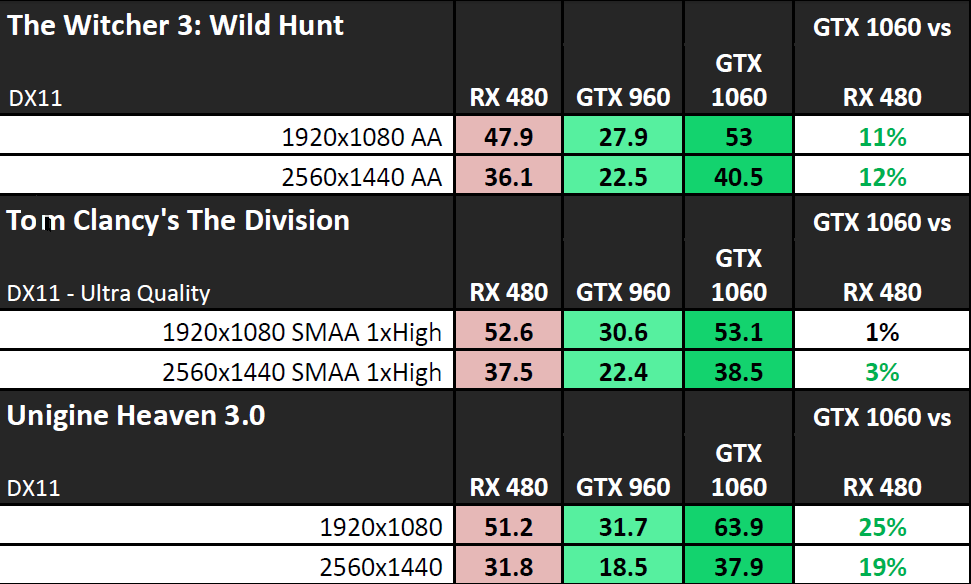
Wow the official numbers for 1060 seems that it can knock GTX980 and let RX480 weep in tears. Looks like my prediction is wrong.

» Click to show Spoiler - click again to hide... «

» Click to show Spoiler - click again to hide... «

» Click to show Spoiler - click again to hide... «


This post has been edited by guguzhiao: Jul 12 2016, 07:40 PM
Vannus
post Jul 12 2016, 08:04 PM

Geeks
*****
Senior Member
909 posts

Joined: Jan 2003
From: Subang Jaya


QUOTE(adilz @ Jul 12 2016, 06:40 PM)
Done a quick run just now. Room ambient temperature around 26-27C. I overclocked my GTX 1080 G1, adding 135 Mhz clock, 190 Mhz memory, power limit up to 108% with temp limit 92C. Had HWMonitor running, reset the min/ max value and ran Firestrike Basic. After that, I let the GOU cool down for awhile, reset the HW Monitor min/ max value and ran CoD: Black Ops III (Screen Resolution and Renderer Resolution both at 3840 x 2160, FOV: 80, Advance Graphics maxed out on all settings including AA using Filmic SMAA T2x. Vsyn-Off. Played for around 5 minutes.
Below is what got on HW Monitor

Attached Image Firestrike Attached Image CoD: Black Ops III

So the GPU stabilized around 73-74C with fan running at around 60+%

Too bad I didn't do the same when I had the GTX 970 SLI. But I feel that my CPU ran cooler then because the GTX 970s are dumping hot air out of the case.
*
Your min temp also 41c same but your aib performed much better keeping the card at 74c at max load compare 82c on FE. Envy envy.. 80iest made me a bit trauma like too hot. :/
TSskylinelover
post Jul 12 2016, 08:45 PM

Future Crypto Player😄👊Driver Abamsado😎😎
********
All Stars
11,265 posts

Joined: Jul 2005
QUOTE(guguzhiao @ Jul 12 2016, 07:39 PM)
Wow the official numbers for 1060 seems that it can knock GTX980 and let RX480 weep in tears. Looks like my prediction is wrong.

» Click to show Spoiler - click again to hide... «

» Click to show Spoiler - click again to hide... «

» Click to show Spoiler - click again to hide... «

*
Haha huge sucker punch in the balls yo laugh.gif rclxms.gif
adilz
post Jul 12 2016, 08:52 PM

Getting Started
**
Junior Member
267 posts

Joined: Oct 2007
From: Kuala Lumpur, Malaysia


QUOTE(Vannus @ Jul 12 2016, 08:04 PM)
Your min temp also 41c same but your aib performed much better keeping the card at 74c at max load compare 82c on FE. Envy envy.. 80iest made me a bit trauma like too hot. :/
*
Typical of AIB design. GPU cooling itself better than standard blower design, if you don't take into consideration the effects on other PC components inside the case. So what brand of GTX 1080 FE do you have?

Makes me wonder, most of the AIB partner also have FE version along with the custom cooler design (Zotac, MSI, Gigabyte to name a few). So is there actually any difference between FE version from the various AIB partners? I know the technical spec is all the same, but what about aesthetics? Quality of material for the shroud, the color etc. Or all of them are 100% identical right down to the color tone. Or all them get it from Nvidia and just put in their own brand box?Anyone knows?
Demonic Wrath
post Jul 12 2016, 09:23 PM

My name so cool
******
Senior Member
1,667 posts

Joined: Jan 2003
From: The Cool Name Place

http://videocardz.com/62138/nvidia-geforce...rs-guide-leaked

GTX1060 reviewer's guide. Top kek.
DeepMemory
post Jul 12 2016, 10:20 PM

Regular
******
Senior Member
1,805 posts

Joined: Oct 2010
Got my EVGA GTX 1070 non-SC. Only managed to OC it to this clock speeds though.

Attached Image
kianweic
post Jul 13 2016, 08:53 AM

Work hard, play hard.
*******
Senior Member
3,809 posts

Joined: Sep 2007
From: Jakarta


SUStlts
post Jul 13 2016, 09:15 AM

pee poo pee poo
******
Senior Member
1,891 posts

Joined: Apr 2008
From: Cheras
heard etech say gtx 1060 amp selling price is rm 1399.. any 1 can comfirm this

127 Pages « < 44 45 46 47 48 > » Top
Topic ClosedOptions
 

Change to:
| Lo-Fi Version
0.0280sec    0.60    6 queries    GZIP Disabled
Time is now: 21st December 2025 - 12:25 PM