

Also bottom flash selection are empty, why?
This post has been edited by kw: Jun 21 2016, 11:29 PM
Xiaomi Xiaomi Redmi Note 3 Thread V4, Fullmetal+Fingerprint+4,000mAh=Awesome
|
|
 Jun 21 2016, 11:28 PM Jun 21 2016, 11:28 PM
|
 
Senior Member
781 posts Joined: Jan 2003 From: Ipoh 
|
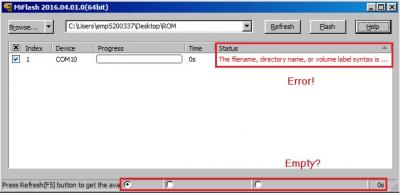
Damn! Stuck at Miflash, any idea about the error?
Also bottom flash selection are empty, why?
This post has been edited by kw: Jun 21 2016, 11:29 PM |
|
|
|
|
|
Jun 21 2016, 11:41 PM
|

Senior Member
521 posts Joined: Aug 2006
|
QUOTE(kw @ Jun 21 2016, 11:28 PM) Damn! Stuck at Miflash, any idea about the error? did you renamed the rom archive to .tgz before extracting?Also bottom flash selection are empty, why?
 |
|
|
Jun 21 2016, 11:54 PM
|
|
Senior Member
781 posts Joined: Jan 2003 From: Ipoh
|
QUOTE(wztech @ Jun 21 2016, 11:41 PM) did you renamed the rom archive to .tgz before extracting? Ok, forgotten this step.Did the rename just now and extract. Reflash again, but another error come out  
This post has been edited by kw: Jun 21 2016, 11:58 PM |
|
|
Jun 22 2016, 12:15 AM
|

Senior Member
1,372 posts Joined: Dec 2007  
|
QUOTE(joehann @ Jun 21 2016, 11:22 PM) Hi. I just bought my Redmi Note 3 SD650 version. now running on stable 7.1.18.0 out of the box. got bloatware but still can be deleted except for nasty APUS and WEQR that keep asking permission to install apps. Im okay with this version since the battery longevity are quite okay. Thinking of flashing to global rom, is it worth it? Kindly sifu2 please share any link to newbie like me on flashing my RN3 SD to global rom. Thanks! yes you should |
|
|
Jun 22 2016, 12:30 AM
|

Junior Member
180 posts Joined: May 2008
|
Considering doing a service to flash RMN3Pro to global. I'm thinking of charging RM 30 to do it. Let me know if you're interested.
|
|
|
Jun 22 2016, 12:34 AM
Show posts by this member only | IPv6 | Post
#2706
|

Junior Member
102 posts Joined: Mar 2014
|
QUOTE(sagethesausage @ Jun 21 2016, 02:53 PM) What wrong item did they send to you instead? haha not wrong item they send me NOTHING after more than a week of waiting. The first reply they gave me was that they lost the item. Good thing i choose COD if not to get refund gonna take time as i already called lazada and have them cancel the order and i didnt get any sorry voucher.By the way, if you email their cs angrily you might get sorry voucher. |
|
|
|
|
|
Jun 22 2016, 01:04 AM
|

Junior Member
213 posts Joined: Jan 2008
|
QUOTE(kw @ Jun 21 2016, 11:54 PM) Ok, forgotten this step. what window u using? Did the rename just now and extract. Reflash again, but another error come out
phone in EDL mode or fastboot mode? |
|
|
Jun 22 2016, 01:06 AM
|
|
Junior Member
213 posts Joined: Jan 2008
|
QUOTE(chiafoo @ Jun 21 2016, 09:22 PM) Wc wc , with tis edl method i think almost impossible to brick our hp la haha yeah this EDL things is so damn good  |
|
|
Jun 22 2016, 01:11 AM
|
|
Senior Member
781 posts Joined: Jan 2003 From: Ipoh
|
QUOTE(terdit @ Jun 22 2016, 01:04 AM) what window u using? I follow exactly the same instruction as per this guide : phone in EDL mode or fastboot mode? http://en.miui.com/thread-235865-1-1.html Everything is fine till I come to flashing. I see that my miflash doesn't show the selection description at the bottom, is it something wrong. In fact, I just downloaded the newer 2015 version, still the same. Is it something wrong with my miflash program? 
From the flash error log, here are the error shown : [000002A8]copy C:\Program Files\Xiaomi\MiPhone\Microsoft\xmllite.dll to C:\Windows\system32(0x00000000) [000002A8]CInstaller::CopyFileW(194): The process cannot access the file because it is being used by another process.(0x80070020) [000002A8]CInstaller::CopyFileW(168): The process cannot access the file because it is being used by another process.(0x80070020) [000002A8]copy C:\Program Files\Xiaomi\MiPhone\Qualcomm\Driver\serial\amd64\qcCoInstaller.dll to C:\Windows\system32(0x80070020) [000002A8]register C:\Program Files\Xiaomi\MiPhone\MiFlash.exe(0x00000000) [000002A8]ExecuteCommand(1092): Unspecified error(0xffffffff) [000002A8]install C:\Program Files\Xiaomi\MiPhone\Google\Driver\android_winusb.inf(0x00000000) [000002A8]install C:\Program Files\Xiaomi\MiPhone\Nvidia\Driver\NvidiaUsb.inf(0x00000000) [000002A8]install C:\Program Files\Xiaomi\MiPhone\Qualcomm\Driver\qcser.inf(0x00000000) Is it I need to go to EDL way to do the flashing : http://en.miui.com/thread-290959-1-1.html |
|
|
Jun 22 2016, 01:21 AM
|
|
Junior Member
213 posts Joined: Jan 2008
|
QUOTE(kw @ Jun 22 2016, 01:11 AM) I follow exactly the same instruction as per this guide : What is your phone current situation? http://en.miui.com/thread-235865-1-1.html Everything is fine till I come to flashing. I see that my miflash doesn't show the selection description at the bottom, is it something wrong. In fact, I just downloaded the newer 2015 version, still the same. Is it something wrong with my miflash program?
From the flash error log, here are the error shown : [000002A8]copy C:\Program Files\Xiaomi\MiPhone\Microsoft\xmllite.dll to C:\Windows\system32(0x00000000) [000002A8]CInstaller::CopyFileW(194): The process cannot access the file because it is being used by another process.(0x80070020) [000002A8]CInstaller::CopyFileW(168): The process cannot access the file because it is being used by another process.(0x80070020) [000002A8]copy C:\Program Files\Xiaomi\MiPhone\Qualcomm\Driver\serial\amd64\qcCoInstaller.dll to C:\Windows\system32(0x80070020) [000002A8]register C:\Program Files\Xiaomi\MiPhone\MiFlash.exe(0x00000000) [000002A8]ExecuteCommand(1092): Unspecified error(0xffffffff) [000002A8]install C:\Program Files\Xiaomi\MiPhone\Google\Driver\android_winusb.inf(0x00000000) [000002A8]install C:\Program Files\Xiaomi\MiPhone\Nvidia\Driver\NvidiaUsb.inf(0x00000000) [000002A8]install C:\Program Files\Xiaomi\MiPhone\Qualcomm\Driver\qcser.inf(0x00000000) Is it I need to go to EDL way to do the flashing : http://en.miui.com/thread-290959-1-1.html i use the EDL way when my phone stuck at MI logo when start Actually I'm not pro in this too but if I'm u, i will do the below - restart pc - reinstall MiFlash ( i use the version provided in the page that u follow) - if is Window 10, make sure disable Driver Signature Enforcement hope above help |
|
|
Jun 22 2016, 01:24 AM
|

Junior Member
450 posts Joined: Jan 2007
|
kw how come ur Miflash look mcm old style icon1 , they suggest use with 64bit windows . FYI MiFlash latest ver is 2016.04.01.0(64bit) , when u install Miphone/MiFlash u got skip any security pop up ? Try reinstall and click install anyway for all unsign drivers or follow the guide disable driver Signature . No need to rename the zip file , after unzip then browse to that location but not till the "images" sub folder .
This post has been edited by chiafoo: Jun 22 2016, 01:44 AM |
|
|
Jun 22 2016, 01:26 AM
|
|
Junior Member
213 posts Joined: Jan 2008
|
QUOTE(chiafoo @ Jun 22 2016, 01:24 AM) kw how come ur Miflash look mcm old style icon1 , they suggest use with 64bit windows . FYI MiFlash latest ver is 2016.04.01.0(64bit) Here come the pro,let the pro handle  |
|
|
Jun 22 2016, 01:41 AM
|
|
Senior Member
781 posts Joined: Jan 2003 From: Ipoh
|
QUOTE(chiafoo @ Jun 22 2016, 01:24 AM) kw how come ur Miflash look mcm old style icon1 , they suggest use with 64bit windows . FYI MiFlash latest ver is 2016.04.01.0(64bit) I don't know, I downloaded it.thought the flashing link given.I don't mind if it's old style as long as it works (unluckily for my case it don't). Well, I've stop the flashing attempt and unplug the phone, luckily still manage to boot the phone normally  Well, will continue trying tomorrow. |
|
|
|
|
|
Jun 22 2016, 01:44 AM
|
|
Junior Member
450 posts Joined: Jan 2007
|
QUOTE(kw @ Jun 22 2016, 01:41 AM) I don't know, I downloaded it.thought the flashing link given. When u install Miphone/MiFlash u got skip any security pop up ? Try reinstall and click install anyway for all unsign drivers or follow the guide disable driver Signature . No need to rename the zip file , after unzip then browse to that location but not till the "images" sub folder . Use the latest ver 2016.04.01.0(64bit) I don't mind if it's old style as long as it works (unluckily for my case it don't). Well, I've stop the flashing attempt and unplug the phone, luckily still manage to boot the phone normally Well, will continue trying tomorrow.  This post has been edited by chiafoo: Jun 22 2016, 01:46 AM |
|
|
Jun 22 2016, 01:58 AM
|
|
Senior Member
781 posts Joined: Jan 2003 From: Ipoh
|
QUOTE(chiafoo @ Jun 22 2016, 01:44 AM) When u install Miphone/MiFlash u got skip any security pop up ? Try reinstall and click install anyway for all unsign drivers or follow the guide disable driver Signature . No need to rename the zip file , after unzip then browse to that location but not till the "images" sub folder . Use the latest ver 2016.04.01.0(64bit) During miflash installation, Windows did prompt out some security notice about to proceed installing the app or not,.by selecting keep processing, it does installed successfully, just not sure installed.correctly or not.I did tried tried driver signature disable as per instruction. Found.another similar.case posted : http://en.miui.com/forum.php?mod=viewthrea...iflash&mobile=2 Seems like only recommendation is through edl method. Since lot of people.able to flash through the normal way, I do wish to continue trying before go to edl method (scare will face another problem later) This post has been edited by kw: Jun 22 2016, 02:01 AM |
|
|
Jun 22 2016, 02:45 AM
|
|
Junior Member
213 posts Joined: Jan 2008
|
How to use the finger print sensor to take photo?
seems the features on redmi note 3 finger print still a little limited compare to huawei  |
|
|
Jun 22 2016, 02:55 AM
Show posts by this member only | IPv6 | Post
#2717
|

Senior Member
2,854 posts Joined: Feb 2006 From: Sri Petaling ~ Kuala Lumpur
|
QUOTE(terdit @ Jun 22 2016, 02:45 AM) How to use the finger print sensor to take photo? Open camera and move your finger to fingerprint sensor... voila.. picture taken.. LOL..seems the features on redmi note 3 finger print still a little limited compare to huawei |
|
|
Jun 22 2016, 03:06 AM
|
|
Junior Member
450 posts Joined: Jan 2007
|
QUOTE(kw @ Jun 22 2016, 01:58 AM) During miflash installation, Windows did prompt out some security notice about to proceed installing the app or not,.by selecting keep processing, it does installed successfully, just not sure installed.correctly or not. From the 1st guide when u type "adb reboot edl" it is reboot to EDL already . EDL method from 2nd link is used because bootloop canot get hp connected to pc . I think is ur MiFlash /select the rom incorrectly , dont rename it unzip and try again .I did tried tried driver signature disable as per instruction. Found.another similar.case posted : http://en.miui.com/forum.php?mod=viewthrea...iflash&mobile=2 Seems like only recommendation is through edl method. Since lot of people.able to flash through the normal way, I do wish to continue trying before go to edl method (scare will face another problem later) |
|
|
Jun 22 2016, 06:11 AM
|
|
Junior Member
149 posts Joined: Jun 2009
|
Maybe you can try to use the latest MiFlash... This is what I used.
http://en.miui.com/thread-281979-1-1.html Choose clean all. Are you the admin user of the computer? Check your privileges or try using a different computer. it seems that from the log there is problem to access the files. |
|
|
Jun 22 2016, 07:33 AM
|
|
All Stars
10,820 posts Joined: Jan 2010 From: KL/PJ
|
QUOTE(terdit @ Jun 22 2016, 02:45 AM) How to use the finger print sensor to take photo? Is your firmware 7.3.2 and above?seems the features on redmi note 3 finger print still a little limited compare to huawei |
|
Topic ClosedOptions
|
| Change to: |  0.0296sec 0.0296sec
 0.35 0.35
 6 queries 6 queries
 GZIP Disabled GZIP Disabled
Time is now: 5th December 2025 - 03:20 PM |
 Quote
Quote