Welcome Guest ( Log In | Register )

Bump Topic Topic Closed RSS Feed

Outline · [ Standard ] · Linear+

Xiaomi Xiaomi Redmi Note 3 Thread V4, Fullmetal+Fingerprint+4,000mAh=Awesome

views
     
chiafoo
post Jun 20 2016, 04:51 PM

Casual
***
Junior Member
450 posts

Joined: Jan 2007


QUOTE(terdit @ Jun 20 2016, 04:39 PM)
How long it takes to delivered?
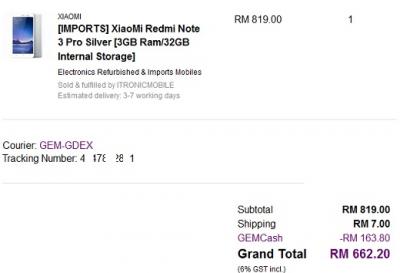
I bought from GEMFIVE ITRONICMOBILE, same shop rite?  hmm.gif
*
Attached Image

I order tis morning and post out juz now , mb tmr will receive it rclxms.gif . Aiya non global firmware , need flash doh.gif
chiafoo
post Jun 20 2016, 05:37 PM

Casual
***
Junior Member
450 posts

Joined: Jan 2007


payaluas terdit
I use code 20gemhlb , 20% disc max RM200 only work with HLB debit/credit tongue.gif
chiafoo
post Jun 20 2016, 10:27 PM

Casual
***
Junior Member
450 posts

Joined: Jan 2007


QUOTE(momuchi @ Jun 20 2016, 08:46 PM)
what CODE used?? blink.gif
*
20gemhlb for HLB
chiafoo
post Jun 21 2016, 03:30 PM

Casual
***
Junior Member
450 posts

Joined: Jan 2007


Received my redmi note3 pro from gemfive . Juz finish flash to global rom , for those who follow the official miui forum method to flash but fail to install/unable to detect the adb driver even installed the miflash tool , try install adb driver with PdaNetA4180 , tis is workaround for me .
chiafoo
post Jun 21 2016, 04:13 PM

Casual
***
Junior Member
450 posts

Joined: Jan 2007


QUOTE(kw @ Jun 21 2016, 03:48 PM)
Is your unit bought from Itronic? If yes, what kind of ROM is it? China stable ROM or vendor customize ROM?
*
Yes from Itronic , shd be vendor rom duno 7.1.X.X no latest OTA update1 . Just flash it to global la , easy only .
chiafoo
post Jun 21 2016, 04:14 PM

Casual
***
Junior Member
450 posts

Joined: Jan 2007


QUOTE(terdit @ Jun 21 2016, 04:11 PM)
Saw the card they included in the box while reading your reply
[attachmentid=6901621]
Hope this help  laugh.gif
*
I am shock with the box , it is damn small laugh.gif
chiafoo
post Jun 21 2016, 04:23 PM

Casual
***
Junior Member
450 posts

Joined: Jan 2007


QUOTE(pcdsb @ Jun 21 2016, 03:41 PM)
is it stable ? any issue like not detect 4g ?
*
Flash to global rom then it will become same as local MY Mi set already
chiafoo
post Jun 21 2016, 05:17 PM

Casual
***
Junior Member
450 posts

Joined: Jan 2007


QUOTE(kw @ Jun 21 2016, 04:55 PM)
I've look into the link shared in MIUI forum.
I try to do the adb step but already stuck, maybe my laptop still in old Win 7 and can't follow exactly the method sad.gif
*
I done it on win7 64bit. Bro install Mi pc suite 1st , then connect ur phone to pc only will show ur device , then install adb with the MiFLash . After all the driver detected only do the cmd command from adb folder

This post has been edited by chiafoo: Jun 21 2016, 05:18 PM
chiafoo
post Jun 21 2016, 05:36 PM

Casual
***
Junior Member
450 posts

Joined: Jan 2007


QUOTE(Alan Yee @ Jun 21 2016, 04:31 PM)
Yes, I also think the same.
I have been to China earlier this year, and has go to their local shop ask for the Redmi Note 3 Pro.
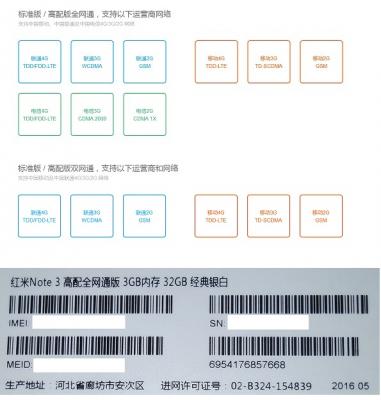
There is 2 variant of Redmi Note 3 Pro with SD650, one variant only support TDD-LTE for China, another variant support both TDD-LTE and FDD-LTE network, the so called global version, also sold in China.
The global version is slightly more expensive, but it guarantee the network compatibility globally.

This proven more where I bring my Malaysia 4G local phone to China, I only can get E (Edge) signal, even I slot in their 4G sim card.
Simply many of our phone only support FDD-LTE, not both.
*
I think tis is what u mean , my unit from gemfive is 全网通版 , but i think now redmi note 3 pro is 全网通版 jo

Attached Image
chiafoo
post Jun 21 2016, 05:59 PM

Casual
***
Junior Member
450 posts

Joined: Jan 2007


QUOTE(kw @ Jun 21 2016, 05:54 PM)
OK, I figure out about the ADB, has installed misuite and miflash too, now downloading the global stable ROM 7.3.5.0, think will try out when free later.
So, you never use the phone originally installed vendor rom duno 7.1.X.X? I'm thinking to test it out some time first before flash to global stable ROM.
*
I dint try the vendor rom but i notice when unlock screen that time got advertisement mcm intro u some apps doh.gif
chiafoo
post Jun 21 2016, 06:53 PM

Casual
***
Junior Member
450 posts

Joined: Jan 2007


QUOTE(terdit @ Jun 21 2016, 06:45 PM)
1. First time flash, choose wrongly, choosed flash all except storage. it move a little then come out some error (forgotten the error)

2. restart PC. Phone stopped at MI logo
- able to enter fastboot

3. MIFlash able to detect phone under fastboot. try to flash from fastboot, get error : 0x80004005:Failed (remote:device is locked. Canot flash images

stuck here  laugh.gif
*
Follow tis http://en.miui.com/thread-290959-1-1.html
Reboot in EDL then use miflash flash again

This post has been edited by chiafoo: Jun 21 2016, 06:54 PM
chiafoo
post Jun 21 2016, 07:26 PM

Casual
***
Junior Member
450 posts

Joined: Jan 2007


QUOTE(terdit @ Jun 21 2016, 07:07 PM)
New error : not enough storage is available to process this command  sweat.gif
I'm 64 bit window 10  shakehead.gif

second try, get this : catastrophic failure (0x8000ffff) receiving hello packet  sweat.gif
*
Tis error from Miflash software?
chiafoo
post Jun 21 2016, 09:22 PM

Casual
***
Junior Member
450 posts

Joined: Jan 2007


QUOTE(terdit @ Jun 21 2016, 08:41 PM)
Many thanks on this info
very usefull  rclxms.gif
*
Wc wc , with tis edl method i think almost impossible to brick our hp la haha
chiafoo
post Jun 22 2016, 01:24 AM

Casual
***
Junior Member
450 posts

Joined: Jan 2007


kw how come ur Miflash look mcm old style icon1 , they suggest use with 64bit windows . FYI MiFlash latest ver is 2016.04.01.0(64bit) , when u install Miphone/MiFlash u got skip any security pop up ? Try reinstall and click install anyway for all unsign drivers or follow the guide disable driver Signature . No need to rename the zip file , after unzip then browse to that location but not till the "images" sub folder .

This post has been edited by chiafoo: Jun 22 2016, 01:44 AM
chiafoo
post Jun 22 2016, 01:44 AM

Casual
***
Junior Member
450 posts

Joined: Jan 2007


QUOTE(kw @ Jun 22 2016, 01:41 AM)
I don't know, I downloaded it.thought the flashing link given.
I don't mind if it's old style as long as it works (unluckily for my case it don't).
Well, I've stop the flashing attempt and unplug the phone, luckily still manage to boot the phone normally smile.gif
Well, will continue trying tomorrow.
*
When u install Miphone/MiFlash u got skip any security pop up ? Try reinstall and click install anyway for all unsign drivers or follow the guide disable driver Signature . No need to rename the zip file , after unzip then browse to that location but not till the "images" sub folder . Use the latest ver 2016.04.01.0(64bit) thumbsup.gif

This post has been edited by chiafoo: Jun 22 2016, 01:46 AM
chiafoo
post Jun 22 2016, 03:06 AM

Casual
***
Junior Member
450 posts

Joined: Jan 2007


QUOTE(kw @ Jun 22 2016, 01:58 AM)
During miflash installation, Windows did prompt out some security notice about to proceed installing the app or not,.by selecting keep processing, it does installed successfully, just not sure installed.correctly or not.
I did tried tried driver signature disable as per instruction.

Found.another similar.case posted :
http://en.miui.com/forum.php?mod=viewthrea...iflash&mobile=2

Seems like only recommendation is through edl method.
Since lot of people.able to flash through the normal way, I do wish to continue trying before go to edl method (scare will face another problem later)
*
From the 1st guide when u type "adb reboot edl" it is reboot to EDL already . EDL method from 2nd link is used because bootloop canot get hp connected to pc . I think is ur MiFlash /select the rom incorrectly , dont rename it unzip and try again .
chiafoo
post Jun 22 2016, 10:17 AM

Casual
***
Junior Member
450 posts

Joined: Jan 2007


QUOTE(kw @ Jun 22 2016, 09:52 AM)
I see, so edl and adb are same , different is phone bootable or not.
I think first I still need to rename downloaded rom to .tgz then only use winrar unzip,right?
Well , I did tried use original unzip file name, parked in desktop, c and d Drive but all fail.
*
Go tis link http://en.miui.com/a-234.html , download "Redmi Note 3 Qualcomm Latest Global Stable Version Fastboot File Download" . No need rename as tis is in tgz , juz unzip with winzip/winrar and use miflash browse to the location whr u unzip
chiafoo
post Jun 22 2016, 10:46 AM

Casual
***
Junior Member
450 posts

Joined: Jan 2007


QUOTE(kw @ Jun 22 2016, 10:34 AM)
Yup, I did download the ROM from this link.
Some mean if it's download here, no need to rename the file to .tgz, right?
Then maybe that can be the problem cause I rename it before unzip through winrar.
However, I still can't download the 2016 or the latest beta ver miflash, the current version I'm using is 2015 and the selection bars at the bottom still no description display. Not sure my miflash is correct to use or not.
*
Download MiFlash v 20160401 here http://xiaomitips.com/getfile/1474/
Thn reinstall again cause it may contain latest drivers from the previous ver

This post has been edited by chiafoo: Jun 22 2016, 10:49 AM
chiafoo
post Jun 22 2016, 10:58 AM

Casual
***
Junior Member
450 posts

Joined: Jan 2007


kw juz gv it 1 more try to flash with MiFlash v 20160401 , not sure why urs dont hv desc at bottom bars , i dl mine from tis http://xiaomitips.com/getfile/1474/ . No need uninstall old 1 , it will juz overwrite

This post has been edited by chiafoo: Jun 22 2016, 11:00 AM
chiafoo
post Jun 22 2016, 03:44 PM

Casual
***
Junior Member
450 posts

Joined: Jan 2007


QUOTE(lyc1982 @ Jun 22 2016, 03:11 PM)
just to check...
will flashing rom by Miflash caused my datas / settings or apps to disappear ?
*
I think flashing rom is replacing whole rom , unless u do OTA update thn data / apps will remain

2 Pages  1 2 >Top
Topic ClosedOptions
 

Change to:
| Lo-Fi Version
0.0616sec    0.55    7 queries    GZIP Disabled
Time is now: 4th December 2025 - 11:29 PM