Outline ·
[ Standard ] ·
Linear+
hp-compaq Presario V3000 series AMD & intel V2, Owners, Comments, Drivers, Support n Etc
|
bearsteven
|
 Mar 28 2008, 12:40 PM Mar 28 2008, 12:40 PM
|
New Member


|
Please~can anyone help me?
can anyone give me the all the driver for v3713au?
i'm really needed now...please somebody help me...
say thanks first for all the people helps...TQ~
i've tried many ways but all failed...please help me...
|
|
|
|
|
|
tripelw
|
Mar 28 2008, 02:41 PM
|
Getting Started
|
QUOTE(dplaya @ Mar 28 2008, 12:14 PM) The Quick Launch button is it the sound sensor? i.e. mute, increase or decrease sound? If yes, then the problem does not lies in the quick launch button since the sensor works. By the way, how to share the memory of graphic ? i.e X3100. Anywhere to set it? I want to max the memory to the graphic i.e. 256MB as I had 4GB RAM. Thanks dplaya and PVCpipe. My mute, increase and decrease button no problem. all can be use. but the left button beside the mute button nothing happen when put my finger there. Its that u call quick lunch. if yes how can i fix it. thanks again... |
|
|
|
|
|
dplaya
|
Mar 28 2008, 04:10 PM
|
|
|
QUOTE(bearsteven @ Mar 28 2008, 12:40 PM) Please~can anyone help me? can anyone give me the all the driver for v3713au? i'm really needed now...please somebody help me... say thanks first for all the people helps...TQ~ i've tried many ways but all failed...please help me... You might wanna try this : - Possible v3713AU driveror HEREFor the 1st link, you might try the following drivers located there but NOT the chipset. i) Wireless ii) Quicktouch (if you had any there) iii) LAN iv) Ethernet v) Cardreader vi) Bluetooth BUT HAVE YOU TRY THIS IN PAGE 1? : - hp-compaq Presario V3614AU (AMD series) XP DriverThis post has been edited by dplaya: Mar 28 2008, 04:13 PM |
|
|
|
|
|
bearsteven
|
Mar 28 2008, 05:37 PM
|
New Member
|
QUOTE(dplaya @ Mar 28 2008, 04:10 PM) You might wanna try this : - Possible v3713AU driveror HEREFor the 1st link, you might try the following drivers located there but NOT the chipset. i) Wireless ii) Quicktouch (if you had any there) iii) LAN iv) Ethernet v) Cardreader vi) Bluetooth BUT HAVE YOU TRY THIS IN PAGE 1? : - hp-compaq Presario V3614AU (AMD series) XP Driverthanks for your help~now i just left the "unknown device" in the device manager...what is that? thanks your help again~ |
|
|
|
|
|
dplaya
|
Mar 28 2008, 05:57 PM
|
|
|
QUOTE(bearsteven @ Mar 28 2008, 05:37 PM) thanks for your help~now i just left the "unknown device" in the device manager...what is that? thanks your help again~ For the Unknown Device, I was having the same problem as you all for now. Plus the Laptop was no longer with me so I can't do more test on it. Looks like we need someone to let us know as well. Plus glad that you have fix your laptop EXCEPT that Unknown Device still lingering there  |
|
|
|
|
|
bearsteven
|
Mar 28 2008, 06:23 PM
|
New Member
|
QUOTE(dplaya @ Mar 28 2008, 05:57 PM) For the Unknown Device, I was having the same problem as you all for now. Plus the Laptop was no longer with me so I can't do more test on it. Looks like we need someone to let us know as well. Plus glad that you have fix your laptop EXCEPT that Unknown Device still lingering there haha...thank you... but i still have a question to ask... why still sound come out after i use the headphone? i already tried the way that shown in page 1 but it's useless... anyone can help?my labtop mosel is V3713AU... thanks... |
|
|
|
|
|
dplaya
|
Mar 28 2008, 07:00 PM
|
|
|
QUOTE(bearsteven @ Mar 28 2008, 06:23 PM) haha...thank you... but i still have a question to ask... why still sound come out after i use the headphone? i already tried the way that shown in page 1 but it's useless... anyone can help?my labtop mosel is V3713AU... thanks... If not mistaken, there is a certain driver so that the sound wont come out when plug in the mic. The driver is at the laptop there so I couldn't upload here unless you can ask from compuzone staff to upload for you in the web. |
|
|
|
|
|
bearsteven
|
Mar 28 2008, 07:18 PM
|
New Member
|
i also think is driver problem...
so anyway i can get the driver or some one watns to gimme the link?
thanks~
|
|
|
|
|
|
rhinodatum
|
Mar 28 2008, 07:53 PM
|
New Member
|
I bought the AMD V3250 laptop for RM2300 months ago until recently my bro dropped it and broke the internal LCD (totally cracked). Anyone know where to replace the LCD? Someone quote me around RM1800 that's crazy. I tried to look for used LCD part but no luck. Anybody got jalan? The reason i don't wanna buy a new one bcos the currently i have is still brand new.
|
|
|
|
|
|
bpay14
|
Mar 29 2008, 03:12 AM
|
|
|
hey guys...
i follow some of ur suggestion to me using everest to check the temperature...
so is this normal for a laptop?? i jz using for surfnet n doing some of my work..
hardisk:50+-
GPU:70++-
Core #2: 57~62+-
Core #1: 48-55+-
CPU : 50+-
|
|
|
|
|
|
bububang
|
Mar 29 2008, 07:21 AM
|
|
|
QUOTE(bpay14 @ Mar 29 2008, 03:12 AM) hey guys... i follow some of ur suggestion to me using everest to check the temperature... so is this normal for a laptop?? i jz using for surfnet n doing some of my work.. hardisk:50+- GPU:70++- Core #2: 57~62+- Core #1: 48-55+- CPU : 50+- ur temp is same as mine  |
|
|
|
|
|
gavind87
|
Mar 29 2008, 07:59 PM
|
|
|
anyone can confirm that 3658TU does not have bluetooth ?
any reason why ?
|
|
|
|
|
|
Netto Hikari
|
Mar 30 2008, 02:06 AM
|
|
|
QUOTE(dplaya @ Mar 28 2008, 05:57 PM) For the Unknown Device, I was having the same problem as you all for now. Plus the Laptop was no longer with me so I can't do more test on it. Looks like we need someone to let us know as well. Plus glad that you have fix your laptop EXCEPT that Unknown Device still lingering there install the quick launch software. it should fix that. applies to all V3000/F700/C700 btw, any1 kind enough to upload or pm me a copy of OEMINFO.INI and OEMLOGO.BMP of yor V3000 series? |
|
|
|
|
|
ristikol
|
Mar 30 2008, 04:13 AM
|
|
|
QUOTE(rhinodatum @ Mar 28 2008, 07:53 PM) I bought the AMD V3250 laptop for RM2300 months ago until recently my bro dropped it and broke the internal LCD (totally cracked). Anyone know where to replace the LCD? Someone quote me around RM1800 that's crazy. I tried to look for used LCD part but no luck. Anybody got jalan? The reason i don't wanna buy a new one bcos the currently i have is still brand new. u have warranty? |
|
|
|
|
|
alexjiezhen
|
Mar 30 2008, 12:38 PM
|
New Member
|
guys... here another problem lo.. i just formated my laptop presario v3000.. all driver installed but wireless cant lo.. the installation of the broadcom wireless drive just hung up like that. On the hp wireless assit only got bluetooth but no wireless. On the wireless homw setup detect my wireless not active at all. So does it to do with my driver or wireless card? what should i do? Last time i format dont have this kind of problem. help pls..  here is the device manager.. 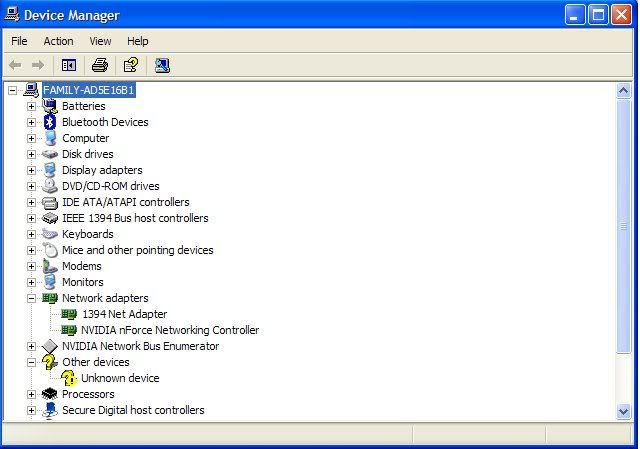 |
|
|
|
|
|
bububang
|
Mar 30 2008, 03:47 PM
|
|
|
QUOTE(alexjiezhen @ Mar 30 2008, 12:38 PM) guys... here another problem lo.. i just formated my laptop presario v3000.. all driver installed but wireless cant lo.. the installation of the broadcom wireless drive just hung up like that. On the hp wireless assit only got bluetooth but no wireless. On the wireless homw setup detect my wireless not active at all. So does it to do with my driver or wireless card? what should i do? Last time i format dont have this kind of problem. help pls.. here is the device manager.. try click at that unknown driver.. then right click and select update driver |
|
|
|
|
|
Mooneyes
|
Mar 30 2008, 04:33 PM
|
|
|
i also have this unknown device after i format my notebook recently..how do i know what driver i'm missing
|
|
|
|
|
|
nxfx
|
Mar 30 2008, 08:56 PM
|
|
|
QUOTE(bububang @ Mar 30 2008, 03:47 PM) try click at that unknown driver.. then right click and select update driver try installing the quick button driver QUOTE(nkymark @ Jan 5 2007, 12:51 PM) New Updates!!! Quick Launch Buttons driver: http://h10025.www1.hp.com/ewfrf/wc/softwar...3255647&lang=enNow u can see the volume bar when u increase/decrease the volume using the Quick Launch Buttons Express Upgrade to Vista: http://h20219.www2.hp.com/services/cache/4...=reg_R1002_MYEN
Added on March 30, 2008, 9:07 pmmy left side of the keyboard is a bit loose, anyone experiencing this too? This post has been edited by nxfx: Mar 30 2008, 09:07 PM |
|
|
|
|
|
SUSPVCpipe
|
Mar 31 2008, 01:30 AM
|
|
|
QUOTE(alexjiezhen @ Mar 30 2008, 01:38 PM) guys... here another problem lo.. i just formated my laptop presario v3000.. all driver installed but wireless cant lo.. the installation of the broadcom wireless drive just hung up like that. On the hp wireless assit only got bluetooth but no wireless. On the wireless homw setup detect my wireless not active at all. So does it to do with my driver or wireless card? what should i do? Last time i format dont have this kind of problem. help pls.. here is the device manager.. have u tried to install like this: update driver>not this time>install from a list or specific location(advance)>dont search,i will search the driver to install>have disk>browse the driver folder, search for the .inf file. then proceed... This post has been edited by PVCpipe: Mar 31 2008, 06:49 AM |
|
|
|
|



 Quote
Quote









 0.0264sec
 1.02
1.02
 6 queries
 GZIP Disabled