

its all brand new one...

hp-compaq Presario V3000 series AMD & intel V2, Owners, Comments, Drivers, Support n Etc
|
|
 Mar 26 2008, 02:00 PM Mar 26 2008, 02:00 PM
|
 
Senior Member
557 posts Joined: Jan 2006 
|
siuyi,
its all brand new one... |
|
|
|
|
|
Mar 26 2008, 02:42 PM
|

Junior Member
24 posts Joined: Jan 2003 
|
QUOTE(SiuYi @ Mar 26 2008, 01:19 PM) chlow6 yes,but not mine.eventualy its the dvd-rom failure.go for waranty.ntg 2 do with driver.  So my dvd drive KO already? Do dvd drives die so suddenly?It was working in the afternoon as i just use it. In the night, it then cannot detect and find it. Damn and my warranty is gone, Had to go get another one,must be expensive. No other explanation? SOLVED-I pulled out the Drive and then clean the connection then plug it in again.Voila, it works! This post has been edited by chlow6: Mar 26 2008, 04:34 PM |
|
|
Mar 26 2008, 03:21 PM
|

Senior Member
782 posts Joined: Jul 2005
|
QUOTE chocobee_2707 the type of readable cards are stated juz above the card slot.read and understand.if not,use an external card reader instead. hmm. it dont stated sdhc on there. but some normal sd card reader can read sdhc too. thats why i asked here. maybe someone here already tried it. i dont want to jump to any conclusion, just want to know. |
|
|
Mar 26 2008, 05:18 PM
|

Junior Member
49 posts Joined: Oct 2005
|
my wireless is not working. Able to connect to the network but it will disconnect after 5 minutes. After that cant detect any wireless network. Reinstalled windows but problem still persist. Any1 facing the same problem?Anywhere i am using V3250
|
|
|
Mar 26 2008, 11:10 PM
|

Senior Member
1,739 posts Joined: Jun 2005
|
QUOTE(pr3dator @ Mar 26 2008, 05:18 PM) my wireless is not working. Able to connect to the network but it will disconnect after 5 minutes. After that cant detect any wireless network. Reinstalled windows but problem still persist. Any1 facing the same problem?Anywhere i am using V3250 This happen to my friend,. his v3250au like not more working.. he installed wifi but ntg happen.. maybe the weather is too hot it burn out(australia-summer)?  |
|
|
Mar 27 2008, 08:40 AM
|

Junior Member
377 posts Joined: Dec 2005 From: temerloh...bandar ikan patin 
|
QUOTE knight_kriss oic....mybe i should try ur idea...thnx u very muchTemp for gpu is normal.but ur hdd temp is high.normally its around 50-55C..cooler pad wont help..juz a lil effect nia..either u try detach the external card slot cover below ur left palm area or play under a fan or air cond.. one more thing, i just realize that v3614au doest have bluetooth function, is it???coz each time i click on the bluetooth icon, it says "bluetooth device cannot be found or it didnt turn on"...........can anyone verify this problem?? |
|
|
|
|
|
Mar 27 2008, 09:02 AM
|

Junior Member
469 posts Joined: May 2005
|
Anyone got all the drivers for this model?
Compaq Presario V3759TU V3759TU Specs This post has been edited by dplaya: Mar 27 2008, 09:03 AM |
|
|
Mar 27 2008, 10:54 AM
|

Senior Member
2,731 posts Joined: Dec 2005 From: Hell
|
i tried slipstreaming sata driver into my xp cd n it works
 but the bad thing is there's no more notification in windows when i press capslock n scroll key but the bad thing is there's no more notification in windows when i press capslock n scroll key  |
|
|
Mar 27 2008, 12:28 PM
|

Junior Member
64 posts Joined: Dec 2007
|
Help me with this....
Cannot enable wlan and cannot install this driver (what this) computer v3751au for xp 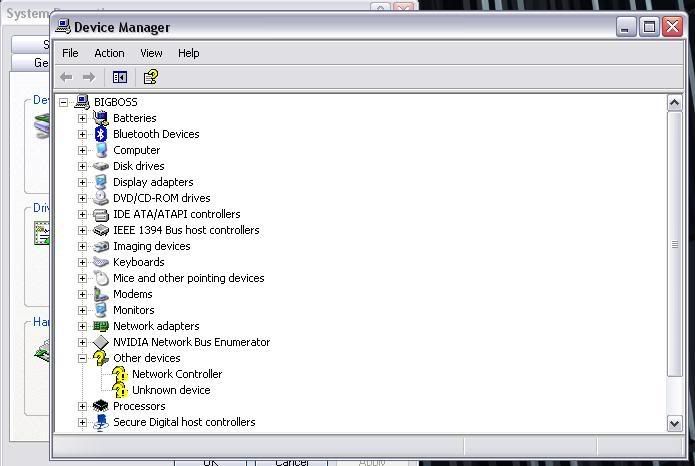 This post has been edited by tripelw: Mar 27 2008, 12:28 PM |
|
|
Mar 27 2008, 04:09 PM
|
|
Junior Member
469 posts Joined: May 2005
|
» Click to show Spoiler - click again to hide... « For the network controller, you have to manually install the driver, its the Broadcom Wireless BG. It should be at the bottom of the list under Category Broadcom. As for the unknown device, I am also waiting someone to let me know what unknown device was that. |
|
|
Mar 27 2008, 06:14 PM
|
|
Junior Member
64 posts Joined: Dec 2007
|
QUOTE(dplaya @ Mar 27 2008, 04:09 PM) » Click to show Spoiler - click again to hide... « For the network controller, you have to manually install the driver, its the Broadcom Wireless BG. It should be at the bottom of the list under Category Broadcom. As for the unknown device, I am also waiting someone to let me know what unknown device was that. where can i find it? (broadcom wireless BG). Coz i dont have in in my Device manager? |
|
|
Mar 27 2008, 06:25 PM
|

Junior Member
44 posts Joined: Jun 2007
|
Please~can anyone help me?
can anyone give me the all the driver for v3713au? i'm really needed now...please somebody help me... say thanks first for all the people helps...TQ~ |
|
|
Mar 27 2008, 09:53 PM
|
|
Junior Member
469 posts Joined: May 2005
|
QUOTE(tripelw @ Mar 27 2008, 06:14 PM) Thanks for the replay Broadcom Driverwhere can i find it? (broadcom wireless BG). Coz i dont have in in my Device manager? From the picture below, your NETWORK CONTROLLER is the Broadcom device. You have to install the driver manually cause XP couldn't detect whether the device is Broadcom device or not.  http://forum.lowyat.net/topic/636738?hl=presario This post has been edited by dplaya: Mar 27 2008, 10:12 PM |
|
|
|
|
|
Mar 27 2008, 11:45 PM
|

Junior Member
27 posts Joined: Jan 2007
|
hi..
I have a problem with my laptop(presario 3000). Before this I am using windows vista, but it is difficult for my bro's, I decided to install window xp back, but when I try to format the laptop, it says no Hard Disk Drives found on the laptop. Is there anyway I can fix this? I ask a few of my fren and they said it is because of the SATA hard disk on the laptop. How can I fix this?  |
|
|
Mar 28 2008, 01:40 AM
|
|
Senior Member
1,739 posts Joined: Jun 2005
|
QUOTE(emperor496 @ Mar 27 2008, 11:45 PM) hi.. There is 2 way..I have a problem with my laptop(presario 3000). Before this I am using windows vista, but it is difficult for my bro's, I decided to install window xp back, but when I try to format the laptop, it says no Hard Disk Drives found on the laptop. Is there anyway I can fix this? I ask a few of my fren and they said it is because of the SATA hard disk on the laptop. How can I fix this? 1.Disable native sata from BIOS 2. Create a bootable win xp +sata driver |
|
|
Mar 28 2008, 04:19 AM
|

Senior Member
2,720 posts Joined: Jan 2005 From: Kuala Lumpur 
|
My screen got a black dot which I can't wipe it away, is dat died pixel? Anyone experiences it? How long hav to wait for them to replace the lcd screen?
|
|
|
Mar 28 2008, 07:13 AM
|
|
Junior Member
64 posts Joined: Dec 2007
|
QUOTE(dplaya @ Mar 27 2008, 09:53 PM) Broadcom Driver Thanks dplaya ..... my wireless now ok From the picture below, your NETWORK CONTROLLER is the Broadcom device. You have to install the driver manually cause XP couldn't detect whether the device is Broadcom device or not. http://forum.lowyat.net/topic/636738?hl=presario  . .but still dont know the other one . It say ACPI- Complain system in the properties. What driver that i need?Thanks..... |
|
|
Mar 28 2008, 08:47 AM
|
|
Junior Member
27 posts Joined: Jan 2007
|
QUOTE(bububang @ Mar 28 2008, 01:40 AM) There is 2 way.. bro.. how to disable native SATA?? I didn't find any setting about sata in BIOS and how to create a bootable win xp +sata driver? where can I find the driver?1.Disable native sata from BIOS 2. Create a bootable win xp +sata driver |
|
|
Mar 28 2008, 10:37 AM
|

Senior Member
1,362 posts Joined: Nov 2005 From: k.terengganu.. alone.. with my bass...play.. alone
|
QUOTE(tripelw @ Mar 28 2008, 08:13 AM) Thanks dplaya ..... my wireless now ok how bout ur lappy quick launch button?.,.. does it work?... coz maybe its them... .but still dont know the other one . It say ACPI- Complain system in the properties. What driver that i need?Thanks..... QUOTE(emperor496 @ Mar 28 2008, 09:47 AM) bro.. how to disable native SATA?? I didn't find any setting about sata in BIOS and how to create a bootable win xp +sata driver? where can I find the driver? that mean the bios have no such option in ur bios.... so u can either use the floppy method which is kinda troublesome... or slipstream driverpack into ur xp installation cd(recomended).... try search the thread, im sure u will found the tutorial |
|
|
Mar 28 2008, 12:14 PM
|
|
Junior Member
469 posts Joined: May 2005
|
QUOTE(PVCpipe @ Mar 28 2008, 10:37 AM) how bout ur lappy quick launch button?.,.. does it work?... coz maybe its them... The Quick Launch button is it the sound sensor? i.e. mute, increase or decrease sound?If yes, then the problem does not lies in the quick launch button since the sensor works. By the way, how to share the memory of graphic ? i.e X3100. Anywhere to set it? I want to max the memory to the graphic i.e. 256MB as I had 4GB RAM. This post has been edited by dplaya: Mar 28 2008, 12:16 PM |
|
Topic ClosedOptions
|
| Change to: |  0.0186sec 0.0186sec
 0.34 0.34
 6 queries 6 queries
 GZIP Disabled GZIP Disabled
Time is now: 17th December 2025 - 08:49 PM |
 Quote
Quote