Outline ·
[ Standard ] ·
Linear+
hp-compaq Presario V3000 series AMD & intel V2, Owners, Comments, Drivers, Support n Etc
|
tripelw
|
 Feb 26 2008, 04:35 PM Feb 26 2008, 04:35 PM
|
Getting Started


|
Hi... Im planing to but this model. May i know what is the latest model of V3xx AMD version. What is the price and where can i get it?
thanks.......
Reseller plz pm me ur price.
This post has been edited by tripelw: Feb 26 2008, 04:36 PM
|
|
|
|
|
|
tripelw
|
Mar 27 2008, 12:28 PM
|
Getting Started
|
Help me with this.... Cannot enable wlan and cannot install this driver (what this) computer v3751au for xp 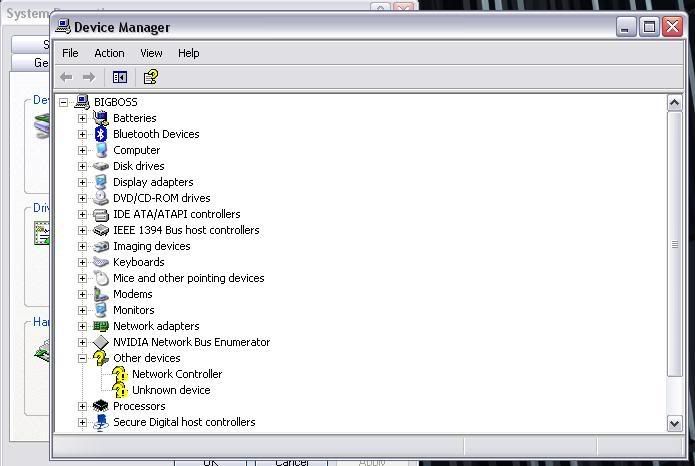 This post has been edited by tripelw: Mar 27 2008, 12:28 PM This post has been edited by tripelw: Mar 27 2008, 12:28 PM |
|
|
|
|
|
tripelw
|
Mar 27 2008, 06:14 PM
|
Getting Started
|
QUOTE(dplaya @ Mar 27 2008, 04:09 PM) » Click to show Spoiler - click again to hide... «
For the network controller, you have to manually install the driver, its the Broadcom Wireless BG. It should be at the bottom of the list under Category Broadcom. As for the unknown device, I am also waiting someone to let me know what unknown device was that. Thanks for the replay where can i find it? (broadcom wireless BG). Coz i dont have in in my Device manager? |
|
|
|
|
|
tripelw
|
Mar 28 2008, 07:13 AM
|
Getting Started
|
QUOTE(dplaya @ Mar 27 2008, 09:53 PM) Broadcom DriverFrom the picture below, your NETWORK CONTROLLER is the Broadcom device. You have to install the driver manually cause XP couldn't detect whether the device is Broadcom device or not.  http://forum.lowyat.net/topic/636738?hl=presario http://forum.lowyat.net/topic/636738?hl=presario Thanks dplaya ..... my wireless now ok  . but still dont know the other one  . It say ACPI- Complain system in the properties. What driver that i need? Thanks..... |
|
|
|
|
|
tripelw
|
Mar 28 2008, 02:41 PM
|
Getting Started
|
QUOTE(dplaya @ Mar 28 2008, 12:14 PM) The Quick Launch button is it the sound sensor? i.e. mute, increase or decrease sound? If yes, then the problem does not lies in the quick launch button since the sensor works. By the way, how to share the memory of graphic ? i.e X3100. Anywhere to set it? I want to max the memory to the graphic i.e. 256MB as I had 4GB RAM. Thanks dplaya and PVCpipe. My mute, increase and decrease button no problem. all can be use. but the left button beside the mute button nothing happen when put my finger there. Its that u call quick lunch. if yes how can i fix it. thanks again... |
|
|
|
|
|
tripelw
|
Apr 17 2008, 02:43 PM
|
Getting Started
|
QUOTE(Bad Cyborg @ Apr 6 2008, 01:05 AM) The last unknown device is usually HP Quick Launch buttons which should have been listed under the Vista drivers page. But strangely enough for your model they only listed the Critical Security Update, which doesn't install the necessary drivers. You may download it here. Audio from the speakers will be muted when you plug in a headphone once you'd installed the Conexant driver. I have a same problem... I still can here sound from lappy speaker after i plug in headphone. Can i use the same driver as above. Im running in xp for v35751au. Thanks... |
|
|
|
|



 Quote
Quote

 0.0536sec
 0.54
0.54
 7 queries
 GZIP Disabled