Welcome Guest ( Log In | Register )

Bump Topic Topic Closed RSS Feed
9 Pages < 1 2 3 4 > » Bottom

Outline · [ Standard ] · Linear+

TIME [OFFICIAL] TIME Fibre Broadband™ v3.o, 500 Mbps of rocket science

views
     
kmrdeva
post Oct 2 2016, 07:22 PM

Look at all my stars!!
*******
Senior Member
4,776 posts

Joined: Jan 2003
QUOTE(cowboypotato @ Oct 2 2016, 07:02 PM)
Hope anybody can help me make my decision.
Many thanks!
*
OK let me help you make a decision. Go ahead and sign up tomorrow.

Ha ha, just kidding. Anyway I've been on Time Fiber since either December 2013 or 2014, can't really remember. No major complaints from me, smooth sailing speed-wise and stability-wise in general.

Note : I never used the default/stock routers provided by Time. Always used my own Asus routers so YMMV.
kmrdeva
post Oct 26 2016, 06:24 AM

Look at all my stars!!
*******
Senior Member
4,776 posts

Joined: Jan 2003
QUOTE(EnTaroAdun23 @ Oct 26 2016, 06:05 AM)
TL;DR:

1.  It's note always Time's fault.  Do your research.

2.  If you're still using the Linksys E1200 router that Time provided to its subscribers up until March 2016, get rid of it and buy yourself a new AC1200 or better router.
*
Wow what a long read wink.gif

Ah I remember the Linksys E1200. Swapped it with my own router within a month after my Time line was installed, more than 2 years back.

Currently using an Asus RT-AC68U (AC1900 class) - this router is rock steady and wifi coverage and performance both are very strong.

From HWZ-SG

QUOTE
From a performance standpoint, all four routers were pretty well-matched. They are certainly very fast, but upon deeper analysis, we have some key findings to share. Beginning with the ASUS RT-AC68U, while it may not be the fastest, it offers the best performance at extreme ranges. At 17m, its uplink, downlink and file transfer speeds were the best. Moving on, the D-Link DIR-880L was very decent throughout and we could only fault its uplink speeds and performance at 17m. The Linksys WRT1900AC performed strongly in all tests, offered fast uplink and downlink speeds and showed little signs of weakness. If we had to nitpick, its performance at 17m was a little shaky - uplink performance at 17m saw a drop of 37% as compared to 13m. Finally, the Netgear Nighthawk R7000 was an absolute monster when it came to downlink and file transfer performance, but its uplink performance was a little underwhelming.
..
..
..
However, putting everything together, the winner here has to be awarded to the Linksys WRT1900AC. Its offered strong, consistent performance in all our tests and only really faltered at our farthest test range of 17m, which, to be entirely honest, is a pretty long distance away from the router. Not to forget, it had exemplary uplink performance compared to other routers in this shootout. Performance aside, we must applaud Linksys for making the router easy to use and setup.
This post has been edited by kmrdeva: Oct 26 2016, 06:30 AM

kmrdeva
post Oct 26 2016, 02:13 PM

Look at all my stars!!
*******
Senior Member
4,776 posts

Joined: Jan 2003
QUOTE(tritonite @ Oct 26 2016, 02:09 PM)
And since it only happens predictably at that time of the night rather than randomly at all times of the day, I highly doubt it's the router's problem.

So yeah, let's stop trying to help TIME mitigate their problem with all sorts of pseudo-excuses. They (and all other ISPs) are great at doing that on their own.
*
Yeah, it sure doesn't look like a router issue. Something at Time's end more likely.
kmrdeva
post Oct 26 2016, 07:39 PM

Look at all my stars!!
*******
Senior Member
4,776 posts

Joined: Jan 2003
QUOTE(Braxton @ Oct 26 2016, 07:28 PM)
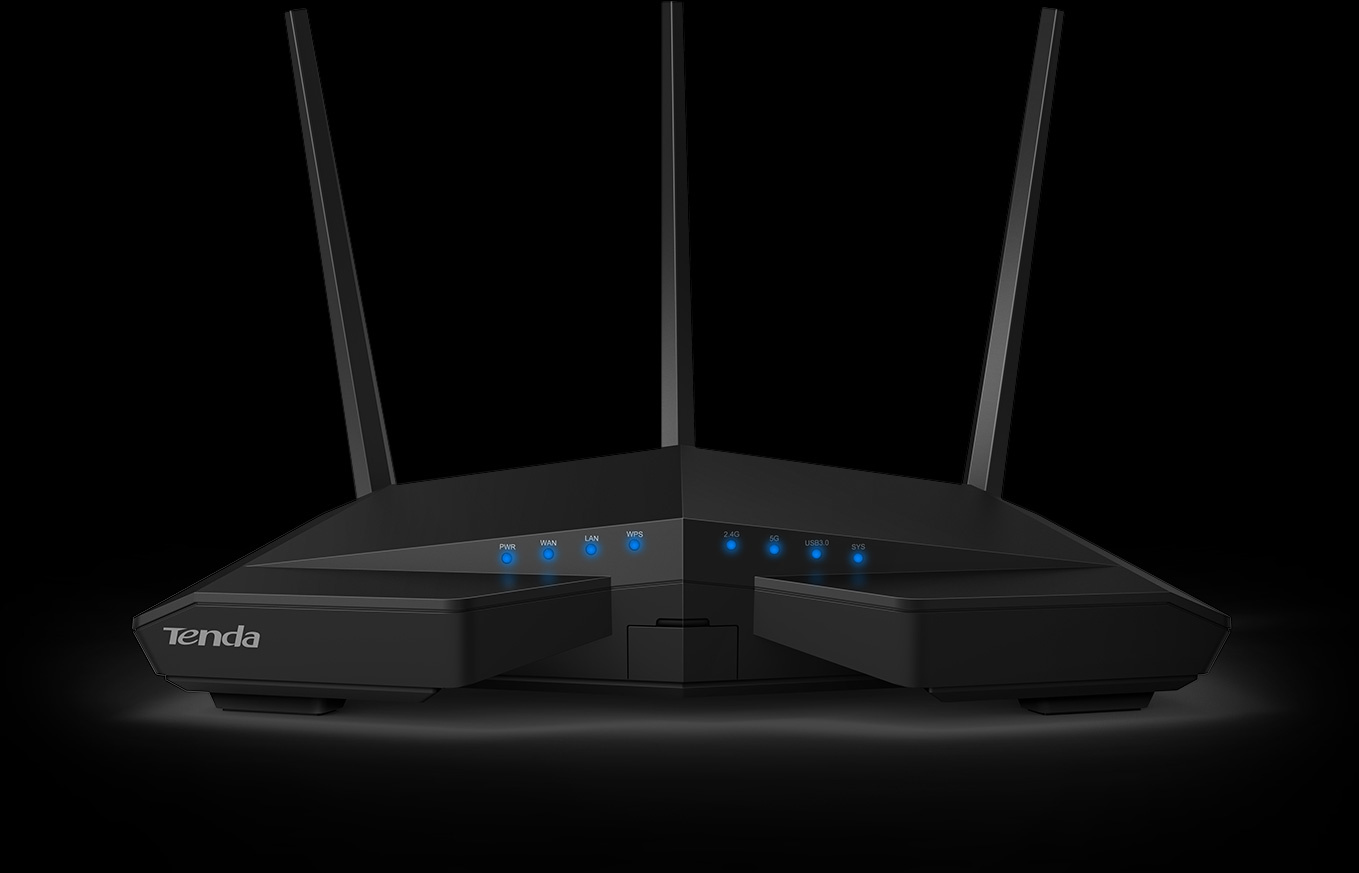
AC18 like a space ship drool.gif
*
Wah it's like love child of asus and netgear router. Even the web page is very much like asus page.

user posted image
kmrdeva
post Oct 26 2016, 09:06 PM

Look at all my stars!!
*******
Senior Member
4,776 posts

Joined: Jan 2003
QUOTE(ryukick @ Oct 26 2016, 08:54 PM)
Are you using this?

I see not that much difference in specs with AC15
*
Different Broadcom cpu and amount of ram?

http://routerchart.com/compare/tenda-ac18-...a-ac15-ac15-213
kmrdeva
post Oct 27 2016, 08:13 PM

Look at all my stars!!
*******
Senior Member
4,776 posts

Joined: Jan 2003
QUOTE(x-1o8-x @ Oct 27 2016, 08:03 PM)
anyone in penang experiencing low download speed?

just now im lagging in game and when i did speedtest, sometimes i get only 2mbps download.
*
Same here in Tg Bungah, Penang. Even FB videos are pausing and buffering with my 500mb link.

Speedtest numbers with KL server are inconsistent too.
kmrdeva
post Oct 27 2016, 08:37 PM

Look at all my stars!!
*******
Senior Member
4,776 posts

Joined: Jan 2003
QUOTE(yaseen1979 @ Oct 27 2016, 08:31 PM)
Anyone having issues streaming movies?
*
Netflix is working fine for me. YouTube too.
kmrdeva
post Nov 16 2016, 02:28 PM

Look at all my stars!!
*******
Senior Member
4,776 posts

Joined: Jan 2003
QUOTE(Macnair @ Nov 16 2016, 04:13 AM)
Hi, I just upgraded to 300 mbps plan but my wifi is getting just about 100 to 120mbps in speedtest.

On LAN I can get 280 to 300mbps.

I'm still using thr DLink 850l.

Is that the max my router can go for wifi?
*
Not sure about the Dlink 850L AC1200 wifi router as I've never used it before.

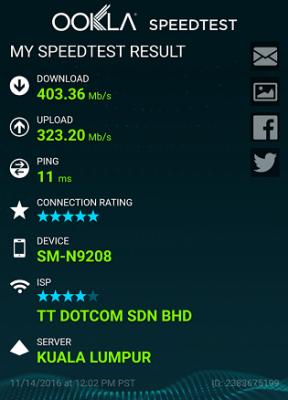
With my Asus AC68U AC1900 wifi router, my Galaxy Note5 can get good speeds but only if connected to the AC 5GHz band and the phone is very near the router, e.g. 2-3 metres.

Attached Image
kmrdeva
post Dec 11 2016, 12:28 AM

Look at all my stars!!
*******
Senior Member
4,776 posts

Joined: Jan 2003
QUOTE(red4900 @ Dec 10 2016, 11:57 PM)
Anyone else getting stability / speed problem with TIME lately?

I can't even play Dota these past few days, ping are just wayyy too bad. Previously was getting 3-12ms, now I'm getting anywhere between 200-300ms ping.

Youtube can only stream smoothly at 240p, 720p will stuck while streaming. Previously I can stream smoothly at 1080p no problem.

Twitch are lagging like shit too, Facebook sometimes stop loading, the internet are just so unstable.

Running speedtest on TIME server seems stable and fast, but try running it against Celcom/Digi/other server and you can see the speed are sooo unstable.

Is it just me or did anyone else experienced this too? I'm in Petaling Jaya btw.
*
No problems at my end. Youtube 1080p streaming on my chromecast 2 is smooth, just watched a Netflix movie and it was fine.

Wife and son enjoying smooth youtube on the phone and tablet. Web browsing is also fast as expected.

I'm in Penang BTW. 500Mb user using my own Asus RT-AC68U router.

user posted image

P/S Speedtest result against MyKris KL server. Hmm, upload seems a bit slow. Probably need to reboot my equipment, they've been running for 2-3 months without a reboot now.

This post has been edited by kmrdeva: Dec 11 2016, 12:29 AM
kmrdeva
post Dec 22 2016, 09:43 AM

Look at all my stars!!
*******
Senior Member
4,776 posts

Joined: Jan 2003
QUOTE(rizqeenizdral @ Dec 22 2016, 09:36 AM)
Hi all, im a newbie so doesn't know much about router.

I'm currently subscribe to 300mbps time internet and my router is the old linksys e1200 that came with the modem when i subscribed to 15mbps.

Now thingking of getting new router. What router do you recommend for at least 4 laptops , 4 iPads and 4 phones? My budget is around RM700-800ish.

Thank you.
*
I'd suggest the Asus RT-AC68U. Saw it going for around RM800 on Lazada if I remember correctly.
kmrdeva
post Dec 22 2016, 10:14 AM

Look at all my stars!!
*******
Senior Member
4,776 posts

Joined: Jan 2003
QUOTE(rizqeenizdral @ Dec 22 2016, 10:07 AM)
How much is the wifi dl/ul of the router with 300mbps?
*
I'm on the 500mb Time package. Usually get about 200-300mb download and upload on my Note 5 when I run speedtest against a KL server (approx. 5m from router).
kmrdeva
post Dec 22 2016, 10:47 AM

Look at all my stars!!
*******
Senior Member
4,776 posts

Joined: Jan 2003
QUOTE(rizqeenizdral @ Dec 22 2016, 10:21 AM)
BTW, i forgot to mention my condo is about 1k square feet.
*
1.25k sf condo here. Obviously the further I am from the router, the lower the speeds.

My pc in the study room (router is in the living room) can get more than 200mbps on 5ghz AC with a tp-link usb3 AC1200 wifi adapter.
kmrdeva
post Dec 22 2016, 05:38 PM

Look at all my stars!!
*******
Senior Member
4,776 posts

Joined: Jan 2003
QUOTE(rizqeenizdral @ Dec 22 2016, 05:19 PM)
My wifi card is Intel Dual Band Wireless-AC 3160, is it suitable with ASUS RT-AC68U?
*
Have not used this card before, but I guess it will work with the AC68U.

Seems to be quite a low end model. Not sure how this card performs, maybe someone else knows.
kmrdeva
post Jan 2 2017, 09:18 PM

Look at all my stars!!
*******
Senior Member
4,776 posts

Joined: Jan 2003
QUOTE(walkmanphone @ Jan 2 2017, 09:09 PM)
It is really ridiculous, if I really have to pay the so called "penalty" fee, ain't going to use their service anymore shakehead.gif
*
Correct me if I misunderstand.

You signed up for a broadband service which comes with a 24 month contract. Before the contract period is up, you decide to move to a place which unfortunately does not have coverage by said service. Is this not considered early termination i.e. breach of contract?

Have you contacted Time, perhaps they are planning to or may consider expanding coverage to the new place?
kmrdeva
post Jan 5 2017, 09:32 PM

Look at all my stars!!
*******
Senior Member
4,776 posts

Joined: Jan 2003
QUOTE(mystic_mac @ Jan 5 2017, 09:27 PM)
Hi , Can anyone here teach me on how to bypass TIME's ISP ? I dont think google or open DNS works with time. Previously, when i was using UNIFI, i had no problems changing the DNS, but i ran into problem with TIME .
thanks.
*
I'm using an Asus RT-AC68U router, no problem setting/using Google DNS with my Time connection.
kmrdeva
post Jan 6 2017, 01:02 PM

Look at all my stars!!
*******
Senior Member
4,776 posts

Joined: Jan 2003
QUOTE(mystic_mac @ Jan 6 2017, 12:47 PM)
I see, how much did you get the router for ?
Also did u try it before with the stock router provided by time ?
*
Got it for RM900 or so about a year back. Before that I had the Asus RT-N66U (dual band minus Wifi AC). Both AC68U and N66U were rock solid with super wifi coverage.

Never used Time's stock routers, sorry to say.

If you can't find a way to enter the Google DNS IPs on your router, have you tested by manually setting the Google DNS addresses on your computer or smartphone?
kmrdeva
post Jan 21 2017, 12:11 AM

Look at all my stars!!
*******
Senior Member
4,776 posts

Joined: Jan 2003
QUOTE(NGT1137 @ Jan 21 2017, 12:00 AM)
Is this normal? I have been getting this speed for my 100mbps package since day one

user posted image
*
Do share more details about your networking environment.

Router model?

Using wifi or wired network?

Speedtest from computer (what network card?)?

Or speedtest from smartphone/tablet (what brand and model)?

kmrdeva
post Jan 21 2017, 12:37 AM

Look at all my stars!!
*******
Senior Member
4,776 posts

Joined: Jan 2003
QUOTE(NGT1137 @ Jan 21 2017, 12:17 AM)
Router: ZTE (stock)
Using Wifi
Router is only 7 feet away from me within line of sight.
Speedtest from laptop (wireless n) and smartphones (huawei p9, iphone6, Xperia Z3) yielded similar result.
*
Thanks for the info. Stock ZTE is model H298N I guess, which is only a single band router supporting 2.4Ghz band. Very prone to interference from neighbours' wifi, bluetooth, cordless phone etc. Even if your smartphones support dual band wifi, the router does not.

Perhaps someone here with more stock router experience can share speed tips.
kmrdeva
post Jan 22 2017, 09:56 PM

Look at all my stars!!
*******
Senior Member
4,776 posts

Joined: Jan 2003
QUOTE(TimKen @ Jan 22 2017, 09:51 PM)
Anyone experiencing slow speed tonight ? can't barely watch youtube
*
Was watching iflix earlier and it was really glitchy. I thought it was only the service.

Something is definitely wrong with Time = getting 3Mbps on my 500Mb line.
kmrdeva
post Feb 6 2017, 11:42 AM

Look at all my stars!!
*******
Senior Member
4,776 posts

Joined: Jan 2003
QUOTE(UsernameCopied @ Feb 6 2017, 11:36 AM)
How has everyone's internet connection and speed with TIME Fibre been?

Thinking bout getting it, but read all the horrible reviews below is making me think twice

http://trustedcompany.com/my/time.com.my-reviews
*
Rating of 3.9 out of 5 is good, no?

9 Pages < 1 2 3 4 > » Top
Topic ClosedOptions
 

Change to:
| Lo-Fi Version
0.0300sec    0.63    7 queries    GZIP Disabled
Time is now: 4th December 2025 - 08:49 PM