Welcome Guest ( Log In | Register )

5 Pages < 1 2 3 4 > » Bottom

Outline · [ Standard ] · Linear+

Tech Support Unifi 30mbps slow on wireless, But with Lan cable running fine

views
     
Zot
post Apr 4 2016, 03:02 PM

Look at all my stars!!
*******
Senior Member
7,938 posts

Joined: Mar 2014
QUOTE(Aordinarypeople @ Apr 4 2016, 02:55 AM)
Hi all,

I have same issue with TS. But after I changed the stock router to Asus RT-N12HP. Everything is fine until last week. I thought is unifi issue, so I checked with them , LAN is no issue but when connect via wireless, the speed that I get only 1mpbs~3mpbs for upload and download speed.And also it very unstable. So I went to the seller that I bought the router , the seller checked and agree to change a new router to me. After I setup the new router, the issue still persist. Any idea is whether the router or unifi issue??? But I change back the stock router, the speed is better than Asus router. cry.gif  cry.gif
*
Did you check if there is another strong WiFi signal(s) colliding with your channel? You need to do frequency scanning
barca96
post Sep 22 2016, 07:14 PM

Enthusiast
*****
Senior Member
980 posts

Joined: Apr 2010


Have you bought a new router?
dannielshazmeer
post Sep 22 2016, 07:22 PM

On my way
****
Senior Member
628 posts

Joined: Apr 2016
best settings for wifi !!
elninomoh2
post Jan 21 2017, 04:43 AM

New Member
*
Newbie
3 posts

Joined: Jan 2017


Hello y'all i'm encountering same problem with unifi 30mb plan, its very slow on wifi and upon reading this thread ive tried changing all the best channels but to no avail. I'm using d-link dir-850l router with the following configuration settings currently. It takes up to Attached Image 15 secs for a google page to open on my phone browser and that sucks, I have to be using vpn app to get speed connection.. is there any configuration to rectify that?

Xefron
post Jan 21 2017, 07:16 AM

Look at all my stars!!
*******
Senior Member
2,507 posts

Joined: Jan 2003


Try this

WPA 2 mode only
N only
Wifi channel,1 or 6 or 11 .
High
20Mhz
HT 20/40 Disable
Visible
Always visible.
Moogle Stiltzkin
post Jan 22 2017, 08:47 AM

Look at all my stars!!
*******
Senior Member
4,465 posts

Joined: Jan 2003
bruce.gif

This post has been edited by Moogle Stiltzkin: Jul 16 2017, 05:35 PM
lolabunny123
post Jan 22 2017, 02:05 PM

Casual
***
Junior Member
414 posts

Joined: Dec 2014
From: South Korea


QUOTE(elninomoh2 @ Jan 21 2017, 06:43 AM)
Hello y'all i'm encountering same problem with unifi 30mb plan, its very slow on wifi and upon reading this thread ive tried changing all the best channels but to no avail. I'm using d-link dir-850l router with the following configuration settings currently. It takes up to Attached Image 15 secs for a google page to open on my phone browser and that sucks, I have to be using vpn app to get speed connection.. is there any configuration to rectify that?
*
What phone you using?
calvinlaw510
post Jan 22 2017, 02:08 PM

Enthusiast
*****
Senior Member
766 posts

Joined: Oct 2007
From: Penang Island


QUOTE(lolabunny123 @ Jan 22 2017, 02:05 PM)
What phone you using?
*
He already solve his problem on below thread.

https://forum.lowyat.net/index.php?showtopi...post&p=83448189
junclj
post Jan 22 2017, 11:46 PM

Look at all my stars!!
*******
Senior Member
2,348 posts

Joined: Apr 2008


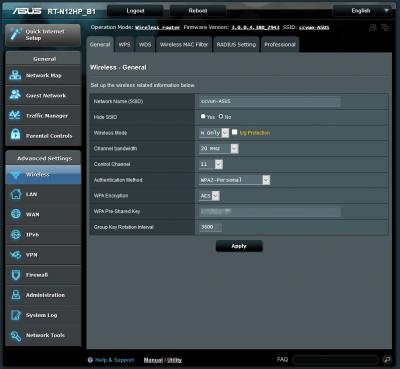
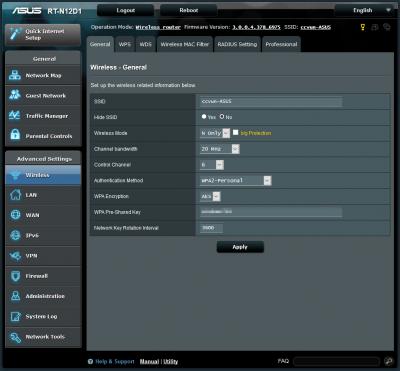
Here is my house Asus routers.

I got 3 Asus routers, the first one is my main router, second and third routers are access points.
Main router is channel 1, second router is channel 11, then the last one is channel 6
My main router starting IP was changed from 192.168.1.2 to 192.168.1.4 because I want to assign my second router to 192.168.1.2 and third router to 192.168.1.3. Both of my 2nd & 3rd routers were disabled DHCP.

My Main router
Attached Image

My second router
Attached Image

My third router
Attached Image

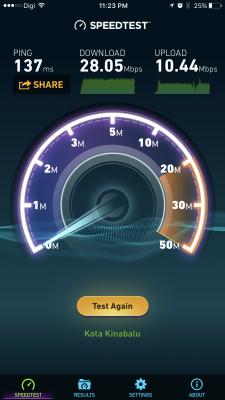
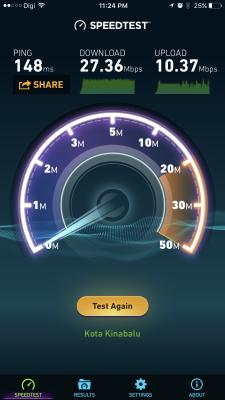
My home only get 28mbps although I was subscribed to unifi 30mbps. My unifi never reach less than 10ms. I have no idea why, probably here is Kota Kinabalu, Sabah got higher ping compare to west Malaysia.

Here is my speed test result from my Desktop PC, connected with LAN.
Attached Image

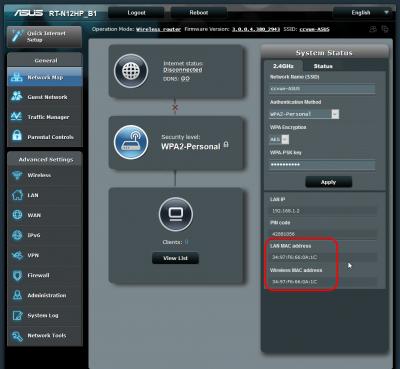
Here is how I set my home wifi connection.


My main router mac address
Attached Image

My first AP mac address
Attached Image

My second AP mac address
Attached Image

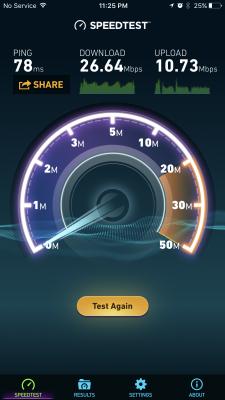
Now, I have to test my wifi speedtest for routers.

Here is my speedtest result for main router
Attached Image

Here is my speedtest result for first AP router
Attached Image

Here is my speedtest result for second AP router
Attached Image

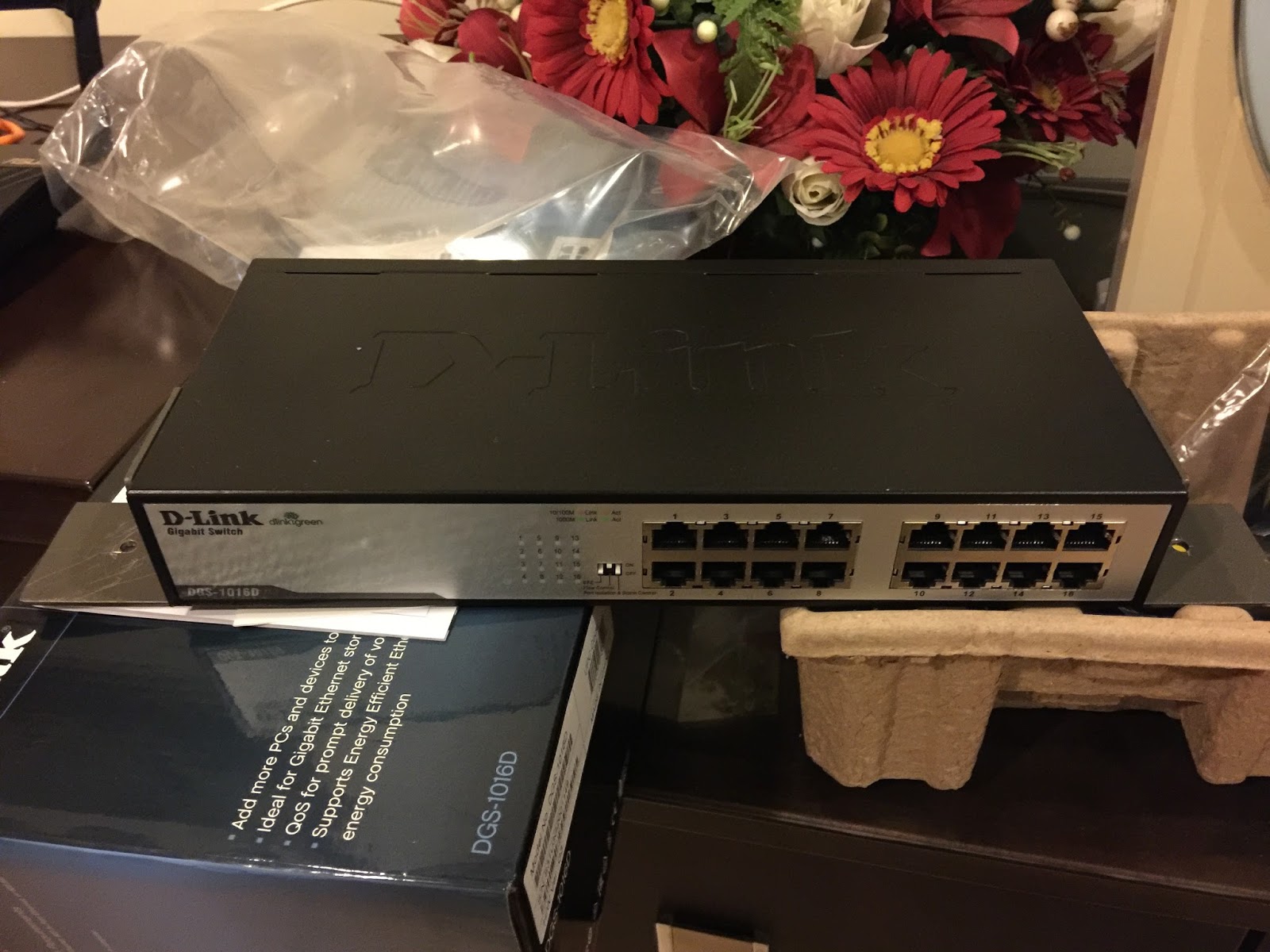
My home network is connected with LAN networks through a D-Link DGS1016D gigabit switch.

This is my home gigabit switch
user posted image

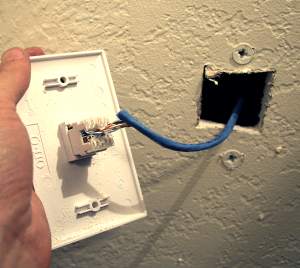
Both my two Asus AP routers are connected with LAN networks. All the network cables are Cat5e and pulled into the wall then connected to network wall socket.

Which is looks similar like this
user posted image

and like this
user posted image

This post has been edited by junclj: Jan 23 2017, 01:39 AM
G99
post Jan 25 2017, 02:32 AM

New Member
*
Junior Member
20 posts

Joined: Jan 2017


Hello im new here
I just upgraded the speed of unifi a few weeks ago and the bring a new router which same on this thread Dir-850L but im facing the same problem with wireless speed specifically 2.4 GHz band it barely reach 10 mbps

Any one solved the problem please help me, cause i do not think technical team of TM can solve it either
GOPI56
post Jan 25 2017, 02:35 AM

Regular
******
Senior Member
1,494 posts

Joined: Dec 2012
Try using the 5GHz wifi frequency.
G99
post Jan 25 2017, 02:57 AM

New Member
*
Junior Member
20 posts

Joined: Jan 2017


QUOTE(GOPI56 @ Jan 25 2017, 02:35 AM)
Try using the 5GHz wifi frequency.
*
I did try and its working but the problem with coverage also we need the 2.4 Ghz in the house because some of the laptops does not support the 5ghz
cucubud
post Jan 25 2017, 07:34 AM

Super Moderator
*******
Senior Member
3,076 posts

Joined: Jan 2008


QUOTE(G99 @ Jan 25 2017, 02:32 AM)
Hello im new here
I just upgraded the speed of unifi a few weeks ago and the bring a new router which same on this thread Dir-850L but im facing the same problem with wireless speed specifically 2.4 GHz band it barely reach 10 mbps

Any one solved the problem please help me, cause i do not think technical team of TM can solve it either
*
Have you disabled IPv6 on your router?
Try it. See if it helps.
G99
post Jan 25 2017, 02:14 PM

New Member
*
Junior Member
20 posts

Joined: Jan 2017


QUOTE(cucubud @ Jan 25 2017, 07:34 AM)
Have you disabled IPv6 on your router?
Try it. See if it helps.
*
Yes i did disable the IPv6 on my router it did not help
Also i noticed after disabling the IPv6 i could not connect to 5Ghz

This post has been edited by G99: Jan 25 2017, 02:15 PM
cucubud
post Jan 25 2017, 02:22 PM

Super Moderator
*******
Senior Member
3,076 posts

Joined: Jan 2008


QUOTE(G99 @ Jan 25 2017, 02:14 PM)
Yes i did disable the IPv6 on my router it did not help
Also i noticed after disabling the IPv6 i could not connect to 5Ghz
*
Maybe the next thing to try is to do a factory reset the router.
Before you do that, please get hold of your Unifi login ID and Password.

SilentForever
post Jan 25 2017, 02:26 PM

On my way
****
Junior Member
580 posts

Joined: Oct 2015


QUOTE(junclj @ Jan 22 2017, 11:46 PM)
Here is my house Asus routers.

I got 3 Asus routers, the first one is my main router, second and third routers are access points.
Main router is channel 1, second router is channel 11, then the last one is channel 6
My main router starting IP was changed from 192.168.1.2 to 192.168.1.4 because I want to assign my second router to 192.168.1.2 and third router to 192.168.1.3. Both of my 2nd & 3rd routers were disabled DHCP.

My Main router
Attached Image

My second router
Attached Image

My third router
Attached Image

My home only get 28mbps although I was subscribed to unifi 30mbps. My unifi never reach less than 10ms. I have no idea why, probably here is Kota Kinabalu, Sabah got higher ping compare to west Malaysia.

Here is my speed test result from my Desktop PC, connected with LAN.
Attached Image

Here is how I set my home wifi connection.


My main router mac address
Attached Image

My first AP mac address
Attached Image

My second AP mac address
Attached Image

Now, I have to test my wifi speedtest for routers.

Here is my speedtest result for main router
Attached Image

Here is my speedtest result for first AP router
Attached Image

Here is my speedtest result for second AP router
Attached Image

My home network is connected with LAN networks through a D-Link DGS1016D gigabit switch.

This is my home gigabit switch
user posted image

Both my two Asus AP routers are connected with LAN networks. All the network cables are Cat5e and pulled into the wall then connected to network wall socket.

Which is looks similar like this
user posted image

and like this
user posted image
*
From same city and exact same lan speed and ping. Sometimes even fall to 27mbps.
G99
post Jan 25 2017, 02:32 PM

New Member
*
Junior Member
20 posts

Joined: Jan 2017


QUOTE(cucubud @ Jan 25 2017, 02:22 PM)
Maybe the next thing to try is to do a factory reset the router.
Before you do that, please get hold of your Unifi login ID and Password.
*
What u mean is first i do disable the IPv6 after that i do factory reset for the router
correct?
cucubud
post Jan 25 2017, 02:37 PM

Super Moderator
*******
Senior Member
3,076 posts

Joined: Jan 2008


QUOTE(G99 @ Jan 25 2017, 02:32 PM)
What u mean is first i do disable the IPv6 after that i do factory reset for the router
correct?
*
I mean if disable IPv6 doesn't work.
I think in another thread, there is a step by step guide on how to disable the IPv6 on the Dir-850L router.
Follow that guide.
G99
post Jan 25 2017, 03:58 PM

New Member
*
Junior Member
20 posts

Joined: Jan 2017


QUOTE(cucubud @ Jan 25 2017, 02:37 PM)
I mean if disable IPv6 doesn't work.
I think in another thread, there is a step by step guide on how to disable the IPv6 on the Dir-850L router.
Follow that guide.
*
Thank you i disabled the Ipv6 but it seems does not help, wireless connection still slow max speedtest is 10mbps compared to wire which is 30Mbps, Any Idea ?
cucubud
post Jan 25 2017, 04:01 PM

Super Moderator
*******
Senior Member
3,076 posts

Joined: Jan 2008


QUOTE(G99 @ Jan 25 2017, 03:58 PM)
Thank you i disabled the Ipv6 but it seems does not help, wireless connection still slow max speedtest is 10mbps compared to wire which is 30Mbps, Any Idea ?
*
How do you test the connection on wireless? on laptop or on mobile phone?
Can you try on other wireless gadgets?

5 Pages < 1 2 3 4 > » Top
 

Change to:
| Lo-Fi Version
0.0253sec    0.43    6 queries    GZIP Disabled
Time is now: 9th December 2025 - 02:20 AM