QUOTE(SSJBen @ Sep 1 2022, 04:15 PM)
It's not bad for the price assuming it's new and not display model.
But you're in a LG thread....

Yup sry for that.. Just asking in comparison to lg c1 77But you're in a LG thread....
LG OLED TV Discussion Thread, OLED TV
|
|
 Sep 4 2022, 05:51 PM Sep 4 2022, 05:51 PM
|
 
Junior Member
516 posts Joined: May 2006  
|
QUOTE(SSJBen @ Sep 1 2022, 04:15 PM) It's not bad for the price assuming it's new and not display model. Yup sry for that.. Just asking in comparison to lg c1 77But you're in a LG thread.... |
|
|
|
|
|
Sep 5 2022, 10:56 AM
|

Junior Member
660 posts Joined: Jan 2005 From: Legio Titanicus
|
QUOTE(tingko @ Aug 28 2022, 01:29 PM) I can only think of one reason why LG does not want to bring in 42 C2 in Malaysia. They don't want to have it compete with their overpriced UltraFine OLED monitors Anyone tried shipping in the C2 42 inch from Singapore? |
|
|
Sep 5 2022, 09:51 PM
Show posts by this member only | IPv6 | Post
#4003
|
|
Junior Member
22 posts Joined: Aug 2014
|
QUOTE(tingko @ Aug 28 2022, 10:44 PM) No need to be harsh. Don't need to beg. Vote with your wallet. There's other choices. The whole damn SEA already make 42" available and then the Malaysia still yet to happen. So I really curious what the actual f**k their brains are thinking lol. But anyway, pretty sure just a bunch of old aunties and uncles on the top management outsmarted themselves though that the 42" demands won't be high. And pretty sure they can't bring a good margin for the 42" version, since the 48" version already pretty cheap that can be found in Shopee.If too expensive, wait for next year. Surely there will be other models to choose from and hope it will be cheaper. Of the 6 ASEAN markets LG is in: LG Indonesia brought it in. https://www.lg.com/id/tv/lg-oled42c2psa LG Philippines brought it in. https://www.lg.com/ph/tvs/lg-oled42c2psa LG Thailand brought it in. https://www.lg.com/th/tvs/lg-oled42c2psa LG Vietnam brought it in. https://www.lg.com/vn/tivi/lg-oled42c2psa Same with LG Singapore. https://www.lg.com/sg/tvs/lg-oled42c2psa It is LG Malaysia decision not to bring 42 in. They know something we don't This post has been edited by williamchiawq: Sep 5 2022, 09:56 PM |
|
|
Sep 5 2022, 10:08 PM
Show posts by this member only | IPv6 | Post
#4004
|
|
Junior Member
22 posts Joined: Aug 2014
|
QUOTE(tingko @ Aug 29 2022, 12:59 PM) No way it will be cheap because the product has these words in marketing material: To an extend in this topic, PG42UQ is 1399 USD at launch, so monitors in Malaysia, unlike TV, that will be at the same price in MYR or another 10-30% marked up. This is "ASUS ROG monitor", the price, never surprise that 100% confirm will be sold at ridiculous price in Malaysia. PG48UQ also not yet appeared in Malaysia market, so I really don't have any high hope on PG42UQ so soon will be available here. World's first 42" OLED gaming monitor Each word cost about RM2K for a total of RM8K lol...  Sorry off topic. This is supposed to be a LG OLED thread. And really huge thanks and shout out to @heavendevil who sold the c1 48 at 3k in perfect condition. After getting this TV, I really wont regret to use a TV as a monitor instead of a monitor within same size same specs. LG really is the top tier in market, those smart TV interface especially settings that make me really enjoyable to swap between SDR & HDR even in different use case like web browsing, gaming and movies. Really can't imagine myself to struggle with an OLED monitor OSD, which seems gonna be pain in the ass. heavendevil and tingko liked this post
|
|
|
Sep 10 2022, 08:30 AM
|

Senior Member
2,120 posts Joined: Jan 2003 From: In front my PC
|
Is it great value for 65 C1 now @8399 or up to C2 evo series? Rm10999
Worth the upgrade? What lowest price you guys can get in Klang valley? How LG c1 or c2 compare to Sony a80k? Main use for movie, YouTube and ps5 gaming Update: place order for C1, hope no regret This post has been edited by splinter: Sep 10 2022, 03:03 PM |
|
|
Sep 10 2022, 11:27 PM
Show posts by this member only | IPv6 | Post
#4006
|
|
Junior Member
22 posts Joined: Aug 2014
|
QUOTE(splinter @ Sep 10 2022, 08:30 AM) Is it great value for 65 C1 now @8399 or up to C2 evo series? Rm10999 I think you can get some references by watching HDTVTEST in Youtube or Rtings website. They both give a really in-depth review on these models. What I remember in HDTVTEST, for normal users, the only difference is the new menus in C2 and also slightly higher peak brightness. Others seems can be ignored. Sony TVs in Malaysia seems like less aggressive in terms of price discount compare to LG. You can usually find LG has cheaper price than Sony.Worth the upgrade? What lowest price you guys can get in Klang valley? How LG c1 or c2 compare to Sony a80k? Main use for movie, YouTube and ps5 gaming Update: place order for C1, hope no regret chungf1 liked this post
|
|
|
|
|
|
Sep 11 2022, 02:23 AM
|
|
Junior Member
315 posts Joined: Jun 2012
|
is it worth to get a1 under 3k? zero gaming intended
|
|
|
Sep 11 2022, 07:59 AM
|
|
Senior Member
2,120 posts Joined: Jan 2003 From: In front my PC
|
Is it true to change the C1 input to pc instead console in order to use 4.4.4 Rgb for ps5 game console? What about my denon amp where it connect my appletv, blue ray drive? Below some setting recommendations from google. When you’ve plugged in your console, you’d want to switch to the PC logo, click on the logo and set it to PC. Make sure you use 444 colors to get the best quality, after that select “Save” and you’re done. bryon liked this post
|
|
|
Sep 11 2022, 03:57 PM
|

Senior Member
4,522 posts Joined: Apr 2006
|
QUOTE(splinter @ Sep 11 2022, 07:59 AM) Is it true to change the C1 input to pc instead console in order to use 4.4.4 Rgb for ps5 game console? Why would you use 4:4:4 for PS5 when the console hard limit is only 4:2:2 @ 12 bit? You do know the PS5's HDMI 2.1 bandwidth is cockblocked at 32gbps right?What about my denon amp where it connect my appletv, blue ray drive? Below some setting recommendations from google. When you’ve plugged in your console, you’d want to switch to the PC logo, click on the logo and set it to PC. Make sure you use 444 colors to get the best quality, after that select “Save” and you’re done. 4:4:4 for PS5 only works if you're only ever going to play in SDR, then in that case you can just use RGB Full which is the same as YCR4:4:4. This post has been edited by SSJBen: Sep 11 2022, 03:57 PM |
|
|
Sep 11 2022, 08:20 PM
|
|
Senior Member
2,120 posts Joined: Jan 2003 From: In front my PC
|
QUOTE(SSJBen @ Sep 11 2022, 03:57 PM) Why would you use 4:4:4 for PS5 when the console hard limit is only 4:2:2 @ 12 bit? You do know the PS5's HDMI 2.1 bandwidth is cockblocked at 32gbps right? So mean can ignore the statement from google. Because saw some google and YouTube mention on this. So want to confirm is it true. 4:4:4 for PS5 only works if you're only ever going to play in SDR, then in that case you can just use RGB Full which is the same as YCR4:4:4. Thanks for your advice I stick to console input then. |
|
|
Sep 11 2022, 11:03 PM
|
|
Senior Member
4,522 posts Joined: Apr 2006
|
QUOTE(splinter @ Sep 11 2022, 08:20 PM) So mean can ignore the statement from google. Because saw some google and YouTube mention on this. So want to confirm is it true. Like I said, it doesn't matter if you use PC mode or not for PS5 (or any other console). When you enable HDR, it'll be locked to 4:2:2. Thanks for your advice I stick to console input then. Google tells you otherwise because that info is derived from idiots who make youtube vids without understanding how chroma subsampling works. You can use PC mode if you want or you can stick with console Game mode. It doesn't make a difference for the PS5. splinter liked this post
|
|
|
Sep 14 2022, 01:53 PM
|
|
Senior Member
2,120 posts Joined: Jan 2003 From: In front my PC
|
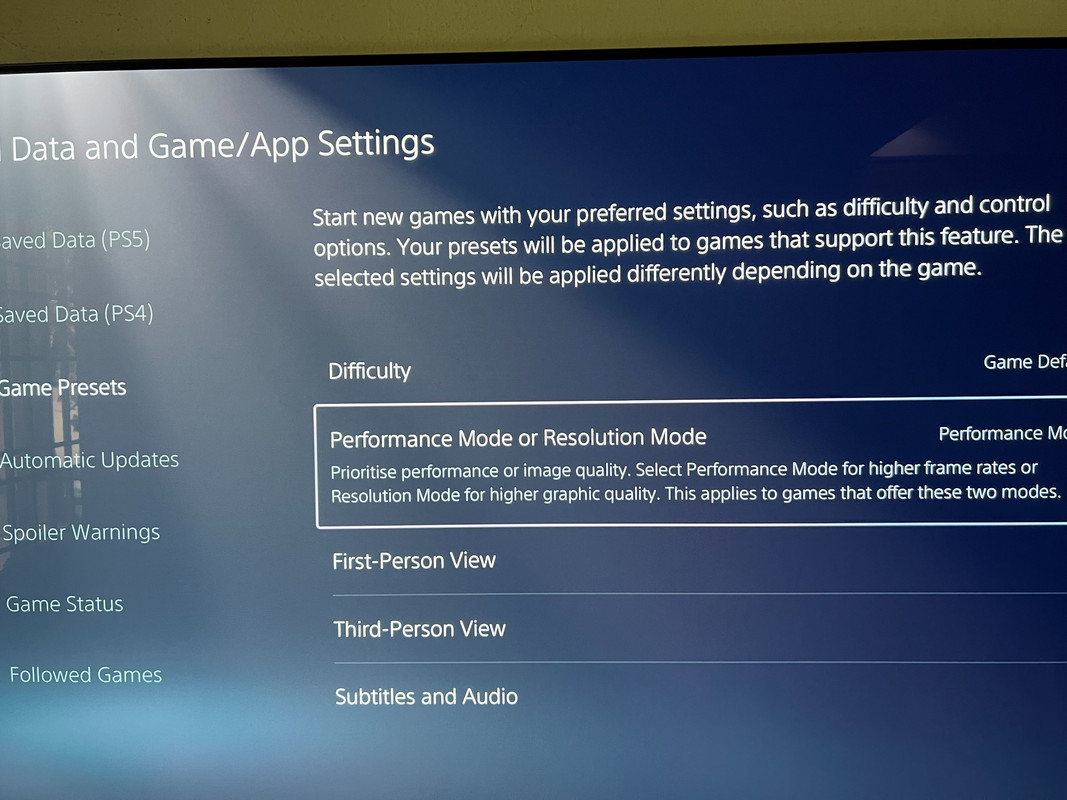
Hi all sifu
I got this hdmi 2.1 from Ugreen. Just got my C1 today playing CoD Cold War dint trigger 120hz. Any setting I could be missed? All set automatic vrr enable https://s.lazada.com.my/s.4lWRn 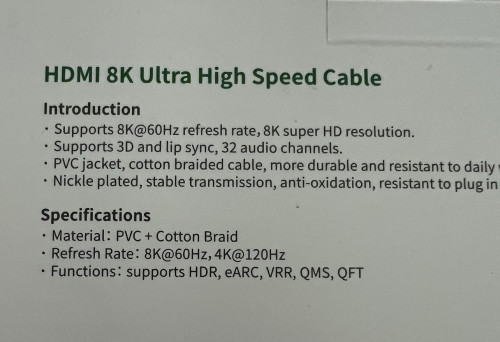 |
|
|
Sep 14 2022, 03:07 PM
|
|
Senior Member
4,522 posts Joined: Apr 2006
|
QUOTE(splinter @ Sep 14 2022, 01:53 PM) Hi all sifu If you can enable 120hz in the PS5's system settings, the game will run in 120hz automatically. The option for 120fps in-game is always disabled for some reason, but if your PS5 is in 120hz mode then the game is already in 120hz.I got this hdmi 2.1 from Ugreen. Just got my C1 today playing CoD Cold War dint trigger 120hz. Any setting I could be missed? All set automatic vrr enable https://s.lazada.com.my/s.4lWRn |
|
|
|
|
|
Sep 14 2022, 08:02 PM
|
|
Senior Member
2,120 posts Joined: Jan 2003 From: In front my PC
|
QUOTE(SSJBen @ Sep 14 2022, 03:07 PM) If you can enable 120hz in the PS5's system settings, the game will run in 120hz automatically. The option for 120fps in-game is always disabled for some reason, but if your PS5 is in 120hz mode then the game is already in 120hz. Hi SSJBen, is it 120hz option as below? If yes it does show in PS5 display setting however playing cod cw I use TV game optimizer it only show 59-60fps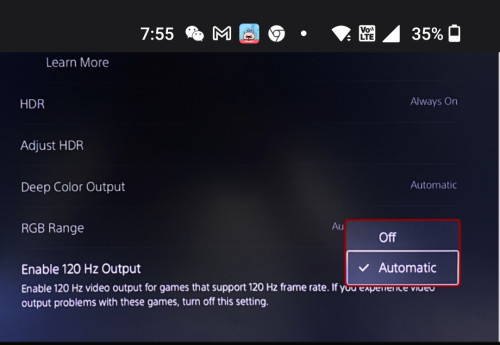 Also can I use VPN change to US and download HBO MAX and Disney+ ? Any problem with the LG agreement things and if I switch back MY the apps still there right? |
|
|
Sep 15 2022, 03:01 PM
|
|
Senior Member
4,522 posts Joined: Apr 2006
|
QUOTE(splinter @ Sep 14 2022, 08:02 PM) Hi SSJBen, is it 120hz option as below? If yes it does show in PS5 display setting however playing cod cw I use TV game optimizer it only show 59-60fps Automatic option is correct for 120hz output.Also can I use VPN change to US and download HBO MAX and Disney+ ? Any problem with the LG agreement things and if I switch back MY the apps still there right? I don't play CODCW, so I'm not sure how the options in-game are like. Maybe check this guide: https://wccftech.com/guide-call-of-duty-bla...-war-ps5-120hz/ |
|
|
Sep 15 2022, 04:54 PM
|
|
Junior Member
370 posts Joined: Dec 2015
|
QUOTE(splinter @ Sep 14 2022, 08:02 PM) Hi SSJBen, is it 120hz option as below? If yes it does show in PS5 display setting however playing cod cw I use TV game optimizer it only show 59-60fps Did you enable ultra HDMI deep Color to enable full bandwidth for HDMI 2.1 on your LG C1 ?Also can I use VPN change to US and download HBO MAX and Disney+ ? Any problem with the LG agreement things and if I switch back MY the apps still there right? |
|
|
Sep 15 2022, 05:24 PM
|

Junior Member
487 posts Joined: Apr 2008
|
QUOTE(splinter @ Sep 14 2022, 01:53 PM) Hi all sifu Perhaps you can check setting PS5 Game preset to Performance mode and in game graphic setting to verify if the game run at 120Hz.I got this hdmi 2.1 from Ugreen. Just got my C1 today playing CoD Cold War dint trigger 120hz. Any setting I could be missed? All set automatic vrr enable https://s.lazada.com.my/s.4lWRn » Click to show Spoiler - click again to hide... «
|
|
|
Sep 16 2022, 12:26 AM
|
|
Senior Member
2,120 posts Joined: Jan 2003 From: In front my PC
|
Thank you @ssjben and others above. 120hz enable via preset to performance setting and restart the game 👍
1) Between that anyone using vpn switch to US LG store and download hbomax and Disney+? Then switch back malaysia and those apps still available. Any risk for LG switch US agreement? 2) https://shopee.com.my/product/22913974/6850...67-1663259492.9 can use this 3M micro fiber to wipe the screen if needed? Or any recommend? 3) I watched most c1 setting on YouTube. Most choose ISF bright or dark but I decide follow hdtv advice and choose film maker mode which mostly don’t have a lot enhancement and pure to natural according to the host. I also find it quite ok not too fancy & bright. Any opinion? This post has been edited by splinter: Sep 16 2022, 12:38 AM |
|
|
Sep 16 2022, 02:25 AM
|
|
Senior Member
4,522 posts Joined: Apr 2006
|
QUOTE(splinter @ Sep 16 2022, 12:26 AM) Thank you @ssjben and others above. 120hz enable via preset to performance setting and restart the game 👍 1) Don't think there's an issue with that. What are they gonna do to you? Ban your TV? Lol. 1) Between that anyone using vpn switch to US LG store and download hbomax and Disney+? Then switch back malaysia and those apps still available. Any risk for LG switch US agreement? 2) https://shopee.com.my/product/22913974/6850...67-1663259492.9 can use this 3M micro fiber to wipe the screen if needed? Or any recommend? 3) I watched most c1 setting on YouTube. Most choose ISF bright or dark but I decide follow hdtv advice and choose film maker mode which mostly don’t have a lot enhancement and pure to natural according to the host. I also find it quite ok not too fancy & bright. Any opinion?  2) I'm not sure about that cloth. Not all micro fiber cloths are made the same, some are not fine enough and some are quite abrasive. Better double check. 3) If you're watching movies, filmaker mode is the most accurate. If you're gaming, don't use any of the modes other than Game (or if you want PC) mode. Been a while since I last touched a C1, but IIRC the ISF expert modes from that model has a lot of delta errors out of the box. The color temperature is also on the very cool side I think. splinter liked this post
|
|
|
Sep 18 2022, 10:44 PM
Show posts by this member only | IPv6 | Post
#4020
|

Senior Member
1,062 posts Joined: May 2008
|
Does Disney+ button on the remote do anything?
I press it and it open browser to Disney+. I installed the app but still it open the browser. |
| Change to: |  0.0437sec 0.0437sec
 0.40 0.40
 6 queries 6 queries
 GZIP Disabled GZIP Disabled
Time is now: 6th December 2025 - 03:27 AM |
 Quote
Quote