So in order to turn it on , you also need to turn Dynamic Contrast on , which will cause fine details to vanish.
Refer to this video for more details
This post has been edited by Convael: Jun 22 2018, 01:05 PM
LG OLED TV Discussion Thread, OLED TV
|
|
 Jun 22 2018, 01:02 PM Jun 22 2018, 01:02 PM
Return to original view | IPv6 | Post
#21
|
 
Senior Member
1,109 posts Joined: Sep 2007 From: Kuala Lumpur 
|
If you are worry about game scenes being too dark , the Dynamic Tone Mapping features are also on C7 / B7 . But they are merged under the Dynamic Contrast settings .
So in order to turn it on , you also need to turn Dynamic Contrast on , which will cause fine details to vanish. Refer to this video for more details This post has been edited by Convael: Jun 22 2018, 01:05 PM |
|
|
|
|
|
Jun 25 2018, 06:25 PM
Return to original view | Post
#22
|
|
Senior Member
1,109 posts Joined: Sep 2007 From: Kuala Lumpur
|
QUOTE(J-HAM @ Jun 25 2018, 02:02 PM) It finally arrive. Legitimate local unit. It is always a gamble to buy expensive TV online from not so famous stores , but it looks like you won the lottery , Grats . Enjoy this badass  |
|
|
Jun 26 2018, 12:33 PM
Return to original view | Post
#23
|
|
Senior Member
1,109 posts Joined: Sep 2007 From: Kuala Lumpur
|
QUOTE(cchenfong @ Jun 26 2018, 08:14 AM) Sony Bravia XBR-65A1E 65" 2160p UHD OLED Internet TV - RM5,000 [https://www.lazada.com.my/products/sony-bravia-xbr-65a1e-65-2160p-uhd-oled-internet-tv-i365635116-s521024384.html?spm=a2o4k.searchlist.list.3.6fe05efcg0Ytsj&search=1] Hahaha , that's a very typical scamming trick from these e-shop.Sorry for posting under this thread since the deal is Sony but it is an OLED tv so this is just for sharing. The payment arrangement is dubious to me as they are asking for money to be transferred to their bank account instead of going through Lazada online payment platform, as I have checked with the so-called seller. Otherwise, the deal may look legit, but still too good to be true. Be warned. You message the merchant and they ask you to transfer via bank account . Who is say they will still send you the TV after paying ? If you pay thru the platform ( Lazada in this case ) , at least Lazada will hold the fund and you can complain to Lazada if the seller bail. This seems to be too fishy , too good to be true . 65 inches A1E , please bro . Even a display unit won't be going at this price. This seller also have NO official trading history on Lazada , no ratings . And then you look at their product list , 65 inches Z9D for RM5000 Maybe if they do Cash On Delivery with you , but I am sure there will be all sort of excuses coming up This post has been edited by Convael: Jun 26 2018, 12:51 PM |
|
|
Jun 29 2018, 07:30 PM
Return to original view | IPv6 | Post
#24
|
|
Senior Member
1,109 posts Joined: Sep 2007 From: Kuala Lumpur
|
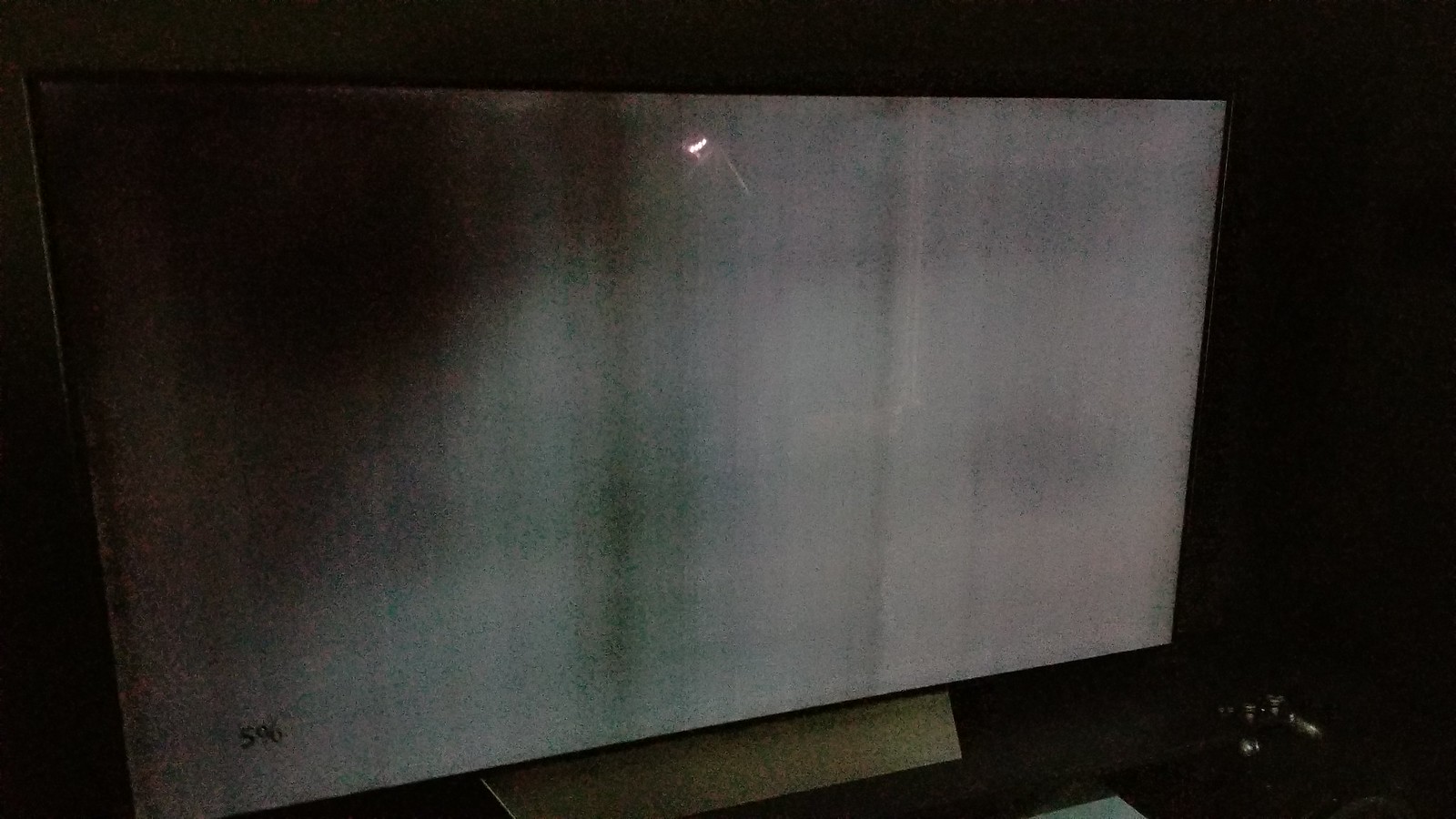
QUOTE(Alias @ Jun 29 2018, 07:19 PM) 55" C8 @ 7.5k at toong heng pj (next to fatty crab). I'm gonna wait til the price hits 7 flat. Get the 65 inches if possible , it is a little brighter than the 55 inches . Especially after calibration . Normally I wouldn't care too much about a little brightness , but with Oled you will want every bit of brightness you can get because once the ABL starts to kick in , a lot of games and sport shows look really dark in comparison , even if the situation has improved from last year's model. And the 5% gray uniformity is also a more severe issue on the 55 inches , which can be quite distracting This post has been edited by Convael: Jun 29 2018, 07:36 PM |
|
|
Jun 29 2018, 09:59 PM
Return to original view | Post
#25
|
|
Senior Member
1,109 posts Joined: Sep 2007 From: Kuala Lumpur
|
QUOTE(SSJBen @ Jun 29 2018, 08:51 PM) @bolded Normally yes Are you sure about that? Screen uniformity is universally agreed and is statistically proven to be better on smaller panels. But the OLED screens have had this problem for a while ago , the near black uniformity particularly 3 or 5% have always been pretty bad. Back then it was just stripes and vertical lines , but it has been getting severe . Something like this . » Click to show Spoiler - click again to hide... « I have exchanged my 55 inches B7 twice because of this . The first one had a big patch of blackness botched at the center of the screen , the second exchanged one had the same problem but the dark spots were moved to corners . I have called LG but they don't think it is a defect either luckily HLK was nice enough to exchange it . I eventually give up and settled with the second one since the one I saw in their shop have similar problems . I know at least 3 others owner who have experienced this , our 65 inches seem to be fine with just lines and stripes but nothing as bad as a patch of darkness so far. I have seen the same thing happening on avforums, unfortunately this problem seems to be not so prominent among the reviewers since many of them use a bigger screen as review models. Rting 's review of 55 inches C8 briefly mentioned this as well in their gray uniformity test but they don't think it is too bad. Steve Withers reviewed a 65 inches and found no problems with it . This can be pretty distracting sometimes , such as Marco Polo where there are a lot of near black scenes . They are nevertheless more of a nuisance than any major defects. This post has been edited by Convael: Jun 29 2018, 10:58 PM |
|
|
Jul 1 2018, 06:49 AM
Return to original view | Post
#26
|
|
Senior Member
1,109 posts Joined: Sep 2007 From: Kuala Lumpur
|
QUOTE(anfieldude @ Jun 30 2018, 03:18 PM) Peak Brightness is more of a panel to panel variation. Not related to panel size. I can accept more typical uniformity issues such as vertical lines / stripes but the these big patch of dark gray is downright unacceptable . It was so distracting on my 55 inches that I had an urge to replace them right away except the stores that sold me the screens don't want to deal with it anymore.I find 5% gray worse on 65' compared to 55' for 2017 models. Near black uniformity will always be a challenge for OLEDs while bright screen uniformity is a challenge for LED backlit LCD technology. LG 's technician explanation for this is vague at best , since they think this is " normal " . But I am not seeing this on my 65 inches screen but it was on all my exchanged 55 inches units as well . Of course this might as well be a defective batch , along with 3 other friends of mine who had the same problem , but I doubt it is mere coincidence . I have spoke to several calibrators and they can't give me any definitive answer either. For normal panels , the peak brightness can be different due to panel variance , but for Oled its somewhat a complicated situation because of its much stronger ABL which involved control circuitry of electricity output onto the screen. The ABL restriction is harder on a larger screens to prevent excessive heat , I have come across several w8 users that owned a 77 screen but their peak brightness are measured about 100 nits lower ( only @ about 600 nits ) , which put them in the same place as last year's Oled. Note : This actually contradict with what I said previously on larger screen should generally be brighter , it should be the reversed . I must have had a brain fart back then  My deepest apologies My deepest apologies QUOTE Get the 65 inches if possible , it is a little brighter than the 55 inches . Especially after calibration . This post has been edited by Convael: Jul 1 2018, 07:18 AM |
|
|
|
|
|
Jul 1 2018, 07:16 AM
Return to original view | Post
#27
|
|
Senior Member
1,109 posts Joined: Sep 2007 From: Kuala Lumpur
|
QUOTE(SSJBen @ Jun 29 2018, 11:12 PM) While I never had a 55", this is interesting news to me. I've monitored a large majority of owners on the C7/B7 and B6 owners thread on AVSForum, they have shown their screen uniformity to be better than 65" owners. There are always more reports about 65" owners exchanging their sets than 55" owners. thx , let me know the result I'll be calibrating a 55" C7 next week, I'm going to look into this. I wanted LG to do something about this but the local LG technician doesn't give a damn really . A bunch of us from avsforum wanted LG to do something about this patches of dark grays , we might just end up petitioning to their UK headquarter |
|
|
Jul 5 2018, 07:52 PM
Return to original view | Post
#28
|
|
Senior Member
1,109 posts Joined: Sep 2007 From: Kuala Lumpur
|
QUOTE(teen08 @ Jul 5 2018, 06:50 PM) read the first 10 pages of this thread. interesting info. thinking of getting an oled too. 55 most probably as i dont feel like spending that much on a tv for 65. i game too. So is c8 the best bet? its for an apartment. 65 in a small hall would look too big. i think. also the sitting position is 2-3 meters away. at the back of where the couch will be theres two horizontal windows and on the side is the sliding door for the balcony. Read here sunlight is not good for OLED. will it be ok for me to get on with my apartment setting? thanks Glare caused by Sunlight is always distracting , even with the best anti reflection finish the picture quality will degrade to certain degree because of the strong environmental lights . However a brighter TV can often perform better under the same situation. If you really can't avoid the sunlights ,perhaps you want to consider getting a brighter TV such as the Samsung's Q9FN. 2-3 meters aren't too far away for a 65 inches , because we are talking about a UHD TV here . If your budget allows it , the 65 inches can be more flexible than the 55 inches . But in terms of PQ they should be identical . C8 transforms all your HDR 10 (Static meta data ) into Dolby Vision - alike HDR (with Dynamic meta data ) , so if you watch a lot of HDR content it is worth picking one over C7 Otherwise just buy whichever you can find cheaper , from a reputable source of course . This post has been edited by Convael: Jul 5 2018, 07:57 PM |
|
|
Jul 6 2018, 01:21 AM
Return to original view | Post
#29
|
|
Senior Member
1,109 posts Joined: Sep 2007 From: Kuala Lumpur
|
QUOTE(teen08 @ Jul 6 2018, 12:58 AM) But not all media is 4K. What Do u mean by flexible? A larger screen means you have more room to adjust the distance between you and the TVIncase if you want to invite friends and guests to your house , a larger screen provide you with a wider viewing area before the brightness and colors starting to shift. As much as OLEDS have one of the best viewing angles , the picture quality can still deteriorate when watched from the sides This post has been edited by Convael: Jul 6 2018, 02:39 AM |
|
|
Jul 6 2018, 11:09 PM
Return to original view | Post
#30
|
|
Senior Member
1,109 posts Joined: Sep 2007 From: Kuala Lumpur
|
QUOTE(anfieldude @ Jul 6 2018, 09:07 AM) What does this mean? I don't think C8 converts HDR10 to Dolby Vision. DTM (Dynamic Tone Mapping) of C8 can analyze the meta data of HDR 10 scene by scene and tonemap the greater difference of mastered display to playback device into something more accurate than typical HDR10. The result is similar to HDR10+ /Dolby Vision You also missed one word , I said Dolby vision - alike ,of course it is not going to miraculously transform from SMPTE ST 2086 into the SMPTE ST2094 format of Dolby vision. And the end result ? If we are going to be extremely finicky here , it is not going to look exactly the same as natively mastered Dolby Vision content but it is close enough. Here is a comparison between a W7 and C8 with Dynamic Tone Mapping on , the C8 is much more capable of tonemapping the area surrounding strong light sources , because most TVs don't usually reach the required nits to display it (4000 cd/m2 in this case ). It is very identical to what Dolby Vision can do. Left is W7 , right is C8 » Click to show Spoiler - click again to hide... « This post has been edited by Convael: Jul 7 2018, 10:10 AM |
|
|
Jul 11 2018, 11:14 PM
Return to original view | Post
#31
|
|
Senior Member
1,109 posts Joined: Sep 2007 From: Kuala Lumpur
|
QUOTE(-kytz- @ Jul 10 2018, 06:31 PM) Thanks man! If the video source do support HDR , it should automatically be turned on . Btw, do I need to like enable HDR in the TV or something? I also assume all the picture settings like OLED Light,brightness would be adjusted accordingly as well? Most of the time , Cinema & the ISF / technicolor mode are accurate enough , so you do not really need to adjust these settings too muich . Under HDR settings , just leave your OLED Lights to max . The OLED Light settings on LG OLED TV 's Dolby Vision mode is a little special , so just leave that @ 50. QUOTE(anfieldude @ Jul 7 2018, 11:19 AM) 2017 models also have dynamic mapping of HDR which is called Dynamic Contrast . The algorithms are tweaked so it's a matter of preference on what is correct. Yep , I am aware of that . In fact I have mentioned that on previous page as well , it is baked into the dynamic contrast from last year's model.But in this case most people shouldn't turn it on , because the dynamic contrast adjustment will cause some of the fine details to vanish. It's similar to contour banding improvement this year , combined with mpeg noise reduction settings , yet another setting most are hesitate to leave On. I know all the video purist are straying away off it , but we have seen how awesome the smooth gradation from Sony TVs can be . The LG's A9 version is just as capable , if not surpassing it . It does comes at a cost of some little fine shadow details , I can live with that. QUOTE The thing about tone mapping is that there is no standard on gamma manipulation. There is no wrong or right. There will always be limitations of the HDR implementation of OLEDs as the presence of WRGB pixels instead of RGB is already against how white light is presented. Even though the LG OLEDs can do close to 800nits, colour is not correct past 400Nits due to the W pixel being used to generate the additional nits past that. I agree with you , being no right and wrongs . But all of us have preference , no ? Personally I just can't get used to the Sony OLED's approach to their tonemapping . Some people are particularly sensitive to graphical details . LG's OLED is just excellent at making these highlight shine , where on Sony's side , the white clipping effects are too heavy , even if the object end up to be brighter. And sadly it is as you said , color volume does remain a struggle for all the OLED due to the wRGB Panel  But again , human eyes are vulnerable and poor compare to many animals . We can perceive more colors and details in the darker zones than white , blinding highlight area . Your tools can measure more values at higher luminance , but can the average joe's untrained eyes perceive all these difference ? 500~nits in a dark room , I already find myself struggling to stare at the edges of sunlight on the screen . To actually notice much more details and colors would be quite a challenge . At 1000 nits ? I almost can't tell if the center of that sparkling dot was of white or blue . I am not saying it doesn't matter because the color difference is definitely there , but how big of a difference it makes with an untrained perception? . Especially when most of these specular highlights that are mastered at high cd/m2 are white lights. That is also why OLED panels , despite of lacking the peak brightness / color volume of those 2018 QLED , the perfect black level will ensure OLED remain the most impressive HDR experience in the market for now. This post has been edited by Convael: Jul 12 2018, 02:46 AM |
|
|
Aug 21 2018, 10:08 PM
Return to original view | Post
#32
|
|
Senior Member
1,109 posts Joined: Sep 2007 From: Kuala Lumpur
|
For SDR , in a darkroom you want to keep the OLED lights lower so the brightness look more comfortable (100 ~ 200 cd/m2) and natural to the eyes .
The settings suggested by rting is not very practical because they calibrate their TVs in a completely sealed , dark room without any source of lights . I find 62 on ISF Dark room with contrast @ 85 ( ~ 200 cd/m2 ) to be perfectly acceptable assuming you have a wee bit of light from kitchen , street lamp from the window etc . Don't mess with the Dolby Vision OLED lights setting above 50 as it changes the gamma . LG do minor calibration for their TVs before shipping out . That's why everytime after I replaced the default OLED screens , the settings feel a bit off and had to be calibrated again. While this is by no means , comparable to hiring an experienced calibrator , the out of box settings should be accurate enough for most people . The last few % is to make your chart look prettier and the color temperature closer to 6500k , average Joes won't notice much of a difference . If you are one of those AV enthusiast aiming to get closer to perfection , there's when you hire a calibrator . Post calibration I noticed better near black details , colors look a little more natural especially skin tones of human look extremely realistic . This post has been edited by Convael: Aug 22 2018, 05:54 AM |
|
|
Aug 23 2018, 08:55 PM
Return to original view | Post
#33
|
|
Senior Member
1,109 posts Joined: Sep 2007 From: Kuala Lumpur
|
QUOTE(teen08 @ Aug 23 2018, 02:03 PM) hi sorry noob in all this. hope u can help Yes the motion pro is BFI , no soap opera effects but there is another problem here , the flicker is too obvious . Some people are more tolerant to flickers .how to activate BFI? motion pro??? does it have soap opera effect? dynamic tone mapping is on in game mode? finally got my c8. no regrets!! awesomeness!!!   There brightness on the screen also take a hit . This is what I use : Picture profile : ISF Expert Dark / Technicolor Energy Saving : Off Aspect ratio : Original Just scan : On OLED Light : Perfect dark room : 35 ~ , Normal Dark / Dim room : 60 ~ , 100 for HDR , 50 for Dolby Vision Contrast : 85 (100 for HDR ) Brightness : 50 Sharpness : 10 ( 0 if you are watching ULTRA HD bluray ) Color : 50 Tint : 0 Dynamic contrast : Off Dynamic Tonemapping ( in HDR only ) : On ( reason to buy C8 , always leave it on ) Super resolution : Off Color gamut : Auto Gamma : 2.2 White balance Color temp : Warm2 Don't touch the rest of the settings unless you are calibrating the TV. Noise reduction : Off ( low for youtube videos ) MPEG noise reduction : On , low *** This activate gradient smoothing at the cost of sacrificing some fine details . Video purist suggests turning it off but I have gone through extensive amount of movies and I find this feature really helpful , the fine details removal only happen in very specific scene which is quite rare. I leave it on low . Black level : Low ( for full RGB , change this to high ) Motion Eye Care : Off TruMotion : Off / Custom (3 , 3 or 0 , 5 , you can adjust this to your preference) . If you don't mind the soap opera effects " CLEAR " generates less motion artifact and is more usable than " SMOOTH " Motion Pro : Off ( the BFI , too much flickers for me ) This post has been edited by Convael: Aug 23 2018, 09:01 PM |
|
|
|
|
|
Aug 31 2018, 09:09 PM
Return to original view | Post
#34
|
|
Senior Member
1,109 posts Joined: Sep 2007 From: Kuala Lumpur
|
QUOTE(DeMl @ Aug 31 2018, 04:25 PM) is c8s built in speaker good enough without getting a soundbar ? saw the unit at best selling 8200 Depends on if you are wall mounting the TV , the Alpine Stand of C8 actually serves a purpose of redirecting the sound waves from the its 2.2 downfiring speakers & woofers to the audience. It is plenty loud but also delivering good and clear dialogues.Obviously You can't compare the TV to having a dedicated sound setup , but for people who don't care enough the TV sound better than your average TV. Although I imagine if you are rich enough to buy an OLED TV , at the very least get a pair of good speakers to complement with the picture quality. This post has been edited by Convael: Sep 1 2018, 10:00 AM |
|
|
Aug 31 2018, 09:12 PM
Return to original view | Post
#35
|
|
Senior Member
1,109 posts Joined: Sep 2007 From: Kuala Lumpur
|
QUOTE(enkil @ Aug 31 2018, 09:04 PM) Its good. I also feel the sound is not powerful enough Yea I find last year's B7 / C7 be a bit lacking , you have already spent this much for some of the best picture quality , why not a bit more for a proper sound setups ? |
|
|
Aug 31 2018, 09:30 PM
Return to original view | Post
#36
|
|
Senior Member
1,109 posts Joined: Sep 2007 From: Kuala Lumpur
|
QUOTE(enkil @ Aug 31 2018, 09:16 PM) Did they fix it on the b8/c8? They are both pretty loud , the C8 does sound a bit better thanks to the Alpine stand .Though they are no match to my 5.1  |
|
|
Oct 16 2018, 08:12 PM
Return to original view | Post
#37
|
|
Senior Member
1,109 posts Joined: Sep 2007 From: Kuala Lumpur
|
QUOTE(SSJBen @ Oct 16 2018, 03:16 PM) Well, well, well. Looks like the latest C8/E8 firmware (4.10.05) has also introduced aggressive ABL algorithm just like the Sony AF8 and last year's C7 (which has been given a FW update this year to revert back to pre-aggressive ABL). I have read about that , the latest firmware has altered the dimming algorithm which was confirmed by LG.Pretty much means C8/E8 is pointless for gaming now. B8 is not affected, but it's only a matter of time when the next firmware hits. (This is no longer the case , Forbes 's John Archer was talking to LG 's engineer , who has clarified that the same dimming algorithm has always been applied to the LG OLEDs a while ago . But there are more people noticing brightness fluctuation now due to the increased amount of new LG OLED TV owners ) I've updated my c8 to the same firmware , so far I have yet to notice any sort of dimming from casual browsing through the Netflix , Youtube and other apps . In order to recreate the issues I have tried leaving static elements on bright scenes for a period of time . What I 've noticed so far , there's a slight delay of transition from darker to brighter area probably due to the dimming algorithm . It is weird in a sense that it almost look like image retention at first (but it isn't ) as it fades away after 5-10 seconds . Think of it as a really crappy F.A.L.D algorithm that is delayed for 5-10 seconds. It doesn't nearly dim the whole screen like C7 did last year but only the scenes with very high APL , particularly the part with a lot of fonts , game HUD & static elements . If you are connecting your PC to the OLED , you may notice this issue much more frequently as the entire screen is filled with fonts and static elements (High APL). To be fair , the LG 8 series are still probably the brightest OLED TVs out there , not just in terms of peak brightness . They are able to retain that same level of brightness up to 70% of APL , which is quite remarkable as no other OLED Tv is capable of such feat. In another word, You will barely notice any sort of screen dimming in 90% of the movies since they are mostly mastered at 30-70% APL . P/S: Several 55 and 65 inches C8 users have also reported they didn't have the issue post update , which leads me to believe LG may be targeting specific region as they are planning to include Burn-Ins as part of the warranty in the European Region. B8 is not affected by the update , yet. This post has been edited by Convael: Nov 23 2018, 08:00 AM |
|
|
Nov 4 2018, 10:15 PM
Return to original view | Post
#38
|
|
Senior Member
1,109 posts Joined: Sep 2007 From: Kuala Lumpur
|
QUOTE(mois @ Nov 4 2018, 11:43 AM) Local here selling 65" C8 Rm12,499 free sound Sk8. Should be among the lowest price already right? Assuming you are planning to sell that sound bar , sure . |
|
|
Nov 8 2018, 10:36 AM
Return to original view | Post
#39
|
|
Senior Member
1,109 posts Joined: Sep 2007 From: Kuala Lumpur
|
QUOTE(asciii @ Nov 8 2018, 09:02 AM) Where can i get the 55 inch C8 model in kl area with good price ya? Looks like shops like senheng n senq only have the B8 models for the 55 inch Lazada is doing sales , under 7k on 11/11. |
|
|
Nov 9 2018, 02:50 PM
Return to original view | Post
#40
|
|
Senior Member
1,109 posts Joined: Sep 2007 From: Kuala Lumpur
|
|
| Change to: |  0.1192sec 0.1192sec
 0.49 0.49
 7 queries 7 queries
 GZIP Disabled GZIP Disabled
Time is now: 20th December 2025 - 10:05 PM |
 Quote
Quote