Welcome Guest ( Log In | Register )

11 Pages « < 4 5 6 7 8 > » Bottom

Outline · [ Standard ] · Linear+

 LG OLED TV Discussion Thread, OLED TV

views
     
TongCN
post Jun 24 2022, 11:39 AM

Look ma, I have lots stars :D
*******
Senior Member
6,614 posts

Joined: Aug 2008
From: Malaysia


QUOTE(Kahlamx @ Jun 24 2022, 11:33 AM)
My 65 CX only Sept 2021. Lol. But I am already itching to upgrade to S95B with so many good reviews in US. Lucky dont have yet in Malaysia this year, otherwise my wife will kill me haha.
*
who knows LG maybe get some pressure from Samsung and C3 will have new panel and also better one to counter thumbup.gif

Tahan another year then see how first
TongCN
post Jun 26 2022, 11:58 AM

Look ma, I have lots stars :D
*******
Senior Member
6,614 posts

Joined: Aug 2008
From: Malaysia


QUOTE(overfloe @ Jun 25 2022, 09:24 PM)
New firmware now available on LG my website.
My tv didnt detect so i updated manually via usb.

Before and after update:

user posted imageuser posted image
*
Same, manual download that 1.3GB files. lolz...

Pendrive old and slow speed copy till luput XD
TongCN
post Jun 27 2022, 10:43 AM

Look ma, I have lots stars :D
*******
Senior Member
6,614 posts

Joined: Aug 2008
From: Malaysia


Yea, it feels faster than out of the box last time XD

But still i really hope they redesign like how C9, CX interface.
TongCN
post Jun 29 2022, 11:16 AM

Look ma, I have lots stars :D
*******
Senior Member
6,614 posts

Joined: Aug 2008
From: Malaysia


LG CX now can download 4.40.10 from https://www.lg.com/my/support/software-firm...OLED55CXPTA.ATS

OTA this morning i checked havent arrived.
TongCN
post Jun 29 2022, 02:57 PM

Look ma, I have lots stars :D
*******
Senior Member
6,614 posts

Joined: Aug 2008
From: Malaysia


QUOTE(Kahlamx @ Jun 29 2022, 02:27 PM)
I was prompted the 04.40.10 OTA on my CX last night. I updated and I dont see any difference le. I wonder if this update resolve the dolby atmos series X lag issue yet.
*
Tonight i try to manual update if there is no OTA.
TongCN
post Jun 30 2022, 09:14 AM

Look ma, I have lots stars :D
*******
Senior Member
6,614 posts

Joined: Aug 2008
From: Malaysia


Updated to 4.40.10 last night manually tru USB

Tested the PCM audio from Xbox > LG CX > Soundbar Q950T and able to play now but have 2 issues:

1) I can select Dolby Atmos for Home Theater now but the result under soundbar doesn't reflect as Dolby Atmos; I still can select sound mode from Standard to others such as surround. Normally should be not accessible.

2) There still slight audio delay but quite minimal now which i tried to play youtube app from Xbox. Previously the lip totally out of sync the moment i start the video.

I then tried the passthrough and still cannot use Dolby Atmos for Home Theater as in there is no sound when i try to play Dolby Atmos contents.

Finally Auto mode works like normal but with slight delay (there's improvement) as compare to before total out of sync.

This post has been edited by TongCN: Jun 30 2022, 09:15 AM
TongCN
post Jun 30 2022, 09:43 AM

Look ma, I have lots stars :D
*******
Senior Member
6,614 posts

Joined: Aug 2008
From: Malaysia


QUOTE(Jeebuy @ Jun 29 2022, 06:32 PM)
How's the experience? Was it good? C1 is attractively priced now
*
I just started using from a month ago.

At first i will feel headache when looking at quite a short distance placing on a 70cm width table (70 * 140 ).
Probably due to the brightness.

Now i completely adjusted to it an can use it like a normal "monitor" for PC usage such as browsing, microsoft office specially Excel is super nice to use now on 48" whistling.gif

My current setup for this C1 is PC, Xbox Series S & Switch (docked)
TongCN
post Jun 30 2022, 10:38 AM

Look ma, I have lots stars :D
*******
Senior Member
6,614 posts

Joined: Aug 2008
From: Malaysia


QUOTE(Jeebuy @ Jun 30 2022, 10:19 AM)
Thanks. I have been watching a lot of YouTube videos too and the use of Fancy Zones seem really practical.
Sounds great. I am an analyst who works from home mostly, so i will use a lot of browsers and word processing docs, excel, pdfs for researches and stuff. I hope with fancy zones, it’ll be able to provide a good workflow. My only sad point right now is that my main machine is the M1 Mac Mini, which only has 60Hz max output. But i tell myself the C1 will serve as a good monitor for PS5 lol.
*
At the moment i think only Safari support 120hz for MacOS , right ? And also like certain pages.

Apple still need to improve on those laugh.gif
TongCN
post Jun 30 2022, 04:25 PM

Look ma, I have lots stars :D
*******
Senior Member
6,614 posts

Joined: Aug 2008
From: Malaysia


QUOTE(zzzz52 @ Jun 30 2022, 03:41 PM)
How far are you sitting from the monitor?
*
QUOTE(maxstrife @ Jun 30 2022, 04:15 PM)
Bro 70cm width also still headache when playing xbox ? Alamak, then what is the suitable distance bro? I'm using 120cm x 60cm table. Planning lg c2 42
*
My table is 70cm width and the TV already occupied like 25~30cm.
So if calculate my keyboard distance is edge there (end of the 70cm), my eyes distance currently roughly 50~60cm away from the TV if i use keyboard and mouse tongue.gif
Gaming with controller will be further from it like 1.5~2 meter away.

QUOTE(SSJBen @ Jun 30 2022, 03:57 PM)
Important for using TVs as monitor usage: make sure the brightness is at 100 cd/m².

This is not just for the sake of accuracy adhering to SDR guidelines, but also not to burn out your panel too quickly (it will still happen eventually, but the idea is that by the time it happens, the TV is so old you might as well junk it).

The OLED brightness setting to achieve 100cd is a value between 32-35 for most panels, at least the ones I've already calibrated (done about 15x C1 panels so far).
*
Yea, this one also done d, screensaver, hide taskbar, dark background as well.
Hide those desktop icons away.

TongCN
post Jul 18 2022, 10:48 AM

Look ma, I have lots stars :D
*******
Senior Member
6,614 posts

Joined: Aug 2008
From: Malaysia


QUOTE(wira1979 @ Jul 18 2022, 09:55 AM)
Can use special wipes for glasses (lens cleaning wipes). Can get on Lazada or Shopee. These are good for those oil smudges and stubborn marks.

Always try to use microfibre cloth first before using the wipes.

And I can attest to the toughness of the OLED panel. Just wall mounted my LG GX last week and there's no way you can lift a 65" panel without it flexing like mad. As long as you're reasonably careful while handling the TV, it's a lot tougher than you think.

Having said that, I still say a little prayer every time I pull the TV out to adjust cables or plug USB though.
*
Yea, the flex of the top part for C series really gimme hard time last time when i tried to assemble the C1 48" alone

The CX 65" of mine also need 2 person to hold for wall mount
TongCN
post Jul 21 2022, 01:01 PM

Look ma, I have lots stars :D
*******
Senior Member
6,614 posts

Joined: Aug 2008
From: Malaysia


But for first timer (let say after technician installed and left but wanna self do next time), for sure will scare scare (kia kia) one when handling ma biggrin.gif

Since it's not cheap also.

This post has been edited by TongCN: Jul 21 2022, 01:01 PM
TongCN
post Sep 19 2022, 10:20 AM

Look ma, I have lots stars :D
*******
Senior Member
6,614 posts

Joined: Aug 2008
From: Malaysia


Hmm.. any one has Apple TV + LG TV having this "screen change" symptom when watch Youtube? (FYI, i also posted in Apply TV post)

My situation with all firmware updated:
1) Apple TV 4K (2021) - TVOS16
2) LG OLED CX

My Apple TV default setting is 4K SDR 60hz only with match frame rate & contents ON

Whenever i watch or exit a video in youtube, the screen will turn black for few seconds (similar to how we watch video with Dolby vision / HDR that moment) but here it doesnt change from SDR to HDR/DV.

The video stays SDR only but dunno why the "black screen"
TongCN
post Sep 20 2022, 11:32 AM

Look ma, I have lots stars :D
*******
Senior Member
6,614 posts

Joined: Aug 2008
From: Malaysia


QUOTE(SSJBen @ Sep 19 2022, 12:50 PM)
HDCP handshake.
*
sweat.gif ouch .. kinda annoying but hopefully can get some patch/fix
TongCN
post Oct 17 2022, 03:25 PM

Look ma, I have lots stars :D
*******
Senior Member
6,614 posts

Joined: Aug 2008
From: Malaysia


QUOTE(Redundant @ Oct 17 2022, 01:59 PM)
Hi guys, i recently bought a LG C2 48" and have been enjoying it with my PS5.

However the CECC feature is bothering me as it switches on my PS5 whenever I switch on the TV. Switching it off will not allow me to on the TV automatically when i Switch on my PS5... my old sony tv allows me to use this feature only when switching on the PS5.

Any option for me to switch off "power sync" on the tv? Tried toggling the option in the secret menu (rapid press mute button) but it doesn't work...

Thanks!
*
If your input source when turning on TV is not stay as PS5 that HDMI port <-- then PS5 wont turn on

But kinda annoying last time when i own PS4 , headache and end up turn of HDMI Link feature in PS4.

While xbox does this HDMI CEC very well
TongCN
post Jun 9 2023, 10:27 AM

Look ma, I have lots stars :D
*******
Senior Member
6,614 posts

Joined: Aug 2008
From: Malaysia


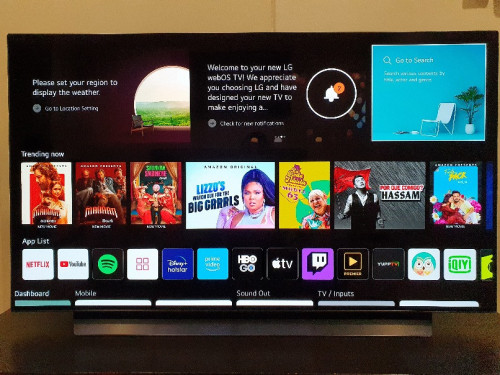
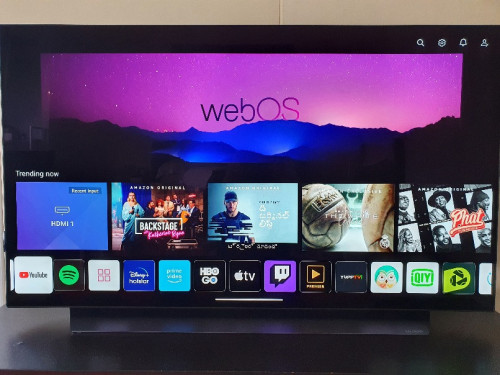
I'm surprised that 2020 (X series) model still got some love from LG to get new UI tru new firmware

Though i dun like the new UI but at least they also give us option to change back blade type.
TongCN
post Jun 9 2023, 10:46 AM

Look ma, I have lots stars :D
*******
Senior Member
6,614 posts

Joined: Aug 2008
From: Malaysia


QUOTE(Kahlamx @ Jun 9 2023, 10:42 AM)
New FW is out already?
*
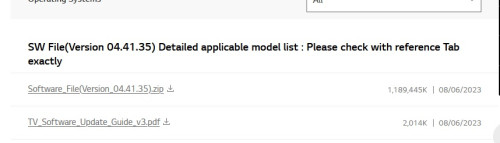
Yea, OTA like last week i received d

The USB version updated yesterday: https://www.lg.com/my/support/software-firmware

user posted image
TongCN
post Jul 6 2023, 10:27 AM

Look ma, I have lots stars :D
*******
Senior Member
6,614 posts

Joined: Aug 2008
From: Malaysia


QUOTE(westlife @ Jul 5 2023, 09:48 PM)
no one will complain tv is too big but otherwise instead.
*
Bought 65" OLED CX 3 years ago and enjoy until recently feel that 65" is small now ...

This post has been edited by TongCN: Jul 6 2023, 10:27 AM
TongCN
post Jul 6 2023, 10:48 AM

Look ma, I have lots stars :D
*******
Senior Member
6,614 posts

Joined: Aug 2008
From: Malaysia


QUOTE(westlife @ Jul 6 2023, 10:46 AM)
yes. indeed. i switch from 32-inch tv to 55-inch OLED sony tv recently, the initial 'upgrade' is significant. now after weeks of watching it, i also find 55-inch too small. tongue.gif

but i will just settle for my 55-inch for now becos the OLED 65-inch and above is way too ex.  tongue.gif
i still cannot spend so much on a tv. cannot swallow. haha.
*
Yea, 77" above really cannot afford right now after calculating all current commitments

So just stick with my 65" and 48" oled for the time being
TongCN
post Jul 6 2023, 11:45 AM

Look ma, I have lots stars :D
*******
Senior Member
6,614 posts

Joined: Aug 2008
From: Malaysia


QUOTE(Kahlamx @ Jul 6 2023, 11:23 AM)
77 G3 MLA OLED seems like a worthy upgrade. Though its still very expensive now.
Once you go black you never go back.  tongue.gif
*
Can only eyeing now with empty wallet

But see how my CX65 goes first, must utilise it 99 till it retires first whistling.gif
TongCN
post Jul 6 2023, 01:05 PM

Look ma, I have lots stars :D
*******
Senior Member
6,614 posts

Joined: Aug 2008
From: Malaysia


QUOTE(Kahlamx @ Jul 6 2023, 11:48 AM)
How many hours you got on your 65CX now?

Mine is 2900+ hours and the PQ is still great and no burn in or dead pixels yet. Though I swapped the entire panel once due to dead pixels in the very beginning.
*
1.5k hours only lolz ..

11 Pages « < 4 5 6 7 8 > » Top
 

Change to:
| Lo-Fi Version
0.0318sec    0.76    7 queries    GZIP Disabled
Time is now: 1st December 2025 - 11:13 AM