Outline ·
[ Standard ] ·
Linear+
Battle of the +/- rm7k TVs, + Discussion on Sharp UE630X
|
SUSjdgobio
|
 Feb 3 2016, 02:13 PM Feb 3 2016, 02:13 PM
|

|
QUOTE(DannyOP @ Feb 3 2016, 01:23 PM) Aiyoo.. that's the sad part no wonder it could not detect some files. Thanks for your suggestion. Best to try Kodi/Plex. Some formats like BD ISO / RMVB may not work anyway due to hardware limitations but you will definitely get more file format support via a third party app compared to the built-in media player. |
|
|
|
|
|
SUSjdgobio
|
Feb 3 2016, 07:18 PM
|
|
|
QUOTE(AVFAN @ Feb 3 2016, 06:17 PM) an alternative is to install vlc from playstore. u can then play via es file explorer, with vlc. es file explorer can read the usb drive better than the native player. can also use vlc direct to play but it is not as neat as es file explorer. es/vlc can read m2ts, mkv, etc. can play dd and dts files but optical out, both will be lpcm. no need to try mx player - this one cannot read dts files properly. i have not tried plex. in summary, for just video, es/vlc is good. if u want dd/dts, use native player. i think i hv tested enough the usb and optical output functions of the ue630x. i will not use them much. maybe for photos on a pendrive. for usb video playback, i just use my android box which can handle all video and audio nicely.  This is a something I did not consider, DD & DTS output only works via native app. I suppose all "uncertified" apps will have the same limitations as well. Which android box are you using now and how happy are you with it? |
|
|
|
|
|
SUSjdgobio
|
Feb 4 2016, 09:29 AM
|
|
|
QUOTE(AVFAN @ Feb 3 2016, 07:40 PM) himedia Q16. good for 3d, bdmv, iso, dts hdma, dd truehd. and dd atmos but my avr can't do.  Video Format : RM, FLV, MOV, AVI, MKV, TS, MP4, ISO, TP, TRP, RMVB , WMV, ASF , VOB, MPG, MPEG, DAT, SWF, 3D MVC Video Format : RM, FLV, MOV, AVI, MKV, TS, MP4, ISO, TP, TRP, RMVB , WMV, ASF , VOB, MPG, MPEG, DAT, SWF, 3D MVC
Video Codec : H.265, H.264, MPEG1/2/4, VC1, WMV, REALVIDEO8/9/10i m very happy with this himedia q16 and the sharp ue630x. what tv, box or device u using? so that we know where u r coming from. I have a 55" Samsung JS7200 tv and I am currently using a Roku 3 for streaming and a Himedia 910B for local files through a NAS. I intend to get a 4K capable box which can do streaming as good as the Roku and handle local files with HD audio. But can't find any that fits the bill within a reasonable budget. |
|
|
|
|
|
SUSjdgobio
|
Feb 4 2016, 12:52 PM
|
|
|
QUOTE(voncrane @ Feb 4 2016, 12:41 PM) What's your reasonable budget? Obviously, if it's too low, you don't get the good stuff. There are very limited & capable boxes that can stream like the Roku. Especially if powered by Android. Edit: probably not a discussion for this thread... Budget 500-600. Anything to recommend? |
|
|
|
|
|
SUSjdgobio
|
Feb 4 2016, 01:38 PM
|
|
|
Thanks for the recommendation. The shield has a shortage of apps and while I do game, I am on the red side not green so there is a hardware limitation there. Also I don't want to build a htpc coz the cost for decent one is closer to rm2k.. The roku 4 is not ideal for local media and the streaming part does not add anything to what I already have via roku 3 and the tv's tizen.
|
|
|
|
|
|
SUSjdgobio
|
Feb 4 2016, 04:42 PM
|
|
|
QUOTE(voncrane @ Feb 4 2016, 04:19 PM) You r welcome.. Seems like only a decent HTPC can improve your current setup.. So you essentially answered your question..  Don't want to go the htpc route. Will wait untill something new comes along. |
|
|
|
|
|
SUSjdgobio
|
Feb 4 2016, 04:45 PM
|
|
|
QUOTE(AVFAN @ Feb 4 2016, 04:30 PM) one cannot keep spending money trying to keep up! True that. Need to take a breather for now and wait until something interesting comes along. Hopefully MYR/USD improves by then as well. |
|
|
|
|
|
SUSjdgobio
|
Feb 8 2016, 08:44 AM
|
|
|
QUOTE(DannyOP @ Feb 8 2016, 02:15 AM) For those using Plex, can you stream dts ma files smoothly? I get stuttering sound when I try playing those files from my notebook in another room on the Sharp UE630X. Using dual band router from Tplink. When I play smaller files it runs smoothly. What's the likely culprit? This is most probably due to bitrate. The wifi throughput you're getting is not enough. You need to improve your local network by using devices with more bandwidth or go for a wired connection with gigabit ethernet or av1200 powerline. Maybe test out other big files and see how it goes first. Does the tv have ac wifi or only n? What about your notebook and your router? Which band are you using 2.4 or 5.0? If only the sound is stuttering and the video is smooth, then try to downmix the audio to dts only. HD audio has high bitrate and needs a better network. This post has been edited by jdgobio: Feb 8 2016, 08:50 AM |
|
|
|
|
|
SUSjdgobio
|
Feb 8 2016, 12:03 PM
|
|
|
QUOTE(DannyOP @ Feb 8 2016, 10:05 AM) At the moment I'm using 2.4.. Will try out 5.0, thanks for your suggestions. * found the problem. I used an old 10/100 switch to add more ports and plugged in the ethernet cable from the tv to the switch, restricting it's bandwidth. Looks like that needs to be upgraded. I unplugged the cable and connected it direct to the router and voila no more stuttering. Great troubleshooting there! It's important to ensure all parts of the network are gigabit to get the best speed. |
|
|
|
|
|
SUSjdgobio
|
Feb 11 2016, 10:29 AM
|
|
|
QUOTE(voncrane @ Feb 11 2016, 09:41 AM) Yeah, same point... TVs (more towards PQ improvement than audio)... For those that want more, an external player & AVR that supports MKV, MP4, ISO, Dolby TrueHD, DTS-HD MA, etc will do. Well TVs are adding all this smart functions but they are all half baked coz these TVs can't even pass 5.1 properly let alone HD / aural audio. I suppose they just want to cater to the masses and keep costs down. Maybe we will see a TV with built in AVR sometime in the future or maybe some form of project ARA for TVs  |
|
|
|
|
|
SUSjdgobio
|
Feb 11 2016, 02:13 PM
|
|
|
QUOTE(AVFAN @ Feb 11 2016, 10:43 AM) yes. some years ago, smart tv's can ony do dd, can't even give audio with dts files! those that can now do dd and dts incl arc/optical out are quite good already. i think it is not only cost of hardware but the licensing of the codecs - all that add to costs. tv makers rightly should focus on video, not audio. about android box that can pass thru dtshdma/dd truehd/dd atmos, jdgobio commented in a previous post that this feature is an exception rather than the norm. so, do check carefully if buying one of them. Yes, codec licensing appears to be an expensive affair to the extent that even mass manufacturers don't want to support them. In reality we are probably talking about just USD1-5 per item which I am sure most of us will gladly pay but manufacturers want to keep costs down as much as possible. Sometimes its also that the hardware (SoC) is unable to support the audio but I have seen many cases where the SoC is disabled to not support the audio format due to licensing. |
|
|
|
|
|
SUSjdgobio
|
Feb 11 2016, 05:49 PM
|
|
|
QUOTE(voncrane @ Feb 11 2016, 04:12 PM) A TV with built-in basic features of an AVR? Perhaps.. Maybe the guys @ Xiaomi can make this a reality.. The Samsung One Connect Evolution Kit is kinda similar to being a "project ARA" for TVs. Well, the closest at least for now. Profits-wise, I doubt any all-in-one package will be introduced. It's like today's smartphones, manufacturers simply won't make that one phone to rule them all for a couple of years (minimum), why? Cuz they want us to replace it, there'll always be something missing.. Sure, those in the know who care about audio passthrough, formats, high res audio, etc won't mind paying even an extra $25 per TV to get codecs supported etc. But from the manufacturer's point of view, $25 x say 200 million units is a lot of lost profit, especially when the people who care about such issues are definitely "negligible" in the grand scheme of things. When a new UHD/SUHD is launched, people go gaga over color reproduction, clarity, motion, processing speed, upscaling engines, etc.. Very rarely do they bother about sound since TV speakers don't cut it anyway. I think the only way they'll all budge, is if it's made an international standard/requirement that all TVs (@ least Mid-range & above) be able to play and passthrough (HDMI) the latest codecs onto a supporting AVR/HT. That just might do it... Good points there. I think we will never see this come to fruition. The other way is a tv to be just a dumb display like a pc monitor. Everything else is supported through a one conect type of box with non-proprietary connectors. All manufacturers can choose the hardware they want to include and the avr, tuner, apps can be integrated inside. Unfortunately, we represent a niche market and the manufacturers can't be bothered about us. Only Dolby and DTS can do do something about this. |
|
|
|
|
|
SUSjdgobio
|
Feb 11 2016, 07:13 PM
|
|
|
QUOTE(AVFAN @ Feb 11 2016, 06:58 PM) right... from a tv mfg biz perspective, there is little incentive to incorporate more peripherals as it will cost more, customers may not like it. sharp once had a model that incl a bluray disc player. it died very quickly. androids already in, better audio maybe possible. the android i have on my sharp 4k tv is quite good. in fact, it is better than my android box in some ways, e.g. that it is certified by neflix, can get uhd videos. that tells me if the big corps have it their way, they will do it if the demand is such - say, if no more DVD's just BDs with hd audio and IPTVs provide mostly HD audio... TV makers will have HD audio codecs, ready to go into AVRs, expanded UI to cater to other apps. they will surely do that if they can sell the TV at a higher price/margin. a matter of $ and cents... I doubt that hd audio will become mainstream enough anytime soon. The audio stream size is too big for sattelite, iptv and cable. If it can get through this hurdle then we have a chance. But maybe by that time we will have UHD audio with smaller size streams. |
|
|
|
|
|
SUSjdgobio
|
Feb 19 2016, 03:25 PM
|
|
|
QUOTE(voncrane @ Feb 12 2016, 01:33 AM) Exactly..  I'm hoping in the next 3 - 5 years, significant & CHEAPER improvements would have been made in the TV industry. True... Thing is, the tech to accomplish this has been available.. Take the new video compression standard, H.265, capable of significantly better compression performance and lower bandwidth utilization. Now, coupled with Gigabit Ethernet, adapters & Internet speed... Way more than enough to power 4K IPTV... Provided those in charge make the proper switches... About 80 years ago, roughly when commercial television broadcasts started in the US, talks about 1080p or 4K streaming would have been considered works of science fiction. But here we are today... Speaking of gigabit Internet speeds.. Malaysia boleh?  The obstacle will be more on the side of broadcasters. Currently most can't even do 1080p, let alone 4K with HD audio. As for internet speeds, gigabit speeds for home users will eventually arrive in Malaysia in a couple of years but even developed countries are still struggling with VDSL speeds (AU, US). So most probably will only be available in major cities. |
|
|
|
|
|
SUSjdgobio
|
Feb 19 2016, 04:15 PM
|
|
|
QUOTE(voncrane @ Feb 19 2016, 03:57 PM) I agree and I'm fine with it taking a few years to achieve, cuz major technological changes do take awhile to be implemented & become mainstream. Take IPv6 adoption rate, since 2009 till date & it's still hovering around a 10% worldwide adoption rate.. Question is.. Are the necessary infrastructure being planned now? Yup, everything is so fragmented due to rapid technological advancement. It will take decades for everyone to catch up completely even if there are no further improvements / new technology. |
|
|
|
|
|
SUSjdgobio
|
Mar 3 2016, 07:16 PM
|
|
|
QUOTE(DannyOP @ Mar 3 2016, 06:52 PM) I wonder how the 8k models perform. Any shops have them on demo? I don't think they are true 8K. Probably quasi 8K like the 4K ready Quattrons. As it is 4K also not much content. I don't think 8K will become mainstream anytime soon. |
|
|
|
|
|
SUSjdgobio
|
Mar 4 2016, 09:09 AM
|
|
|
QUOTE(DannyOP @ Mar 4 2016, 08:47 AM) Yes that's why I got the 58" initially, if u have a big hall better to opt for the 65". I'm upgrading to a bigger one too. I will definitely encourage you to try to get the biggest you could afford. It makes a difference and it is one of the primary regrets of TV buyers for not going big |
|
|
|
|
|
SUSjdgobio
|
Mar 4 2016, 12:01 PM
|
|
|
QUOTE(susu_capbadak @ Mar 4 2016, 11:37 AM) Any of you guys have problem with the usb connection in Sharp LC58UE630X? everytime i plug my pendrive to watch in TV and plug back to PC, windows says it detected problem and need to scan. In manual it says don't insert and remove pendrive repeatedly but then it also says do not use USB cable. But we have to plug and remove everyday to watch new things from PC right? Cannot use the cable below?  uploading pictures uploading pictures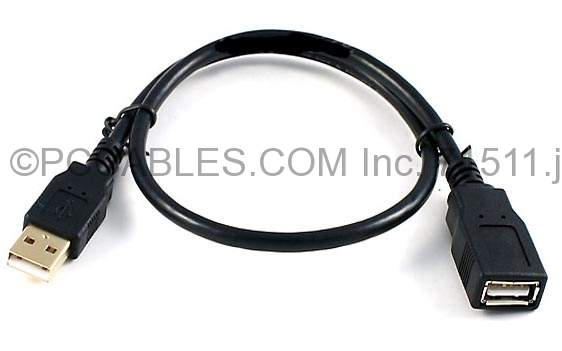 Why don't you connect your TV to your home network (LAN) so that you can access your PC files from the TV? No need to transfer files to a hard drive and plug-in to the TV. |
|
|
|
|
|
SUSjdgobio
|
Mar 4 2016, 12:32 PM
|
|
|
QUOTE(susu_capbadak @ Mar 4 2016, 12:11 PM) Hmm didn't know can do that. Have to dig in manual and see how, looks complicated  Not complicated. Just try to figure out how to turn-on DLNA server on your PC and then you should be able to access your PC files. You can also use Plex app if you want. Install Plex media server on your PC and then on your TV install the Plex app. |
|
|
|
|
|
SUSjdgobio
|
Mar 4 2016, 04:13 PM
|
|
|
QUOTE(voncrane @ Mar 4 2016, 03:26 PM) Sounds like Sharp really screwed up there huh.. On the older Samsung Smart hub here, it handles USB drives & media playback beautifully. Upon plug in, a popup appears on screen asking how to view the plugged in device: As Files (regular explorer style), Pictures (gallery) or Videos (Thumbnails with scrolling images from within each media file). No lag, also HDMI-ARC, DTS/DD detection just works. After playback or if one simply wants to disconnect, simply press the Source button repeatedly till the drive is selected, hold down on the enter button to dismount the drive safely, a confirmation notice appears to that effect, the drive can now be unplugged safely.. Alternatively, it also performs a safe eject when the TV is placed in standby mode.. I've performed either method, hundreds of times, with multiple drives & never had any issues.. Hopefully, it's incorporated & performs better in the newer Tizen OS. The Android TV OS is supposed to be smarter. My old 2010 Samsung pre-smart hub aTV also handles USB drives competently and can do DLNA without issues. I realized that the Sharp had issues with USB media playback when I couldn't get my HDD to work on it in 2 different shops. All the Samsung's on the other hand, read it just fine and gave a pop up. Well at least there are other ways to make it work via the Android TV. |
|
|
|
|



 Quote
Quote
 0.0657sec
 0.49
0.49
 7 queries
 GZIP Disabled