

 Nov 30 2006, 06:44 PM, updated 16y ago


Please.. forget about the "True Power", not many can explain to us what the so call 'true power' thing is. Instead of looking for 'true power', maybe we should looking at something that is measurable like ATX12V standard, 12V rails output circuits, Active PFC and power efficiency. Those information can be easily obtain by reading the PSU's label, manual or reviews. It tells us the overall performance of the PSU and makes job easier if you wanna do comparison betweeen PSU or even brands. Here are some PSU Technologies Explained.
PRIMARY PSU TECHNOLOGIES
Single or Dual +12V output circuits
What are Rails?
A rail is the delivery system for power. On a modern PSU these rails are divided into +3.3v, +5v, +12v, -5v and -12v. The important ones for us to look at are the positive rails. These will be specified to deliver an amount of amps per rail. Seeing as w = v * a. This tells us the output in watts of the PSU.
EXAMPLE:
Watts =+3.3v rail*30a = 100w
Watts =+5v rail *30a = 150w
Watts =+12v rail*25a = 300w
Adding them together gives us a power output of 550w.
The most important voltage rail in a power supply now is the +12V rail. This voltage rail supplies power to the most power demanding components including the Processor, DVD drives, HDD, cooling fans and Graphics cards. All of these items draw a lot of current and as a result you want to make sure that you purchase a unit that supplies enough current to the +12Vrail.
Dual +12V output circuits
QUOTE
Good 500w PSU:
Have atleast 18A on 12V rail, so:
(12v *18A)*2 = 432w (total output from 12v rail)
Cap ayam 500w PSU:
Might have only 15A on 12V rail, so:
(12v *15A)*2 = 360w (total output from 12v rail)
That means, the higher Amp(A) on +12V rail(s), the BETTER and capable to provide you HIGHER output on +12V rail(s).
Have atleast 18A on 12V rail, so:
(12v *18A)*2 = 432w (total output from 12v rail)
Cap ayam 500w PSU:
Might have only 15A on 12V rail, so:
(12v *15A)*2 = 360w (total output from 12v rail)
That means, the higher Amp(A) on +12V rail(s), the BETTER and capable to provide you HIGHER output on +12V rail(s).
Single +12V output circuits
QUOTE
Good 500w PSU:
Have 36A on 12V rail, so:
(12v *36A) = 432w (total output from 12v rail)
Cap ayam 500w PSU:
Might have only 30A on 12V rail, so:
(12v *30A) = 360w (total output from 12v rail)
That means, the higher Amp(A) on +12V rail(s), the BETTER and capable provide you HIGHER output on +12V rail(s).
Have 36A on 12V rail, so:
(12v *36A) = 432w (total output from 12v rail)
Cap ayam 500w PSU:
Might have only 30A on 12V rail, so:
(12v *30A) = 360w (total output from 12v rail)
That means, the higher Amp(A) on +12V rail(s), the BETTER and capable provide you HIGHER output on +12V rail(s).
So how to check the ''True Power'' come out from your PSU?
Observe the Amp value of your +12V rail(s) and do the calculation yourself

Why +12V rail(s) is important?
The most important voltage rail in a power supply now is the +12V rail. This voltage rail supplies power to the most power demanding components including the Processor, DVD drives, HDD, cooling fans and Graphics cards !!
Get atleast ATX12V Version 2.1 compliance PSU for mordern rig
ATX12V power supply. With the move to 12V voltage regulators for the processor, ATX guidelines for 5V as main power are no longer provided.
Increased +12 VDC output capability
System components that use 12V are continuing to increase in power. In cases where expected current requirements is greater than 18A a second 12 V rail should be made available. ATX12V power supplies should be designed to accommodate these increased +12 VDC currents.
TIPS: Get a PSU that provides atleast 18A on 12V rails.
(for Dual +12V output type PSU)


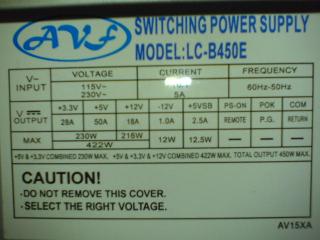
These ratings can be found easily on the PSU label.
Active PFC
The AC electric mains can be considered as having two types of power: active and reactive. Reactive power is generated in two cases: when the load current and the mains voltage are out of phase (that is, the load is inductive or capacitive) or when the load is non-linear. The PC power supply is a pronounced example of the second case. It will normally consume the mains current in short high impulses that coincide with the maximums of the mains voltage.
The problem is that while active power is fully transformed into useful work in the load, reactive power is not consumed at all. It is driven back into the mains. It is kind of wandering to and fro between the generator and the load, but it heats up the connecting wires as well as active power does. That's why reactive power must be got rid of.
The circuit called active PFC is the most efficient way to suppress reactive power. It is in fact an impulse transformer that is designed in such a way that its instantaneous consumed power is directly proportional to the instantaneous voltage in the mains. In other words, it is made linear on purpose and thus consumes active power only. The voltage from the output of the active PFC device goes right to the switching transformer of the power supply which used to be a reactive load due to its non-linearity. But now that it receives direct voltage, the non-linearity of the second transformer doesn't matter anymore because it is detached from the electric mains and cannot affect it.
The power factor is the measure of reactive power. It is the ratio of active power to the total of active and reactive power. It is about 0.65 with an ordinary PSU, but PSUs with active PFC have a power factor of 0.97-0.99. So, the active PFC device reduces reactive power almost to zero.
Power supply companies rather than the users that profit from active PFC because it reduces the computer's load on the electric mains by over one third. And this amounts to big numbers today when there is a PC standing on every office desk. From an ordinary user's point of view, active PFC makes no difference even when it comes to electricity bills. Home electricity supply meters measure only active power as yet. The manufacturers' claims that active PFC can in any way help your computer are nothing but marketing noise.
Active PFC is not an obligatory feature right now, but from the next year a power supply will have to have a power factor that can only be achieved with active PFC to pass the Energy Star certification (which is voluntary, though).
Passive PFC
Passive PFC is the simplest way to correct the power factor. It is a small choke connected in series with the power supply. Its inductance is smoothing out the pulsation of the current consumed by the PSU and is thus reducing the level of non-linearity. There is a very small effect from passive PFC - the power factor grows only from 0.65 to 0.7-0.75. But while implementing active PFC requires a deep redesign of the PSU's high-voltage circuitry, passive PFC can be easily added into any existing power supply.
Power supplies with passive PFC with eventually be replaced with active-PFC models.
High efficiency
Efficiency is the ratio of input power to output power. The higher the efficiency of a PSU is, the less heat it generates and the quieter its cooling can be made. Your electricity bills will be lower if the efficiency is high, too.
The current version of the ATX12V 2.2 standard limits the PSU efficiency from below: a minimum of 72% at typical load, 70% at full load and 65% at low load. Besides that, there are optional numbers (an efficiency of 80% at nominal load) and the voluntary certification program "80 Plus" which requires that the PSU has an efficiency of 80% and higher at loads from 20% to maximum. The new Energy Star certification program to come to effect in 2007 will have the same requirements as in the 80 Plus.
Minimum Efficiency Required
Minimum measured efficiency is required to be 70% at full and 72% at typical (~50%) load and 65% at light (~20%) load. The recommended guidance is 77% at full load, 80% at typical (50%) load and 75% at light (20%) load to provide direction for future requirements.
HIGH EFFICIENCY = LOWER HEAT = LOWER FAN SPEED = LOW NOICE
QUOTE
Efficiency means, how many percent of power comsume (input) in order to produce the output power.
e.g
if your system need 400W to run, a 80% efficiency PSU will consume 500W of power. 500W x 80% = 400W
if you have a 50% effiency PSU, then you will consume 800W in order to supply 400W for your system.
the higher efficiency PSU you have, the less electricity bill you will pay.
Credit to: YiQi
Low noisee.g
if your system need 400W to run, a 80% efficiency PSU will consume 500W of power. 500W x 80% = 400W
if you have a 50% effiency PSU, then you will consume 800W in order to supply 400W for your system.
the higher efficiency PSU you have, the less electricity bill you will pay.
Credit to: YiQi
This means that the speed of the PSU fan is varied depending on temperature or, less often, on load power. This speed management is currently implemented in all PSUs, even cheapest ones, so the question is about the quality of implementation. This quality can be viewed from three aspects: the quality of the employed fan, the minimum speed of the fan, and the speed adjustment range. For example, simplest power supplies may have speed management, but the speed is changed from 2500rpm at a 50W load to 2700rpm at a 350W load. It's like the speed doesn't change at all.
Respectable manufacturers implement the fan speed management system properly, but often play another marketing trick. The fan speed (or the noise level) they write into the power supply specs is measured at a temperature of 18?C as reported by a sensor inside the PSU. This thermal sensor is usually installed somewhere in the hottest part of the PSU, on the heatsink with diode packs, so you can only have that temperature in reality if you put your PSU in a refrigerator. Although no one keeps PSUs in a fridge, the specification still contains an unrealistically pretty number like a noise level of 16dBA (this is quieter than the background noise in a quiet room). In reality, the room temperature is usually within 20-25?C, and the temperature inside the PC case is closer to 30?C. Of course, you can't get 16dBA under such conditions.
OTHER PSU TECHNOLOGIES (Optional)
Nylon sleeve
Soft braided nylon tubes on the PSU's output cables help lay them out neatly inside the system case.
Some manufacturers have switched from the undoubtedly good idea of using nylon sleeves to the use of thick plastic tubes, often screened and covered with a paint that shines in ultraviolet. The shining paint is a matter of personal taste, of course, but the screening does not do anything good to the PSU cables. The thick tubes make the cables stiff and unwilling to bend, which makes it hard to lay them out in the system case properly and is even dangerous for the power connectors that have to bear the pressure of the cables that resist the bending.
This is often advertised as a means to improve the cooling of the system case, but the tubes on the power cables have but a very small effect on the airflows inside your computer.
Dual core CPU support
This is nothing but a pretty-looking label. Dual-core processors do not require any special support from the power supply.
SLI and CrossFire support
Yet another pretty-looking label that means two power connectors for graphics cards and an ability to yield as much power as is considered sufficient for a SLI graphics subsystem. Nothing else stands behind that label.
Industrial class components
One more pretty-looking sticker! Industrial class components are components that can work in a very wide range of temperatures. But what's the purpose of installing a chip capable of working under -45?C into a PSU if this PSU will never be used in such cold weather?
Sometimes the term industrial class components refers to capacitors meant for operation under a temperature up to 105?C, but that's all clear here, too. The capacitors in the PSU's output circuits heat up by themselves and also located very close to the hot chokes are always rated for a temperature of 105?C max or their service life would be too short. Of course, there is a much lower temperature inside the PSU, but the problem is that the service life of a capacitor depends on the ambient temperature. Capacitors rated for higher max temperatures are going to last longer under the same thermal conditions.
The input high-voltage capacitors work almost at the temperature of the ambient air, so the use of somewhat cheaper 85?C capacitors there doesn't affect the PSU's service life much.
Advanced double forward switching design
Alluring the potential customer with mysterious terms is a favorite trick of the marketing department.
Here, the term means the topology of the PSU, i.e. the general concept of its circuit design. There are quite a number of different topologies. Besides the double forward converter, PC power supplies may use a forward converter or a half-bridge converter. These terms are only interesting for a specialist and don't mean much for an ordinary user.
The choice of the particular PSU topology is determined by a number of reasons like the availability and price of transistors with required characteristics (they differ greatly depending on the topology), transformers, controller chips, etc. For example, the single-transistor forward converter is simple and cheap but requires a high-voltage transistor and high-voltage diodes on the PSU output, so it is only used in inexpensive low-wattage models (high-voltage diodes and transistors of high power are too expensive). The half-bridge converter is somewhat more complex, but has a two times lower voltage on the transistors. So, this is generally a matter of availability and cost of the necessary components. I can predict, for example, that synchronous rectifiers will be sooner or later used in the secondary circuits of PC power supplies. There's nothing new in that technology, but it is too expensive as yet and its advantages don't cover its cost.
RoHS (Reduction of Hazardous Substances)
This is a new European Union directive that limits the use of certain substances in electronic equipment since July 1, 2006. It restricts the use of lead, mercury, cadmium, hexavalent chromium, and two bromides. For power supplies this mainly means a transition to non-lead solders. Yes, we are all for ecology and against heavy metals, but a too hasty transition to new materials may have unpleasant consequences.
SAFETY/CIRCUIT PROTECTIONS
Short circuit protection (SCP)
Short circuit protection is obligatory according to the ATX12V Power Supply Design Guide. This means that it is implemented in all power supplies, even those that don't explicitly mention such protection, that claim to comply with that standard.
Overpower (overload) protection (OPP)
This protects the power supply from overload on all of its outputs combined. This protection is obligatory.
Overcurrent protection (OCP)
This protects the separate PSU outputs from overload (but not yet from short circuit). It is available on many, but not all, PSUs, and not for all of the outputs. This protection is not obligatory.
Overtemperature protection (OTP)
This protects the PSU from overheat. It is not required and is not implemented often.
Overvoltage protection (OVP)
This protection is obligatory, but is only meant for critical failures. It works only when some output voltage shoots 20-25% above the nominal value. In other words, if your power supply yields 13V instead of 12V, you must replace it as soon as possible, but its protection is not required to react yet because it is designed for even more critical situations.
Undervoltage protection (UVP)
As opposed to too-high voltage, too-low voltage cannot do much harm to your computer, but may cause failures in operation of the hard drive, for example. This protection works when a voltage bottoms out by 20-25%.
Source: X-bit labs
Edit by me
Encolsed with some PSUs reviews HERE and HERE... Enjoy

Usefull Links:
i) Official XS ~ Tiered PSU Manufacturer Brand Listing
ii) PSU Recommendations for High End Gaming PC's ~ jonnyguru
iii) Power Supply Manufacturers ~ hardwaresecrets
iv) PC modding Malysia's Power Supply reviews.
v) extreme psu calculator.
vi) 1000W Power Supply Unit Roundup
vii) Power Supply Terminology ~ PC Power & Cooling
viii) Tech Questions and Answered ~ PC Power & Cooling
This post has been edited by yehlai: Nov 20 2010, 09:43 PM
 Quote
Quote







 0.0314sec
 0.59
0.59
 6 queries
 GZIP Disabled