Welcome Guest ( Log In | Register )

Bump Topic Topic Closed RSS Feed
4 Pages < 1 2 3 4 >Bottom

Outline · [ Standard ] · Linear+

Unifi Official TM UniFi High Speed Broadband Thread V22, ( -_・) ︻デ═一▸ Maxis & Time

views
     
jolmy
post Oct 5 2015, 10:39 PM

Meow
******
Senior Member
1,182 posts

Joined: Jan 2003


QUOTE(plumberly @ Oct 5 2015, 07:30 AM)
Thanks for the infor.

I assume the tag is on TM's router. What if I use my own router? Try and try till I get it right?

By the way, what is the brand of TM's router? Any good? I am using DLink.

Cheerio.
*
You can use own router that has VLAN-tagging features, but unfortunately, most of the consumer routers don't support that.

But there are quite a number of routers in the market such as Asus & TP-Link have firmware that are customized to support UniFi & Maxis Fibre where the VLAN tagging is hard-coded just like TM's stock router. Asus is highly recommended.

Guide when buying: Look for the "Supports UniFi" label.
jolmy
post Oct 6 2015, 06:16 AM

Meow
******
Senior Member
1,182 posts

Joined: Jan 2003


QUOTE(reddoxxvi @ Oct 6 2015, 04:27 AM)
Assalam & Hi,

Dear all,

Ive changed my DNS ipv4 to google dns, do i need to change the ipv6 to google dns as well?

Thanks smile.gif
*
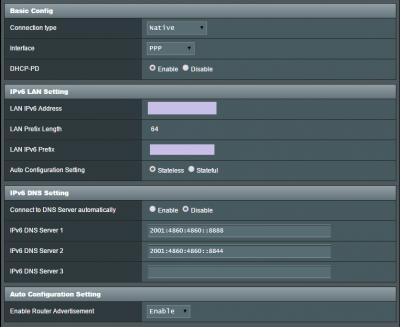
you don't have to, it will use the default auto-config by TM, but you should (recommended).

2001:4860:4860::8888
2001:4860:4860::8844

This post has been edited by jolmy: Oct 6 2015, 06:18 AM
jolmy
post Oct 6 2015, 10:22 PM

Meow
******
Senior Member
1,182 posts

Joined: Jan 2003


QUOTE(plumberly @ Oct 6 2015, 08:11 AM)
Thanks for the infor.

In that case, my Dlink has no supports unifi label on it. Damn! Ha.
*
Go for a new one.

Recommended: Asus RT-N12HP or RT-N14UHP
jolmy
post Oct 7 2015, 07:05 PM

Meow
******
Senior Member
1,182 posts

Joined: Jan 2003


Check out the attached image. Also suggest you update your firmware to the latest as there are some bug fixes for IPv6 support.

QUOTE(xHj09 @ Oct 7 2015, 06:48 PM)
hi guys

how to enable ipv6? which should i choose? then after applying, what steps should i do?

*
This post has been edited by jolmy: Oct 7 2015, 07:07 PM


Attached thumbnail(s)
Attached Image
jolmy
post Oct 11 2015, 07:52 AM

Meow
******
Senior Member
1,182 posts

Joined: Jan 2003


Obviously nothing is wrong with your UniFi connection.

It's the wireless interference that you are facing in a highrise condo, as there are just too many neighboring wireless access points above, below & beside you.

And there is not much you could do other than using HomePlug + setting up another access point in another room.

QUOTE(alucard1983 @ Oct 10 2015, 03:23 PM)
Hey guys, thanks but i tried all the suggestions given, and nothing seems to be out of place(ping was low, no packet loss). I read that some people are also experiencing downloading/updating ios apps using unifi, which I am not sure whether this problem of mine is related or not to that since I am using android and even whats app images I am unable to download.

since my desktop seems to be having little no no problems when it comes to the unifi using rj45 cable, i tested my wifi using both my smartphone and laptop.

laptop -> no problems to browse and download stuff
smartphones (xiaomii and note 3) , there are occasion where browsing wasnt good (due to signal strength I assume) but when it can browse well, I cant download whats app images to begin with.

This doesnt happen at all when i was at my terrace house previously. Something happen when the technician changed the home fibre modem to the condo version of the modem (mandatory change). If this is the case and somebody has found a solution to this, mind sharing it ?

wasting my mobile data at home when I shouldnt be using the wifi connection
*
jolmy
post Oct 11 2015, 10:29 PM

Meow
******
Senior Member
1,182 posts

Joined: Jan 2003


I saw in OCC website that my package is now called "UniFi Advance 30Mbps"

QUOTE(tai_digidestany @ Oct 11 2015, 08:08 PM)
-No more branding Streamyx
-All start with UniFi from 1 Mbps till 50Mbps.Will have their own variants.100Mbps maybe next year.
-FTTH will start from 30Mbps.No more 5/10/20 after this for FTTH
-VDSL and ADSL will cater 20Mbps and below
-Don’t expect pricing cut but more on values add in. biggrin.gif
*
QUOTE(cybpsych @ Oct 11 2015, 08:12 PM)
exactly what i heard few months back.

tm planning to unify all the fixed broadband branding into single "Unifi" brand umbrella.

whereas the wireless broadband could be from the new tm-p1 LTE branding.
*
jolmy
post Oct 12 2015, 06:31 AM

Meow
******
Senior Member
1,182 posts

Joined: Jan 2003


QUOTE(fkinmeng @ Oct 11 2015, 11:42 PM)
so no impact to existing users? or will have more free value add-on?
*
Well, I guess everything will be revealed on October 15.
jolmy
post Oct 12 2015, 05:55 PM

Meow
******
Senior Member
1,182 posts

Joined: Jan 2003


QUOTE(MyPIA @ Oct 12 2015, 01:33 PM)
So no more 20Mbps and above for high rise ? as they're VDSL  sweat.gif
*
VDSL2 can support 30Mbps..
jolmy
post Oct 12 2015, 11:45 PM

Meow
******
Senior Member
1,182 posts

Joined: Jan 2003


QUOTE(MyPIA @ Oct 12 2015, 11:20 PM)
Actually it can support much more sweat.gif

https://en.wikipedia.org/wiki/Very-high-bit...bscriber_line_2

I have checked mine, I'm getting 50Mbps downstream and 10Mbps upstream on my router page for Unifi 30 package and yes I'm on VDSL (not sure if it's VDSL or VDSL2 though)
*
It's actually VDSL2, and I believe you are referring to the VDSL Modem, NOT the router.

Yes, the port speed is capped at 50Mbps download & 10Mbps upload for 30Mbps users.

For the download portion, 30Mbps for Internet access while another 8Mbps is required for IPTV and a certain amount of bandwidth (unsure though) is also required for the VoIP phone. Of course, there is an overcap on the port speed while your actual speed is managed by user account instead of on the port.
jolmy
post Oct 14 2015, 12:15 AM

Meow
******
Senior Member
1,182 posts

Joined: Jan 2003


QUOTE(Moogle Stiltzkin @ Oct 13 2015, 04:54 AM)
i think i also been miscapped

user posted image
http://www.speedtest.net/my-result/4739918025

package is 30mbps dl, but never goes beyond 20 mbps.... miscap right ?  hmm.gif  or are other getting a similar result to US server ?

only rare instances i get 30mbps dl is local download or peering.
*
Don't put too much hope on getting full speed to the US. The international link is heavily used and shared by many users.
jolmy
post Oct 14 2015, 03:15 PM

Meow
******
Senior Member
1,182 posts

Joined: Jan 2003


QUOTE(plumberly @ Oct 14 2015, 11:16 AM)
Sorry to barge in here.

Why IPv6? Faster? More stable?

Easy to set it up?

Sorry, I am non IT guy.

Thanks.
*
Read this: http://www.pcworld.com/article/257037/ipv6...hould_know.html
jolmy
post Oct 14 2015, 03:21 PM

Meow
******
Senior Member
1,182 posts

Joined: Jan 2003


For those who still wonder how UniFi Advance (previously known as UniFi 30 Mbps) breakdown of charges, please refer to this attachment, a snapshot of the Service Details section of my latest bill.

In short, UniFi Advance is RM169 per month and compulsory to choose a HyppTV pack (minimum RM30, mine is Ruby Pack 2 @ RM40).

For existing users who upgrade via Telemarketing channel, you may still enjoy free calls to TM landlines and 10 sen/min to other national numbers. In my bill, I still enjoy the free calls (did make some TM landline calls which are not shown in the bill) and two calls to mobile lines at 10 sen/min as shown.

Otherwise, you will be charged 20 sen/min under this new package , unless you opt for the Voice Add-on for RM20 per month that gives you free calls to TM landlines for 600 mins, and calls to national numbers at 10 sen/min.

All prices quoted here excluding GST

This post has been edited by jolmy: Oct 14 2015, 03:22 PM


Attached thumbnail(s)
Attached Image
jolmy
post Oct 14 2015, 07:24 PM

Meow
******
Senior Member
1,182 posts

Joined: Jan 2003


Well, I guess I know why we early adopters are paying more. We keep our free calls to TM Fixed line which otherwise you will need to pay RM20 voice add-on.

In the new package, it is an option.

Too bad for us early adopters.

But keep finger crossed that they announce RM20 discount for all early adopters (hopefully but don't hope too much)

QUOTE(fruitie @ Oct 14 2015, 05:40 PM)
Pity those early adopters, like me. cry.gif
*
QUOTE(LovelyPotato @ Oct 14 2015, 05:59 PM)
I'm even worse, I just upgraded 2-3 weeks ago lol
*
This post has been edited by jolmy: Oct 14 2015, 07:30 PM
jolmy
post Oct 14 2015, 07:32 PM

Meow
******
Senior Member
1,182 posts

Joined: Jan 2003


QUOTE(fruitie @ Oct 14 2015, 07:29 PM)
I don't get to keep free calls and many others also no free calls. sweat.gif
*
This is basically like those days, let's say you started with VIP10 for RM199, I started with VIP5 for RM149, then years later I upgraded to VIP10 with RM20 or RM30 discount, but you continue to be paying for VIP10 without discount. vmad.gif
jolmy
post Oct 14 2015, 07:39 PM

Meow
******
Senior Member
1,182 posts

Joined: Jan 2003


QUOTE(fruitie @ Oct 14 2015, 07:36 PM)
Yeah. I know how it felt because I got RM 20 discount when I upgraded to VIP 10. I guess it's payback time now. sweat.gif
*
I got RM30 discount upgrade to VIP10 last time.

Arghh... let's just keep finger crossed (but don't put too much hope) for any surprise announcements for early adopters like us. Preferably a RM20 discount la.
jolmy
post Oct 15 2015, 08:19 AM

Meow
******
Senior Member
1,182 posts

Joined: Jan 2003


QUOTE(plumberly @ Oct 15 2015, 08:15 AM)
Just realised that with the chinese TV package, it is RM10 more than the other 2 packages. Normal price is RM30 extra for each of these 3 packages.  Not fair with this "racial" twisted promotion. Chinese can afford to pay more? TM, wake up!
*
It's more like the cost of acquiring Chinese contents are higher.

Just look at the price of the Chinese packages in Astro compared to others you will know.
jolmy
post Oct 15 2015, 09:12 AM

Meow
******
Senior Member
1,182 posts

Joined: Jan 2003


QUOTE(fkinmeng @ Oct 15 2015, 09:10 AM)
how come ruby need pay extra rm10?

user posted image

user posted image
*
The Ruby Pack supposed to be RM40, looks like there is an error in the page.
jolmy
post Oct 15 2015, 08:55 PM

Meow
******
Senior Member
1,182 posts

Joined: Jan 2003


QUOTE(kuroro6262 @ Oct 15 2015, 08:33 PM)
may i know if i remove the rubypack RM40, then the bill still charge RM40?
im 30Mbps rubypack RM209+6%(fxxx tmnut!)

but...can remove it?[attachmentid=5131401]
*
got minimum 1 year contract for HyppTV pack if I remember correctly. Terminating will incur charges of the remaining months for your pack.
jolmy
post Oct 22 2015, 01:04 PM

Meow
******
Senior Member
1,182 posts

Joined: Jan 2003


QUOTE(fruitie @ Oct 21 2015, 10:53 PM)
Just complain to SKMM which most of us did and walked in to TM after receiving calls from TM, and got RM 20 discount. biggrin.gif
*
Do you have any template what should be written in the complain to SKMM to get the RM20 discount?
jolmy
post Oct 22 2015, 01:24 PM

Meow
******
Senior Member
1,182 posts

Joined: Jan 2003


QUOTE(fruitie @ Oct 22 2015, 01:11 PM)
Are you sure? laugh.gif
I think Zi-Tech has shared earlier or someone has shared, just try to find back.

Or you just walk in to the nearest TM Point since it is a well-known issue now. laugh.gif
*
Thanks. Complain to SKMM first, so that have "extra backing" when walk in to TM point. biggrin.gif biggrin.gif

Now awaiting feedback.

4 Pages < 1 2 3 4 >Top
Topic ClosedOptions
 

Change to:
| Lo-Fi Version
0.0514sec    0.37    7 queries    GZIP Disabled
Time is now: 3rd December 2025 - 05:05 PM