Welcome Guest ( Log In | Register )

Bump Topic Topic Closed RSS Feed
126 Pages « < 5 6 7 8 9 > » Bottom

Outline · [ Standard ] · Linear+

 ILLEGEAR Z5 & Z7 Discussion Thread V2, ILLEGEAR Z7 is here!

views
     
BlizzardCraft
post Sep 17 2015, 12:24 AM

ChiakChiak
******
Senior Member
1,562 posts

Joined: May 2012


QUOTE(Arvinaaaaa @ Sep 16 2015, 07:37 PM)
ya bro..if want to run many apps at the same time then ram better..but it also depends, because i used to open many apps at the same time too and 8gb enough for me

for start up time, file transfer speeds  increase u can get msata (64gb enough)..then put your os in the msata and use the 1tb hdd as your storage for your files..with this your os speed will increase alot

u dont even need 128gb msata smile.gif ssd is quite similar to msata(the features and advantages) thats why i put that link in my earlier posts.

btw your hdd is the normal hdd or the sshd? blizzardcraft
*
mine is SSHD, my illegear z5 left only msata slot D: else im going to use back my 128GB SSD liao.. T_T
lightroom eats RAM for breakfast,lunch and dinner D:
u mean the 64GB only for OS?

QUOTE(EXkurogane @ Sep 16 2015, 07:40 PM)
Yes, if you run a lot of programs at one time RAM is the better upgrade if u have limited budget; I went for RAM upgrade for this reason. I usually will have 2 browsers with dozen of tabs each open, photoshop/Lightroom open, torrent or any downloader, and bunch of other stuff running at the same time.
*
photoshop + lightroom is enough to kill the RAM already >< so 16GB worked well for u?
Arvinaaaaa
post Sep 17 2015, 07:18 AM

Peace :D
*******
Senior Member
3,928 posts

Joined: Jan 2012


QUOTE(BlizzardCraft @ Sep 17 2015, 12:24 AM)
mine is SSHD, my illegear z5 left only msata slot D: else im going to use back my 128GB SSD liao..  T_T
lightroom eats RAM for breakfast,lunch and dinner D:
u mean the 64GB only for OS?
photoshop + lightroom is enough to kill the RAM already >< so 16GB worked well for u?
*
Ok..since its sshd, forget everything I said about the msata

Sshd is good enough dy..its a hybrid drive with ssd cache in it..so don't need to worry about speed

Just upgrade your ram for the lightroom biggrin.gif
christ14
post Sep 17 2015, 08:04 AM

Regular
******
Senior Member
1,567 posts

Joined: Jul 2011
From: Grand Ol' Lady


QUOTE(zonan4 @ Sep 17 2015, 12:02 AM)
Yep you are right  tongue.gif Come convert and join us  biggrin.gif
*
haha no lah... i change laptop once in a green moon, probably next would be 9th gen intel with v6 beast LOL whistling.gif
TShuislaw
post Sep 17 2015, 09:27 AM

Regular
******
Senior Member
1,344 posts

Joined: Jan 2013


QUOTE(Arvinaaaaa @ Sep 17 2015, 07:18 AM)
Ok..since its sshd, forget everything I said about the msata

Sshd is good enough dy..its a hybrid drive with ssd cache in it..so don't need to worry about speed

Just upgrade your ram for the lightroom biggrin.gif
*
I'm using sshd with 16Gb, so far quite satisfied with OS speed.
Arvinaaaaa
post Sep 17 2015, 09:36 AM

Peace :D
*******
Senior Member
3,928 posts

Joined: Jan 2012


QUOTE(huislaw @ Sep 17 2015, 09:27 AM)
I'm using sshd with 16Gb, so far quite satisfied with OS speed.
*
YUP..i forgot that z5 comes with sshd instead of the hdd..hence i recommended the msata with hdd configuration.

since come with sshd, no need dy..ram upgrade is enough
Arvinaaaaa
post Sep 17 2015, 09:37 AM

Peace :D
*******
Senior Member
3,928 posts

Joined: Jan 2012


QUOTE(christ14 @ Sep 17 2015, 08:04 AM)
haha no lah... i change laptop once in a green moon, probably next would be 9th gen intel with v6 beast LOL whistling.gif
*
desktop brows.gif whistling.gif
Qwristews
post Sep 17 2015, 09:40 AM

Casual
***
Junior Member
303 posts

Joined: May 2007
From: Jordan's Playground @23
@.@ .......
christ14
post Sep 17 2015, 09:49 AM

Regular
******
Senior Member
1,567 posts

Joined: Jul 2011
From: Grand Ol' Lady


QUOTE(Arvinaaaaa @ Sep 17 2015, 09:37 AM)
desktop  brows.gif  whistling.gif
*
not bad wor if illegear got, like aftershock

got no use for me, always outstation, cant bring here and there, my base and home different haha


yusukezz
post Sep 17 2015, 10:23 AM

New Member
*
Junior Member
21 posts

Joined: Feb 2010
QUOTE(christ14 @ Sep 17 2015, 10:49 AM)
not bad wor if illegear got, like aftershock

got no use for me, always outstation, cant bring here and there, my base and home different haha
*
Take the D5/7 , since its using the Desktop processor blush.gif blush.gif
jason_tee
post Sep 17 2015, 11:20 AM

Getting Started
**
Junior Member
133 posts

Joined: Apr 2010
From: Seremban / Cyberjaya / Damansara


Guys, usually how long it takes for your order to complete? Placed my order last week, hoping i can get it before weekend though...
Prince J
post Sep 17 2015, 11:29 AM

Regular
******
Senior Member
1,272 posts

Joined: May 2010
From: Team ILLEGEAR


QUOTE(jason_tee @ Sep 17 2015, 11:20 AM)
Guys, usually how long it takes for your  order to complete? Placed my order last week, hoping i can get it before weekend though...
*
Hi jason,

Do pm me your order number will check the status for you.
BlizzardCraft
post Sep 17 2015, 11:38 AM

ChiakChiak
******
Senior Member
1,562 posts

Joined: May 2012


QUOTE(Arvinaaaaa @ Sep 17 2015, 09:36 AM)
YUP..i forgot that z5 comes with sshd instead of the hdd..hence i recommended the msata with hdd configuration.

since come with sshd, no need dy..ram upgrade is enough
*
SSHD and SSD difference so little meh? except the start up time, i tried counting the startup time, almost same as my SSD laptop ( part of the reason maybe cuz my z5 stli new ? )
Arvinaaaaa
post Sep 17 2015, 11:42 AM

Peace :D
*******
Senior Member
3,928 posts

Joined: Jan 2012


QUOTE(BlizzardCraft @ Sep 17 2015, 11:38 AM)
SSHD and SSD difference so little meh? except the start up time, i tried counting the startup time, almost same as my SSD laptop ( part of the reason maybe cuz my z5 stli new ? )
*
quite little the difference except for the writting speed and the rotating disc (ssd dont have)
u got sshd, then no need msata dy...go for the ram upgrade
Arvinaaaaa
post Sep 17 2015, 11:45 AM

Peace :D
*******
Senior Member
3,928 posts

Joined: Jan 2012


QUOTE(christ14 @ Sep 17 2015, 09:49 AM)
not bad wor if illegear got, like aftershock

got no use for me, always outstation, cant bring here and there, my base and home different haha
*
d5 lor...with skylake and nvidia pascal gpu next year brows.gif brows.gif whistling.gif
EXkurogane
post Sep 17 2015, 12:11 PM

Regular
******
Senior Member
1,715 posts

Joined: Sep 2010


QUOTE(Arvinaaaaa @ Sep 16 2015, 11:37 PM)
Oh yea. For your case, since u download 10 to 29gb per day, its best to have the classic HDD or sshd..but u can still install your OS on the msata like what I explained above to blizzardcraft smile.gif

Same question for u also, yours is the normal HDD or the sshd?
*
I went for Hitachi 7200rpm 1TB HDD
Arvinaaaaa
post Sep 17 2015, 12:28 PM

Peace :D
*******
Senior Member
3,928 posts

Joined: Jan 2012


QUOTE(EXkurogane @ Sep 17 2015, 12:11 PM)
I went for Hitachi 7200rpm 1TB HDD
*
owh, then the msata configuration i told above will benefit u alot.
jason_tee
post Sep 17 2015, 01:03 PM

Getting Started
**
Junior Member
133 posts

Joined: Apr 2010
From: Seremban / Cyberjaya / Damansara


QUOTE(Prince J @ Sep 17 2015, 11:29 AM)
Hi jason,

Do pm me your order number will check the status for you.
*
PM you already, thanks for checking.
willaw
post Sep 17 2015, 02:03 PM

Enthusiast
*****
Senior Member
920 posts

Joined: Oct 2006
This is my short review on Z5 v3. My laptop was ready within 2 working days after I ordered it (No OS). I bought this laptop mainly for coding (I'm a programmer) and I don't really game a lot nowadays.

I have 2 mSata 256GB and installed Windows 10 Pro on the first drive, and Linux Mint 17.2 on the 2nd drive. So, for you folks thinking about running Linux, this laptop works well. Just install Nvidia proprietary drivers (if you want maximum performance) and you're good to go.

Keyboard. This is the number 1 priority for me when choosing a laptop. I type a lot (especially when I'm coding) and I own few mechanical keyboards (this shows how important the keyboard is to me). It does NOT flex at all, and feels really solid (perhaps the aluminum helps). I do feel Macbook Pro keyboards are better. I'm totally disappointed with Alienware laptop keyboards though!

Screen. I'm used to IPS screen at home (I have 2 Dell UltraSharp), so having IPS on a laptop screen is a definite welcome. However, the backlight bleed is quite obvious. But then again, you don't really notice it on everyday usage. The hinge is quite strong/solid. It's quite stiff to open and close the laptop lid. However, it's wobbly compared to Dell Latitude E6540. I suspect it's due to the hinge being placed closed to each other, where as the Dell's hinge is quite far apart in between. With that being said, it doesn't feel like it's going to break anytime soon. The black bezel is made of thick glossy plastic. It could scratch easily if you're not careful.

Storage. A laptop that allows 3 storage device? Awesome! The only downside is that m2 is replacing mSata (or so I heard), and I only realize this after I bought it. That's why I just get 2 mSata drive straight. No more worries. I can add a 2.5" 1TB drive for data storage.

This laptop runs really quiet. I can hardly hear the fan noise (compared to a Dell Latitude E6540).

I seriously dislike the trackpad. The buttons are stiff, and cursor movements are not smooth. But then again, not many laptop have really good trackpads anyway (Macbooks are the best!). It's worse if you run Linux. So I just use my Logitech bluetooth mouse. Given that gamers will be using their own gaming mouse anyway, this might not be a problem at all.

Battery is built-in, but can be removed. However, there's just so many screws to remove! I think there's at least 12 screws? The problem is if you're on the go, you can't easily swap battery. Now why is this an issue? Because the power supply (150W) is quite heavy. The 8-cell battery can last 4.5 hours on normal use.

Overall, I love this Z5. For the price, you're getting a lot compared to well-known brands such as Asus, Acer, MSI or Alienware.

Pros:
  • Solid keyboard. No flex.
  • Can install up to 3 HDD. (1 x 2.5", 2 x mSata)
  • Beautiful IPS screen. (There's backlight bleeding though, which is common.)
  • Feels solid overall.
  • LED lights on top cover and trackpad.
  • The anodized aluminum cover is really nice!
  • Charging USB port (I haven't test the output current though.)
  • Spdif digital output. (This is great as I have an external DAC/Amp.)
  • Ethernet, HDMI and VGA ports at the back. (Good for cable management.)
  • Runs cool and quiet!

Cons
  • Though the hinges are solid, the screen panel wobbles more compared to other laptops such as Dell Latitude E6540.
  • Thick black glossy plastic bezel could scratch easily.
  • Trackpad buttons are stiff, and cursor movements are not smooth. (But then again, good trackpad are rare. Macbook still dominates in this area.)

BlizzardCraft
post Sep 17 2015, 02:56 PM

ChiakChiak
******
Senior Member
1,562 posts

Joined: May 2012


QUOTE(willaw @ Sep 17 2015, 02:03 PM)
This is my short review on Z5 v3. My laptop was ready within 2 working days after I ordered it (No OS). I bought this laptop mainly for coding (I'm a programmer) and I don't really game a lot nowadays.

I have 2 mSata 256GB and installed Windows 10 Pro on the first drive, and Linux Mint 17.2 on the 2nd drive. So, for you folks thinking about running Linux, this laptop works well. Just install Nvidia proprietary drivers (if you want maximum performance) and you're good to go.

Keyboard. This is the number 1 priority for me when choosing a laptop. I type a lot (especially when I'm coding) and I own few mechanical keyboards (this shows how important the keyboard is to me). It does NOT flex at all, and feels really solid (perhaps the aluminum helps). I do feel Macbook Pro keyboards are better. I'm totally disappointed with Alienware laptop keyboards though!

Screen. I'm used to IPS screen at home (I have 2 Dell UltraSharp), so having IPS on a laptop screen is a definite welcome. However, the backlight bleed is quite obvious. But then again, you don't really notice it on everyday usage. The hinge is quite strong/solid. It's quite stiff to open and close the laptop lid. However, it's wobbly compared to Dell Latitude E6540. I suspect it's due to the hinge being placed closed to each other, where as the Dell's hinge is quite far apart in between. With that being said, it doesn't feel like it's going to break anytime soon. The black bezel is made of thick glossy plastic. It could scratch easily if you're not careful.

Storage. A laptop that allows 3 storage device? Awesome! The only downside is that m2 is replacing mSata (or so I heard), and I only realize this after I bought it. That's why I just get 2 mSata drive straight. No more worries. I can add a 2.5" 1TB drive for data storage.

This laptop runs really quiet. I can hardly hear the fan noise (compared to a Dell Latitude E6540).

I seriously dislike the trackpad. The buttons are stiff, and cursor movements are not smooth. But then again, not many laptop have really good trackpads anyway (Macbooks are the best!). It's worse if you run Linux. So I just use my Logitech bluetooth mouse. Given that gamers will be using their own gaming mouse anyway, this might not be a problem at all.

Battery is built-in, but can be removed. However, there's just so many screws to remove! I think there's at least 12 screws? The problem is if you're on the go, you can't easily swap battery. Now why is this an issue? Because the power supply (150W) is quite heavy. The 8-cell battery can last 4.5 hours on normal use.

Overall, I love this Z5. For the price, you're getting a lot compared to well-known brands such as Asus, Acer, MSI or Alienware.

Pros:

  • Solid keyboard. No flex.
  • Can install up to 3 HDD. (1 x 2.5", 2 x mSata)
  • Beautiful IPS screen. (There's backlight bleeding though, which is common.)
  • Feels solid overall.
  • LED lights on top cover and trackpad.
  • The anodized aluminum cover is really nice!
  • Charging USB port (I haven't test the output current though.)
  • Spdif digital output. (This is great as I have an external DAC/Amp.)
  • Ethernet, HDMI and VGA ports at the back. (Good for cable management.)
  • Runs cool and quiet!

Cons

  • Though the hinges are solid, the screen panel wobbles more compared to other laptops such as Dell Latitude E6540.
  • Thick black glossy plastic bezel could scratch easily.
  • Trackpad buttons are stiff, and cursor movements are not smooth. (But then again, good trackpad are rare. Macbook still dominates in this area.)

*
mine scratched abit already T_T the black surface
EXkurogane
post Sep 17 2015, 04:15 PM

Regular
******
Senior Member
1,715 posts

Joined: Sep 2010


QUOTE(willaw @ Sep 17 2015, 02:03 PM)
» Click to show Spoiler - click again to hide... «


Pros:


  • Solid keyboard. No flex.

  • Can install up to 3 HDD. (1 x 2.5", 2 x mSata)
  • Beautiful IPS screen. (There's backlight bleeding though, which is common.
  • Feels solid overall.
  • LED lights on top cover and trackpad.
  • The anodized aluminum cover is really nice!
  • Charging USB port (I haven't test the output current though.)
  • Spdif digital output. (This is great as I have an external DAC/Amp.)
  • Ethernet, HDMI and VGA ports at the back. (Good for cable management.)
  • Runs cool and quiet!


Cons

  • Though the hinges are solid, the screen panel wobbles more compared to other laptops such as Dell Latitude E6540.
  • Thick black glossy plastic bezel could scratch easily.
  • Trackpad buttons are stiff, and cursor movements are not smooth. (But then again, good trackpad are rare. Macbook still dominates in this area.)

*
Sounds fair for the price i guess.
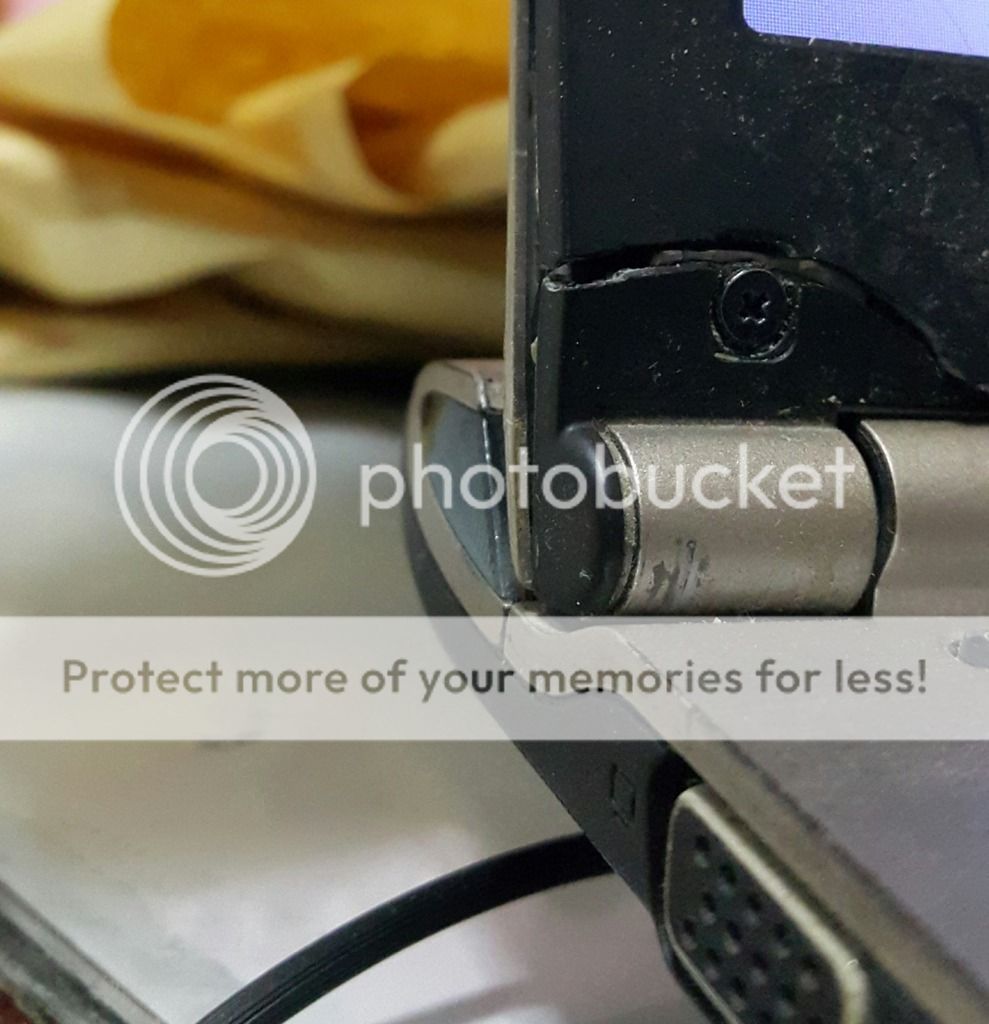
This is what a wobbly screen and a tight hinge did to my Asus laptop within 3-4 years. But then it's a <RM2400 laptop and the build/material quality wasn't that good. And, the plastic bezel surrounding the screen (very thin since it's an ultrabook) flexed under tension over time from a very stiff hinge and started to split apart from the aluminium back and began to crack. Nowadays i hold the hinge part whenever i open my laptop. I travel a lot so opening/closing the lid a few times a week is common. Well, probably i was being a bit too rough with opening the lid (not too sure myself if i have to be more delicate - i dont handle gadgets roughly in general) especially when the hinge are very stiff or tight.

user posted image

This post has been edited by EXkurogane: Sep 17 2015, 04:16 PM

126 Pages « < 5 6 7 8 9 > » Top
Topic ClosedOptions
 

Change to:
| Lo-Fi Version
0.0310sec    0.74    6 queries    GZIP Disabled
Time is now: 7th December 2025 - 07:48 AM