Outline ·
[ Standard ] ·
Linear+
ILLEGEAR Z5 & Z7 Discussion Thread V2, ILLEGEAR Z7 is here!
|
EXkurogane
|
 Sep 12 2015, 12:38 PM Sep 12 2015, 12:38 PM
|

|
QUOTE(BlizzardCraft @ Sep 12 2015, 12:04 AM) imo quite worth, i've been thinking about that too before i've decided to take the 970. if you can afford, why not? cause the graphic card will be soldered hence cant be change in the future. and after looking at performance difference, there's quite a big gap between the 970 and 960. and again, depends on what games you're playing also. Im going for 960M only, no money no talk  But i will throw in a lot of other small additions like a bump to 16GB RAM, IC Diamond Thermal Compound, etc. I want to play games like GTA5, but i wont be pushing the graphics high. medium also can ady. The main reason i want this machine is RAW photo editing and heavy multitasking. This post has been edited by EXkurogane: Sep 12 2015, 12:42 PM |
|
|
|
|
|
EXkurogane
|
Sep 13 2015, 05:05 PM
|
|
|
I just made my order for a Z5 yesterday. =3=
Oh well, uploading a filled-up credit card authorization form is rather unusual as far as the payment procedures go.
|
|
|
|
|
|
EXkurogane
|
Sep 13 2015, 07:47 PM
|
|
|
QUOTE(StenCL @ Sep 13 2015, 07:37 PM) Hello.. may I ask to any Z5 users about the hinges of the laptop? Is it ok as in not easy to break or something when opening and closing it? Planning to buy it but when I read the Z5 review and the part about the hinges makes me worried. Because I had a bad experience with a laptop with bad hinges not so long ago which kinda ruined the laptop screen. When sent for repair, the cost are high due to its aluminum cover included.. more than RM1k.. it kinda traumatized me.. 😵 Pls be kind to me as in this is my first time askin.. Noob in Tech stuff.. 😟 I just asked the same question in V1 of this thread, and my current laptop also hinge issue lol. It should be fine, i just ordered one. The review u read with questionable hinge quality, is probably the oldest version of the Z5 i believe, where some parts are plastic. By now the 3rd generation it's already fully aluminium build. |
|
|
|
|
|
EXkurogane
|
Sep 13 2015, 08:40 PM
|
|
|
QUOTE(StenCL @ Sep 13 2015, 08:29 PM) Ah I see. Thanks for your fast reply! Now that take off some bit of my worries. Btw, I read in a thread somewhere that we could pay monthly? If it's true then how does it work? Do we receive it 1st then pay monthly or something? Also if I asked for delivery to my house by post, how will the package be wrap in regards to prevent damage or prying hands? Since I don't really have the leisure to travel much these days.. 😣 I have bought online from Dell before - 3 times including my dad getting a business-use laptop, and all arrived in perfect condition; Anyway i doubt you have to worry much regarding the delivery, regardless of brand. If anything happens usually the company will have to take responsibility for it. But everyone in my family is already done with Dell lol, for obvious reasons. Their products just dont last, not durable. On monthly payment you can opt for 6 or 12 month installment but there'll be additional interest rates. I remember seeing 4% for 6 month installment; 6% for 12 month installment. Most likely your credit card is charged at least a few hundred monthly. This post has been edited by EXkurogane: Sep 13 2015, 08:45 PM |
|
|
|
|
|
EXkurogane
|
Sep 14 2015, 09:33 PM
|
|
|
QUOTE(Neomax3 @ Sep 14 2015, 09:10 PM) Hi guys! Congratz on v2!  This model is so hot that it oficially got v2 thread  Anyone using msata ssd? Mind recommend one? SSD is always recommended for your OS drive, just that for me, well, no money no talk - as usual I went for 7200rpm 1TB HDD. Ideally it's having SSD for drive C and HDD for drive D. This post has been edited by EXkurogane: Sep 14 2015, 09:43 PM |
|
|
|
|
|
EXkurogane
|
Sep 14 2015, 10:13 PM
|
|
|
QUOTE(Neomax3 @ Sep 14 2015, 10:08 PM) We're the same bro.. 1tb hdd as main storage.. just got a little budget more so I opt to buy msata ssd.. thinking buying 120 or 250gb for the os,antivirus,office etc.. just want to choose something good with price/performance ratio.. Games like GTA5 takes up at least 70GB after installation if not mistaken, 500GB is puny. |
|
|
|
|
|
EXkurogane
|
Sep 14 2015, 10:50 PM
|
|
|
QUOTE(zonan4 @ Sep 14 2015, 10:33 PM) Yeah they swapped the sub woofer as the old one have problem... the new one so far so good ... no static noise been produced... the girl in Illegear office, I think her name Daphine say whole day the playing song with my Z5 to test it.  Oh, that buzzing noise i hear when i plug headphones into my laptop, that is static noise eh? My current old laptop had it for some time but i cant figure out why. It's like Im hearing the sounds of parts in a machine/laptop operating. |
|
|
|
|
|
EXkurogane
|
Sep 15 2015, 04:36 PM
|
|
|
8GB RAM is more than enough no matter what software or game you throw at it unless you multitask to an extreme level, i went 16GB just for bragging rights  I've opened like 30 Google chrome tabs before on my old laptop with 4GB of RAM. |
|
|
|
|
|
EXkurogane
|
Sep 15 2015, 10:27 PM
|
|
|
QUOTE(Prince J @ Sep 15 2015, 10:22 PM) Hi StenCL, Latest ETA from Toshiba is end this month / early next month. If ordering without the Toshiba 1TB SSHD, it will take 2 to 4 working days. Currently we are running Malaysia Day specials with free 16GB RAM upgrade and so on. Damn, i made my order on, like, just last saturday  |
|
|
|
|
|
EXkurogane
|
Sep 15 2015, 11:15 PM
|
|
|
QUOTE(jason_tee @ Sep 15 2015, 10:52 PM) Can we get those offer since we just order it like few days ago, order yet to be complete I paid for 16GB of RAM though |
|
|
|
|
|
EXkurogane
|
Sep 16 2015, 01:47 AM
|
|
|
QUOTE(Arvinaaaaa @ Sep 16 2015, 01:27 AM) startup, app loading, file transfer speed, no defragment etc etc http://asia.pcmag.com/storage-devices-revi...-the-difference"File transfer speed" For someone like me who downloads 10-20 gigs of stuff a day i wonder if writing excessive amount of data on SSDs is a good idea. I dont know about current SSDs, but in the past i have heard of wear and tear/lifespans associated with SSDs. Anyway Im still in the stone age of USB2.0 in transfer speed. The only single 3.0 port available in my current laptop died more than a year ago  This post has been edited by EXkurogane: Sep 16 2015, 01:47 AM This post has been edited by EXkurogane: Sep 16 2015, 01:47 AM |
|
|
|
|
|
EXkurogane
|
Sep 16 2015, 07:40 PM
|
|
|
QUOTE(BlizzardCraft @ Sep 16 2015, 07:28 PM) if i were to run more programs on the same time then RAM would be the choice? I used to have SSD on my old laptop, can't bring over cause it's not MSATA and only 126GB. So far I still can get use to not using SSD lah Yes, if you run a lot of programs at one time RAM is the better upgrade if u have limited budget; I went for RAM upgrade for this reason. I usually will have 2 browsers with dozen of tabs each open, photoshop/Lightroom open, torrent or any downloader, and bunch of other stuff running at the same time. |
|
|
|
|
|
EXkurogane
|
Sep 17 2015, 12:11 PM
|
|
|
QUOTE(Arvinaaaaa @ Sep 16 2015, 11:37 PM) Oh yea. For your case, since u download 10 to 29gb per day, its best to have the classic HDD or sshd..but u can still install your OS on the msata like what I explained above to blizzardcraft  Same question for u also, yours is the normal HDD or the sshd? I went for Hitachi 7200rpm 1TB HDD |
|
|
|
|
|
EXkurogane
|
Sep 17 2015, 04:15 PM
|
|
|
QUOTE(willaw @ Sep 17 2015, 02:03 PM) » Click to show Spoiler - click again to hide... « This is my short review on Z5 v3. My laptop was ready within 2 working days after I ordered it (No OS). I bought this laptop mainly for coding (I'm a programmer) and I don't really game a lot nowadays.
I have 2 mSata 256GB and installed Windows 10 Pro on the first drive, and Linux Mint 17.2 on the 2nd drive. So, for you folks thinking about running Linux, this laptop works well. Just install Nvidia proprietary drivers (if you want maximum performance) and you're good to go.
Keyboard. This is the number 1 priority for me when choosing a laptop. I type a lot (especially when I'm coding) and I own few mechanical keyboards (this shows how important the keyboard is to me). It does NOT flex at all, and feels really solid (perhaps the aluminum helps). I do feel Macbook Pro keyboards are better. I'm totally disappointed with Alienware laptop keyboards though!
Screen. I'm used to IPS screen at home (I have 2 Dell UltraSharp), so having IPS on a laptop screen is a definite welcome. However, the backlight bleed is quite obvious. But then again, you don't really notice it on everyday usage. The hinge is quite strong/solid. It's quite stiff to open and close the laptop lid. However, it's wobbly compared to Dell Latitude E6540. I suspect it's due to the hinge being placed closed to each other, where as the Dell's hinge is quite far apart in between. With that being said, it doesn't feel like it's going to break anytime soon. The black bezel is made of thick glossy plastic. It could scratch easily if you're not careful.
Storage. A laptop that allows 3 storage device? Awesome! The only downside is that m2 is replacing mSata (or so I heard), and I only realize this after I bought it. That's why I just get 2 mSata drive straight. No more worries. I can add a 2.5" 1TB drive for data storage.
This laptop runs really quiet. I can hardly hear the fan noise (compared to a Dell Latitude E6540).
I seriously dislike the trackpad. The buttons are stiff, and cursor movements are not smooth. But then again, not many laptop have really good trackpads anyway (Macbooks are the best!). It's worse if you run Linux. So I just use my Logitech bluetooth mouse. Given that gamers will be using their own gaming mouse anyway, this might not be a problem at all.
Battery is built-in, but can be removed. However, there's just so many screws to remove! I think there's at least 12 screws? The problem is if you're on the go, you can't easily swap battery. Now why is this an issue? Because the power supply (150W) is quite heavy. The 8-cell battery can last 4.5 hours on normal use.
Overall, I love this Z5. For the price, you're getting a lot compared to well-known brands such as Asus, Acer, MSI or Alienware. Pros:
- Solid keyboard. No flex.
- Can install up to 3 HDD. (1 x 2.5", 2 x mSata)
- Beautiful IPS screen. (There's backlight bleeding though, which is common.
- Feels solid overall.
- LED lights on top cover and trackpad.
- The anodized aluminum cover is really nice!
- Charging USB port (I haven't test the output current though.)
- Spdif digital output. (This is great as I have an external DAC/Amp.)
- Ethernet, HDMI and VGA ports at the back. (Good for cable management.)
- Runs cool and quiet!
Cons
- Though the hinges are solid, the screen panel wobbles more compared to other laptops such as Dell Latitude E6540.
- Thick black glossy plastic bezel could scratch easily.
- Trackpad buttons are stiff, and cursor movements are not smooth. (But then again, good trackpad are rare. Macbook still dominates in this area.)
Sounds fair for the price i guess. This is what a wobbly screen and a tight hinge did to my Asus laptop within 3-4 years. But then it's a <RM2400 laptop and the build/material quality wasn't that good. And, the plastic bezel surrounding the screen (very thin since it's an ultrabook) flexed under tension over time from a very stiff hinge and started to split apart from the aluminium back and began to crack. Nowadays i hold the hinge part whenever i open my laptop. I travel a lot so opening/closing the lid a few times a week is common. Well, probably i was being a bit too rough with opening the lid (not too sure myself if i have to be more delicate - i dont handle gadgets roughly in general) especially when the hinge are very stiff or tight. 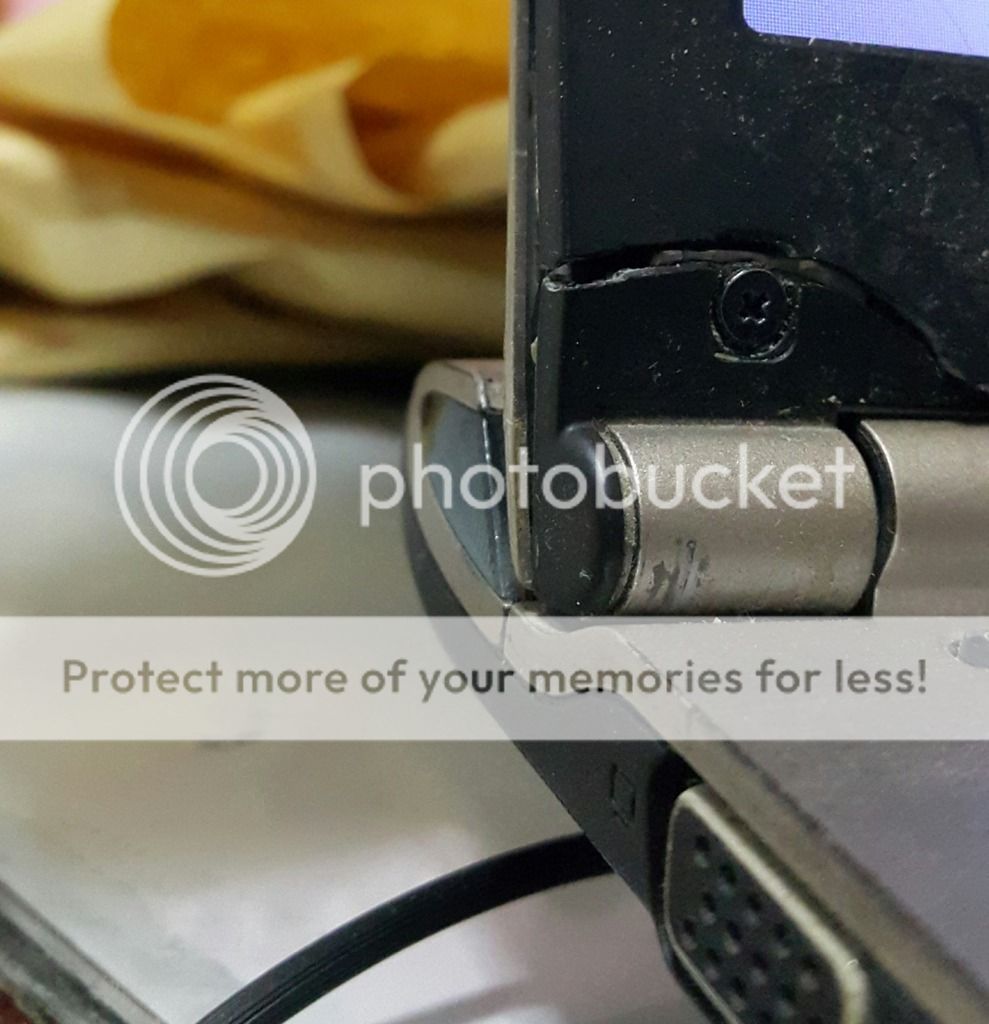 This post has been edited by EXkurogane: Sep 17 2015, 04:16 PM This post has been edited by EXkurogane: Sep 17 2015, 04:16 PM |
|
|
|
|
|
EXkurogane
|
Sep 21 2015, 07:23 PM
|
|
|
My Z5 just arrived today, but at my dad's office so i will only get to see it on this friday  By the way, a friend who owns an illegear laptop told me not to use cooling pad, because it will cause issues to its cooling system/fan and he had to send the laptop back to be fixed because of this. Should i heed this advice? I have a cooling pad but i use it mainly as a stand to level up the laptop slightly higher, the cooling fan is not as important (so i dont plug in the USB). |
|
|
|
|
|
EXkurogane
|
Sep 21 2015, 07:55 PM
|
|
|
QUOTE(huislaw @ Sep 21 2015, 07:52 PM)  I'm using cooling pad. Since he bring back to fix, maybe @Prince J can explain what happened? From what he told me, due to using a cooling pad, the sensor could not get the correct reading for the temperature, then it will just keep beepppp-ing around few mins, then shut down the laptop. First time I've heard of something like this though, but his model is an RE series model, not the Z5. |
|
|
|
|
|
EXkurogane
|
Sep 21 2015, 10:25 PM
|
|
|
QUOTE(hayrol @ Sep 21 2015, 10:02 PM) As for me, I'll let my room in low temperature to do the work. Air conditional will do the trick. Hehe When there is aircond there is no need for cooling pad at all even for my older laptops, it is my campus hostel which has no aircond. |
|
|
|
|
|
EXkurogane
|
Sep 22 2015, 05:40 PM
|
|
|
QUOTE(hayrol @ Sep 21 2015, 11:56 PM) I see, sorry my bad then. This is the 1st time I've heard that the laptop temp. sensor mess up by the laptop cooler. Is it cause by the airflow of the cooler or the sensor was mess up? I've use CM notepal on my ASUS ROG G73J for quite a long time - with room temperature (hostel room) & without aircond; just the fan ceiling, so far seems good enough keeping my notebook from getting high temperature. Just a suggestion from me, maybe you can find the cooler with better air flow with better build (aluminum case instead of plastic build). Just running my Z5 today, play BnS with ultra setting (3 hour running the game), so far my Z5 quite good handling the temp (without enable the Intel Boost & normal fan speed). Anyway Z5 also equip with manual fan speed, I think its quite handy to keep the notebook in cool condition; although you can hear the fan noise when you turn on the fan to high speed. I believe that friend of mine simply got defective hardware (well, shyt happens, regardless of what brand you buy as far as electronic stuff is concerned - sometimes you need luck too), it was also my first time hearing something like that. But then he also told me an Illegear staff advised him not to use cooling pad if possible (I have doubts as far as this statement is concerned - did the staff really said this?). Cooling pad i have heard of Cooling Master Notepal X3 being one of the best, but so far i havent bought one yet. Sometimes, when you hear about problems regarding a product, you are only hearing the story from the customer's side, and you have no idea whether they are telling you the truth either. This post has been edited by EXkurogane: Sep 22 2015, 05:43 PM |
|
|
|
|
|
EXkurogane
|
Sep 22 2015, 08:09 PM
|
|
|
QUOTE(Prince J @ Sep 22 2015, 05:46 PM) Hi Mind to let me know who is your friend model number and his RMA case no. (on RMA copy) / order number (on SO copy)? This sounds a bit weird. I will try to ask him and see. Apparently the he sent it back once before and it has been rectified since then. It wasn't a Z5, but a RE series model. |
|
|
|
|
|
EXkurogane
|
Sep 22 2015, 09:11 PM
|
|
|
QUOTE(huislaw @ Sep 22 2015, 08:35 PM) 80+ is the recommend max temp for CPU and GPU ? After I use cooler pad, no longer go above 90. I suspect coz my table has table cloth. Fabric material heats up a computer the most, i told some of my friends who use their laptop on the bed to avoid doing that; the laptop takes in air from outside via the vents at the bottom usually. I have one friend who left his computer on the bed, and then his (ignorant) mum wants to sweep his room and was like "later got dust lah", went and cover his laptop with bedsheet without turning it off. What happens next regarding overheating, is up to your imagination. |
|
|
|
|



 Quote
Quote
 0.0432sec
 0.77
0.77
 7 queries
 GZIP Disabled