

QUOTE(Agathon55 @ Oct 29 2021, 03:27 PM)
Anyone know of an affordable zigbee light ecosystem (bulbs and lightstrips) that isn't tuya?

Tuta & ewelink got the cheapest ones out thereThere’s also tradfri, and tplink
Smart Home, Let's discuss
|
|
 Oct 29 2021, 04:04 PM Oct 29 2021, 04:04 PM
Return to original view | Post
#561
|
 
Senior Member
4,454 posts Joined: Apr 2006 
|
QUOTE(Agathon55 @ Oct 29 2021, 03:27 PM) Anyone know of an affordable zigbee light ecosystem (bulbs and lightstrips) that isn't tuya? Tuta & ewelink got the cheapest ones out thereThere’s also tradfri, and tplink |
|
|
|
|
|
Nov 11 2021, 09:09 AM
Return to original view | IPv6 | Post
#562
|
|
Senior Member
4,454 posts Joined: Apr 2006
|
QUOTE(Agathon55 @ Nov 11 2021, 09:05 AM) If it wasn't for cost, I would totally choose Aqara over Tuya just because of HomeKit support and personally I think Aqara has nicer switches. If only they (and Xiaomi) weren't so strict about regions. Is Xiaomi the only one with this restriction thing?Other smart home makers all open borders |
|
|
Nov 12 2021, 10:27 AM
Return to original view | Post
#563
|
|
Senior Member
4,454 posts Joined: Apr 2006
|
QUOTE(Agathon55 @ Nov 12 2021, 09:55 AM) So far the Xiaomi-related devices are the only one I've tried that has obvious region restrictions. That said, it seems to be the Xiaomi Home App and Aqara apps that are more restrictive. The Yeelight app seems to be a little more open. I haven't had any issues connecting any Yeelight bulbs as of yet (even though they don't show up in Xiaomi Home). Especially with their ip cameras when they introduce new update that blocks use outside china lol. LifeSmart, Orvibo, Sonoff and Tuya all seem to be pretty unrestricted (other than possible language issues) in comparison. Back when their cameras were the cheapest one around, now got so many option This post has been edited by alucard89: Nov 12 2021, 10:28 AM |
|
|
Nov 12 2021, 02:09 PM
Return to original view | Post
#564
|
|
Senior Member
4,454 posts Joined: Apr 2006
|
QUOTE(mikeeeee @ Nov 12 2021, 01:00 PM) Fyi, not all ZigBee smart plugs have the repeater/router built in. Try read thru the buyers comments to confirm to avoid disappointment. Interesting, so the sure way is using wall switch that acts as repeater |
|
|
Nov 12 2021, 02:57 PM
Return to original view | Post
#565
|
|
Senior Member
4,454 posts Joined: Apr 2006
|
QUOTE(adamw @ Nov 12 2021, 02:44 PM) The switch need to have neutral to act as repeater. Exactly, i’m just surprised not all zigbee plug acts as repeaterAnything to check on the zigbee plug specification? |
|
|
Nov 12 2021, 03:38 PM
Return to original view | Post
#566
|
|
Senior Member
4,454 posts Joined: Apr 2006
|
QUOTE(Fubar20 @ Nov 12 2021, 03:18 PM) 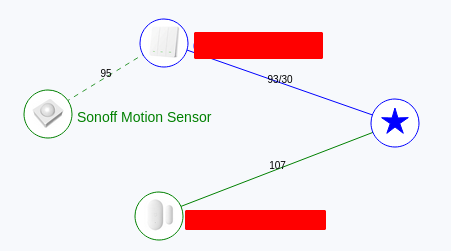  Sure or not? My Tuya Zigbee wall switch no use neutral but is acting like a repeater/router, no? Sure or not? My Tuya Zigbee wall switch no use neutral but is acting like a repeater/router, no? |
|
|
|
|
|
Nov 13 2021, 10:09 AM
Return to original view | IPv6 | Post
#567
|
|
Senior Member
4,454 posts Joined: Apr 2006
|
QUOTE(Fubar20 @ Nov 12 2021, 04:05 PM) Nice, got 4 gang also |
|
|
Nov 13 2021, 09:45 PM
Return to original view | IPv6 | Post
#568
|
|
Senior Member
4,454 posts Joined: Apr 2006
|
QUOTE(lucklyghost @ Nov 13 2021, 09:39 PM) I was considering Can, link with homeassistant- Xiaomi Global version - I can use back all my old door sensor and motion sensor - Aqara - but M1S global version is damn costly, china version cheaper RM 100 ...not sure why ... - Tuya - too many products or brand how sure how to choose Another thing is if I change to Tuya, can I use back my old Door Sensor (xiaomi / Aqara) door sensor And i think someone mentioned before you can link with tuya somehow with mihome |
|
|
Nov 15 2021, 08:52 AM
Return to original view | IPv6 | Post
#569
|
|
Senior Member
4,454 posts Joined: Apr 2006
|
QUOTE(lucklyghost @ Nov 15 2021, 07:02 AM) Tuya product really don't know how to choose , too many brand Other oem just use same tuya chipset, just stick to the ones you like, probably the build quality or just design |
|
|
Nov 18 2021, 07:19 AM
Return to original view | Post
#570
|
|
Senior Member
4,454 posts Joined: Apr 2006
|
Guys, got zigbee switch/module that can do two way wiring (no need neutral)?
Currently using this one, but wifi only https://shopee.com.my/product/33337179/5750...50-1637190989.9 This post has been edited by alucard89: Nov 18 2021, 07:21 AM |
|
|
Nov 18 2021, 10:20 AM
Return to original view | Post
#571
|
|
Senior Member
4,454 posts Joined: Apr 2006
|
QUOTE(Agathon55 @ Nov 18 2021, 09:26 AM) https://shopee.com.my/SMATRUL-16A-No-Neutra...b5-463a99968e83 Thanks, looks a bit thick to put behind switchMentions that can be used with or without neutral and without capacitor. Might work. Might have to get spacer |
|
|
Nov 18 2021, 11:40 AM
Return to original view | Post
#572
|
|
Senior Member
4,454 posts Joined: Apr 2006
|
QUOTE(deadman8836 @ Nov 18 2021, 11:37 AM) Hello all sifu! I want to start my smart home journey and I plan to start small by changing the wall switches. Yep, go for it, just get the hub first for pairingI am planning to get this 3 gang switches for my LED track lights and ceiling fan. https://www.lazada.com.my/products/moes-off...9925199575.html Is it okay? |
|
|
Nov 19 2021, 07:24 AM
Return to original view | Post
#573
|
|
Senior Member
4,454 posts Joined: Apr 2006
|
QUOTE(mikeeeee @ Nov 18 2021, 11:31 PM) Bro this one is it to convert the stair case 2 way switch ah? Need to install at both switch or only one side? I decided not to get that one and just stick with the wifi module i bought before this. That zigbee requires different wiring arrangement after discussion with other users |
|
|
|
|
|
Nov 24 2021, 06:07 PM
Return to original view | IPv6 | Post
#574
|
|
Senior Member
4,454 posts Joined: Apr 2006
|
QUOTE(tomastan4134 @ Nov 24 2021, 05:32 PM) anyone here can recommend me zigbee 4 gang smart switch using tuya system. currently i only can find 3 gang zigbee tuya. 4 gang cannot find . So far just the touch switch 4 gang zigbeeim looking for this type of design but only 3 gang the most. https://www.lazada.com.my/products/moes-off...uP&search=store |
|
|
Nov 24 2021, 10:58 PM
Return to original view | Post
#575
|
|
Senior Member
4,454 posts Joined: Apr 2006
|
QUOTE(tomastan4134 @ Nov 24 2021, 08:35 PM) In that case. I have no choice to use 3 gang lo. 4 switch become 3 Bro, what about this one, looks like click switch with different designhttps://www.aliexpress.com/item/32989766851.html https://www.aliexpress.com/item/40012275494...:%2223416%22%7D This post has been edited by alucard89: Nov 24 2021, 11:05 PM |
|
|
Nov 25 2021, 10:11 AM
Return to original view | IPv6 | Post
#576
|
|
Senior Member
4,454 posts Joined: Apr 2006
|
QUOTE(tomastan4134 @ Nov 25 2021, 10:03 AM) That's the problem. So need to find the one that no need neutral line. I think you can still diy by just going up the ceiling and just pulling the neutral wire to the switch. That’s what my father in law (retired tnb staff) taught me, easier than expectedBut I think most people use this. Will likely install at main switch panel. Where got aircond switch. Which that switch got neutral line. Just tap that line to use with smart switches. For my case. My garden side switch panel is at different location from the aircond switch. Just don't have access to neutral line No choice just have to use without neutral line |
|
|
Nov 26 2021, 12:13 AM
Return to original view | IPv6 | Post
#577
|
|
Senior Member
4,454 posts Joined: Apr 2006
|
QUOTE(GymBoi @ Nov 25 2021, 11:08 PM) Anyone in the "Smart Life" (also called TUYA?) environment and tried to connect device from 2 different location/house? As long as it’s paired on the same account it’s accesibleExample 1 smart socket in House A and another smart socket in House B. if I on socket in House A i want the socket in House B to auto turn on. Can it work? Can connect device on different wifi on the same account? |
|
|
Nov 26 2021, 02:12 AM
Return to original view | IPv6 | Post
#578
|
|
Senior Member
4,454 posts Joined: Apr 2006
|
QUOTE(GymBoi @ Nov 26 2021, 01:16 AM) Very nice thank you The only issue with most hotel wifi is need to login at their web portal for internet accessedit: Sorry another question. Let say I have the smart socket on House A, set up correctly with the wifi there all working fine. Then let say weekend i go getaway in a hotel and i bring the smart socket there. How to change the wifi and make the socket connect to hotel wifi? (for example sake let say my socket has automation that after it on, it will off after 1h - for phone charging purpose) or need reset the socket, pair again and create the automation again Easiest way would bring your travel router, connect lan cable, put the same wifi/password so no need to reset device. |
|
|
Nov 26 2021, 10:13 AM
Return to original view | IPv6 | Post
#579
|
|
Senior Member
4,454 posts Joined: Apr 2006
|
QUOTE(incubus_skj @ Nov 26 2021, 09:51 AM) 555 replies Didn’t samsung just dropped the support for Smart things? Doesn’t look like a long term solution how to find the solution la like that lol [EDIT] oh it looks like ppl got a workaround by installing Samsung's Smart Things and then linking the Mi Home account to it, then use Smart Things to connect to Google Home I'm not using a Samseng device, I wonder if it will work.... will try later tonight thanks for the info!!! |
|
|
Nov 26 2021, 04:15 PM
Return to original view | IPv6 | Post
#580
|
|
Senior Member
4,454 posts Joined: Apr 2006
|
QUOTE(Agathon55 @ Nov 26 2021, 02:46 PM) Samsung stopped producing their SmartThings hub themselves. Now it's being produced by a Aeotec. They're all in on the SmartThings platform but are focusing more on the appliances side rather than small smart home devices (I have no idea if they're still producing their sensors). Aha, i still got their usb smartthings for nvidia shield, back when i needed something to control z-wave door lock.Because only Yeelight is integrated with SmartThings right now. |
| Change to: |  0.0371sec 0.0371sec
 0.79 0.79
 7 queries 7 queries
 GZIP Disabled GZIP Disabled
Time is now: 10th December 2025 - 05:31 PM |
 Quote
Quote