Outline ·
[ Standard ] ·
Linear+
The Official Maxis FTTH Thread | v5, Maxis Home Fibre Internet, from RM89
|
netken
|
 Nov 2 2018, 11:54 AM Nov 2 2018, 11:54 AM
|

|
QUOTE(tsmin1989 @ Nov 1 2018, 08:11 PM) Previously I’m using Aminia router but after upgrade to 100mbps, there is no SIM card slot, have to use 4G dongle, now have to wait maxis. same here ... but i don't need the dongle urgently cos i did not encounter downtime yet ... so i just the sim in .....  |
|
|
|
|
|
netken
|
Nov 2 2018, 11:55 AM
|
|
|
QUOTE(tsmin1989 @ Nov 1 2018, 08:09 PM) Me also same, maxis told me will sent out within 2-3 week start from 18 sept but now already November, still not yet received, I will call maxis again to ask, it not I’m going to use the backup sim on iPad.. haha i already do that in sim 2 ...  |
|
|
|
|
|
netken
|
Nov 13 2018, 08:22 AM
|
|
|
that's why i just use the C5 for wan connect and Lan out to Asus ... off all the AP function ... so far so good ...
|
|
|
|
|
|
netken
|
Nov 24 2018, 10:14 AM
|
|
|
last night i have instable connection .... and this morning when i restart the router and btu - no connection and phone line.
made a quick call to maxis and escalate to tier 2 - they reconfig with update of firmware for the TP link - hopefully the firmware more stable and not lose the setting always.
|
|
|
|
|
|
netken
|
Nov 24 2018, 11:34 AM
|
|
|
mine as escalated to 2nd level ..
1st level said update firmware - didnt work
2nd level said 1st actually just reflashed the same firmware, and said in my case they need to update the firmware and ask me not to off the router for 2 hours ... so i am not sure if they are actually updating or just reflash the same firmware or trying to BS me ...
seems like the setting on this router will 'lari' or 'reset' again every once in a while and this new firmware 'either updated or not' will solve this problem ...
|
|
|
|
|
|
netken
|
Nov 24 2018, 02:35 PM
|
|
|
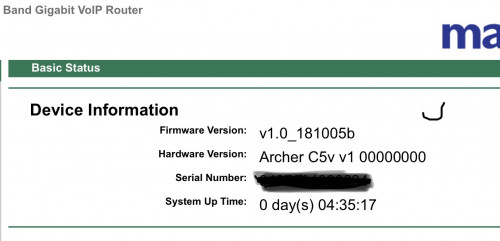 guys - ur TP Link firmware what version? |
|
|
|
|
|
netken
|
Nov 24 2018, 06:39 PM
|
|
|
QUOTE(jaspreettttt @ Nov 24 2018, 05:33 PM) 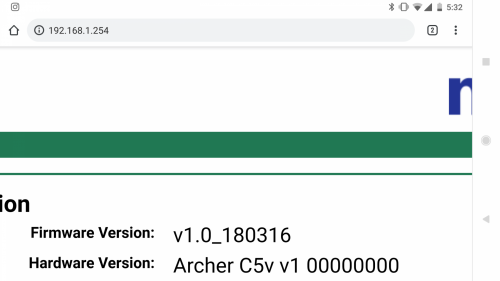 Apparently way older 😂😂😂 thanks man - looks like they have a so called update. |
|
|
|
|
|
netken
|
Nov 29 2018, 06:21 AM
|
|
|
mine too the same 2am onwards with the abv firmware ... pushed update?
|
|
|
|
|
|
netken
|
Nov 29 2018, 08:40 AM
|
|
|
hopefully with this 181024 - things are better
but i have changed my DNS lease time renewal to the max already ...
so far so good - speed holding one .... no intermittent disconnection detected ...
|
|
|
|
|
|
netken
|
Jan 5 2019, 06:43 PM
|
|
|
my home fibre maxis seems to be stable for more than 18 days ... just restarted it ..
|
|
|
|
|
|
netken
|
Apr 25 2019, 09:21 PM
|
|
|
i’ve upgraded mine -all within 1 day
now my AC66u is too for this
time for AC86u ...
|
|
|
|
|
|
netken
|
Apr 28 2019, 08:47 PM
|
|
|
QUOTE(kwai_83 @ Apr 28 2019, 06:15 PM) I been using maxis router since fibre service lunch so far TG389AC most stable,second will be amania(131), tp link current supplier by maxis really cannot been use 5g(wifi) signal always freeze(same problem which everone are facing now so far no solution from maxis .maybe untill there change another model or ..If got budget can purchase asus router as main router included your wifi,maxis router just as phone My current setup will be Asus RT-AC86U as my main setup and connect to maxis router only for my phone usage, room usually got lan cable connected .if can go buy asus router from china taobao will be more cheaper compare to local malaysia set,due to asus firmware all is universal global can use for our local fiber service,disadvantage is when kaput need to send back to china for warranty. means router would be asus 86u - then LAN to TP link? or router TP Link - then connect as lan to asus 86u? |
|
|
|
|
|
netken
|
Apr 29 2019, 07:56 AM
|
|
|
QUOTE(kwai_83 @ Apr 28 2019, 09:29 PM) Asus as main router.using lan port 3 to the wan port to the maxis router as phone use only nice- are u using the Maxis router archer c5? any config needed to just plug and play? This post has been edited by netken: Apr 29 2019, 07:57 AM |
|
|
|
|
|
netken
|
May 3 2019, 06:56 PM
|
|
|
maxis called me today and insist to change my modem from the old TM modem to maxis modem - anyone knows?
|
|
|
|
|
|
netken
|
May 4 2019, 07:56 AM
|
|
|
QUOTE(CuriOu5 @ May 4 2019, 01:32 AM) Upgraded from 100 Mbps to 300 Mbps within 24 hours but can't get max 300 Mbps. Maxis technician trouble shoot the problem and said that the TM BTU need an upgrade as it could not support 300 Mbps. Anyone had this problem after upgrading from 100 to 300 Mbps. mine was successfully done to 300mb but yet they insist to come next week to change the BTU ... |
|
|
|
|
|
netken
|
May 6 2019, 07:34 PM
|
|
|
QUOTE(CuriOu5 @ May 5 2019, 12:29 PM) mine is also the huawei ... |
|
|
|
|
|
netken
|
May 7 2019, 10:07 AM
|
|
|
i see - actually my btu is the same since my first subscription to maxis many many years ago.
Recently it has no problems reaching 300mb btu speed at all but maxis keep calling me and insisting to change to a newer type btu - maybe mine is maxed at 300mb?
or they foresee that i keep upgrading packages the BTu would need to be upgraded ?
|
|
|
|
|
|
netken
|
May 9 2019, 10:31 AM
|
|
|
they came this morning both maxpert and tm - did the swap ... old (6 years) to new BTU - that's about it ... did test all okay holding about 320MB DOWN and 56MB UP ... 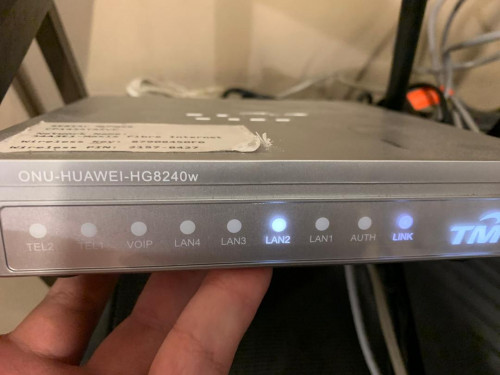 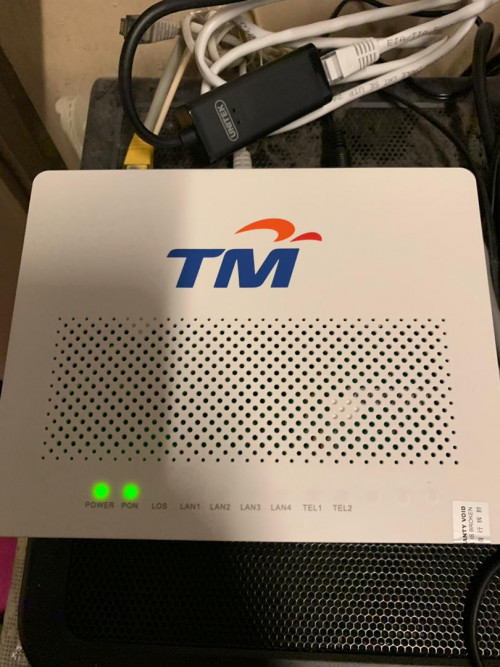 |
|
|
|
|
|
netken
|
May 26 2019, 08:36 PM
|
|
|
so far so good - i restarted everything after 11 days ...
all is good - speed wise and all
|
|
|
|
|
|
netken
|
Jun 7 2019, 12:30 PM
|
|
|
QUOTE(wyh @ Jun 7 2019, 11:47 AM) Do anyone have solution/trick for archer c5v router configuration for Xiaomi Ipcamera ? Mine gets disconnected often. mine too - started a few days back right? |
|
|
|
|





 Quote
Quote
 0.0285sec
 0.58
0.58
 7 queries
 GZIP Disabled