Welcome Guest ( Log In | Register )

6 Pages < 1 2 3 4 5 > » Bottom

Outline · [ Standard ] · Linear+

 The Official Maxis FTTH Thread | v5, Maxis Home Fibre Internet, from RM89

views
     
waisang
post Nov 22 2018, 01:34 AM

On my way
****
Junior Member
588 posts

Joined: Dec 2009
QUOTE(Mazda9 @ Nov 21 2018, 09:07 PM)
I’m currrently on Unifi 800mbps + ultimate pack (all tv channels) + 600 mins free calls paying rm159.

I have 2 main maxis lines Rm188 plan and 2 maxis share lines and tempted to signup for maxis fiber to be eligible for prime (unlimited data plan).

The issue is by doing so, I’ll loose my 800mbps plan and all tv channels. Need you opinion guys on maxis fiber experience and I’m currrently using my own Asus high end router RT-AC5300. Can I maintain my Asus router with maxis fiber as I understand their router is Sim based?
*
If u happy with Unifi, keep it, at the most time, it is due to the router issue, for my experience, i didn't really contact CS when i was with Unifi, but now Maxis, call them headache!!!
the incident takes days to address the issue, they are need to go or wait for TM feedback if u r complaint the network performance, although it may not related,
Please take note that Maxis has network prioritize policy, such as like u cannot really do torrent,
How i wash i could continue with Unifi, my switch was due to the Maxshit promotion

This post has been edited by waisang: Nov 22 2018, 09:45 AM
waisang
post Nov 22 2018, 09:45 AM

On my way
****
Junior Member
588 posts

Joined: Dec 2009
QUOTE(waisang @ Nov 22 2018, 01:34 AM)
If u happy with Unifi, keep it, at the most time, it is due to the router issue, for my experience, i didn't really contact CS when i was with Unifi, but now Maxis, call them headache!!!
the incident takes days to address the issue, they are need to go or wait for TM feedback if u r complaint the network performance, although it may not related,
Please take note that Maxis has network prioritize policy, such as like u cannot really do torrent,
How i wash i could continue with Unifi, my switch was due to the Maxshit promotion
*
waisang
post Nov 24 2018, 11:10 AM

On my way
****
Junior Member
588 posts

Joined: Dec 2009
QUOTE(netken @ Nov 24 2018, 10:14 AM)
last night  i have instable connection .... and this morning when i restart the router and btu - no connection and phone line.

made a quick call to maxis and escalate to tier 2 - they reconfig with update of firmware for the TP link - hopefully the firmware more stable and not lose the setting always.
*
holy shit...... hv spoken to call centre, there is still no no tplink firmware process update

waisang
post Nov 25 2018, 12:36 AM

On my way
****
Junior Member
588 posts

Joined: Dec 2009
QUOTE(netken @ Nov 24 2018, 11:34 AM)
mine as escalated to 2nd level ..

1st level said update firmware - didnt work

2nd level said 1st actually just reflashed the same firmware, and said in my case they need to update the firmware and ask me not to off the router for 2 hours ...  so i am not sure if they are actually updating or just reflash the same firmware or trying to BS me ...

seems like the setting on this router will 'lari' or 'reset' again every once in a while and this new firmware 'either updated or not' will solve this problem ...
*
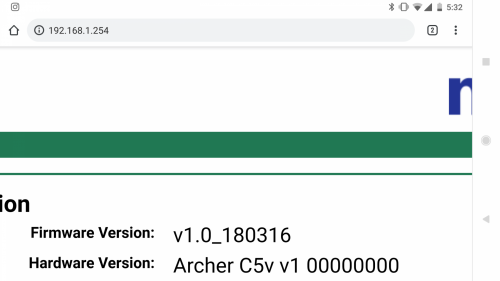
what is your firmware version number now? pls share
waisang
post Nov 25 2018, 12:48 AM

On my way
****
Junior Member
588 posts

Joined: Dec 2009
QUOTE(jaspreettttt @ Nov 24 2018, 05:33 PM)
user posted image
Apparently way older 😂😂😂
*
holy shit.... the real joker lol
As at now, maxshit does not want to tell u the tplink firmware issues until u scold them, is it the way the agent has been trained by their sop and not to disclosed the issue????


waisang
post Nov 26 2018, 02:52 PM

On my way
****
Junior Member
588 posts

Joined: Dec 2009
QUOTE(numbertwo @ Nov 26 2018, 10:03 AM)
If you are on 1200 c5v too, try to set the DHCP Lease Time from default 60 mins (1 hour)  to maybe 1200..  see if the connection stays on and less disconnection due to IP re-assign issue ?
*
not only this issue, quick many wifi devices are unable to connect to this holy shit tplink, example wifi printer and some not latest devices....
there isn't any issue for technicolor tg389ac router
waisang
post Nov 27 2018, 01:54 PM

On my way
****
Junior Member
588 posts

Joined: Dec 2009
QUOTE(digipaq @ Nov 27 2018, 01:34 PM)
I have seen a lot of ppl complaining about the stock TP Link router provided by Maxis. Frankly, I have not had any issue with it so far only once where the router reset itself to factory config. After the firmware update, everything is fine so far.

In fact I found that the 2.4 wifi range is better than my old ADSL TP Link router with dual external antenna. I used to not be able to receive any signal last time while in the kitchen but now it is quite strong with the signal. No problem even to use the internet while using the toilet, surrounded by 4 thick brick walls.
*
what is your current version?
waisang
post Nov 27 2018, 06:53 PM

On my way
****
Junior Member
588 posts

Joined: Dec 2009
QUOTE(digipaq @ Nov 27 2018, 06:21 PM)
V1.0_181005b
*
Same version of mine, too many wifi offline disruption in online streaming, some wifi devices unable to get connected within the network example wifi printer bridge etc. U will hit the error if u hit the tplink performance issue

technicolor tg389, asus router works good.

Maxshit suggests to upgrade the new firmware in the next release, as at now, no information for the update.
waisang
post Nov 28 2018, 11:45 PM

On my way
****
Junior Member
588 posts

Joined: Dec 2009
QUOTE(scorpio75jb @ Nov 28 2018, 08:15 PM)
I did call maxis this afternoon. Explain and tild everything about my router problem. The person said will update my router firmware. Just now check my firmware is still the same v1.0_180316 😂.
*
Believed the latest or beta V1.0_181005b but did not resolved neither!!!
waisang
post Nov 29 2018, 07:47 AM

On my way
****
Junior Member
588 posts

Joined: Dec 2009
QUOTE(supervai @ Nov 29 2018, 07:14 AM)
Confirm push update as my system up time is 0 days. Last couple of days was up for 10 days
*
what is your firmware ver number now?
waisang
post Nov 29 2018, 02:17 PM

On my way
****
Junior Member
588 posts

Joined: Dec 2009
QUOTE(asiatrader98 @ Nov 29 2018, 02:01 PM)
line down again since 12pm
*
what is your firmware version now??
waisang
post Nov 30 2018, 01:43 AM

On my way
****
Junior Member
588 posts

Joined: Dec 2009
QUOTE(rajlesta00 @ Nov 29 2018, 08:36 PM)
Just got Maxis fibre installed today.
The internet keep dropping.
Restart router helps but after few mins it drops again.

Never had this kind of issue with unifi before although was using single band (old dlink router).

Terrible. Is this router issue or Maxis experiencing intermittent downtime?

Tp link black color router.
*
This is the fact of Maxis new Tplink router firmware bugs, as at now, there is no firmware fix announced by Maxshit

Option 1, replace with your own personal Wifi router to save the issue
Option 2, ask Maxshit to provide u the Technicolor Wifi router, keep shoot them (old brand but it works)
Option 3, wait for Maxshit for new firmware to release
waisang
post Dec 1 2018, 02:29 AM

On my way
****
Junior Member
588 posts

Joined: Dec 2009
QUOTE(G K Lai @ Nov 30 2018, 10:53 AM)
Yup! Actually I just want to set it up properly then pack it back into the box, as a backup. laugh.gif

I have my own router and no hesitate to use back after reading so many bad comments on that Maxis router, hehe…
Haha… last night I wait till nearly 2:00am only can restart the router. laugh.gif
*
Setup it Maxis TPlink router is straight forward, due to the firmware bugs, there is nothing much we can do at the moment,
Maxis TPlink router is sufficient for standard usage unless you want more power or powerful router for personal requirement,
As at now, they are aware the firmware bugs, however there is no further action taken,
waisang
post Dec 4 2018, 12:32 PM

On my way
****
Junior Member
588 posts

Joined: Dec 2009
QUOTE(supervai @ Dec 3 2018, 06:05 PM)
Mine is v1.0_181024.

Maxis push update for me. Don't need to do manually.
*
Hv spoken to Maxshit Fibre team, as advised this is NOT latest firmware (v1.0_181024), and the firmware with "b" is latest,
She said if u hv the "b" firmware, you dont need to upgrade the firmware,
What the Fxxx!!!!!!!!!!!!!!!!!!!!!!!!!!!!!!!!
waisang
post Dec 4 2018, 07:40 PM

On my way
****
Junior Member
588 posts

Joined: Dec 2009
QUOTE(hong_chuan @ Dec 4 2018, 07:00 PM)
The Modem offered by Maxis are very bad, for me i regularly has issues with WiFi 5G disconnected. Therefore, there is nothing better feature to everyone...
*
hv spoken with Maxis Fiber Team however they are denied the issue of this TP Link Wifi Router firmware bugs, unfortunately we r experiencing the issues,
Sadly they hv no update or resolution for this fix for months!!!!
waisang
post Dec 19 2018, 01:47 AM

On my way
****
Junior Member
588 posts

Joined: Dec 2009
QUOTE(McLaren01 @ Dec 18 2018, 01:02 AM)
Im going to register fiber next month.  Need to choose either maxis or unifi. I have used unifi and i have no issue with it. In other hand maxis offer rm89 package which cheaper than unifi. I'm staying at kota kemuning.
How is maxis service interm of data speed and down time.
*
Why switch if u hv no issue with Unifi??? your question was already discussed in the forum and your answer is there...
waisang
post Jan 6 2019, 07:38 PM

On my way
****
Junior Member
588 posts

Joined: Dec 2009
Hi All, what is the best router for Maxis Home Fibre Internet support Maxis VOIP for alternative? thanks

waisang
post Jan 7 2019, 02:25 PM

On my way
****
Junior Member
588 posts

Joined: Dec 2009
QUOTE(ivan0826 @ Jan 7 2019, 11:49 AM)
Same issue here...they arrange appointment need 14 days rclxub.gif quite useless
*
Same thing goes to me.... really disappointed with Maxis

This post has been edited by waisang: Jan 7 2019, 02:27 PM
waisang
post Jan 8 2019, 02:44 AM

On my way
****
Junior Member
588 posts

Joined: Dec 2009
QUOTE(supervai @ Jan 7 2019, 03:48 PM)
Mine will be more of disconnect for a little while and maybe couple of minutes later Internet is back.
*
Guess you are using Maxis TP-Link stock router, it is common errors of the router firmware bugs, anyway Maxis will tell you no problem lol
No matter how Maxis try to assist you, unless Maxis has new firmware to address the issues,
As at now, what i know no new firmware to resolve the problem
waisang
post Jan 8 2019, 12:49 PM

On my way
****
Junior Member
588 posts

Joined: Dec 2009
QUOTE(supervai @ Jan 8 2019, 08:16 AM)
Also maybe because I never restart more than 40 days after Maxis updated the router firmware
*
I am still using Technicolor TG389ac, as at today, it has been running 121 days since last rebooted

6 Pages < 1 2 3 4 5 > » Top
 

Change to:
| Lo-Fi Version
0.0292sec    0.71    7 queries    GZIP Disabled
Time is now: 12th December 2025 - 11:38 AM