Welcome Guest ( Log In | Register )

6 Pages « < 3 4 5 6 >Bottom

Outline · [ Standard ] · Linear+

 The Official Maxis FTTH Thread | v5, Maxis Home Fibre Internet, from RM89

views
     
waisang
post Mar 23 2019, 05:21 PM

On my way
****
Junior Member
588 posts

Joined: Dec 2009
How is it the new firmware running until today? Any disconnection or any disruption?

QUOTE(numbertwo @ Mar 20 2019, 02:52 PM)
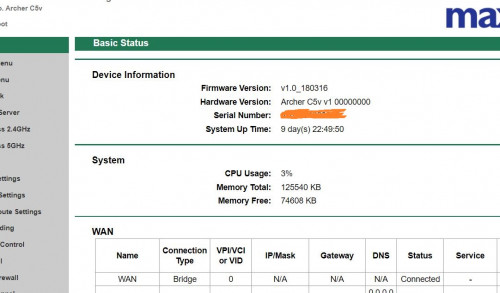
Is this your version guys ?  Just noticed a new FW version, and my unit has been reset (by looking at the System Up time -- which i have never reboot/shut down in the past month)..

Firmware Version:v1.0_190304

Hardware Version:Archer C5v v1 00000000

Serial Number:31890xxx01341

System Up Time:0 day(s) 13:26:29
*
waisang
post Apr 2 2019, 12:48 PM

On my way
****
Junior Member
588 posts

Joined: Dec 2009
QUOTE(huang17app @ Apr 2 2019, 11:24 AM)
This Firmware Version:v1.0_190304 still have some bugs never fix until now.

1)When C5V using WDS wireless bridge method connect to any repeater only can work less than 12 hours,after that all repeater IP will lost, need reboot C5V daily to solve.

2)When C5V work more than 12 hours ,iphone can't transfer photo via wifi anymore,need to reboot C5V to solve, tested few photo transfer app download from AppStore.

TPLink technician told that they notice this issues,but still not fix on this latest firmware.
*
The easy way to address the issue, suggest you to purchase your own personal router and if you want to opt out for Maxis home phone connection,
Otherwise talk to Maxis again escalate again shot again again,
think there is no other way we can do
waisang
post Apr 17 2019, 10:08 AM

On my way
****
Junior Member
588 posts

Joined: Dec 2009
QUOTE(hafiez @ Apr 16 2019, 10:15 PM)
hi im seeking advise on MAxis Free Sim cards

anybody in this thread using this?

is it worth it?

currently im on Celcom. 5GB weekday 5GB weekends. no free calls and sms.
*
This Maxis Sim is RM98 after promotion deal, it is 300GB (so call unlimited data) + unlimited calls/sms,
Worth it or not, it is very personal
waisang
post Jul 16 2019, 12:36 AM

On my way
****
Junior Member
588 posts

Joined: Dec 2009
QUOTE(numbertwo @ Jul 15 2019, 11:53 AM)
Just noticed an update on the C5v , but not sure what is being fixed though :

**
Firmware Version:v1.0_190524

Hardware Version:Archer C5v v1 00000000

System Up Time:11 day(s) 08:08:43
*
Running up to 11 days.... it it stable now? my stock router has kept in the storage room
waisang
post Aug 8 2019, 12:25 AM

On my way
****
Junior Member
588 posts

Joined: Dec 2009
My internet is down, there is "red" color on LOS light of the huawei modem, i have made the report to the maxis
anyone knows what is it about??


Attached thumbnail(s)
Attached Image Attached Image
waisang
post Aug 9 2019, 12:24 AM

On my way
****
Junior Member
588 posts

Joined: Dec 2009
QUOTE(jusbella @ Aug 8 2019, 08:03 AM)
Fibre cable issue.

Try check Fibre cable got any break or not.
*
Maxis replied that the Fibre optic can be fixed at the end of the month, main while, a 4G backup dongle will temporary to install.
waisang
post Aug 16 2019, 11:14 AM

On my way
****
Junior Member
588 posts

Joined: Dec 2009
QUOTE(netken @ Aug 11 2019, 08:29 AM)
my turn suddenly getting LOS red light blinking after so many years, report lodged and thank good ness for the backup dongle.
*
Common issue???
waisang
post Aug 19 2019, 12:28 AM

On my way
****
Junior Member
588 posts

Joined: Dec 2009
Do you use any your own WiFi Router outside of Maxis Stock router that able to support 4G USB Dongle Connection? please share, thanks.
waisang
post Sep 1 2019, 01:12 PM

On my way
****
Junior Member
588 posts

Joined: Dec 2009
QUOTE(huang17app @ Apr 2 2019, 11:24 AM)
This Firmware Version:v1.0_190304 still have some bugs never fix until now.

1)When C5V using WDS wireless bridge method connect to any repeater only can work less than 12 hours,after that all repeater IP will lost, need reboot C5V daily to solve.

2)When C5V work more than 12 hours ,iphone can't transfer photo via wifi anymore,need to reboot C5V to solve, tested few photo transfer app download from AppStore.

TPLink technician told that they notice this issues,but still not fix on this latest firmware.
*
do you still using the Maxis C5v router? any update of the latest firmware??
waisang
post Sep 6 2019, 04:48 PM

On my way
****
Junior Member
588 posts

Joined: Dec 2009
QUOTE(uhlaw @ Sep 6 2019, 10:31 AM)
I manually updated to v1.190524 few days ago  wink.gif
*
how did you performed manually update? can you share the download link? Thanks.
waisang
post Sep 11 2019, 10:25 AM

On my way
****
Junior Member
588 posts

Joined: Dec 2009
QUOTE(delaciox @ Sep 11 2019, 01:27 AM)
maxis c5v router is same with VR1200v ???

tplink web got firmware: https://www.tp-link.com/my/home-networking/...archer-vr1200v/
*
looks the same, have you try to upgrade firmware???
waisang
post Sep 19 2019, 09:57 AM

On my way
****
Junior Member
588 posts

Joined: Dec 2009
Wanna share my recent Maxis Fiber Optic incident case, Maxis has taken nearly almost two months to schedule an appointment with TM, it took 10min to rectify the line issue, no changes to the TM modem and WIFI router.

As per Maxis advised, it was the earlier appointment Maxis could fixed with TM, although Maxis has provided the USB dongle during the line down, additionally the USB dongle was not able to provide to the same speed you have been subscribed.

It was appeared that Maxis has taken own sweet time to do it no matter of how much you have pushed them, it was speechless of the Maxis SLA/KPI performance completely.

From the experience, i will quit once my contract end with Maxis.

This post has been edited by waisang: Sep 19 2019, 10:56 AM
waisang
post Sep 21 2019, 11:35 PM

On my way
****
Junior Member
588 posts

Joined: Dec 2009
QUOTE(sitescope @ Sep 20 2019, 04:53 PM)
weird... my exp is different
9/9 9pm - auth blinking due to TM cable cut hit by lorry, rpt to maxis
10/9 3pm - connection restored

13/9 7pm - auth blinking again, rpt to maxis, maxis fix something on the spot then ok
14/9 11am - maxis call inform wanna send engineer to check the auth blinking isu although i said dah ok
15/9 2pm - maxis engineer came and dunno what he did at router then he said ok, should be not auth blinking again

maybe depend on loc, my loc at sg buloh
so far for the past 4yrs, my prob nvr exceed 1 week

reason i nvr consider unipai due to slow upload speed
*
My location is bukit jalil, maxis has advised this is best schedule with tm and nothing much can be done lol
waisang
post Dec 9 2019, 04:45 PM

On my way
****
Junior Member
588 posts

Joined: Dec 2009
QUOTE(ronnie @ Dec 5 2019, 10:25 AM)
Anybody tried Hotlink Flex Home Fibre At RM99 per month ?
*
cannot migrate, new application, maxis told that you need to terminate the line in order to proceed the application, you may not guarantee for the port or lost of port and if you are still within the contract period, the penalty fee to be applied,

speechless...
waisang
post Jun 12 2020, 12:27 PM

On my way
****
Junior Member
588 posts

Joined: Dec 2009
Many Maxshit subscribers have switched back to Unifi because of the free TV promotion, Will you change??
waisang
post Jun 12 2020, 03:43 PM

On my way
****
Junior Member
588 posts

Joined: Dec 2009
QUOTE(muhammadnajmi96 @ Jun 12 2020, 03:40 PM)
nah after 12 months have to pay higher price
*
It is the same monthly subscription fee to pay, RM50x10 months is the reimburse/rebate or so called the cashback to buy back your Maxshit penalty RM500
waisang
post Jun 12 2020, 03:46 PM

On my way
****
Junior Member
588 posts

Joined: Dec 2009
QUOTE(sitescope @ Jun 12 2020, 01:16 PM)
Nope
Seldom watch tv
*
I have switched back one of the account, after compared, Im still preferred Maxshit, Unifi in the night time is very crowded, played Youtube, ping respond lagged...
waisang
post Jun 22 2020, 09:17 AM

On my way
****
Junior Member
588 posts

Joined: Dec 2009
QUOTE(delaciox @ Jun 21 2020, 10:24 PM)
using maxis C5v, power 24x7 now already 10 day still havent auto reboot

user posted image

how long you power router?? console.gif
*
Using Maxis Technicolor TG389ac router, no auto reboot issue, now it is my extra router
Reason: Have switched to Unifi
waisang
post Jul 4 2020, 07:25 PM

On my way
****
Junior Member
588 posts

Joined: Dec 2009
QUOTE(Vincent6596 @ Jul 4 2020, 06:59 PM)
wanna all sifu over here, currently i am using maxis home fiber and will move to new house maybe after another 1 year, but the contract still will have half year left, but i found out that my new house din have coverage for maxis home fiber and i will not possible to transfer the current home fiber to my new house, then what will maxis do?? any solution for this??
*
If there is no port, Maxis will offer you for free cancellation.
waisang
post Jul 19 2020, 05:41 PM

On my way
****
Junior Member
588 posts

Joined: Dec 2009
QUOTE(konon @ Jul 19 2020, 11:26 AM)
Hi, thinking of installing MaxisOne Home Fibre 89 plan over TM Unifi 89.
If any advice on the pros & cons over this two plans?

Currently I'm using Digi Infinite 150.
*
Not much different, Maxis same download/upload speed of 30mb/30mb, however Unifi is 30mb/10mb.

6 Pages « < 3 4 5 6 >Top
 

Change to:
| Lo-Fi Version
0.0301sec    0.43    7 queries    GZIP Disabled
Time is now: 12th December 2025 - 11:50 PM