Welcome Guest ( Log In | Register )

19 Pages « < 16 17 18 19 >Bottom

Outline · [ Standard ] · Linear+

 The Official Maxis FTTH Thread | v5, Maxis Home Fibre Internet, from RM89

views
     
YoungMan
post Apr 18 2025, 09:55 AM

Look at all my stars!!
*******
Senior Member
6,793 posts

Joined: Oct 2008
From: Kuala Lumpur


QUOTE(fruitie @ Apr 17 2025, 12:42 PM)
Oh, I'm not too sure if being tied to a 3-year contract is a good idea, that's my thought.
*
Hence, need to be extra extra careful now, especially with free TV offer. I believe Maxis offer for TV is also 3 years.

QUOTE(jsnhoh @ Apr 17 2025, 01:26 PM)
But in their website, their tnc is still 24 months contract for new sign up.
*
If in doubt, it is always better to sign up at Tmpoint rather than going through agent.
YoungMan
post Apr 18 2025, 11:53 AM

Look at all my stars!!
*******
Senior Member
6,793 posts

Joined: Oct 2008
From: Kuala Lumpur


QUOTE(BuKeYi @ Apr 18 2025, 11:12 AM)
ah i see, hopefully they can escalate it faster..... sweat.gif
*
Try call them to follow up
YoungMan
post Apr 23 2025, 08:33 AM

Look at all my stars!!
*******
Senior Member
6,793 posts

Joined: Oct 2008
From: Kuala Lumpur


QUOTE(Anime in HD @ Apr 22 2025, 09:37 PM)
Anyone here after restart router get assign with IPv4 prefix 113.X.X.X...Usually Maxis will give this IPv4 prefix for Hotlink user. For fibre, private IPv4 user get 14.192.X.X

I manage to get symmetrical speed. Im using Maxis Fibre ride in TM area.
user posted image
*
Symmetrical speed only with this IP? Got use custom ONU or not? if not then this is something new.
YoungMan
post Apr 23 2025, 07:56 PM

Look at all my stars!!
*******
Senior Member
6,793 posts

Joined: Oct 2008
From: Kuala Lumpur


QUOTE(Anime in HD @ Apr 23 2025, 11:18 AM)
Just this morning i restart router again. Off IPv6. And, use IPv4 all the way to experience 100Mbps symmetrical speed with 113.X.X.X ip range. You can try reboot router today. Maxis seems no longer give 14.192.X.X ip range. No need subs 500Mbps plan just to get 100Mbps upload... brows.gif tongue.gif
*
113.211.xxx.xxx IP range. Speed still same.
YoungMan
post Apr 24 2025, 07:30 PM

Look at all my stars!!
*******
Senior Member
6,793 posts

Joined: Oct 2008
From: Kuala Lumpur


QUOTE(Anime in HD @ Apr 23 2025, 09:01 PM)
Make sure to turn off IPv6. Only certain speedtest server like TIME MY KL or Astro Fibre that use IPv4 route. If speed still same, maybe different OLT treat different speed. I still get 95down/50up..hardcap if use IPv6...if IPv6 turn off...all speedtest server by default will use IPv4 ip address...need to change settings in router..i use stock router TP Link EX510..
*
I believe it's your OLT. I have make sure IPV6 is turned off, result still 94/52mbps.
YoungMan
post May 4 2025, 02:37 PM

Look at all my stars!!
*******
Senior Member
6,793 posts

Joined: Oct 2008
From: Kuala Lumpur


QUOTE(Kerplunk @ May 4 2025, 02:28 PM)
Will do. How long ago did you receive the new modem btw? Oh I tried switching off the QOS stuff, and pretty surprised by the bump in speed, up to 900+ Mbps. Unfortunately, upload speeds remain pathetic at 2.0/2.1 Mbps 😂
*
Lodge report to Maxis, including report to SKMM. I think quite possibly someone mess with your speed config, either from Maxis side or TM side if your line is running on TM infra.
The link to lodge report to MCMC is: https://aduan.mcmc.gov.my/#/public/main
YoungMan
post May 5 2025, 09:46 AM

Look at all my stars!!
*******
Senior Member
6,793 posts

Joined: Oct 2008
From: Kuala Lumpur


QUOTE(tarpaucase @ May 4 2025, 09:43 PM)
Asking for a friend - anyone having problem with their web surfing at night? Sporadically - I checked his internet connectivity - can ping, dns can resolve, but cannot surf. Open an FTP server - can FTP no issue, but can't surf. Maxis running some web cache thingee thats getting overloaded or something?
*
So far have not encounter such problem. Try restart router and modem?
YoungMan
post May 14 2025, 01:56 PM

Look at all my stars!!
*******
Senior Member
6,793 posts

Joined: Oct 2008
From: Kuala Lumpur


QUOTE(mental007 @ May 14 2025, 10:17 AM)
Meaning if we want to change service provider basically we won't be entitled for the transfer promo right?
We would need to cancel and then resubscribe to other service provider.
*
Yes.
YoungMan
post May 20 2025, 02:12 PM

Look at all my stars!!
*******
Senior Member
6,793 posts

Joined: Oct 2008
From: Kuala Lumpur


QUOTE(64bit @ May 19 2025, 09:33 PM)
New user transferred from Digi Fibre 50Mbps RM85 (not including tax) to Maxis Fibre 100Mbps RM89 (3 months free + 2 months cash rebate) sharing my transfer experience.

2 May: Submitted transfer request via 3rd party agent.
5 May: Digi counter offer RM45 to remain with same package and 1 year contract. Rejected their offer.
9 May: Maxis called for installation appointment.
17 May: Maxis configured with tp-link EX230v router and reuse ZTE fibre modem. Reconfigured replacing their router with my existing Deco X50.
*
Congrats! Meanwhile, your Digi fibre is still available until 1 or 2 weeks later. Then there is a final prorated bill.
If you like, you can temporary run both lines by reconnecting the Digi fibre router to the appropriate lan port of the ONU.
YoungMan
post May 23 2025, 07:37 PM

Look at all my stars!!
*******
Senior Member
6,793 posts

Joined: Oct 2008
From: Kuala Lumpur


QUOTE(sexysarah1992 @ May 23 2025, 05:50 PM)
Is Maxis fibre down?
*
It's running fine here in Kuching. Unifi infra btw.
YoungMan
post May 29 2025, 11:57 AM

Look at all my stars!!
*******
Senior Member
6,793 posts

Joined: Oct 2008
From: Kuala Lumpur


QUOTE(hantarkatsini2 @ May 29 2025, 11:34 AM)
Hi guys, just recently came back to Maxis Fibre after using Unifi for quite some time. They came and installed the new Skyworth Modem + black router.

I want to change back to my ROG router to replace the black one, did all the usual steps (PPPoE username and password, ISP profile Maxis-Fibre).

Had the "Connected" status inside the router webpage and no red light on the router.

Problem is I am not connected to the internet. Cannot speedtest or browse.

I am stuck, the provided router works just fine. What am I missing?
*
Not sure the exact setting for your ROG router, but try go to LAN > IPTV > Select ISP Profile > Choose Maxis.
YoungMan
post Jun 6 2025, 08:31 AM

Look at all my stars!!
*******
Senior Member
6,793 posts

Joined: Oct 2008
From: Kuala Lumpur


QUOTE(joeboto @ Jun 5 2025, 10:51 PM)
Tried, also same. Used 99% ipa.
Any method to get into the modem gui?

Holy shit. Now a different issue. Asus router suddenly says "invalid account or password, please modify it" on the main page. Using wizard, on pppoe wizard shows like wrong account or password.

Username : accnumber@home.maxis.com.my
Password : accnumber1

Using kaon router, shows PPP Status
ERROR_AUTHENTICATION_FAILURE

Im royally fucked tonight bois
*
QUOTE(joeboto @ Jun 6 2025, 04:18 AM)
On Nokia uses lan 2, other port not detected. I also never change anything in router settings or physically. Everything should be working. But Till now 4am still auth error.
*
No choice. Time for you to call up Maxis CS.
YoungMan
post Jun 8 2025, 09:43 AM

Look at all my stars!!
*******
Senior Member
6,793 posts

Joined: Oct 2008
From: Kuala Lumpur


QUOTE(blacktubi @ Jun 7 2025, 10:54 PM)
Fully random like Unifi

Mix of characters and it's case sensitive
*
So old users can still continue using the previous password right?
YoungMan
post Jun 30 2025, 09:29 PM

Look at all my stars!!
*******
Senior Member
6,793 posts

Joined: Oct 2008
From: Kuala Lumpur


QUOTE(jianwei87 @ Jun 30 2025, 04:59 PM)
What a joke if you need to downgrade a package that requires a 24 month contract.
*
It's same across any other fibre provider.
YoungMan
post Jul 11 2025, 07:36 PM

Look at all my stars!!
*******
Senior Member
6,793 posts

Joined: Oct 2008
From: Kuala Lumpur


QUOTE(fruitie @ Jul 11 2025, 04:03 PM)
OMG. I just got to know this today, I have been using LAN1 for years and no issues until recently, it easily gets disconnected. I called Maxis, they told me to use LAN2 and I have changed to it, hopefully it solves the disconnection issue. hmm.gif Why was it possible in the past?
*
Is your line from Unifi to Maxis? If yes, it could be how Unifi configure your profile.
My previous line from Unifi to Digi Fibre, they configure it on LAN 2. Then from Digi to Maxis, they configure LAN 3 and LAN 4. So if I use LAN 2 for Maxis it won't work.
I have try login to my BTU and found out that LAN 2 is set for Digi, LAN 3 and 4 for Maxis.
YoungMan
post Jul 12 2025, 08:14 PM

Look at all my stars!!
*******
Senior Member
6,793 posts

Joined: Oct 2008
From: Kuala Lumpur


QUOTE(fruitie @ Jul 11 2025, 08:02 PM)
It is using UniFi infra but have been on Maxis since day 1, didn't change ISP from UniFi or anything. Probably the TM technician did it since day 1.
How to login to the BTU? sweat.gif
*
Depend on what type of BTU, but generally need to set static IP on PC, then logon to the BTU address, e.g. 192.168.1.254, key in the correct username and password. Some of the BTU like Huawei, you need to disconnect the fibre cable otherwise cannot access the web GUI.
No matter what, there is not much things you can change in there, as TM does have the ability to override the settings according to what is provision on their end.

QUOTE(fruitie @ Jul 11 2025, 09:33 PM)
Probably the guy screwed it up or I screwed it up when I changed to my own router? laugh.gif
Anyway, it was all good for 3 years, no frequent disconnection until recently.
*
It could also be that the technician update some settings remotely, who knows. but then other providers riding on Unifi infra will always be on port 2, 3, and 4.

YoungMan
post Jul 14 2025, 01:47 PM

Look at all my stars!!
*******
Senior Member
6,793 posts

Joined: Oct 2008
From: Kuala Lumpur


QUOTE(effectz @ Jul 13 2025, 11:37 PM)
Just want to try for few months. Not heavy user, just netflix on 1 tv and light browsing.
*
If totally netflix/streaming and light browsing, 5G is sufficient.
But to really test out, I suggest you subscribe 5G for example using 5G prepaid sim or U Home 5G without contract. Then you can decide to ditch fibre permanently if you feel it is enough for your usage.
YoungMan
post Jul 18 2025, 01:53 PM

Look at all my stars!!
*******
Senior Member
6,793 posts

Joined: Oct 2008
From: Kuala Lumpur


QUOTE(Raymond T. @ Jul 17 2025, 09:30 PM)
Currently using UniFi 1Gbps, planning to port over to maxis due to UniFi junk modem keep frequent disconnects.

If port over will maxis provide new modem / router ?

Is maxis better then UniFi now ?

Maxis 1Gbps - RM 159
UniFi 1Gbps - RM 219 (Currently)

user posted image
*
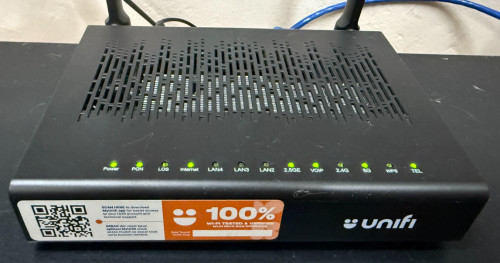
Unlike Unifi which uses AIO ONU +router combo, Maxis provides separate router and ONU. I'm not sure how's the performance of their router now, but you could easily replace with own better router with this setup.
My personal experience, I find Maxis has less congestion at night compare to Unifi.
YoungMan
post Jul 22 2025, 10:17 AM

Look at all my stars!!
*******
Senior Member
6,793 posts

Joined: Oct 2008
From: Kuala Lumpur


QUOTE(Raymond T. @ Jul 21 2025, 11:00 PM)
I see, just to check Maxis 1Gbps what's their upload speed ?
*
500mbps same as Unifi
YoungMan
post Jul 27 2025, 09:02 PM

Look at all my stars!!
*******
Senior Member
6,793 posts

Joined: Oct 2008
From: Kuala Lumpur


QUOTE(effectz @ Jul 27 2025, 10:29 AM)
Is it the same if using any Telco for 5G?
*
In general, yes. But I would suggest telco with good 5G and 4G in your area. This is so you can have reliable fallback if 5G is down.

19 Pages « < 16 17 18 19 >Top
 

Change to:
| Lo-Fi Version
0.1641sec    0.44    7 queries    GZIP Disabled
Time is now: 1st December 2025 - 06:41 PM