

QUOTE(peri peri @ Jan 26 2019, 12:01 AM)

after upgraded from 181024, even shitty!!!!
thinking to change back my thompson router. the archer 5g is plain stupid and unstable

The Official Maxis FTTH Thread | v5, Maxis Home Fibre Internet, from RM89
|
|
 Jan 26 2019, 03:33 PM Jan 26 2019, 03:33 PM
Return to original view | Post
#121
|
 
Junior Member
464 posts Joined: Dec 2004 
|
QUOTE(peri peri @ Jan 26 2019, 12:01 AM) after upgraded from 181024, even shitty!!!! thinking to change back my thompson router. the archer 5g is plain stupid and unstable |
|
|
|
|
|
Apr 28 2019, 06:15 PM
Return to original view | IPv6 | Post
#122
|
|
Junior Member
464 posts Joined: Dec 2004
|
QUOTE(yan7181 @ Apr 28 2019, 10:01 AM) ya, u are right, i refresh again, and went down below 300mbps, now around 250-260mbps. I been using maxis router since fibre service lunch so far TG389AC most stable,second will be amania(131), tp link current supplier by maxis really cannot been use 5g(wifi) signal always freeze(same problem which everone are facing now so far no solution from maxis .maybe untill there change another model or ..If got budget can purchase asus router as main router included your wifi,maxis router just as phone thinking of changing the router, cause 5g always shows no internet. suspect maxis router sucks. any recommendation? My current setup will be Asus RT-AC86U as my main setup and connect to maxis router only for my phone usage, room usually got lan cable connected .if can go buy asus router from china taobao will be more cheaper compare to local malaysia set,due to asus firmware all is universal global can use for our local fiber service,disadvantage is when kaput need to send back to china for warranty. This post has been edited by kwai_83: Apr 28 2019, 06:16 PM |
|
|
Apr 28 2019, 09:29 PM
Return to original view | Post
#123
|
|
Junior Member
464 posts Joined: Dec 2004
|
QUOTE(netken @ Apr 28 2019, 08:47 PM) means router would be asus 86u - then LAN to TP link? Asus as main router.using lan port 3 to the wan port to the maxis router as phone use onlyor router TP Link - then connect as lan to asus 86u? |
|
|
Apr 28 2019, 10:31 PM
Return to original view | IPv6 | Post
#124
|
|
Junior Member
464 posts Joined: Dec 2004
|
QUOTE(yan7181 @ Apr 28 2019, 10:11 PM) noted, thanks for advice, asus cost 1k? my god. i think i will go for the Tenda ac18 tenda is the cheapest in the market. u can try buy from taobao. cheaper |
|
|
Apr 29 2019, 12:32 PM
Return to original view | IPv6 | Post
#125
|
|
Junior Member
464 posts Joined: Dec 2004
|
QUOTE(netken @ Apr 29 2019, 07:56 AM) nice- are u using the Maxis router archer c5? tplink nope..spare onlyany config needed to just plug and play? |
|
|
May 14 2019, 04:52 PM
Return to original view | Post
#126
|
|
Junior Member
464 posts Joined: Dec 2004
|
QUOTE(jojoe @ May 14 2019, 09:22 AM) anyone able to configure only single device (netis dl4480v1) for maxis home fiber and wifi? maxis user cant use all in 1 like last time streamyx century .tm limit and the modem .maxis home fiber come with 2 devices.... netis dl4480 (modem) - from tm tplink ac1200 (touter) - from maxis i have google the netis device from tm..... the unit have modem, router, wifi, analogue phone port and gigalan. anyone have able to or hack configure the netis device.... to become single device. too messy as.... modem , router, telephone and etc on that area. too many wires and adaptors. This post has been edited by kwai_83: May 14 2019, 04:54 PM |
|
|
|
|
|
May 20 2019, 07:36 PM
Return to original view | Post
#127
|
|
Junior Member
464 posts Joined: Dec 2004
|
is the router KO?
Attached thumbnail(s) 

|
|
|
May 20 2019, 08:05 PM
Return to original view | Post
#128
|
|
Junior Member
464 posts Joined: Dec 2004
|
QUOTE(jusbella @ May 20 2019, 07:54 PM) Try use other adapter. try same |
|
|
May 20 2019, 09:18 PM
Return to original view | Post
#129
|
|
Junior Member
464 posts Joined: Dec 2004
|
QUOTE(jusbella @ May 20 2019, 08:10 PM) Call maxis for replacement. wait..lucky this only for voip.. |
|
|
May 23 2019, 11:33 PM
Return to original view | Post
#130
|
|
Junior Member
464 posts Joined: Dec 2004
|
QUOTE(tsmin1989 @ May 23 2019, 09:03 AM) How do you setup Asus as main router, because I try to setup but my VOIP is no working. 1)Maxis Router Set up make sure everything can connect included your voip are working .Than Disable your wifi at your maxis router and off your router2)setup your asus router (my is Asus RT-AC86U) same as above step make sure internet are connect. 3)Asus setup as photo attach as reference,connect your Asus Lan port 3 to wan port (maxis router) on back your maxis router..wait about 5 min if your TEL port light up means success work.But today seems VOIP are not working..any one facing the same problem as me????? Attached thumbnail(s) 
|
|
|
May 26 2019, 02:47 PM
Return to original view | Post
#131
|
|
Junior Member
464 posts Joined: Dec 2004
|
QUOTE(tsmin1989 @ May 26 2019, 01:19 PM) Thank you, I will try again sure hope this guide will help u |
|
|
May 26 2019, 02:59 PM
Return to original view | Post
#132
|
|
Junior Member
464 posts Joined: Dec 2004
|
QUOTE(uncle wong @ May 26 2019, 02:52 PM) My Maxis fibre is down since yesterday. should be ok..tired call again afternoon usually more easy getI call their customer service many times but nobody pickup. Jln ipoh area |
|
|
Jul 27 2019, 07:22 PM
Return to original view | Post
#133
|
|
Junior Member
464 posts Joined: Dec 2004
|
ttdi area also down.but some area ttdi ok
|
|
|
|
|
|
Jul 27 2019, 10:58 PM
Return to original view | Post
#134
|
|
Junior Member
464 posts Joined: Dec 2004
|
ttdi back to normal 9pm
|
|
|
Sep 2 2019, 11:55 PM
Return to original view | Post
#135
|
|
Junior Member
464 posts Joined: Dec 2004
|
QUOTE(stevenX @ Aug 30 2019, 09:00 AM) 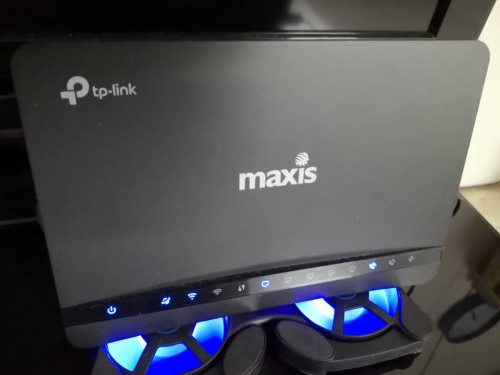 Just install maxis home fibre, the technician gave me this router and he said this is the best. and previous router always disconnect. The thing is , i feel like this router also disconnect itself very often, watch IPTV also will stop loading. Any good router recommend ? |
|
|
Oct 25 2019, 08:25 AM
Return to original view | Post
#136
|
|
Junior Member
464 posts Joined: Dec 2004
|
QUOTE(nawkaz @ Oct 24 2019, 10:30 PM) Hello all, port no need active..the internal wall socket just connect your lan cable only.using a lan cable tester to make sure the internal lan cable is ok second check the wall socket make sure connect correctlySorry if I was in the wrong thread.  I recently installed Maxis Home Fibre at my parents house. The installer came and setup everything downstairs and all works fine. Now, I noticed at my house on 2nd floor there is 2 ethernet port at the wall (in living and master bedroom) but both seems like not active when I plugged in directly to my laptop. I called Maxis but they said could be internal wiring issue but I doubt it. How can they activate the port downstairs when they set up in the first place? Means they could help to activate the port on the 2nd floor too right? |
|
|
Aug 17 2020, 08:45 PM
Return to original view | Post
#137
|
|
Junior Member
464 posts Joined: Dec 2004
|
QUOTE(Mollai @ Aug 13 2020, 03:49 PM) Hi Guys... need some advice here. CI recently changed my internet from Maxis Astro bundle to a standalone one because my parents decided to cancel Astro. I applied for the Maxis home fibre, they sent some technician to install with a new router. It's been a month, and I felt that the connection gets disconnected intermittently - because I am still working from home I can tell that my internet disconnected as my VPN will have a pop up that it is disconnected and reconnecting. I called Maxis, they sent someone over. The technician said there is nothing wrong with my internet, but my disconnection issue is probably my room is not near the router. He explained that I never experience in the past as now we have 5g signal, so there could be interference as there are 2 signals being transmitted (2.4g and 5g) He suggested me to get wifi booster to get a better signal. I did some reading on wifi extender, mesh network, and also get to know that routers may also affect the connection. So I would like to ask if anyone had similar issue, and what would be the best solution? TL/DR version: I experience intermittent disconnection using Maxis home fiber plan. I stay double story, router installed in living room. My room is on 1st floor far behind. Maxis technician suggest wifi extender - wanna ask if you had similar issue and your suggested solution. There are only my parents and I at home, I don't really need very canggih solutions as they are not very tech-savy. I just need to work with smooth internet in my room. In case you suggest me to work closer to the router, my job requires some privacy and my router is installed near the TV. Any comments is very much appreciated.  Replacement a good router with the maxis supplied stock. confirm is better than what u need. budget depends suggest u can go for ax3000 asus or ac86 confirm better |
|
|
Oct 31 2020, 06:14 PM
Return to original view | Post
#138
|
|
Junior Member
464 posts Joined: Dec 2004
|
QUOTE(YoungMan @ Oct 16 2020, 08:52 PM) Have you choose the correct Maxis profile, or configure VLAN setting? I'm not sure what VLAN does Maxis run on but you can dig from the stock router and configure it into your new Asus router. At the router u need selected maxis profie at the iptv. remember lan port 3need to be empty for maxis stocks router to connect for voip. if u need use can manual set vlan so all 4port can be used |
|
|
Dec 2 2020, 06:46 PM
Return to original view | Post
#139
|
|
Junior Member
464 posts Joined: Dec 2004
|
upgrade to maxis 300 mbps.problem is how come stock router speed test is better than asus .anyone facing this problem.
|
|
|
Dec 2 2020, 08:27 PM
Return to original view | Post
#140
|
|
Junior Member
464 posts Joined: Dec 2004
|
QUOTE(thamch @ Dec 2 2020, 06:51 PM) Try use Wifi 5Ghz. Not 2.4Ghz for Wifi speed test on Asus Router. suspect is firmware issue.as i mention using direct lan cable connection. |
| Change to: |  0.0289sec 0.0289sec
 0.55 0.55
 7 queries 7 queries
 GZIP Disabled GZIP Disabled
Time is now: 13th December 2025 - 03:29 PM |
 Quote
Quote