Welcome Guest ( Log In | Register )

11 Pages « < 4 5 6 7 8 > » Bottom

Outline · [ Standard ] · Linear+

 The Official Maxis FTTH Thread | v5, Maxis Home Fibre Internet, from RM89

views
     
QuantumEdge
post Nov 23 2023, 07:30 PM

Regular
******
Senior Member
1,601 posts

Joined: Jan 2016


QUOTE(khainiz94 @ Nov 23 2023, 07:18 PM)
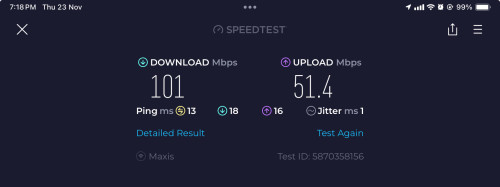
4th time restart.
Now capped at 100 Mbps.
🥲😂🤣

user posted image
*
Contacted CS, want me to use their in app diagnostic functions
Good luck doing that, I'm using my own router and far from home now

From CS: Thank you for bringing this to our attention. As we check from the system, your service already subscribes and getting the 500mbps. TQ

This post has been edited by QuantumEdge: Nov 23 2023, 07:42 PM
QuantumEdge
post Nov 23 2023, 08:15 PM

Regular
******
Senior Member
1,601 posts

Joined: Jan 2016


QUOTE(khainiz94 @ Nov 23 2023, 08:02 PM)
Update: They test it on my account and confirm it is from their side.
It seems capped at 100 Mbps down, 50 Mbps up.
They said the system might not provision the speed properly, so they ask me to wait till the next morning to check with technical team.

And they ask me not to turn off the internet till they call the next morning.
*
You contacted them through twitter or phone call?
QuantumEdge
post Nov 23 2023, 08:19 PM

Regular
******
Senior Member
1,601 posts

Joined: Jan 2016


QUOTE(khainiz94 @ Nov 23 2023, 08:17 PM)
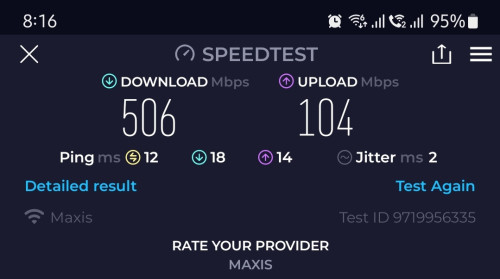
Ok dah normal balik.

I directly call them.
Talk via WhatsApp is a hassle, so everytime I got issue I call them directly.

user posted image
*
What did they asked you to do, hooking up their router or??
I'm outstation now... Can't touch anything hardware
Only able to restart my router and that's it

This post has been edited by QuantumEdge: Nov 23 2023, 08:20 PM
QuantumEdge
post Nov 23 2023, 09:17 PM

Regular
******
Senior Member
1,601 posts

Joined: Jan 2016


QUOTE(khainiz94 @ Nov 23 2023, 08:24 PM)
Nothing.
They just check remotely from their system and they confirmed it just like that.
Since I never change my Kaon router, so they just check it directly.

And after the call, I restart my router and TM modem one last time and BAM!
500 Mbps is there.
*
Mine is getting even slower now...30Mbps up and down
I will try to call them and persuade them it is definitely not my device's problem...

--------------------Okay... doh.gif -------------
For those using your own router, if you are having the same issue
Install back the router provided by Maxis first before you contact them
They are unable (wont) to do anything if you are using your own device

Mine is still unresolved because I'm not at home and my parents got no idea how to put the router back

This post has been edited by QuantumEdge: Nov 23 2023, 09:27 PM
QuantumEdge
post Nov 23 2023, 09:50 PM

Regular
******
Senior Member
1,601 posts

Joined: Jan 2016


QUOTE(kenjixx @ Nov 23 2023, 09:45 PM)
user posted image
100 to 300 also cant get why la maxis why
*
I'm wondering, if you use your own router instead
Will they bother you with this?
QuantumEdge
post Nov 24 2023, 10:42 AM

Regular
******
Senior Member
1,601 posts

Joined: Jan 2016


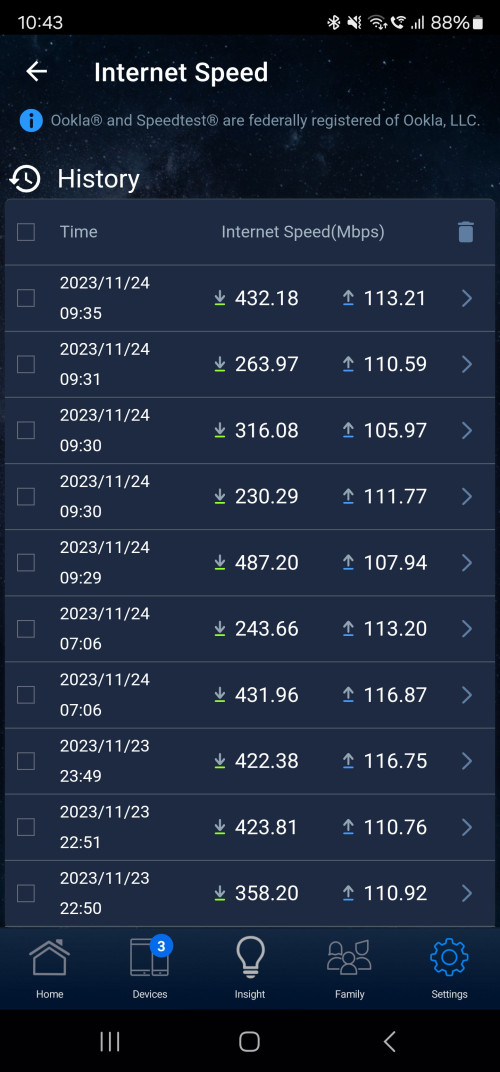
So something really funny
As I'm running speed tests using the tool on my router, I'm unable to choose Maxis server as it deemed too far away.

Ran like 50 speed tests throughout the night, I'm only able to get almost the full 500Mbps on Umobile's server

However, for other servers (Digi, Celcom, Singtel) I'm averaging 300 ish Mbps but till retaining the full 100Mbps upload

Tried those on my Time 500Mbps, getting similar results as well

I'm guessing it is routing issues or those lines are congested enough then?

user posted image

This post has been edited by QuantumEdge: Nov 24 2023, 10:43 AM
QuantumEdge
post Nov 24 2023, 11:03 AM

Regular
******
Senior Member
1,601 posts

Joined: Jan 2016


QUOTE(khainiz94 @ Nov 24 2023, 10:58 AM)
My issue yesterday every server I tried capped at 100 Mbps down, 50 Mbps up.
After reporting to them last night and restart once again, all issues gone.
Now full speed on all servers.
They said might be provision error.
And also I noticed, the IP range I got is 113.xx which is really unusual.
Usually I get 14.xx range.
*
I tried to explain the whole thing to them through phone call, but they said they're unable (refused) to do anything if I'm using my own router.

Guess I'll leave it as it is, till I got time to travel back to swap out the router

Makes no sense man... Why would you need that router to modify something that's on server side?
QuantumEdge
post Nov 24 2023, 03:30 PM

Regular
******
Senior Member
1,601 posts

Joined: Jan 2016


QUOTE(khainiz94 @ Nov 24 2023, 11:08 AM)
Maybe they want to check the settings at the ONU?
Who knows.
TR-069 is quite scary, they can go into our router and check everything.

BTW, maybe you can ask your family to restart one more time today and it might fix everything?
If not, like you said, you have to go back to swap the router so that they can troubleshoot from their system.
*
From what I've heard from CS, they can remote to your ONU even when you are using 3rd party router
As they remotely restart my ONU during the phone call
Going to ask them to restart it again, this is getting old real quick

QUOTE(tro11 @ Nov 24 2023, 12:07 PM)
Because lower level support aren't very technical. They were trained to do one thing and they will just do that.

They have diagnostic tools from their side to access the router they provide. If they can't access, they'll say not their issue.
*
Indeed, but I need my VPN and their Kaon doesnt support anything (Even tying MAC address with IP address also cant)

QUOTE(YoungMan @ Nov 24 2023, 01:57 PM)
Are you on TM infra? With so many upgrade going on, is Maxis on TM still capped slightly lower even for those upgrade to 300mbps and 500mbps?
*
Yes I'm, but I always get a bit more than what I've subscribed to
Same goes to my neighbors

QuantumEdge
post Nov 25 2023, 11:11 AM

Regular
******
Senior Member
1,601 posts

Joined: Jan 2016


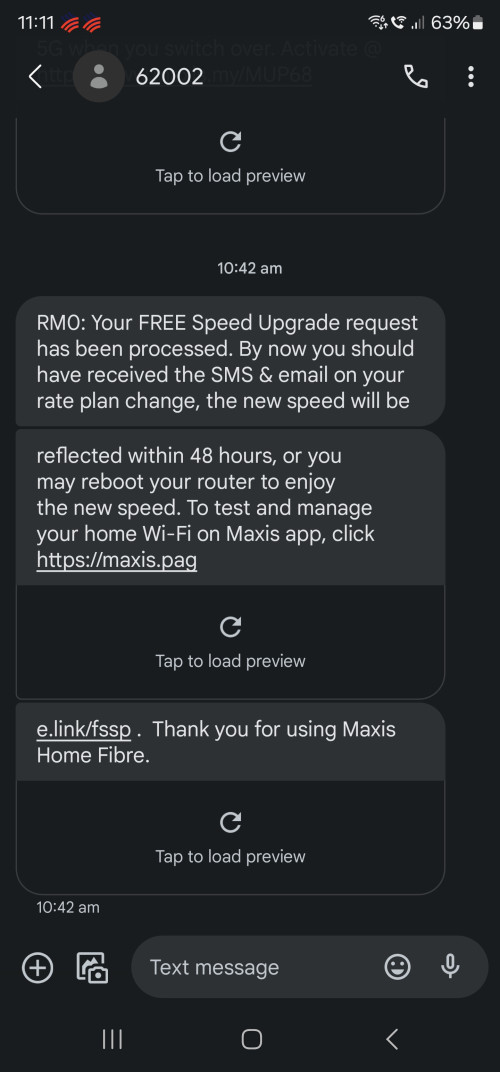
user posted image
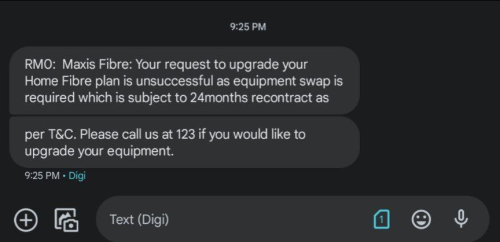
Well, message is finally here
Still not getting the full 500Mbps but I don't really care anymore
QuantumEdge
post Nov 25 2023, 08:11 PM

Regular
******
Senior Member
1,601 posts

Joined: Jan 2016


QUOTE(lowyard @ Nov 25 2023, 01:03 PM)
When did you press upgrade and when did you receive this message bro?
*
Till I get the speed upgrade, 2 days
Receive the message after 4 days
QuantumEdge
post Dec 5 2023, 07:14 PM

Regular
******
Senior Member
1,601 posts

Joined: Jan 2016


QUOTE(fruitie @ Dec 4 2023, 08:30 PM)
In that case, it seems only those with Maxis postpaid will have this option. Mine is pure fiber.
*
I asked them right after installation, they told me (at that time) they will provide the dongle as per request if customer required
If you need it, you can ask them for it
I wasnt using their postpaid that time
QuantumEdge
post Dec 10 2023, 05:25 PM

Regular
******
Senior Member
1,601 posts

Joined: Jan 2016


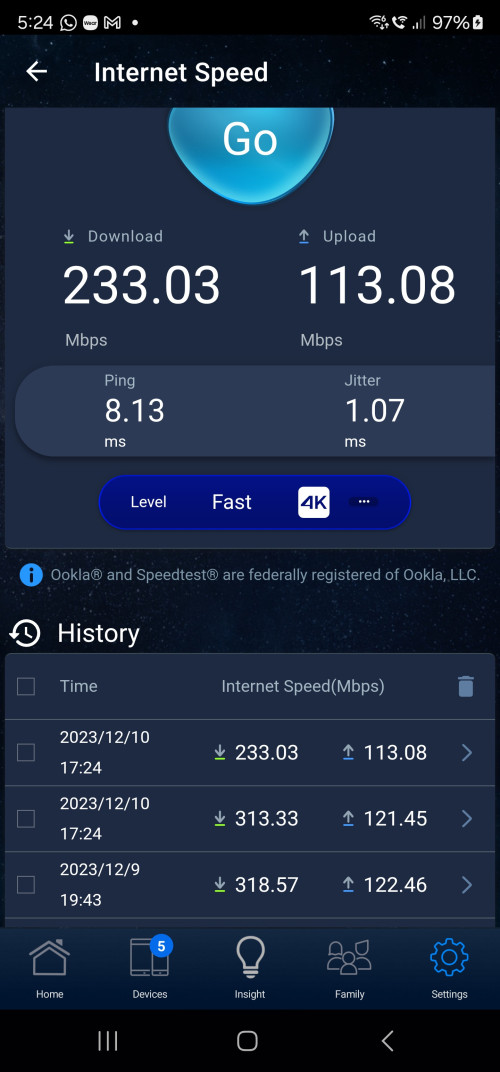
user posted image
My Maxis 500Mbps is getting even slower now...oh my
QuantumEdge
post Dec 12 2023, 10:15 PM

Regular
******
Senior Member
1,601 posts

Joined: Jan 2016


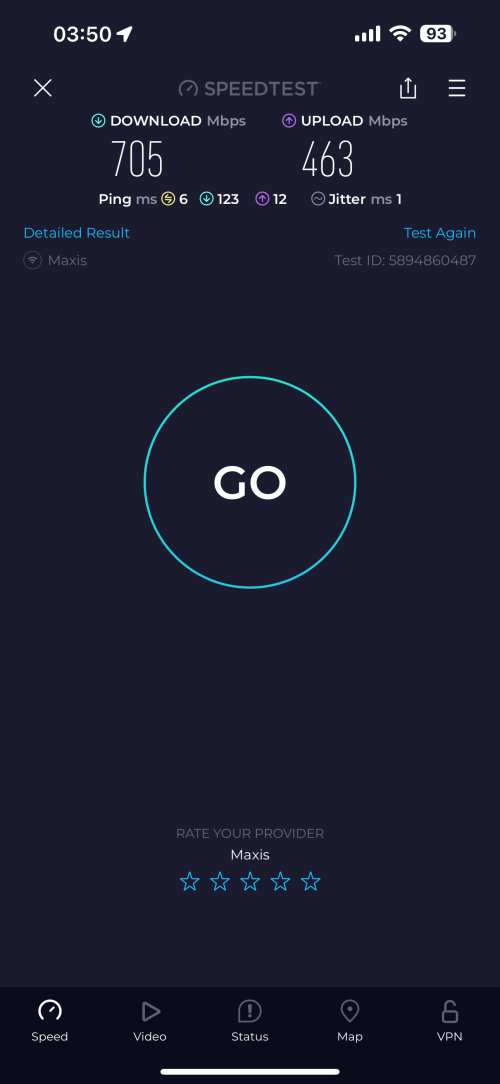
QUOTE(sadlyfalways @ Dec 11 2023, 03:50 AM)
Make sure your test server isn’t any of the maxis ones. They seem to be having issues

user posted image
*
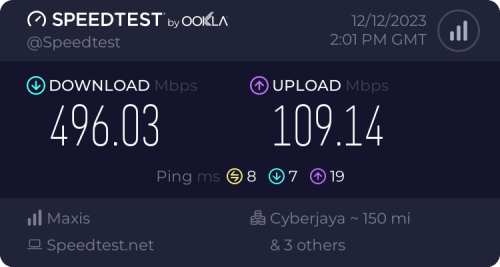
user posted image
Fixed! Turns out it was asus's build-in speedtest's fault
I remote back to my PC, ended up getting almost the full 500Mbps wired
QuantumEdge
post Dec 16 2023, 10:58 PM

Regular
******
Senior Member
1,601 posts

Joined: Jan 2016


QUOTE(stinger @ Dec 15 2023, 08:56 AM)
hope you enjoy your stay in unifi
I was from unifi > Maxis because of 3 reasons :

- unlimited data plan on postpaid
- backup 4g dongle
- Maxis will rush TM to fix line problem and better follow up service if you report MCMC and provided me compensation [rebate on service loss days]

Why I did not liked unifi :

- if you encounter any problems and report MCMC, unifi still doesn't give a shit on it [slow response all the way], no follow up call even after issue resolved, no compensation on service loss days
- no backup dongle, unifi down = outage
- if you terminate / switch line ..... wow good luck to you ... there are many threads out there complaining the slowness of TM unifi side on processing - on releasing the port to Maxis (mine took 1.5 months after reported to MCMC!)
- maxis never called and bother me to upgrade plan, unifi agent did (at least once annually).... so annoying....
- Unifi had very bad stock wifi router back then .....serious packet loss when more devices connected 

Well... of course, everyone gets different experience  cool2.gif
*
For me, the only reason I switched from Unifi to Maxis was their lousy routing during and after MCO
Maxis given me RM20*24 months discount on my bill (300Mbps, RM149) to RM129
However, after they never provide me anything similar to stay with unifi plan when my contract ended recently
And my bill is back to the full RM149 for 500Mbps now, excluding the RM10 extra for public IP
Thinking about switching back to Unifi as they are willing to provide me 6 months free
Still deciding lah, Allo is not an option now as I've seen enough of complaints in FB group
Menwhile TIME's routing to China is bad...

Overall Maxis is better on international routing, but their price is kinda meh
And they left you hanging once contract ended

QuantumEdge
post Dec 16 2023, 11:09 PM

Regular
******
Senior Member
1,601 posts

Joined: Jan 2016


QUOTE(blacktubi @ Dec 16 2023, 11:00 PM)
Curious do you have any comparisons with TIME?

Contemplating to move due to cheaper 2Gbps plan on Maxis
*
I'm using TIME and Maxis
Never tried online gaming on TIME, however their routing to China is quite bad when comparing to Maxis
And the speed test results are really inconsistent, yes I do get 500Mbps but most of the time it will be around 400ish

Do take note I'm on their stock huawei router

This post has been edited by QuantumEdge: Dec 16 2023, 11:09 PM
QuantumEdge
post Dec 18 2023, 08:28 PM

Regular
******
Senior Member
1,601 posts

Joined: Jan 2016


QUOTE(fruitie @ Dec 18 2023, 11:52 AM)
Looks like I need to start planning now and initiate the switch in February. I have an overseas trip in Feb and hopefully can get it sorted out before March where my contract expires. So sad to let go Maxis but well this is just a fiber for me to use in my house which I only occupy about two weeks in a month and I live alone, so I don't intend to pay more for the Internet fees. Just enough for me to use and my IoT stuff to run 24/7. 300Mbps is a sweet spot for me, enough also if I have guests to my house occasionally. No intention to downgrade below 300Mbps and no interest in paying more than RM 129. I guess, I don't have much choice. laugh.gif
*
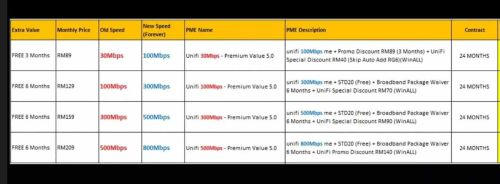
user posted image
I'm looking at this rclxms.gif
QuantumEdge
post Dec 19 2023, 12:29 PM

Regular
******
Senior Member
1,601 posts

Joined: Jan 2016


QUOTE(fruitie @ Dec 19 2023, 11:34 AM)
If Maxis doesn't counter-offer me with something nice, then I will opt for UniFi. tongue.gif

Anyway, actually I prefer to stay with Maxis, eases everything. I don't need to wait for the technician to come and change for me, redo my router settings again.
So let's see when the time comes. biggrin.gif
*
May I know how can one push them to counter offer?
QuantumEdge
post Dec 26 2023, 09:45 PM

Regular
******
Senior Member
1,601 posts

Joined: Jan 2016


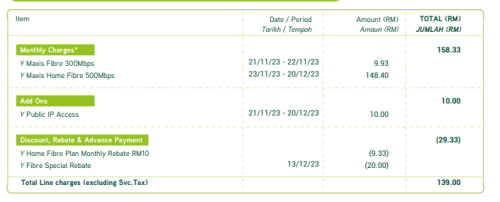
user posted image
My bill at the moment, plus 6% SST=RM147.34
QuantumEdge
post Dec 27 2023, 10:57 PM

Regular
******
Senior Member
1,601 posts

Joined: Jan 2016


I think the free upgrade promotion has ended, the option to upgrade is not longer available in the app
QuantumEdge
post Dec 28 2023, 03:57 PM

Regular
******
Senior Member
1,601 posts

Joined: Jan 2016


QUOTE(kurogane @ Dec 28 2023, 08:36 AM)
OK this is even weirder, your rebate is properly pro-rated. I am starting to think they fucked up on my account. May I know what is the special rebate?
*
The RM20 discount is the rebate for new subscriber 2 years ago, ended this month
The current one should be the RM10 rebate

11 Pages « < 4 5 6 7 8 > » Top
 

Change to:
| Lo-Fi Version
0.0293sec    0.57    7 queries    GZIP Disabled
Time is now: 18th December 2025 - 09:54 AM