Outline ·
[ Standard ] ·
Linear+
[FAQ] PC auto restart/Blue Screen (BSOD), All questions go here please.
|
fruxano
|
 Jan 1 2011, 01:30 PM Jan 1 2011, 01:30 PM
|
Getting Started


|
well, technically no more BSOD since i can't even boot into OS. he2. alright, might as well ask in a new thread. thanx for your advice though. I initially suspected the PCI wireless card was at fault though since after reformat, no BSOD until I install the wireless card driver. now I've confirmed the culprit, just need to boot back into my OS. he2
|
|
|
|
|
|
xi4n9
|
Jan 2 2011, 11:51 PM
|
Getting Started
|
i have a new system just about to install my OS, but turn into BSOD while half way into the progress. Trying out with windows xp at 1st, after that tried windows 7 as well, still the same results. tried with different optical drive, different hard disk, still no cure. anyone has the same problem experience like me? i've google-ed it somehow they gave me a few hints, but i end up thinking that the only problem would be either the ram or the mobo. any help here? i have no OS in it, i cant do anything other than BIOS setting. clueless.
|
|
|
|
|
|
aasif90
|
Jan 6 2011, 08:25 AM
|
Getting Started
|
last night when i using my pc, my pc suddenly become hang for a while and then come back to normal. this happens for a few times. so i restart the pc but another problem is raised, my partition E need to format. i restart again my pc in hope in can back to normal. but the real problem is raise whereby i can't get into windows and below error is shown 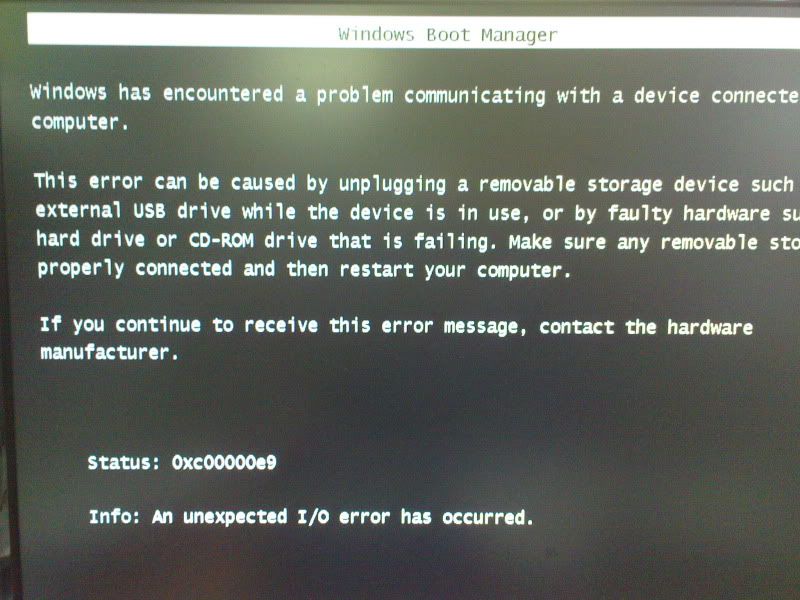 i try disconect all the internal and external hardware and just connect only hdd to my mobo (including ram,gc) but the result still same. can problem due to failure of my hdd.. really need help ASAP |
|
|
|
|
|
badminto
|
Jan 6 2011, 10:14 AM
|
|
|
QUOTE(aasif90 @ Jan 6 2011, 08:25 AM) last night when i using my pc, my pc suddenly become hang for a while and then come back to normal. this happens for a few times. so i restart the pc but another problem is raised, my partition E need to format. i restart again my pc in hope in can back to normal. but the real problem is raise whereby i can't get into windows and below error is shown i try disconect all the internal and external hardware and just connect only hdd to my mobo (including ram,gc) but the result still same. can problem due to failure of my hdd.. really need help ASAP Maybe it is your windows 7 fault. Try format and reinstall windows. |
|
|
|
|
|
RigerZ
|
Jan 6 2011, 02:22 PM
|
|
|
QUOTE(badminto @ Dec 30 2010, 10:00 PM) Your bsod caused by avira and sis ethernet...(Network Card) and Netio.sys My suggestions: 1) Try uninstall avira 2) Uninstall your Sis ethernet card and make sure your driver downloaded from manufacturer site. Update it. 3) Try to unplug ur sis ethernet card and reboot. Check the adapter if it is damaged or not. 4) Install latest updates from microsoft 5) Make sure all your driver is up to date. Your feedback is appreciated 
Added on December 30, 2010, 10:06 pmAttach your minidump Too late, the computer was not able to start Windows the next day (Windows is unable to start), sent it to the shops last week, then today the shop said it could not partition the hard drive (after reformatting). They SUSPECT it could be a motherboard failure. Now they're checking the components to see what's the problem. *Online from cyber cafe |
|
|
|
|
|
aasif90
|
Jan 6 2011, 04:44 PM
|
Getting Started
|
QUOTE(badminto @ Jan 6 2011, 10:14 AM) Maybe it is your windows 7 fault. Try format and reinstall windows. i can't even format the pc bcoz during wanna boot from cd, this problem also raised |
|
|
|
|
|
badminto
|
Jan 6 2011, 06:03 PM
|
|
|
QUOTE(aasif90 @ Jan 6 2011, 04:44 PM) i can't even format the pc bcoz during wanna boot from cd, this problem also raised For more answers, please ask in technical support  |
|
|
|
|
|
MjMax15
|
Jan 6 2011, 11:34 PM
|
|
|
greetings, recently my acer aspire give this BSOD while shutting down PC btw, im using windows xp pro 32bit. done registry cleaning, uninstalling some programs but no luck  |
|
|
|
|
|
badminto
|
Jan 6 2011, 11:38 PM
|
|
|
QUOTE(MjMax15 @ Jan 6 2011, 11:34 PM) greetings, recently my acer aspire give this BSOD while shutting down PC btw, im using windows xp pro 32bit. done registry cleaning, uninstalling some programs but no luck Please attach your minidump here |
|
|
|
|
|
nanatanjung
|
Jan 8 2011, 08:08 AM
|
New Member
|
|
|
|
|
|
|
badminto
|
Jan 8 2011, 08:55 AM
|
|
|
QUOTE(nanatanjung @ Jan 8 2011, 08:08 AM) From your given minidump, halmacpi.dll and win2k.sys is cause of your bsod Free up windows drive at least has 1gb free space or more. If not fix, update your all ur drivers especially graphic card to the latest one from manufacture (IMPORTANT). If not fix, run memtest. If not fix, try check your temperature of your processor.If not fix try perform clean install of your windows. Your feedback is appreciated This post has been edited by badminto: Jan 8 2011, 08:57 AM |
|
|
|
|
|
nanatanjung
|
Jan 8 2011, 10:29 PM
|
New Member
|
gc driver is updated. mobo too as well. hurmm .. means i hv to reformatted again the windows rite ?
|
|
|
|
|
|
MjMax15
|
Jan 10 2011, 12:04 AM
|
|
|
QUOTE(badminto @ Jan 6 2011, 11:38 PM) Please attach your minidump here sry im noob about this where can i find minidump? |
|
|
|
|
|
khamsan
|
Jan 10 2011, 03:07 AM
|
New Member
|
hello,...
im having this problem on winXP displayed couldnt open drive multi (0) disk error.i tried fresh format after a while browsing.BSOD displayed as above.any ideas?much appreciate ur input guys.thnx in advance.
|
|
|
|
|
|
SUSdemamkuning
|
Jan 10 2011, 06:42 PM
|
Getting Started
|
hi, im having this problem recently..pls  Attached File(s) Attached File(s) Mindump.zip
 ( 28.6k )
Number of downloads: 10 |
|
|
|
|
|
badminto
|
Jan 10 2011, 11:10 PM
|
|
|
QUOTE(demamkuning @ Jan 10 2011, 06:42 PM) hi, im having this problem recently..pls Your BSOD caused by ysfsbte.sys which is related to F-Secure Boot Time Scanner Uninstall F-secure. If not fix, try update your ethernet card and wireless card driver to the latest one YOur feedback is appreciated |
|
|
|
|
|
SUSdemamkuning
|
Jan 10 2011, 11:29 PM
|
Getting Started
|
QUOTE(badminto @ Jan 10 2011, 11:10 PM) Your BSOD caused by ysfsbte.sys which is related to F-Secure Boot Time Scanner Uninstall F-secure. If not fix, try update your ethernet card and wireless card driver to the latest one YOur feedback is appreciated never installed f-secure b4.will update those drivers then. thanks |
|
|
|
|
|
wen9x88
|
Jan 19 2011, 11:34 AM
|
|
|
need help.
i cant do anything because the laptop keep bsod and then restart,cant enter safe mode.
and the error showing is iastor.sys-address FFFFF8800107ED4D BASE AT FFFFF88001035000, DATESTAMP 4A287AA4.
how to fix it ?
urgent,because got many important data inside.
thank you
|
|
|
|
|
|
yeakyau
|
Jan 19 2011, 11:51 AM
|
Getting Started
|
QUOTE(wen9x88 @ Jan 19 2011, 11:34 AM) need help. i cant do anything because the laptop keep bsod and then restart,cant enter safe mode. and the error showing is iastor.sys-address FFFFF8800107ED4D BASE AT FFFFF88001035000, DATESTAMP 4A287AA4. how to fix it ? urgent,because got many important data inside. thank you advise, remove your hard disk, and put in external enclosrure than plug in other pc take ur data out, or using linux or ubuntu boot it |
|
|
|
|
|
mandy06
|
Jan 20 2011, 03:26 PM
|
New Member
|
Hi. sometime blue screen appear on my laptop and it automatically restart after that... i dont have enough time to jot down the problem detail sicnce the blue screen disappears in seconds.. this usually happens when i am watching movies for too long.. can i know what is the problem of my laptop?? and sometime if my laptop is overwork, mean i on my laptop for too long, like 15 hours a day, a white tiny light will keep 'splashing' at the bottom of my screen, until the screen becomes normal again after a few minutes. but i still can see clearly what is on the screen when the white tiny light is there.. what is the problem of this?? thx thx..  |
|
|
|
|



 Quote
Quote







 0.0314sec
 0.59
0.59
 6 queries
 GZIP Disabled