

QUOTE(tonyvyp @ Feb 1 2011, 12:36 AM)
BS again...frustrated ady, tml juz go claim warranty... 

hope its not going to be like that anymore.gluck! [FAQ] PC auto restart/Blue Screen (BSOD), All questions go here please.
|
|
 Feb 1 2011, 01:37 AM Feb 1 2011, 01:37 AM
|
 
Junior Member
237 posts Joined: Jun 2009 From: German Malaysian Institute  
|
QUOTE(tonyvyp @ Feb 1 2011, 12:36 AM) BS again...frustrated ady, tml juz go claim warranty... hope its not going to be like that anymore.gluck! |
|
|
|
|
|
Feb 2 2011, 11:27 PM
|

Junior Member
26 posts Joined: Jul 2006 
|
this is the minidump.what should i do next?
This post has been edited by unrealsilver: Feb 6 2011, 10:31 AM Attached File(s)  Mini012011_01.zip ( 161.42k )
Number of downloads: 8
Mini012011_01.zip ( 161.42k )
Number of downloads: 8 |
|
|
Feb 3 2011, 12:46 PM
|

Senior Member
706 posts Joined: Sep 2010 From: Pluto 
|
QUOTE(unrealsilver @ Feb 2 2011, 11:27 PM) this is the minidump.what should i do next? Your BSOD is caused by kmixer.sys.Uninstalled your sound driver and install the latest driver from manufacturer site. If not fix scanned your computer for virus with good av. If not fix, run memtest to check whether your ram are faulty. If you have more than one stick ram, run it stick by stick. |
|
|
Feb 7 2011, 12:06 AM
|
|
Junior Member
145 posts Joined: Apr 2006
|
keep on BS...now can't even access my computer after i log in
 This post has been edited by bmwlover: Feb 7 2011, 12:08 AM Attached File(s)
020511_25724_01.zip ( 38.58k )
Number of downloads: 9 |
|
|
Feb 7 2011, 10:51 AM
|
|
Senior Member
706 posts Joined: Sep 2010 From: Pluto
|
QUOTE(bmwlover @ Feb 7 2011, 12:06 AM) keep on BS...now can't even access my computer after i log in Possibly memory corruption. Run memtest on pc, stick by stick if you have more ram stick. Try also reseat the ram and boot again. Also try open casing and look if there is a lot of dust to clean.Can you boot into safe mode? This post has been edited by badminto: Feb 7 2011, 10:52 AM |
|
|
Feb 8 2011, 08:35 AM
|
|
Junior Member
145 posts Joined: Apr 2006
|
ya i can boot into safe mode, but normal mode after log in i will hang there..just clean the dust last week, lappie is quite laggy..isit hard disk failure?
|
|
|
|
|
|
Feb 9 2011, 12:27 AM
|
|
Senior Member
706 posts Joined: Sep 2010 From: Pluto
|
QUOTE(bmwlover @ Feb 8 2011, 08:35 AM) ya i can boot into safe mode, but normal mode after log in i will hang there..just clean the dust last week, lappie is quite laggy..isit hard disk failure? Maybe some of your recent installed software interrupted ur system. Uninstall the suspected software or restore ur system. This also can be result of virus infection. Scan ur computer. Your feedback is appreciated  This post has been edited by badminto: Feb 9 2011, 12:34 AM |
|
|
Feb 9 2011, 01:47 AM
|
|
Junior Member
145 posts Joined: Apr 2006
|
i just checked with the western digital diagnostic tool and it said my hard disk fail the test..but miraclely, today i can start up my computer, gosh, i just don't know what is going on with it!!
|
|
|
Feb 9 2011, 07:50 AM
|

Junior Member
215 posts Joined: Oct 2004 From: BUTTERWORTH / PENANG
|
QUOTE(bmwlover @ Feb 9 2011, 01:47 AM) i just checked with the western digital diagnostic tool and it said my hard disk fail the test..but miraclely, today i can start up my computer, gosh, i just don't know what is going on with it!! hard disk got problem is time to change  |
|
|
Feb 9 2011, 06:50 PM
|

Senior Member
837 posts Joined: Oct 2007 From: Penang
|
QUOTE(bmwlover @ Feb 9 2011, 01:47 AM) i just checked with the western digital diagnostic tool and it said my hard disk fail the test..but miraclely, today i can start up my computer, gosh, i just don't know what is going on with it!! Back up your important data (if any) before too late...This is your error : Bug Check 0x7A: KERNEL_DATA_INPAGE_ERROR -> indicates bad blocks (sectors) on the hard disk -> indicates defective cable ---> Run Windows check disk... |
|
|
Feb 10 2011, 09:20 AM
|

Junior Member
261 posts Joined: Sep 2004 From: UEP Subang Jaya 
|
Just a new BSoD last night.can someone tell me what's the reason of it? btw I'm running Windows 7
 A problem has been detected and Windows has been shut down to prevent damage to your computer. The problem seems to be caused by the following file: ntkrnlpa.exe BAD_POOL_CALLER If this is the first time you've seen this stop error screen, restart your computer. If this screen appears again, follow these steps: Check to make sure any new hardware or software is properly installed. If this is a new installation, ask your hardware or software manufacturer for any Windows updates you might need. If problems continue, disable or remove any newly installed hardware or software. Disable BIOS memory options such as caching or shadowing. If you need to use safe mode to remove or disable components, restart your computer, press F8 to select Advanced Startup Options, and then select Safe Mode. Technical Information: *** STOP: 0x000000c2 (0x00000099, 0xfdc765b0, 0x00000000, 0x00000000) *** ntkrnlpa.exe - Address 0x82ce1d10 base at 0x82c05000 DateStamp 0x4a5bc007 MiniDumps This post has been edited by andy_mc_d: Feb 10 2011, 09:28 AM |
|
|
Feb 11 2011, 12:44 AM
|

Junior Member
366 posts Joined: Jan 2010
|
anyone can help me diagnose my problem..im kinda frustrated with my BSOD..
help me thx..
021111_18174_012.zip ( 18.44k )
Number of downloads: 17
020911_21699_01.zip ( 19.06k )
Number of downloads: 7
021111_18174_012.zip ( 18.44k )
Number of downloads: 17This post has been edited by apek1989: Feb 11 2011, 12:57 AM Attached File(s)
021011_27409_01.zip ( 10.43k )
Number of downloads: 8 |
|
|
Feb 11 2011, 11:47 AM
|
|
Senior Member
706 posts Joined: Sep 2010 From: Pluto
|
QUOTE(apek1989 @ Feb 11 2011, 12:44 AM) anyone can help me diagnose my problem..im kinda frustrated with my BSOD.. This is problem caused by your nvidia.help me thx..
021111_18174_012.zip ( 18.44k )
Number of downloads: 17
020911_21699_01.zip ( 19.06k )
Number of downloads: 7
021111_18174_012.zip ( 18.44k )
Number of downloads: 17Update your gc driver to the latest from manufacturer. If not fix uninstall nvidia driver and reinstall it again. If not fix, make sure the graphic card is not overheating. Your feedback is appreciated |
|
|
|
|
|
Feb 12 2011, 04:50 PM
|

Junior Member
16 posts Joined: Feb 2011
|
This behaviour can occur if the following requirements:
# A fatal system error (STOP error) causes the computer to stop. # Automatically restart option is enabled in recovery on the Startup / Shutdown tab in System Properties. # Windows paging file is smaller than the amount of physical memory installed on your computer, or do not have enough free space on your hard disk system for write the error dump file (Memory.dmp). Thanks. |
|
|
Feb 14 2011, 01:10 AM
|

Senior Member
672 posts Joined: Nov 2004 From: Pasir Puteh
|
need help from sifu..
just build my pc today got bsod after try opening games or programs here my minidump This post has been edited by ioriamd: Feb 14 2011, 01:20 AM Attached File(s)
021411_27612_01.zip ( 27.04k )
Number of downloads: 9 |
|
|
Feb 14 2011, 10:21 AM
|
|
Senior Member
837 posts Joined: Oct 2007 From: Penang
|
QUOTE(ioriamd @ Feb 14 2011, 01:10 AM) need help from sifu.. Bug Check 0x116 ---> atikmpag.sys & dxgkrnl.sysjust build my pc today got bsod after try opening games or programs Related to your ATI driver & direct X files... Suggestion : - update the graphic driver from AMD - update direct X runtime from Microsoft - run memory check on RAM - check / monitor the graphic card temperature |
|
|
Feb 15 2011, 06:48 PM
|
|
Junior Member
366 posts Joined: Jan 2010
|
QUOTE(badminto @ Feb 11 2011, 11:47 AM) This is problem caused by your nvidia. i already reinstall the nvidia driver..n same problem happen..Update your gc driver to the latest from manufacturer. If not fix uninstall nvidia driver and reinstall it again. If not fix, make sure the graphic card is not overheating. Your feedback is appreciated i think my problem because of the overheating of my gc..  any recommendation for me what to do??  |
|
|
Feb 15 2011, 09:19 PM
|
|
Senior Member
706 posts Joined: Sep 2010 From: Pluto
|
QUOTE(apek1989 @ Feb 15 2011, 06:48 PM) i already reinstall the nvidia driver..n same problem happen.. Download speedfan and run it. If you don't know how to read it, post the screenshoti think my problem because of the overheating of my gc.. any recommendation for me what to do?? |
|
|
Feb 16 2011, 03:29 PM
|
|
Senior Member
672 posts Joined: Nov 2004 From: Pasir Puteh
|
QUOTE(ioriamd @ Feb 14 2011, 01:10 AM) need help from sifu.. problem solved..just build my pc today got bsod after try opening games or programs here my minidump gc driver only thanx everybody |
|
|
Feb 16 2011, 11:55 PM
|
|
Junior Member
366 posts Joined: Jan 2010
|
QUOTE(badminto @ Feb 15 2011, 09:19 PM) Download speedfan and run it. If you don't know how to read it, post the screenshot 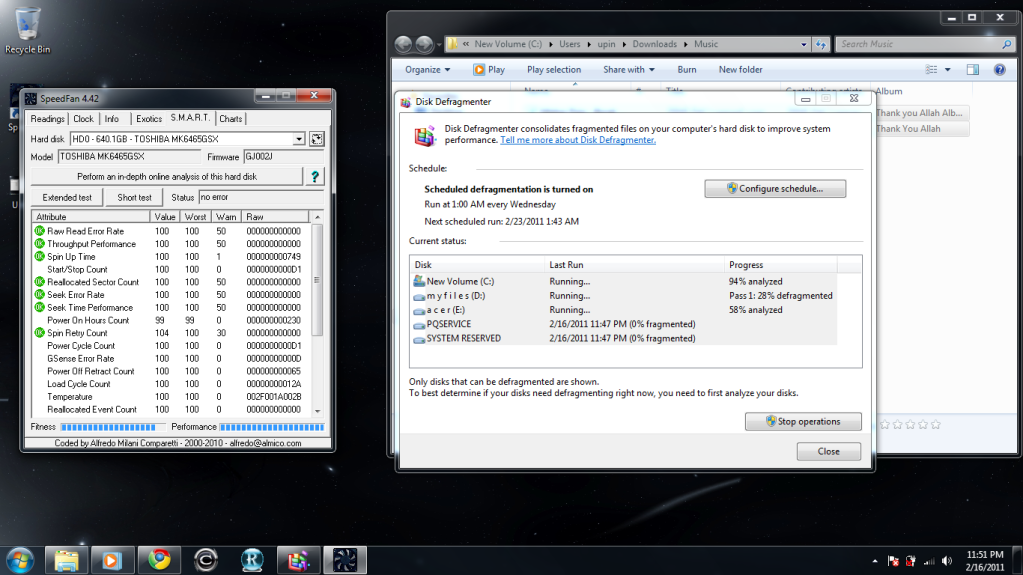 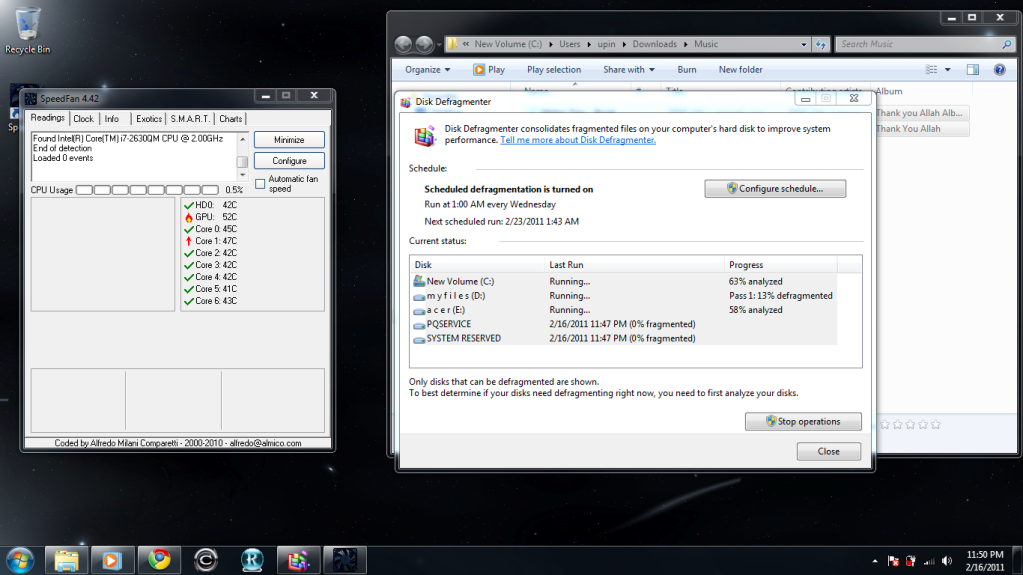 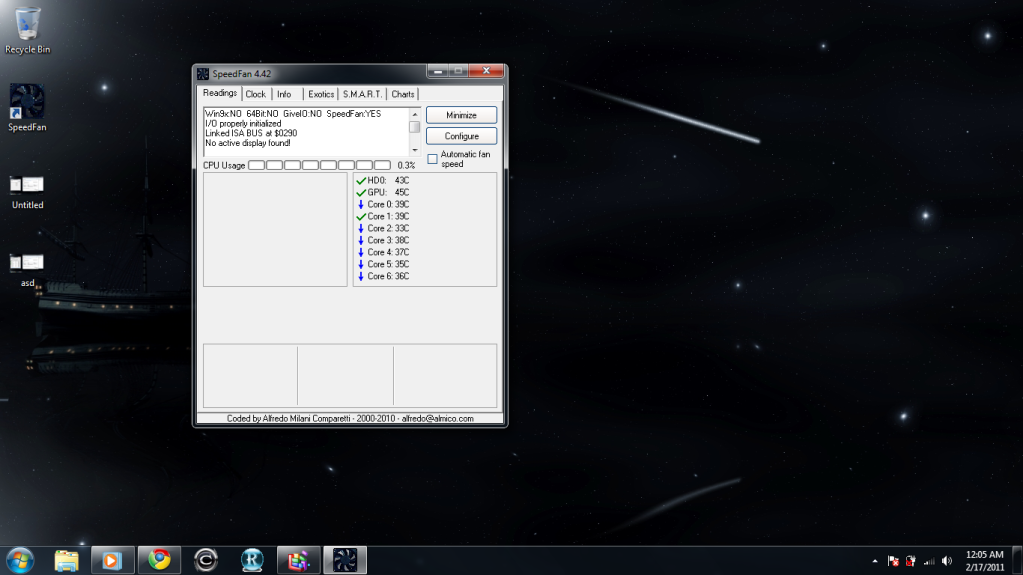 actually i dunno how to use the speedfan..this idle state. This post has been edited by apek1989: Feb 17 2011, 12:07 AM |
| Change to: |  0.0361sec 0.0361sec
 0.38 0.38
 6 queries 6 queries
 GZIP Disabled GZIP Disabled
Time is now: 3rd December 2025 - 04:15 AM |
 Quote
Quote