

can anyone help me with this?
 dumpfile.zip ( 26.46k )
Number of downloads: 23
dumpfile.zip ( 26.46k )
Number of downloads: 23got blue screen out of nowhere after boot into windows..
after that the pc cannot start at all.. i took this dump file from the hard disk..
can somebody help?
[FAQ] PC auto restart/Blue Screen (BSOD), All questions go here please.
|
|
 Oct 10 2010, 10:37 PM Oct 10 2010, 10:37 PM
|
 
Junior Member
17 posts Joined: Sep 2007 
|
hello all...
can anyone help me with this?
dumpfile.zip ( 26.46k )
Number of downloads: 23got blue screen out of nowhere after boot into windows.. after that the pc cannot start at all.. i took this dump file from the hard disk.. can somebody help? |
|
|
|
|
|
Oct 17 2010, 01:10 PM
|

Junior Member
154 posts Joined: Nov 2009 From: Mareshia 
|
Hi... I got the blue screen problem...
When I use skype to videocall, then after awhile, maybe 30 minutes, it will come out blue screen, and then got this running bar and the bottom dumping some physical memory thing... when it reaches 100%, will auto restart... Can someone teach me how to rectify it please?  |
|
|
Oct 22 2010, 08:18 PM
|

Junior Member
60 posts Joined: Dec 2007
|
My computer been having problem lately.. Sometimes when i use halfway it will auto restart/ auto shutdown (cant restart) / or hang... Sometimes when it cant start up back..i will just unpluck the ram and plug it in again..it will be able to start up.. But then, the auto restart problem come again. I really dono what happen, i d send to the repair shop once, they run it for 4 5 hours , nothing wrong with it. But when i use it at home, sometimes 30 min will auto restart or sometimes 3 4 hours ... Hope u all can gimmi a hand.
I tried uploading the minidump file but i not sure how. when i zip it i get this error "Upload failed. You are not permitted to upload a file with that file extension." |
|
|
Oct 23 2010, 07:18 PM
|

Junior Member
89 posts Joined: Apr 2007 From: Setia Alam
|
hi guys, my pc has been constantly getting blue screen from random moments. I've tried programs that will max out processor usage but from 15hrs test no problem, same goes for RAM, where I ran another 15hrs for it and not a single error.
But then sometimes on random moments, like opening another window, playing games half way, or trying to open a folder, blue screen will pop out suddenly. I'm unable to pin point which hardware is facing problem til now. my only idea so far is that my USB is having some problem. It seems that the ports sometimes will just die all together, need to reset pc then it will go back to normal. It dies on random times, can die the moement pc starts, can be 5mins after turning on pc, can be 5hrs later... or can work perfectly for days. I've attached around 16 logs dated from 14oct (since i thought I kena virus so I formatted my pc on that day) I've got other random restarts by itself, sadly there are no logs for it Here are the logs http://www.megaupload.com/?d=DTN9MTXP My pc hardwares are Intel® Core™ i7 CPU 860 @ 2.80GHz Asus P7P55D Mobo NVIDIA GeForce GTX 275 2GB x 2 RAM 2 HDD, im not sure about rpm but its 1 black and 1 green from WD PSU : Silverstone ST56F 560w I'm looking for a pc shop that offers to troubleshoot n fix the problem, i'll be more than happy if anyone can recommend me one because I have a problem of carrying it around the mall (like lowyat) to the shop, too heavy prefer if its a shophouse.please assist.. thanks  |
|
|
Nov 12 2010, 09:31 PM
|

Junior Member
161 posts Joined: Oct 2008 From: Shah Alam 
|
hi...need help
 URGENT, URGENT,recently got this error after using p1 wimax super wiggy.... after while using it...notice that my laptop cannot shut down properly  ...btw i'm using windows 7 ...btw i'm using windows 7when trying to uninstall p1 wimax suddenly BSOD auto-restart  ...then successfully uninstall thru safe mode.... ...then successfully uninstall thru safe mode....  BUT the problem remain the same it wont shutdown BUT the problem remain the same it wont shutdown  so please me out on this matter.... Anything just PM me back here is the minidump Minidump.rar This post has been edited by niesma84: Nov 12 2010, 09:33 PM |
|
|
Nov 15 2010, 12:34 AM
|

Junior Member
7 posts Joined: Sep 2010
|
futher places to look for error is in your event log viewer. Right-click My Computer | Manage | expand Event Viewer | check Application, System
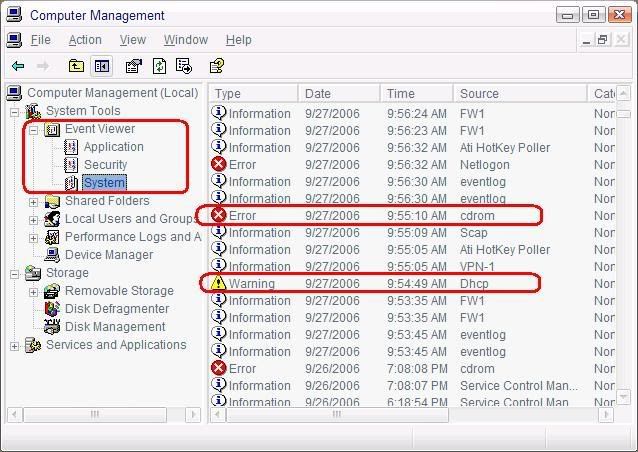  i have checked thru my computer management the error sources is DCOM..... what is that mean how do i fix it...? |
|
|
|
|
|
Nov 16 2010, 01:50 AM
|

Senior Member
706 posts Joined: May 2008
|
Hello there, my brother's computer blacked out and went on an endless loop. Here is the minidump.
I suspect it is hardware so a prompt and swift reply will be great, thanks. Attached File(s)
Mini111610_01.zip ( 20.6k )
Number of downloads: 14 |
|
|
Nov 16 2010, 02:32 PM
|

Junior Member
78 posts Joined: Aug 2008
|
Here's my laptop spec:
Operating system : Microsoft Windows XP Home Edition (5.1, Build 2600) System Manufacturer : Acer System Model : Aspire 5040 BIOS : Ver 1.00PARTTBL Processor : AMD Turion ™ 64 Mobile Technology ML-34, MMX, 3DNow, 1.8GHz Memory : 1470MB RAM Page file : 425MB used, 2941MB available Direct X version : DirectX 9.0c (4.09.0000.0904) Recently I have been facing alot of BSOD errors, such as TCPIP.sys, ACPI.sys and NDIS.sys. One of the most critical error : 0x0000007E (0xC0000005, 0x805D82B7, 0xBAD7944, 0xBAD37640) Help me identify this code. Coz I wanna make sure I'm uninstalling the exact software for solving the problem. |
|
|
Dec 3 2010, 05:27 PM
|

Senior Member
1,049 posts Joined: Apr 2008 From: cookie jar 
|
i don't know i'm in the right place or not but my MSI(Win. Vista) has this problem. Firstly, it said something's missing in the windows hardware or something(the black screen). It doesn't direct me to the login page evne after I choose start windows normally(or something like that...couldn't remember the exact word).
So I try to reformat. after reformat and logging in, the cmd.exe suddenly appear. I don't know why this happened because when I reformat last time, cmd.exe never appears. Then, there's this thing that came out 'Your system will reboot automatically as soon as the installation is completed. Please do not turn off the computer when this procedure is being performed' So I let it restart loh. But restart already. The same thing happen. Still, the cmd.exe came out and the message above. It keeps on restarting by itself with the same message. I tried reformatting again but it doesn't works. What's wrong and how can I fix this? Thanks guys. |
|
|
Dec 4 2010, 12:34 AM
|

Junior Member
86 posts Joined: Feb 2008
|
i wanna thank all the sifus here for enlighten us noobs with the BSOD problems. i encountered BSOD problem since last week, and later i found this help thread. i wanted to straightaway shoot my question at 1st, but decided to read the whole 90 pages 1st to get familiar with BSOD problems. while reading somewhere in between page 60 - 70, i found my answer regarding my BSOD, and thank goodness i successfully overcome the problem.
just a friendly advice to the rest of us noobs, try to read the whole thread 1st, perhaps u could find your answers there. yeah the thread seems kinda dead, so reading the whole 90 pages is the least u can do as for now..thanks again! |
|
|
Dec 4 2010, 10:52 AM
|
|
Junior Member
24 posts Joined: May 2009
|
Microsoft ® Windows Debugger Version 6.12.0002.633 AMD64
Copyright © Microsoft Corporation. All rights reserved. Loading Dump File [C:\Windows\Minidump\120410-25053-01.dmp] Mini Kernel Dump File: Only registers and stack trace are available Symbol search path is: http://msdl.microsoft.com/download/symbols Executable search path is: Windows 7 Kernel Version 7600 MP (4 procs) Free x64 Product: WinNt, suite: TerminalServer SingleUserTS Personal Built by: 7600.16617.amd64fre.win7_gdr.100618-1621 Machine Name: Kernel base = 0xfffff800`0325f000 PsLoadedModuleList = 0xfffff800`0349ce50 Debug session time: Sat Dec 4 00:08:16.767 2010 (UTC + 8:00) System Uptime: 0 days 1:06:15.922 Loading Kernel Symbols ............................................................... ................................................................ ........................................................... Loading User Symbols Loading unloaded module list .............. ******************************************************************************* * * * Bugcheck Analysis * * * ******************************************************************************* Use !analyze -v to get detailed debugging information. BugCheck 1A, {41287, 30, 0, 0} Probably caused by : ntkrnlmp.exe ( nt! ?? ::FNODOBFM::`string'+42ba5 ) Followup: MachineOwner --------- 2: kd> !analyze -v ******************************************************************************* * * * Bugcheck Analysis * * * ******************************************************************************* MEMORY_MANAGEMENT (1a) # Any other values for parameter 1 must be individually examined. Arguments: Arg1: 0000000000041287, The subtype of the bugcheck. Arg2: 0000000000000030 Arg3: 0000000000000000 Arg4: 0000000000000000 Debugging Details: ------------------ BUGCHECK_STR: 0x1a_41287 CUSTOMER_CRASH_COUNT: 1 DEFAULT_BUCKET_ID: VISTA_DRIVER_FAULT PROCESS_NAME: upnp.exe CURRENT_IRQL: 0 TRAP_FRAME: fffff88009bdb650 -- (.trap 0xfffff88009bdb650) NOTE: The trap frame does not contain all registers. Some register values may be zeroed or incorrect. rax=0000000000000000 rbx=0000000000000000 rcx=00000000ffffffff rdx=000000000000000c rsi=0000000000000000 rdi=0000000000000000 rip=fffff800033b3db1 rsp=fffff88009bdb7e0 rbp=fffff88009bdb840 r8=fffff8000325f000 r9=0000000000000001 r10=0000000fffffffff r11=0000000000000001 r12=0000000000000000 r13=0000000000000000 r14=0000000000000000 r15=0000000000000000 iopl=0 nv up ei pl nz na po nc nt!MiResolvePageFileFault+0x10c1: fffff800`033b3db1 8b4830 mov ecx,dword ptr [rax+30h] ds:00000000`00000030=???????? Resetting default scope LAST_CONTROL_TRANSFER: from fffff8000327bb7a to fffff800032cf740 STACK_TEXT: fffff880`09bdb4e8 fffff800`0327bb7a : 00000000`0000001a 00000000`00041287 00000000`00000030 00000000`00000000 : nt!KeBugCheckEx fffff880`09bdb4f0 fffff800`032cd82e : 00000000`00000000 00000000`fffff8a0 00000000`00000000 00000000`00000000 : nt! ?? ::FNODOBFM::`string'+0x42ba5 fffff880`09bdb650 fffff800`033b3db1 : fffff8a0`00000078 00000000`ffffffff 00000202`00000023 fffffa80`0d0f98d0 : nt!KiPageFault+0x16e fffff880`09bdb7e0 fffff800`033456e1 : 00000000`6d84f419 fffff8a0`00000078 fffffa80`0d6043f8 00000000`00000000 : nt!MiResolvePageFileFault+0x10c1 fffff880`09bdb910 fffff800`032eb5be : 00000000`00000000 00000000`6d84f419 fffff680`0036c278 fffffa80`0d6043f8 : nt! ?? ::FNODOBFM::`string'+0x363f4 fffff880`09bdb9b0 fffff800`032e9743 : 00000000`00000000 00000000`6d84f419 fffff880`09bdbc20 fffff680`00000000 : nt!MiDispatchFault+0x1de fffff880`09bdbac0 fffff800`032cd82e : 00000000`00000008 00000000`00000001 ffffffff`fa0a1f01 00000000`7efd8000 : nt!MmAccessFault+0x343 fffff880`09bdbc20 00000000`6d84f419 : 00000000`00000000 00000000`00000000 00000000`00000000 00000000`00000000 : nt!KiPageFault+0x16e 00000000`021cfd90 00000000`00000000 : 00000000`00000000 00000000`00000000 00000000`00000000 00000000`00000000 : 0x6d84f419 STACK_COMMAND: kb FOLLOWUP_IP: nt! ?? ::FNODOBFM::`string'+42ba5 fffff800`0327bb7a cc int 3 SYMBOL_STACK_INDEX: 1 SYMBOL_NAME: nt! ?? ::FNODOBFM::`string'+42ba5 FOLLOWUP_NAME: MachineOwner MODULE_NAME: nt IMAGE_NAME: ntkrnlmp.exe DEBUG_FLR_IMAGE_TIMESTAMP: 4c1c44a9 FAILURE_BUCKET_ID: X64_0x1a_41287_nt!_??_::FNODOBFM::_string_+42ba5 BUCKET_ID: X64_0x1a_41287_nt!_??_::FNODOBFM::_string_+42ba5 Followup: MachineOwner --------- Okay, here's my thinggy. 1st i dunnoe which is the problem, upnp.exe? is it plug and play thinggy ?? or it's ntkrnlmp.exe? and what should i do ? hope to hear from some pros around. i trying to read from the 1st post , and search for post related to ntkrnlmp.exe it's like alot of them with different problems and solution. so i have to ask - - hope someone can help. PS i dunnoe y i unable to upload the minidump file. it said Upload failed. You are not permitted to upload a file with that file extension. This post has been edited by ahloong888: Dec 4 2010, 10:57 AM |
|
|
Dec 22 2010, 09:16 PM
|
|
Junior Member
31 posts Joined: Apr 2010
|
i'm using dell vostro 3400 windows 7 32-bit
i got the worst bsod!!! what ever i do now bsod came out 1. i can't even log into window because will bsod 2. not even safe mode because will bsod 3. can't reformat cause when loading screen will bsod 4. all the option in F8 wont help it doesn't give me any chance the bsod shows- PAGE_FAULT_IN_NONPAGED_AREA technical information: STOP: 0x00000050 (0x99400000, 0x00000000, 0x8b58b13, 0x00000002) This post has been edited by y2ou: Dec 22 2010, 09:18 PM |
|
|
Dec 25 2010, 11:34 AM
|

Junior Member
122 posts Joined: Oct 2010 From: Jalan Reko Kajang
|
to all the sifus :
my current OS just installed it a few weeks ago ; not always but in 3 days or up to 4 days my screen will become blue screen and then its can onli recover by restart it. at first, i just think it is becoz my gpu driver coz at the fresh installation of my OS, i forgot to install the gpu driver. then after install it everything was ok, until today.. the blue screen appeared again.. how to solve this problem? C:\Windows\Minidump\ 122510-25428-01.dmp my problem with windows 7 ultimate 64bit its comes with blue screen.. help me This post has been edited by adi88: Dec 25 2010, 11:34 AM |
|
|
|
|
|
Dec 25 2010, 03:50 PM
|

Senior Member
1,486 posts Joined: Jun 2005 From: Cyberjaya/Kamunting
|
my system lately..it has been 2-3 weeks, its restart itself..i really cant figure out whats the prob..even for normal browsing(forum, youtube) its restart itself randomly...everytime i use my pc, im well prepared it will restart soon..
this is what i got from the system log: » Click to show Spoiler - click again to hide... « my spec are: q6600 with hyper212 dfi dk p35 4 x 1gb crucial ballistix palit hd4850 sonic st560f psu 3 sata hdd..1 tb + 500 gb + 320 gb win 7 no oc..all at default..im pretty sure there is no overheat issue.. any helps would much appreciated.tq. This post has been edited by xen0: Dec 25 2010, 03:52 PM |
|
|
Dec 25 2010, 03:58 PM
|
 
VIP
1,342 posts Joined: Jun 2005
|
QUOTE(y2ou @ Dec 22 2010, 09:16 PM) i'm using dell vostro 3400 windows 7 32-bit The stop error may refer to issue with your RAM / memory or motheboard. You may want to test your RAM / memory by using Windows 7 built-in Windows Memory Diagnostic Tool. Please follow Method 4 in the link below to boot from start.i got the worst bsod!!! what ever i do now bsod came out 1. i can't even log into window because will bsod 2. not even safe mode because will bsod 3. can't reformat cause when loading screen will bsod 4. all the option in F8 wont help it doesn't give me any chance the bsod shows- PAGE_FAULT_IN_NONPAGED_AREA technical information: STOP: 0x00000050 (0x99400000, 0x00000000, 0x8b58b13, 0x00000002) How To: Test Your RAM or Memory With Windows Memory Diagnostic Tool In Windows 7 Hope it'll help. Added on December 25, 2010, 4:03 pm QUOTE(adi88 @ Dec 25 2010, 11:34 AM) to all the sifus : Please attach the dump file which you have listed it and also add in few more previous crash for references. my current OS just installed it a few weeks ago ; not always but in 3 days or up to 4 days my screen will become blue screen and then its can onli recover by restart it. at first, i just think it is becoz my gpu driver coz at the fresh installation of my OS, i forgot to install the gpu driver. then after install it everything was ok, until today.. the blue screen appeared again.. how to solve this problem? C:\Windows\Minidump\ 122510-25428-01.dmp my problem with windows 7 ultimate 64bit its comes with blue screen.. help me Added on December 25, 2010, 4:06 pm QUOTE(xen0 @ Dec 25 2010, 03:50 PM) my system lately..it has been 2-3 weeks, its restart itself..i really cant figure out whats the prob..even for normal browsing(forum, youtube) its restart itself randomly...everytime i use my pc, im well prepared it will restart soon.. Please check for memory dump files as mentioned in page one of this thread. Attach it and few more previous memory dump files for references. If there were none, you may be dealing with electrical power failure issue blackout instead.this is what i got from the system log: » Click to show Spoiler - click again to hide... « my spec are: q6600 with hyper212 dfi dk p35 4 x 1gb crucial ballistix palit hd4850 sonic st560f psu 3 sata hdd..1 tb + 500 gb + 320 gb win 7 no oc..all at default..im pretty sure there is no overheat issue.. any helps would much appreciated.tq. This post has been edited by tthm: Dec 25 2010, 04:06 PM |
|
|
Dec 25 2010, 11:52 PM
|

Junior Member
119 posts Joined: Nov 2006
|
Hi Sifu....
I have a problem of blues screen too. I just bought a used processor (AMD Athlon 64x2 6000+) and installed to the mobo. At first, the PC hang at the "Starting Windows" logo (Window 7 Ultimate). Then, my friend ask me to update the BIOS(before update the BIOS was 2007). After updated the latest BIOS(Aug 2010), I successful load into the desktop screen, but just few second the screen turn blue with a lot of text and the PC auto shut down. After auto shut down & restart, the windows goes to the "Repair start up...." & "Start windows normally". Both I tried, but seems not working coz been wait more than 20mins hanging there. My friend told me isn't a processor problem as long as loaded into windows, it is BIOS setting configuration. Can't wait for another week to wait for my friend to help  . Any solution & advise? . Any solution & advise?Thanks & appreciate  This is my rigs, AMD Athlon 64x2 4000+ <------(** I bought a used processor AMD Athlon 64x2 6000+ for upgrade) ASUS M2N-X Mobo 1x2G Kingston DDR2 800 POV Geforce 9600GT 512DDR3 WD HDD SATA This post has been edited by NanaHara: Dec 25 2010, 11:59 PM |
|
|
Dec 26 2010, 12:07 AM
|

Senior Member
706 posts Joined: Sep 2010 From: Pluto 
|
Upload the dump file please
|
|
|
Dec 26 2010, 12:58 AM
|
|
Junior Member
119 posts Joined: Nov 2006
|
QUOTE(badminto @ Dec 26 2010, 12:07 AM) Upload the dump file please hi bro, thanks. by the way what is dump file  |
|
|
Dec 26 2010, 01:00 AM
|
|
Senior Member
706 posts Joined: Sep 2010 From: Pluto
|
It is file which generated when your computer encounter bsod. It located in C:\Windows\Minidump
|
|
|
Dec 26 2010, 04:29 PM
|
|
Junior Member
119 posts Joined: Nov 2006
|
QUOTE(badminto @ Dec 26 2010, 01:00 AM) It is file which generated when your computer encounter bsod. It located in C:\Windows\Minidump hi bro,Do u mind to let me know where the file located to read the .dmp file? There is many tools there, not sure which 1 is correct for Windows 7 Ultimate version. Thank you very much  |
| Change to: |  0.3830sec 0.3830sec
 0.95 0.95
 6 queries 6 queries
 GZIP Disabled GZIP Disabled
Time is now: 6th December 2025 - 11:29 AM |
 Quote
Quote