Welcome Guest ( Log In | Register )

Bump Topic Topic Closed RSS Feed
128 Pages « < 59 60 61 62 63 > » Bottom

Outline · [ Standard ] · Linear+

 AMD Radeon™ Discussion V12, Latest - 14.12 | WHQL - 14.12

views
     
kizwan
post Mar 30 2015, 11:23 PM

BÖw DÖwn TÖ LÖrd PringlËs
*****
Senior Member
826 posts

Joined: Jan 2009


QUOTE(ah_fong @ Mar 30 2015, 01:19 PM)
soo any idea which is which ??
I try furmark for 1 hour with max settings without prob ! is this enuf to proof this card is stable ?
*
Modern gpu will run at limited TDP when running furmark. Which means the card not necessarily stable. For true stability test, test with games.
ah_fong
post Mar 31 2015, 02:07 AM

On my way
****
Senior Member
540 posts

Joined: Jan 2003
From: penang,KL
thx everyone !!
been playing farcry 4 and advance warfare for few hours !
I oc the card 1150 MHz core and 1500mhz memory with temp around 74 c with auto fan profile at 40%
1 thing I notice my gpu core wont run at 1150mhz ! its running 1100mhz only
my pc running at naked !
waiting for my nzxt s340 case ! biggrin.gif

This post has been edited by ah_fong: Mar 31 2015, 02:10 AM
Unseen83
post Apr 1 2015, 07:22 AM

TooFAT4U 2Handle!
*******
Senior Member
2,337 posts

Joined: Dec 2008
From: KING CANNEL JB


QUOTE(ah_fong @ Mar 31 2015, 02:07 AM)
thx everyone !!
been playing farcry 4 and advance warfare for few hours !
I oc the card 1150 MHz core and 1500mhz memory with temp around 74 c with auto fan profile at 40%
1 thing I notice my gpu core wont run at 1150mhz ! its running 1100mhz only
my pc running at naked !
waiting for my nzxt s340 case  ! biggrin.gif
*
ah good.. now! go test on3Dmark so i can see how guuding ur score! rclxms.gif
ah_fong
post Apr 1 2015, 01:30 PM

On my way
****
Senior Member
540 posts

Joined: Jan 2003
From: penang,KL
i think my score will be low ! bcoz im running g3258 in 4.5ghz only !
still deciding 4690k or 4790k !
Unseen83
post Apr 1 2015, 07:38 PM

TooFAT4U 2Handle!
*******
Senior Member
2,337 posts

Joined: Dec 2008
From: KING CANNEL JB


QUOTE(ah_fong @ Apr 1 2015, 01:30 PM)
i think my score will be low ! bcoz im running g3258 in 4.5ghz only !
still deciding 4690k or  4790k !
*
U Got budget ? if not go for I7 4790K or Intel Xeon E3-1246 v3
Unseen83
post Apr 1 2015, 07:44 PM

TooFAT4U 2Handle!
*******
Senior Member
2,337 posts

Joined: Dec 2008
From: KING CANNEL JB


Has anyone Exp a Black Screen but Mouse and CTRL+alt+del still working(task manager) after downloading/update/restart a Window update... ?

x
I fix it after getting black screen by going to Safe mode/Win recovery turn it back to day not update.. but strangely have to do it when remove AMD driver.. or it not work...
X
i experiment on the problem try to remove driver AMD first(with DUU) than Window update it... got black screen with mouse/Task manager working so does internet and so on But run true Task manager.. so strange black screen is not Driver related? ? hm but Recovery file seem to be corrupt this way no matter what date i try to recover it fail... so i have to do Window Refresh to fix it.. eh fun day after work... smile.gif
Minecrafter
post Apr 1 2015, 10:58 PM

ROCK N ROLL STAR
*******
Senior Member
5,043 posts

Joined: Aug 2013
From: Putrajaya


QUOTE(ah_fong @ Apr 1 2015, 01:30 PM)
i think my score will be low ! bcoz im running g3258 in 4.5ghz only !
still deciding 4690k or  4790k !
*
i7 4790K.Games are getting demanding on the CPU side,heck,the Witcher 3 recommended CPU requirement is an i7 3770/AMD Phenom II X4 940.. sweat.gif

QUOTE(Unseen83 @ Apr 1 2015, 07:38 PM)
U Got budget ? if not go for I7 4790K or Intel Xeon E3-1246 v3
*
Intel Xeon E3-1246 V3?Don't think that is available here. tongue.gif

QUOTE(Unseen83 @ Apr 1 2015, 07:44 PM)
Has anyone Exp a Black Screen but Mouse and CTRL+alt+del still working(task manager)  after downloading/update/restart a Window update... ?

x
I fix it after getting black screen by going to Safe mode/Win recovery turn it back to day not update.. but strangely have to do it when remove AMD driver.. or it not work...
X
i experiment on the problem try to remove driver AMD first(with DUU) than Window update it...  got black screen with mouse/Task manager working so does internet and so on But run true Task manager.. so strange black screen is not Driver related? ? hm but Recovery file seem to be corrupt this way no matter what date i try to recover it fail... so i have to do Window Refresh to fix it.. eh fun day after work... smile.gif
*
Maybe Windows dislike AMD? laugh.gif

This post has been edited by Minecrafter: Apr 1 2015, 10:58 PM
fikku
post Apr 2 2015, 01:40 AM

Getting Started
**
Junior Member
124 posts

Joined: Sep 2010
From: Selangor


anybody read this?
http://wccftech.com/nvidia-gtx-990-ti-24gb...arked-reviewed/
ah_fong
post Apr 2 2015, 08:00 AM

On my way
****
Senior Member
540 posts

Joined: Jan 2003
From: penang,KL
QUOTE(fikku @ Apr 2 2015, 01:40 AM)
april fool !
goldfries
post Apr 2 2015, 08:21 AM

40K Club
Group Icon
Forum Admin
44,415 posts

Joined: Jan 2003


QUOTE(Najmods @ Mar 30 2015, 10:51 PM)
Yup 100% agree. I hate those synthetic load especially furmark. It gives strain to the graphics card, crazy amount of strain that no other games put that much load on it. I can't even run furmark more than a few second it's bizarre that people put an hour load on their card. What are people try to achieve?? doh.gif Just play some games and it'll be sufficient. If there is any issue it should pop up in game.
*
Unigine Heaven Benchmark is good enough to test a card. If the card works it will pass the benchmark, simple as that.

For Furmark, it's good for testing out the PSU whether it can handle load. I only use Furmark for 2 purpose

1. Test out the graphic card's cooling system.
2. Load PSU.

terradrive
post Apr 2 2015, 09:38 AM

RRAAAWWRRRRR
******
Senior Member
1,943 posts

Joined: Apr 2005


QUOTE(Unseen83 @ Apr 1 2015, 07:44 PM)
Has anyone Exp a Black Screen but Mouse and CTRL+alt+del still working(task manager)  after downloading/update/restart a Window update... ?

x
I fix it after getting black screen by going to Safe mode/Win recovery turn it back to day not update.. but strangely have to do it when remove AMD driver.. or it not work...
X
i experiment on the problem try to remove driver AMD first(with DUU) than Window update it...  got black screen with mouse/Task manager working so does internet and so on But run true Task manager.. so strange black screen is not Driver related? ? hm but Recovery file seem to be corrupt this way no matter what date i try to recover it fail... so i have to do Window Refresh to fix it.. eh fun day after work... smile.gif
*
Didn't happen to me.
Unseen83
post Apr 2 2015, 10:59 AM

TooFAT4U 2Handle!
*******
Senior Member
2,337 posts

Joined: Dec 2008
From: KING CANNEL JB


QUOTE(terradrive @ Apr 2 2015, 09:38 AM)
Didn't happen to me.
*
hmm.gif guess time for me to move to WINDOW 10... i am scare to fully update my window 8.1 now... ehh
pspslim007
post Apr 2 2015, 03:55 PM

Enthusiast
*****
Senior Member
701 posts

Joined: Apr 2010
From: Malaysia


hi guys, whats the max OC settings for Sapphire 7970 and the safest temp for it ? Thanks
Unseen83
post Apr 2 2015, 05:13 PM

TooFAT4U 2Handle!
*******
Senior Member
2,337 posts

Joined: Dec 2008
From: KING CANNEL JB


QUOTE(pspslim007 @ Apr 2 2015, 03:55 PM)
hi guys, whats the max OC settings for Sapphire 7970 and the safest temp for it ? Thanks
*
hmm.gif test on heaven benchmark... try slowly increase Core clock/mem and run bench if no artifact temp below 80C con't on(please check the Vrm1/2 temp also) till you see artifact and temp over 80C... (this i test my Sapphire R9 290x trix OC
pspslim007
post Apr 2 2015, 06:49 PM

Enthusiast
*****
Senior Member
701 posts

Joined: Apr 2010
From: Malaysia


QUOTE(Unseen83 @ Apr 2 2015, 05:13 PM)
hmm.gif  test on heaven benchmark... try slowly increase Core clock/mem and run bench if no artifact temp below 80C con't on(please check the Vrm1/2 temp also) till you see artifact and temp over 80C...  (this i test my Sapphire R9 290x trix OC
*
haha thats the problem, i lazy to tune it myself, i mean is there anyone that already oc their 7970 to the optimum and i just wanna take their settings thats all XD
Unseen83
post Apr 2 2015, 07:16 PM

TooFAT4U 2Handle!
*******
Senior Member
2,337 posts

Joined: Dec 2008
From: KING CANNEL JB


QUOTE(pspslim007 @ Apr 2 2015, 06:49 PM)
haha thats the problem, i lazy to tune it myself, i mean is there anyone that already oc their 7970 to the optimum and i just wanna take their settings thats all XD
*
right.. every gpu hav it own limit.. but if u care not go check out review same model see how far they push it.. try on that... good luck
marfccy
post Apr 2 2015, 08:57 PM

Le Ponyland!!!
*******
Senior Member
4,254 posts

Joined: Nov 2011


QUOTE(pspslim007 @ Apr 2 2015, 06:49 PM)
haha thats the problem, i lazy to tune it myself, i mean is there anyone that already oc their 7970 to the optimum and i just wanna take their settings thats all XD
*
overclocking to its limits without tweaking voltage is easy

1. get a good OC software
2. check websites on what its average best overclocked speed
3. tweak your own card's speed as you like. you can choose the slow and steady route or the lets see what can it do route
4. slow and steady is where you increase like 5-10MHz and test each time on games/benchies
5. what it can do route is, just throw in something like 200MHz and watch if it succeed the benchies. if it fails, drop 20-50MHz and repeat

do it until you reach to the point the game runs fine with no artifacts and issues. thats your overclock!

as for temps, its super subjective. one person can withstand GPUs at 80C, while another die die also need it to be at <60C

in short, if you feel comfortable at the temps, then its fine. but if you want to follow the rule of overclocking, lower temps = better

Unseen83
post Apr 3 2015, 08:01 PM

TooFAT4U 2Handle!
*******
Senior Member
2,337 posts

Joined: Dec 2008
From: KING CANNEL JB


QUOTE(marfccy @ Apr 2 2015, 08:57 PM)
overclocking to its limits without tweaking voltage is easy

1. get a good OC software
2. check websites on what its average best overclocked speed
3. tweak your own card's speed as you like. you can choose the slow and steady route or the lets see what can it do route
4. slow and steady is where you increase like 5-10MHz and test each time on games/benchies
5. what it can do route is, just throw in something like 200MHz and watch if it succeed the benchies. if it fails, drop 20-50MHz and repeat

do it until you reach to the point the game runs fine with no artifacts and issues. thats your overclock!

as for temps, its super subjective. one person can withstand GPUs at 80C, while another die die also need it to be at <60C

in short, if you feel comfortable at the temps, then its fine. but if you want to follow the rule of overclocking, lower temps = better
*
he want u give him the answer... sweat.gif e.g. exact OC clock for that gpu... why he ask on amd threads.. wondering if other 7970 owner could help him.. A.k.a spoon feed the baby
S4PH
post Apr 3 2015, 09:43 PM

adam_s4ph
******
Senior Member
1,167 posts

Joined: Jan 2007
From: ..Tsukuba..


hand got itchy again , had a r9 290 tri x deal at rm780 (its brand new) cooling is way better than reference
ah_fong
post Apr 3 2015, 11:49 PM

On my way
****
Senior Member
540 posts

Joined: Jan 2003
From: penang,KL
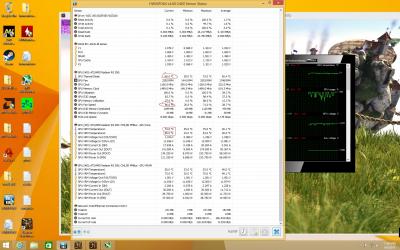
what u guys think my vrm temp and gpu temp ??
is the temp ok ??

QUOTE(S4PH @ Apr 3 2015, 09:43 PM)
hand got itchy again , had a r9 290 tri x deal at rm780 (its brand new) cooling is way better than reference
*
where u bought it ? I jz bought for 780 also ! biggrin.gif

This post has been edited by ah_fong: Apr 3 2015, 11:50 PM


Attached thumbnail(s)
Attached Image

128 Pages « < 59 60 61 62 63 > » Top
Topic ClosedOptions
 

Change to:
| Lo-Fi Version
0.0328sec    0.40    6 queries    GZIP Disabled
Time is now: 6th December 2025 - 07:30 AM