Outline ·
[ Standard ] ·
Linear+
illegear z5 discussion thread, anything and everything about the beast
|
xarive
|
 Jan 17 2015, 01:06 AM Jan 17 2015, 01:06 AM
|
Getting Started


|
QUOTE(Prince J @ Jan 16 2015, 03:23 PM) Hi xarive, Try windows update to see if the issue still persists. So far how many BSODs did you encounter? As in screenshot. Updated the windows to the latest one. No more windows update for me. Attached thumbnail(s)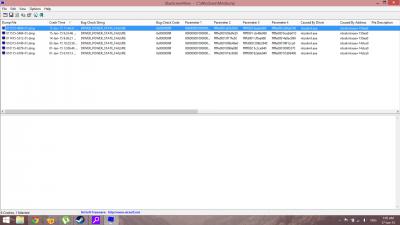
|
|
|
|
|
|
Prince J
|
Jan 17 2015, 09:44 AM
|
|
|
QUOTE(xarive @ Jan 17 2015, 01:06 AM) As in screenshot. Updated the windows to the latest one. No more windows update for me. Hi xarive, How many BSODs did you encounter so far? From the beginning you received your laptop. |
|
|
|
|
|
xarive
|
Jan 17 2015, 10:22 AM
|
Getting Started
|
QUOTE(Prince J @ Jan 17 2015, 09:44 AM) Hi xarive, How many BSODs did you encounter so far? From the beginning you received your laptop. It's all in the screenshot. Starting from Jan 1 until today. This problem only happened starting from Jan 1. I received my laptop @15th Dec. |
|
|
|
|
|
MgrSagaaboyz
|
 Jan 17 2015, 12:27 PM Jan 17 2015, 12:27 PM
|
Getting Started
|
QUOTE(xarive @ Jan 17 2015, 10:22 AM) It's all in the screenshot. Starting from Jan 1 until today. This problem only happened starting from Jan 1. I received my laptop @15th Dec. Found this so far on youtube https://www.youtube.com/watch?v=2c0onEJXU2Eand http://www.eightforums.com/bsod-crashes-de...ws-8-1-pro.html  good luck Im not sure about mine since haven't receive yet. |
|
|
|
|
|
Prince J
|
Jan 17 2015, 06:38 PM
|
|
|
QUOTE(xarive @ Jan 17 2015, 10:22 AM) It's all in the screenshot. Starting from Jan 1 until today. This problem only happened starting from Jan 1. I received my laptop @15th Dec. Hi xarive, Please send your laptop back to us for test, we will also test with our OS. |
|
|
|
|
|
xarive
|
Jan 17 2015, 09:47 PM
|
Getting Started
|
QUOTE(Prince J @ Jan 17 2015, 06:38 PM) Hi xarive, Please send your laptop back to us for test, we will also test with our OS. Currently not in KL. Not anytime in future planning. We'll see :'( Thanks for your offer. BTW, what's Realtek RealSpeed for? I installed them too but I use INTEL DUALBAND. Is it the problem for BSOD? |
|
|
|
|
|
Prince J
|
Jan 19 2015, 11:11 AM
|
|
|
QUOTE(xarive @ Jan 17 2015, 09:47 PM) Currently not in KL. Not anytime in future planning. We'll see :'( Thanks for your offer. BTW, what's Realtek RealSpeed for? I installed them too but I use INTEL DUALBAND. Is it the problem for BSOD? Hi xarive, No problem, just let us know when you are free to pop in. The realspeed is a speed-up utility. Most likely not, we do not have BSOD with that software. |
|
|
|
|
|
miong93
|
Jan 19 2015, 01:07 PM
|
|
|
QUOTE(xarive @ Jan 17 2015, 09:47 PM) Currently not in KL. Not anytime in future planning. We'll see :'( Thanks for your offer. BTW, what's Realtek RealSpeed for? I installed them too but I use INTEL DUALBAND. Is it the problem for BSOD? I also believe the Realtek RealSpeed is not the course.. And I think we can't use the RealSpeed software as we're using different wifi card, intel AC.. I didn't install the utility software, if it's possible to be used, please correct me |
|
|
|
|
|
reality123
|
Jan 19 2015, 01:13 PM
|
New Member
|
QUOTE(miong93 @ Jan 19 2015, 01:07 PM) I also believe the Realtek RealSpeed is not the course.. And I think we can't use the RealSpeed software as we're using different wifi card, intel AC.. I didn't install the utility software, if it's possible to be used, please correct me but some on internet saying the problem is because of this stwrt64.sys and Rtnic64.sys driver become old for windows 8.1. And required to update tht driver to become compatible with windows 8.1. source: http://www.eightforums.com/bsod-crashes-de...ws-8-1-pro.htmland when I google about the driver above. And stwrt64.sys driver is the High Definition Audio Driver. So try updating that audio driver and the rtnic64.sys is the Realtek driver. So problem is with them actually. So maybe the driver didnt found the hardware component or other related stuffs. This post has been edited by reality123: Jan 19 2015, 01:21 PM |
|
|
|
|
|
MgrSagaaboyz
|
Jan 19 2015, 01:32 PM
|
Getting Started
|
QUOTE(reality123 @ Jan 19 2015, 01:13 PM) but some on internet saying the problem is because of this stwrt64.sys and Rtnic64.sys driver become old for windows 8.1. And required to update tht driver to become compatible with windows 8.1. source: http://www.eightforums.com/bsod-crashes-de...ws-8-1-pro.htmland when I google about the driver above. And stwrt64.sys driver is the High Definition Audio Driver. So try updating that audio driver and the rtnic64.sys is the Realtek driver. So problem is with them actually. So maybe the driver didnt found the hardware component or other related stuffs. I think it caused by faulty hardware, corrupt device driver files, firmware, or software issues. What the software you have installed in your z5 Xarive? |
|
|
|
|
|
miong93
|
Jan 19 2015, 01:37 PM
|
|
|
QUOTE(reality123 @ Jan 19 2015, 01:13 PM) but some on internet saying the problem is because of this stwrt64.sys and Rtnic64.sys driver become old for windows 8.1. And required to update tht driver to become compatible with windows 8.1. source: http://www.eightforums.com/bsod-crashes-de...ws-8-1-pro.htmland when I google about the driver above. And stwrt64.sys driver is the High Definition Audio Driver. So try updating that audio driver and the rtnic64.sys is the Realtek driver. So problem is with them actually. So maybe the driver didnt found the hardware component or other related stuffs. I think the RealTek driver it's referring to is not the RealSpeed software.. it should be the audio or other RealTek driver.. Yesterday I just encountered a BSOD also.. error code : PAGE_FAULT_IN_NONPAGED_AREA I googled and it said it's cause of RAM problem or hardware problem.. Find it quite weird cause I'm using it for 1 months ad without any sign of corruption.. Hmm.. Mind go to KL after CNY to have a throughout check with Prince J.. |
|
|
|
|
|
mingxun112
|
Jan 19 2015, 04:31 PM
|
New Member
|
the macro key really useful. Now i can use m1 to blink dagger in dota huhhuu.
|
|
|
|
|
|
xarive
|
Jan 19 2015, 08:40 PM
|
Getting Started
|
QUOTE(MgrSagaaboyz @ Jan 19 2015, 01:32 PM) I think it caused by faulty hardware, corrupt device driver files, firmware, or software issues. What the software you have installed in your z5 Xarive? I've installed a lot of software. I sent an email attached together with the screenshots of programs installed to support@illegear.com. They just told me it might be a software related issue and there's broad range of causing it. Yup, that's all. I even attached the dump file of the BSoD for them. Day 3, still waiting for their reply. QUOTE(mingxun112 @ Jan 19 2015, 04:31 PM) the macro key really useful. Now i can use m1 to blink dagger in dota huhhuu. If you're still using M1 to blink dagger you probably waste a lot of time to press the blink dagger . Too far to reach the button. |
|
|
|
|
|
leftside03
|
Jan 19 2015, 09:30 PM
|
New Member
|
|
|
|
|
|
|
Prince J
|
Jan 19 2015, 09:30 PM
|
|
|
QUOTE(xarive @ Jan 19 2015, 08:40 PM) I've installed a lot of software. I sent an email attached together with the screenshots of programs installed to support@illegear.com. They just told me it might be a software related issue and there's broad range of causing it. Yup, that's all. I even attached the dump file of the BSoD for them. Day 3, still waiting for their reply. If you're still using M1 to blink dagger you probably waste a lot of time to press the blink dagger . Too far to reach the button. Dear xarive, I thought we already replied you here? Please send your laptop in so we can check with our OS for the BSOD. Without your laptop on hand it is not possible to identify what's the real cause, let us know when you are sending in. Thank you. |
|
|
|
|
|
xarive
|
Jan 19 2015, 09:58 PM
|
Getting Started
|
QUOTE(Prince J @ Jan 19 2015, 09:30 PM) Dear xarive, I thought we already replied you here? Please send your laptop in so we can check with our OS for the BSOD. Without your laptop on hand it is not possible to identify what's the real cause, let us know when you are sending in. Thank you. I thought it's different people for support. Sorry. Thanks for your reply. |
|
|
|
|
|
vinz92
|
Jan 20 2015, 12:38 AM
|
New Member
|
Have any owners encounter speaker buzzing sound if it's a little loud? It sounds like the speakers burst..?
|
|
|
|
|
|
Prince J
|
Jan 20 2015, 06:04 PM
|
|
|
QUOTE(vinz92 @ Jan 20 2015, 12:38 AM) Have any owners encounter speaker buzzing sound if it's a little loud? It sounds like the speakers burst..? Hey vin92, Please bring your laptop back to us for checking  |
|
|
|
|
|
miong93
|
Jan 21 2015, 02:27 PM
|
|
|
QUOTE(MgrSagaaboyz @ Jan 21 2015, 01:27 AM) Collected my z5 yesterday from Illegear. Just installed win 8.1 pro so far no problem yet, cooling is amazing no sound at all, right now installing Far Cry 4 lets see the gameplay. And having doubt in gpu. Currently no gamme playing so it's showing intel hd graphics ... but will it change it self to nvidia when start game?? . Everything is awesome except the num key is not enable when starting OS so become hard sometimes. Anyone knows how to make it enable as default. TQ Forgot to mention battery.Battery is beyond my expectation. Because my old laptop once battery full then itwill say batterry full and keep on charging but z5 stick on 99% and not touching 100% when connected Gratz on the machine.. again welcome to Z5 family  mostly ur nvidia will be kicking in when you play game.. if your're unsure you can chekc it at the nvidia control panel.. The number pad issue is due to win8.1.. you can google it.. there's a lot of post regarding this issue.. it's cause by the Fast Boot Up or hybrid boot up.. |
|
|
|
|



 Quote
Quote


 0.0327sec
 0.40
0.40
 6 queries
 GZIP Disabled