Hi everyone. Need to ask something. My GE60 2pc suddenly didnt want to start even msi logo wont show. When i press power button, its only blinking blue and orange while hdd indicator blinking 2-3 second sequencely. Any sifu face this problem? Help me anyone.
We suggest you to send in our service centre and claim for warranty, kindly contact service centre hotline 1300-88-2273 (operating from Mon-Fri, 9am-6pm, except public holiday).
Reminder to all MSI Dragon Army, hurry and redeem before the promo ends!
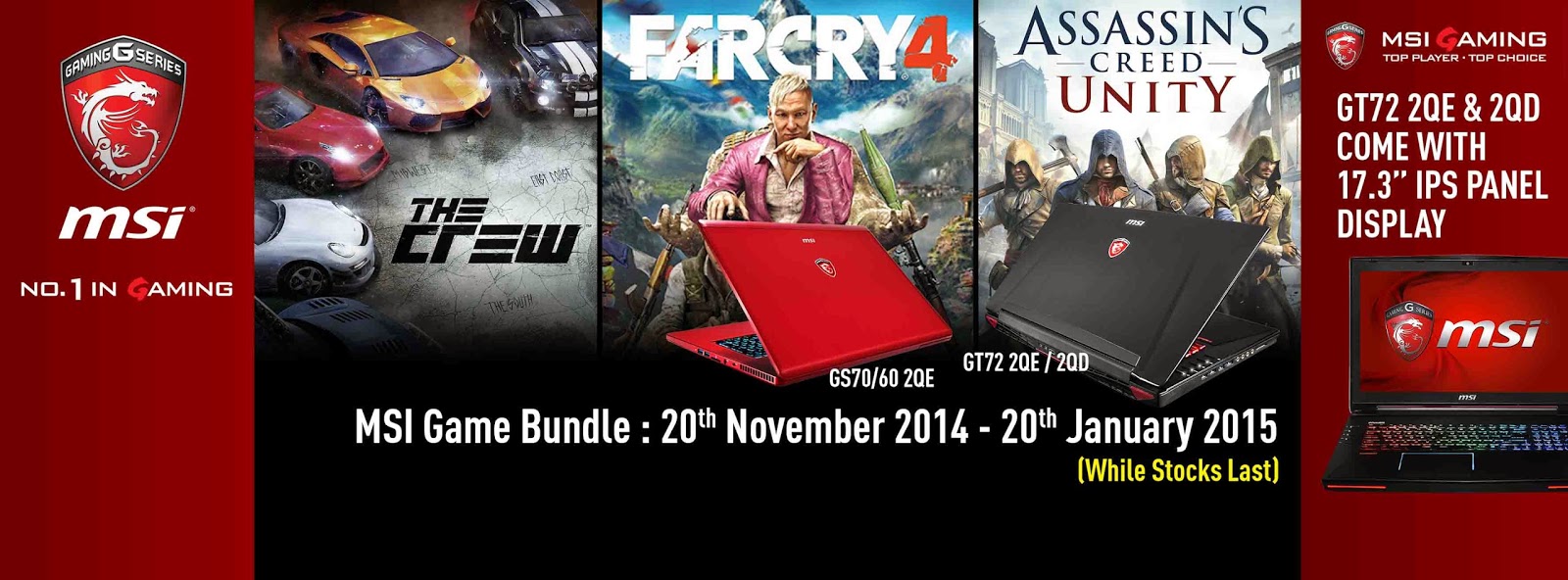
[NEW!]NVIDIA GeForce Pick Your Path Game Bundle
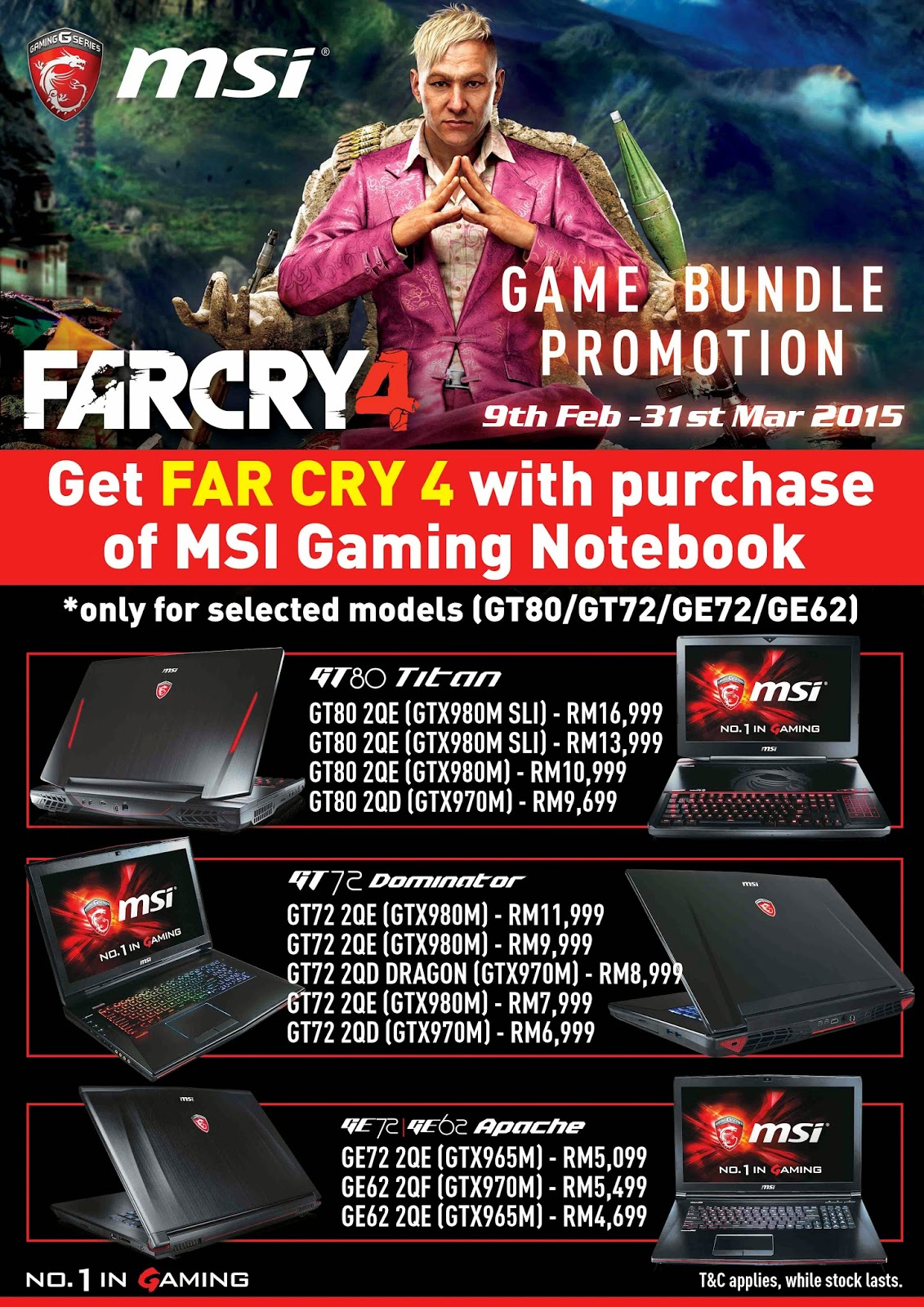
You're a gamer, and we have the hottest titles this holiday for whatever you like to play. Buy any MSI Notebook with GTX 970M/980M. and get a game code. You can pick the path of an assassin, a freedom fighter, or a racer, and download Assassin's Creed Unity, Far Cry 4, or The Crew for free. For further details, please follow the steps below of registration for getting game code.
Promotion Date:20th November 2014 - 20th January 2015
Bundle Games (Choose 1 out of 3 games): The Crew Far Cry 4 Assassin's Creed Unity
Note: To be eligible, consumers must purchase MSI Notebook with GTX970M or GTX980M from 20th Nov 2014 to 20th Jan 2015. The redemption is available from 20th Nov 2014 to 20th Jan 2015 or till supplies last.
A lot of you will be familiar with the new gaming notebooks launched by MSI, as we've already been making some noise about the GT80 SLI Titan as well as the GS30 Shadow beforehand. However, we want to clarify what's what and what's new, going into 2015:
GT80 SLI Titan The new top of the range offering, a true desktop replacement with a standard keycap size mechanical keyboard with Cherry MX Brown switches. 18.4” 1080P screen with a PLS panel driven by two NVIDIA GeForce GTX 980M (with plenty of external outputs for higher-res external monitors), and the usual Super RAID features, tons of RAM and even an Intel Core i7-4980HQ if you wish. Plenty of cooling capacity ensures the GT80 stays cool, employing a total of 8 heatpipes, while still keeping the weight down to 4.5kg, which is less than other systems in this size range.
Just like the GT72 Dominator, you're given plenty of upgrade options with the GT80, where you can upgrade SSDs, HDD, RAM yourself, while the graphics cards are upgradable via select service partners around the world.
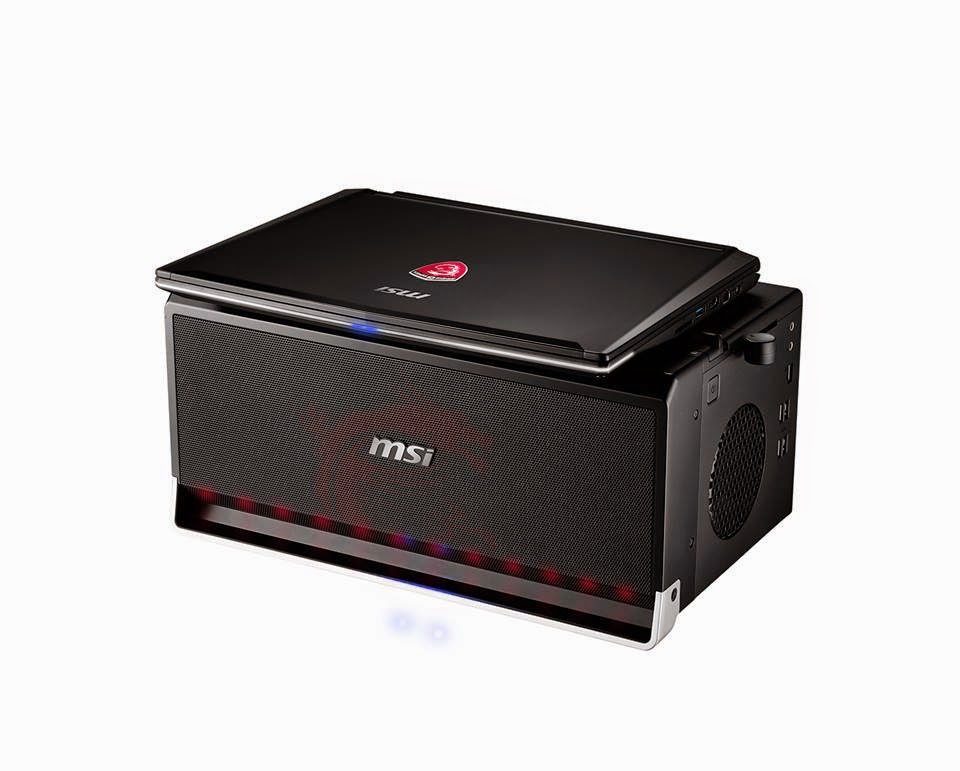
GS30 Shadow with Gaming Dock The GS30 Shadow itself is a very slim and light notebook, with Crystal Well CPUs from Intel and a couple of SSDs in Super RAID. Its built-in graphics comes courtesy of the CPU and Iris Pro, leaving all the graphics power to be provided through the Gaming Dock – connected via a full PCI-E 3.0 x16 docking mechanism, fitting a standard PCI-E desktop graphics card in the dock.
The Gaming Dock also features a 3.5” SATA HDD, USB 3.0, LAN and Audio I/O, so you can leave everything plugged in at home (external monitor, keyboard/mouse, speakers) and just grab the GS30 to go when needed.
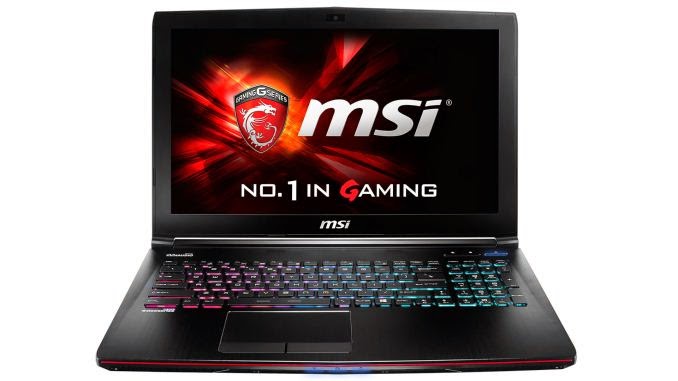
GE62 Apache An all new model to sit below the GT and GS range, the GE62 moves slightly upfield from its predecessor GE60. With NVIDIA GeForce GTX 965M and 970M graphics and better cooling, the performance is higher than the one of the GE60, while also being a lot more stylish and contemporary thanks to its new design.
The GE62 also receives a fully backlit SteelSeries keyboard complete with SteelSeries Engine 3.0 as well as a massively improved battery life.
This post has been edited by MSI-NB: Jan 20 2015, 12:34 PM
The GS30 Shadow was just launched at CES, and already there are questions going around, mainly related to the Gaming Dock. For those of you still unfamiliar with the GS30 Shadow, it's a slim 13.3” notebook with a high-end Core i7 CPU with Iris Pro graphics, Super RAID with a bunch of SSDs – with no real gaming capabilities of its own.
The Gaming Dock though, changes all this. You simply dock the notebook into it and through magic (a PCI-E 3.0 x16 connector), you can hook up any desktop graphics to your GS30. The dock holds said PCI-E connector, a bunch of USB ports, a Killer LAN port, audio jacks, a 3.5” HDD as well as speakers in the front panel. The idea is that you have everything plugged in at home (including external monitor(s), keyboard and mouse) and simply pop in the GS30 when you get back home from work or school.
Obviously there are technical limitations as well, that we want to highlight. You can't use the built-in monitor on the GS30, because all PCI-E signals are being sent to the gaming dock when plugged in. This also extends to the keyboard, touchpad and speakers, meaning you must have these separately on your desk. It's sort of the point of the Gaming Dock, using the keyboard on top of the dock would most likely be uncomfortable, but we still want to make it clear.
All in all, we're excited to have launched the GS30 Shadow with it's full-bandwidth Gaming Dock, as it fuses full-powered desktop graphics where you want it (at home) with a properly mobile notebook for the road.
I sent my laptop to the service center in Kelana Square to install the SSD so no idea if it can be done ourselves. MSI doesn't allow us to do it anyway since it will void the warranty if we open the back case ourselves. The service center charged RM140 for labor fee which is very pricy.
My blue screen issue finally resolved after I contact MSI office directly. Am happy with the quick follow up by MSI office. Hope they will improve their service center quality because the Kelana square service center is really hopeless.
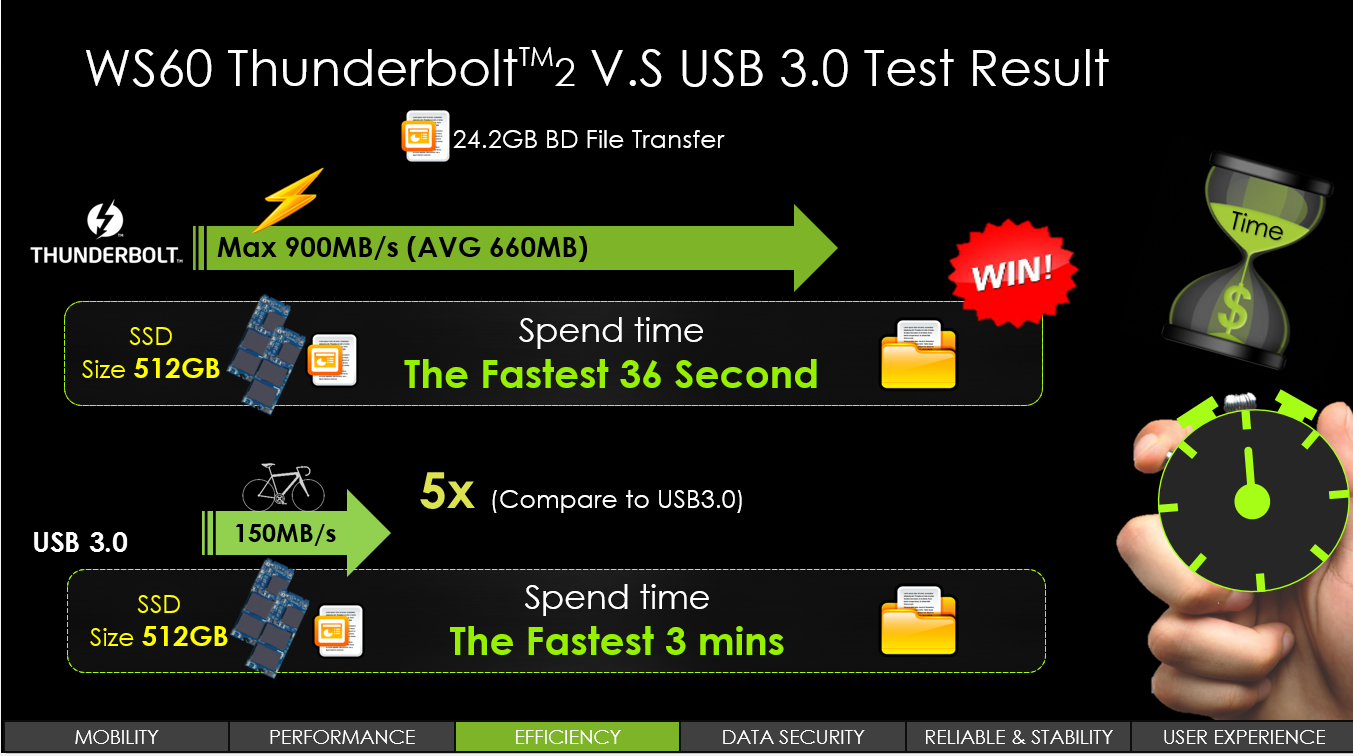
Intel’s proprietary multi-purpose interface Thunderbolt has always been a high-performance solution for connecting up your external devices, although it has never really made an impact on the consumer market. In other words, it is an interface for mostly professional users, and one we proudly feature in the MSI Workstation series, and you can clearly see the performance benefits in the chart below.
USB 3.0 is undoubtedly a big step up from USB 2.0, but if you often transfer large files back and forth from your workstation, Thunderbolt 2.0 will save you time counted in days rather than hours over the course of a year.
Just revealed at CES earlier this month is the all-new MSI GT80 Titan SLI – the world’s first gaming notebook with a mechanical keyboard. We’ve spoken about it at length at the launch itself, and it is pretty eye-catching, so it didn’t go unnoticed even for the most battle-hardened media visiting.
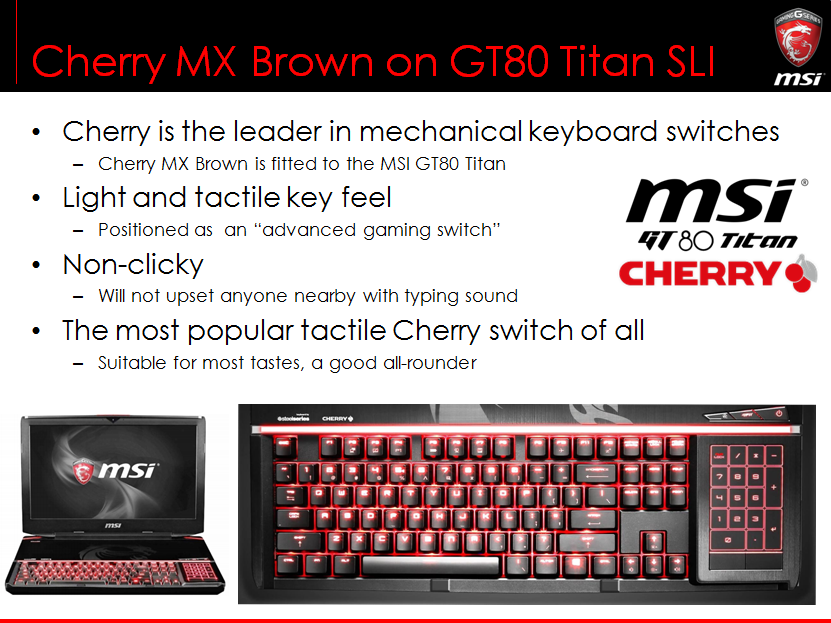
In any case – you know about the GT80 Titan SLI, it comes with dual 980M graphics and high-power CPUs, but the party piece is its mechanical keyboard. For now, we’re offering the GT80 with Cherry MX Brown switches, but for the future, there might be different offerings, such as MX Red.
The reasons we’ve chosen the Brown switches can be seen on the picture above. Cherry itself positions it as an “advanced gaming switch”, and being a gaming notebook, it’s a bit of a no-brainer. It is also a silent solution, unlikely to upset anyone unnecessarily.
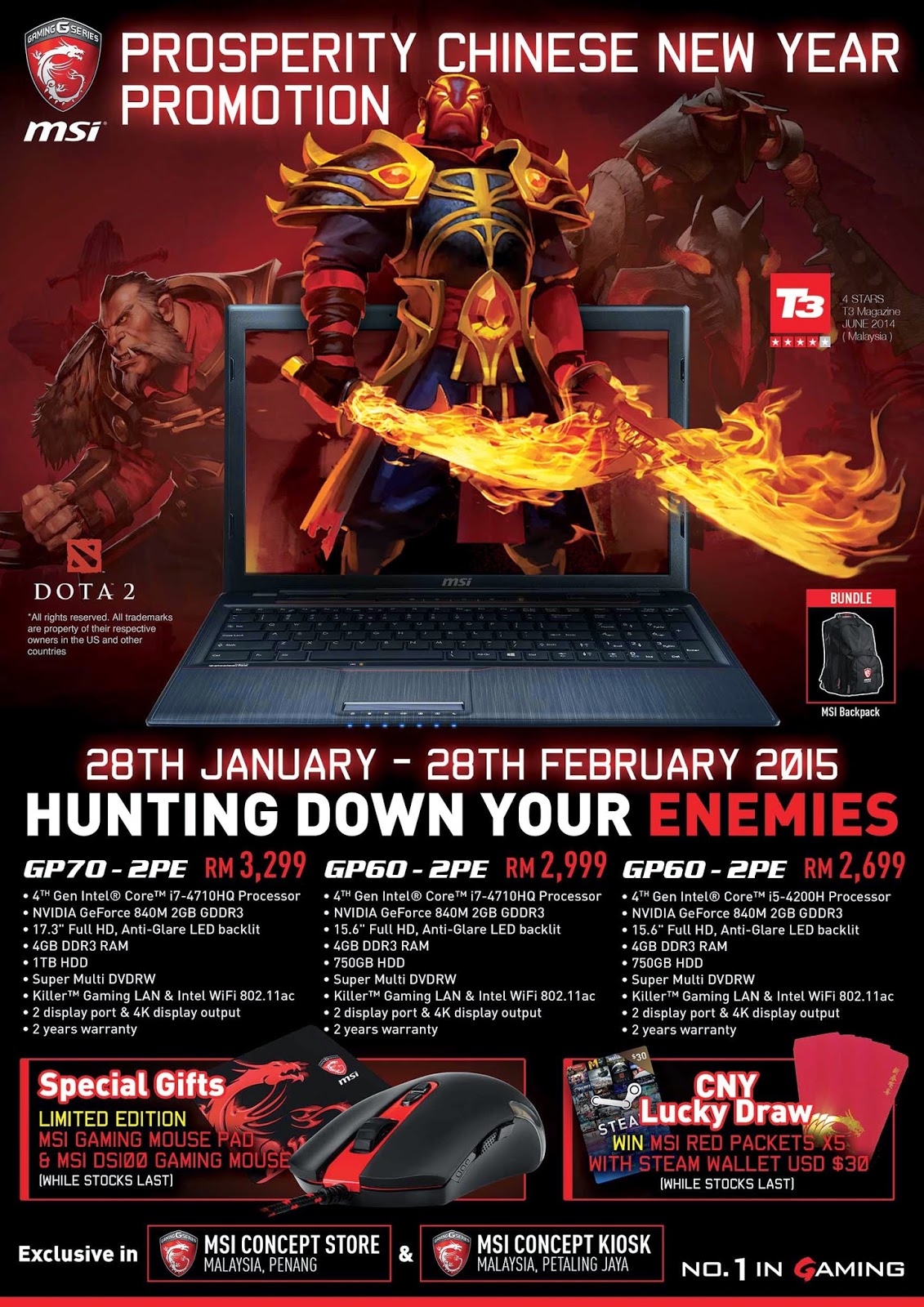
Purchase any GP series with GT840M graphics card from 28th Jan till 28th Feb 2015 and get your CNY Prosperity Pack consists of a Limited Edition MSI Gaming Mousepad and a MSI DS100 Gaming Mouse.
This promotion also entitles for CNY Lucky Draw and stand a chance to win MSI Red Packet with Steam Wallet worth USD$30. 5 lucky winners will be selected.
*Only available at participated stores: MSI Concept Store (Penang) Unit No.1B & 1D, 1.01-4.01,L3-42A, Level 3, Komtar,Jln Penang,10000 Penang. Tel: 04- 2623127
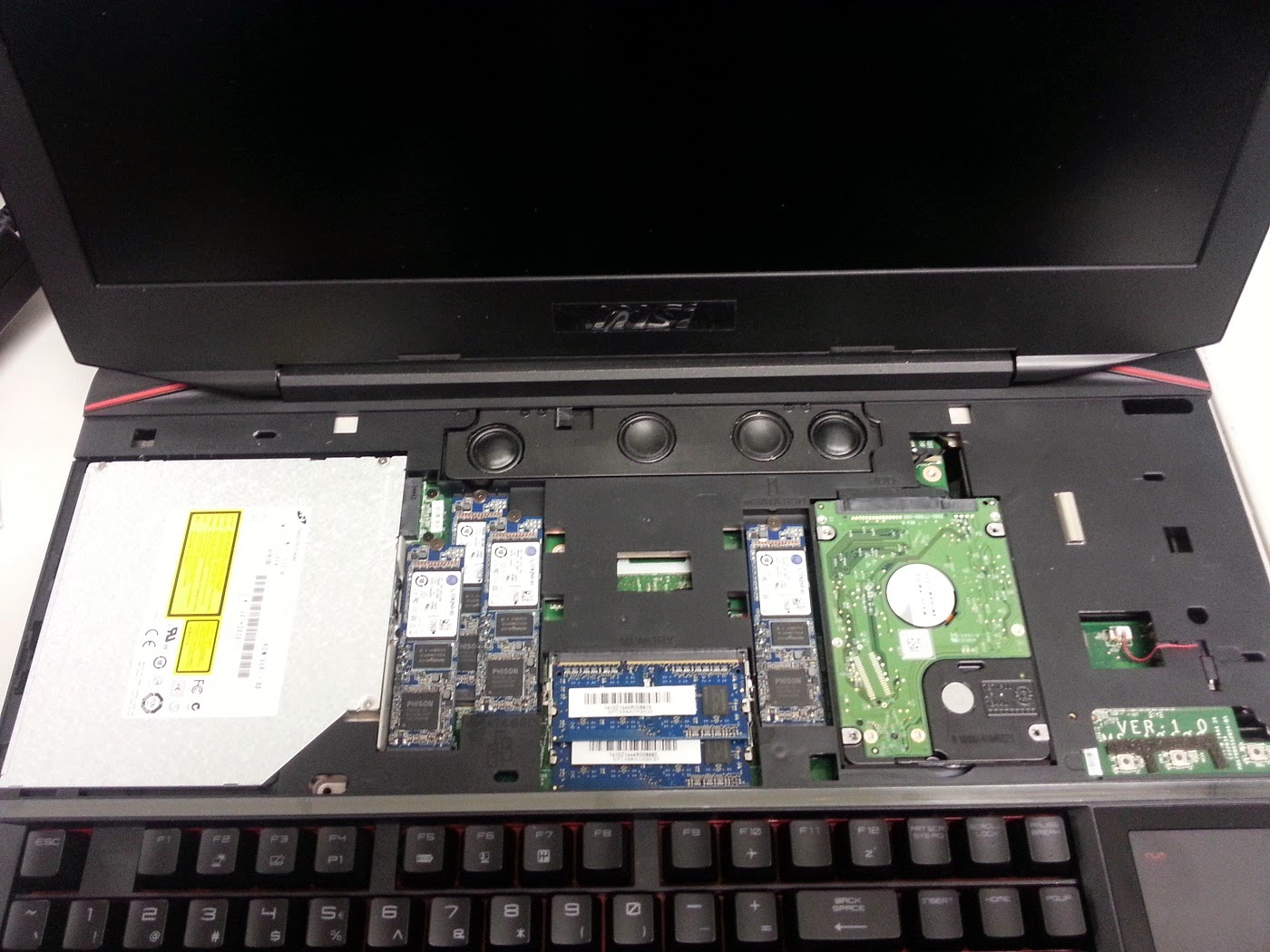
The GT80 Titan SLI is both a successor as well as an improvement on the GT72 in many ways. Obviously, it’s a completely new design, and the two don’t have much in common, but in one critical aspect, it shares the possibility to be upgraded in the future. The GT72 comes with a replaceable MXM graphics card, while the GT80 takes this a couple of steps further by pretty much full modularity.
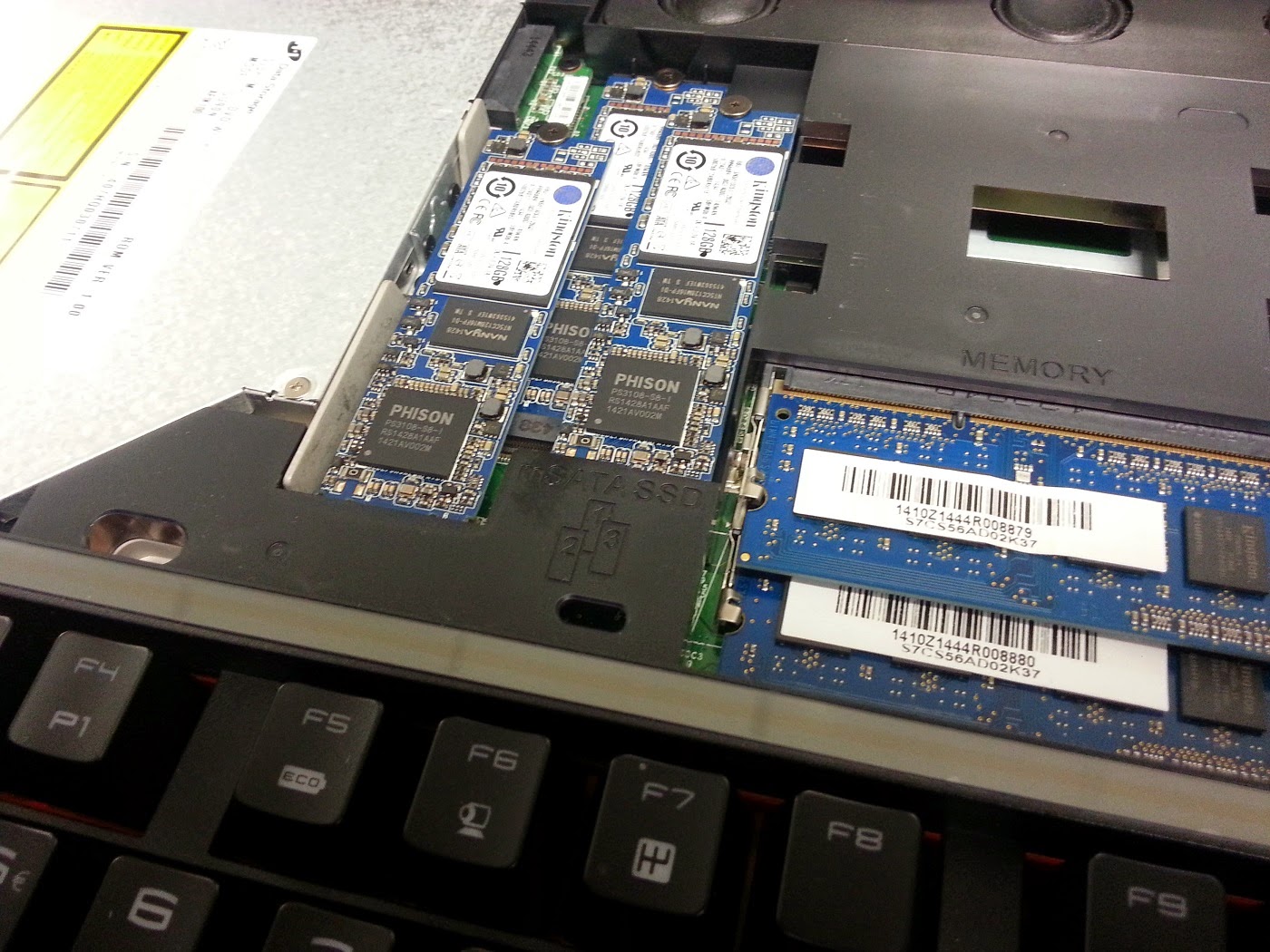
The placement of the keyboard means you can remove the somewhat unusual large top cover with two screws and access HDDs, ODD and the M.2 2280 type SSDs (all slots clearly numbered).
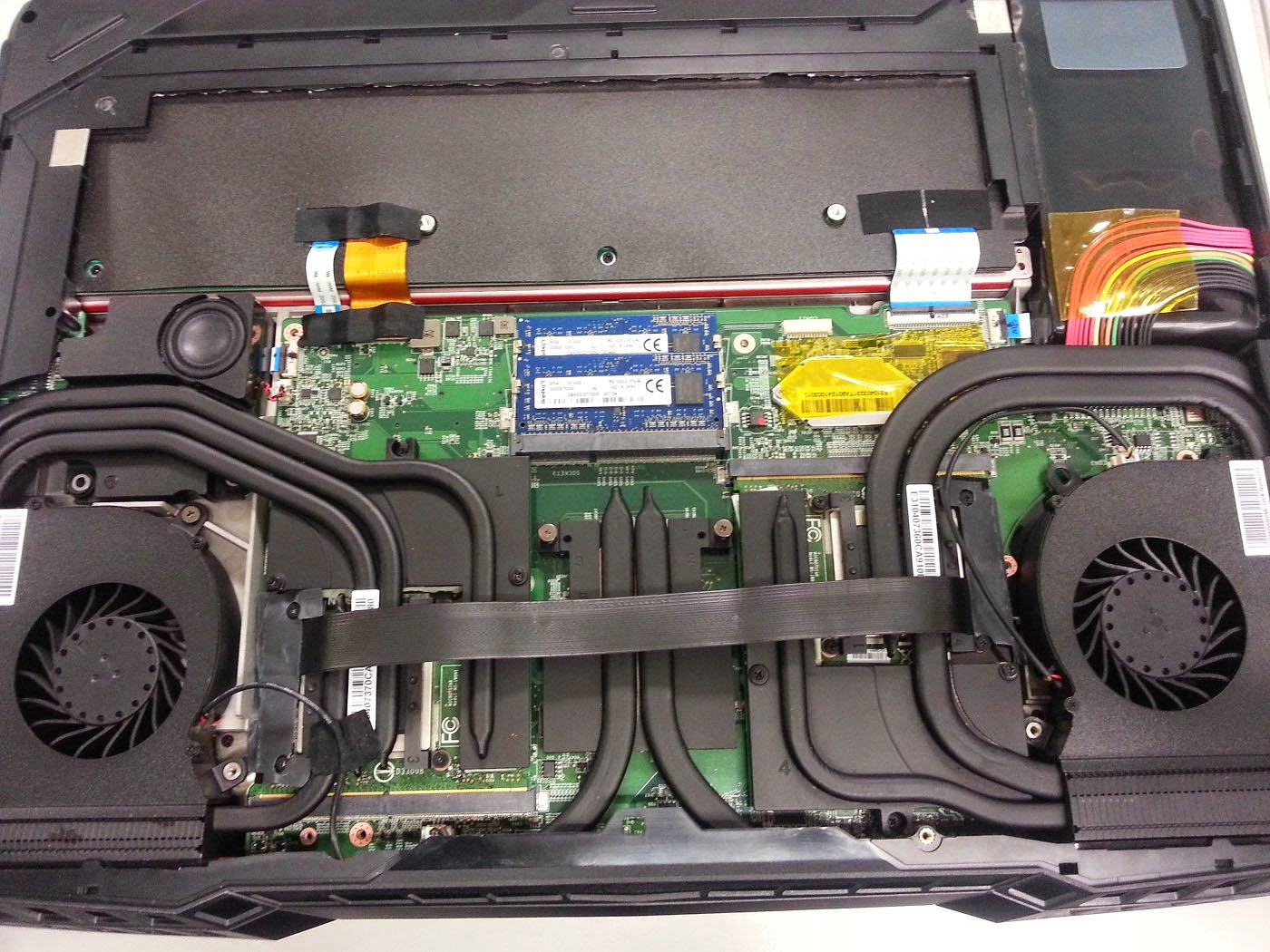
Through the bottom you can access the dual GTX 980M GPUs as well as the RAM. Another unusual feature is a ribbon cable running between the graphics cards – this is the SLI bridge.
As you can see then, we’re building on the GT72 upgradability DNA, but make it even easier for those who go for the top-of-the-line offering.
This post has been edited by MSI-NB: Feb 4 2015, 05:38 PM
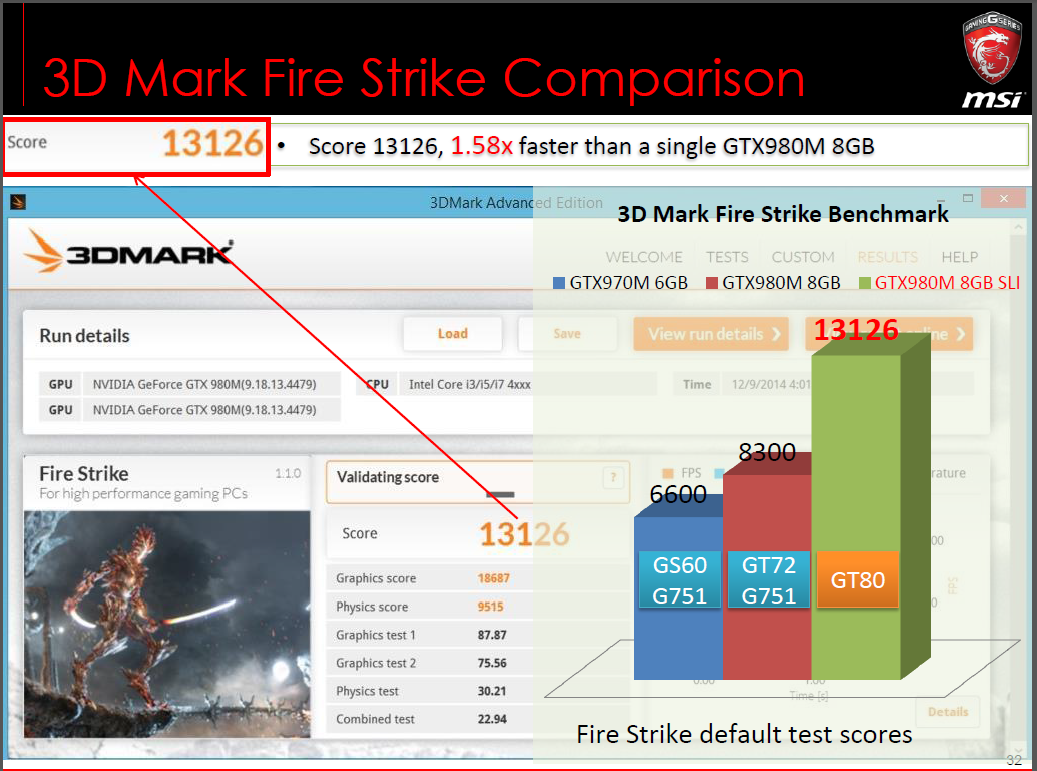
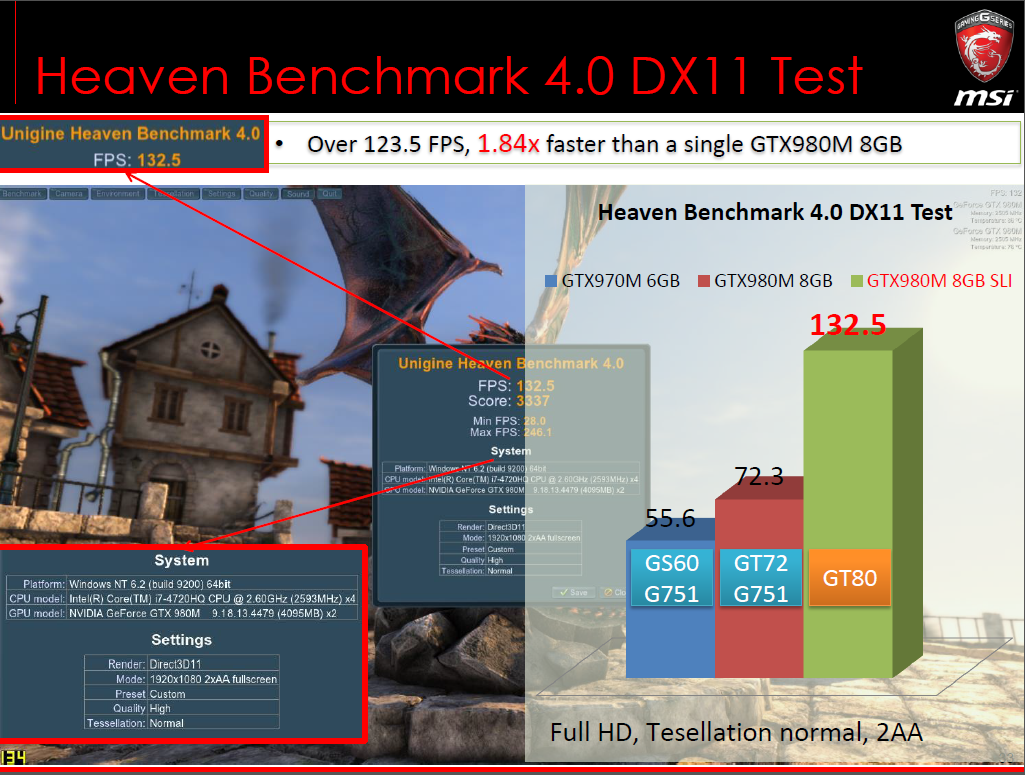
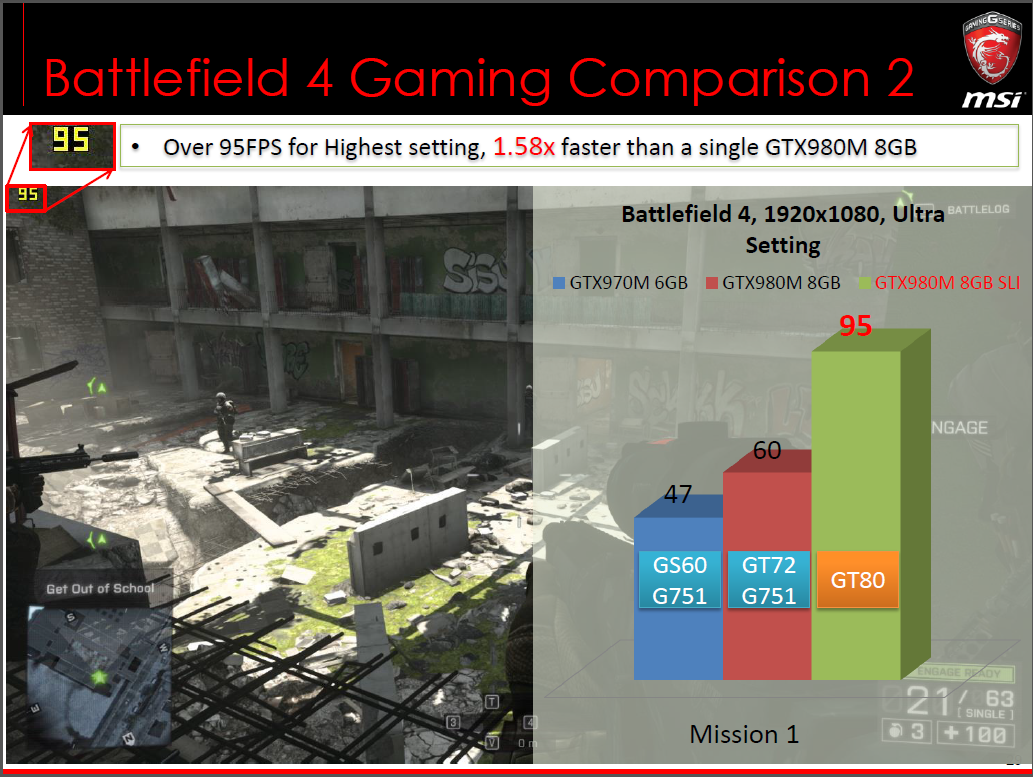
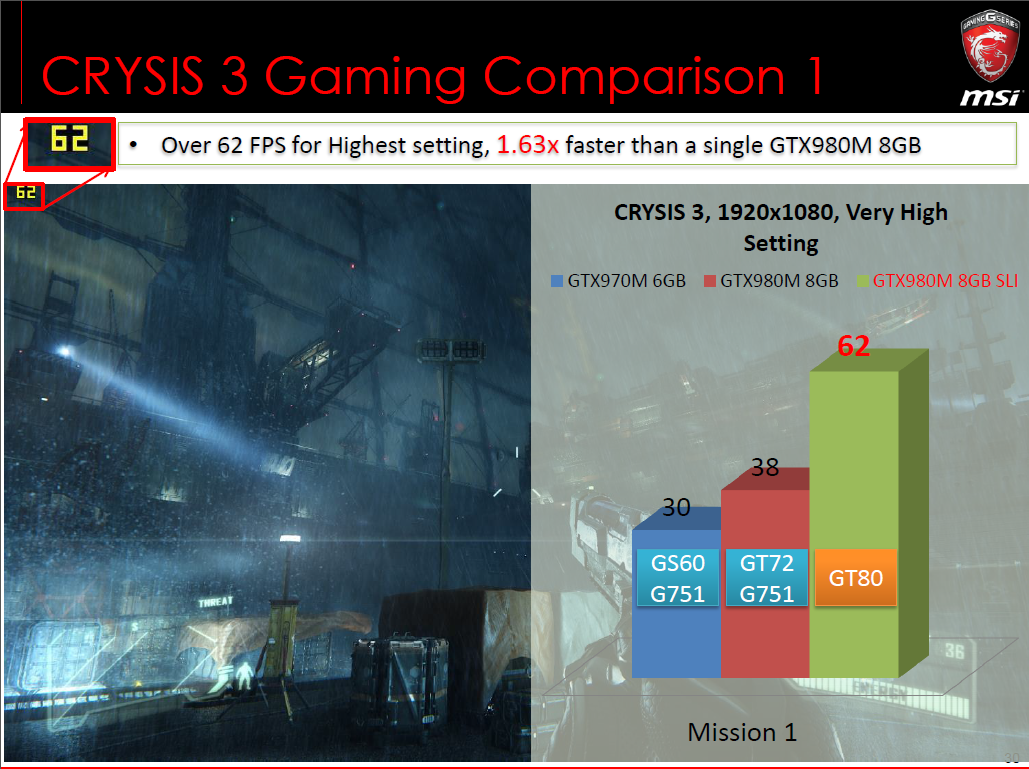
It’s not without reason we make a lot of noise about the GT80 Titan SLI – we’re immensely proud of all its unique features, not to mention the fact that it’s our most high-performing system, and probably the fastest gaming notebook out there. We can rant and rave about the keyboard for weeks (and we have done, internally), but in the end, it’s down to performance figures… Something we thought we’d share with you.
You will not have missed the fact that we’re using two NVIDIA GeForce GTX 980M with 8GB each, in SLI, leading to… Well, see for yourself, below.
In general, the SLI solution in the GT80 gives a performance boost of more than 60% compared to a single GTX 980M, as found in our GT72, or for that matter in a lot of other high-end notebooks. For example, this solution scores noticeably higher in 3DMark Fire Strike than an overclocked GeForce Titan desktop system – just to give you an idea of what kind of powerhouse the GT80 really is.
The GE62 was unveiled at CES, and us obviously the successor to the out-going-but-not-quite-dead-yet GE60. In fact, the GE60 will still remain in the MSI line-up for a while, but the GE62 will bridge the gap between the GE60 and the GS series – it will be more upmarket than the GE60.
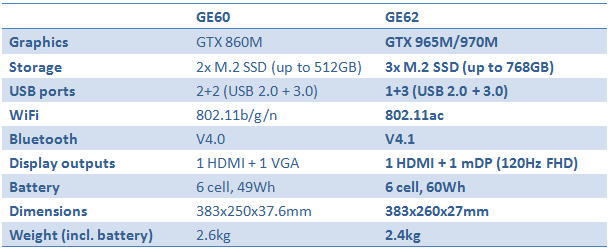
Obviously, this all starts with the looks, it’s more solid and sturdy than the GE60, and the GE62 has metal on pretty much all surfaces you actually touch – it’s a very sleek and stylish design. On top of that, the updated versions will actually come with higher-end graphics than before, in the shape of GTX 965M and 970M, while being noticeably slimmer and lighter.
A non-exhaustive list of differences can be seen below.
Hi guys, wondering im using the gt60-20c right now, is it possible to upgrade to an ssd? or use an ssd coexisting with the current hdd?
Yes you may, feel free to contact service centre hotline for upgrade @1300-88-2273 (operating from Mon-Fri, 9am-6pm, except public holiday). Thank you.
The GE62 is NOT an upgrade-friendly notebook, let’s just clear that up from the start. It features a lot (closer to 20) of screws that you need to undo in order to get close to the tasty bits. Our hope is that this article will deter you from simply opening your GE62 for fun, because unlike the GT72 and GT80, we strongly recommend you leave it alone.
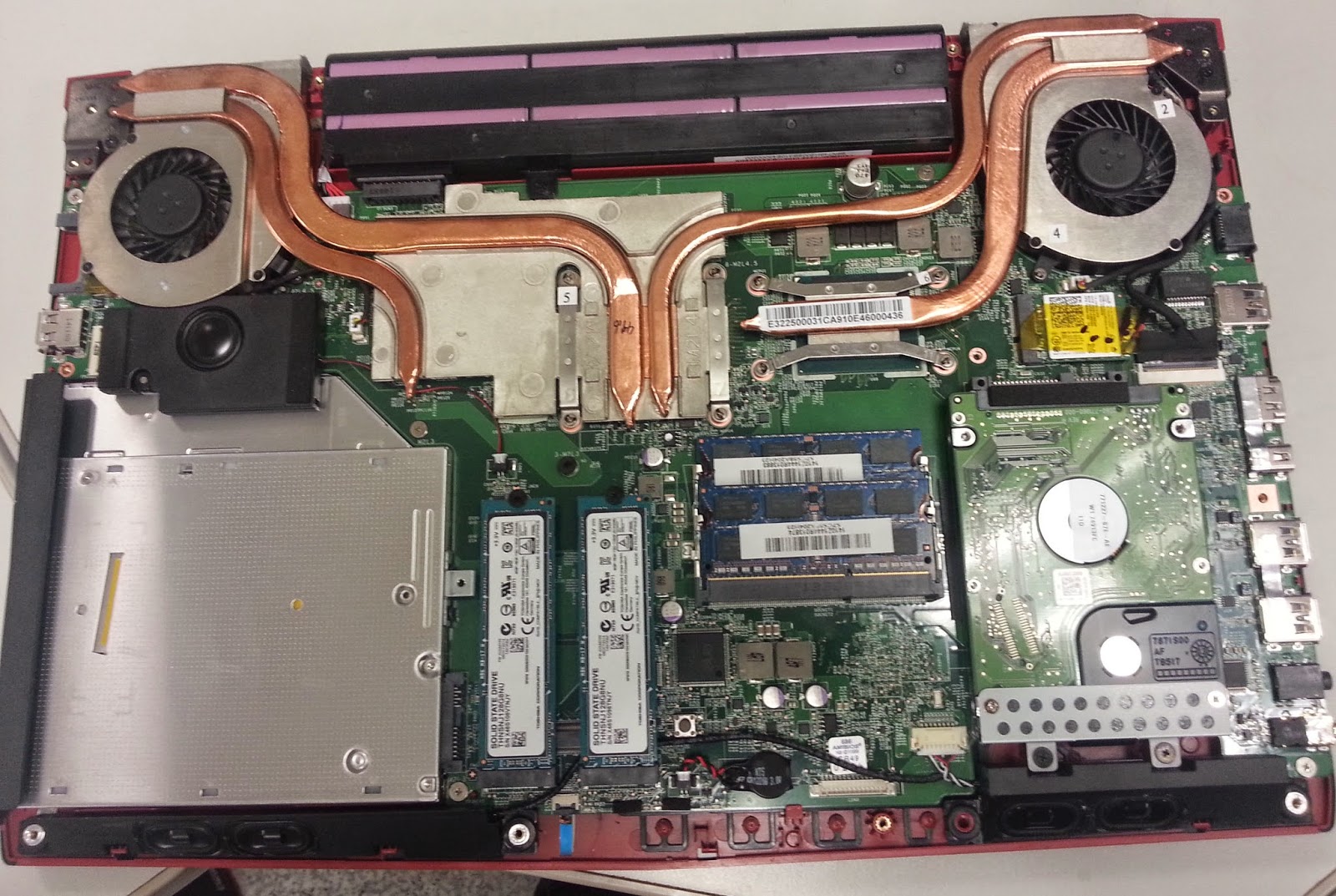
If you do decide to make it inside though (thus potentially breaking your warranty – check with your local service center what you’re allowed to do and not do), here’s what you’ll find:
The picture doesn’t really do it justice, but the only things you can upgrade yourself in the GE62 is the RAM (DDR3L), HDD (2.5” SATA) as well as the SSDs. The SSDs are M.2 2280 type ones, and there’s actually three slots (only two occupied in the picture), compared to two of the GE60 – meaning higher transfer speeds or more freedom to create a RAID of your choice.
Also pictured are the two Dynaudio speakers for each channel in the front (bottom of picture) as well as the subwoofer (between ODD and top left fan). Both the CPU and GPU used are BGA type, and therefore not user-replaceable.
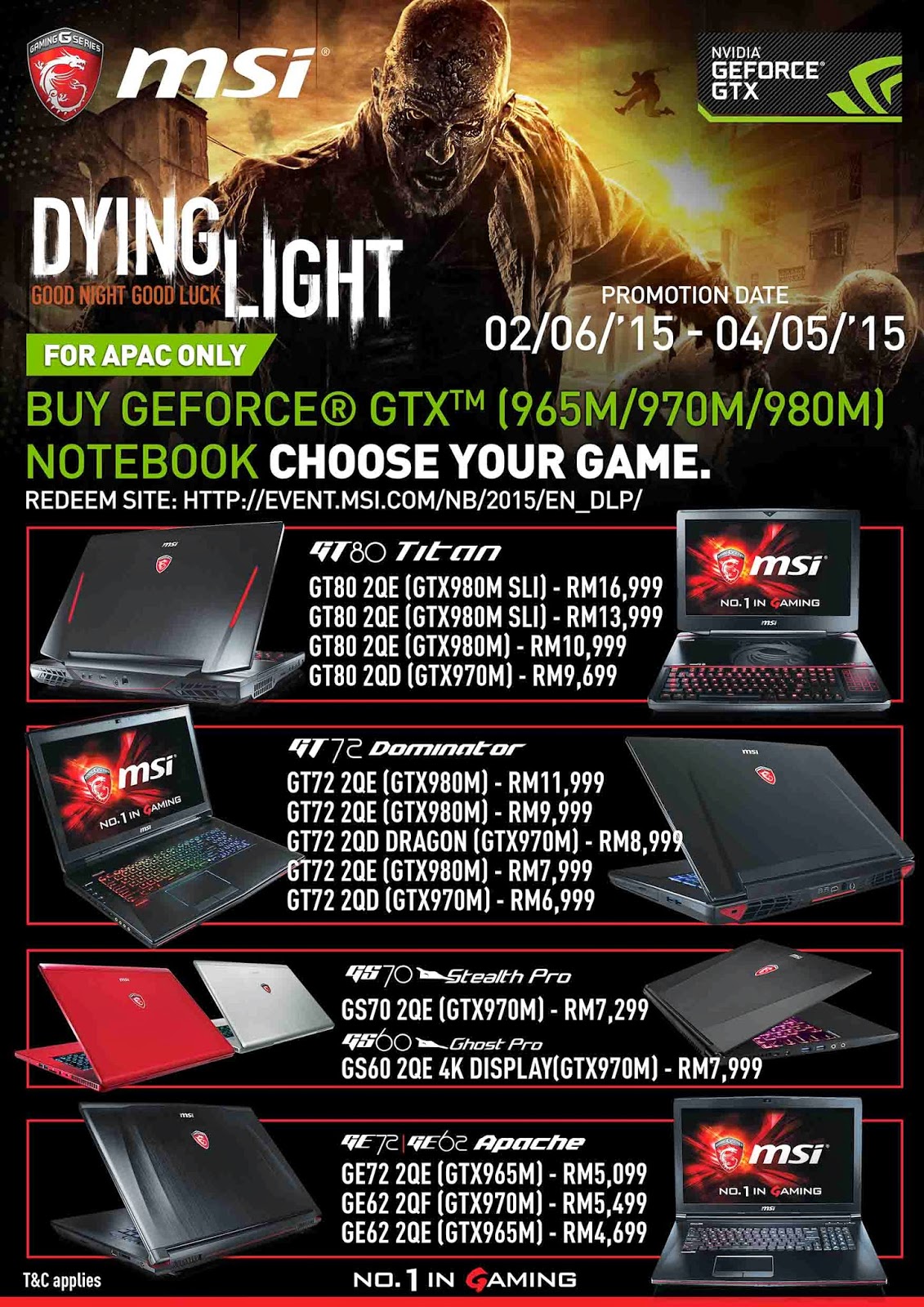
[NEW!]Buy a GeForce® GTX™ 965M or above MSI notebook, get Dying Light™ FREE
To be eligible, consumers must purchase selected GeForce® GTX™ 965/970/980 notebook from February 6th 2015 to Apr 5th 2015(promotion period),from an authorized and participating MSI retailer/reseller within APEC ONLY.(Malaysia, Singapore, Vietnam, Indonesia, Philippines, Thailand, Myanmar, Australia, New Zealand, Korea, Taiwan, Hong Kong)
Promotion Date: 6th February 2015 – 5th April 2015
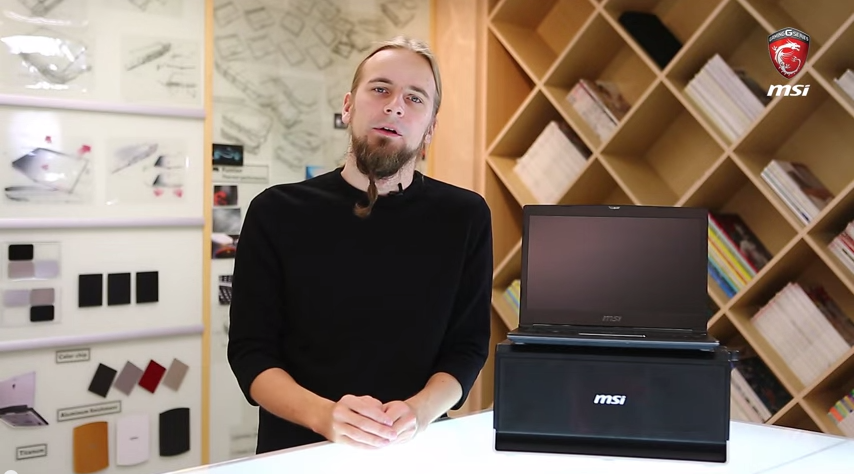
The GS30 Shadow is a light, slim machine with a high-powered, high-voltage Intel Core i7 CPU and the usual stuff you find in an MSI Gaming notebook. One thing it does lack though, is a dedicated graphics card, instead it comes with a PCI-E 3.0 x16 connector and a sizeable dock, the Gaming Dock, in which you’ll be able to fit a full desktop graphics card and a few other goodies.
To tell you more about the GS30 Shadow and the Gaming Dock, we’ve created a little video to walk you through the combo and what you can expect hardware-wise.



 Jan 15 2015, 05:12 PM


 Quote
Quote






 0.0650sec
 0.46
0.46
 7 queries
 GZIP Disabled