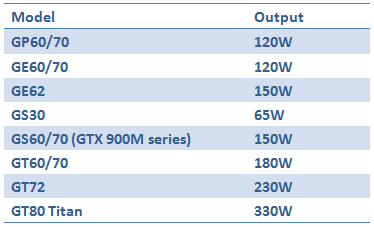
Generally speaking, notebooks use a lot less power than desktop systems, even our most high-powered ones, such as the GT80 Titan. This comes with a pretty large 330W power adaptor, and is by far the most power-hungry notebook in the lineup, thanks to its GTX 980M SLI solution.
Of course, the rest is much more modest, but we thought we’d give you an overview of what sort of AC adaptors we ship with our notebooks, in case you ever lose one and need to find a new one.
All adaptors come with a 19.5V output voltage, and are currently made by Delta Electronics.
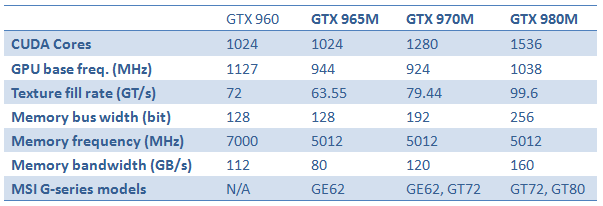
With the launch of GTX 965M, which will be built into the GE62, NVIDIA has a full lineup of high-end mobile graphics in place. As we exclusively use NVIDIA graphics, we figured we’d take a moment and try to highlight the differences in specs on the GTX 900M series, and also compare it to the new GTX 960 desktop graphics card.
With these specifications, we can discern that the GTX 965M is not too far off the desktop GTX 960 in terms of theoretical performance, while the GTX 970M is actually better than the mid-range desktop graphics card. The GTX 980M absolutely outclasses it on paper (and in real life as well, we assure you), with its 1536 CUDA cores and 256 bit memory bus. In fact, the GTX 980M comes pretty close to rivaling the desktop GTX 970 – at a fraction of the power consumption.
If we were to liken the MSI Gaming notebook lineup to weapons, the GE62 would probably be a SCAR, the GT72 a Minimi while the GT80 Titan would probably best be represented by an M1 Abrams tank.
Despite the war related talk, our relations with media when talking to the GT80 Titan has been very calm and peaceful – maybe thanks to all the nice things they keep saying about it once they’ve gotten their hands on it. Below follows a few excerpts from GT80 reviews around the world.
“We’ve never laid eyes (or fingers) on a gaming laptop quite like the GT80. With awesome SLI gaming power, a huge screen, and a true mechanical keyboard, this mega-machine sets a new standard of dream machine—so long as you don’t have to carry it very far.” - Computer Shopper http://www.computershopper.com/laptops/reviews/msi-gt80-titan-sli/(page)/5#product-review
“It’s easy to see why we’re so impressed; GT80 Titan SLI is outstanding in many ways, it pushes the boundaries for all-out mobile performance and achieves this while delivering a catalogue of innovative features.” - Vortez http://www.vortez.net/articles_pages/msi_gt80_titan_sli_review,12.html
Hey guys, my GP60 laptop just crashed yesterday while playing games, and now its stuck in a boot loop exactly like this :-
Anyone knows what is going on?
Hi Metallics, we suggest you to send in our service centre, you may contact service centre hotline 1300-88-2273 (operating from Mon-Fri, 9am-6pm, except public holiday). Thank you.
We love to rave on about the GT80 Titan SLI, and today, we’re doing it for you in video format. Enjoy our 12-minute video guide into what you hopefully want to know about the 18.4” leviathan.
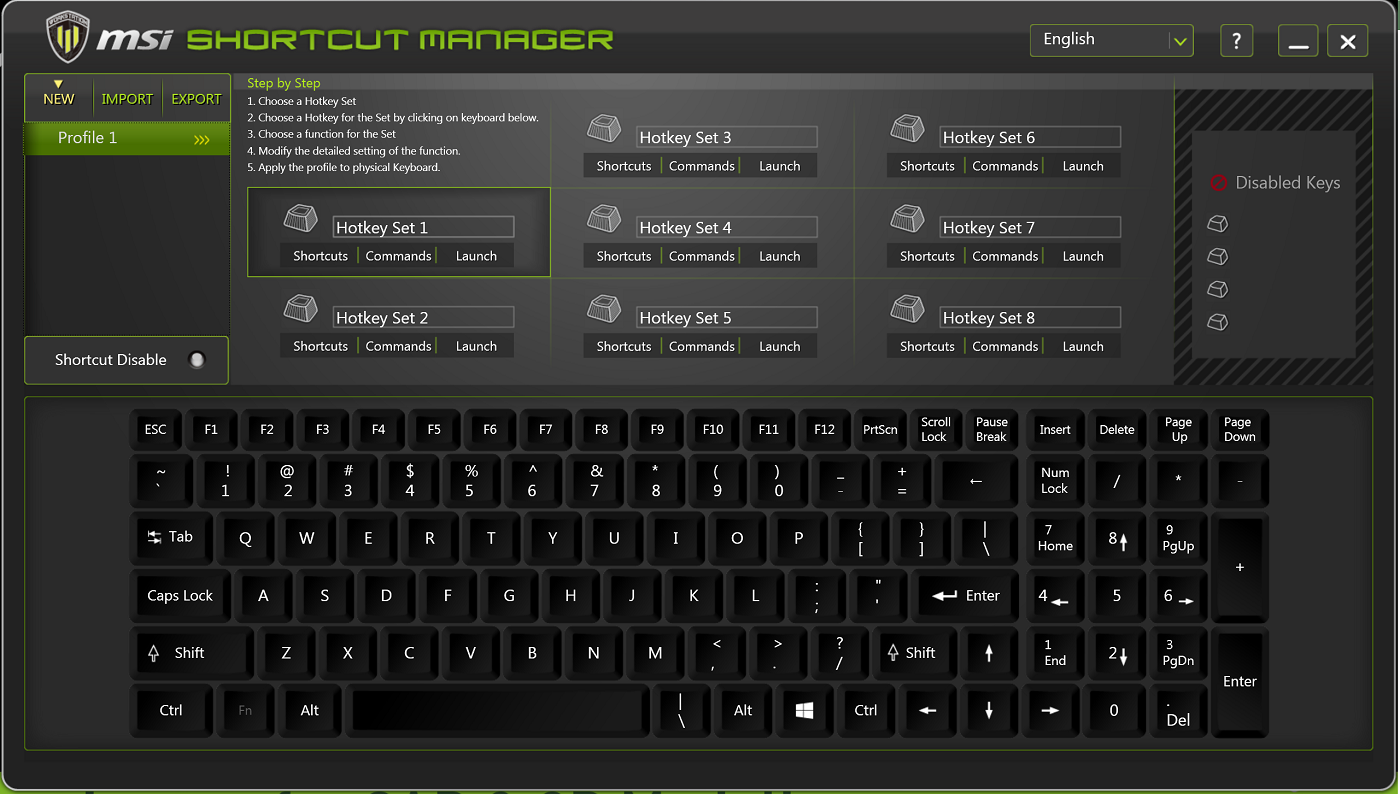
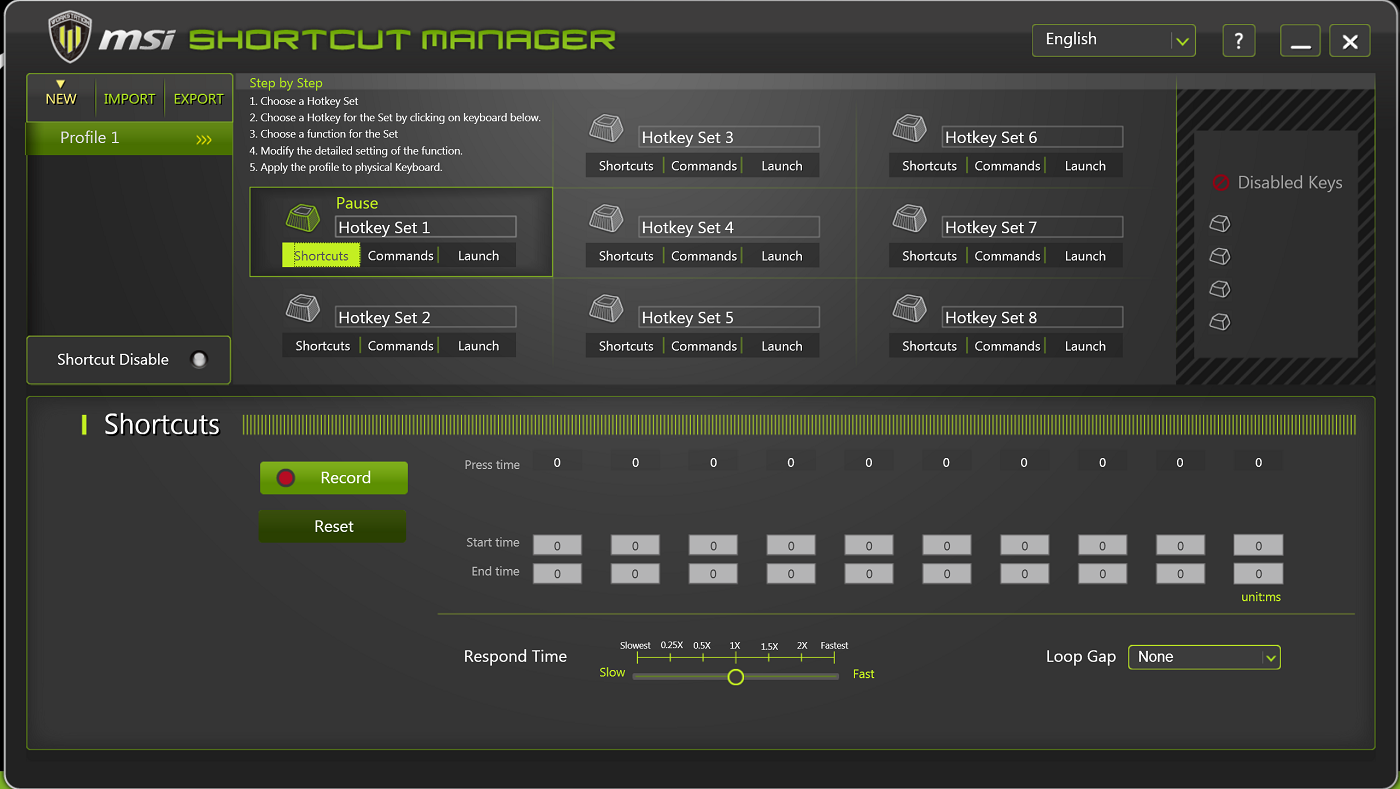
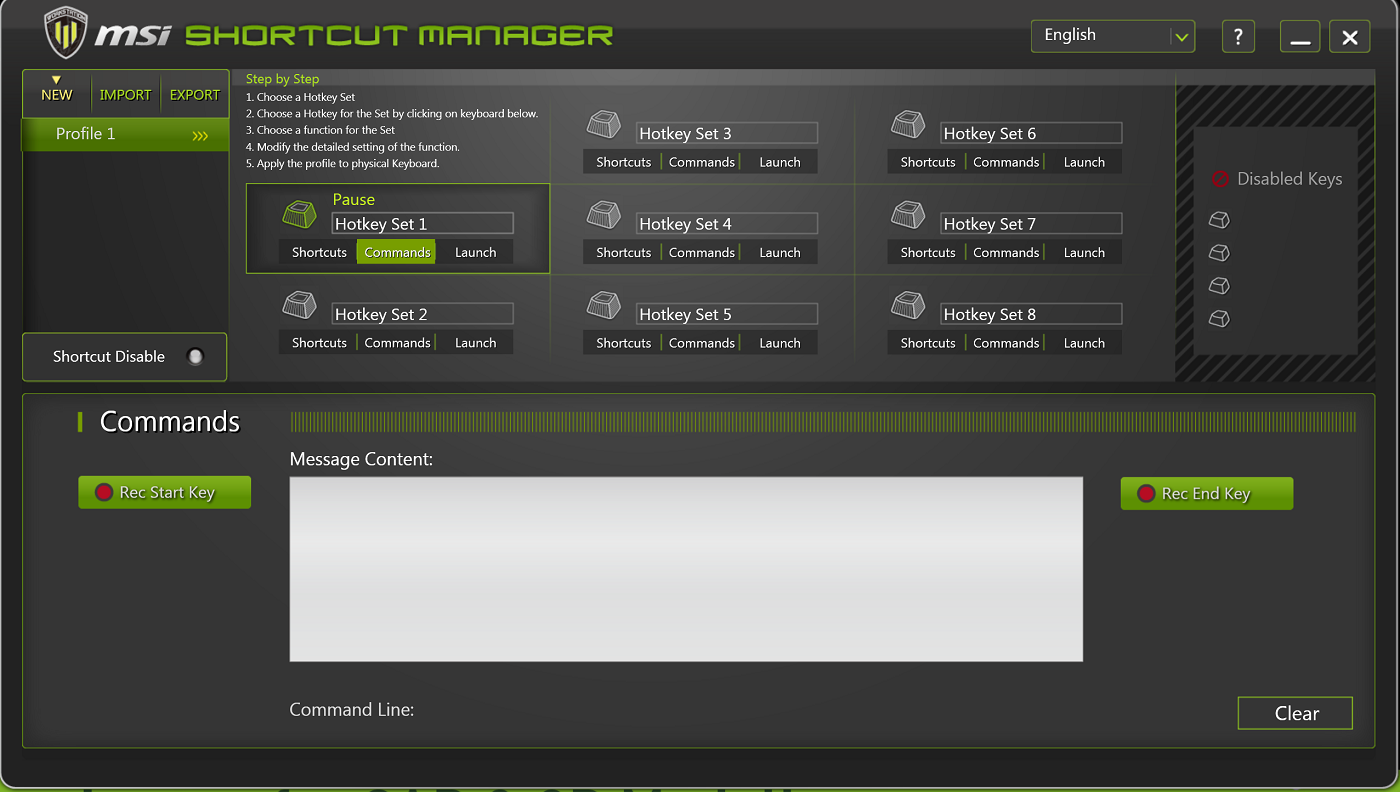
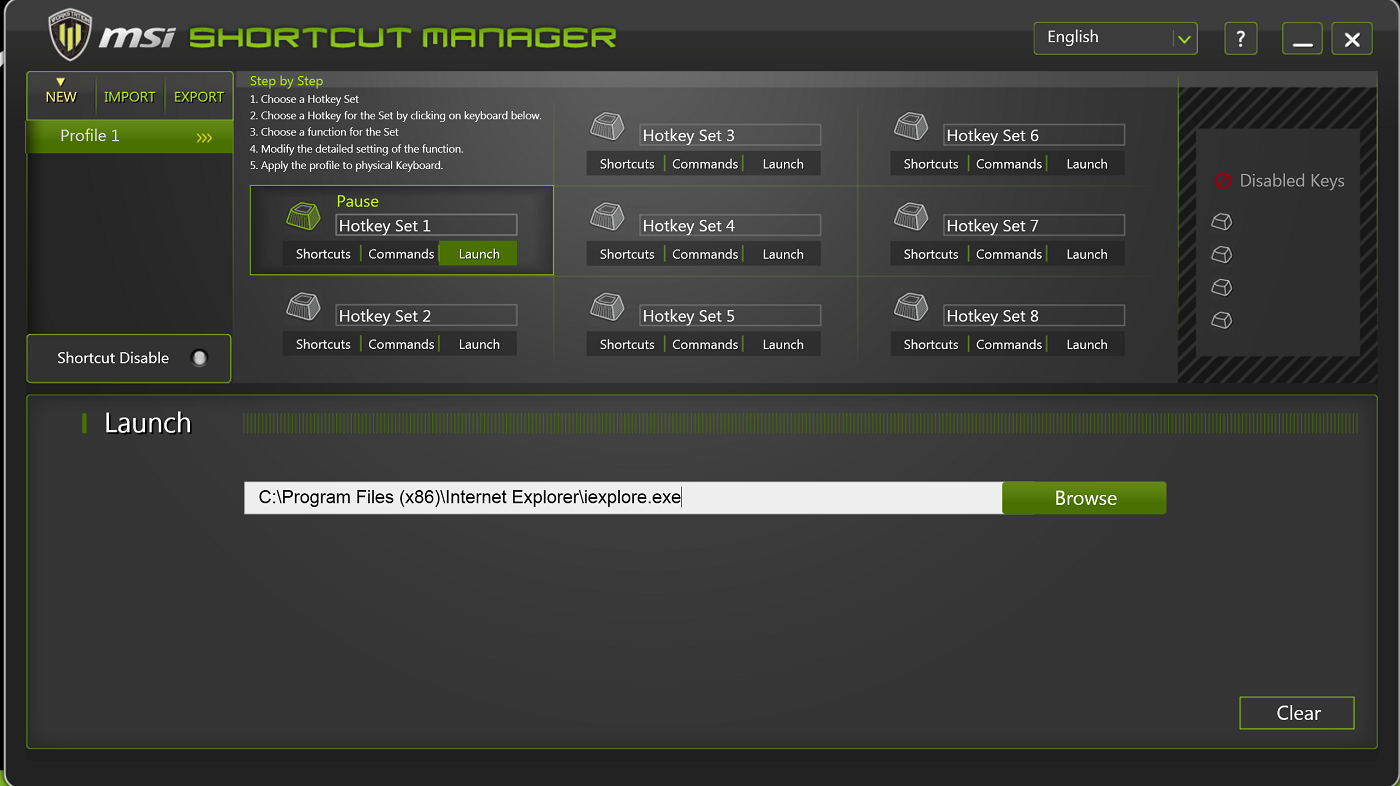
Have you heard about Shortcut Manager? In brief, it’s a tool to make your life easier on the workstation series of notebooks. You can launch applications with a simple key press, or record and run more advanced macros and/or commands, all customized by you for the applications you use.
You can create fully portable profiles, transferable to other systems with Shortcut Manager. Each profile can hold up to 8 hotkeys, each with its specific feature. You’re also able to customize the time between keypresses, as well as which speed they’re executed at.
The main window – where you choose your profile keys:
The ”Shortcuts” window – record a succession of keys to be launched by pressing the key you chose in the main window.
The Commands screen – input any key combo to be run at any given time.
Lastly – the Launch key – choose an application to be launched at the press of your key of choice.
This post has been edited by MSI-NB: Mar 12 2015, 12:02 PM
Ever wondered why workstation graphics are so expensive? While it is true that regular gaming graphics are good enough for most people for home and recreational use, a proper workstation graphics solution will still kick the snot out of a solution that comes with much higher performance where it matters.
We lined up a WS60 with a Quadro K2100M and an i7-4710HQ CPU against a GE62 with GeForce GTX 970M graphics and a slightly faster i7-4720HQ CPU and decided to fire up a Siemens NX CAD benchmark. Not only did we get to see some nice car bodies and drive trains being rendered, but we also got a result with which we can prove our point, see below.
True, in gaming, the GE62 would be about as dominant as the WS60 is in this test, but still – workstation graphics work. Also, we ran this test out of curiousity ourselves, as you don’t see that many comparisons out there.
At MSI, most of us are gamers in the true sense of the word – we spend a lot of our free time playing the latest and greatest titles, and many of us even keep track of what’s going on in e-sports. Not because it’s work, but because we’re simply passionate.
Logically, therefore, we’re forcing one of our more technical marketing guys who’s not really a massive fan of games, but more of an occasional gamer, to play games. And record his mishaps. We’ve named the project “Useless Gamer,” because frankly, he is useless. Find out exactly how useless from his Dying Light video introduction with commentary below.
I wanted to ask about graphic card upgrade kit, is it available in Malaysia?
How much would it cost for a GTX970M upgrade kit?
Kindly let me know, thank you
Currently it is not available in Malaysia. Kindly contact service centre hotline 1300-88-2273 (operating from Mon-Fri, 9am-6pm, except public holiday) for more info. Thank you.
I Want to install m.2 ssd In my ge62 Apache. I notice at the back panel there is warranty seal at the screw hole. If i remove the seal, will it void warranty?
We encourage user to upgrade SSD or RAM via service centre or MSI authorized resellers to enjoy warranty service. Please note that any damage caused by user will void the system warranty. Kindly contact service centre hotline 1300-88-2273 (operating from Mon-Fri, 9am-6pm, except public holiday). Thank you.
Performance figures are pretty abundant when it comes to the higher end of mobile graphics, but have you ever been curious about how the GeForce GTX 950M and 960M compare to, say, the 850M/860M? No? Well, that’s fine, because you’ll get the figures anyway.
We present you – our own performance results, comparing the mid-range graphics in 3DMark Fire Strike. Emphasis on the newly launched 950M and the 960M (pink and bronze in the graph below).
If you want more performance comparisons, please let us know, and we’ll do our best to post more like this for the future.



 Feb 26 2015, 03:47 PM


 Quote
Quote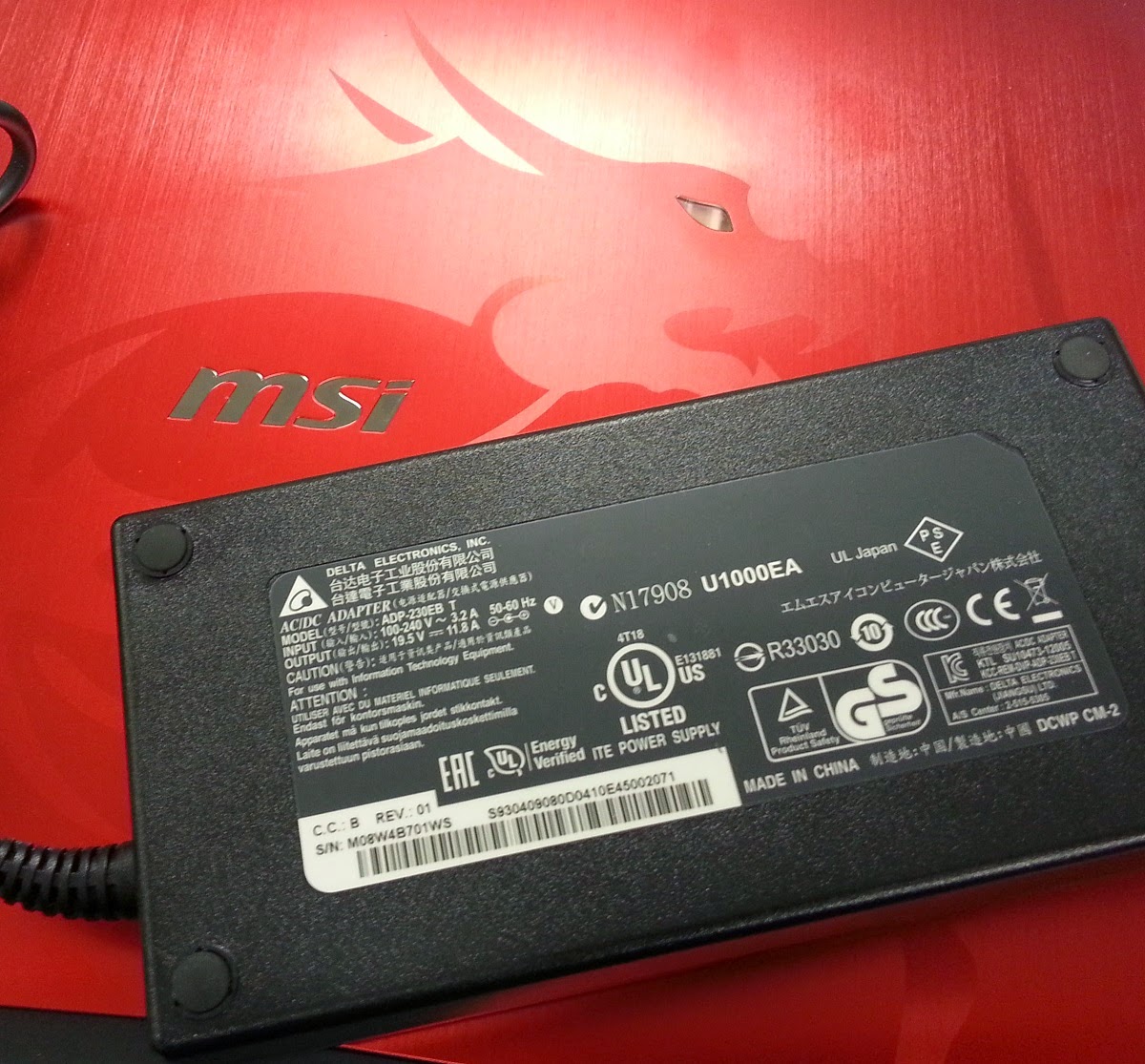






 0.0571sec
 0.87
0.87
 7 queries
 GZIP Disabled