Welcome Guest ( Log In | Register )

113 Pages « < 29 30 31 32 33 > » Bottom

Outline · [ Standard ] · Linear+

 Xiaomi Redmi 1S Discussion Thread V2, THE MID-END GODPHONE

views
     
WeSLeY
post Sep 10 2014, 09:27 AM

Getting Started
**
Junior Member
153 posts

Joined: Jan 2003
From: Taman Bukit Belimbing, Balakong


QUOTE(bluecat68 @ Sep 10 2014, 09:05 AM)
I do play game but just prefer to play on pc  thumbup.gif
Ic. Understood.

The more i use this phone the more i feel the phone is ok other than getting this "Unfortunately, the process android.process.acore has stopped" error message everytime i do something related to my SIM card.

I found that i actually cannot edit / add / delete any contact number which is store in my SIM card.

Really weird. I might actually need to go amcorp mall for a check. Trouble  sweat.gif  sweat.gif  sweat.gif

But other than that the phone is ok.
*
Save contact to google contact better than SIM card tongue.gif easy recovery and sync whenever u switch phone.. contact in SIM card if gone means forever gone
bluecat68
post Sep 10 2014, 09:57 AM

Casual
***
Junior Member
361 posts

Joined: Dec 2008


QUOTE(WeSLeY @ Sep 10 2014, 09:27 AM)
Save contact to google contact better than SIM card tongue.gif easy recovery and sync whenever u switch  phone.. contact in SIM card if gone means forever gone
*
Yeah i know that already thanks to all you guys but then the problem is not about where to sync but i just cant edit or add or delete my SIM card contact using the phone itself.. I cant configure or organize my SIM card contact list at all.

Meaning if my SIM card now has 50 contacts then it stay 50 contacts forever .. i cant delete some of them .. cant edit some of them and cant add in new contact as well unless i use the SIM card with other phone sweat.gif sweat.gif sweat.gif

Also i have no problem to connect the phone to pc & gain access like this =>
Attached Image

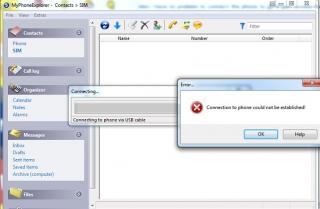
But MyPhoneExplorer show this error when i trying to connect it to phone =>
Attached Image

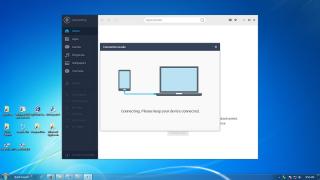
And my phone is detected by Mobogenie if i plug the phone in thru usb cable like this =>
Attached Image

but fail to connect & the screen stay forever like this =>
Attached Image

I suspect it has something to do with the adb.exe *32 (Google android Bridge) which wont shut down itself even if i close the software, i have to manually close it thru task manager or else the phone is not safe to unplug.

And yes i already enable the "USB Debugging" option.
Attached Image

Very headache right now shakehead.gif shakehead.gif shakehead.gif

This post has been edited by bluecat68: Sep 10 2014, 09:59 AM
verz84
post Sep 10 2014, 10:31 AM

On my way
****
Senior Member
592 posts

Joined: Nov 2006


Using this phone seems complicated leh...judging from the complains..even MiUi complicated?
WeSLeY
post Sep 10 2014, 10:41 AM

Getting Started
**
Junior Member
153 posts

Joined: Jan 2003
From: Taman Bukit Belimbing, Balakong


QUOTE(bluecat68 @ Sep 10 2014, 09:57 AM)
Yeah i know that already thanks to all you guys but then the problem is not about where to sync but i just cant edit or add or delete my SIM card contact using the phone itself.. I cant configure or organize my SIM card contact list at all.

Meaning if my SIM card now has 50 contacts then it stay 50 contacts forever .. i cant delete some of them .. cant edit some of them and cant add in new contact as well  unless i use the SIM card with other phone sweat.gif  sweat.gif  sweat.gif

Also i have no problem to connect the phone to pc & gain access like this =>
Attached Image

But MyPhoneExplorer show this error when i trying to connect it to phone =>
Attached Image

And my phone is detected by Mobogenie if i plug the phone in thru usb cable like this =>
Attached Image

but fail to connect & the screen stay forever like this =>
Attached Image

I suspect it has something to do with the adb.exe *32 (Google android Bridge) which wont shut down itself even if i close the software, i have to manually close it thru task manager or else the phone is not safe to unplug.

And yes i already enable the "USB Debugging" option.
Attached Image

Very headache right now  shakehead.gif  shakehead.gif  shakehead.gif
*
found my phone dun hv option to edit SIM contact also
bluecat68
post Sep 10 2014, 10:47 AM

Casual
***
Junior Member
361 posts

Joined: Dec 2008


QUOTE(WeSLeY @ Sep 10 2014, 10:41 AM)
found my phone dun hv option to edit SIM contact also
*
Contacts -> Settings (Menu) -> Organize contacts -> Configure SIM card. Then either edit or delete SIM contact there. But i got error message everytime i do that shakehead.gif shakehead.gif shakehead.gif

By the way just found out my phone need some driver when connected to pc ... and online search driver didnt help.
Attached Image
WeSLeY
post Sep 10 2014, 11:29 AM

Getting Started
**
Junior Member
153 posts

Joined: Jan 2003
From: Taman Bukit Belimbing, Balakong


QUOTE(bluecat68 @ Sep 10 2014, 10:47 AM)
Contacts -> Settings (Menu) -> Organize contacts -> Configure SIM card. Then either edit or delete SIM contact there. But i got error message everytime i do that  shakehead.gif  shakehead.gif  shakehead.gif

By the way just found out my phone need some driver when connected to pc ... and online search driver didnt help.
Attached Image
*
Ya... i using the same steps as well... only can delete but no edit... n most time... got error msg
bluecat68
post Sep 10 2014, 11:36 AM

Casual
***
Junior Member
361 posts

Joined: Dec 2008


QUOTE(WeSLeY @ Sep 10 2014, 11:29 AM)
Ya... i using the same steps as well... only can delete but no edit... n most time... got error msg
*
Am sorry but i must say i a bit happy to found out am not alone in this one sweat.gif

Only my case is more serious. Cant add / edit / delete and error msg happen 100% of the time sweat.gif

I will go Amcorp Mall Xiaomi service center later and screw them kuat kuat laugh.gif

This post has been edited by bluecat68: Sep 10 2014, 11:38 AM
xperiaVuser
post Sep 10 2014, 01:29 PM

Regular
******
Senior Member
1,201 posts

Joined: Jul 2013
QUOTE(bluecat68 @ Sep 10 2014, 10:47 AM)
Contacts -> Settings (Menu) -> Organize contacts -> Configure SIM card. Then either edit or delete SIM contact there. But i got error message everytime i do that  shakehead.gif  shakehead.gif  shakehead.gif
I have no issues deleting contacts from 'Configure SIM card'.

You can try installing 'Sim Contacts' from Google Play. See if it works, it still doesn't then it's your sim card problem. Go to your service provider to change a new sim.

This post has been edited by xperiaVuser: Sep 10 2014, 01:49 PM
bluecat68
post Sep 10 2014, 04:23 PM

Casual
***
Junior Member
361 posts

Joined: Dec 2008


QUOTE(xperiaVuser @ Sep 10 2014, 01:29 PM)
I have no issues deleting contacts from 'Configure SIM card'.

You can try installing 'Sim Contacts' from Google Play. See if it works, it still doesn't then it's your sim card problem. Go to your service provider to change a new sim.
*
I already try delete sim contact with my old old SE W595 phone and didnt has any problem so the sim card should be ok.

But its ok i lazy to try this try that any more; Already send the phone to their Amcorp Mall service centre & will get the phone back not later than friday or if they cant fix it i will get a new one since i own this phone for less than 1 week.

Thats it. So just wait for their call sweat.gif

This post has been edited by bluecat68: Sep 10 2014, 04:24 PM
suntzulee
post Sep 10 2014, 04:48 PM

Look at all my stars!!
Group Icon
Trade Dispute
5,689 posts

Joined: Nov 2008

still waiting for the hong guy who claim can add "RAM" to 1s....where is he or he just scam us only....
boonsheng
post Sep 10 2014, 05:47 PM

Getting Started
**
Junior Member
275 posts

Joined: Nov 2012


QUOTE(suntzulee @ Sep 10 2014, 04:48 PM)
still waiting for the hong guy who claim can add "RAM" to 1s....where is he or he just scam us only....
*
hope new ver of ROM can solve this lo...


hongchai888
post Sep 10 2014, 08:41 PM

You Are Not Alone
******
Senior Member
1,497 posts

Joined: Jun 2009
From: Kuala Lumpur

QUOTE(suntzulee @ Sep 10 2014, 04:48 PM)
still waiting for the hong guy who claim can add "RAM" to 1s....where is he or he just scam us only....
*
Just finished hardcore test lol. I think that's it, scare will spoil the phone and mmc. I am using 8GB mmc for the swap only.

Best result as below, I open Kuwo + TTpod + Build in music player + huge size Racing game at the same time, its running smooth without lag. But when I try put in another music player, the game crash before race start yawn.gif yawn.gif

user posted image


yibaandre
post Sep 10 2014, 08:43 PM

Casual
***
Junior Member
496 posts

Joined: Sep 2008
QUOTE(hongchai888 @ Sep 10 2014, 08:41 PM)
Just finished hardcore test lol. I think that's it, scare will spoil the phone and mmc. I am using 8GB mmc for the swap only.

Best result as below, I open Kuwo + TTpod + Build in music player + huge size Racing game at the same time, its running smooth without lag. But when I try put in another music player, the game crash before race start  yawn.gif  yawn.gif

user posted image
*
waiting for instructions bro tongue.gif
hongchai888
post Sep 10 2014, 08:55 PM

You Are Not Alone
******
Senior Member
1,497 posts

Joined: Jun 2009
From: Kuala Lumpur

QUOTE(yibaandre @ Sep 10 2014, 08:43 PM)
waiting for instructions bro  tongue.gif
*
Sure, will try asap rclxms.gif
ephunk
post Sep 10 2014, 10:00 PM

Getting Started
**
Junior Member
255 posts

Joined: Jan 2009
QUOTE
Held for Future Delivery Requested
UPS has received a request from either the sender or the receiver to hold this shipment for future delivery.


I just got this status from UPS.. Should I call UPS?
bluecat68
post Sep 11 2014, 01:01 AM

Casual
***
Junior Member
361 posts

Joined: Dec 2008


QUOTE(hongchai888 @ Sep 10 2014, 08:41 PM)
Just finished hardcore test lol. I think that's it, scare will spoil the phone and mmc. I am using 8GB mmc for the swap only.

Best result as below, I open Kuwo + TTpod + Build in music player + huge size Racing game at the same time, its running smooth without lag. But when I try put in another music player, the game crash before race start  yawn.gif  yawn.gif

user posted image
*
Since i dont play any size of game with phone so your solution should be more than enough for me.
We all wait wait here to know the trick drool.gif drool.gif drool.gif

Many many thanks first thumbup.gif

This post has been edited by bluecat68: Sep 11 2014, 01:02 AM
GodJesterZ
post Sep 11 2014, 06:45 AM

Regular
******
Senior Member
1,542 posts

Joined: Jul 2012


QUOTE(bluecat68 @ Sep 10 2014, 09:57 AM)
Yeah i know that already thanks to all you guys but then the problem is not about where to sync but i just cant edit or add or delete my SIM card contact using the phone itself.. I cant configure or organize my SIM card contact list at all.

Meaning if my SIM card now has 50 contacts then it stay 50 contacts forever .. i cant delete some of them .. cant edit some of them and cant add in new contact as well  unless i use the SIM card with other phone sweat.gif  sweat.gif  sweat.gif

Also i have no problem to connect the phone to pc & gain access like this =>
Attached Image

But MyPhoneExplorer show this error when i trying to connect it to phone =>
Attached Image

And my phone is detected by Mobogenie if i plug the phone in thru usb cable like this =>
Attached Image

but fail to connect & the screen stay forever like this =>
Attached Image

I suspect it has something to do with the adb.exe *32 (Google android Bridge) which wont shut down itself even if i close the software, i have to manually close it thru task manager or else the phone is not safe to unplug.

And yes i already enable the "USB Debugging" option.
Attached Image

Very headache right now  shakehead.gif  shakehead.gif  shakehead.gif
*
What I did is reinstall the drivers.
imbibug
post Sep 11 2014, 07:56 AM

Regular
******
Senior Member
1,699 posts

Joined: Jan 2013


QUOTE(suntzulee @ Sep 10 2014, 04:48 PM)
still waiting for the hong guy who claim can add "RAM" to 1s....where is he or he just scam us only....
*
There is no such thing as adding ram. What he is doing is adding swap space on an Android which is similar to configuring the paging file settings on Windows.

And its no big secret on how to do it. Theres a guide on the official website:
[Tools, Tips & Tutorials] [HowTo] Expand your RAM using SWAP partition on SD card
imbibug
post Sep 11 2014, 07:57 AM

Regular
******
Senior Member
1,699 posts

Joined: Jan 2013


QUOTE(hongchai888 @ Sep 10 2014, 08:41 PM)
Just finished hardcore test lol. I think that's it, scare will spoil the phone and mmc. I am using 8GB mmc for the swap only.
....
*
I don't follow, if you are afraid of degrading the mmc why did you use the 8Gb mmc for the swap?
imbibug
post Sep 11 2014, 08:14 AM

Regular
******
Senior Member
1,699 posts

Joined: Jan 2013


QUOTE(xperiaVuser @ Sep 9 2014, 10:50 PM)
Do keep us updated  thumbup.gif
....
*
Again no secrets here. I'm looking into the tweak posted here:
http://en.miui.com/thread-41496-1-1.html

113 Pages « < 29 30 31 32 33 > » Top
 

Change to:
| Lo-Fi Version
0.0251sec    0.65    6 queries    GZIP Disabled
Time is now: 9th December 2025 - 07:25 AM