

*credit from fantagero
Download the file below to fix this error
This
Or
This
This post has been edited by 3536837: Jul 11 2008, 07:24 PM
Attached File(s)
 WindowsXP_KB921883_x86_ENU.zip ( 665.37k )
Number of downloads: 2529
WindowsXP_KB921883_x86_ENU.zip ( 665.37k )
Number of downloads: 2529Win32 Services Error, Win32 Services Encountered A Problem
|
|
 Aug 13 2006, 10:13 AM, updated 18y ago Aug 13 2006, 10:13 AM, updated 18y ago
Show posts by this member only | Post
#1
|
 
Senior Member
1,602 posts Joined: Aug 2005  
|
http://forum.lowyat.net/index.php?act=Atta...=post&id=517457
*credit from fantagero Download the file below to fix this error This Or This This post has been edited by 3536837: Jul 11 2008, 07:24 PM Attached File(s)
WindowsXP_KB921883_x86_ENU.zip ( 665.37k )
Number of downloads: 2529 |
|
|
|
|
|
Aug 13 2006, 12:43 PM
Show posts by this member only | Post
#2
|
|
Senior Member
1,602 posts Joined: Aug 2005
|
Event Type: Error Event Source: Application Error Event Category: (100) Event ID: 1000 Date: 2006/8/13 Time: 下午 12:24:12 User: N/A Computer: HAPPYLOW Description: Faulting application svchost.exe, version 5.1.2600.2180, faulting module netapi32.dll, version 5.1.2600.2180, fault address 0x0000a3c0. For more information, see Help and Support Center at http://go.microsoft.com/fwlink/events.asp. Data: 0000: 41 70 70 6c 69 63 61 74 Applicat 0008: 69 6f 6e 20 46 61 69 6c ion Fail 0010: 75 72 65 20 20 73 76 63 ure svc 0018: 68 6f 73 74 2e 65 78 65 host.exe 0020: 20 35 2e 31 2e 32 36 30 5.1.260 0028: 30 2e 32 31 38 30 20 69 0.2180 i 0030: 6e 20 6e 65 74 61 70 69 n netapi 0038: 33 32 2e 64 6c 6c 20 35 32.dll 5 0040: 2e 31 2e 32 36 30 30 2e .1.2600. 0048: 32 31 38 30 20 61 74 20 2180 at 0050: 6f 66 66 73 65 74 20 30 offset 0 0058: 30 30 30 61 33 63 30 000a3c0 This post has been edited by sUBs: Aug 21 2006, 10:03 PM |
|
|
Aug 13 2006, 12:44 PM
Show posts by this member only | Post
#3
|
|
Senior Member
1,602 posts Joined: Aug 2005
|
QUOTE(nelza_ax @ Aug 13 2006, 12:33 PM) no nedd to format..u can use systemrestore or repair the windows i tried system restore aleadi but no use.....T.T |
|
|
Aug 13 2006, 12:49 PM
Show posts by this member only | Post
#4
|

Senior Member
1,053 posts Joined: Mar 2006 From: Stop monitoring =)
|
wat the hell~!
same thing happen to me suddenly previously my system are all fine but now few of my frens and I kena the same thing i've browse thru forums and forums to seek for solution and tried alot non of it are working even updating windows |
|
|
Aug 13 2006, 12:54 PM
Show posts by this member only | Post
#5
|

Junior Member
108 posts Joined: Jan 2003 From: Kuala Lumpur
|
LOL, I also having exact problem this morning on 2 of my pc, connections stalled then has to restart. Another one on router no problem at all.
I activated the windows firewall then no more w32 pop up until now (3hours tested). So I guess you are on direct connection, dloading torrent files right. Post back here if this method works. |
|
|
Aug 13 2006, 01:04 PM
Show posts by this member only | Post
#6
|
|
Senior Member
1,602 posts Joined: Aug 2005
|
QUOTE(logi @ Aug 13 2006, 12:54 PM) LOL, I also having exact problem this morning on 2 of my pc, connections stalled then has to restart. Another one on router no problem at all. kk , i actived my firewall too ...hope no don pop-up againI activated the windows firewall then no more w32 pop up until now (3hours tested). So I guess you are on direct connection, dloading torrent files right. Post back here if this method works. direct connection means ?...yes,i'm bting.... thx ur help ^^" and thx all .... |
|
|
|
|
|
Aug 13 2006, 01:12 PM
Show posts by this member only | Post
#7
|
|
Senior Member
1,602 posts Joined: Aug 2005
|
btw.....y a lot of ppl faces tis problem ?
is it a bug of windows ?... |
|
|
Aug 13 2006, 01:15 PM
Show posts by this member only | Post
#8
|
|
Junior Member
108 posts Joined: Jan 2003 From: Kuala Lumpur
|
QUOTE(3536837 @ Aug 13 2006, 01:01 PM) hows 2 recovery by using winxp disc ? Haha...I not sleep too, frikin tired...now passed 24minutes no pop-up yet.... no dare to sleep , worry when i slept then tat tings pop-up then can't dl anymor watse my time T.T I am guessing this attack only on windows xp sp2 or maybe ahem* windows xp, HOPE not a new tactic from tmnut shaping our p2p. if so, encription 10x also no use. direct connections (direct from modem without router) coz router has firewall protection. |
|
|
Aug 13 2006, 03:55 PM
Show posts by this member only | Post
#9
|
|
Senior Member
1,602 posts Joined: Aug 2005
|
i believe many ppl starting got this prob at this morning cos i oso got this prob when this morning when i plying triskters......-.-"
n make wan nearly going to uninstall triskters cos i tot is triskters launcher/someting else is virused |
|
|
Aug 13 2006, 04:25 PM
|

Senior Member
4,506 posts Joined: Aug 2005 
|
count me in!!! I'm also kena that. So soi
 |
|
|
Aug 13 2006, 04:35 PM
|

Senior Member
1,480 posts Joined: Jan 2003 From: Sunway
|
waaaaaaaaaa imm the latest victim please help
my fren was asking for help he send me a screenshot of win32 generic host error bla bla shit now i kena liao fking hell |
|
|
Aug 13 2006, 05:03 PM
|

Junior Member
224 posts Joined: Oct 2004 From: Sabah, Malaysia
|
What the hell?! I started getting the exact same problem today aswell. My event managers gives me:
Faulting application svchost.exe, version 5.1.2600.2180, faulting module netapi32.dll, version 5.1.2600.2180, fault address 0x0000a3c0. At the exact time the error occured. I get a Mixer Device Not Found either, when I double click my Sound icon after this happens...could it be something affecting streamyx users...? EDIT: can you guys find any trace of ezpinst.exe in your tasklist or computer? It seems to be related to a trojan or virus. This post has been edited by timekeeper: Aug 13 2006, 05:07 PM |
|
|
Aug 13 2006, 05:07 PM
|
All Stars
15,182 posts Joined: Jan 2003 From: Damansara Heights
|
It seems like everybody just kena like yesterday. Stupid virus bug.
|
|
|
|
|
|
Aug 13 2006, 05:20 PM
|
|
Junior Member
224 posts Joined: Oct 2004 From: Sabah, Malaysia
|
Did a bit more googling, this may help, I'm downloading the hotfix now.
http://support.microsoft.com/default.aspx?...kb;en-us;894391 |
|
|
Aug 13 2006, 05:54 PM
|
|
Junior Member
224 posts Joined: Oct 2004 From: Sabah, Malaysia
|
Seems to work for me so far, rebooted after installing hotfix, no problems so far. My net stays on after that msg though, unlike some of you, only my sound mixer has problems.
|
|
|
Aug 13 2006, 06:07 PM
|
|
Senior Member
1,053 posts Joined: Mar 2006 From: Stop monitoring =)
|
well switching firewall on seems working for me...
din encounter it about few hours liao |
|
|
Aug 13 2006, 06:11 PM
|
|
Junior Member
224 posts Joined: Oct 2004 From: Sabah, Malaysia
|
Never mind...didn't work, got the damn dialog again. A few mins after it appaer, my taskbar changes to the windows classic briefly...annoying.
|
|
|
Aug 13 2006, 06:18 PM
|
|
All Stars
15,182 posts Joined: Jan 2003 From: Damansara Heights
|
Really ar? Damn, i also just installed that Hotfix.
Oh yea, that thing pop up again, just drag it to bottom and ignore it. No point, still get disconnected and the thing will gone by itself.  This post has been edited by zeist: Aug 13 2006, 06:26 PM |
|
|
Aug 13 2006, 06:50 PM
|
|
Junior Member
224 posts Joined: Oct 2004 From: Sabah, Malaysia
|
Are any of you experiencing audio problems after clicking OK to that dialog aswell? After clicking OK, double click the volume icon in your taskbar and see if it gives an error message about no mixer devices.
I have a solution for that, strange that my net stays on though after the error. |
|
|
Aug 13 2006, 08:00 PM
|
|
All Stars
15,182 posts Joined: Jan 2003 From: Damansara Heights
|
QUOTE(NicJolin @ Aug 13 2006, 06:07 PM) well switching firewall on seems working for me... What firewall are you using? din encounter it about few hours liao  |
|
|
Aug 13 2006, 08:46 PM
|
|
Senior Member
1,053 posts Joined: Mar 2006 From: Stop monitoring =)
|
QUOTE(zeist @ Aug 13 2006, 08:00 PM) What firewall are you using? juz ordinary window XP SP2 firewall |
|
|
Aug 13 2006, 08:56 PM
|
|
Junior Member
224 posts Joined: Oct 2004 From: Sabah, Malaysia
|
QUOTE(allornothing @ Aug 13 2006, 08:41 PM) I do. I can't play mp3/sounds. My net stays on thoough. Ok, go to start -> run, type in services.msc, look for windows audio, change startup type to Automatic, and click Start button if the service is stopped.Go to the recovery tab, change all the options to Restart the Service (all three of them), the popup won't show again, and you have sound back  , at least until you reboot. , at least until you reboot. |
|
|
Aug 13 2006, 10:00 PM
|

Senior Member
926 posts Joined: Feb 2006 From: KL, Malaysia
|
Thanks alot for the tip. Tried it. I also tried turning on the Windows Firewall. No more pop ups. All the while my firewall was not on
|
|
|
Aug 13 2006, 10:05 PM
|
|
Junior Member
108 posts Joined: Jan 2003 From: Kuala Lumpur
|
ok here my latest status:
2 pc's with direct connections (no router) Operating System: Windows XP Pro with SP2 Firewall: default Windows XP - ON modem: ZTE & Aztech 900eb2 p2p: running max Comment: both stable since 9am after enable windows firewall 2 pc's on router. Operating System: Windows XP Pro with SP2 Firewall: none modem: Router p2p: running max Comment: none problem & no pop up at all 1 pc (office) direct connections. Operating System: Windows XP Pro with SP2 Firewall: default Windows XP - ON modem: Aztech 900eb2 p2p: running max Comment: edited - ok it is working with enable firewall too. earlier thought it stalled when I couldn't vpn back, i just pressed wrong pass. So, all are fine now with Firewall ON. your bting won't slow if got the port open in firewall. This post has been edited by logi: Aug 13 2006, 11:07 PM |
|
|
Aug 13 2006, 11:18 PM
|

Junior Member
296 posts Joined: Feb 2005 From: Kud Wafter
|
i did the same reopen back my window firewall then the problem gone... should be tmnut doing something stupid
|
|
|
Aug 14 2006, 12:25 AM
|
|
Junior Member
224 posts Joined: Oct 2004 From: Sabah, Malaysia
|
That's strange though...I have Windows Firewall turned off, but I'm running Steganos Personal Firewall 2006...why doesn't it help, I mean, they're both firewalls right?
|
|
|
Aug 14 2006, 12:59 AM
|

Senior Member
571 posts Joined: Jan 2003
|
Faced the same problem before, I have formatted my comp in vain. Then i download fix from Microsoft website, open firewall and update my antivirus. Apparently opening your firewall did the trick.
|
|
|
Aug 14 2006, 10:26 AM
|

Senior Member
1,386 posts Joined: Jan 2003 From: Subang Jaya
|
so really, what was this 'virus bug' about?
i really thought i got hacked or something when i was playing online games x.x"" |
|
|
Aug 14 2006, 10:49 AM
|

Senior Member
3,572 posts Joined: Oct 2004 From: 痴心无人岛 
|
add me in
also face the same prob |
|
|
Aug 14 2006, 11:28 AM
|

Junior Member
100 posts Joined: Oct 2005 From: Johor Bahru
|
Turn on firewall & disable or uncheck remote assistance & remote desktop in firewall advance setting.
My office pc got that annoying pop up, now gone. |
|
|
Aug 14 2006, 12:33 PM
|

Senior Member
1,615 posts Joined: May 2005
|
need to open firewall meh ?? haih ..
want to create game in dota one le . lol !!! i also got this stupid problem la . what is actually the problem ?? |
|
|
Aug 14 2006, 02:11 PM
|
|
Senior Member
3,572 posts Joined: Oct 2004 From: 痴心无人岛
|
even i turn on windows firewall it pop out after 4hours
 |
|
|
Aug 14 2006, 04:19 PM
|

Senior Member
2,423 posts Joined: Jan 2003 From: Alor Star & Changlun
|
Still have no one solve this problem ? Me also got pop out this message... but i m just leave it alone......
|
|
|
Aug 14 2006, 10:12 PM
|

Elite
3,347 posts Joined: Jan 2003 From: Malaysia, Selangor, Sg. Buloh. 
|
Try download Microsoft security updates for August 2006
Security Update for Windows XP (KB921883) Scroll to the bottom page, download all the fix. QUOTE What Others Are Downloading Others who downloaded Security Update for Windows XP (KB921883) also downloaded: 1. Security Update for Windows XP (KB920683) 2. Security Update for Windows XP (KB922) 3. Security Update for Windows XP (KB921398) 4. Security Update for Windows XP (KB922616) 5. Security Update for Windows XP (KB920670) |
|
|
Aug 15 2006, 06:29 PM
|

Junior Member
31 posts Joined: Jan 2003
|
Wow... that is alot of people having this problem, so now i can conclude that this problem not from my own computer...... mostly TMNET!!!! And now i donno the stupid msg will pop out again or not.... and very sadly i format my PC 5 time already !!!! Wasting my time.
|
|
|
Aug 15 2006, 08:28 PM
|

Senior Member
1,391 posts Joined: Jan 2003 From: KL, Malaysia
|
haha.. i thought i'm the only one of this problem..
this problem exist in my PC since 12th Aug i beleive.. that time i was watching a movie through my PC.. suddenly the printer AUTO on and print.. wat the.. then i unplug my printer, and saw that win32 error.. i ignore it and continue my movie.. and then, now it keeps on prompt out T.T suspecting is it MSN Live problem.. now didn't start, no problem yet.. but i tried reinstall MSN live.. still got this error. OK.. without MSN and still got error This post has been edited by F1meteor: Aug 15 2006, 08:29 PM |
|
|
Aug 15 2006, 08:52 PM
|

Junior Member
340 posts Joined: Mar 2006
|
Hi all,
Guess i'm not alone, i facing the same problem as you guys also. i was on 1 month holiday until yesterday when i came back from the trip. The nightmare started yesterday.... i was surfing the internet awhile only and this annoying icon started pop up non stop! alright i did found a trick to stop it just move the icon to any of the corner and leave it alone(a bro did mention it here). But it won't help much unless you are surfing net and you dont mind it, for pple who are playing online game is really a pain in da @$$. I do hope people here can find a way to stop it. please update here. Thankyou |
|
|
Aug 15 2006, 09:44 PM
|
|
Senior Member
1,391 posts Joined: Jan 2003 From: KL, Malaysia
|
hmm.. that method of moving it to a side does not help.
i can stay online for a while more then, 2 more error msg pop out.. and another svchost error then connection will be disconnected |
|
|
Aug 15 2006, 10:17 PM
|
|
Junior Member
340 posts Joined: Mar 2006
|
QUOTE(F1meteor @ Aug 15 2006, 09:44 PM) hmm.. that method of moving it to a side does not help. yeah true, but it will work if you done click on debug or cancel. the maximum icon i encounter now is 6 i can stay online for a while more then, 2 more error msg pop out.. and another svchost error then connection will be disconnected  needed  badly. badly. |
|
|
Aug 16 2006, 09:22 AM
|
|
Junior Member
73 posts Joined: Jan 2003
|
anyone still having this problem?
after u enable windows firewall, the darn thing never ever pop up anymore? for me, it popped up after several hours, damn it. so frus. please share the solution in case u have completely got rid of it. thanks!!!1! |
|
|
Aug 16 2006, 10:37 AM
|

Junior Member
81 posts Joined: Feb 2005
|
count me in!!
got the same problem too. |
|
|
Aug 16 2006, 11:14 AM
|

Senior Member
1,309 posts Joined: Dec 2004 From: The Lion City
|
i got the same problem and found this on one website that helps me get rid of the problem. hope this helps.
1. Click Start->Run, type "services.msc" (without quotation marks) in the open box and click OK. 2. Double click the service "Automatic Updates". 3. Click on the Log On tab, please ensure the option "Local System account" is selected and the option "Allow service to interact with desktop" is unchecked. 4. Check if this service has been enabled on the listed Hardware Profile. If not, please click the Enable button to enable it. 5. Click on the tab "General "; make sure the "Startup Type" is "Automatic". Then please click the button "Start" under "Service Status" to start the service. 6. Repeat the above steps with the other service: Background Intelligent Transfer Service (BITS) Step 4: Re-register Windows Update components and Clear the corrupted Windows Update temp folder ================================ 1. Click on Start and then click Run, 2. In the open field type "REGSVR32 WUAPI.DLL" (without quotation marks) and press Enter. 3. When you receive the "DllRegisterServer in WUAPI.DLL succeeded" message, click OK. 4. Please repeat these steps for each of the following commands: REGSVR32 WUAUENG.DLL REGSVR32 WUAUENG1.DLL REGSVR32 ATL.DLL REGSVR32 WUCLTUI.DLL REGSVR32 WUPS.DLL REGSVR32 WUPS2.DLL REGSVR32 WUWEB.DLL After the above steps are finished. Sicne temporary folder of Windows Update may be corrupted. We can refer to the following steps to rename this folder that 1. Click Start, Run, type: cmd and press Enter. Please run the following command in the opened window. net stop WuAuServ 2. Click Start, Run, type: %windir% and press Enter. 3. In the opened folder, rename the folder SoftwareDistribution to SDold. 4. Click Start, Run, type: cmd and press Enter. Please run the following command in the opened window. net start WuAuServ Please check if you receive any error when trying to re-register these components. If not, please try to visit the Windows Update site again. Windows Update case SRZ060207002222. |
|
|
Aug 16 2006, 11:58 AM
|

Junior Member
145 posts Joined: Oct 2005 From: Somewhere Over The Rainbow
|
I have this problem too since last saturday.. somemore just upgrade from tmnet 1515 to streamyx...
we never have this problem with tmnet's 1515 for 5 years.. jus upgrade to streamyx then have this stupid problem everytime we go online... have to restart everytime  |
|
|
Aug 16 2006, 12:03 PM
|

Senior Member
1,866 posts Joined: Jan 2003
|
Same problem. Tried what dualshock suggested. Let's see wether this'll work...
|
|
|
Aug 16 2006, 12:12 PM
|

Junior Member
327 posts Joined: Jan 2003 From: Bandar Baru Bangi
|
Same problem here.. since last monday (14/08/2006)... that thing still poping up ... is it this problem comes from microsoft ?
|
|
|
Aug 16 2006, 12:29 PM
|
|
Senior Member
1,866 posts Joined: Jan 2003
|
I don't know. It's strange, it happens all of a sudden on many pcs. Very weird.
I did a full reformat and made new partitions, erasing all data, same thing. It must have something to do with an external program, not on your pc or something like that... |
|
|
Aug 16 2006, 12:50 PM
|
|
Senior Member
4,506 posts Joined: Aug 2005
|
So weird.
For my case, it owez morning or afternoon kena that. When at night time, i online for 4-5hours. It never happen. That's so freaking weird. But now i online for 2hours, it didn't pop-up. I install some window patches as some of the forumers given the links. |
|
|
Aug 16 2006, 01:17 PM
|

VIP
3,941 posts Joined: Jan 2005
|
This is not a solution but a query... I'm trying to figure out why so many people are affected recently
1) When was the last time your machines visited Windows Updates? 2) Is auto-updates switched on? 3) Is the Windows Firewall enabled? 4) Does this happen to anyone who has installed 3rd party firewalls like Zone Alarm? 5) Does this happen to anyone who has one of the more powerful antivirus programs onboard? Eg Kaspersky, NOD32 or BitDefender? This post has been edited by sUBs: Aug 16 2006, 01:22 PM |
|
|
Aug 16 2006, 01:23 PM
|
|
VIP
3,941 posts Joined: Jan 2005
|
For those who havent done it yet, go download the solution profferred by waifaq on post #53
http://forum.lowyat.net/index.php?showtopi...dpost&p=8125519 |
|
|
Aug 16 2006, 01:26 PM
|

VIP
3,022 posts Joined: Jul 2006 From: KL
|
I don't suffer the problems reported here. I really have no idea why this is suddenly popping up now.
1) I have not downloaded the August M$ updates yet. My last download were the July updates. 2) I am on manual updates. I have switched off auto updates for more than a year now. 3) Windows Firewall is disabled. 4) I have ZoneAlarm Free, and I have no problems. 5) Only basic AVG Free on my machine. |
|
|
Aug 16 2006, 01:32 PM
|
|
VIP
3,941 posts Joined: Jan 2005
|
I believe it's a new worm making it's rounds. It's probably exploiting unpatched machines & causing these buffer overruns.
You're unaffected because ZA is preventing the worm from getting in. The shutdowns should be more prevalent during the day when more infected machines are on the network. Hehe..try disabling ZA for a few hours & see what happens This post has been edited by sUBs: Aug 16 2006, 01:34 PM |
|
|
Aug 16 2006, 01:38 PM
|

Senior Member
2,671 posts Joined: Jul 2005 From: Bestine, the capital of Tatooine
|
QUOTE(sUBs @ Aug 16 2006, 01:17 PM) This is not a solution but a query... I'm trying to figure out why so many people are affected recently for me, i dont get any error popup.. the connection just died. Need to restart.. 1) When was the last time your machines visited Windows Updates? 2) Is auto-updates switched on? 3) Is the Windows Firewall enabled? 4) Does this happen to anyone who has installed 3rd party firewalls like Zone Alarm? 5) Does this happen to anyone who has one of the more powerful antivirus programs onboard? Eg Kaspersky, NOD32 or BitDefender? n for ur question 1)I only update windows with auto patcher, but the last update is april patch 2)My auto update is off 3)No windows firewall 4)No firewall at all  5)No Antivirus by the way, mine was fix after repair my winxp with cd |
|
|
Aug 16 2006, 01:43 PM
|

Junior Member
43 posts Joined: Aug 2006
|
got same prob here
1) Long time not able to update.Reason is ahem...ahem 2) Auto-update is switched off 3) No Windows firewall is disabled 4) Yes, i have zone alarm 5) I only have zone alarm as my anti-virus |
|
|
Aug 16 2006, 01:50 PM
|
|
VIP
3,941 posts Joined: Jan 2005
|
QUOTE(blackamikaze) by the way, mine was fix after repair my winxp with cd It's not fixed. It just hasn't manifested itself yet QUOTE(Grimwrath) Yes, i have zone alarm But is it configured properly?The best locks are only good if you use them properly. Most fellas end up opening multiple ports for online games, BT or whatever. Can you pass this test? http://www.grc.com/x/ne.dll?rh1dkyd2 This post has been edited by sUBs: Aug 16 2006, 01:51 PM |
|
|
Aug 16 2006, 01:58 PM
|
|
Junior Member
43 posts Joined: Aug 2006
|
QUOTE(sUBs @ Aug 16 2006, 01:50 PM) But is it configured properly? hmm i'll try the fix and the test on my home machine later....i usualy disable za whenever i play online games or download stuff The best locks are only good if you use them properly. Most fellas end up opening multiple ports for online games, BT or whatever. Can you pass this test? http://www.grc.com/x/ne.dll?rh1dkyd2  lucky i found this thread, i almost reformated and thought to myself if that doesnt solve the problem i'm just gonna sell my pc lol... *crosses fingers* hope the fixes u guyz sugested helps...if not bye-bye PC |
|
|
Aug 16 2006, 02:12 PM
|
|
VIP
3,941 posts Joined: Jan 2005
|
Patch your machines with the latest updates. That should stop it.
Re-enable autoupdates. It's that easy |
|
|
Aug 16 2006, 02:38 PM
|
|
Junior Member
81 posts Joined: Feb 2005
|
i already updated with patches.. but it still dun work.. that pop-up still there.. then.. i just try enable windows firewall .. luckily . since that, my pc has running more than 3 hours until now.. rite now.. i just keep waitin..
|
|
|
Aug 16 2006, 03:15 PM
|
|
VIP
3,022 posts Joined: Jul 2006 From: KL
|
QUOTE(sUBs @ Aug 16 2006, 01:32 PM) I believe it's a new worm making it's rounds. It's probably exploiting unpatched machines & causing these buffer overruns. Hehe, if you're right (and I bet you are!) and there is a new worm making its rounds, no way am I disabling my ZA. You're unaffected because ZA is preventing the worm from getting in. The shutdowns should be more prevalent during the day when more infected machines are on the network. Hehe..try disabling ZA for a few hours & see what happens |
|
|
Aug 16 2006, 03:29 PM
|
|
VIP
3,941 posts Joined: Jan 2005
|
Just for a lark. I have had my firewall down on my machine since yesterday evening. It's a fully patched machine.
Havent got attacked by the worm but I suppose it couldnt make it's way through the router's hardware firewall. Can't lower that or the other machines in my network will be affected. This post has been edited by sUBs: Aug 16 2006, 03:31 PM |
|
|
Aug 16 2006, 03:32 PM
|
|
VIP
3,941 posts Joined: Jan 2005
|
QUOTE(goodforlife) i already updated with patches.. but it still dun work Are you fully patched? |
|
|
Aug 16 2006, 04:24 PM
|
|
Senior Member
1,239 posts Joined: Nov 2005
|
i have no problem this few days but the icon downloading sp2 updates keeps pop out at the task bar with 0% download for a more than a week already and yesterday when i shut download, i shows install 8 updates which i don't see the sp2 is downloading it :-/
|
|
|
Aug 16 2006, 05:21 PM
|
|
Junior Member
81 posts Joined: Feb 2005
|
QUOTE(-vip3rleon9- @ Aug 15 2006, 03:02 PM) i dunno .. just use patch from this user link |
|
|
Aug 16 2006, 05:22 PM
|
|
Senior Member
2,671 posts Joined: Jul 2005 From: Bestine, the capital of Tatooine
|
it seems this problem only happen to people who using bridge connection.. not router.. becoz when i had this problem, i try to connect on router mode no problem happen. But when i change back to bridge mode.. the problem back again. Maybe like SuBs said.. this worm cant get through hardware firewall..
This post has been edited by blackamikaze: Aug 16 2006, 05:23 PM |
|
|
Aug 16 2006, 05:25 PM
|
|
Senior Member
3,506 posts Joined: Jan 2003 From: Lumpur
|
so any1 got the final solution liao?
i switch on my windows firewall this morning and install the patches, so far so good. no pop up yet... but i want to host game in warcraft!!! |
|
|
Aug 16 2006, 07:41 PM
|
|
VIP
3,941 posts Joined: Jan 2005
|
Interesting report here.. but I dont think it's related
http://news.zdnet.com/2100-1009_22-6106039...=feed&subj=zdnn |
|
|
Aug 16 2006, 09:43 PM
|
|
Junior Member
296 posts Joined: Feb 2005 From: Kud Wafter
|
don't think so since i juz leave my connection on without using the internet... the damn thing pop out if i don't apply the firewall
|
|
|
Aug 16 2006, 11:34 PM
|
|
Senior Member
4,506 posts Joined: Aug 2005
|
Well, today i was lucky, i guess. Didn't encounter any pop out.
Hope the problem solved. I install few windows patches... hope it works |
|
|
Aug 17 2006, 01:05 AM
|
|
Senior Member
1,866 posts Joined: Jan 2003
|
Everything solved for me as well, thank god. Wheee!
|
|
|
Aug 17 2006, 03:59 AM
|

Senior Member
1,334 posts Joined: Jun 2005 From: Kuala Lumpur
|
hmm..i patched up my OS just like what sUBs said..so far no crashing after restarting..keeping my fingers crossed.
This post has been edited by Yapmy: Aug 17 2006, 04:00 AM |
|
|
Aug 17 2006, 02:22 PM
|

Senior Member
1,365 posts Joined: Jan 2003 From: Seri Petaling
|
darn... i oso kena that day and i re-format my PC.
the same thing persists after i re-format my PC... sUBs, is the solution in post #53 the final definite solution? anybody know what caused this problem? |
|
|
Aug 17 2006, 03:26 PM
|
|
VIP
3,941 posts Joined: Jan 2005
|
QUOTE sUBs, is the solution in post #53 the final definite solution? A fully patched system is mandatory if you plan to use the internet. Who knows when some other worm with a new exploit will come along? Stay safe & patch your systems. The updates are free. It's that easy |
|
|
Aug 18 2006, 01:34 AM
|
|
Senior Member
1,386 posts Joined: Jan 2003 From: Subang Jaya
|
i got it fully patched, still doesnt work for me... dunno why....
worse part is, i cant even rename the folder as suggested by DualShock |
|
|
Aug 18 2006, 07:43 AM
|
|
Junior Member
224 posts Joined: Oct 2004 From: Sabah, Malaysia
|
I'm using a router/modem combo, I still get errors, but it doesn't cut off my internet, so it happens to both types.
|
|
|
Aug 18 2006, 11:45 AM
|

Senior Member
1,091 posts Joined: Oct 2005
|
I have not been affected by this 'worm'. I've been online for 2 weeks with AVG and zone alarm ON.... Nothing happened.
My pc is ZERO patched, never bothered to run the auto update and turned the update off too... Is it due to XP SP2? Or external programs? |
|
|
Aug 18 2006, 01:22 PM
|
|
Senior Member
4,506 posts Joined: Aug 2005
|
QUOTE(ff7yta @ Aug 18 2006, 12:45 PM) I have not been affected by this 'worm'. I've been online for 2 weeks with AVG and zone alarm ON.... Nothing happened. I'm not sure. I didn't install zone alarm, as well as my frie. Only i kena that. Rest of my frie all don't hav such problem. My pc is ZERO patched, never bothered to run the auto update and turned the update off too... Is it due to XP SP2? Or external programs? Don't know it's lucky or unlucky Now the problem solve, i think. I didn't hav that pop-up after installing few patches since two days ago |
|
|
Aug 18 2006, 05:53 PM
|
|
VIP
3,941 posts Joined: Jan 2005
|
Read these...
*MS06-040 exploit in the wild - http://isc.sans.org/diary.php?storyid=1592 * Mocbot/MS06-040 IRC Bot Analysis - http://www.lurhq.com/mocbot-ms06040.html * http://msmvps.com/blogs/harrywaldron/archi.../13/107522.aspx QUOTE A generic IRCbot called MocBot by some AV vendors has been adpated to use a recently developed MS06-040 exploit. The Windows MS06-040 patch fixes critical security issues for a recently discovered "Server" service vulnerability. This protective patch was issued on August 8th by Microsoft. Now five days later, this new IRC-MocBot attack is now in the wild. It will automatically affect unpatched W/2000 systems (unless firewall controls to block ports 139 and 445 are in place). This IRCbot can also potentially spread through AOL Instant messaging traffic. On infected systems, it hides as a Windows Genuine Advantage (WGA) Registration service and instability will result with improper removal. Finally, Trend is reporting a 2nd variant so this new malware model may be adaptable to creating new variants to bypass AV detection as it emerges. Please install all available Microsoft security updates (esp. MS06-040) for the best level of protection. Get the patch - http://www.microsoft.com/technet/security/...n/MS06-040.mspx This post has been edited by sUBs: Aug 18 2006, 06:06 PM |
|
|
Aug 18 2006, 06:50 PM
|
|
Senior Member
1,365 posts Joined: Jan 2003 From: Seri Petaling
|
sUBs, i think this topic shall be temporarily pinned up due to it is not affecting one user but a batch of users.....
|
|
|
Aug 19 2006, 04:20 PM
|

Junior Member
160 posts Joined: Jun 2006
|
I also experience with your problem on my personal notebook. My case is I have turn on my firewall and the msg still prompt out while connect to internet. Pls provide a best solution. Thx....
Attached thumbnail(s) 
|
|
|
Aug 19 2006, 04:32 PM
|
|
Senior Member
4,506 posts Joined: Aug 2005
|
QUOTE(ywyoon @ Aug 19 2006, 05:20 PM) » Click to show Spoiler - click again to hide... « |
|
|
Aug 19 2006, 11:20 PM
|
|
Junior Member
160 posts Joined: Jun 2006
|
Thx Alvin, Sorry because just now i was rushing to search the solution and forget to see the previous pages. Anyway, Thx...
|
|
|
Aug 21 2006, 09:18 PM
|

Junior Member
117 posts Joined: Dec 2005
|
try use zone alarm firewall , i also having same problem . problem solve after i install zone alarm firewall ...
|
|
|
Aug 21 2006, 09:48 PM
|
|
VIP
3,941 posts Joined: Jan 2005
|
QUOTE sUBs, i think this topic shall be temporarily pinned up due to it is not affecting one user but a batch of users..... Thread pinned |
|
|
Aug 21 2006, 10:18 PM
|
|
All Stars
19,321 posts Joined: Jan 2003 From: Klang
|
Luckily mine has been updated with all August updates already after reformatting my comp
I downloaded the updates into my comp b4 I reformat, so can update every single thing there is to update from previous to the latest 1s About the IE error, just wait for Microsoft's update on the 22nd of August this month to solve the HTTP 1.1 error |
|
|
Aug 22 2006, 09:59 AM
|
|
Junior Member
53 posts Joined: Aug 2005
|
dengz... now i jz finish download the updates n installed hotfix.. hopin no error will come out..
if it does.. i will jz follow wad ongbilly's word.. use zone alarm =.=" last option.. |
|
|
Aug 22 2006, 12:38 PM
|
|
Junior Member
53 posts Joined: Aug 2005
|
so far so gud haven dc yet~~ thx to the thread starter & those who give the solution~~ arigato
|
|
|
Aug 23 2006, 01:43 AM
|
|
Junior Member
265 posts Joined: Jun 2005 From: Penang
|
I installed all the updates and guess wat...that d*mn thing poped up at the start of the window!!
Currently trying the setting of disabling bridge connection and windows firewall is disabled as well. Another 5 pc in my house are safe so far coz they are behind the router, i think. Jx me, who is using the bridging, affectted by the d*mn bug! |
|
|
Aug 23 2006, 01:15 PM
|
|
Junior Member
265 posts Joined: Jun 2005 From: Penang
|
Wif the above setting, my pc survived for all nite long...so i think hardware firewall plays a very important role here!
Then i installed zone alarm this morning n my pc is safe until this moment. I re-enable my port forwarding and DMZ and it's still safe. This post has been edited by soohoe84: Aug 23 2006, 01:25 PM |
|
|
Aug 26 2006, 09:43 PM
|

All Stars
19,323 posts Joined: Jan 2003 
|
QUOTE(allvin @ Aug 18 2006, 01:22 PM) I'm not sure. I didn't install zone alarm, as well as my frie. Only i kena that. Rest of my frie all don't hav such problem. ur fren is sharing the same network with u too? Don't know it's lucky or unlucky Now the problem solve, i think. I didn't hav that pop-up after installing few patches since two days ago  |
|
|
Aug 27 2006, 08:01 AM
|

Junior Member
67 posts Joined: Jan 2003
|
a great many thanks to all the forumers that have participated in this thread. i too am a victim of this "bug"... sighz :S
i have a runaround method that i used the last couple of days though, it was whenever the message pops up, i dc my streamyc connection and click the ok button. then after a few seconds i dial the streamyx login again, it takes some time but i can get it to somehow access internet. (though there is no icon that is on the taskbar) and the sound problem i just solved with help from the forumers with the system services. i never had this problem when i was using a router connection, but my router busted so i used a direct connection, therefore i got this problem. hope this problem can be permenantly solved SOON. |
|
|
Aug 27 2006, 11:14 AM
|
|
Junior Member
265 posts Joined: Jun 2005 From: Penang
|
QUOTE(mariajustin @ Aug 27 2006, 08:01 AM) a great many thanks to all the forumers that have participated in this thread. i too am a victim of this "bug"... sighz :S Yes u will be safe behind a router.i have a runaround method that i used the last couple of days though, it was whenever the message pops up, i dc my streamyc connection and click the ok button. then after a few seconds i dial the streamyx login again, it takes some time but i can get it to somehow access internet. (though there is no icon that is on the taskbar) and the sound problem i just solved with help from the forumers with the system services. i never had this problem when i was using a router connection, but my router busted so i used a direct connection, therefore i got this problem. hope this problem can be permenantly solved SOON. After i install ZoneAlarm firewall, i can use direct connection again and that popup din appear till now since my last post here. |
|
|
Aug 27 2006, 12:32 PM
|
|
Junior Member
5 posts Joined: Aug 2006
|
i also have this stupid error come out....so anyone know how to fix it ?????
|
|
|
Aug 27 2006, 06:39 PM
|
|
All Stars
19,323 posts Joined: Jan 2003
|
QUOTE(Soon123 @ Aug 27 2006, 12:32 PM) i also have this stupid error come out....so anyone know how to fix it ????? pls refer to the first page. |
|
|
Aug 28 2006, 12:29 AM
|
|
Junior Member
5 posts Joined: Aug 2006
|
who fixed it already the win32 error ???????? totally no come out already ?
|
|
|
Aug 28 2006, 08:50 AM
|
|
Junior Member
67 posts Joined: Jan 2003
|
dude, just read the earlier pages in this thread, it will explain the win32 error greatly.
really helps. haven't received it till today.. XD |
|
|
Aug 28 2006, 12:46 PM
|
|
All Stars
19,321 posts Joined: Jan 2003 From: Klang
|
Till now no errors whatsoever
Thank god for that |
|
|
Aug 28 2006, 04:16 PM
|

Junior Member
461 posts Joined: Oct 2005 From: Klang | HP
|
me too was facing this problem for the past 2 day.. but since i updated my windows... it doesnt pop out anymore..
|
|
|
Aug 31 2006, 01:19 AM
|

Junior Member
48 posts Joined: Mar 2006
|
LOL look like not only me kena that thing .... a lot ppl also having the same problem... the only thing i did is on the window firewall and everything went fine now... be4 this i try everything include low level format and flashed my MBR but still having the same problem then i accidently on my firewall and now still ok after 72 hours online
 i hope got a fix for this stupid bug soon cause wif the firewall on i cant bting i hope got a fix for this stupid bug soon cause wif the firewall on i cant bting |
|
|
Aug 31 2006, 01:52 PM
|
|
Junior Member
6 posts Joined: Aug 2006
|
omg... got so much ppl face this problem = =
so.. which method can solve it ?? pls tell me..... |
|
|
Aug 31 2006, 01:55 PM
|

Junior Member
135 posts Joined: Nov 2004 From: Setia Alam<->Banting<->Shah Alam
|
this problem happen when u using winxp sp2....
how to solve it.... hahah dun disable ur winxp build in firewall, then the error wont come out. the error is self protect action trigger by windows when detect virus/hacker. |
|
|
Aug 31 2006, 01:56 PM
|
|
Junior Member
135 posts Joined: Nov 2004 From: Setia Alam<->Banting<->Shah Alam
|
this problem happen when u using winxp sp2....
how to solve it.... hahah dun disable ur winxp build in firewall, then the error wont come out. the error is self protect action trigger by windows when detect virus/hacker. |
|
|
Aug 31 2006, 03:24 PM
|
|
Junior Member
439 posts Joined: Jun 2005 From: KL Tower
|
i need to turn off ma firewall.. how?
|
|
|
Sep 1 2006, 12:34 AM
|
|
Junior Member
48 posts Joined: Mar 2006
|
u can install zone alarm or just unblock the program that need u to disable the firewall
|
|
|
Sep 2 2006, 10:35 AM
|

Senior Member
2,690 posts Joined: Aug 2006 From: KL
|
thanks to this thread and the people that shed some light to this problem :]
thank you |
|
|
Sep 2 2006, 08:07 PM
|
|
Junior Member
10 posts Joined: Aug 2005 From: Ipoh , Perak
|
i got this f**kin problems after i format my pc too , win32 service and sound mixer problem ...
i found out a trick can continue to on9 after u get tat win32 service error... it works for me.. i ald din off my pc for whole week d.. when da error pop out , don click anything 1st in da error box .. u go click tat streaymyx connect icon .. and disconnect it .. after dc.. u onli click dont send in da error box .. after u try connect again .. 1st will get a donno wat phonebook error when u click it .. just straight click OK .. the box will pop out few times .. don care just OK it.. after few times wont get any error box again ..then u can connect it tat time .. wont got any win32 service error again more ... about tat sound mixer i still cant find out da way to slove .. hope tat trick can works with ur pc ..*sry for my poor english* |
|
|
Sep 5 2006, 01:33 AM
|

Senior Member
1,506 posts Joined: Jan 2003 From: KL
|
my fren kena the friggin thing...the day i reformatted n stuff din kena coz it was behind my router...then when i give back to her kena...crap... thanks for the solutions will try the update...
|
|
|
Sep 16 2006, 12:29 PM
|
|
Junior Member
106 posts Joined: Jan 2003
|
Ok...
I can see from your desktop image..you are using bit comet.... i had this problem before and is come from bit comet...and i had found out my problem and i had solve it.. i tried to search microsoft, technet microsoft....and is not helpful at all..haHaha and i actaully close all program and do some testing...and finally found out that it is caused from bitcomet and the issues of the connection.. My situation is when i click don't send on the error msg... the windows xp themes all change to classic...and then the connection dies... and when you dissconnect the connection and reconnect back...it conect successful...but the connection is not sending and receiving... My Problem occurs is because i used the LvlLord patch to patch the half-open tcp limit for the services pack 2 and also the setting in the bitcomet.. May i ask you a few question:: Did u use the LvlLord patch to patch?? and Did u set any preferrences of max host, half-open limit or anything to do with the connection setting or any setting in bit comet..?? if yes.. use the patch to set back the original limit host to 10 and uninstall the bit comet and also remove the remain folder and setting.. and try to on your computer and use it at usual without the bit comet.... after sometimes..and if when you see no more generic host error msg come out.. install back the bit comet.... Hope this can help you. *Correct me if i am wrong. This post has been edited by ahsai: Sep 16 2006, 12:54 PM |
|
|
Sep 16 2006, 08:17 PM
|
|
Junior Member
224 posts Joined: Oct 2004 From: Sabah, Malaysia
|
Yikes, bitcomet might be the link between all this, I just found out that I DO have bitcomet installed from some time ago, I will try this tomorrow and let you know how it goes, good work!
EDIT: Nope...reset back to 10 tcpip, and throughly removed bitcomet, on reboot, the first thing that appeared was the error. This post has been edited by timekeeper: Sep 17 2006, 03:20 PM |
|
|
Sep 18 2006, 04:13 PM
|

Senior Member
829 posts Joined: Jan 2003 From: TTDI
|
i got this problem too..dmz-ed my PC.. then i installed my kaspersky internet security... on kaspersky firewall.. problem gone...
|
|
|
Sep 18 2006, 07:30 PM
|

Senior Member
913 posts Joined: Jun 2006
|
just got this prob. now using the hotfix by windows, lets see what happened.
edited: no probs . just d/l the hotfix.This post has been edited by joeboto: Sep 18 2006, 10:26 PM |
|
|
Sep 22 2006, 01:33 AM
|

Senior Member
545 posts Joined: Jul 2005 From: 444 Industrial Drive. Shreveport, LA
|
Got this problem today.
After read all post, then download the Hotfix at Page 2. Install > Restart > Online > No Pop-up or Warning anymore Problem solved! |
|
|
Sep 25 2006, 03:06 PM
|
|
Junior Member
102 posts Joined: Aug 2006
|
I have a question.
If i am using Zonealarm and allowing Generic Host for Windows32 Processor to run and giving it rights is it bad? or must I delete the file or something. Help please. |
|
|
Sep 28 2006, 05:56 PM
|
|
Junior Member
224 posts Joined: Oct 2004 From: Sabah, Malaysia
|
It should be alright, unless it's masquerading as a virus or something, racoon.
|
|
|
Oct 7 2006, 10:03 PM
|

Junior Member
434 posts Joined: Mar 2005 From: Subang Jaya
|
Oh, thank God I found this thread, almost created a new thread for it since my friend was infected and asking for help. Just a question-
Will enabling Windows Firewall/Zone Alarm solve the problem? I know downloading updates with patches will solve the problem but my friend's comp is using *ahem version. |
|
|
Nov 9 2006, 01:07 PM
|

Senior Member
516 posts Joined: Jan 2003 From: Bandar Kinrara
|
Updated all the patches from Microsoft and followed the instruction from forumers....
Problem for Win32 solved. Thanks alot..... |
|
|
Nov 9 2006, 05:31 PM
|
|
Senior Member
1,091 posts Joined: Oct 2005
|
This is what happened to my pc...
This post has been edited by ff7yta: Nov 9 2006, 05:33 PM |
|
|
Nov 14 2006, 10:16 AM
|

Senior Member
7,173 posts Joined: Jan 2003 From: PCH
|
 now everybody got same problem as me as well..., but lucky me, after all hotfix downloaded the problem solved already, i think this kind of error because the svchost.exe might be infected and moved/quarantined by AV or any security software -- i don't know, i heard this from one of the forummer here... now everybody got same problem as me as well..., but lucky me, after all hotfix downloaded the problem solved already, i think this kind of error because the svchost.exe might be infected and moved/quarantined by AV or any security software -- i don't know, i heard this from one of the forummer here... |
|
|
Nov 18 2006, 12:19 AM
|
|
Junior Member
27 posts Joined: Mar 2006
|
According to me experience....reformat the window can solve the problem
|
|
|
Nov 18 2006, 02:54 AM
|
|
Senior Member
1,602 posts Joined: Aug 2005
|
QUOTE(Johnques @ Nov 18 2006, 12:19 AM) According to me experience....reformat the window can solve the problem bro.....reformat can't solve tat prob 1.... |
|
|
Nov 21 2006, 12:45 AM
|
|
Junior Member
268 posts Joined: Sep 2005 From: City of Concrete
|
I've try to enable my firewall and currently as at this time I already online for 7 hours. Try. But I don't do any torrent or ares currently.
This post has been edited by Eunose Roadster: Nov 21 2006, 01:00 AM |
|
|
Nov 25 2006, 09:18 AM
|
|
Junior Member
69 posts Joined: Nov 2006
|
for all the problem so many people faced, do you think this will be the work of telekom???
to stop us from downloading ?? cause it is not like one o two but a lot people get this kind of problems.. |
|
|
Dec 20 2006, 12:44 AM
|

Senior Member
3,239 posts Joined: Oct 2006 From: Sydney, NSW
|
so guys..any update on how to solve the problem? i get this annoying msg everytime i online! if offline..everything is 100% fine. i'm currently using a 56k line to online. havent tried with my streamyx yet. might this be a work of telekom??? does anyone who uses jaring or maxis broadband get the same error msg?
|
|
|
Dec 20 2006, 11:45 PM
|

Senior Member
9,257 posts Joined: Aug 2005 From: Not so sure myself Status: 1+3+3=7
|
QUOTE(waifaq @ Aug 14 2006, 11:12 PM) Try download Microsoft security updates for August 2006 Download the following patch.Security Update for Windows XP (KB921883) Scroll to the bottom page, download all the fix. It worked for me... so far no more popup once I disable Windows Firewall XP SP2 for BT....  |
|
|
Dec 20 2006, 11:51 PM
|

Junior Member
87 posts Joined: Dec 2006 From: kl
|
I oso got this stupid win32sock come out recently,i click dun send,den all my streaymx cannot connect,even connect oso kenot surfting or download thg,everytime nid restart pc..duno from where get this virus..
|
|
|
Dec 21 2006, 12:35 AM
|
|
Senior Member
3,239 posts Joined: Oct 2006 From: Sydney, NSW
|
QUOTE(eXPeri3nc3 @ Dec 20 2006, 11:45 PM) Download the following patch. yeah..it reli works!! no more annoying win32 generic host popups! It worked for me... so far no more popup once I disable Windows Firewall XP SP2 for BT.... |
|
|
Dec 21 2006, 11:56 AM
|
|
Senior Member
9,257 posts Joined: Aug 2005 From: Not so sure myself Status: 1+3+3=7
|
QUOTE(teikwing @ Dec 21 2006, 01:35 AM) yeah..it reli works!! no more annoying win32 generic host popups! I was so damn scared yesterday night... My first time having that stupid popup.Luckily the patch works.  |
|
|
Dec 26 2006, 12:46 AM
|

Senior Member
2,295 posts Joined: Jan 2005 From: Penang
|
last time i also got this error... but it solve after i install the autopatcher Xp nov edition... probably the secuirity patch provided also included... hehe
|
|
|
Jan 4 2007, 09:43 AM
|
|
Junior Member
94 posts Joined: Jan 2006 From: Malaysia
|
QUOTE(eXPeri3nc3 @ Dec 21 2006, 11:56 AM) I was so damn scared yesterday night... My first time having that stupid popup. Yup, me too here. Biasalah.....Microsoft mah......hehe Luckily the patch works. |
|
|
Jan 6 2007, 02:52 AM
|
|
Senior Member
1,602 posts Joined: Aug 2005
|
lol.....the stupid error no yet dissapear , i format my pc las week and din't install tat patch then tat error pop up when i disabled firewall
|
|
|
Jan 7 2007, 02:37 PM
|
|
Senior Member
4,541 posts Joined: Jan 2003
|
Except hotfix KB921883, what other hotfixes should I install?
|
|
|
Jan 8 2007, 08:01 AM
|
|
Senior Member
1,602 posts Joined: Aug 2005
|
QUOTE(coolguy_0925 @ Jan 7 2007, 02:37 PM) Except hotfix KB921883, what other hotfixes should I install? nothing else..... |
|
|
Jan 8 2007, 05:00 PM
|

Senior Member
1,008 posts Joined: Mar 2006 From: Kuantan Pahang
|
last time got this problem after reformat this problem gone but new problem pop up T_T
|
|
|
Jan 8 2007, 06:02 PM
|
|
Junior Member
265 posts Joined: Jun 2005 From: Penang
|
Reformatting doesn't help anything for this problem, i format for couple times n problem is still the same.
|
|
|
Jan 9 2007, 10:55 AM
|
|
Senior Member
1,602 posts Joined: Aug 2005
|
ya lo , reformat can't solve tis prob
|
|
|
Jan 9 2007, 08:02 PM
|
|
Senior Member
9,257 posts Joined: Aug 2005 From: Not so sure myself Status: 1+3+3=7
|
Install everything I'd quoted[Treepex Post]
Sure no problem. Unless you got problems in patching or you don't want to patch for some reasons  |
|
|
Jan 11 2007, 11:00 PM
|

Junior Member
322 posts Joined: Apr 2006 From: Penang
|
so , any1 here find d source or cause of dis prob ??
|
|
|
Jan 15 2007, 10:59 AM
|
|
Senior Member
1,602 posts Joined: Aug 2005
|
any 1 still having tis stupid error and din't solve yet ?
|
|
|
Jan 23 2007, 12:17 AM
|

Senior Member
2,061 posts Joined: Jan 2003 From: Jabaronie to Astaka Status: のあ..?
|
mine just now kene already..update the patch and walaaaa..solved already..phewww i tot tonite gonna format my pc
|
|
|
Jan 23 2007, 01:47 PM
|

Junior Member
108 posts Joined: Jan 2007
|
The patch doesn't work for me whenever i try to run it,blue screen appears saying that the com nid to shut down to prevent further damage and i cant even turn on my firewall.It says that due to unidentified problems,windows cannot display windows firewall settings.What should i do?
|
|
|
Jan 23 2007, 02:40 PM
|
|
Junior Member
265 posts Joined: Jun 2005 From: Penang
|
QUOTE(Anubiz @ Jan 23 2007, 01:47 PM) The patch doesn't work for me whenever i try to run it,blue screen appears saying that the com nid to shut down to prevent further damage and i cant even turn on my firewall.It says that due to unidentified problems,windows cannot display windows firewall settings.What should i do? Updating with the patch did not help in my case last time also. Dun know what's wrong with the patch or my windows. |
|
|
Jan 23 2007, 03:00 PM
|
|
Senior Member
1,602 posts Joined: Aug 2005
|
did u try to install it under safe mode ?
|
|
|
Jan 24 2007, 07:19 PM
|
|
All Stars
19,323 posts Joined: Jan 2003
|
QUOTE(Anubiz @ Jan 23 2007, 01:47 PM) The patch doesn't work for me whenever i try to run it,blue screen appears saying that the com nid to shut down to prevent further damage and i cant even turn on my firewall.It says that due to unidentified problems,windows cannot display windows firewall settings.What should i do? after disable the firewall still same problem? |
|
|
Feb 1 2007, 01:31 PM
|
|
Junior Member
108 posts Joined: Jan 2007
|
I cant even open my windos firewall.It says due to unidentified problem,windows cannot display windows firewall settings.
|
|
|
Feb 6 2007, 01:19 AM
|

Junior Member
111 posts Joined: Nov 2004
|
mine also was infected with this wierd thing.... this error apper every time i restart, and after about 5minutes my computer restart itself.
i'm using bitdefender  the worse thing is it also infect my modem . cant log in to modem. if can, error occur (got modem interface, but when click on submenu:page cannot be displayed  ) )here's how i solve the problem: 1. reformat pc. dont open any other partition/file in case of infected 2. install necessary driver (mobo n graphic) 3. install bitdefender ....update 4. scan all partition/ file (fully scan)... found so much virus, trojan, spyware, malware etc etc.. in my partition  5. update windows problem solved... hope this will help This post has been edited by pedas: Feb 6 2007, 01:45 AM |
|
|
Feb 7 2007, 06:34 PM
|
|
Senior Member
1,602 posts Joined: Aug 2005
|
QUOTE(pedas @ Feb 6 2007, 01:19 AM) mine also was infected with this wierd thing.... this error apper every time i restart, and after about 5minutes my computer restart itself. just simply enable ur firewalls......i'm using bitdefender the worse thing is it also infect my modem . cant log in to modem. if can, error occur (got modem interface, but when click on submenu:page cannot be displayed )here's how i solve the problem: 1. reformat pc. dont open any other partition/file in case of infected 2. install necessary driver (mobo n graphic) 3. install bitdefender ....update 4. scan all partition/ file (fully scan)... found so much virus, trojan, spyware, malware etc etc.. in my partition 5. update windows problem solved... hope this will help |
|
|
Feb 9 2007, 12:13 PM
|

Senior Member
1,262 posts Joined: Aug 2006 From: Butterworth, Penang
|
Yep. firewall does help in to protect certain area.
|
|
|
Feb 15 2007, 09:02 PM
|
|
Newbie
3 posts Joined: Jan 2007
|
i oso faced this problem lately. but now my PC works fine after i run "Update for Windows XP Service Pack 2 (KB884020)" from Microsoft Download Center. Update or Windows XP SP2 hope it helps! Detail of this error msg; MSDN |
|
|
Feb 19 2007, 03:11 AM
|
|
Junior Member
15 posts Joined: May 2005
|
try scanning ur hdd wit power av........like kaspersky......some is caused by trojan......
jus my 2 cents |
|
|
Feb 19 2007, 03:34 AM
|
|
Senior Member
1,262 posts Joined: Aug 2006 From: Butterworth, Penang
|
Anyone here faced problem in SLi setup to scan disk at windows startup?
I just cant do the scan disk whenever i have the other card plugged to the mobo. |
|
|
Mar 25 2007, 12:48 PM
|

Senior Member
2,915 posts Joined: Jan 2005
|
need help here...
it faced this problem two times...  happened before open the program and before the system shuts...  
only when i pressed the "send" button now no more asking this and that... no more freeze/hanged...  the question is...what actually the caused of that?...is it virus?  waaaa...so pity to my new notebook...yesterday only,two times had to take out the battery...would it give problem/broken my notebook HDD if do that many times? |
|
|
Mar 27 2007, 06:26 PM
|

Junior Member
300 posts Joined: Jan 2003 From: kjg
|
for 2 days no pop up since ive downloaded the hotfix and the rest of the patch. hopefully it'll stay on
|
|
|
Apr 8 2007, 12:08 AM
|

Junior Member
98 posts Joined: Sep 2005
|
before this i used to online with my laptop. dell pentium 3. this prob frequently happend to my laptop. at first i juz iqnore it. i drag it to the bottom of the window and juz click dont send when i am shutting down my com.
and the, in 3 month,i face a problem. my hard this broke down. cannot be repair. as long i used my laptop, the problem occur juz this one... so the assumtion here is, this prob lead to hardware (hdd) prob... |
|
|
Apr 10 2007, 08:37 AM
|

Senior Member
1,045 posts Joined: Sep 2004
|
just disable error report
|
|
|
Apr 19 2007, 02:42 AM
|
|
Junior Member
99 posts Joined: Mar 2005
|
last time i format a lot and managed to somehow fix it... now i format again and i forgot how to fix this thing =/.. dling everything possible to fix it, hope la now..
|
|
|
Apr 20 2007, 10:51 AM
|

Senior Member
547 posts Joined: Jan 2003 From: Malacca
|
i just simply off the automatic update then solve
|
|
|
May 19 2007, 12:11 PM
|

Junior Member
58 posts Joined: May 2007
|
anybody, plz help me solve this problem!!!!
one day, when i turned on my computer, i cant get in 2 window. my windows is win xp sp2 media center edition. it said this file----> \WINDOWS\SYSTEM32\CONFIG\SYSTEM is missing it said need 2 insert setup disk 2 repair. i dont have. so, i use system recovery.everything looks fine,the desktop still there, but all cant open. the saddest thing is all my personal files gone. Anyone else plz help me?How do i restore my files? |
|
|
May 23 2007, 01:15 PM
|

Senior Member
1,468 posts Joined: Sep 2006 From: Taman Melati, KL
|
wa! a lot of ppl kena this prob !
this problem occur since yesterday i change router modem to brige modem ! may be brige modem no firewall or something else to protect system .. i install the patch from microsoft website . till now , 30minute , happen no occur again ! wish full problem solved .. cheer ! thanks u guy given solution ! |
|
|
May 25 2007, 11:16 PM
|

Senior Member
2,980 posts Joined: Jan 2007 From: Mount Chiliad
|
@little one,
my fren also encountered this problem..but he show me unexpected answer. he said it cause by power supply. when the power supply cant supply enough power, your hard disk will start meragam. It happens when ur hard disk are doing extra hard work but ur power supply cant 'cash' the energy. so, the data spilt. As the result, the error come out. So my fren change new PSU.. walla! problem solved. U wanna try? Good Luck! |
|
|
May 26 2007, 03:50 AM
|
|
Junior Member
301 posts Joined: Apr 2005 From: SS2, PJ
|
so many method to solve ... btw ... this was the lasted windows update for this week... ya ...its about the svchost.exe
Microsoft already released the fix. http://support.microsoft.com/kb/927891/en-us Read about it. Welldone Microsoft |
|
|
May 26 2007, 05:31 PM
|

Junior Member
70 posts Joined: May 2006
|
erk..i can't install the latest file.. kb927891...
This post has been edited by xenogears86: May 26 2007, 08:19 PM Attached thumbnail(s) 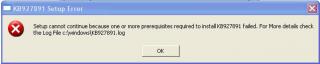
|
|
|
May 27 2007, 07:39 PM
|
|
Senior Member
2,980 posts Joined: Jan 2007 From: Mount Chiliad
|
haven't u update ur windows since u install the windows? maybe dats y... because ur computer doesnt have the require components...
|
|
|
May 27 2007, 10:48 PM
|
|
Junior Member
58 posts Joined: May 2007
|
QUOTE(hafiez @ May 25 2007, 11:16 PM) @little one, Can i know what is PSU? my fren also encountered this problem..but he show me unexpected answer. he said it cause by power supply. when the power supply cant supply enough power, your hard disk will start meragam. It happens when ur hard disk are doing extra hard work but ur power supply cant 'cash' the energy. so, the data spilt. As the result, the error come out. So my fren change new PSU.. walla! problem solved. U wanna try? Good Luck! |
|
|
May 27 2007, 11:29 PM
|
|
Senior Member
2,980 posts Joined: Jan 2007 From: Mount Chiliad
|
Power Supply Unit..
|
|
|
Jun 24 2007, 03:41 PM
|
|
Junior Member
32 posts Joined: Jun 2007
|
I m now facing the same problem..
I have installed WindowsXP-KB894391-x86-ENU but still the same problem comes to me again n again.. Help i canot download the attached file also.. Help.. |
|
|
Jun 29 2007, 11:45 PM
|
|
Newbie
2 posts Joined: Jun 2007
|
previously my system are all fine but now few of my frens and I kena the same thing
|
|
|
Jul 2 2007, 01:41 AM
|

Junior Member
310 posts Joined: Jun 2006
|
just turn on ur firewall. then try updating windows legally or *cough*. Or go to the site which offer free security windows update. Find the website urself. I dont think i am able to tell here
|
|
|
Jul 2 2007, 10:34 PM
|
|
Newbie
4 posts Joined: Jul 2007
|
I'm a newbie here. Encountered same prob aft I got internet connection. The error msg will pop up everytime I online. Then the internet line was disconnected and I have to restart the PC.
FYI, my PC is brand new, using Win XP home edition (original). I installed Microsoft Office 2 weeks ago, and got internet connection for less than a week. Could it be triggered by any of the things I've done to the PC? 1. Not aware that Win XP has got Internet Explorer bundled, I install again using a CD. May be this has corrupted the original IE? Cause the err msg started to pop up. 2. I uninstalled the IE and reinstall again using the WIN XP CD. But same error msg when online. 3. I did some updates for the PC, but has not installed the updates. Heard that some sort of such updates triggered the error msg too. Also, I encountered prob with the mouse. It hangs everytime I left the PC idle for sometime, say, abt one hour or more. But the keyboard still function, so have to restart/shut down when the mouse hangs. I've bought new mouse and tried. Some prob. This really iritates me. Now I'm using fren's PC to online. Pls help...I'm not so well versed with technical stuff. Thanks so much. |
|
|
Jul 4 2007, 04:30 PM
|
|
Senior Member
2,924 posts Joined: Jan 2005 From: Stamford Bridge
|
|
|
|
Jul 17 2007, 05:30 PM
|
|
Newbie
4 posts Joined: Jul 2007
|
QUOTE(spikeee @ Jul 4 2007, 04:30 PM) Thank you Spikeee, I've dowloaded it and run it. Hopefully it works. |
|
|
Aug 10 2007, 11:54 PM
|

Senior Member
1,167 posts Joined: Nov 2006
|
HI!!!I have a problem here!!When i install cd , it pop out the error message:NCDSTART.EXE is not a valid Win 32 applicatio.Do you guys know what causing tghis error?Need Help!!!!!
|
|
|
Aug 11 2007, 12:14 AM
|
|
Senior Member
2,924 posts Joined: Jan 2005 From: Stamford Bridge
|
starfallz - how are updates?
jonuslee - what do u mean when u install cd? please elaborate |
|
|
Aug 11 2007, 12:18 AM
|
|
Senior Member
1,167 posts Joined: Nov 2006
|
QUOTE(spikeee @ Aug 11 2007, 12:14 AM) starfallz - how are updates? When I Install norton cd ,it say that "NCDSTART.EXE is not a valid win32 application."NOrmally when we install , the will be an installer icon instead of DOS.. When i put the cd on my fren pc , it can run and its icon is not a DOS But when i put in the cd to my pc , the installer icon become DOS.HELP!!!!!!!!!jonuslee - what do u mean when u install cd? please elaborate This post has been edited by jonuslee: Aug 11 2007, 12:19 AM |
|
|
Aug 16 2007, 02:39 AM
|

Senior Member
1,954 posts Joined: Jan 2005
|
i've already installed the windows update, so far no problem with the win32 error
but the below error occured..........explorer.exe closed after almost every program i opened, then after i closed explorer.exe, doctor watson appeared with an error. i have to close doc watson from task mng if i wanna continue to use windows, if not, everything will just hang right there any ideas what's wrong? Attached thumbnail(s) 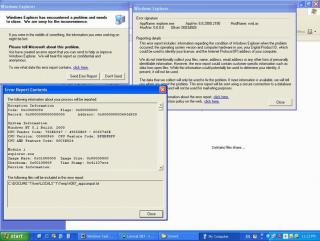

|
|
|
Aug 23 2007, 01:53 PM
|

Junior Member
13 posts Joined: Dec 2006
|
HELP PLZ!!!I started having this problem since this morning!!!I've tried installing zone alarm,the hotfix,prevx and ad aware and nothing seems to work!!!!!!
|
|
|
Sep 17 2007, 01:03 AM
|

Senior Member
1,242 posts Joined: Aug 2005 From: Sila Mampir,JB sTaTus:GTX 680 SLI
|
i have this problem.it happens when i double click the hdd icon and this msg pops up any idea how to solve it?
 |
|
|
Sep 17 2007, 11:09 AM
|
|
Senior Member
545 posts Joined: Nov 2006
|
To all sifu
I just got my self a Tforce 7050 and a new Pioneer DVDRW Drive over the weekend. Ofcourse i have the rest of the parts CPU, bla bla bla... bla bla bla... I installed everything as per normal and it was great. I know that i have to reformat the HDD on C: drive and eventually i did. Here is my situation. I set the bios to CD rom booting and i manage to boot and install a new fresh WinXP after the format. Everything went ok. when the window is fully installed, i replace the WinXP cd with the mobo driver CD. I waited but no autorun came up. so i try to explore the CD but there arn't any file inside. Curious... then i tested that cd in another computer and it works. it seems like the CDrom is not detecting the files. Then i try to put back the WinXP cd into the drive to test out. This time it can read the file content but the exe files does not shows the setup icon. It shows something like an unrecognise file. I explore the CD and try to manually execute the setup and here is the error message. "E:\ is not a valid Win32 application" I thought that it was my DVD drive problem so i swap with my old LG. Same problem came up. All the CD which i can't read form my PC, i can explore in my old rig. I even try to copy file from my new PC DVD drive to the HDD, same error came up. "E:\ is not a valid Win32 application" I have check, there is nothing wrong with my WinXP CD as well as other drivers CD. Your help is highly appreciated. thanks... |
|
|
Sep 18 2007, 12:56 AM
|

Junior Member
73 posts Joined: Sep 2007
|
reinstall back ur window xp
|
|
|
Oct 13 2007, 12:26 AM
|

Junior Member
115 posts Joined: Sep 2007 From: subang jaya/sunway/cyberjaya/cheras
|
i've been facing this Win32 Generic Host Error, and needs to shut down..
only happens when im online.. tried googling for solutions.. tried downloading windows updates.. tried installing this n that.. BUT.. none of them works.. so i got fed up of it.. and everytime that window pops.. i wont click on any of the buttons but i'll just drag the window out of my screen.. and.. i can still online no matter how many times this kinda window pops.. i will simply drag it out of my screen.. problem solved!  FXXK Win32.. i hate u! |
|
|
Oct 13 2007, 01:41 PM
|
|
Senior Member
1,205 posts Joined: May 2007
|
oh the last time i had that i disabled some services.. i cant seem to remember which but try googling
|
|
|
Oct 14 2007, 10:40 PM
|

Senior Member
2,702 posts Joined: Dec 2004 From: P8X-86A
|
I also kena this thingy recently. Damn annoying bugs. After i click don't send my internet totally cant move at all. I have dlded the patch and hope no more the scary pop up. Btw, will it crash if i start my bt and ares download??
 This post has been edited by nightzstar: Oct 14 2007, 10:41 PM |
|
|
Oct 15 2007, 02:04 AM
|
|
Junior Member
115 posts Joined: Sep 2007 From: subang jaya/sunway/cyberjaya/cheras
|
NONE of them patches works for my case.. damn irritating lah.. tsk tsk
|
|
|
Nov 24 2007, 01:59 PM
|

Junior Member
90 posts Joined: Sep 2005 From: Penang
|
 i dled the patch, i switched on my firewall hopefully it works D: |
|
|
Dec 2 2007, 11:54 AM
|

Junior Member
128 posts Joined: Oct 2007
|
I also have this problem weeks ago with sound problems. It started when I opened the computer. So I reinstalled the sound driver( C-Media ) and then it gone forever.
Until last week I press reset on my computer and boom there it goes. Do the same thing and ok already. What is going on here. I did installed some patches and some is still not installed yet. I am using Kapersky Internet Security with Windows Update on but set to download only. |
|
|
Dec 6 2007, 05:33 PM
|

Junior Member
376 posts Joined: Nov 2004 From: Soviet Putrajaya
|
count me in...
my WinXp oso behave like this when I'm online around 1 hour, then it will pop up the error message, and you know the rest la... same here.... |
|
|
Dec 6 2007, 08:04 PM
|
|
Senior Member
1,602 posts Joined: Aug 2005
|
QUOTE i dled the patch, i switched on my firewall hopefully it works D: a ha....is it working right ?.... QUOTE I also have this problem weeks ago with sound problems. It started when I opened the computer. So I reinstalled the sound driver( C-Media ) and then it gone forever. Until last week I press reset on my computer and boom there it goes. Do the same thing and ok already. What is going on here. I did installed some patches and some is still not installed yet. I am using Kapersky Internet Security with Windows Update on but set to download only. u may dl that patch on the 1st page to try it..... QUOTE count me in... my WinXp oso behave like this when I'm online around 1 hour, then it will pop up the error message, and you know the rest la... same here.... problem solved is it ?... |
|
|
Dec 8 2007, 03:04 AM
|
|
Junior Member
376 posts Joined: Nov 2004 From: Soviet Putrajaya
|
QUOTE(3536837 @ Dec 6 2007, 09:04 PM) a ha....is it working right ?.... i found thisu may dl that patch on the 1st page to try it..... problem solved is it ?... and this. not sure it work or not... will update..... Added on December 8, 2007, 3:17 am QUOTE(Hate_Myself @ Nov 24 2007, 02:59 PM) i dled the patch, i switched on my firewall hopefully it works D: This post has been edited by chocobee: Dec 8 2007, 03:17 AM |
|
|
Dec 8 2007, 09:49 PM
|
|
Junior Member
128 posts Joined: Oct 2007
|
The patch I dled it the file inside is corrupted.....
Added on December 8, 2007, 9:53 pmNvm. I will dl it through Microsoft. This post has been edited by emiya_shin: Dec 8 2007, 09:53 PM |
|
|
Dec 9 2007, 04:21 AM
|

Junior Member
543 posts Joined: Mar 2005 From: Cyberjaya | Kota Bharu | Republic of Terengganu
|
wanna ask something..
perform a low level format will delete this error and all the infected virus in the hd rite? |
|
|
Dec 9 2007, 09:35 PM
|
|
Junior Member
128 posts Joined: Oct 2007
|
No not really....
|
|
|
Dec 10 2007, 06:40 AM
|
|
Senior Member
1,602 posts Joined: Aug 2005
|
|
|
|
Dec 10 2007, 06:12 PM
|

Junior Member
373 posts Joined: Jan 2006
|
i have this problem for 2 weeks already. drove me nuts.
it'll disable my internets and media but only after i closed the error window. if u leave the window alone can still use like normal.. i tried this solution instead. http://www.firewallleaktester.com/wwdc.htm it's called Windows Worms Door Cleaner. what it does basically is block all the ports that are vulnerable to worms exploits. The thing with windows is all ports are open by default whereas in Linux all ports are blocked by default. problem all gone for me! |
|
|
Dec 14 2007, 03:18 PM
|

Junior Member
26 posts Joined: Apr 2007
|
I have the same problem.. and that i have lost my audio driver, means completely no sound from the pc.. how can i get it back??
|
|
|
Dec 14 2007, 05:17 PM
|
|
Junior Member
128 posts Joined: Oct 2007
|
First, reinstall the sound driver just like my case but don't do a hard reset if not the problem will come again IMO.
Second, dl the patch by the MS. Third, maybe you can try mukhlisz solution. For now I dled the patch and everything is going well and I need to give a notice that different computers may yield different results. |
|
|
Dec 21 2007, 12:41 PM
|

Senior Member
8,930 posts Joined: Nov 2005 From: Subang Jaya
|
the file in the first post is corrupted...
at least thats what my winrar sez -.-" |
|
|
Dec 21 2007, 01:22 PM
|
|
Senior Member
9,257 posts Joined: Aug 2005 From: Not so sure myself Status: 1+3+3=7
|
QUOTE(waifaq @ Aug 14 2006, 10:12 PM) Try download Microsoft security updates for August 2006 Try this instead.Security Update for Windows XP (KB921883) Scroll to the bottom page, download all the fix. |
|
|
Jan 11 2008, 02:37 PM
|
|
Junior Member
6 posts Joined: Jan 2008 From: KL 
|
does anyone know about "W32.mamuwow.Flint" this virus? any solution?
|
|
|
Jan 13 2008, 12:32 PM
|

Senior Member
1,581 posts Joined: Jul 2007 From: .:kEpaLa bAtaS | jApAn:.
|
im also one among u guys who got this prob too... but wif that firewallleakstalker...that prob solve...so far at this moment that demn dialog box doesnt appear yet for a long time i online....hopefully it is solved
|
|
|
Feb 10 2008, 07:40 AM
|
|
Junior Member
14 posts Joined: Feb 2008
|
when i have problems with my computer i just preinstall it
|
|
|
Feb 10 2008, 11:50 AM
|
|
Senior Member
1,581 posts Joined: Jul 2007 From: .:kEpaLa bAtaS | jApAn:.
|
QUOTE(bozaluka @ Feb 10 2008, 07:40 AM) when i have problems with my computer i just preinstall it how long u want to keep preinstall it..huhu.... |
|
|
Mar 17 2008, 12:55 AM
|
|
All Stars
19,323 posts Joined: Jan 2003
|
QUOTE(bozaluka @ Feb 10 2008, 07:40 AM) when i have problems with my computer i just preinstall it not recomend to do so, as sumtime u just need few minutes just to solve it only. |
|
|
Apr 21 2008, 11:02 AM
|

Junior Member
431 posts Joined: Apr 2008
|
didn't try the recovery CD eh? it works like a charm to me..
|
|
|
Apr 23 2008, 08:08 AM
|

Junior Member
90 posts Joined: Jun 2007 From: Australia / Malaysia
|
The W32 error is actually a computer virus running slowly in the background of the computer. I just finish reading thru the posts in this topic. To avoid having this problem again, there are a few solutions that I can think of. Firstly is to update any virus definitions and scan the overall computer. Secondly, is to clear all your Internet Explorer or Mozilla or browser cache, cookies, and all. Thirdly, some of you mention system restore or using recovery CD - it may work and it may not work depending on the strength of the bug and what defects it has done to the computer. Dont simply do something you know you can fix but it actually does something else more harmful to the computer. Fourthly, the Microsoft patch may work for some people and may not be for all - the patches are for several versions of operating systems and beware to scan the patches first for virus as of coz, I dont trust any downloadings from the global Internet as we dont know the real source of the websites. So just be prepare and try to backup your information first before the worst happens. The W32 bug error is quite common these days and it spreads quite fast. How it comes into our computers is something I am still not sure. This is all I can share at the moment.
|
|
|
Apr 25 2008, 01:22 PM
|
|
Junior Member
431 posts Joined: Apr 2008
|
that's another solutions for using recovery CD...
|
|
|
Jul 10 2008, 06:33 PM
|

Senior Member
590 posts Joined: Feb 2008 From: Ampang
|
i just kena Win32 Virut..damn i format 4 times it does not fixed..the fourth time,i using dos scanning then format again..around 60% of the virut fixed..then the rest i clean in the fifth os..it take three days to fixed it..the most difficult virus i ever met..advice-dun be like me coz i;m not using any AV..now started to use AV..
|
|
|
Sep 24 2008, 04:35 PM
|
|
Newbie
1 posts Joined: Sep 2008
|
A couple days ago I started getting the error "Generic Host Process for Win32 Services has encountered a problem and needs to close." Whether I leave it there, send the problem or just close it, another one would pop up within a minute or two. It wont go away. My computer started running extremely slow, and when I checked my processes I noticed that iexplore.exe is listed from between 20-40 times, as well as almost as many WLLoginProxy.exe. I also have about 15 svchost.exe and just today when I tried to start msn i started getting duplicates of msnmsgr.exe and then msn wouldn't load.
---------------------- williamgeorge Search Engine Optimization |
|
|
Sep 24 2008, 04:42 PM
|

Senior Member
2,152 posts Joined: Feb 2006
|
QUOTE(williamgeorge @ Sep 24 2008, 04:35 PM) A couple days ago I started getting the error "Generic Host Process for Win32 Services has encountered a problem and needs to close." Whether I leave it there, send the problem or just close it, another one would pop up within a minute or two. It wont go away. My computer started running extremely slow, and when I checked my processes I noticed that iexplore.exe is listed from between 20-40 times, as well as almost as many WLLoginProxy.exe. I also have about 15 svchost.exe and just today when I tried to start msn i started getting duplicates of msnmsgr.exe and then msn wouldn't load. Hi there george,---------------------- williamgeorge Search Engine Optimization the issue here is that your PC is being infected with viruses thats why you are having slow startup the malware is disguising as the process to interrupt your pc. Please do use antivirus/antimalware software to scan your pc. Thanks |
|
|
Oct 21 2008, 04:00 PM
|
|
Senior Member
5,542 posts Joined: Dec 2006
|
i also having the generic host process for win32 services problem, it only occur when i plug out my LAN cable from my laptop, and this few days, the internet connection keep disconnect and the DSL light blinking then connect again, then after few mins it blink again, this is very annoying, cant get good speed in torrent due to the frequent disconnect, and cant even ply on9 game, when i ply online game, even normal web surfing and leave it idle still a problem.
|
|
|
Oct 29 2008, 04:14 PM
|
|
Junior Member
373 posts Joined: Jan 2006
|
a solution if u guys are still stuck with the problem..
http://www.firewallleaktester.com/wwdc.htm btw, i had the problem while i was using pirated XP. now using legit no problem already.. |
|
|
Nov 4 2008, 11:50 AM
|
Senior Member
1,186 posts Joined: Jun 2005
|
Alright everyone, I have some update on this problem :
This problem is similiar to the problem & solution posted by sUBs 2 years ago in post #76 of this topic : http://forum.lowyat.net/topic/326260 The Microsoft article : http://www.microsoft.com/technet/security/...n/MS06-040.mspx All freshly installed WinXP with SP2 will still face this problem unless you install the updated patch. Your PC that are connected directly to the modem & using Window's PPPOE dailer, or PCs that are behind a router but was set as the DMZ PC would be hit by this problem. As of 23 October 2008, Microsoft has released a new update to solve this new attack that affect even fresh installed WinXP with Service Pack 3 and Vista with Service Pack 1. http://www.microsoft.com/technet/security/...n/MS08-067.mspx Install this update for 32-bit WinXP SP2/SP3 users : http://www.microsoft.com/downloads/details...76-2067B73D6A03 Install this update for 32-bit Vista users : http://www.microsoft.com/downloads/details...5C-CAC7D8713B21 For other Windows version please, select the appropriate version from http://www.microsoft.com/technet/security/...n/MS08-067.mspx If you are interested in the technical details of this problem: http://blogs.technet.com/swi/archive/2008/...t-MS08-067.aspx This post has been edited by Hattori: Nov 4 2008, 12:16 PM |
|
|
Nov 8 2008, 12:26 AM
|

Senior Member
618 posts Joined: Dec 2006 From: Metal Box Enterprise JB
|
problem still
help! Added on November 8, 2008, 12:29 amhttp://forum.lowyat.net/index.php?act=ST&f=25&t=835098&st=0#entry21187968 the problem remained This post has been edited by blue16: Nov 8 2008, 12:29 AM |
|
|
Nov 8 2008, 12:39 AM
|
|
Senior Member
2,152 posts Joined: Feb 2006
|
Replied in your topic. Refer there.
I will see what i can do there. |
|
|
Nov 8 2008, 02:58 AM
|
|
Senior Member
1,602 posts Joined: Aug 2005
|
QUOTE(blue16 @ Nov 8 2008, 12:26 AM) problem still do u dl n install the patch on post #1 ? and u can enable the firewall to prevent genetic host32help! Added on November 8, 2008, 12:29 amhttp://forum.lowyat.net/index.php?act=ST&f=25&t=835098&st=0#entry21187968 the problem remained |
|
|
Nov 11 2008, 09:45 AM
|
|
Senior Member
1,186 posts Joined: Jun 2005
|
The (KB921883) in the 1st post of the sticky is outdated and was meant for WinXP SP1 & SP 2 only.
Service Pack 3 has this hotfix included, but it doesn't solve the new attack which started last month. The latest is (KB958644) and the updated netapi32.dll is version 5.1.2600.5694 |
|
|
Nov 13 2008, 06:28 AM
|

Junior Member
72 posts Joined: Jun 2007 From: WMKK/KUL
|
loading script"C:\windows\system32\'vbe"failed(access is Denied) What Happened to my laptop... I suspect got trojan... mY laptop Hangs frequently... Please help
Here's hijackthis log » Click to show Spoiler - click again to hide... « This post has been edited by wen_pin_s: Nov 13 2008, 06:30 AM |
|
|
Nov 14 2008, 12:38 PM
|

Senior Member
2,095 posts Joined: Nov 2008 From: misery
|
Wow, use the recovery programme to recover la
|
|
|
Nov 19 2008, 01:53 AM
|

Junior Member
372 posts Joined: Sep 2008 From: Klang
|
I'm getting this problem, suddenly the Generic Host Process for Win32 services got problem
So install this KB958644 update will solve it??  |
|
|
Nov 24 2008, 09:09 PM
|

Junior Member
175 posts Joined: Aug 2007
|
QUOTE(Hattori @ Nov 11 2008, 09:45 AM) The (KB921883) in the 1st post of the sticky is outdated and was meant for WinXP SP1 & SP 2 only. Hi bro Hittori.Service Pack 3 has this hotfix included, but it doesn't solve the new attack which started last month. The latest is (KB958644) and the updated netapi32.dll is version 5.1.2600.5694 I have upgraded to SP3 and had installed that latest hotfix for SP3 above but still I face the same problem. Any idea about this? |
|
|
Nov 29 2008, 01:39 AM
|

Junior Member
4 posts Joined: May 2006 From: Johor Bahru
|
francischuahcw or anyone,
I also have this problem. My internet connection will be lost after Generic Host appear.. How to solve my proble. i have already install from http://www.microsoft.com/downloads/details...76-2067B73D6A03 but the problem still not solve. these attachment, i follow instruction from francischuahcw.. Help!.. Attached File(s)  problem.txt ( 84.24k )
Number of downloads: 27
problem2.txt ( 84.43k )
Number of downloads: 15
problem3.txt ( 112.42k )
Number of downloads: 17
problem.txt ( 84.24k )
Number of downloads: 27
problem2.txt ( 84.43k )
Number of downloads: 15
problem3.txt ( 112.42k )
Number of downloads: 17 |
|
|
Nov 29 2008, 02:50 PM
|
|
Senior Member
2,152 posts Joined: Feb 2006
|
Good day.
Please tell me are you using original Windows? From what i can see in your Event Viewer it seems like you have some rootkit infection running on your registry. Do you experience Blue Screen? |
|
|
Nov 30 2008, 09:08 PM
|
|
Junior Member
175 posts Joined: Aug 2007
|
I googled and found this bloody securitystronghold that keep telling you that their antivirus can cure this problem...
http://www.securitystronghold.com/solution...ed-problem.html Ok... downloaded the first one which is Truesword. Ok. Before it scans, it still tell me this thing will solved. Ok. Scanned... then crap this and that.... at the end... want me to pay them to get another antivirus which they claim will solve la... Anyone solved this problem already? |
|
|
Dec 19 2008, 04:33 PM
|

Junior Member
23 posts Joined: Dec 2008
|
Finally, found out the solution.
I go try 1st. |
|
|
Dec 19 2008, 04:51 PM
|
|
All Stars
10,429 posts Joined: Jan 2003 
|
haha..isn't it kinda misleading to put your own safe trader tag? I don't think this should be allowed.
|
|
|
Dec 19 2008, 06:40 PM
|

Junior Member
378 posts Joined: Jan 2008 From: Kuala Lumpur
|
» Click to show Spoiler - click again to hide... « im facing same problem with u..i downloaded the latest KB958644 and problem solved.. |
|
|
Dec 19 2008, 07:59 PM
|

Junior Member
92 posts Joined: Aug 2006 From: Banlieue 13
|
also facing the same problem right now
...very annoyed to always restart pc when there is no sound.. now trying to install the latest patches KB958644 in my pc.. hopefully can heal this prob.. usually in 1 hr, the error will appear.. will wait to see if it dare to appear again.. |
|
|
Dec 23 2008, 09:58 AM
|

Senior Member
2,186 posts Joined: Aug 2005
|
Edited because answer found.
This post has been edited by Silfrijin: Dec 23 2008, 01:43 PM |
|
|
Dec 27 2008, 08:41 PM
|

Junior Member
206 posts Joined: Nov 2008 From: KLANG
|
how does this problem occurs.?
cause everytime i reformat my pc i will get this message. i need to download all the thing again. how to prevent from getting this message again??? |
|
|
Jan 8 2009, 12:56 PM
|
|
Junior Member
126 posts Joined: Mar 2008
|
download the patch from microsoft..
|
|
|
Jan 11 2009, 10:52 PM
|

Senior Member
688 posts Joined: Nov 2008 From: SIK
|
im having this generic host32 problem, then i found this method on the internet and try it out..
the step is as following » Click to show Spoiler - click again to hide... « it works.. but i cant file sharing with my friends through LAN.. i cant access my friends' pc and also the other way round.. after i set the registry back to the previous one, i still cant access their pcs... but amazingly the generic host32 prob doesnt pop up anymore... can anyone help me how to fix this prob? |
|
|
Jan 15 2009, 02:16 AM
|
|
Newbie
1 posts Joined: Jan 2009
|
i have the same problem 'generic host process for win 32 services has encountered a problem and needs to a close''
please help people!!!!!!!!!!! |
|
|
Jan 16 2009, 01:07 PM
|

Junior Member
60 posts Joined: Oct 2008 From: BaNTiNG-SeRDaNG
|
for those who have dis problem,
I recommend u all to use sheenho method (editing ur registry).. It's really works on me actually.. Bout LAN sharing, I dont test it yet.. |
|
|
Jan 21 2009, 03:55 PM
|

Senior Member
685 posts Joined: Jan 2003 From: Ampang KiA
|
Try install the update from Microsoft. This will solve the generic issue.
Security Bulletin : http://www.microsoft.com/technet/security/...n/MS08-067.mspx Summary , Analysis , Prevention and Recovery : http://www.microsoft.com/security/portal/E...2%2fConficker.B |
|
|
Feb 3 2009, 06:09 PM
|
|
Newbie
2 posts Joined: Feb 2009
|
|
|
|
Feb 4 2009, 03:51 AM
|
|
Junior Member
9 posts Joined: Sep 2008
|
accually if u get the win32 pop up means alot of ur services had already been STOP so what u need to do is start the services then it will run back normal again .. but u need to check where is the source coming from , it must be in 1 of the computers in ur network ..
yes if u use a firewall it will stop it.. i think u can try disable the REMOTE REGISTRY in the services there .. scanner wont help any ... u need to manually start the services This post has been edited by joedecruz: Feb 4 2009, 03:52 AM |
|
|
Feb 5 2009, 09:57 AM
|

Senior Member
1,223 posts Joined: May 2006 From: Klang
|
my svchost error...
n sound aint workin winxp taskbar become winclasic taskbar can any one help..... |
|
|
Feb 16 2009, 01:16 AM
|

Junior Member
208 posts Joined: Jan 2009 From: Batang Berjuntai
|
it is risky to download the hotfix for those who used NOT a original windows coz it will install also in ur hdd the genuine detector
if lucky, it will not be install la hehehe but its not a big deal for those who pro in removing them rite? this prob have a connection wit a virus that change ur registry key also damaging them little by little, so i suggest u to repair ur windows file if it failed, so please BACKUP ur data n reformat hehehe i faced a lot of this prob but i simply just reformat them hehehe already tired to find the solution hehehe |
|
|
Mar 2 2009, 01:44 PM
|
|
Junior Member
78 posts Joined: Jan 2009
|
can win32 be deleted? and is win32 a big virus? please tell me cuz my pen drive got infected
|
|
|
Mar 6 2009, 04:14 AM
|

Junior Member
8 posts Joined: Mar 2008
|
yes, same problem with me..
but i'm using xp sp3, still become like this... the hotfix cannot be use for sp3... after this happen, my taskbar become like the classic one... and it cannot detect my sound driver... must restart... hmmm...any solution? |
|
|
Mar 23 2009, 05:45 AM
|

Senior Member
865 posts Joined: Jan 2008 From: Kay Kay, Sabah
|
will some antivirus cause problems for the windows if they are not compatible?
|
|
|
Mar 31 2009, 09:45 PM
|
|
Junior Member
4 posts Joined: Mar 2009
|
I face Win32 Services Error problem. I would like to download the Security Update for Windows XP (KB921883) from internet through this address http://www.microsoft.com/downloads/details...&DisplayLang=en. But I face another problem, I unable to access this site even http://www.microsoft.com site. The message of "The page cannot be displayed" come out. May I know what is the problem of my PC. Any solution?
|
|
|
Apr 24 2009, 02:12 PM
|

Senior Member
1,891 posts Joined: Apr 2008 From: Cheras
|
help me i cant seem to find a cure for this after looking and download some file
 |
|
|
May 20 2009, 09:32 AM
|

Junior Member
26 posts Joined: Jul 2008
|
i have this prob with both of my pc...damn anoying..i format about 5 time with different cd already until i try to search for this prob =(...u can try this solution cuz it works 4 me:
Close Port 445: 1. Start Registry Editor (Regedit.exe) by clicking Start menu, and then click the Run icon. 2. In the small box that Opens, type: regedit then click the OK button. The Registry Editor will now have opened. 3. Locate the following key in the registry: HKEY_LOCAL_MACHINE\System\CurrentControlSet\Services\NetBT\Parameters In the right-hand side of the window find an option called TransportBindName. Double click that value, and then delete the default value, thus giving it a blank value. Close Port 135: 1. Then you must now navigate to the following registry key: HKEY_LOCAL_MACHINE\Software\Microsoft\OLE 2. You will see there is a String Value called: EnableDCOM Set the value to: N (it should currently be Y) 3. Close the Registry Editor. Shutdown and Restart your computer this thing works but the negatif part of it is u will not be able to share n access other ppl file sharing... Added on May 21, 2009, 11:10 ami want to change to vista =D This post has been edited by zhafran87: May 21 2009, 11:10 AM |
|
|
May 31 2009, 10:43 AM
|

Junior Member
283 posts Joined: Dec 2004
|
i still looking for this solution....
any antivirus recommended |
|
|
Jul 18 2009, 09:12 AM
|

Junior Member
16 posts Joined: Sep 2008
|
QUOTE(pezal @ May 31 2009, 10:43 AM) i still looking for this solution.... try use www.avast.com is free register and free useany antivirus recommended |
|
|
Aug 26 2009, 04:28 PM
|
|
Newbie
1 posts Joined: Aug 2009
|
i use regedit...download torrent also (watch stepbystep video on youtube)
good luck.. but still got this problem. win32 i'll try your download soon |
|
|
Aug 27 2009, 06:37 PM
|

Junior Member
15 posts Joined: Oct 2006
|
i think windows firewall...
|
|
|
Oct 1 2009, 10:12 PM
|

Junior Member
62 posts Joined: Dec 2007 From: Ipoh
|
these are cause by a downadup virus , its able to spread though network and VPN and bridge mode modem, then copy it self to removeable drive
under a hidden recycler folder with a name jwgkvsq.vmx it also will turn of your "window audio service" , and network sharing "workstation" ,check it by start > run > services.msc download a remove tool here , http://www.symantec.com/business/security_...-011316-0247-99 update your windows ,enable your firewall This post has been edited by sookean: Oct 1 2009, 10:19 PM Attached thumbnail(s) 
|
|
|
Oct 4 2009, 10:16 PM
|
|
All Stars
19,323 posts Joined: Jan 2003
|
QUOTE(sookean @ Oct 1 2009, 10:12 PM) these are cause by a downadup virus , its able to spread though network and VPN and bridge mode modem, then copy it self to removeable drive All tis long i thought it was just win bug. XDunder a hidden recycler folder with a name jwgkvsq.vmx it also will turn of your "window audio service" , and network sharing "workstation" ,check it by start > run > services.msc download a remove tool here , http://www.symantec.com/business/security_...-011316-0247-99 update your windows ,enable your firewall |
|
|
Oct 5 2009, 03:41 PM
|

Junior Member
186 posts Joined: Aug 2006 From: Magic Dimensions
|
Hi everyone,please install Security Updated patch to prevent attacker access and gain over your computer,this will help your computer protected
from automatically disable some "Windows Services" like "Server"(Supports file, print, and named-pipe sharing over the network for this computer) "Windows Audio" (Manages audio for Windows-based programs.) Windows XP Service Pack 2 or 3 (32 Bits) Important Security Updated list : 1.IE7-WindowsXP-KB947518-x86-ENU (if you're using IE7) (SP2/SP3) 2.WindowsXP-KB884020-x86-enu (SP2 only) 3.WindowsXP-KB894391-x86-ENU (SP2 only) 4.WindowsXP-KB921883-x86-ENU (SP2 only) 5.WindowsXP-KB932823-v3-x86-ENU (SP2 only) 6.WindowsXP-KB954211-x86-ENU (SP2/SP3) 7.WindowsXP-KB955069-x86-ENU (SP2/SP3) 8.WindowsXP-KB956802-x86-ENU (SP2/SP3) 9.WindowsXP-KB956803-x86-ENU (SP2/SP3) 10.WindowsXP-KB957097-x86-ENU (SP2/SP3) 11.WindowsXP-KB958644-x86-ENU (SP2/SP3) 12.WindowsXP-KB958687-x86-ENU (SP2/SP3) 13.WindowsXP-KB960225-x86-ENU (SP2/SP3) Download Link My SkyDrive (Please extract using Winrar 3.80 or later verion to prevent file damage or corrupted.) Reboot your computer after installing these updated and disable "Background Intelligent Transfer Services"(BITS) and "Automatic Update" in Control Panel->Adminstrative Tools->Services P/S : These update are also available for search and download from Microsoft website This post has been edited by ghost705: Nov 3 2009, 05:56 PM |
|
|
Oct 30 2009, 10:48 PM
|

Junior Member
59 posts Joined: Nov 2007 From: Subang or Shah Alam
|
can someone like put up a definite list of solutions to this problem?
instead of scouring thru 13 pages of ppl complaining of the same problem. |
|
|
Nov 11 2009, 03:49 PM
|

Senior Member
1,285 posts Joined: Mar 2007
|
any solution? gone through the whole thread but non of them work for me
|
|
|
Nov 20 2009, 09:35 AM
|

Junior Member
93 posts Joined: Apr 2009
|
aku gune cara ni dah bertahun²..
-1st- - go to run - regedit - cari hkey_local_machine - system - currentcontrolset - services - browser - parameter - isdomainmaster - SET TO FALSE - then restart -2nd- - run - cmd - netsh - winsock - TYPE RESET -3rd- - run - hkey_local_machine - system - currentcontrolset - services - netbt - parameters - transportbindname - DOUBLE KLIK VALUE, DELETE, LET IT BLANK. -4- - hkey_local_machine - software - microsoft - ole - enableDCOM - SET VALUE TO: N (IT SHOULD Y) DONE! RESTART. SEPATUTNYA TIADA MASALAH DAN BERJAYA |
|
|
Nov 30 2009, 05:21 AM
|
|
Junior Member
59 posts Joined: Nov 2007 From: Subang or Shah Alam
|
hie guys, still no solution? updated the windows accordin to previous instructions in the thread.
but the bug is still dere, disturbing my audio jack thingy. |
|
|
Nov 30 2009, 10:42 AM
|
|
Junior Member
187 posts Joined: Jul 2009
|
I got GENERIC HOST 32 Problem also,always disturb my internet connections.Connect no long time,then disconnect again,connect then a few minutes disconnect again.This problem is me just need to install KB958644 then the problem will solved ? Me is using manually connections and win xp sp2. Help me pls.
|
|
|
Jan 24 2010, 06:41 PM
|

Junior Member
54 posts Joined: Sep 2008 From: Seri Kembangan \ Cyberjaya
|
guys...u might wanna try this...it worked for me...
Close Port 445: 1. Start Registry Editor (Regedit.exe) by clicking Start menu, and then click the Run icon. 2. In the small box that Opens, type: regedit then click the OK button. The Registry Editor will now have opened. 3. Locate the following key in the registry: HKEY_LOCAL_MACHINESystemCurrentControlSetServicesNetBTParameters In the right-hand side of the window find an option called TransportBindName. Double click that value, and then delete the default value, thus giving it a blank value. Close Port 135: 1. Then you must now navigate to the following registry key: HKEY_LOCAL_MACHINESoftwareMicrosoftOLE 2. You will see there is a String Value called: EnableDCOM Set the value to: N (it should currently be Y) 3. Close the Registry Editor. Shutdown and Restart your computer. source: http://www.sizlopedia.com/2007/01/28/fix-g...hostexe-errors/ |
|
|
Mar 8 2010, 02:07 PM
|

Senior Member
536 posts Joined: Nov 2006 From: Kuala Lumpur
|
new victim here...
my PC @ office and another PC here got that problem too... 've done ronDON and ashkann's solution but the problem is still there... now this PC got sound problem, local network sharing problem, and firefox problem (type something in google, hit search then it'll crash... Luckily there is no problems with internet connection...(at least I can search for some solution and still can do my work.. )now, scouring for fixes/tips/solution before I'll just format this PC... update : just've done ghost705's solution... still no luck with this thing...  mine is Win XP SP3... so I've just download and install update 6 - 13 (in the list)... guess I'll just format this PC next morning... This post has been edited by nk3371: Mar 8 2010, 04:33 PM |
|
|
Nov 30 2010, 11:21 AM
|

Junior Member
439 posts Joined: Nov 2010
|
hey guys my winxp also gv me blue screen?format will solve the problem?
|
|
|
Dec 22 2010, 10:46 AM
|
|
Senior Member
2,096 posts Joined: May 2008
|
Depends on what error message that you get. Try reboot in safe mode.
|
|
|
Jul 6 2012, 05:19 PM
|

Junior Member
52 posts Joined: Dec 2006 From: Penang Mainland / Ipoh
|
Maybe your software (os) it self corrupted....
|
|
|
Oct 10 2012, 08:58 PM
|

Newbie
2 posts Joined: Aug 2012 From: Petaling Jaya
|
How to remove this follow post?
This post has been edited by 1minternet: Oct 10 2012, 08:59 PM |
|
|
Apr 13 2013, 02:00 AM
|
|
Newbie
2 posts Joined: Apr 2013
|
how can i get windows 7 activation key?
|
|
|
Nov 21 2014, 10:02 PM
|
|
Junior Member
45 posts Joined: Oct 2014
|
Dont know this. I dint faced before
|
|
|
Oct 22 2020, 10:09 AM
Show posts by this member only | IPv6 | Post
#261
|
|
Probation
14 posts Joined: Aug 2020
|
QUOTE(3536837 @ Aug 13 2006, 12:44 PM) i tried system restore aleadi but no use.....T.T same |
|
Topic ClosedOptions
|
| Change to: |  0.1313sec 0.1313sec
 0.75 0.75
 6 queries 6 queries
 GZIP Disabled GZIP Disabled
Time is now: 11th December 2025 - 11:12 AM |
 Quote
Quote
