

Wah Shit. I post some drillz and now everyone nak test. Hahahaha.
AMD Radeon™ Discussion V11, Latest - 14.12 | WHQL - 14.12
AMD Radeon™ Discussion V11, Latest - 14.12 | WHQL - 14.12
|
|
 Apr 30 2014, 12:10 AM Apr 30 2014, 12:10 AM
|
 
Senior Member
3,573 posts Joined: Nov 2013 From: The Deathlands of Audio Poisoning.  
|
Wah Shit. I post some drillz and now everyone nak test. Hahahaha.
|
|
|
|
|
|
Apr 30 2014, 12:48 AM
|

Senior Member
1,943 posts Joined: Apr 2005
|
wah inside the UE4 demo got FPS multiplayer game somemore
|
|
|
Apr 30 2014, 01:03 AM
|

Senior Member
1,411 posts Joined: Jun 2009 From: land of burung kenyalang 
|
reading you guys results on the UE4 demo, felt excited to try it out too. wanna know what tool di you guys used to benchmark?
also what settings did you guys set in the config or console? tried to use fraps (i know there's a warning at the start) and it showed i got avg 90 when i'm only using a single 7970  |
|
|
Apr 30 2014, 01:37 AM
|
|
Senior Member
3,573 posts Joined: Nov 2013 From: The Deathlands of Audio Poisoning.
|
QUOTE(terradrive @ Apr 30 2014, 12:48 AM) wah inside the UE4 demo got FPS multiplayer game somemore Upload upload! Wanna see. |
|
|
Apr 30 2014, 01:40 AM
|
||||||

Senior Member
6,612 posts Joined: Jan 2003 From: Tomorrow
|
QUOTE(terradrive @ Apr 30 2014, 12:48 AM) wah inside the UE4 demo got FPS multiplayer game somemore Did you try the MP?QUOTE(graphidz @ Apr 30 2014, 01:03 AM) reading you guys results on the UE4 demo, felt excited to try it out too. wanna know what tool di you guys used to benchmark? You can Fraps. I use RadeonPro benchmark(basically free Fraps). I use Elemental demo, which one u used?also what settings did you guys set in the config or console? tried to use fraps (i know there's a warning at the start) and it showed i got avg 90 when i'm only using a single 7970 Btw you need to set the resolution to 1920x1080 and Fullscreenmode=0 I get much crappier frametime with OC GPU, kinda expected with an engine that use CPU physics.

 I wonder if it use GPU Phsyx on Nvidia side since UE4 engine natively support GPU Physx.  |
||||||
|
|
Apr 30 2014, 01:42 AM
|

Senior Member
4,254 posts Joined: Nov 2011
|
QUOTE(Acid_RuleZz @ Apr 30 2014, 01:40 AM) » Click to show Spoiler - click again to hide... « cause im still using the free one |
|
|
|
|
|
Apr 30 2014, 01:47 AM
|
|
Senior Member
3,573 posts Joined: Nov 2013 From: The Deathlands of Audio Poisoning.
|
QUOTE(Acid_RuleZz @ Apr 30 2014, 01:40 AM) Did you try the MP? I'm now wondering how wouId highly overClocked X79 CPUs will fare here.You can Fraps. I use RadeonPro benchmark(basically free Fraps). I use Elemental demo, which one u used? Btw you need to set the resolution to 1920x1080 and Fullscreenmode=0 I get much crappier frametime with OC GPU, kinda expected with an engine that use CPU physics. » Click to show Spoiler - click again to hide... « I wonder if it use GPU Phsyx on Nvidia side since UE4 engine natively support GPU Physx. |
|
|
Apr 30 2014, 01:54 AM
|
|
Senior Member
6,612 posts Joined: Jan 2003 From: Tomorrow
|
QUOTE(marfccy @ Apr 30 2014, 01:42 AM) Fraps benching is only available for the paid version? Uh.. i forgot, I think you can use it in Free version as well. cause im still using the free one I use RadeonPro built-in benchmark tool. It look like Fraps, it feel like Fraps but it's not Fraps.  QUOTE(Sentinel92 @ Apr 30 2014, 01:47 AM) I'm now wondering how wouId highly overClocked X79 CPUs will fare here. Sponsor me one and i'll be glad to test it out for you.  Hmm.. I'll check how the CPU utilization look like.  |
|
|
Apr 30 2014, 01:56 AM
|
|
Senior Member
4,254 posts Joined: Nov 2011
|
QUOTE(Acid_RuleZz @ Apr 30 2014, 01:54 AM) Uh.. i forgot, I think you can use it in Free version as well. ahh found it, i turned it off deswai never noticed I use RadeonPro built-in benchmark tool. It look like Fraps, it feel like Fraps but it's not Fraps. |
|
|
Apr 30 2014, 02:00 AM
|
||||||
|
Senior Member
1,411 posts Joined: Jun 2009 From: land of burung kenyalang
|
QUOTE(Acid_RuleZz @ Apr 30 2014, 01:40 AM) You can Fraps. I use RadeonPro benchmark(basically free Fraps). I use Elemental demo, which one u used? Lemme retry that again. I used the one with 4 other demoes, namely the Cave demo Btw you need to set the resolution to 1920x1080 and Fullscreenmode=0 I get much crappier frametime with OC GPU, kinda expected with an engine that use CPU physics.
I wonder if it use GPU Phsyx on Nvidia side since UE4 engine natively support GPU Physx. I need to try this again and see how it goes This post has been edited by graphidz: Apr 30 2014, 02:03 AM |
||||||
|
|
Apr 30 2014, 02:28 AM
|
|
Senior Member
6,612 posts Joined: Jan 2003 From: Tomorrow
|
QUOTE(Sentinel92 @ Apr 30 2014, 01:47 AM) I'm now wondering how wouId highly overClocked X79 CPUs will fare here. Meh, 24% utilization with my 4c/8t proc. Basically only maxed out 2 threads, no point to use LGA-2011 proc unless it's oc'ed over 5 jigahertz..Not sure what i'm expecting, it's Physx on CPU, of course it will be gimped. » Click to show Spoiler - click again to hide... « This post has been edited by Acid_RuleZz: Apr 30 2014, 02:30 AM |
|
|
Apr 30 2014, 02:53 AM
|
|
Senior Member
3,573 posts Joined: Nov 2013 From: The Deathlands of Audio Poisoning.
|
QUOTE(Acid_RuleZz @ Apr 30 2014, 02:28 AM) Meh, 24% utilization with my 4c/8t proc. Basically only maxed out 2 threads, no point to use LGA-2011 proc unless it's oc'ed over 5 jigahertz.. Hmmm, so much for that. Since cards like the Titan Black or even your 4C/8T CPU isn't pushing it much, guess we can only blame in its horrendous optimization. Not sure what i'm expecting, it's Physx on CPU, of course it will be gimped. » Click to show Spoiler - click again to hide... « Now we have to wait for soneone with PhysX to come along. |
|
|
Apr 30 2014, 04:23 AM
|
|
Senior Member
4,254 posts Joined: Nov 2011
|
just finish testing the UE4 Demo and making own webm
muh score, one stock, one OCed. see the minor change in FPS?  as for video, link is per here as its pretty huge (30+MB, just in case someone on quota came in to check thread) UnrealEngine4.webm this is a smaller scale webm  (5MB) (5MB)EDIT: AcidRulez was right too, it mainly utilise 2 cores at most. my other 2 cores were at 30+% usage only EDIT2: apparently the file hoster deleted my file lol so the link above is obsolete This post has been edited by marfccy: Apr 30 2014, 05:29 AM |
|
|
|
|
|
Apr 30 2014, 10:42 AM
|
|
Senior Member
1,411 posts Joined: Jun 2009 From: land of burung kenyalang
|
Acid_RuleZz
Hmm... can you guide me on this. I'm not familiar with the tools you use and this is more or less a "video" instead of a benchmark "program" set the config file to 1920 and 1080 and full screen to 0. rest no change open the 64bit file at the start of the video, i press F9 to benchmark(radeon pro tool). then press again when the video shows the UE4 logo. grabbed the csv file and drag into fraps bench viewer the result : 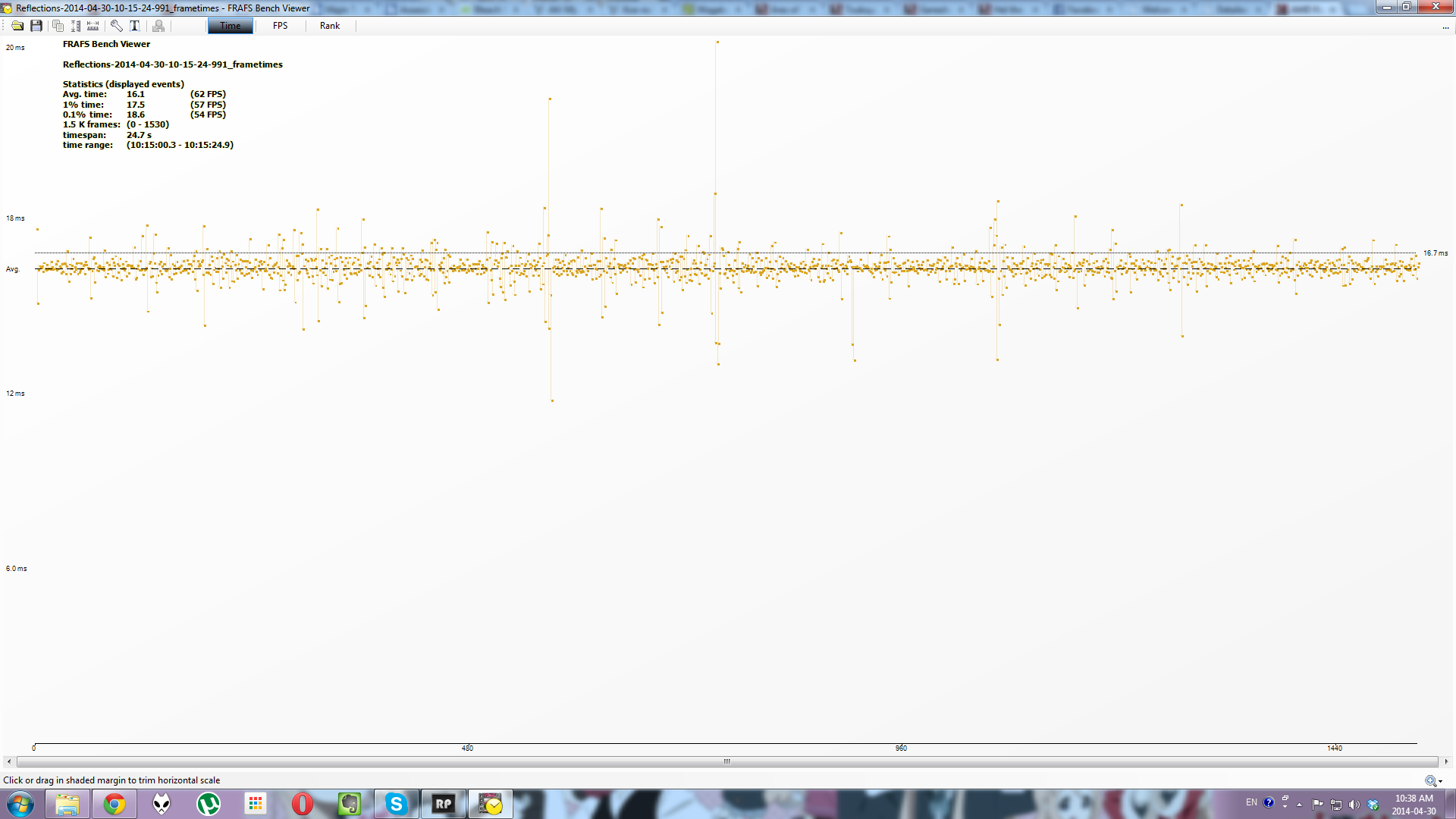 too high don't you think? (specs in the siggy) everything was unchanged except for the resolution change and fullscreen. wonder where i did wrong? UPDATE : using the in-demo FPS tool, the FPS counter stayed around 40-45 until the dude stands up. then the counter was 35-40. then when outside that "dungeon" and the video views the iceman, the counter was 20-30. can't trust fraps? This post has been edited by graphidz: Apr 30 2014, 10:50 AM |
|
|
Apr 30 2014, 11:04 AM
|

Junior Member
451 posts Joined: Apr 2013 From: Meow City
|
hey guys,
what software can be used to run stress test on our build, gc peformance, temp status for cpu, gc, mobo etc.. sorry not that familiar.. thanks in advance! EDIT:- i will try use OCCTP3.1  This post has been edited by RoyRF: Apr 30 2014, 11:18 AM |
|
|
Apr 30 2014, 11:55 AM
|
|
Senior Member
6,612 posts Joined: Jan 2003 From: Tomorrow
|
QUOTE(graphidz @ Apr 30 2014, 10:42 AM) Acid_RuleZz How to activate demo FPS counter? MSI Afterburner reported similar FPS compare to RadeonPro. Hmm... can you guide me on this. I'm not familiar with the tools you use and this is more or less a "video" instead of a benchmark "program" set the config file to 1920 and 1080 and full screen to 0. rest no change open the 64bit file at the start of the video, i press F9 to benchmark(radeon pro tool). then press again when the video shows the UE4 logo. grabbed the csv file and drag into fraps bench viewer the result : » Click to show Spoiler - click again to hide... « too high don't you think? (specs in the siggy)everything was unchanged except for the resolution change and fullscreen. wonder where i did wrong? UPDATE : using the in-demo FPS tool, the FPS counter stayed around 40-45 until the dude stands up. then the counter was 35-40. then when outside that "dungeon" and the video views the iceman, the counter was 20-30. can't trust fraps? |
|
|
Apr 30 2014, 02:34 PM
|
|
Senior Member
1,411 posts Joined: Jun 2009 From: land of burung kenyalang
|
QUOTE(Acid_RuleZz @ Apr 30 2014, 11:55 AM) How to activate demo FPS counter? MSI Afterburner reported similar FPS compare to RadeonPro. open up console "~" and type in "set unit" and "set fps" (all minus the quotes) |
|
|
Apr 30 2014, 04:08 PM
|

Senior Member
5,043 posts Joined: Aug 2013 From: Putrajaya
|
Now the 1-1.3K price range is filled with 280Xs?
Saw it on IdealTech's FB. Attached thumbnail(s) 
|
|
|
Apr 30 2014, 04:12 PM
|
 
Elite
6,799 posts Joined: Jan 2003
|
QUOTE(RoyRF @ Apr 30 2014, 11:04 AM) hey guys, U wanna stress GC or CPUwhat software can be used to run stress test on our build, gc peformance, temp status for cpu, gc, mobo etc.. sorry not that familiar.. thanks in advance! EDIT:- i will try use OCCTP3.1 take note hmm theres ppl who says i tend to do hmm a bit on the extreme side. This post has been edited by cstkl1: Apr 30 2014, 04:12 PM |
|
|
Apr 30 2014, 04:41 PM
|
|
Junior Member
451 posts Joined: Apr 2013 From: Meow City
|
QUOTE(cstkl1 @ Apr 30 2014, 04:12 PM) U wanna stress GC or CPU i intend to know is my build temp, stretched performance for my gc and cpu under heavy load..that's all..but feel free to recommend! take note hmm theres ppl who says i tend to do hmm a bit on the extreme side.  |
|
Topic ClosedOptions
|
| Change to: |  0.0331sec 0.0331sec
 0.25 0.25
 6 queries 6 queries
 GZIP Disabled GZIP Disabled
Time is now: 4th December 2025 - 03:47 AM |
 Quote
Quote
