Welcome Guest ( Log In | Register )

19 Pages < 1 2 3 4 5 > » Bottom

Outline · [ Standard ] · Linear+

Router Configuration Riger DB102 modem thread, Technical support

views
     
wiraone
post Feb 24 2007, 11:48 PM

Who cares about all the stars?
*******
Senior Member
3,892 posts

Joined: Jan 2003
From: Back on earth!
It means that your modem could not sync with the DSLAM(exchange). Have you got yours and waiting for activation? If yes, then you need to wait until they activate your line .. otherwise, something went wrong with your line (or you don't use the filter) ..
TStan_pang
post Feb 25 2007, 12:57 PM

Look at all my stars!!
*******
Senior Member
3,110 posts

Joined: Jun 2005


QUOTE(ThuG_PoeT @ Feb 20 2007, 02:03 PM)
I have a question:

Is DB102 a modem only or a modem/router?

In other words, if I have more than 1 PC do i need 2 buy a switch only or a router & a switch?
*
you can set this router/modem... (i dunno how to say) to 'Bridging', 'Routing', or 'Bridging and Routing' mode
Bridging mode connect like modem
Routing mode connect like router
Bridging and Routing mode...... sorry, i dunno much about that tongue.gif


This post has been edited by tan_pang: Feb 25 2007, 12:57 PM
@sd
post Mar 13 2007, 06:23 PM

Getting Started
**
Junior Member
101 posts

Joined: Jul 2006
hi there...

Could anyone tell me..can this modem support more than 5 user in same time..
coz mine really pure when more then 5 user go online in the same time...
is it about configuration or wut...

This post has been edited by @sd: Mar 13 2007, 06:23 PM
scorps
post Mar 13 2007, 06:48 PM

Something you call love, but I call sex
*******
Senior Member
9,572 posts

Joined: Jun 2005
From: Terengganu Darul Iman


QUOTE(@sd @ Mar 13 2007, 07:23 PM)
hi there...

Could anyone tell me..can this modem support more than 5 user in same time..
coz mine really pure when more then 5 user go online in the same time...
is it about configuration or wut...
*
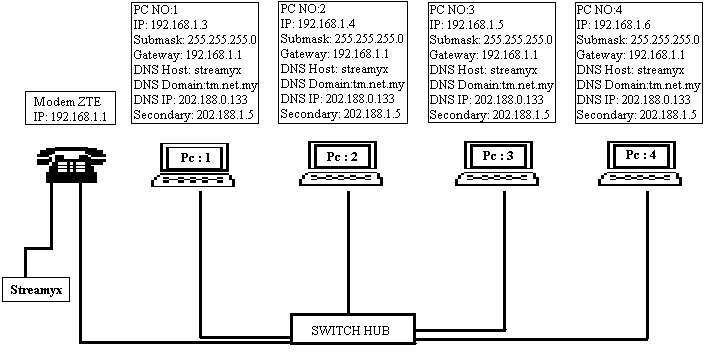
so u need to buy switch with 5ports or more ports to support for 5 users,
and your modem should be in router mode(pppoe mode)

just for example..

user posted image
@sd
post Mar 13 2007, 06:58 PM

Getting Started
**
Junior Member
101 posts

Joined: Jul 2006
Thanks...now i configure it using PPPoA. I using DHCP server mode. and system mode is
routing and bridging...about 10 pc to go online....

user posted image

Do i need to feel this...if yes please guide me...

This post has been edited by @sd: Mar 13 2007, 06:59 PM
scorps
post Mar 13 2007, 07:04 PM

Something you call love, but I call sex
*******
Senior Member
9,572 posts

Joined: Jun 2005
From: Terengganu Darul Iman


QUOTE(@sd @ Mar 13 2007, 07:58 PM)
Thanks...now i configure it using PPPoA. I using DHCP server mode. and system mode is
routing and bridging...about 10 pc  to go online....

user posted image

Do i need to feel this...if yes please guide me...
*
so u are using enterprise package??
it's correct??
@sd
post Mar 13 2007, 07:05 PM

Getting Started
**
Junior Member
101 posts

Joined: Jul 2006
yup...please guide me...i just configure..one connection pc ok but more than that..koyak already...
huss_wuss
post Mar 15 2007, 05:27 PM

New Member
*
Newbie
2 posts

Joined: Jul 2006
From: Kenny Hills, KL


one question... after i resetted my modem (stick a screwdriver in the small hole)my data light is not on.. i cnt connect.. any suggestions?
TStan_pang
post Mar 15 2007, 11:59 PM

Look at all my stars!!
*******
Senior Member
3,110 posts

Joined: Jun 2005


QUOTE(huss_wuss @ Mar 15 2007, 05:27 PM)
one question... after i resetted my modem (stick a screwdriver in the small hole)my data light is not on.. i cnt connect.. any suggestions?
*
try reset again
else, maybe the only solution is to call them...
scorps
post Mar 17 2007, 12:30 AM

Something you call love, but I call sex
*******
Senior Member
9,572 posts

Joined: Jun 2005
From: Terengganu Darul Iman


QUOTE(huss_wuss @ Mar 15 2007, 06:27 PM)
one question... after i resetted my modem (stick a screwdriver in the small hole)my data light is not on.. i cnt connect.. any suggestions?
*
try to ping the modem ip address,
or try to get ipconfig for it
TStan_pang
post Mar 19 2007, 09:00 PM

Look at all my stars!!
*******
Senior Member
3,110 posts

Joined: Jun 2005


is there any firmware to Riger DB102??

i have try google, but seen like no good result...


This post has been edited by tan_pang: May 8 2007, 03:47 PM
mns
post May 8 2007, 10:54 AM

Getting Started
**
Junior Member
79 posts

Joined: Jan 2003
From: kL


Broadband provider
ISP/package: Streamyx 1.0Mbps
Location: Serdang
Have you called your ISP's helpline?: not yet

Personal equipment
Modem: RIGER DB102 included in the package
Router: Aztech WL730RT4
Firewall used: just Windows Firewall

Problem details
First occurence of problem:
Problem frequency:
Problem description:

The problems goes like this, i just subscribe to the new package for streamyx 1.0Mbps last week, i ask for the technician to come to install and set the modem for me as i hv zero knowlegde in networking and there fly rm88 out of my pocket cry.gif

yesterday i bought a new wireless router (Aztech WL730RT4) and thinking that i can save some money by setting the router by myself, i tried to do so this morning by reading the manual given but i failed..what do u expect from a guy who hv no knowlegde of networking huh tongue.gif

then i tried to change the setting for the modem hoping that it would work after that but of course it wont work huhuhu, my biggest mistake here is that i forgot to make the backup for the modem configuration before i mess it up, and now the problem is worse bcos i cant connect to internet even directly connecting to the modem without using the router.

can you guys help me out here icon_question.gif ...maybe some of u guys have the modem configuration file (*.cfg) pls send it to me..or if u can teach me how to set it up manually even better..i hope to solve the problem with my modem first then later maybe u guys can help me to set up the router thumbup.gif

thanx guys

scorps
post May 8 2007, 11:14 AM

Something you call love, but I call sex
*******
Senior Member
9,572 posts

Joined: Jun 2005
From: Terengganu Darul Iman


http://koneksen.com/modem/riger-db102/
this is to make your modem be in router mode(automatic connect)
TStan_pang
post May 8 2007, 03:48 PM

Look at all my stars!!
*******
Senior Member
3,110 posts

Joined: Jun 2005


my fren said his fren got problem in this modem
dunno what he had config, it made the modem cant connect
all the 4 light always light on, cant even enter the 192.168.1.1
and this problem cant even been solved by reset the modem...

whats the problem with it??
OKLY
post May 8 2007, 03:52 PM

The Penguin Vader
Group Icon
Staff
12,090 posts

Joined: Dec 2004
From: Malaysia


QUOTE(mns @ May 8 2007, 10:54 AM)
Broadband provider
ISP/package: Streamyx 1.0Mbps
Location: Serdang
Have you called your ISP's helpline?: not yet

Personal equipment
Modem: RIGER DB102 included in the package
Router: Aztech WL730RT4
Firewall used: just Windows Firewall

Problem details
First occurence of problem:
Problem frequency:
Problem description:

The problems goes like this, i just subscribe to the new package for streamyx 1.0Mbps last week, i ask for the technician to come to install and set the modem for me as i hv zero knowlegde in networking and there fly rm88 out of my pocket  cry.gif

yesterday i bought a new wireless router (Aztech WL730RT4) and thinking that i can save some money by setting the router by myself, i tried to do so this morning by reading the manual given but i failed..what do u expect from a guy who hv no knowlegde of networking huh  tongue.gif

then i tried to change the setting for the modem hoping that it would work after that but of course it wont work huhuhu, my biggest mistake here is that i forgot to make the backup for the modem configuration before i mess it up, and now the problem is worse bcos i cant connect to internet even directly connecting to the modem without using the router.

can you guys help me out here  icon_question.gif ...maybe some of u guys have the modem configuration file (*.cfg) pls send it to me..or if u can teach me how to set it up manually even better..i hope to solve the problem with my modem first then  later maybe u guys can help me to set up the router  thumbup.gif

thanx guys
*
Topic merged.
goolias
post May 8 2007, 11:15 PM

Casual
***
Junior Member
321 posts

Joined: Jan 2003
QUOTE(tan_pang @ May 8 2007, 03:48 PM)
my fren said his fren got problem in this modem
dunno what he had config, it made the modem cant connect
all the 4 light always light on, cant even enter the 192.168.1.1
and this problem cant even been solved by reset the modem...

whats the problem with it??
*
Could have been bricked.(="KONG")
mns
post May 9 2007, 01:01 PM

Getting Started
**
Junior Member
79 posts

Joined: Jan 2003
From: kL


guys..is my line wrongly capped? im subscribbed to the new package 1.0Mbps RM77/month just last week

user posted image

This post has been edited by mns: May 9 2007, 01:06 PM
scorps
post May 9 2007, 02:52 PM

Something you call love, but I call sex
*******
Senior Member
9,572 posts

Joined: Jun 2005
From: Terengganu Darul Iman


QUOTE(mns @ May 9 2007, 02:01 PM)
guys..is my line wrongly capped? im subscribbed to the new package 1.0Mbps RM77/month just last week

user posted image
*
Wrong Capped,
maybe u can report to Tm about this,

and did you try do a speedtest(using speedometer)
what result??
zax2_z
post May 10 2007, 12:28 PM

Getting Started
**
Junior Member
91 posts

Joined: Jan 2003
From: Bear Hill, Melaka


This modem is somehow low cost plastic garbage. It can't handle 2 and more PC. On routing mode if 1 of the PC using high bandwidth program, browsing dead. Timeout and even can't go to modem configuration. Nice piece of garbage Telekom!. What's odd is that at nat rule entry it will auto portward to an application. Like torrent, i guess that make it crazy.

This post has been edited by zax2_z: May 10 2007, 12:31 PM
TStan_pang
post May 10 2007, 07:17 PM

Look at all my stars!!
*******
Senior Member
3,110 posts

Joined: Jun 2005


QUOTE(zax2_z @ May 10 2007, 12:28 PM)
This modem is somehow low cost plastic garbage. It can't handle 2 and more PC. On routing mode if 1 of the PC using high bandwidth program, browsing dead. Timeout and even can't go to modem configuration. Nice piece of garbage Telekom!. What's odd is that at nat rule entry it will auto portward to an application. Like torrent, i guess that make it crazy.
*
haha
quite agree... sweat.gif

now having this problem
the solution seen like juz have to make your 2 pc online with bridging mode only... sweat.gif
and it really like what you said, sometimes cant go to the modem configuration page...

there is auto portforward??
i think it is becoz you had tick the "Enable UPnP port mapping (Windows XP Only)" in the BitComet Preferences (assume that you are using BitComet)

This post has been edited by tan_pang: May 10 2007, 07:18 PM

19 Pages < 1 2 3 4 5 > » Top
 

Change to:
| Lo-Fi Version
0.0242sec    0.94    6 queries    GZIP Disabled
Time is now: 16th December 2025 - 12:35 PM