


I wonder if i can use HDMI connection
This post has been edited by chokia: Mar 30 2014, 12:49 AM
Astro NJOI Free Satellite TV Service V1, Free activation promo until April 30th
|
|
 Mar 30 2014, 12:48 AM Mar 30 2014, 12:48 AM
|
 
Senior Member
3,617 posts Joined: Oct 2010 
|
my byond decoder like so slowpoke only tonite want to autoupdate with the new interface v1.79
I wonder if i can use HDMI connection This post has been edited by chokia: Mar 30 2014, 12:49 AM |
|
|
|
|
|
Mar 30 2014, 10:59 AM
|

Junior Member
81 posts Joined: Aug 2011
|
anyone can teach me how to enable hdmi in my astro beyond decoder?? already test, canot use hdmi.
|
|
|
Mar 30 2014, 02:37 PM
|

Senior Member
850 posts Joined: Oct 2006
|
Are u using njoi? Upgrade to latest firmware than hdmi can use
|
|
|
Mar 30 2014, 08:20 PM
|
|
Junior Member
81 posts Joined: Aug 2011
|
QUOTE(mun88 @ Mar 30 2014, 02:37 PM) Are u using njoi? Upgrade to latest firmware than hdmi can use yup..njoi in astrok beyond decoder, how to update firmware? |
|
|
Mar 30 2014, 09:25 PM
|

Senior Member
3,176 posts Joined: May 2013 From: Petaling Jaya 
|
QUOTE(chokia @ Mar 30 2014, 12:48 AM) my byond decoder like so slowpoke only tonite want to autoupdate with the new interface v1.79 Yes you can I wonder if i can use HDMI connection  QUOTE(macang @ Mar 30 2014, 08:20 PM) yup..njoi in astrok beyond decoder, how to update firmware? Pace Astro Byond: 1)Turn off your decoder2)Plug it in and press Channel + and Power button on decoder repeatedly until u see auto update on screen. Samsung Astro Byond/ zapper: Refer to Astro Byond Episode VI in LYF. Search for the last 10 page of it |
|
|
Mar 30 2014, 09:27 PM
|
|
Senior Member
3,617 posts Joined: Oct 2010
|
QUOTE(Anonymous34 @ Mar 30 2014, 09:25 PM) Yes you can U sure? you mean after you upgraded to 1.79? |
|
|
|
|
|
Mar 30 2014, 09:28 PM
|
|
Senior Member
3,176 posts Joined: May 2013 From: Petaling Jaya
|
QUOTE(chokia @ Mar 30 2014, 09:27 PM) U sure? you mean after you upgraded to 1.79? 1.79 is bootloader version.The new interface/EPG/UI you having now enables HDMI port on NJOI decoders. Just plug it in and ready to go. |
|
|
Mar 30 2014, 09:42 PM
|
|
Senior Member
3,617 posts Joined: Oct 2010
|
QUOTE(Anonymous34 @ Mar 30 2014, 09:28 PM) 1.79 is bootloader version. Yes TQ for that info i tried and it works.The new interface/EPG/UI you having now enables HDMI port on NJOI decoders. Just plug it in and ready to go. |
|
|
Mar 30 2014, 09:46 PM
|
|
Senior Member
3,617 posts Joined: Oct 2010
|
now i wonder if you subscribed or purchased movie on astro first will it come in HD and 5.1 audio since now we can use HDMI
|
|
|
Mar 31 2014, 10:00 AM
|
|
Senior Member
850 posts Joined: Oct 2006
|
QUOTE(chokia @ Mar 30 2014, 09:46 PM) now i wonder if you subscribed or purchased movie on astro first will it come in HD and 5.1 audio since now we can use HDMI only SD. last weekend i already purchase 2 movie ( monkey king & the journey) watching... picture quality not bad via hdmi |
|
|
Mar 31 2014, 06:36 PM
|
|
Junior Member
81 posts Joined: Aug 2011
|
QUOTE(Anonymous34 @ Mar 30 2014, 09:25 PM) Yes you can no work for me Pace Astro Byond: 1)Turn off your decoder 2)Plug it in and press Channel + and Power button on decoder repeatedly until u see auto update on screen. Samsung Astro Byond/ zapper: Refer to Astro Byond Episode VI in LYF. Search for the last 10 page of it  already test. already test. |
|
|
Mar 31 2014, 08:47 PM
|

Junior Member
5 posts Joined: Apr 2013
|
QUOTE(uhlaw @ Mar 28 2014, 07:44 PM) This is my njoi decoder hellow friend...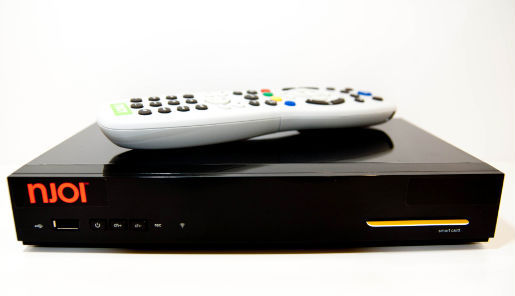 please give me some advice how to make HD on njoi using this decoder... let me know step by step.. my bootloader as attach... Attached thumbnail(s) 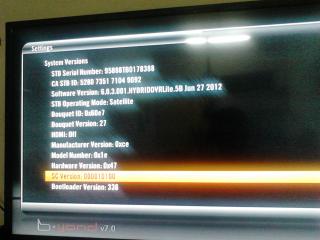
|
|
|
Mar 31 2014, 10:27 PM
|
|
Senior Member
3,617 posts Joined: Oct 2010
|
QUOTE(ghaf85 @ Mar 31 2014, 08:47 PM) hellow friend... Where got HD in NJOI. you can only connect with HDMI cable with that bootloader and yes thats the new versionplease give me some advice how to make HD on njoi using this decoder... let me know step by step.. my bootloader as attach... |
|
|
|
|
|
Apr 1 2014, 12:16 AM
|
|
Junior Member
5 posts Joined: Apr 2013
|
QUOTE(chokia @ Mar 31 2014, 10:27 PM) Where got HD in NJOI. you can only connect with HDMI cable with that bootloader and yes thats the new version what u mean by that??i dont clear... did i must update system software??? |
|
|
Apr 1 2014, 01:21 AM
|

Senior Member
6,106 posts Joined: Apr 2009 From: Marang, Terengganu 
|
QUOTE(chokia @ Mar 30 2014, 12:48 AM) my byond decoder like so slowpoke only tonite want to autoupdate with the new interface v1.79 Since the "Record" function is available, i wonder if one can pause live TV too? I wonder if i can use HDMI connection  |
|
|
Apr 1 2014, 07:27 AM
|
|
Senior Member
3,617 posts Joined: Oct 2010
|
QUOTE(ghaf85 @ Apr 1 2014, 12:16 AM) what u mean by that?? Your software already up to date and you can have HDMI connection. (previously HDMI cable not working need to use yellow red white)i dont clear... did i must update system software??? But NJOI doesnt offer High Definition (HD) channel yet like Astro Byond. |
|
|
Apr 1 2014, 09:03 AM
|
|
Senior Member
850 posts Joined: Oct 2006
|
HDMI enable only give us better picture quality. but i hear in future NJOI customer also can watch some HD channel
|
|
|
Apr 1 2014, 11:01 AM
|
|
Senior Member
6,106 posts Joined: Apr 2009 From: Marang, Terengganu
|
QUOTE(mun88 @ Apr 1 2014, 09:03 AM) HDMI enable only give us better picture quality. but i hear in future NJOI customer also can watch some HD channel It's true.http://www.newsabahtimes.com.my/nstweb/fullstory/74588 |
|
|
Apr 1 2014, 05:12 PM
|
|
Senior Member
3,176 posts Joined: May 2013 From: Petaling Jaya
|
QUOTE(chokia @ Mar 31 2014, 10:27 PM) Where got HD in NJOI. you can only connect with HDMI cable with that bootloader and yes thats the new version Nope thats not bootloader in update screen. My bad my bad. It's hardware revision. I compared three decoders to realise that   QUOTE(Qash-M @ Apr 1 2014, 01:21 AM) Since the "Record" function is available, i wonder if one can pause live TV too? Nope. Tested a lot of time with my Pace PVRQUOTE(chokia @ Apr 1 2014, 07:27 AM) Your software already up to date and you can have HDMI connection. (previously HDMI cable not working need to use yellow red white) It's not UP to date yet. That's the old UI!But NJOI doesnt offer High Definition (HD) channel yet like Astro Byond. QUOTE(mun88 @ Apr 1 2014, 09:03 AM) HDMI enable only give us better picture quality. but i hear in future NJOI customer also can watch some HD channel Perhaps as they have already enabled the HDMI port. |
|
|
Apr 1 2014, 11:03 PM
|

Senior Member
2,356 posts Joined: Jan 2003
|
I can confirm that the latest EPG update has finally enabled the HDMI port on my friend's decoder, resulting in better picture quality and sharper text compared to standard composite output.
However, I haven't received the update yet on my Beyond decoder. In retrospect, I think it is most likely because I usually switch off the decoder completely when I'm not watching Astro instead of leaving it on standby. I reckon I should start leaving the decoder on standby now so that it can download the update. |
| Change to: |  0.0216sec 0.0216sec
 0.81 0.81
 6 queries 6 queries
 GZIP Disabled GZIP Disabled
Time is now: 24th December 2025 - 07:10 PM |
 Quote
Quote