Outline ·
[ Standard ] ·
Linear+
Sony XPERIA™ Z1, Official Thread V6, 4.3 (14.2.A.0.290 OTA) out now!
|
jloi
|
 Feb 16 2014, 08:40 PM Feb 16 2014, 08:40 PM
|

|
QUOTE(WindChaseR @ Feb 16 2014, 08:30 PM) haha jloi come give me 5.. i've been washing my phone all this time and today is the first time i brought it to swimming pool, and then i drop it too hard into the water and the sim card slot cover opened under water.. no problem switching on too but i think water inside causing some hardware function being triggered.. so gotta wait it dry 1st.. front cam back cam flashlight all got water now.. sim card slot shud be dried up already..  haha.. weird my slot never opened but somehow water managed go in Oh well i have confident in sony.. hope it dun disappoint me |
|
|
|
|
|
lemond
|
Feb 16 2014, 08:59 PM
|
|
|
QUOTE(choonwai11 @ Feb 16 2014, 12:01 AM) 290 to 136 working fine. i just OTA last week to 136, retaining all root access. Same here,updated to latest .136 and still in root access |
|
|
|
|
|
TSlilzany
|
Feb 16 2014, 09:36 PM
|
|
|
QUOTE(WindChaseR @ Feb 16 2014, 08:30 PM) haha jloi come give me 5.. i've been washing my phone all this time and today is the first time i brought it to swimming pool, and then i drop it too hard into the water and the sim card slot cover opened under water.. no problem switching on too but i think water inside causing some hardware function being triggered.. so gotta wait it dry 1st.. front cam back cam flashlight all got water now.. sim card slot shud be dried up already.. hmm this reminds me to use back my old case next time i take my phone to the swimming pool to prevent the ports from accidentally open but the usb port is still exposed.  |
|
|
|
|
|
TSlilzany
|
Feb 16 2014, 09:43 PM
|
|
|
QUOTE(jloi @ Feb 16 2014, 08:12 PM) Unfortunate stuff happened on me today  Brought my Z1 and finally dip into water for the first time and tadaaa... camera lens masuk air wtf.. At least my phone wasn't damage and still work like normal. Oh found out my sim card was wet too. Not the slot but the sim itself. » Click to show Spoiler - click again to hide... «  Oh well waiting it to dry now hope it dries up soon for you. my previous Sony phone get moisture all up the longer I keep the camera on. those are some frustrating moments. it was raining and I was drenched. the phone still works but the camera lens took two days to dry. |
|
|
|
|
|
jloi
|
Feb 16 2014, 09:53 PM
|
|
|
QUOTE(lilzany @ Feb 16 2014, 09:43 PM) hope it dries up soon for you. my previous Sony phone get moisture all up the longer I keep the camera on. those are some frustrating moments. it was raining and I was drenched. the phone still works but the camera lens took two days to dry. Well I am fine with it as long as the phone works and the lens can dry up Don't dare to dip in water again. My Olympus TG-2 has been crazily torture today at underwater and still work fine. Sony should really learn from Olympus since they are partner now in camera business  |
|
|
|
|
|
WindChaseR
|
Feb 16 2014, 10:44 PM
|
|
|
QUOTE(lilzany @ Feb 16 2014, 09:36 PM) hmm this reminds me to use back my old case next time i take my phone to the swimming pool to prevent the ports from accidentally open but the usb port is still exposed. QUOTE(jloi @ Feb 16 2014, 09:53 PM) Well I am fine with it as long as the phone works and the lens can dry up Don't dare to dip in water again. My Olympus TG-2 has been crazily torture today at underwater and still work fine. Sony should really learn from Olympus since they are partner now in camera business well i'll still proud of the waterproof but really need to make sure the ports are closed tightly.. yea i've been thinking whether there're cases that cover all the ports.. so that when the phone get impacted it open opens up the covers.. |
|
|
|
|
|
jloi
|
Feb 16 2014, 10:50 PM
|
|
|
QUOTE(WindChaseR @ Feb 16 2014, 10:44 PM) well i'll still proud of the waterproof but really need to make sure the ports are closed tightly.. yea i've been thinking whether there're cases that cover all the ports.. so that when the phone get impacted it open opens up the covers.. guess any rubber case will do? if only otterbox got casing for Z1  |
|
|
|
|
|
WindChaseR
|
Feb 16 2014, 10:50 PM
|
|
|
QUOTE(jloi @ Feb 16 2014, 09:53 PM) Well I am fine with it as long as the phone works and the lens can dry up Don't dare to dip in water again. My Olympus TG-2 has been crazily torture today at underwater and still work fine. Sony should really learn from Olympus since they are partner now in camera business i leave my the phone next to my laptop air ventilation mouth and now its dried! haha took only 2 hours.. leave all the ports open too.. Edit: but shit, cant switch it on now.. This post has been edited by WindChaseR: Feb 16 2014, 10:56 PM |
|
|
|
|
|
jloi
|
Feb 16 2014, 10:51 PM
|
|
|
For those who wondering those strange honeycomb pattern in our Z1 screen 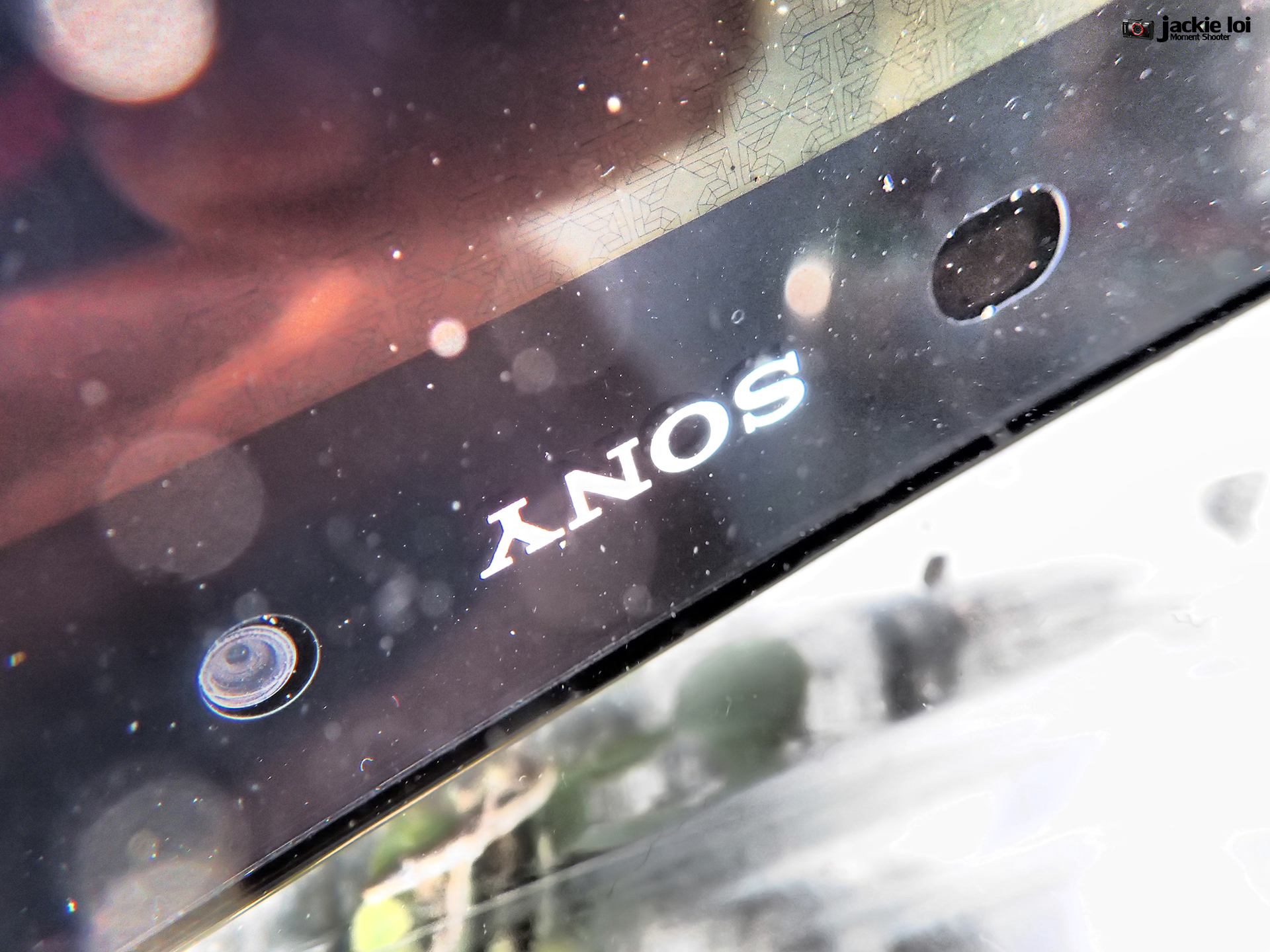 |
|
|
|
|
|
Bernard Yeo
|
Feb 16 2014, 11:40 PM
|
|
|
QUOTE(WindChaseR @ Feb 16 2014, 10:44 PM) well i'll still proud of the waterproof but really need to make sure the ports are closed tightly.. yea i've been thinking whether there're cases that cover all the ports.. so that when the phone get impacted it open opens up the covers.. So far, the best protection case I've seen is the Ballistic case. But it still leaves the USB port uncovered. https://www.goballisticcase.com/shop/sony/xperia-z1/ |
|
|
|
|
|
jloi
|
Feb 16 2014, 11:54 PM
|
|
|
QUOTE(mode893 @ Feb 4 2014, 09:40 PM) Just wanna share, Sony Style has a new batch of casings for Z1 that are pretty awesome. I got this one from Elecom that's featured in the Z1 Sony coffee table magazine, it fits the doc, made of thin lightweight metal, enough room at camera lens to not reflect flash, has opening for noise cancelling mic, comes with a really nicely designed sp with anti grease feature and the casing has a beautiful shade of purple which compliments Z1's purple. Finally, a perfect match for my gadget.  » Click to show Spoiler - click again to hide... « Bro I purchase this case adi but cannot fit in the dock 1? How do you do it? |
|
|
|
|
|
WindChaseR
|
Feb 17 2014, 12:02 AM
|
|
|
which service center given good service?
just in case i gotta visit them..
|
|
|
|
|
|
Andrewtst
|
Feb 17 2014, 12:21 AM
|
|
|
QUOTE(Andrew_1980 @ Feb 16 2014, 04:53 PM) Lol. Now I seldom touch Note 3 ady, in home I use iPad. Note 3 is just my outside gadget But still Note 3 is your phone right? Or you already switch to others phone.  |
|
|
|
|
|
Andrewtst
|
Feb 17 2014, 12:31 AM
|
|
|
QUOTE(jloi @ Feb 16 2014, 08:40 PM) haha.. weird my slot never opened but somehow water managed go in Oh well i have confident in sony.. hope it dun disappoint me It happen a lot cases before. Want play inside water, when new and not heat can play, after long usage better don't. Sony use glue, glue won't last long forever, after sometimes or heat will change the stickiness . Water and electrical still enemies. This post has been edited by Andrewtst: Feb 17 2014, 12:32 AM |
|
|
|
|
|
WindChaseR
|
Feb 17 2014, 09:44 AM
|
|
|
Everything working perfectly now. Just that all the wifi access points get deleted. Easily restored them since im rooted.Dont need to visit service center XD
place the phone next to laptop air ventilation port and everything dried up in 3 hours..
|
|
|
|
|
|
TSlilzany
|
Feb 17 2014, 09:56 AM
|
|
|
QUOTE(Andrewtst @ Feb 17 2014, 12:31 AM) It happen a lot cases before. Want play inside water, when new and not heat can play, after long usage better don't. Sony use glue, glue won't last long forever, after sometimes or heat will change the stickiness . Water and electrical still enemies. yeah heat is greatest enemies...but i think they have perfected a bit. so long still haven't heard of the raised back glass problem that prevalent for Xperia Z and it is already half a year. |
|
|
|
|
|
Andrewtst
|
Feb 17 2014, 01:39 PM
|
|
|
QUOTE(lilzany @ Feb 17 2014, 09:56 AM) yeah heat is greatest enemies...but i think they have perfected a bit. so long still haven't heard of the raised back glass problem that prevalent for Xperia Z and it is already half a year. Ya, at least Z1 seems did much better than Z (Maybe) as Z1 processor S800 is much way cooler than Z processor S4 Pro. This post has been edited by Andrewtst: Feb 17 2014, 01:40 PM |
|
|
|
|
|
Bernard Yeo
|
Feb 17 2014, 05:13 PM
|
|
|
I noticed my home screen and app drawer do not rotate unless plugged into a magnetic charger. I have set screen rotate on in Settings, even in Xblast Tools I have set it to rotate in all directions. Still these don't work unless it is charging. Is this a bug?
|
|
|
|
|
|
ckchan
|
Feb 17 2014, 05:21 PM
|
|
|
QUOTE(Bernard Yeo @ Feb 17 2014, 05:13 PM) I noticed my home screen and app drawer do not rotate unless plugged into a magnetic charger. I have set screen rotate on in Settings, even in Xblast Tools I have set it to rotate in all directions. Still these don't work unless it is charging. Is this a bug? i tot it's normal? it only rotates when running certain apps. and yes, my homescreen also rotates only when plug into the charging dock |
|
|
|
|
|
Andrew_1980
|
Feb 17 2014, 05:33 PM
|
|
|
QUOTE(Andrewtst @ Feb 17 2014, 12:21 AM) Not yet lol still stick with it |
|
|
|
|



 Quote
Quote





 0.0269sec
 1.06
1.06
 6 queries
 GZIP Disabled