Welcome Guest ( Log In | Register )

Bump Topic Topic Closed RSS Feed
125 Pages « < 5 6 7 8 9 > » Bottom

Outline · [ Standard ] · Linear+

 Sony XPERIA™ Z1, Official Thread V6, 4.3 (14.2.A.0.290 OTA) out now!

views
     
Bernard Yeo
post Dec 27 2013, 02:16 PM

On my way
****
Senior Member
570 posts

Joined: May 2006
QUOTE(patienceGNR @ Dec 27 2013, 12:49 PM)
You won't.

Which is what I am currently experimenting - can we keep FULL root access and not partial when we are rooted on .534 then update to .290, not via OTA but flashing .290 firmware.

Long as you do not "WIPE DATA" "WIPE CACHE".

I am still experimenting, in order to give proper rooting guide.
*
Looking forward to your guide. rclxms.gif
SweetPuff
post Dec 27 2013, 02:18 PM

Look at all my stars!!
*******
Senior Member
2,021 posts

Joined: Jan 2003


QUOTE(jloi @ Dec 27 2013, 12:45 PM)
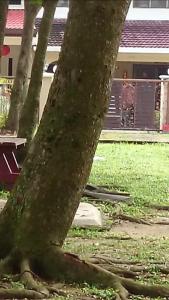
using high ISO? or low ISO that cause the handshake even minor
*
Here's what I meant.
Attached Image


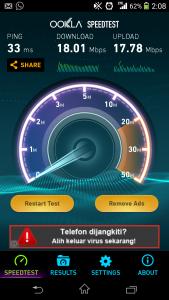
Oh ya. LTE ain't too bad. LYN pages loads within a second.
Attached Image
patienceGNR
post Dec 27 2013, 02:20 PM

♥ Ride All Day ♥
*******
Senior Member
2,058 posts

Joined: Mar 2011
From: Today: 9:03 AM


QUOTE(SweetPuff @ Dec 27 2013, 02:18 PM)
Here's what I meant.
Attached Image
Oh ya. LTE ain't too bad. LYN pages loads within a second.
Attached Image
*
Your phone is infected ohmy.gif quickly click on that red alert there!!!!11!1one1
ZeneticX
post Dec 27 2013, 02:27 PM

stars for what
********
All Stars
12,413 posts

Joined: Jan 2008
From: KL - Cardiff - Subang - Sydney


QUOTE(patienceGNR @ Dec 27 2013, 12:49 PM)
You won't.

Which is what I am currently experimenting - can we keep FULL root access and not partial when we are rooted on .534 then update to .290, not via OTA but flashing .290 firmware.

Long as you do not "WIPE DATA" "WIPE CACHE".

I am still experimenting, in order to give proper rooting guide.
And well, I currently lost my old back up of my ROM. Screw it, haha!
*
you moved your nandroid backup to the internal memory, then you performed a wipe data / cache right ?

i did the same thing doh.gif a lesson to us , next time don't cut and paste, just copy

This post has been edited by ZeneticX: Dec 27 2013, 02:27 PM
patienceGNR
post Dec 27 2013, 02:29 PM

♥ Ride All Day ♥
*******
Senior Member
2,058 posts

Joined: Mar 2011
From: Today: 9:03 AM


QUOTE(ZeneticX @ Dec 27 2013, 02:27 PM)
you moved your nandroid backup to the internal memory, then you performed a wipe data / cache right ?

i did the same thing doh.gif a lesson to us , next time don't cut and paste, just copy
*
Nope. I backed up to Ext_sd


then CWM from XZDRecovery can't read my ext_sd (unlike older CWM)

then nandroid back up is also set to backup as CWM mode, not TWRP. fakap betul la doh.gif
ZeneticX
post Dec 27 2013, 02:33 PM

stars for what
********
All Stars
12,413 posts

Joined: Jan 2008
From: KL - Cardiff - Subang - Sydney


QUOTE(patienceGNR @ Dec 27 2013, 12:49 PM)
You won't.

Which is what I am currently experimenting - can we keep FULL root access and not partial when we are rooted on .534 then update to .290, not via OTA but flashing .290 firmware.

Long as you do not "WIPE DATA" "WIPE CACHE".

I am still experimenting, in order to give proper rooting guide.
And well, I currently lost my old back up of my ROM. Screw it, haha!
*
i think i tried edi.... cannot work

because i followed your guide on rooting .534, then flashing to .257 via flashtool without wipe data and cache

root is gone

QUOTE(patienceGNR @ Dec 27 2013, 02:29 PM)
Nope. I backed up to Ext_sd
then CWM from XZDRecovery can't read my ext_sd (unlike older CWM)

then nandroid back up is also set to backup as CWM mode, not TWRP. fakap betul la doh.gif
*
you just need to move the backup to your internal sd card, remember to copy and not cut and paste


my case is similar to you...... the stupid CWM cannot read from external sd card, so i cut and paste to internal sd card. ok first recovery no problem, then i try to root again

2nd root failed, i flash back to .534 and i choose wipe data + cache, goodbye to my backup doh.gif


btw there's a previous CWM recovery which can restore from ext sd card iinm
Kenneth93
post Dec 27 2013, 02:34 PM

New Member
*
Junior Member
26 posts

Joined: Dec 2012
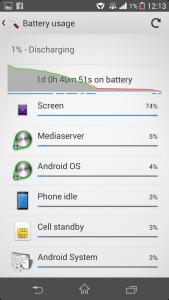
guys, i just found out, my z1 battery can last longer than i think after 4.3 update ( no high-end game, web browsing, reading, walkman, tos only) thumbup.gif


Attached thumbnail(s)
Attached Image Attached Image
ZeneticX
post Dec 27 2013, 02:41 PM

stars for what
********
All Stars
12,413 posts

Joined: Jan 2008
From: KL - Cardiff - Subang - Sydney


QUOTE(Kenneth93 @ Dec 27 2013, 02:34 PM)
guys, i just found out, my z1 battery can last longer than i think after 4.3 update ( no high-end game, web browsing, reading, walkman, tos only) thumbup.gif
*
wtf 9 hr SOT

u off wifi and data when not in use is it ?
Kenneth93
post Dec 27 2013, 02:46 PM

New Member
*
Junior Member
26 posts

Joined: Dec 2012
QUOTE(ZeneticX @ Dec 27 2013, 02:41 PM)
wtf 9 hr SOT

u off wifi and data when not in use is it ?
*
ya, i closed auto-sync and open wifi or data when needed, airplane mode when sleeping.
wanttobuylaptop
post Dec 27 2013, 02:47 PM

.......
******
Senior Member
1,693 posts

Joined: Sep 2009


QUOTE(Kenneth93 @ Dec 27 2013, 02:34 PM)
guys, i just found out, my z1 battery can last longer than i think after 4.3 update ( no high-end game, web browsing, reading, walkman, tos only) thumbup.gif
*
wth 9 hrs...
my best is 4 hrs til 20%, with lots of gaming.
browsing tax the batter as much also.

QUOTE(patienceGNR @ Dec 27 2013, 02:15 PM)
I don't remember pirated games require root. Correct my if I'm wrong.

All you need is just the APK, and a file browser to install it.

Nothing else.

Root will NOT void warranty - unless you send in your phone WHILE STILL rooted.

I only have one phone, and I'm still rooting, unlocking bootloader, etc. Well, I'm advanced user lah, so I don't worry much actually laugh.gif
*
modded play store bro. lots of game require license check.
root and send to warranty claim will void warranty means root will void warranty right...
is in the eula.
plus, i mean first time root ur phone la, most did on old phone first ma.

This post has been edited by wanttobuylaptop: Dec 27 2013, 02:50 PM
Kenneth93
post Dec 27 2013, 02:51 PM

New Member
*
Junior Member
26 posts

Joined: Dec 2012
QUOTE(wanttobuylaptop @ Dec 27 2013, 02:47 PM)
wth 9 hrs...
my best is 4 hrs til 20%, with lots of gaming.
browsing tax the batter as much also.
*
haha i purposely to test my z1 battery after 4.3 update, improved many than 4.2. erm, with gaming (coc,tos),web-browsing, video playing and wifi or data on all the time,my best is around 6hrs after 4.3 update. Before 4.3 my z1 only can last around 5hrs screen on.
ZeneticX
post Dec 27 2013, 03:01 PM

stars for what
********
All Stars
12,413 posts

Joined: Jan 2008
From: KL - Cardiff - Subang - Sydney


QUOTE(Kenneth93 @ Dec 27 2013, 02:51 PM)
haha i purposely to test my z1 battery after 4.3 update, improved many than 4.2. erm, with gaming (coc,tos),web-browsing, video playing and wifi or data on all the time,my best is around 6hrs after 4.3 update. Before 4.3 my z1 only can last around 5hrs screen on.
*
screen brightness ? and what web browser you using
Kenneth93
post Dec 27 2013, 03:05 PM

New Member
*
Junior Member
26 posts

Joined: Dec 2012
QUOTE(ZeneticX @ Dec 27 2013, 03:01 PM)
screen brightness ? and what web browser you using
*
50% brightness with auto adjust on, next browser
chrono7
post Dec 27 2013, 03:16 PM

Casual
***
Junior Member
442 posts

Joined: Jan 2011


QUOTE(Kenneth93 @ Dec 27 2013, 03:05 PM)
50% brightness with auto adjust on, next browser
*
Holy....

You have to share the settings here drool.gif . First time I seen 9hrs SOT. Mine SOT at best last 3 hours plus(but whole charge last me 2 days+)
TSlilzany
post Dec 27 2013, 03:20 PM

Regular
******
Senior Member
1,479 posts

Joined: Mar 2005
From: Kuala Lumpur
QUOTE(Kenneth93 @ Dec 27 2013, 02:34 PM)
guys, i just found out, my z1 battery can last longer than i think after 4.3 update ( no high-end game, web browsing, reading, walkman, tos only) thumbup.gif
*
SOT 9 hrs is very geng already. is a world record for Sony. besides there are a lot of things we can do other than just browsing and gaming
Kenneth93
post Dec 27 2013, 03:24 PM

New Member
*
Junior Member
26 posts

Joined: Dec 2012
QUOTE(chrono7 @ Dec 27 2013, 03:16 PM)
Holy....

You have to share the settings here  drool.gif  . First time I seen 9hrs SOT. Mine SOT at best last 3 hours plus(but whole charge last me 2 days+)
*
erm with medium gaming, videos, 50% auto brightness, and next browser, wifi or data on all the time, my z1 can last around 6hrs SOT only no 9 hrs. About my setting, i think mine 1 no much different with u. i got close lte, and open stamina mode.
Kenneth93
post Dec 27 2013, 03:29 PM

New Member
*
Junior Member
26 posts

Joined: Dec 2012
QUOTE(lilzany @ Dec 27 2013, 03:20 PM)
SOT 9 hrs is very geng already. is a world record for Sony. besides there are a lot of things we can do other than just browsing and gaming
*
haha to be honest, 9hrs sot need me to open and close wifi or data many time, and no high-end gaming. If with wifi or data on all time, gaming and web-browsing, my z1 only can last around 6 hrs SOT max.
TSlilzany
post Dec 27 2013, 03:32 PM

Regular
******
Senior Member
1,479 posts

Joined: Mar 2005
From: Kuala Lumpur
QUOTE(Kenneth93 @ Dec 27 2013, 03:24 PM)
erm with medium gaming, videos, 50% auto brightness, and next browser, wifi or data on all the time, my z1 can last around 6hrs SOT only no 9 hrs. About my setting, i think mine 1 no much different with u. i got close lte, and open stamina mode.
*
mine is lte always on 24/7. i never turned it off unless I download heavy gaming stuff. but then I have 6GB data so yeah i won't be afraid running out laugh.gif
patienceGNR
post Dec 27 2013, 03:33 PM

♥ Ride All Day ♥
*******
Senior Member
2,058 posts

Joined: Mar 2011
From: Today: 9:03 AM


QUOTE(ZeneticX @ Dec 27 2013, 02:33 PM)
i think i tried edi.... cannot work

because i followed your guide on rooting .534, then flashing to .257 via flashtool without wipe data and cache

root is gone
you just need to move the backup to your internal sd card, remember to copy and not cut and paste
my case is similar to you...... the stupid CWM cannot read from external sd card, so i cut and paste to internal sd card. ok first recovery no problem, then i try to root again

2nd root failed, i flash back to .534 and i choose wipe data + cache, goodbye to my backup doh.gif
btw there's a previous CWM recovery which can restore from ext sd card iinm
*
Yeah but I don't really care, can reinstall the apps any time. Only take 30mins to finish re-set everything again.


Here's what I find out so far.

-On stock 534.
-Root with bin4ry
-Update to 257 over OTA (must not install XZDR or OTA will fail)

Currently experimenting from here.

-install XDZR
-flash .290


Kenneth93
post Dec 27 2013, 03:41 PM

New Member
*
Junior Member
26 posts

Joined: Dec 2012
QUOTE(lilzany @ Dec 27 2013, 03:32 PM)
mine is lte always on 24/7. i never turned it off unless I download heavy gaming stuff. but then I have 6GB data so yeah  i won't be afraid running out  laugh.gif
*
haha i am using prepaid plan, so no lte provided >.<

125 Pages « < 5 6 7 8 9 > » Top
Topic ClosedOptions
 

Change to:
| Lo-Fi Version
0.0280sec    0.51    6 queries    GZIP Disabled
Time is now: 11th December 2025 - 10:31 PM