Welcome Guest ( Log In | Register )

Bump Topic Topic Closed RSS Feed
112 Pages « < 107 108 109 110 111 > » Bottom

Outline · [ Standard ] · Linear+

 MacBook Pro Retina User Thread, All you can feedback here and report in.

views
     
westlife
post Dec 24 2015, 07:59 PM

10k Club
********
All Stars
14,313 posts

Joined: Jan 2011
QUOTE(poi2005 @ Dec 24 2015, 07:52 PM)
Thanks for sharing ur experience. Can I know ur rMBP configuration? I am heavy user of lightroom (raw files) and photoshop, my current laptop 4gb ram can't cope with it, I can't do other things when I am exporting raw to jpeg.

Is true what u said, IT products hard to play catching games, just buy wisely and enjoy the product.
*
my 15-inch rMBP configuration. It is definitely a desktop powered power haus machine. It is very suitable for video editor.

2.5GHz Processor
512 GB Storage

2.5GHz quad-core Intel Core i7
Turbo Boost up to 3.7GHz
16GB 1600MHz memory
512GB PCIe-based flash storage1
Intel Iris Pro Graphics
AMD Radeon R9 M370X with 2GB GDDR5 memory
Built-in battery (9 hours)2
Force Touch trackpad

westlife
post Dec 24 2015, 08:03 PM

10k Club
********
All Stars
14,313 posts

Joined: Jan 2011
QUOTE(poi2005 @ Dec 24 2015, 07:57 PM)
Why sold ur 15inch mid 2015? Underpowered?
When will the new rMBP announced is still a mystery, possible early or late march, but all still rumours at this stage, is a waiting game.

I might consider to get one soon if there is a price drop..xD
*
no. definitely not becos it is underpowered. it is opposite. it is more than capable to handle any tasks that you throw to it. the problem is i cannot even utilize more than 30% of its power most of the time so to me it is overkilled.

most importantly, it is too heavy for my need. I prefer a portable machine that i can carry around all day long.
so 13-inch rMBP or 12-inch retina macbook are my best choices.

normally apple does not have discount until the new one is out.


poi2005
post Dec 24 2015, 08:05 PM

Casual
***
Junior Member
380 posts

Joined: Dec 2009


QUOTE(westlife @ Dec 24 2015, 07:59 PM)
my 15-inch rMBP configuration. It is definitely a desktop powered power haus machine. It is very suitable for video editor.

*
I see, 15inch uses quad core, is a beast machine for sure.
13inch only have dual core haha.

But ram and sad also jmportant factor.


QUOTE(westlife @ Dec 24 2015, 08:03 PM)
most importantly, it is too heavy for my need. I prefer a portable machine that i can carry around all day long.
so 13-inch rMBP or 12-inch retina macbook are my best choices.

normally apple does not have discount until the new one is out.
*
Same, I m looking balance between portable and performace. I m looking at 13 rMBP. Yea loh unless like those Machines refurbished units, but the price is not attractive also.

Maybe I'll get someone work in Apple store(not in Malaysia though) to get their staff discount.

This post has been edited by poi2005: Dec 24 2015, 08:12 PM
westlife
post Dec 24 2015, 08:13 PM

10k Club
********
All Stars
14,313 posts

Joined: Jan 2011
QUOTE(poi2005 @ Dec 24 2015, 08:05 PM)
I see, 15inch uses quad core, is a beast machine.
13inch only have dual core haha.

But ram also jmportant factor.
*
yes, if u are doing video editing related programs, it does take advantage of the multi-cores processors.

but if it is for normal tasks like web browsing, word processing or even gaming, the quard core does not really benefit much those tasks. instead it drains battery faster, or the fan kick ups more frequently only.

ram wise based on the current 13-inch configuration, it comes with minimum 8GB, it is actually more than sufficient for normal usage unless u are running VMs or rendering video alot. besides, 13-inch does allow the customizing of ram to 16GB too. while i am using my 15-inch, i cannot even hit 8GB ram of usage.

again 15-inch is definitely a super power haus machine, but it is not for everyone. if u are doing photo editing etc, it may give u benefit of more real estate to use.
westlife
post Dec 24 2015, 08:20 PM

10k Club
********
All Stars
14,313 posts

Joined: Jan 2011
QUOTE(poi2005 @ Dec 24 2015, 08:05 PM)
I see, 15inch uses quad core, is a beast machine for sure.
13inch only have dual core haha.

But ram and sad also jmportant factor.
Same, I m looking balance between portable and performace. I m looking at 13 rMBP. Yea loh unless like those Machines refurbished units, but the price is not attractive also.

Maybe I'll get someone work in Apple store(not in Malaysia though) to get their staff discount.
*
13-inch is quite balanced in terms of performance and form factor. it is quite a power haus also even it is not as power as 15-inch, but to handle most tasks even 4k video editing, it is reasonable too.

u see the picture attached, u can tell how much power i can actually utilize it on the daily tasks.

ram just simply allows more tasks to be run, so it is not to have more the better actually. it really depends how much tasks u run.

This post has been edited by westlife: Dec 24 2015, 08:21 PM


Attached thumbnail(s)
Attached Image
poi2005
post Dec 24 2015, 08:24 PM

Casual
***
Junior Member
380 posts

Joined: Dec 2009


QUOTE(westlife @ Dec 24 2015, 08:13 PM)
yes, if u are doing video editing related programs, it does take advantage of the multi-cores processors.

ram wise based on the current 13-inch configuration, it comes with minimum 8GB, it is actually more than sufficient for normal usage unless u are running VMs or rendering video alot. besides, 13-inch does allow the customizing of ram to 16GB too. while i am using my 15-inch, i cannot even hit 8GB ram of usage.

again 15-inch is definitely a super power haus machine, but it is not for everyone. if u are doing photo editing etc, it may give u benefit of more real estate to use.
*
Hmm, I m looking at the 2.7GHz/256 SSD/16gb or 2.9GHz/512 SSD/16gb at this moment. The 0.2GHz I don't think big difference, but the storage does xD

I run vmware, but not alot or video editing, mainly photo editing.

Owning a 15inch before, I know how powerful it can be, but nowadays, portable is higher priority to me, haha.
westlife
post Dec 24 2015, 08:32 PM

10k Club
********
All Stars
14,313 posts

Joined: Jan 2011
QUOTE(poi2005 @ Dec 24 2015, 08:24 PM)
Hmm, I m looking at the 2.7GHz/256 SSD/16gb or  2.9GHz/512 SSD/16gb at this moment. The 0.2GHz I don't think big difference, but the storage does xD

I run vmware, but not alot or video editing, mainly photo editing.

Owning a 15inch before, I know how powerful it can be, but nowadays, portable is higher priority to me, haha.
*
yup. the two configuration should fit ur needs.

processor does not make big differences and there are already review on the different processor version of 13-inch rmbp even the i7 customized upgrade one. in fact, if upgrade to i7, the fan will kick up a lot more often than the default i5 processor which it can be annoying.
kayFX
post Dec 24 2015, 08:34 PM

i got title 0.o
*****
Senior Member
913 posts

Joined: Dec 2008
From: mobile 0.o


QUOTE(poi2005 @ Dec 24 2015, 07:52 PM)
Thanks for sharing ur experience. Can I know ur rMBP configuration? I am heavy user of lightroom (raw files) and photoshop, my current laptop 4gb ram can't cope with it, I can't do other things when I am exporting raw to jpeg.

Is true what u said, IT products hard to play catching games, just buy wisely and enjoy the product.
*
im using 15" highest end stock.. (custom config allow a higher clock proc and 1tb SSD).. so far my SSD aren't full yet.. and yes i use Lr (raw files) as well.. fan does kick in if i export more than 30 files at a time.. but i can still do other thing as well.. unless im doing something with after effects i have to wait for everything to pre rendered as 16gb RAM still not enough apparently.. if that the case i have to switch to my PC with 32gb RAM.. AE is RAM intensive program sweat.gif

Attached Image
poi2005
post Dec 24 2015, 08:41 PM

Casual
***
Junior Member
380 posts

Joined: Dec 2009


QUOTE(kayFX @ Dec 24 2015, 08:34 PM)
im using 15" highest end stock..  (custom config allow a higher clock proc and 1tb SSD).. so far my SSD aren't full yet.. and yes i use Lr (raw files) as well.. fan does kick in if i export more than 30 files at a time.. but i can still do other thing as well.. unless im doing something with after effects i have to wait for everything to pre rendered as 16gb RAM still not enough apparently.. if that the case i have to switch to my PC with 32gb RAM.. AE is RAM intensive program
*
nice configuration. AE is RAM killer, lucky I don't have to deal with it.
QUOTE(westlife @ Dec 24 2015, 08:32 PM)
yup. the two configuration should fit ur needs.

processor does not make big differences and there are already review on the different processor version of 13-inch rmbp even the i7 customized upgrade one. in fact, if upgrade to i7, the fan will kick up a lot more often than the default i5 processor which it can be annoying.
*
Ya, read those reviews and YouTube regarding I5 and i7, many advise use the money to up ram instead of processor.

So you will continue to wait? Haha
Since u also looking for portable one.

This post has been edited by poi2005: Dec 24 2015, 08:44 PM
westlife
post Dec 24 2015, 08:41 PM

10k Club
********
All Stars
14,313 posts

Joined: Jan 2011
QUOTE(kayFX @ Dec 24 2015, 08:34 PM)
im using 15" highest end stock..  (custom config allow a higher clock proc and 1tb SSD).. so far my SSD aren't full yet.. and yes i use Lr (raw files) as well.. fan does kick in if i export more than 30 files at a time.. but i can still do other thing as well.. unless im doing something with after effects i have to wait for everything to pre rendered as 16gb RAM still not enough apparently.. if that the case i have to switch to my PC with 32gb RAM.. AE is RAM intensive program sweat.gif

Attached Image
*
The ram is not sufficient as it depends on the size of the raw file, the more ram u have that can match to the raw file size, it will definitely helps in the rendering.

But upgrade the processor will definitely not helping much in the performance much.

these video explained the difference in terms of performance between the different specs of mid-2015 rmbp including the upgraded frequency version of the highest end stock version.


This post has been edited by westlife: Dec 24 2015, 08:46 PM
kayFX
post Dec 24 2015, 09:36 PM

i got title 0.o
*****
Senior Member
913 posts

Joined: Dec 2008
From: mobile 0.o


QUOTE(westlife @ Dec 24 2015, 08:41 PM)
The ram is not sufficient as it depends on the size of the raw file, the more ram u have that can match to the raw file size, it will definitely helps in the rendering.

But upgrade the processor will definitely not helping much in the performance much.

these video explained the difference in terms of performance between the different specs of mid-2015 rmbp including the upgraded frequency version of the highest end stock version.

» Click to show Spoiler - click again to hide... «

*
err.. i don't quite understand what are you talking about lol.. in AE any clips need to be pre rendered or RAM preview before you can actually see animation or clip with 3D effects or what ever crazy stuff u put in your clip.. even just a few second clip can eat all your RAM (in my situation i allocate all my available RAM for AE alone when im working with it)..
this is an MP4 format footage.. if u talk about RAW video footage not even a custom config can handle it.. unless u do offline editing (which im not really familiar because i never work with RAW video footage nor i have a camera capable of recording such <--- which cost a lotsa money and epic effin storage is needed, talking about Terabytes here)

below is my screen shot of an 8 sec intro footage in AE and already been RAM previewed.. not even a complex, just an intro with a glitch effect.. not even rendered the actual video yet, but having a pre rendered clips beforehand does help the process.. just take a look at my RAM on top status bar with the RAM icon.. only 2.8% left sweat.gif yes it can do preview fast enough but it can run out of memory..

Attached Image
carpathia
post Dec 24 2015, 11:18 PM

Look at all my stars!!
*******
Senior Member
2,619 posts

Joined: Apr 2005
From: KL


Hey guys, how do you set the ram usage icon on the notifications bar?
westlife
post Dec 24 2015, 11:46 PM

10k Club
********
All Stars
14,313 posts

Joined: Jan 2011
QUOTE(kayFX @ Dec 24 2015, 09:36 PM)
err.. i don't quite understand what are you talking about lol.. in AE any clips need to be pre rendered or RAM preview before you can actually see animation or clip with 3D effects or what ever crazy stuff u put in your clip.. even just a few second clip can eat all your RAM (in my situation i allocate all my available RAM for AE alone when im working with it)..
this is an MP4 format footage.. if u talk about RAW video footage not even a custom config can handle it.. unless u do offline editing (which im not really familiar because i never work with RAW video footage nor i have a camera capable of recording such <--- which cost a lotsa money and epic effin storage is needed, talking about Terabytes here)

below is my screen shot of an 8 sec intro footage in AE and already been RAM previewed.. not even a complex, just an intro with a glitch effect.. not even rendered the actual video yet, but having a pre rendered clips beforehand does help the process.. just take a look at my RAM on top status bar with the RAM icon.. only 2.8% left sweat.gif yes it can do preview fast enough but it can run out of memory..

Attached Image
*
That's why I said the ram is not even sufficient for such rendering.

Like I said, 15-inch is powerful for some but definitely not for anyone. And it is clear that even the base model of the 15-inch vs the 512GB version with discrete graphic card or even the one with upgraded cpu. For price vs value, the performance has no significant difference.

15-inch is powerful, but definitely not a machine for everyone unless one who really needs for graphic or video editing else it is over killed not to say the weight to bear for crying around and the price tag. It is rm11k for retailed price for the model with discrete graphic card.
poi2005
post Dec 24 2015, 11:58 PM

Casual
***
Junior Member
380 posts

Joined: Dec 2009


QUOTE(carpathia @ Dec 24 2015, 11:18 PM)
Hey guys, how do you set the ram usage icon on the notifications bar?
*
U mean something like this??
If yes, I am using iStats Menu.
Attached Image
kayFX
post Dec 25 2015, 12:12 AM

i got title 0.o
*****
Senior Member
913 posts

Joined: Dec 2008
From: mobile 0.o


QUOTE(carpathia @ Dec 24 2015, 11:18 PM)
Hey guys, how do you set the ram usage icon on the notifications bar?
*
i use memory monitor.. it optimize memory usage automatically or you can set if memory fall under certain percentage it will start optimization..
carpathia
post Dec 25 2015, 12:38 AM

Look at all my stars!!
*******
Senior Member
2,619 posts

Joined: Apr 2005
From: KL


Oh... ok. Let me go try istats and memory monitor
ciwi1166
post Dec 25 2015, 08:55 AM

~~~Prestissimo~~~
*******
Senior Member
2,263 posts

Joined: Dec 2006
From: In your head...
know ur requirements and limitations.


westlife
post Dec 25 2015, 10:27 AM

10k Club
********
All Stars
14,313 posts

Joined: Jan 2011
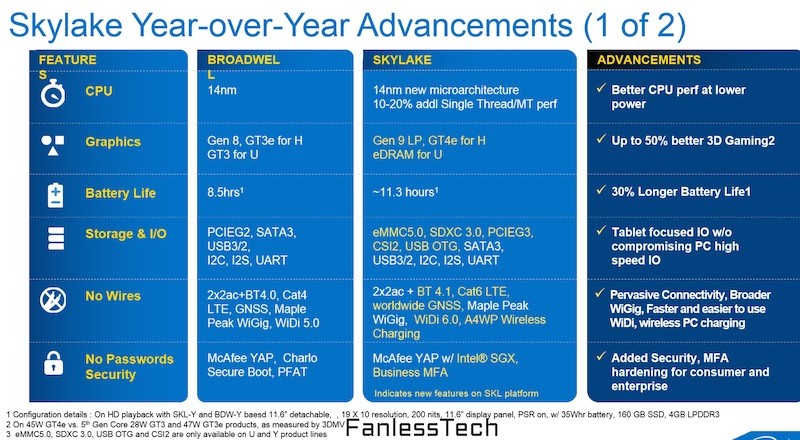
waiting for skylake version of Macbooks.

user posted image

user posted image

The specific performance improvements to the four main Skylake families are outlined below based on preliminary data, with the MacBook model appropriate for each chip listed in parentheses:

- Y-Series (MacBook): Up to 17% faster CPU, up to 41% faster Intel HD graphics, up to 1.4 hours longer battery life
- U-Series (MacBook Air): Up to 10% faster CPU, up to 34% faster Intel HD graphics, up to 1.4 hours longer battery life
- H-Series (MacBook Pro): Up to 11% faster CPU, up to 16% faster Intel HD graphics, up to 80% lower silicon power
- S-Series (iMac): Up to 11% faster CPU, up to 28% faster Intel HD graphics, 22% lower TDP (thermal design power)
westlife
post Dec 25 2015, 01:09 PM

10k Club
********
All Stars
14,313 posts

Joined: Jan 2011
Already 291 days since the launch of early 2015 rmbp 13-inch.

This post has been edited by westlife: Dec 25 2015, 01:13 PM


Attached thumbnail(s)
Attached Image Attached Image
carpathia
post Dec 25 2015, 01:27 PM

Look at all my stars!!
*******
Senior Member
2,619 posts

Joined: Apr 2005
From: KL


You know what I want in all macbooks ? Dedicated graphic cards.

112 Pages « < 107 108 109 110 111 > » Top
Topic ClosedOptions
 

Change to:
| Lo-Fi Version
0.0272sec    0.86    6 queries    GZIP Disabled
Time is now: 21st December 2025 - 02:27 AM