Welcome Guest ( Log In | Register )

47 Pages < 1 2 3 4 > » Bottom

Outline · [ Standard ] · Linear+

Home Networking TP-Link 3G Routers Owner Club V3, MR3420

views
     
lpc26
post Nov 18 2013, 09:26 PM

Getting Started
**
Junior Member
135 posts

Joined: Jan 2003
QUOTE(blacktubi @ Nov 18 2013, 09:22 PM)
AT^SETPORT="A1,A2;10,12,16,13,A1,A2"
Hmm, this should work as I did it for many people already.
For firmware 132, 13(DIAG) is compulsory.

What is the least essential code that work for you, NCM and PCUI only
*
AT^SETPORT="A1,A2;10,12,13,14,16,A1,A2"

this also won't work, tested anything that start from 10(which is start from 4g) will not run, will give ERROR.

so I have to add in the 3g modem function(1,2,3) inorder to make it work.

chuahcs79
post Nov 18 2013, 09:26 PM

Look at all my stars!!
Group Icon
Elite
6,931 posts

Joined: Apr 2011
From: Bolehland for sure ^_^


QUOTE(blacktubi @ Nov 18 2013, 09:22 PM)
AT^SETPORT="A1,A2;10,12,16,13,A1,A2"
Hmm, this should work as I did it for many people already.
For firmware 132, 13(DIAG) is compulsory.

What is the least essential code that work for you, NCM and PCUI only
*
yeah that's code works for my E3276 firmware version 132 too,.
lpc26
post Nov 18 2013, 09:32 PM

Getting Started
**
Junior Member
135 posts

Joined: Jan 2003
I think about the AT command, just remove the GPS of both 3g and 4g will be ok... as long as the modem is detectable.

My rooter able to bootup and connected within 1min.(which is faster than my E398u-15 connected)

This post has been edited by lpc26: Nov 18 2013, 09:34 PM
noobandroid
post Nov 18 2013, 09:33 PM

Audiophile
********
All Stars
11,836 posts

Joined: Mar 2011
From: Kota Kinabalu, Sabah


still on AA 12.09 and still loving it, and the saying goes " if it aint broken, dont fix it!"
chuahcs79
post Nov 18 2013, 09:34 PM

Look at all my stars!!
Group Icon
Elite
6,931 posts

Joined: Apr 2011
From: Bolehland for sure ^_^


QUOTE(noobandroid @ Nov 18 2013, 09:33 PM)
still on AA 12.09 and still loving it, and the saying goes " if it aint broken, dont fix it!"
*
AA not able to dial my E3276,.. ha ha,.. already tried sweat.gif
chuahcs79
post Nov 18 2013, 09:35 PM

Look at all my stars!!
Group Icon
Elite
6,931 posts

Joined: Apr 2011
From: Bolehland for sure ^_^


QUOTE(lpc26 @ Nov 18 2013, 09:32 PM)
I think about the AT command, just remove the GPS of both 3g and 4g will be ok... as long as the modem is detectable.

My rooter able to bootup and connected within 1min.(which is faster than my E398u-15 connected)
*
do you encounter Auto DC connection after 18~ 22 hour on your rooter ?
kwikpiks
post Nov 18 2013, 09:37 PM

New Member
*
Junior Member
24 posts

Joined: Oct 2013

waht is the maxis connection settings should use ka??
lpc26
post Nov 18 2013, 09:38 PM

Getting Started
**
Junior Member
135 posts

Joined: Jan 2003
QUOTE(chuahcs79 @ Nov 18 2013, 09:35 PM)
do you encounter Auto DC connection after 18~ 22 hour on your rooter ?
*
sorry I can't test that, I only open for 12hrs.
yonghong
post Nov 18 2013, 09:49 PM

On my way
****
Junior Member
551 posts

Joined: Jan 2011


QUOTE(chuahcs79 @ Nov 18 2013, 09:12 PM)
my rooter will DC itself no matter which version after connection running between 18 ~ 22 hour,.

so very weird  hmm.gif
*
bro, after dc, need restart again the modem? if use with original firmware , will auto dc or not? notworthy.gif notworthy.gif
TSblacktubi
post Nov 18 2013, 09:56 PM

-
Group Icon
Elite
8,415 posts

Joined: Jul 2008

QUOTE(yonghong @ Nov 18 2013, 09:49 PM)
bro, after dc, need restart again the modem? if use with original firmware , will auto dc or not? notworthy.gif  notworthy.gif
*
E3276 is incompatible with MR3420 stock firmware smile.gif
yonghong
post Nov 18 2013, 09:57 PM

On my way
****
Junior Member
551 posts

Joined: Jan 2011


QUOTE(blacktubi @ Nov 18 2013, 09:56 PM)
E3276 is incompatible with MR3420 stock firmware smile.gif
*
mean tat if use e372 which is compatible with original firmware, will not dc one. bt use rooter with e3276, will dc? hmm.gif hmm.gif
TSblacktubi
post Nov 18 2013, 10:04 PM

-
Group Icon
Elite
8,415 posts

Joined: Jul 2008

Added a compatibility list, let me know if you want to add anything.

Thanks
Skylinestar
post Nov 18 2013, 10:04 PM

Mega Duck
********
All Stars
10,476 posts

Joined: Jan 2003
From: Sarawak
I went to TPLink service center in LYP (top floor) to RMA my faulty MR3420 power supply. Too bad...warranty for the power brick is only 3 months, 2 years for the router. Bought a new power brick from them at RM10.

Then...went to Sricomp, saw the same power brick but with OEM wording instead of TPLink brand...RM15. Glad that I bought from TPLink service center.
chuahcs79
post Nov 18 2013, 10:37 PM

Look at all my stars!!
Group Icon
Elite
6,931 posts

Joined: Apr 2011
From: Bolehland for sure ^_^


after just now flash a few other version of rooter,

still 2013-10-12 yellow version works best for my E3276,..

the rest is totally not working and it detected wrong protocol sweat.gif

guess i will have to stay with this DC issue till new solution out

This post has been edited by chuahcs79: Nov 18 2013, 10:37 PM
TSblacktubi
post Nov 18 2013, 11:15 PM

-
Group Icon
Elite
8,415 posts

Joined: Jul 2008

QUOTE(chuahcs79 @ Nov 18 2013, 10:37 PM)
after just now flash a few other version of rooter,

still 2013-10-12 yellow version works best for my E3276,..

the rest is totally not working and it detected wrong protocol sweat.gif

guess i will have to stay with this DC issue till new solution out
*
USB modeswitch in 11-10 yellow seem broken.

Change to red and fixed
toucan
post Nov 18 2013, 11:17 PM

New Member
*
Junior Member
19 posts

Joined: Nov 2005
QUOTE(blacktubi @ Nov 18 2013, 09:56 PM)
E3276 is incompatible with MR3420 stock firmware smile.gif
*
Anyone has try below beta stock firmware?

http://www.tplink.com/fi/Support/download/...3420&version=V2

TL-MR3420_V2_130314_FI
Published Date 2013/3/14
Language English
File Size 3.77 MB
Operating System Win2000/XP/2003/Vista/7/Mac/Linux
Modifications and Bug Fixes
Beta Firmware Released Compatible for Huawei E3276

Notes For TL-MR3420 V2 hardware version

This post has been edited by toucan: Nov 18 2013, 11:17 PM
TSblacktubi
post Nov 18 2013, 11:33 PM

-
Group Icon
Elite
8,415 posts

Joined: Jul 2008

QUOTE(toucan @ Nov 18 2013, 11:17 PM)
Anyone has try below beta stock firmware?

http://www.tplink.com/fi/Support/download/...3420&version=V2

TL-MR3420_V2_130314_FI
Published Date 2013/3/14
Language English
File Size 3.77 MB
Operating System Win2000/XP/2003/Vista/7/Mac/Linux
Modifications and Bug Fixes
Beta Firmware Released Compatible for Huawei E3276

Notes For TL-MR3420 V2 hardware version
*
This is beta firmware, no it didnt work
chuahcs79
post Nov 18 2013, 11:49 PM

Look at all my stars!!
Group Icon
Elite
6,931 posts

Joined: Apr 2011
From: Bolehland for sure ^_^


QUOTE(blacktubi @ Nov 18 2013, 11:15 PM)
USB modeswitch in 11-10 yellow seem broken.

Change to red and fixed
*
yeah , but that version also can't solve my auto DC issue, haiz,


chuahcs79
post Nov 18 2013, 11:50 PM

Look at all my stars!!
Group Icon
Elite
6,931 posts

Joined: Apr 2011
From: Bolehland for sure ^_^


QUOTE(toucan @ Nov 18 2013, 11:17 PM)
Anyone has try below beta stock firmware?

http://www.tplink.com/fi/Support/download/...3420&version=V2

TL-MR3420_V2_130314_FI
Published Date 2013/3/14
Language English
File Size 3.77 MB
Operating System Win2000/XP/2003/Vista/7/Mac/Linux
Modifications and Bug Fixes
Beta Firmware Released Compatible for Huawei E3276

Notes For TL-MR3420 V2 hardware version
*
that firmware not even come close for my E3276,.. it keep blinking green LED,.. biggrin.gif
lpc26
post Nov 19 2013, 02:38 PM

Getting Started
**
Junior Member
135 posts

Joined: Jan 2003
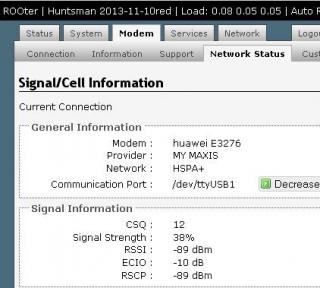
My signal strength keep up and down... dunno why

» Click to show Spoiler - click again to hide... «


while E398 stay stable.

» Click to show Spoiler - click again to hide... «


This post has been edited by lpc26: Nov 19 2013, 02:40 PM

47 Pages < 1 2 3 4 > » Top
 

Change to:
| Lo-Fi Version
0.0283sec    0.80    6 queries    GZIP Disabled
Time is now: 14th December 2025 - 03:41 AM