


Unifi TMnet Streamyx/Unifi & IPv6, Now live!
Unifi TMnet Streamyx/Unifi & IPv6, Now live!
|
|
 Sep 3 2014, 08:12 PM Sep 3 2014, 08:12 PM
|
 
Junior Member
26 posts Joined: Apr 2005  
|
sorry my bad.
|
|
|
|
|
|
Sep 4 2014, 12:04 AM
Show posts by this member only | IPv6 | Post
#782
|
 
Elite
4,541 posts Joined: Jan 2003 From: BSRPPG51 Access Concentrator
|
QUOTE(kupang @ Sep 3 2014, 06:55 PM) I got it through IPv6 generator website... You should have let the router obtain a prefix from the exchange, not by auto generating it.am doing it the wrong way .. ?  |
|
|
Sep 4 2014, 02:52 PM
|
 
VIP
6,008 posts Joined: Jan 2003
|
kupang I think you're very confused. IPv6 is nothing like IPv4 when it comes to LAN addressing so it's time to relearn this
 1) You do not need to specify "private LAN IPs", because it's auto-generated by the operating system. 2) All your PCs on the LAN will get a public IP. 3) You do not necessarily need DHCPv6 to assign addresses, provided that the router announces its public IPv6 prefix using SLAAC. |
|
|
Sep 4 2014, 06:53 PM
|

Junior Member
160 posts Joined: Jan 2005 From: sp.kd.my 
|
QUOTE(wKkaY @ Sep 4 2014, 02:52 PM) kupang I think you're very confused. IPv6 is nothing like IPv4 when it comes to LAN addressing so it's time to relearn this OK based on your advise.. I've tweaked the router settings 1) You do not need to specify "private LAN IPs", because it's auto-generated by the operating system. 2) All your PCs on the LAN will get a public IP. 3) You do not necessarily need DHCPv6 to assign addresses, provided that the router announces its public IPv6 prefix using SLAAC. LAN global address is randomly generated 

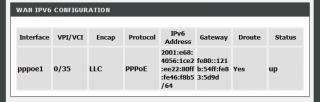
but now the ping 6 is giving the general failure message 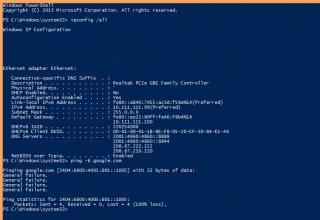
This post has been edited by kupang: Sep 4 2014, 07:01 PM |
|
|
Sep 4 2014, 09:35 PM
Show posts by this member only | IPv6 | Post
#785
|

Junior Member
362 posts Joined: Jan 2011
|
How the result when the request address is ticked?
|
|
|
Sep 4 2014, 10:11 PM
|
|
Junior Member
160 posts Joined: Jan 2005 From: sp.kd.my
|
QUOTE(michaelkkl @ Sep 4 2014, 09:35 PM) How the result when the request address is ticked? the result still the same with both ticked or with either one ticked  |
|
|
|
|
|
Sep 5 2014, 01:45 AM
Show posts by this member only | IPv6 | Post
#787
|

Senior Member
1,472 posts Joined: Apr 2005 From: SumwHeRe In MaLaYsIa
|
QUOTE(kupang @ Sep 4 2014, 06:53 PM) OK based on your advise.. I've tweaked the router settings I notice that DHCP is not being enableLAN global address is randomly generated
but now the ping 6 is giving the general failure message
Do you assign your IP manually? as I dont see any DHCP Server inside your ipconfig result |
|
|
Sep 5 2014, 09:15 AM
|
|
Junior Member
160 posts Joined: Jan 2005 From: sp.kd.my
|
QUOTE(amirsubhi @ Sep 5 2014, 01:45 AM) I notice that DHCP is not being enable I've assigned IPv4 manually... Do you assign your IP manually? as I dont see any DHCP Server inside your ipconfig result Does DHCP (v4) being turned off affect DHCPv6 address assignment ..? This post has been edited by kupang: Sep 5 2014, 09:17 AM |
|
|
Sep 5 2014, 10:02 AM
|
|
Senior Member
1,472 posts Joined: Apr 2005 From: SumwHeRe In MaLaYsIa
|
QUOTE(kupang @ Sep 5 2014, 09:15 AM) I've assigned IPv4 manually... Just ensure at LAN Properties, Internet Protocol V6 is obtain an IPv6 automaticallyDoes DHCP (v4) being turned off affect DHCPv6 address assignment ..? |
|
|
Sep 5 2014, 02:33 PM
|
|
Junior Member
160 posts Joined: Jan 2005 From: sp.kd.my
|
QUOTE(amirsubhi @ Sep 5 2014, 10:02 AM) Just ensure at LAN Properties, Internet Protocol V6 is obtain an IPv6 automatically Yes, IPv6 is already set to obtain IP automatically... |
|
|
Sep 5 2014, 03:15 PM
Show posts by this member only | IPv6 | Post
#791
|

Senior Member
822 posts Joined: Jan 2003
|
configured and tested ipv6 on unifi
|
|
|
Sep 5 2014, 03:22 PM
|
|
VIP
6,008 posts Joined: Jan 2003
|
QUOTE(kupang @ Sep 4 2014, 06:53 PM) OK based on your advise.. I've tweaked the router settings I haven't used that router before so I can't advise what settings you should put. I have a feeling that it's easier to reset it to factory defaults and see if it works out of the box.LAN global address is randomly generated
but now the ping 6 is giving the general failure message
|
|
|
Sep 5 2014, 03:47 PM
|
|
Junior Member
160 posts Joined: Jan 2005 From: sp.kd.my
|
QUOTE(wKkaY @ Sep 5 2014, 03:22 PM) I haven't used that router before so I can't advise what settings you should put. I have a feeling that it's easier to reset it to factory defaults and see if it works out of the box. Will try to set it up again using the setup CD...----- well it seems the router is set to enable dual stack protocol by default with SLAAC and RA enabled but not DHCPv6. With this condition, the PC still cannot access the web using IPv6  This post has been edited by kupang: Sep 5 2014, 06:41 PM |
|
|
|
|
|
Sep 5 2014, 10:05 PM
|
|
Junior Member
160 posts Joined: Jan 2005 From: sp.kd.my
|
I'm beginning to suspect that the DHCPv6 feature for this Dlink's modem/router is the culprit as I can browse happily with IPv6 in bridge mode ..
|
|
|
Sep 6 2014, 12:03 AM
|
|
VIP
6,008 posts Joined: Jan 2003
|
If you have SLAAC on the LAN side, you don't need DHCPv6.
|
|
|
Sep 6 2014, 07:40 AM
|

Senior Member
2,054 posts Joined: Oct 2007 From: Johor Bahru, Johor
|
Hey guys suddenly my free OpenDNS doesn't work cannot access to kickasstorrents because got blocked by Malaysian government. For the past 3 years been using it no prob but yesterday I was stumped to get this problem..
|
|
|
Sep 6 2014, 08:00 AM
Show posts by this member only | IPv6 | Post
#797
|

Senior Member
4,333 posts Joined: Jan 2003
|
QUOTE(ulwan25 @ Sep 6 2014, 07:40 AM) Hey guys suddenly my free OpenDNS doesn't work cannot access to kickasstorrents because got blocked by Malaysian government. For the past 3 years been using it no prob but yesterday I was stumped to get this problem.. What has this got to do with IPv6? |
|
|
Sep 6 2014, 05:42 PM
|
|
Junior Member
89 posts Joined: Mar 2012
|
QUOTE(ulwan25 @ Sep 6 2014, 07:40 AM) Hey guys suddenly my free OpenDNS doesn't work cannot access to kickasstorrents because got blocked by Malaysian government. For the past 3 years been using it no prob but yesterday I was stumped to get this problem.. Seriously you have been blocked using uniFi? |
|
|
Sep 6 2014, 06:07 PM
|
|
Junior Member
160 posts Joined: Jan 2005 From: sp.kd.my
|
QUOTE(wKkaY @ Sep 6 2014, 12:03 AM) If you have SLAAC on the LAN side, you don't need DHCPv6. this is my current setup ..
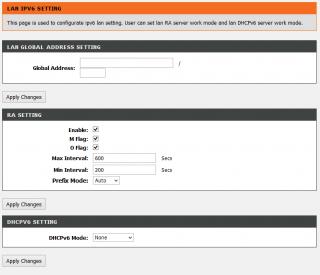

IPv6 properties for PC is set to automatic |
|
|
Sep 6 2014, 06:53 PM
Show posts by this member only | IPv6 | Post
#800
|
|
Senior Member
4,333 posts Joined: Jan 2003
|
IPv6 is not running on your system.
You do not have the "ipv6" connection indicator in your above post, unlike mine. Here is my IPCONFIG and PING to google.com See the difference?   |
| Change to: |  0.0213sec 0.0213sec
 0.83 0.83
 6 queries 6 queries
 GZIP Disabled GZIP Disabled
Time is now: 9th December 2025 - 11:18 AM |
 Quote
Quote